


571
社区成员
 发帖
发帖 与我相关
与我相关 我的任务
我的任务
 分享
分享项目实现了基于web的实时聊天室,支持多用户登录、聊天、加载历史消息。前端采用Vue实现,后端为Gin框架,采用websocket进行前后端的通信。
1. 登录界面:

选择输入用户名以加入聊天室,可以选择的前端通信模式为websocket、长轮询和刷新机制。
进入聊天室:
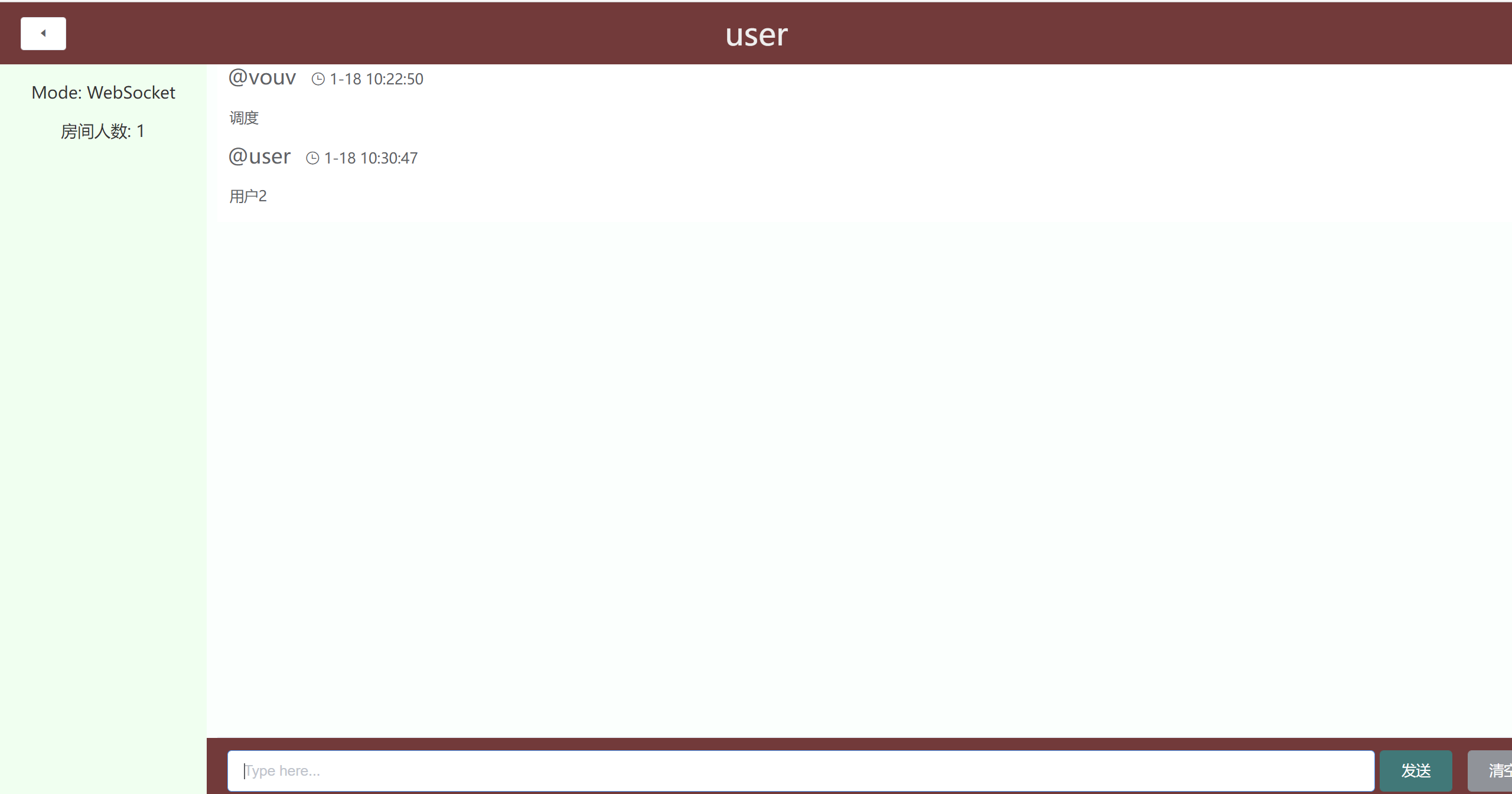
可以获取历史消息和时间。
代码分析:
前端主体页面:
<div id="app">
      <el-container class="container">
        <el-header>
          <el-row :gutter="20">
            <el-col :span="4" style="text-align:left; ">
              <el-button
                size="small"
                style="display: block; margin-top: 14px;"
                icon="el-icon-caret-left"
                @click="onExit"
              />
            </el-col>
            <el-col :span="16">
              {{ name }}
            </el-col>
          </el-row>
        </el-header>
        <el-container>
          <el-aside width="200px">
            <p>Mode: WebSocket</p>
            <p>房间人数: {{ userCount }}</p>
          </el-aside>
          <el-container ref="container">
            <el-main ref="area" style="margin-bottom: 160px;">
              <el-table
                :data="chatData"
                :show-header="false"
                :height="tableHeight"
                ref="table"
              >
                <el-table-column>
                  <template slot-scope="scope">
                    <span style="font-size: 20px;">@{{ scope.row.user }}</span>
                    <i class="el-icon-time" style="margin-left: 10px"></i>
                    <span>{{ scope.row.timestamp| formatDate }}</span>
                    <p style="margin-left: 2px;">{{ scope.row.text }}</p>
                  </template>
                </el-table-column>
              </el-table>
            </el-main>
            <el-footer
              style="width: 100%; height:60px; position: absolute; bottom: 0; text-align: left;"
            >
              <div style="width: 78%; display: inline-block;">
                <el-input
                  placeholder="Type here..."
                  v-model="msg"
                  ref="input"
                  @keyup.enter.native="sendMessage"
                ></el-input>
              </div>
              <div
                style="width: 20%; display: inline-block; margin-right: 20px;"
              >
                <el-button type="primary" @click="sendMessage">发送</el-button>
                <el-button type="info" @click="clearInput">清空</el-button>
              </div>
            </el-footer>
          </el-container>
        </el-container>
      </el-container>
    </div>
websocket在组件mount时加载:
function initSocket(username) {
        let url = `ws://${window.location.host}/ws/socket?name=${username}`;
        const socket = new WebSocket(url);
        return socket;
      }
      const app = new Vue({
        el: "#app",
        data() {
          return {
            socket: null,
            tableHeight: window.innerHeight - 120,
            name: name,
            userCount: 0,
            msg: "",
            chatData: []
          };
        },
        mounted() {
          const socket = initSocket(name);
          this.setUpSocket(socket);
          this.socket = socket;
          window.addEventListener(
            "resize",
            _ => (this.tableHeight = window.innerHeight - 120)
          );
        },
        watch: {
          socket(val) {
            if (!val) {
              this.socket = initSocket(Cookies.get("username"));
              this.setUpSocket(this.socket);
            }
          },
          chatData() {
            // 滚动到最底部
            this.$nextTick(() => {
              const div = this.$refs.table.bodyWrapper;
              div.scrollTop = div.scrollHeight;
            });
          }
        },
        filters: {
          formatDate(val) {
            const date = new Date(val);
            const y = date.getFullYear();
            const m = date.getMonth() + 1;
            const d = date.getDate();
            const hh = date.getHours();
            const mm = date.getMinutes();
            const ss = date.getSeconds();
            return `${m}-${d} ${hh}:${mm}:${ss}`;
          }
        },
        methods: {
          setUpSocket(socket) {
            socket.onopen = () => {
              this.$message({
                type: "success",
                message: "聊天室连接成功"
              });
            };
            socket.onclose = () => {
              this.$message({
                type: "warning",
                message: "连接断开"
              });
              this.socket = null;
            };
            socket.onmessage = event => {
              let dt = JSON.parse(event.data);
              switch (dt.type) {
                case EventTypeMsg:
                  this.receiveMsg(dt);
                  this.userCount = dt.userCount;
                  console.log(this.userCount);
                  break;
                case EventTypeSystem:
                  this.userCount = dt.userCount;
                  break;
              }
            };
          },
          onExit() {
            window.location.href = "/";
          },
          clearInput() {
            this.msg = "";
            this.$refs.input.focus();
          },
          sendMessage() {
            if (!this.msg) {
              this.$refs.input.focus();
              return;
            }
            const req = JSON.stringify({
              msg: this.msg
            });
            this.socket &&
              (this.socket.send(req),
              (this.msg = ""),
              this.$refs.input.focus());
          },
          receiveMsg(data) {
            this.chatData.push(data);
          }
        }
      });
websocket
package server

import (
	"github.com/gin-gonic/gin"
	"github.com/gorilla/websocket"
	"net/http"
)

var Websocket = &ws{
	upgrader: &websocket.Upgrader{
		ReadBufferSize:  1024,
		WriteBufferSize: 1024,
		CheckOrigin: func(r *http.Request) bool {
			return true
		},
	},
}

type ws struct {
	upgrader *websocket.Upgrader
}

func (s *ws) Handle() gin.HandlerFunc {
	return func(c *gin.Context) {
		name := c.Query("name")
		conn, err := s.upgrader.Upgrade(c.Writer, c.Request, nil)
		if err != nil {
			panic(err)
		}

		// 加入房间
		evs := Room.GetArchive()
		Room.MsgJoin(name)
		control := Room.Join(name)
		defer control.Leave()

		// 先把历史消息推送出去
		for _, event := range evs {
			if conn.WriteJSON(&event) != nil {
				// 用户断开连接
				return
			}
		}

		// 开启通道监听用户事件然后发送给聊天室
		newMessages := make(chan string)
		go func() {
			var res = struct {
				Msg string `json:"msg"`
			}{}
			for {
				err := conn.ReadJSON(&res)
				if err != nil {
					// 用户断开连接
					close(newMessages)
					return
				}
				newMessages <- res.Msg
			}
		}()

		// 接收消息,在这里阻塞请求,循环退出就表示用户已经断开
		for {
			select {
			case event := <-control.Pipe:
				if conn.WriteJSON(&event) != nil {
					// 用户断开连接
					return
				}
			case msg, ok := <-newMessages:
				// 断开连接
				if !ok {
					return
				}
				control.Say(msg)
			}
		}
	}
}
用户进入聊天室时加载历史消息,通过chan获取聊天室历史记录和用户人数
package core

import (
	"container/list"

	"github.com/google/uuid"
)

// 保存历史消息的条数
const archiveSize = 20
const chanSize = 10

const msgJoin = "[加入房间]"
const msgLeave = "[离开房间]"
const msgTyping = "[正在输入]"

// 聊天室
type Room struct {
	users       map[uid]chan Event     // 当前房间订阅者
	userCount   int                    // 当前房间总人数
	publishChn  chan Event             // 聊天室的消息推送入口
	archive     *list.List             // 历史记录 todo 未持久化 重启失效
	archiveChan chan chan []Event      // 通过接受chan来同步聊天内容
	joinChn     chan chan Subscription // 接收订阅事件的通道 用户加入聊天室后要把历史事件推送给用户
	leaveChn    chan uid               // 用户取消订阅通道 把通道中的历史事件释放并把用户从聊天室用户列表中删除
}

func NewRoom() *Room {
	r := &Room{
		users:     map[uid]chan Event{},
		userCount: 0,

		publishChn:  make(chan Event, chanSize),
		archiveChan: make(chan chan []Event, chanSize),
		archive:     list.New(),

		joinChn:  make(chan chan Subscription, chanSize),
		leaveChn: make(chan uid, chanSize),
	}

	go r.Serve()

	return r
}

// 用来向聊天室发送用户消息
func (r *Room) MsgJoin(user string) {
	r.publishChn <- NewEvent(EventTypeJoin, user, msgJoin)
}

func (r *Room) MsgSay(user, message string) {
	r.publishChn <- NewEvent(EventTypeMsg, user, message)
}

func (r *Room) MsgLeave(user string) {
	r.publishChn <- NewEvent(EventTypeMsg, user, msgLeave)
}

func (r *Room) Remove(id uid) {
	r.leaveChn <- id // 将用户从聊天室列表中移除
}

// 用户订阅聊天室入口函数
// 返回用户订阅的对象,用户根据对象中的属性读取历史消息和即时消息
func (r *Room) Join(username string) Subscription {
	resp := make(chan Subscription)
	r.joinChn <- resp
	s := <-resp
	s.Username = username
	return s
}

func (r *Room) GetArchive() []Event {
	ch := make(chan []Event)
	r.archiveChan <- ch
	return <-ch
}

// 处理聊天室中的事件
func (r *Room) Serve() {
	for {
		select {
		// 用户加入房间
		case ch := <-r.joinChn:
			chn := make(chan Event, chanSize)
			r.userCount++
			uid := uuid.New().String()
			r.users[uid] = chn
			ch <- Subscription{
				Id:       uid,
				Pipe:     chn,
				EmitCHn:  r.publishChn,
				LeaveChn: r.leaveChn,
			}
			ev := NewEvent(EventTypeSystem, "", "")
			ev.UserCount = r.userCount
			for _, v := range r.users {
				v <- ev
			}
		case arch := <-r.archiveChan:
			var events []Event
			//历史事件
			for e := r.archive.Front(); e != nil; e = e.Next() {
				events = append(events, e.Value.(Event))
			}
			arch <- events
		// 有新的消息
		case event := <-r.publishChn:
			// 推送给所有用户
			event.UserCount = r.userCount
			for _, v := range r.users {
				v <- event
			}
			// 推送消息后,限制本地只保存指定条历史消息
			if r.archive.Len() >= archiveSize {
				r.archive.Remove(r.archive.Front())
			}
			r.archive.PushBack(event)
		// 用户退出房间
		case k := <-r.leaveChn:
			if _, ok := r.users[k]; ok {
				delete(r.users, k)
				r.userCount--
			}
			ev := NewEvent(EventTypeSystem, "", "")
			ev.UserCount = r.userCount
			for _, v := range r.users {
				v <- ev
			}
		}
	}
}
基于vue + gin实现了基于websocket的前后端通信,可以获取该聊天室的历史数据,主要方式为群聊,单独用户对话还未实现。
NP583

有源码吗大佬

