


571
社区成员
 发帖
发帖 与我相关
与我相关 我的任务
我的任务
 分享
分享允许用户注册、登录;
允许用户创建和加入群聊;
允许用户将信息发送到群聊内,群聊内的所有用户都可以接收到笑嘻;
需要存储用户列表、历史信息等;
使用session记录用户登录信息。
使用Django REST Framework来开发后端,使用vue开发前端。
后端提供两种API,一种是WebSocket API,用于用户在群聊中发送聊天信息,另一种是Restful API,用于用户登录、注册、历史消息等。
对于WebSocket,后端可以使用Channels来进行开发,前端可以使用HTML原生的WebSocket来进行开发。
对于前端,基本运行步骤为:
 npm install
 npm run serve
对于后端,首先需要进行数据库迁移:
 python manage.py makemigrations
 python manage.py migrate
Channels需要使用redis,所以在安装好redis后启动redis server,在此之后
python manage.py runserver
即可运行项目。
在浏览器中打开前端网址,首先看到的是用户登录页面,输入用户名和密码即可登录。
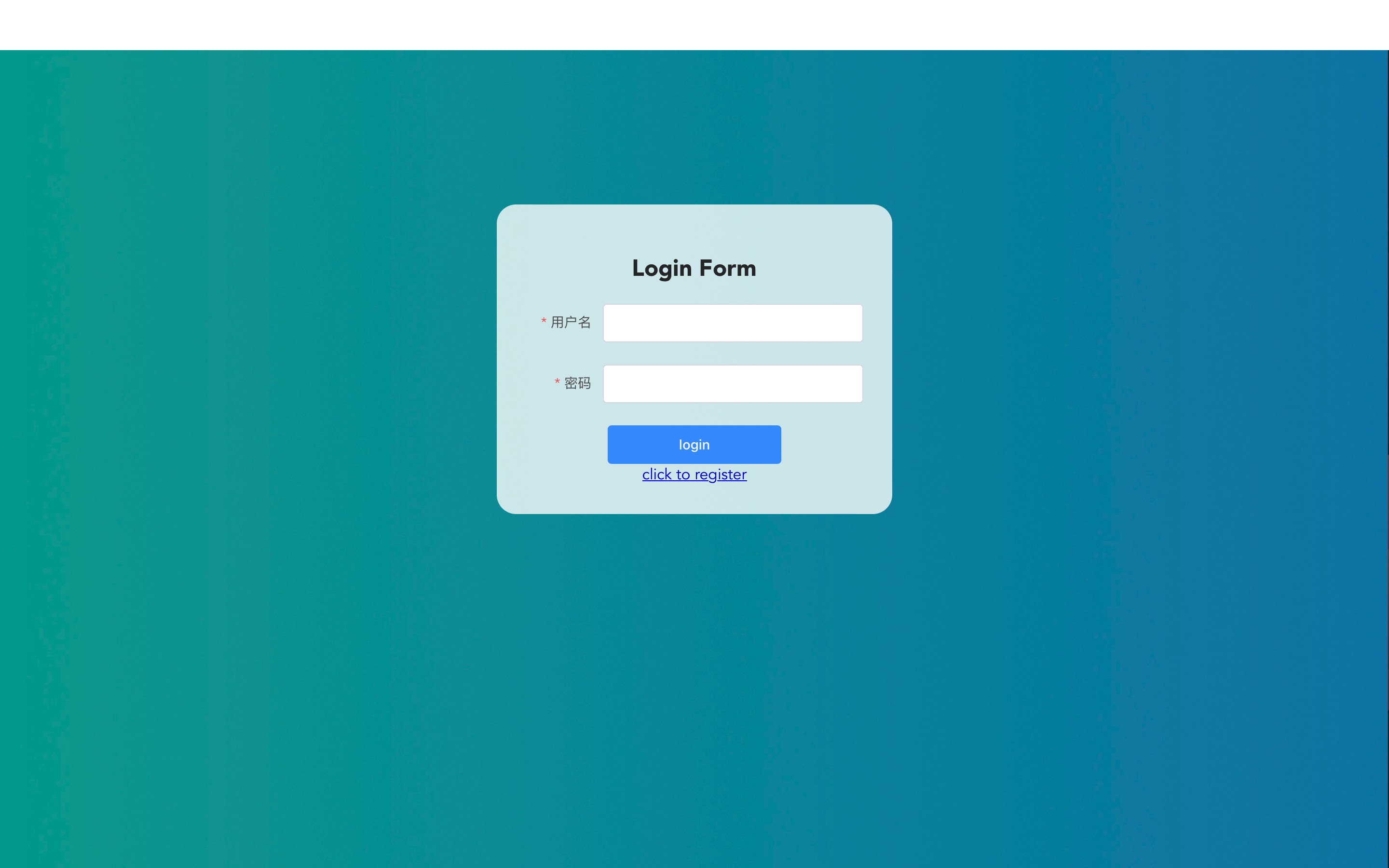
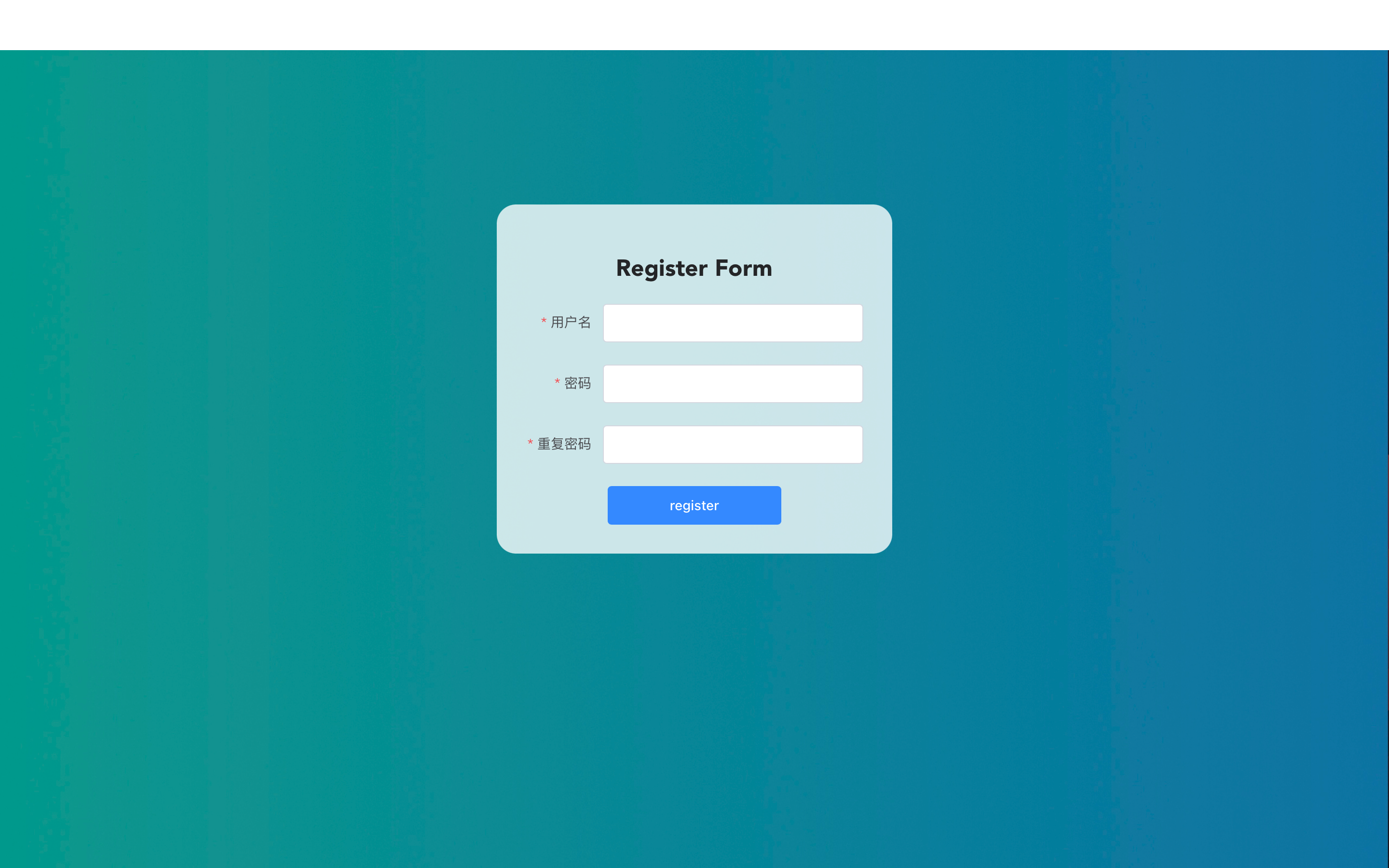
如果没有账号,点击login下的click to register即可进入注册页面,注册仅需用户名和密码。
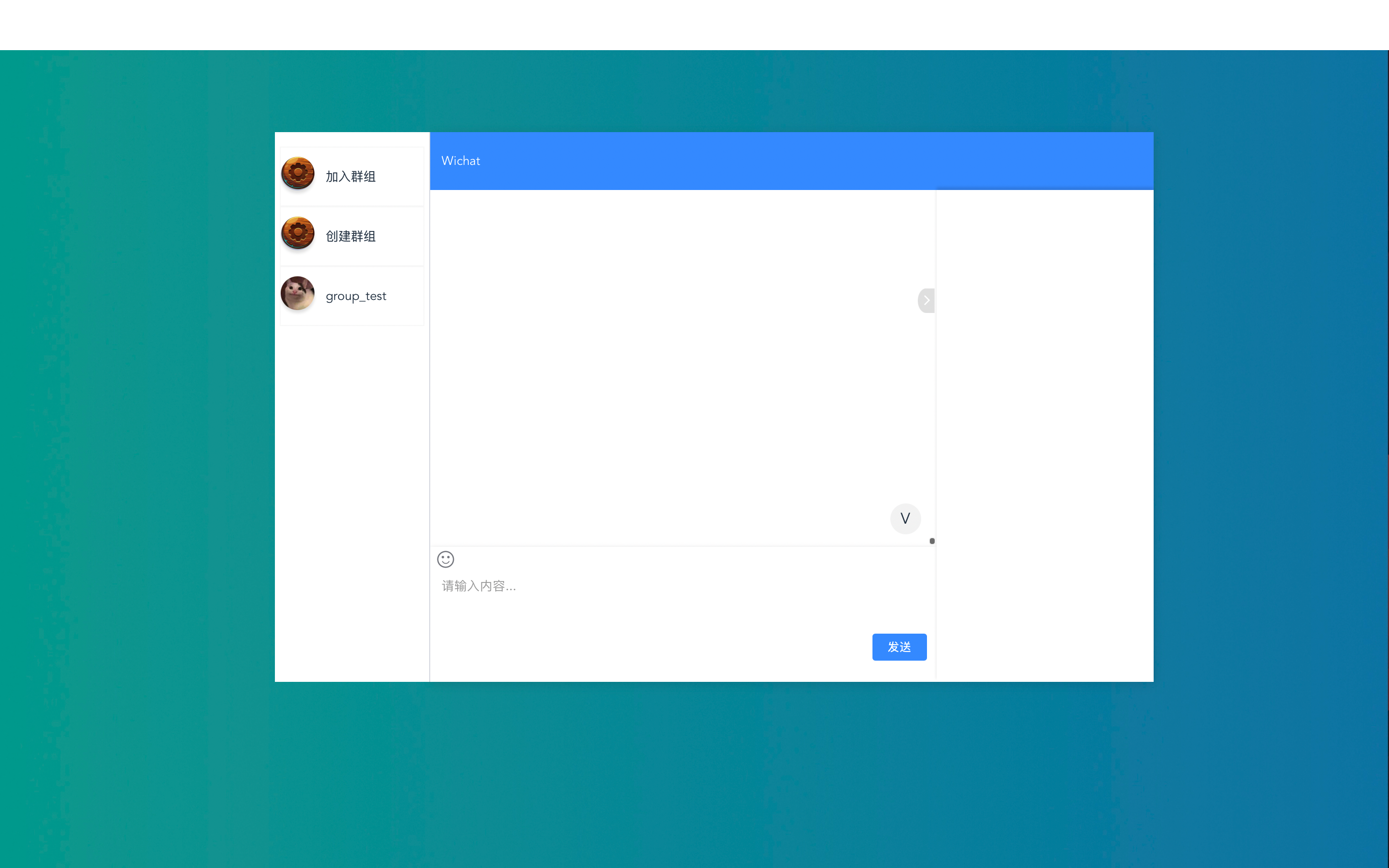
登录后,即可看到主界面,左侧的加入群组和创建群组是按钮,这之后的是进入某个群组的按钮。
点击加入群组,可以从已有的、未加入的群组中选择一个群组加入。
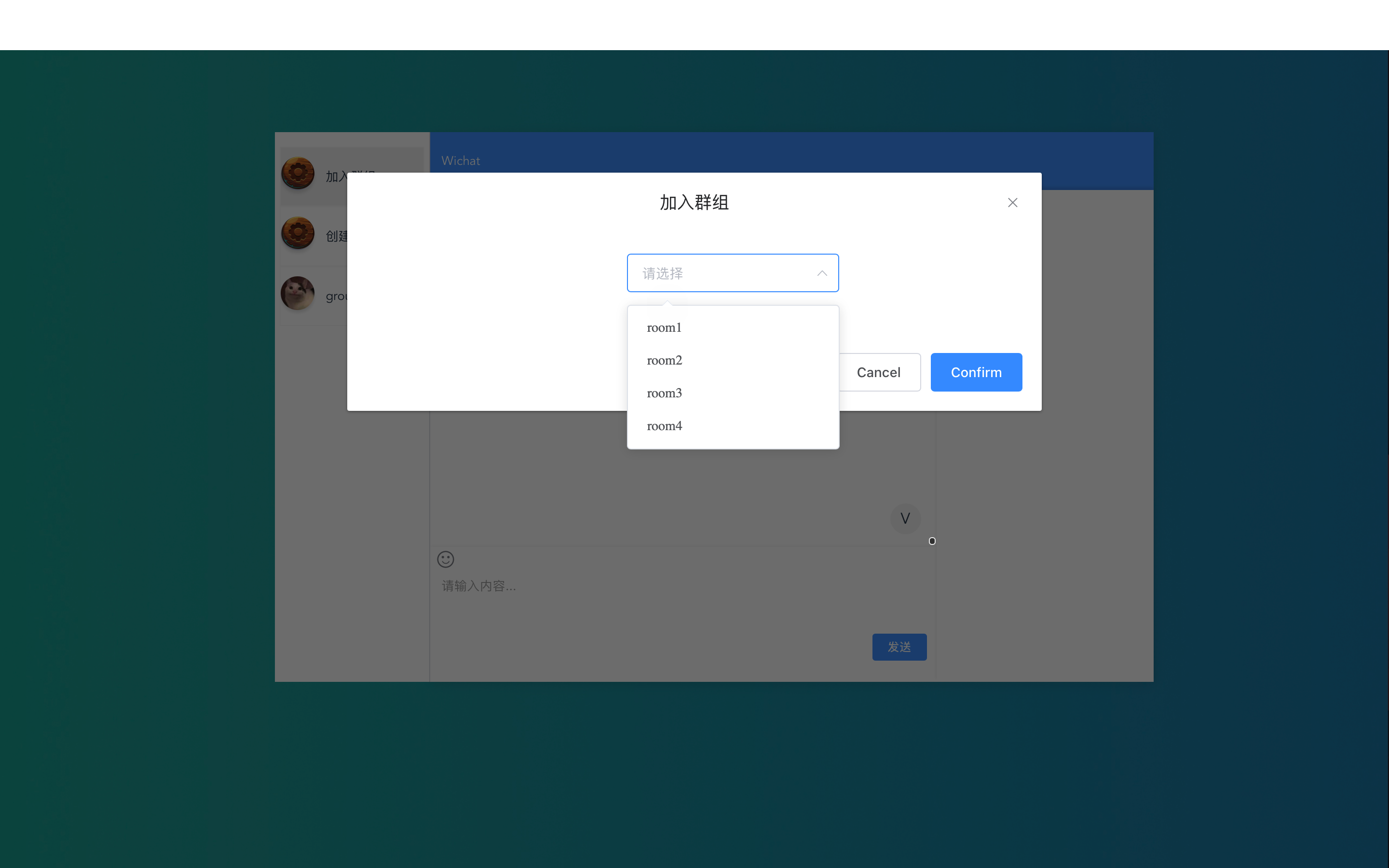
例如这里选择room1加入,即可看到左侧多出了一个room1。
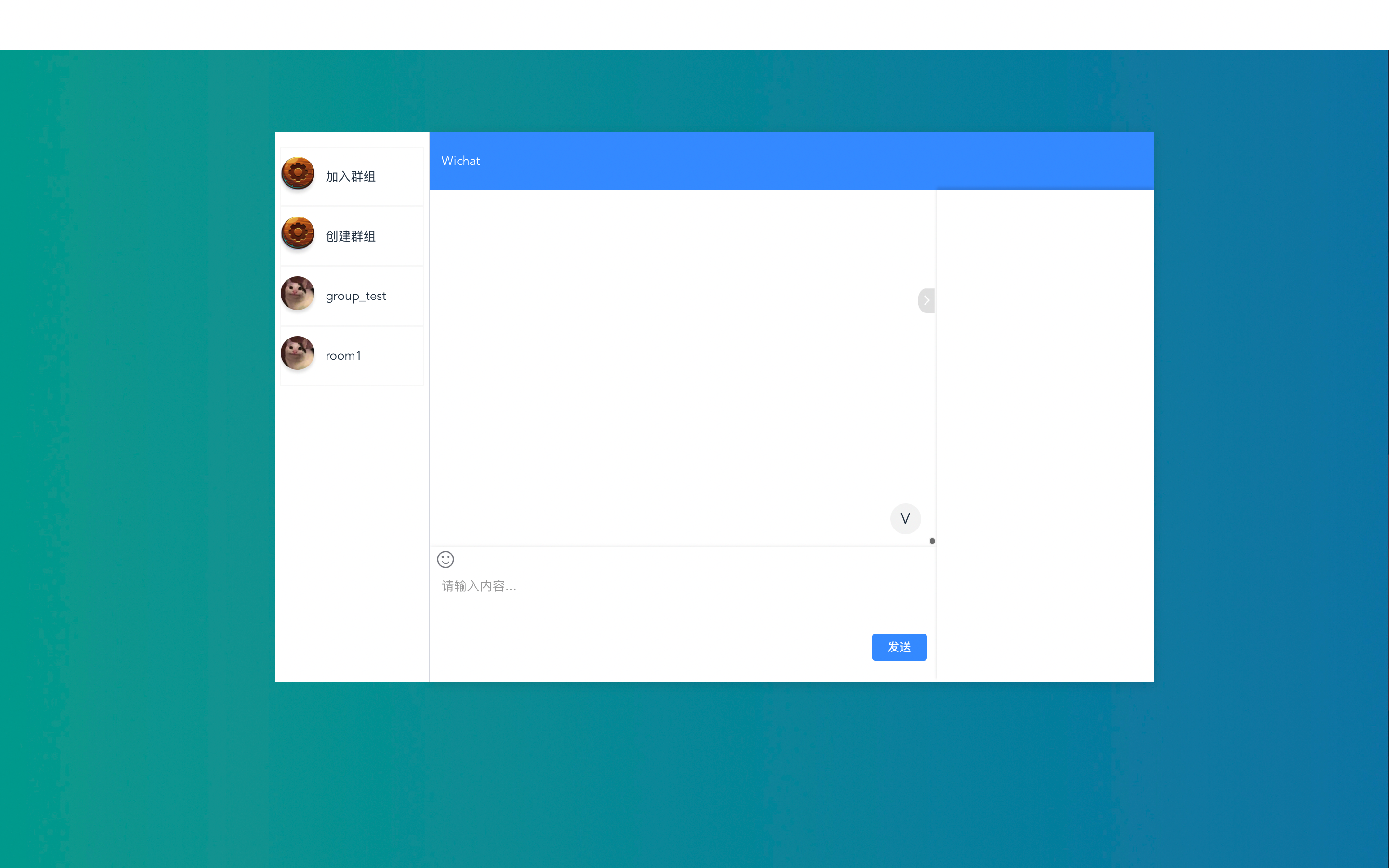
点击创建群组,只需要输入群组名,即可创建并加入新群组。
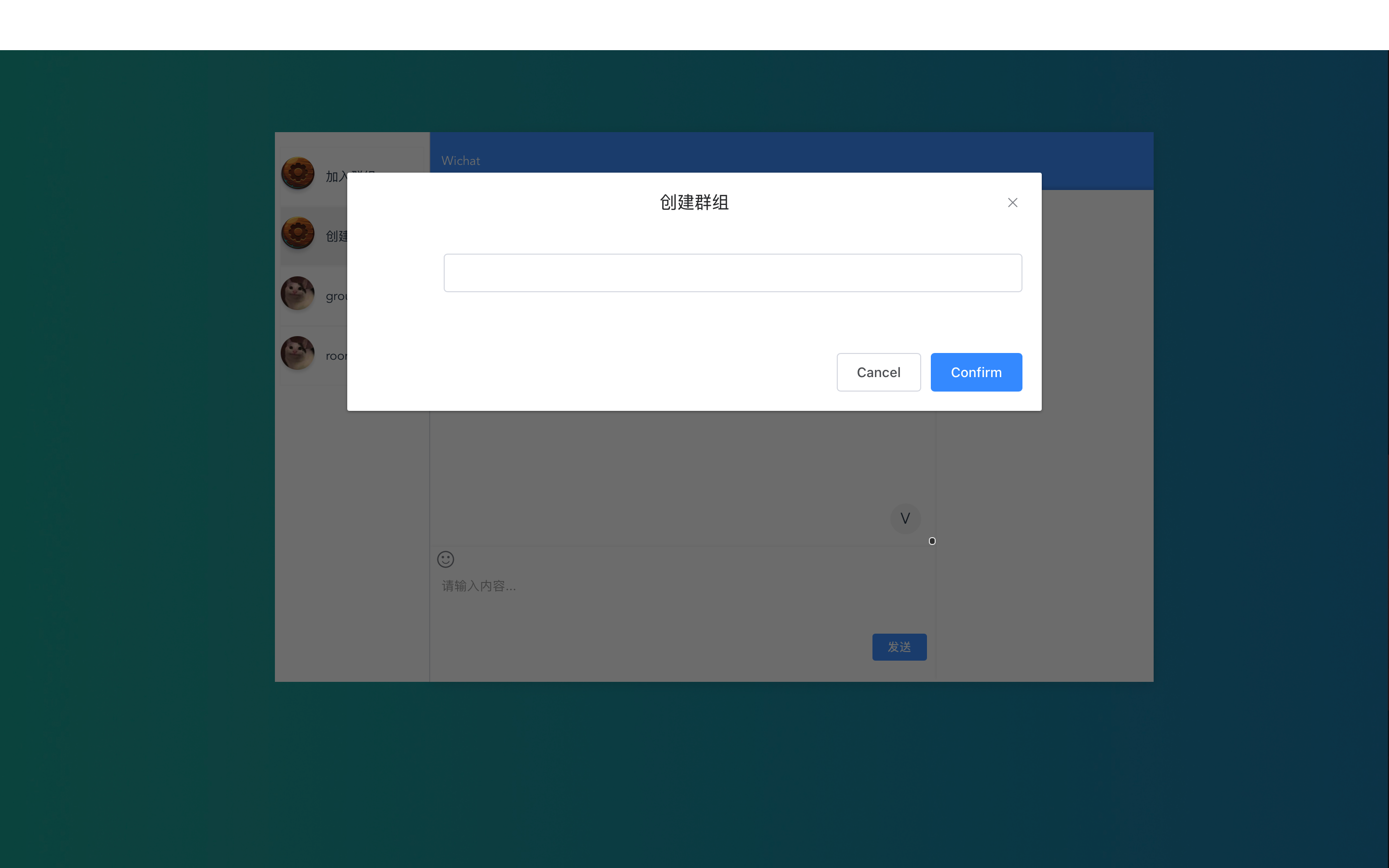
例如这里创建群组user1_group,即可看到左边多出一个群组。
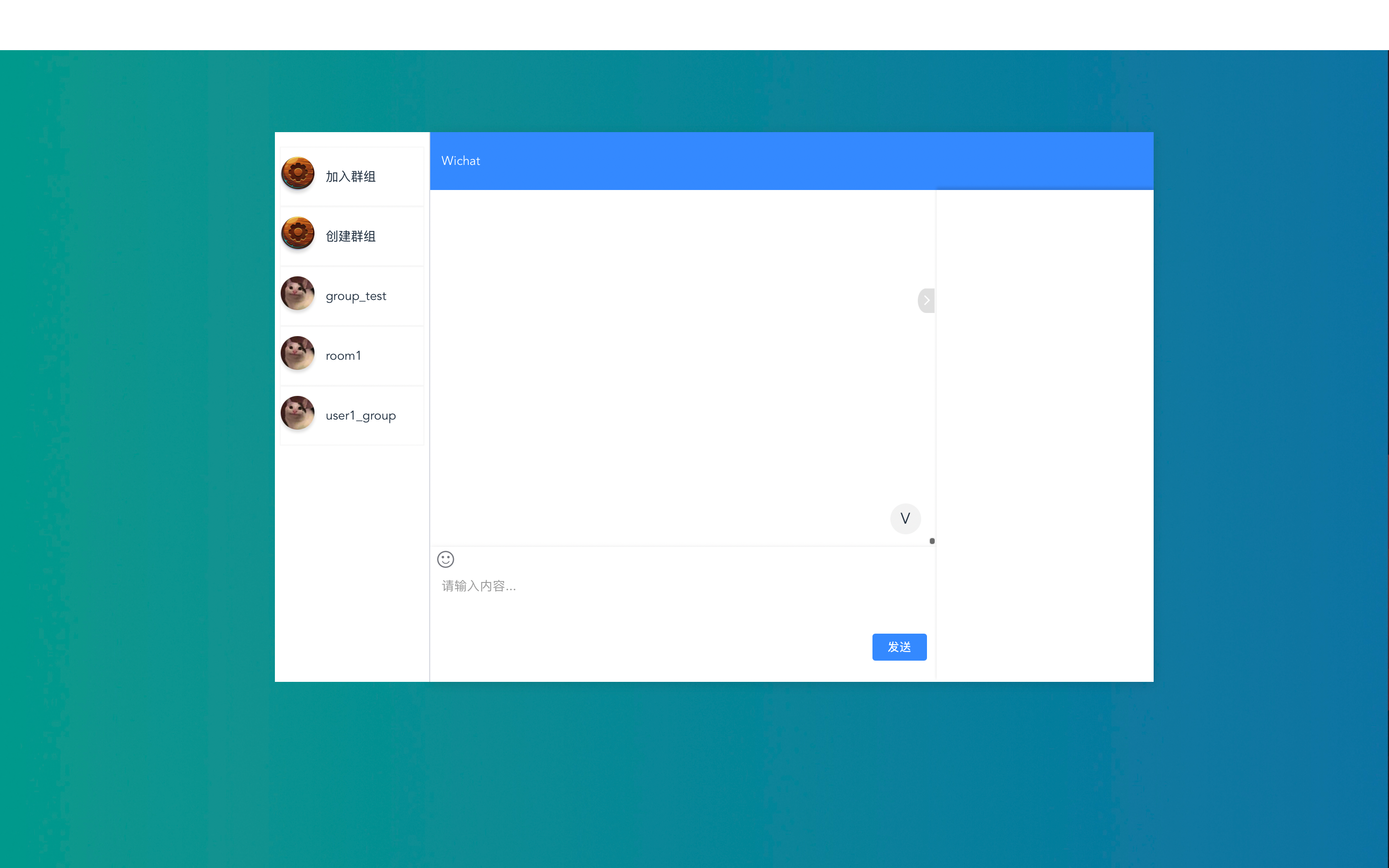
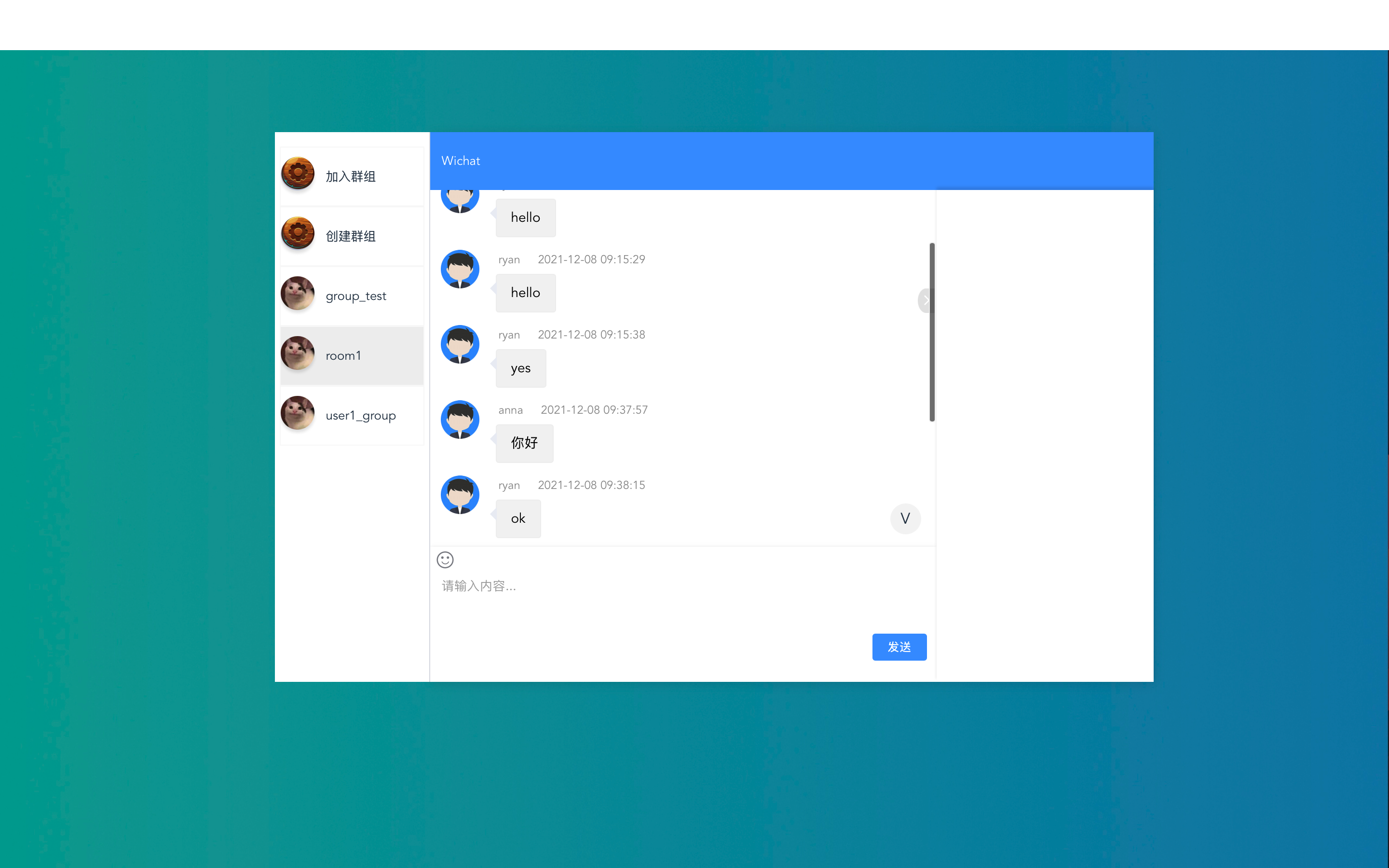
选择某一群组,可以看到其历史消息。
项目结构
|-backend
   |-backend           # 基本配置文件夹
   | |-__init__.py
   | |-asgi.py         # websocket的相关配置
   | |-settings.py     # 项目设置
   | |-urls.py         # Restful API的全局路由配置
   | |-wsgi.py
   |-chat              # 群聊的实现
   | |-__init__.py
   | |-admin.py
   | |-apps.py
   | |-models.py
   | |-tests.py
   | |-urls.py         # websocket基本路由配置
   | |-views.py        # 使用channels实现的websocket群聊主逻辑
   |-chatroom          # 聊天室的实现
   | |-__init__.py
   | |-admin.py
   | |-apps.py
   | |-models.py       # 聊天室关系
   | |-serializers.py  # 聊天室序列化器
   | |-tests.py
   | |-urls.py         # 聊天室相关的路由配置
   | |-views.py        # 聊天室相关的Restful API实现
   |-message           # 聊天信息的实现
   | |-__init__.py
   | |-admin.py
   | |-apps.py
   | |-models.py       # 聊天信息关系
   | |-serializers.py  # 聊天信息序列化器
   | |-tests.py
   | |-urls.py         # 聊天信息相关的路由配置
   | |-views.py        # 聊天室相关的Restful API实现
   |-static            # 静态文件夹
   | |- default.png
   |-user              # 用户
   | |-__init__.py
   | |-admin.py
   | |-apps.py
   | |-models.py       # 用户关系
   | |-tests.py
   | |-urls.py         # 用户相关的路由配置
   | |-views.py        # 用户相关的Restful API实现
消费者(view)
consumer是channels中websocket的处理者,相当于是一个抽象的websocket连接,它是前端请求的处理者,相当于controller。这个概念和view很类似。对于一个websocket,我们通常需要定义三个回调函数:
function onConnect: 当websocket连接建立,就自动调用该函数;
function onMessage: 当websocket接收方接收到一个消息,就自动调用该函数;
function onDisconnect: 当websocket连接关闭,就自动调用该函数。
channels提供了一个基类WebsocketConsumer,我们的consumer只需要继承该基类,重载其回调函数即可。
不过我们现在需要的功能是群聊,此时后端需要维护多个websocket连接,并且对于每一条websocket连接,后端只要收到消息,就要将其转发给所有的websocket连接,从而实现群聊的功能。
构造函数
定义构造函数是因为我们有一些变量需要定义,为了编码规范,就定义了构造函数,在构造函数中定义变量。其实在回调函数中定义变量也是可以的。
在这个构造函数中,我们定义了三个变量:
username: 用户名,必须要加,因为后端会对信息进行一次转发,如果没有这个字段,所有websocket客户端都无法知道信息是谁发送的。当然,直接添加这个字段会有一些安全性的问题,之后我们会考虑使用channels中的认证组件解决;
room_name: 聊天室名称,是一个群聊的标志,信息只会在同一个群聊内的websocket连接中转发;
room_group_name: channels group名称,基于room_name构建。
 class ChatConsumer(WebsocketConsumer):
     # 构造函数
     def __init__(self, *args, **kwargs):
         """
         initialize the object
         username: the user name of this websocket connection
         room_name: the room name of this websocket connection
         """
         super().__init__(args, kwargs)
         self.username = ...
         self.room_name = ...
         self.room_group_name = ...
     ...
connect回调函数
建立连接时会自动调用。首先,该函数会从前端访问的url中提取参数room_name,并使用room_name构造出room_group_name,用做channels.layer的组名。其中使用async_to_sync的原因是因为group_add是异步函数,所以要将其异步执行。
class ChatConsumer(WebsocketConsumer):
     ...
     def connect(self):
         # Get essential params
         self.room_name = self.scope['url_route']['kwargs']['room_name']
         self.room_group_name = 'chat_%s' % self.room_name
         # Join the group
         async_to_sync(self.channel_layer.group_add)(
             self.room_group_name,
             self.channel_name
         )
         # Accept client connection
         self.accept()
     ...
disconnect回调函数
class ChatConsumer(WebsocketConsumer):
     ...
     def disconnect(self, close_code):
         # Close the connection
         self.close()
receive回调函数
当收到消息,就要向所在组群发消息,群发消息其实是触发事件,type就指定了事件的处理函数。
class ChatConsumer(WebsocketConsumer):
     ...
     def receive(self, text_data):
         data = json.loads(text_data)
         usr = data['usr']
         msg = data['msg']
         # Send message to group
         async_to_sync(self.channel_layer.group_send)(
             self.room_group_name,
             {
                 'type': 'chat_message',  # call chat_message function
                 'usr': usr,
                 'msg': msg
             }
         )
     ...
chat_message
该函数是事件触发的处理函数,在receive回调函数中所进行的群发,不过是通知群组内所有连接有一个事件发生,并要求它们对事件进行处理,处理就需要调用该函数。在该函数中,服务器会将信息转发给所有的websocket客户端。
class ChatConsumer(WebsocketConsumer):
     def chat_message(self, event):
         usr = event['usr']
         msg = event['msg']
         # Send message to websocket
         self.send(text_data=json.dumps({
             'usr': usr,
             'msg': msg
         }))
WebSocket仅仅是为了完成群聊的基本功能,除了聊天以外,我们还希望能够记录用户、用户参加的聊天室、群聊的聊天记录等内容,这些API可以通过Restful API实现。
以下是聊天室相关的Restful API。
# chatroom/views.py
class CreateChatRoom(APIView):
"""
创建群聊的API
"""
def post(self, request):
username = request.data.get('username')
chatroom = request.data.get('chatroom')
if len(ChatRoom.objects.filter(name=chatroom)) == 0:
new_room = ChatRoom(name=chatroom)
new_room.save()
user = User.objects.get(username=username)
new_record = UsersInChatRoom(user=user, room=new_room)
new_record.save()
return JsonResponse(data={'message': 'success'}, status=status.HTTP_201_CREATED)
else:
return JsonResponse(data={'message': 'room already exist'}, status=status.HTTP_409_CONFLICT)
class JoinChatRoom(APIView):
"""
加入群聊的API
"""
def post(self, request):
print('called api')
username = request.data.get('username')
chatroom = request.data.get('chatroom')
try:
user = User.objects.get(username=username)
except User.DoesNotExist:
return JsonResponse(data={'message': 'user does not exist'}, status=status.HTTP_404_NOT_FOUND)
else:
try:
room = ChatRoom.objects.get(name=chatroom)
except ChatRoom.DoesNotExist:
return JsonResponse(data={'message': 'room does not exist'}, status=status.HTTP_404_NOT_FOUND)
else:
records = UsersInChatRoom.objects.filter(user_id=user.id, room__name=room.name)
if len(records) == 0:
new_record = UsersInChatRoom(user=user, room=room)
new_record.save()
return JsonResponse(data={'message': 'success'}, status=status.HTTP_200_OK)
else:
return JsonResponse(data={'message': 'this user has already joined'},
status=status.HTTP_409_CONFLICT)
class GetUserNotInRooms(APIView):
"""
获取不包含当前用户的聊天室列表
"""
def post(self, request):
username = request.data.get('username')
user = User.objects.get(username=username)
records = UsersInChatRoom.objects.filter(user=user)
has_user_rooms = []
for record in records:
room = ChatRoom.objects.get(name=record.room.name)
has_user_rooms.append(room.name)
data, rooms = [], ChatRoom.objects.all()
for room in rooms:
if room.name not in has_user_rooms:
data.append(room.name)
return JsonResponse(data=data, safe=False, status=status.HTTP_200_OK)
class GetUserJoinedRooms(APIView):
"""
获取包含当前用户的聊天室列表
"""
def post(self, request):
username = request.data.get('username')
records = UsersInChatRoom.objects.filter(user__username=username)
data = []
for record in records:
room = ChatRoom.objects.get(name=record.room.name)
data.append(room.name)
return JsonResponse(data=data, safe=False, status=status.HTTP_200_OK)
以下是聊天信息相关的API
class MessageViewSet(ModelViewSet):
queryset = Message.objects.all().order_by("date")
serializer_class = MessageSerializer
def list(self, request, *args, **kwargs):
chatroom = request.data.get("chatroom")
print('get history of ', chatroom)
filtered_queryset = []
for message in self.get_queryset():
if message.chatroom.name == chatroom:
filtered_queryset.append(message)
serializer = self.get_serializer(filtered_queryset, many=True)
return JsonResponse(data=serializer.data, safe=False, status=status.HTTP_200_OK)
全局路由如下。
# backend/urls.py
urlpatterns = [
path('admin/', admin.site.urls),
path('user/', include('user.urls')),
path('chatroom/', include('chatroom.urls')),
path('message/', include('message.urls'))
]
# groupchat/groupchat/asgi.py
import os
from channels.auth import AuthMiddlewareStack
from django.core.asgi import get_asgi_application
from channels.routing import ProtocolTypeRouter, URLRouter
from chat.urls import websocket_urlpatterns as chat_urls
os.environ.setdefault('DJANGO_SETTINGS_MODULE', 'websocket_demo.settings')
# application = get_asgi_application()
application = ProtocolTypeRouter({
# Explicitly set 'http' key using Django's ASGI application.
"http": get_asgi_application(),
'websocket': AuthMiddlewareStack(
URLRouter(
chat_urls,
)
),
})
项目结构
src
 |-App.vue
 |-main.js
 |-api             # 访问后端的API封装
 | |-chatroom.js
 | |-message.js
 | |-user.js
 |-assets
 |-components      # 基本页面实现
 | |-Chat.vue
 | |-ChatRoom.vue
 | |-Login.vue
 | |-Register.vue
 |-router
 | |-index.js       # 前端路由配置
 |-utils
 | |-requests.js    # 对于Axios的封装
 |-vuex
   |-index.js
App.vue
该页面中仅展示路由匹配到的页面。
<template>
<div id="app">
<router-view></router-view>
</div>
</template>
<script>
export default {
name: 'app'
}
</script>
<style>
#app {
font-family: Avenir, Helvetica, Arial, sans-serif;
-webkit-font-smoothing: antialiased;
-moz-osx-font-smoothing: grayscale;
text-align: center;
color: #2c3e50;
margin-top: 60px;
}
</style>
main.js
该文件中会导入主要使用的组件,并且进行页面渲染。
import Vue from 'vue'
import App from './App.vue'
import router from './router/index'
import ElementUI from 'element-ui'
import JwChat from 'jwchat'
import 'element-ui/lib/theme-chalk/index.css'
Vue.use(ElementUI)
Vue.use(JwChat)
Vue.config.productionTip = false
new Vue({
el: '#app',
router: router,
render: c => c(App)
})
router
在router/index.js中,配置路由。
import Vue from "vue"
import Router from "vue-router"
import Login from "components/Login.vue"
import Register from "components/Register.vue"
import ChatRoom from "components/ChatRoom.vue"
Vue.use(Router);
export default new Router({
routes: [
{
path: '/login',
name: 'login',
component: Login,
meta: {
isLogin: false
}
},
{
path: '/register',
name: 'register',
component: Register,
meta: {
isLogin: false
}
},
{
path: '/chatroom',
name: 'chatroom',
component: ChatRoom,
meta: {
isLogin: false
}
},
{
path: '/',
redirect: '/login'
}
]
})
ChatRoom.vue
该页面展示聊天室的主要界面以及websocket的主要逻辑。
<template>
<div class="chat-container">
<JwChat-index
:config="config"
:taleList="taleList"
@enter="bindEnter"
v-model="inputMsg"
:toolConfig="tool"
:showRightBox="true"
:winBarConfig="winBarConfig"
style="top: 10%; left: 7%; margin: 0px auto"
/>
<el-dialog
:title="createFormText"
:visible.sync="createDialogVisible"
:modal-append-to-body="false"
>
<el-form label-width="80px">
<el-form-item lable="name">
<el-input v-model="createRoomName"></el-input>
</el-form-item>
</el-form>
<div slot="footer" class="dialog-footer">
<el-button @click="createDialogVisible = false"> Cancel </el-button>
<el-button type="primary" @click="handleCreateConfirm">
Confirm
</el-button>
</div>
</el-dialog>
<el-dialog
:title="joinFormText"
:visible.sync="joinDialogVisible"
:modal-append-to-body="false"
>
<el-form label-width="80px">
<el-form-item>
<el-select v-model="joinRoomName" placeholder="请选择" @change="selectChange">
<el-option
v-for="item in notJoinedChatroomList"
:key="item.value"
:label="item.label"
:value="item.value"
>
</el-option>
</el-select>
</el-form-item>
</el-form>
<div slot="footer" class="dialog-footer">
<el-button @click="joinDialogVisible = false"> Cancel </el-button>
<el-button type="primary" @click="handleJoinConfirm">
Confirm
</el-button>
</div>
</el-dialog>
</div>
</template>
<script>
import $ from "jquery";
import {
createChatRoom,
joinChatRoom,
getJoinedChatRoom,
getNotJoinedChatRoom,
} from "@/api/chatroom";
import { getMessageList } from "@/api/message";
export default {
data() {
return {
taleList: [],
joinedChatroomList: [],
notJoinedChatroomList: [],
username: '',
inputMsg: null,
config: {
name: "Wichat",
callback: this.bindCover,
historyConfig: {
show: true,
tip: "加载更多",
callback: this.bindLoadHistory,
},
},
winBarConfig: {
active: "",
width: "160px",
listHeight: "60px",
originlist: [
{
id: "join",
name: "加入群组",
img: "https://img.ixintu.com/download/jpg/201912/0d386ee1fd74c4ca82a64858a7b6feea.jpg!con",
},
{
id: "create",
name: "创建群组",
img: "https://img.ixintu.com/download/jpg/201912/0d386ee1fd74c4ca82a64858a7b6feea.jpg!con",
},
],
list: [
{
id: "join",
name: "加入群组",
img: "https://img.ixintu.com/download/jpg/201912/0d386ee1fd74c4ca82a64858a7b6feea.jpg!con",
},
{
id: "create",
name: "创建群组",
img: "https://img.ixintu.com/download/jpg/201912/0d386ee1fd74c4ca82a64858a7b6feea.jpg!con",
},
],
callback: this.selectCallBack,
},
tool: {
callback: this.toolEvent,
},
ws: null,
currentRoom: null,
createDialogVisible: false,
joinDialogVisible: false,
createFormText: "创建群组",
joinFormText: "加入群组",
createRoomName: "",
tCreateRoomName: "",
joinRoomName: ""
};
},
created() {
this.username = sessionStorage.getItem('user')
this.fetchJoinedList()
console.log(sessionStorage.getItem('user'))
},
methods: {
constructMsg(msgText, mine, usr) {
console.log(msgText);
var date = new Date()
var dateString = date.getFullYear() + '-' + date.getMonth() + '-' + date.getDay() + ' ' + date.getHours() + ':' + date.getMinutes() + ':' + date.getSeconds()
const msg = {
date: dateString,
text: { text: msgText },
mine: mine,
name: usr,
img: "https://ts1.cn.mm.bing.net/th?id=OIP-C.maao8hq8Cf4UDcIK_HMMNgAAAA&w=127&h=133&c=8&rs=1&qlt=90&o=6&dpr=2&pid=3.1&rm=2",
};
return msg;
},
constructMsgWithDate(msgText, mine, usr, date) {
console.log(msgText);
const msg = {
date: date,
text: { text: msgText },
mine: mine,
name: usr,
img: "https://ts1.cn.mm.bing.net/th?id=OIP-C.maao8hq8Cf4UDcIK_HMMNgAAAA&w=127&h=133&c=8&rs=1&qlt=90&o=6&dpr=2&pid=3.1&rm=2",
};
return msg;
},
bindEnter() {
if (this.inputMsg === '')
return
const msg = this.constructMsg(this.inputMsg, true, this.username);
const ready_to_send = JSON.stringify({
usr: this.username,
msg: msg["text"]["text"],
});
console.log(this.username + " sent " + ready_to_send);
this.ws.send(ready_to_send);
this.taleList.push(msg);
},
ChatWebSocket() {
const _this = this;
const url = "ws://127.0.0.1:8000/chat/" + this.currentRoom
this.ws = new WebSocket(url);
this.ws.onopen = function () {
// 获取历史信息列表
getMessageList({
'chatroom': _this.currentRoom
}).then((response) => {
const roomTaleList = response
console.log("room table list")
console.log(_this.currentRoom)
console.log(roomTaleList)
_this.taleList = []
for (var i=0; i<roomTaleList.length; i++) {
var isMine = false;
if (roomTaleList[i]["sender"] === _this.username) {
isMine = true;
}
const message = _this.constructMsgWithDate(roomTaleList[i]["text"], isMine, roomTaleList[i]["sender"], roomTaleList[i]["date"])
_this.taleList.push(message)
}
})
};
this.ws.onmessage = function (msgText) {
const recv = $.parseJSON(msgText["data"]);
console.log(recv["usr"] + " " + _this.username);
if (recv["usr"] != _this.username) {
const msg = _this.constructMsg(recv["msg"], false, recv["usr"]);
_this.taleList.push(msg);
}
// const msg = _this.constructMsg(recv['msg'], false, recv['usr'])
// _this.taleList.push(msg)
};
this.ws.onclose = function () {
this.ws.close();
};
this.ws.onerror = function () {
alert("Cannot connect to server.");
};
},
selectCallBack(play = {}) {
const { type, data = {} } = play;
console.log(type);
if (type === "winBar") {
const { id, name } = data;
console.log(id);
console.log(name);
if (id === "create") {
this.createDialogVisible = true;
} else if (id === "join") {
this.fetchNotJoinedList()
this.joinDialogVisible = true;
} else {
this.currentRoom = id
this.ChatWebSocket()
this.winBarConfig.active = id
}
}
},
selectChange(value) {
this.joinChatRoom = value
},
fetchJoinedList() {
getJoinedChatRoom({
'username': this.username
}).then(response => {
console.log('joined')
console.log(response)
this.joinedChatroomList = response
this.winBarConfig.list = this.winBarConfig.originlist
for (var i=0; i<this.joinedChatroomList.length; i++) {
this.winBarConfig.list.push({
'id': this.joinedChatroomList[i],
'name': this.joinedChatroomList[i],
'img': 'https://tse1-mm.cn.bing.net/th/id/R-C.d59599278978c2afd4e7529e8381571c?rik=GpSh7qKxaaO1GA&riu=http%3a%2f%2fpm1.narvii.com%2f7119%2fb0abdf491cffde4bdf95850956c1b15a5591a4b5r1-712-707v2_uhq.jpg&ehk=F4J%2bZAzrvoQU9v58KgUP92lXUBFs8mR%2bA4jDhLunfas%3d&risl=&pid=ImgRaw&r=0'
})
}
})
},
fetchNotJoinedList() {
console.log("username: " + this.username)
getNotJoinedChatRoom({
'username': this.username
}).then(response => {
const roomList = response
this.notJoinedChatroomList = []
for (var i=0; i<roomList.length; i++) {
this.notJoinedChatroomList.push({
value: roomList[i],
label: roomList[i]
})
}
})
},
handleCreateConfirm() {
this.tCreateRoomName = this.createChatRoom
createChatRoom({
'username': this.username,
'chatroom': this.createRoomName,
}).then((response) => {
console.log(response);
this.fetchJoinedList()
});
this.createDialogVisible = false;
},
handleJoinConfirm() {
console.log('prepare to join')
console.log({
'username': this.username,
'chatroom': this.joinChatRoom
})
joinChatRoom({
'username': this.username,
'chatroom': this.joinChatRoom
}).then((response) => {
this.fetchJoinedList()
console.log(response)
})
this.joinDialogVisible = false;
},
},
};
</script>
<style acoped>
.chat-container {
margin: 0px auto;
height: 100%;
width: 100%;
background: url("../assets/header.jpg") center center;
background-size: 100% 100%;
position: fixed;
top: 0px;
left: 0px;
}
</style>
NP579 赵瑞阳

