


571
社区成员
 发帖
发帖 与我相关
与我相关 我的任务
我的任务
 分享
分享项目概述:
前端使用vue技术,后端使用express框架,实现了简单的多人在线聊天系统。
Vue是一种用于构建用户界面的渐进式JavaScript框架,也就是说在项目中只加载需要使用的那一部分组件,不需要同时加载全部组件。Vue框架独特于其他大型框架的地方在于它是能够自底向上逐层应用的框架。
一方面,对于Vue 的核心库而言,它只去关注视图层的构建,使得Vue不仅容易上手,还便于和第三方的库或者已有的项目进行整合。另一方面,当Vue与现代化的工具链以及各种支持类库结合在一起使用时,它也完全可以为十分复杂的单页应用(SPA)提供驱动。
Vue框架使用尽可能简单的API来实现响应的数据绑定和组合的视图组件。
Vue有五大核心特点:响应的数据绑定、可组合的视图组件、虚拟DOM、MVVM模式以及声明式渲染。下面对其进行一一介绍。
(1)响应的数据绑定
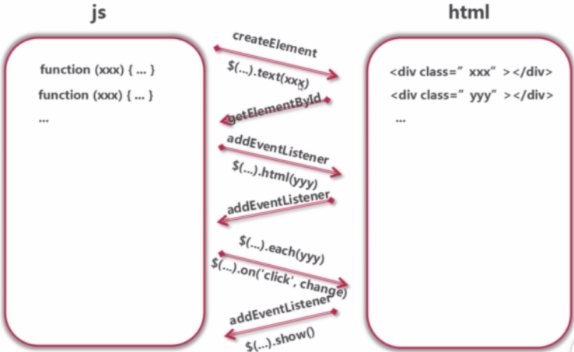
在vue之前,我们一直使用传统的js操作页面。而使用传统的js操作页面时,如果需要操作某个HTML元素的数据,就需要先使用js代码获取元素,然后再进行相应的业务逻辑处理。如下图所示:
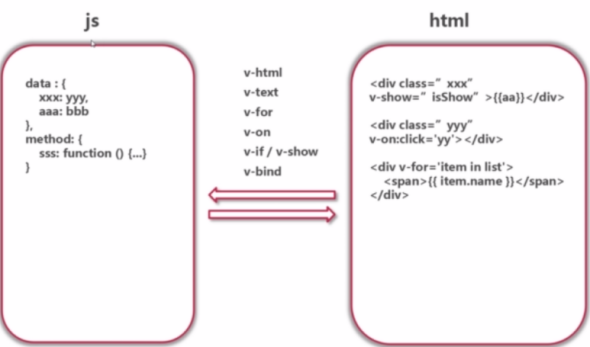
而使用vue的响应式数据绑定的方式来操作页面时,可以使用v-if/v-show、v-html、v-for、v-text、v-on、v-bind标签来对数据进行绑定,如下图所示
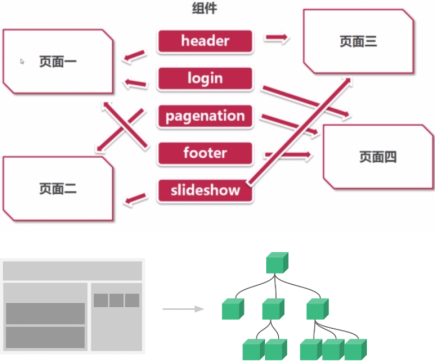
在Vue框架中,每一个页面都会被映射成组件树。而划分成的组件则具有可维护、可重用以及可测试的优点,如图所示。
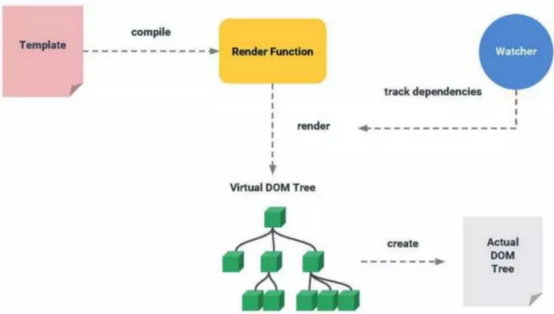
在实际项目中,运行的js速度是非常快的,这时候若大量的操作DOM就会使性能变慢。比如一次数据更新操作完成之后需要重新渲染页面,这时会出现数据不用更新的地方也再次渲染了DOM结点,使得系统性能受到很大影响。
而虚拟DOM则能够很好地解决上述问题。虚拟DOM是指在内存中生成的与真实DOM相对应的数据结构。当页面数据更新时,可以计算出重新渲染组件的最小代价并应用到DOM操作上。过程如下图所示:
MVVM模式即:M(Model数据模型)、V(view视图模板)、VM(view-Model视图模型)。如下图所示。
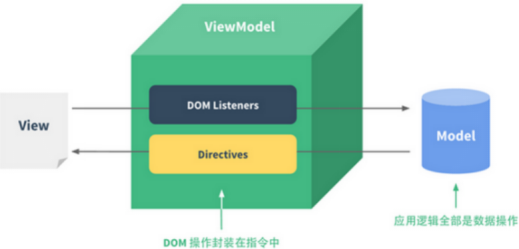
Vue的核心是一个允许采用简洁的模板语法来声明式地将数据渲染进 DOM 的系统,初始化根实例后,vue会自动地将数据绑定到DOM模板上。
声明式渲染与命令式渲染区别
声明式渲染:我们只需要向程序说明在什么地方做什么操作,而不需要关心怎样实现这些操作。
命令式渲染:通过具体的编程,让程序根据要求去操作。
Express 是一个简洁而灵活的 node.js Web应用框架, 提供了一系列强大特性帮助你创建各种 Web 应用,和丰富的 HTTP 工具。
使用 Express 可以快速地搭建一个完整功能的网站。
Express 框架核心特性:
可以设置中间件来响应 HTTP 请求。
定义了路由表用于执行不同的 HTTP 请求动作。
可以通过向模板传递参数来动态渲染 HTML 页面。
简单点说express就是一个封装了很多功能的包,而你只需要用简单的express的专属的一些代码便可解决本来正常较为复杂的代码,方便使用。
部分代码展示.
登录界面代码:
<template>
  <div class="login-page-container">
    <div class="login-container">
      <el-form :model="loginForm" :rules="rules" ref="loginForm" autoComplete="on" label-position="left">
        <div class="login-header">
          <div class="login-title-container"><strong class="login-title">Leo IM</strong></div>
          <div class="profile-image"></div>
        </div>
        <div class="login-content">
          <el-form-item prop="username">
            <el-input placeholder="用户名" prefix-icon="el-icon-third-my_light" v-model="loginForm.username" autoComplete="on" autofocus="autofocus" @focus="clearValidate"></el-input>
          </el-form-item>
          <el-form-item prop="password">
            <el-input type="password" placeholder="密码" prefix-icon="el-icon-third-lock" v-model="loginForm.password" @keyup.enter.native="doLogin"></el-input>
          </el-form-item>
          <el-button class="login-button" type="primary" :loading="loadingVisible" @click.native.prevent="doLogin">登录</el-button>
        </div>
        <div class="login-footer">
          <a href="#" @click="openRegisterDialog()">没有账号,立即注册</a>
        </div>
      </el-form>
    </div>
    <register-user ref="registerUser" @onRegisterSuccessed="onRegisterSuccessed"></register-user>
  </div>
</template>

<script>
import { outputError } from '@/utils/exception'
import { login } from '@/api/auth'
import { updateOnlineStatus } from '@/api/user'

export default {
  data() {
    return {
      loadingVisible: false,
      loginForm: {
        username: '',
        password: ''
      },
      rules: {
        username: [
          { required: true, message: '请输入用户名', trigger: 'blur' }
        ],
        password: [{ required: true, message: '请输入口令', trigger: 'blur' }]
      }
    }
  },
  methods: {
    clearValidate() {
      this.$refs['loginForm'].clearValidate()
    },
    openRegisterDialog() {
      this.$refs.registerUser.$emit('openDialog')
    },
    onRegisterSuccessed(username, password) {
      this.loginForm.username = username
      this.loginForm.password = password
      this.doLogin()
    },
    doLogin() {
      this.loadingVisible = true
      this.$refs['loginForm'].validate(valid => {
        if (valid) {
          login(this.loginForm.username, this.loginForm.password)
          .then(response => {
            sessionStorage.setItem('currentUser', JSON.stringify({
              id: response.data.userId,
              name: response.data.username,
              nickname: response.data.nickname,
              firstLetterOfName: response.data.firstLetterOfName,
              avatarUrl: response.data.avatarUrl
            }))
            sessionStorage.setItem('token', response.data.token)

            updateOnlineStatus(response.data.userId, 'online')
            .then(_ => {
              this.loadingVisible = false
              let redirect = decodeURIComponent(
                this.$route.query.redirect || "/"
              )
              this.$router.push(redirect)
            })
            .catch(error => {
              this.loadingVisible = false
              outputError(this, error)
            })
          })
          .catch(error => {
            this.loadingVisible = false
            if(error.response && error.response.status === 401) {
              this.$message({
                showClose: true,
                message: '登录失败,请检查用户名或口令是否正确!',
                type: 'error'
              })
              return
            }
            outputError(this, error)
          })
        }
      })
      this.loadingVisible = false
    }
  },
  components: {
    RegisterUser: resolve => require(['@/components/user/register'], resolve)
  }
}
</script>

<style rel="stylesheet/scss" lang="scss" scoped>
.login-page-container {
  padding: 80px 0px 0px 0px;
}

.login-container {
  width: 390px;
  margin: 0px auto;
  padding: 0px;
  background-color: #fff;
}

.login-header {
  padding: 0px 0px 75px 0px;
  margin: 0px 0px 15px 0px;
  position: relative;
  border-bottom: 1px solid #ddd;
  z-index: 10;
  -webkit-transition: padding-bottom 0.4s;
  transition: padding-bottom 0.4s;
  text-align: center;
  .login-title-container {
    padding-top: 30px;
    .login-title {
      color: #1685C1;
      font-size: 25px;
    }
  }
  .profile-image {
    position: absolute;
    width: 85px;
    height: 85px;
    margin: 30px 0px 0px 152px;
    background-color: #fff;
    background-repeat: no-repeat;
    background-position: center center;
    background-size: cover;
    background-clip: content-box;
    color: #fff;
    border-radius: 50%;
    box-shadow: 0 0 0 15px;
    background-image: url(../../assets/images/undefined-user.png);
  }
}

.login-content {
  padding: 50px 40px 20px;
  -webkit-transition: padding-top 0.4s;
  transition: padding-top 0.4s;
  .login-username {
    width: 20px;
    height: 20px;
    margin: 0px -10px;
    background-image: url(../../assets/images/user.png);
  }
  .login-password {
    width: 20px;
    height: 20px;
    margin: 0px -10px;
    background-image: url(../../assets/images/lock.png);
  }
  .login-button {
    width: 100%;
  }
}

.login-footer {
  font-size: 13px;
  padding: 0px 40px 40px;
  text-align: left;
}
</style>
信息拦截处理代码:
import axios from 'axios'

// 创建axios实例
const service = axios.create({
    // api的base_url
    baseURL: process.env.BASE_API,
    // 请求超时时间
    timeout: 5000,
    // 允许携带cookie
    withCredentials: true
})

// request拦截器
service.interceptors.request.use(config => {
    // Do something before request is sent
    if (sessionStorage.getItem('token')) {
        // 让每个请求携带token--['X-Token']为自定义key 请根据实际情况自行修改
        config.headers['X-Token'] = sessionStorage.getItem('token')
    }
    return config
}, error => {
    // Do something with request error
    console.log(error) // for debug
    Promise.reject(error)
})

// respone拦截器
service.interceptors.response.use(
    response => {
        if (response.data.errCode == 2) {
            router.push({
                path: "/login",
                // 从哪个页面跳转
                querry: { redirect: router.currentRoute.fullPath }
            })
        }
        return response;
    },
    error => {
        return Promise.reject(error)
    })

export default service
前后端跨域访问处理:
import { resolve } from 'path'
// 部署应用包时的基本 URL,用法和 webpack 本身的 output.publicPath 一致
export const publicPath = './'
// 输出文件目录
export const outputDir = 'dist'
 // eslint-loader 是否在保存的时候检查
export const lintOnSave = true
// 是否使用包含运行时编译器的 Vue 构建版本
export const runtimeCompiler = false
// 生产环境是否生成 sourceMap 文件
export const productionSourceMap = false
 // 生成的 HTML 中的 <link rel="stylesheet"> 和 <script> 标签上启用 Subresource Integrity (SRI)
export const integrity = false
 // webpack相关配置
export function chainWebpack(config) {
  config.resolve.alias
    .set('vue$', 'vue/dist/vue.esm.js')
    .set('@', resolve(__dirname, './src'))
}
export function configureWebpack(config) {
  if (process.env.NODE_ENV === 'production') {
    // 生产环境
    config.mode = 'production'
  } else {
    // 开发环境
    config.mode = 'development'
  }
}
export const css = {
  // 是否分离css(插件ExtractTextPlugin)
  extract: true,
  // 是否开启 CSS source maps
  sourceMap: false,
  // css预设器配置项
  loaderOptions: {},
  // 是否启用 CSS modules for all css / pre-processor files.
  modules: false
}
export const parallel = require('os').cpus().length > 1
export const pwa = {}
export const devServer = {
  open: true,
  host: 'localhost',
  port: 8080,
  https: false,
  hotOnly: false,
  // http 代理配置
  proxy: {
    '/': {
      target: 'http://127.0.0.1:8888/api',
      changeOrigin: true,
      pathRewrite: {
        '^/': '/'
      }
    }
  },
  before: (app) => { }
}
export const pluginOptions = {}
消息分发:
// JavaScript Document
// 消息分发服务器

//! error:Redis connection gone from end event.
//	长连接的redis 添加这个ping 什么的,看如何解决上面的问题

var redis=require('redis')
	, redisClient=redis.createClient(6379,'192.168.0.6')
	, redisPubClient=redis.createClient(6379,'192.168.0.6')
	, EventProxy= require('eventproxy');

//redis异常处理
redisClient.on('error',function(error){
	console.log('redis错误:'+error);
});
redisPubClient.on('error',function(error){
	console.log('redis错误:'+error);
});


//启动工作循环
distribute();

//消息分发主循环 TODO 测试一次获取多个消息然后分发的性能
function distribute() {
	//rpop 用brpop代替,不用settimeout
	redisClient.brpop('queueMsgDstr', 0, function(error,data){
		if(error){
			console.log('! error:'+error);

			redisClient=redis.createClient(6379,'192.168.0.6');
			redisPubClient=redis.createClient(6379,'192.168.0.6');

			distribute();
			return;
		}
		console.log('Original Message\t'+data[1]);


		var eventProxy = new EventProxy();
		var json = JSON.parse(data[1])
			, jsonForSave = JSON.parse(data[1]);

		//完成一个工作循环,启动下一个
		eventProxy.all('save','msgDstr','pushDstr',function(save, msgDstr, pushDstr){
			console.log('end \n\n');
			distribute();
		});


		//save 消息放入持久存储
		delete jsonForSave.fromName;
		redisClient.hmset('message:'+json.id, jsonForSave, function(error,data){
			console.log('#save');
			eventProxy.emit('save', null);
		});

		//msgDstr 读取被推送人,并根据他们的状态推送数据
		eventProxy.tail('userList' ,function(userList){
			console.log('userList:'+userList);
			var msg=json;
			//TODO 可以删除id,根据客户端的最小需求返回数据
			delete msg.to;
			//delete msg.fromName, msg.to;
			msg=JSON.stringify(msg);

			if(typeof(userList)!='object'){
				messageDistribute(userList,msg);
			}else{
				for (key in userList){
					messageDistribute(userList[key],msg);
				}
			}

			console.log('2 #msgDstr');
			eventProxy.emit('msgDstr', null);
		});


		//pushDstr 准备推送json数据,读取被推送的人
		eventProxy.tail('userList', 'pushMsg' ,function(userList,pushMsg){
			if(typeof(userList)!='object'){
				pushMsg.to=userList;
				redisClient.lpush('queuePushDstr',JSON.stringify(pushMsg));
			}else if(userList.length>0){
				var commands=[];
				for (user in userList){
					pushMsg.to=userList[user];
					commands.push(['lpush','queuePushDstr',JSON.stringify(pushMsg)]);
				}
				redisClient.multi(commands).exec();
			}

			console.log('4 #pushDstr');
			eventProxy.emit('pushDstr', null);
		});


		//userList 读取分发对象列表
		if(json.to){
			console.log('1 #userList to\t\t'+json.to);
			eventProxy.emit('userList',json.to);
		}else if('undefined'!=typeof json.dialogue){
			redisClient.zrange('dialogueUser:'+json.dialogue, 0, -1, function(error,data){
				if(error){
					console.log('# 2 userList\t\tempty');
					eventProxy.emit('userList', []);
				}else{
					console.log('dialogueUser result\t'+JSON.stringify(data));
					for (key in data){
						if(data[key]==json.from){
							data.splice(key,1);
						}
					}
					console.log('# 3 userList\t\t'+JSON.stringify(data));
					//eventProxy.emit('userList', '胖猫猫');
					eventProxy.emit('userList', data);
				}
			});
		} else{
			console.log('# 4 userList\t\tempty');
			eventProxy.emit('userList', []);
		}
		//eventProxy.emit('userList', '胖猫猫');

		//pushMsg 准备推送消息
		var pushMsg={alert:'', title:json.fromName, body:''};
		switch (json.type){
			case 'voice':
				pushMsg.alert=json.fromName+':[声音]';
				pushMsg.body='[声音]';
				break;
			case 'image':
				pushMsg.alert=json.fromName+':[图片]';
				pushMsg.body='[图片]';
				break;
			default:
				console.log('pushMsg json\t\t'+JSON.stringify(json));
				pushMsg.alert=(json.fromName+':'+json.text).substr(0,20);
				pushMsg.body=json.text
					? json.text.substr(0,20)
					: '[新消息]';
				break;
		}
		console.log('3 #pushMsg\t\t'+JSON.stringify(pushMsg));
		eventProxy.emit('pushMsg', pushMsg);
	});
};

//消息分发执行函数
function messageDistribute(uid,msg){
	redisClient.sismember('onlineUser', uid, function(error,data){
		if(data==true){
			console.log('channel:'+uid+msg);
			redisPubClient.publish('channel:'+uid, msg);
		}else{
			console.log('userMessage1:'+uid+msg);
			redisClient.lpush('userMessage:'+uid,msg);
		}
	});
}
socket推送消息:
// Socket 聊天服务器

var server = require('http').createServer()
	, io = require('socket.io').listen(server)
	, redis = require('redis')
	, Kado = require('kado').create()
	, fs = require('fs');


//连接
io.sockets.on('connection',function(socket){

	var antiSpam = new Kado.AntiSpam()
		, cache = new Kado.Store()
		, redisSubClient = redis.createClient(6379,'192.168.0.6');

	//redis异常处理
	redisSubClient.on('error',function(error){
		//修改这里的异常处理 TODO
		io.sockets.emit('error','网络异常,稍候试试:(');
		//中止往后的程序执行 TODO
	});

	//redis订阅的事件处理 TODO 是否移动到connection事件里面?
	redisSubClient.on('message', function (channel, message) {
		console.log('message:'+JSON.parse(message));
		socket.json.send(JSON.parse(message));
	});

	//非登录用户直接进入公共通道
	redisSubClient.subscribe('publicChannel');

	//test 输出用户列表
	var users=['大家','睿之','包子','Bruce'];
	socket.emit('online', users);
	redisClient = redis.createClient(6379,'172.16.1.200');

	for (key in users){
		redisClient.zadd('dialogueUser:大家',1,users[key]);
	}
	redisClient.quit();


	//中断连接
	//	1 修改device的在线状态
	//	3 用户离线
	//	4 清理cache数据
	//	5 取消通道的订阅
	socket.on('disconnect',function(){
		if(!antiSpam.check('disconnect',1000)){
			console.log('AntiSpam blocked: disconnect');
			return;
		}

		var uid = cache.get('uid');
		if(uid==null){
			return;
		}

		var redisClientMaster = redis.createClient(6379,'192.168.0.6')
		var commands=[ ['srem', 'onlineUser', uid]
			, ['hset', 'userDevice:'+uid, cache.get('device'), cache.get('os')+'1']
		];
		redisClientMaster.multi(commands).exec();
		redisClientMaster.quit();

		redisSubClient.unsubscribe();
		redisSubClient.quit();

		cache.del(uid);
	});

	//提交身份认证
	//	必须包含的信息
	//	us:用户的session
	//	device:用户的设备token
	//	os:用户的系统
	socket.on('authentication',function(json){
		if(!antiSpam.check('auth',100)){
			console.log('AntiSpam blocked: auth');
			return;
		}

		//可以根据其他条件判断出os
		var OSlist={android:'a',iOS:'i',wp:'w'};
		json.os = 'undefined'!=typeof OSlist[json.os]
			? OSlist[json.os]
			: '' ;

		//test
		//var uid=json.us;
		var uid=Kado.parseUid(json.us);
		if(uid==0 || 'undefined'==typeof json.device || json.os==''){
			return;
		}
		cache.set('uid',uid);
		cache.set('device',json.device);
		cache.set('os',json.os);
		cache.set('name','undefined'==typeof json.name ? 'USER'+uid : json.name);

		//登录用户订阅个人通道
		redisSubClient.subscribe('channel:'+uid);

		//更新在线状态 TODO 修改redis主库
		var redisClientMaster = redis.createClient(6379,'172.16.1.200')
		var commands=[ ['sadd', 'onlineUser', uid]
			, ['hset', 'userDevice:'+uid, json.device, json.os+'1']
			// 这里的设备到用户的映射关系,用更慢的存储就行比如mysql
			, ['set', 'device:'+json.device, uid]
		];
		redisClientMaster.multi(commands).exec();
		redisClientMaster.quit();

		//读取用户的离线消息直接发送
		var redisClient = redis.createClient(6379,'192.168.0.6')
		redisClient.lrange('userMessage:'+uid, 0, -1, function(error,data){
			if(data){
				var commands=[];
				for (v in data){
					commands.push(['publish','channel:'+uid,v]);
					socket.json.send(JSON.parse(data[v]));
				}

				//清理master的用户数据
				var redisClientMaster = redis.createClient(6379,'192.168.0.6');
				redisClientMaster.ltrim('userMessage:'+uid, 0, -(data.length+1));
				redisClientMaster.quit();
			}
		});
		redisClient.quit();
	});

	//主动退出登录,但不退出应用 TODO
	//	1 取消device的注册 删除 'device:'+device
	//	2 删除uid和device的关联关系
	//	3 用户离线
	//	4 清理cache数据
	//	5 取消个人通道的订阅
	//		总体上,和authentication相反
	socket.on('logout',function(json){
		if(!antiSpam.check('logout',100)){
			console.log('AntiSpam blocked: message');
			return;
		}

		var uid = cache.get('uid');
		if(uid==null){
			return;
		}

		var redisClientMaster = redis.createClient(6379,'172.16.1.200')
		var commands=[ ['srem', 'onlineUser', uid]
			, ['hdel', 'userDevice:'+uid, cache.get('device')]
			// 这里的设备到用户的映射关系,用更慢的存储就行比如mysql
			, ['del', 'device:'+json.device, uid]
		];
		redisClientMaster.multi(commands).exec();
		redisClientMaster.quit();

		redisSubClient.unsubscribe('channel:'+uid);

		cache.del(uid);
	});

	//发送消息
	socket.on('message',function(json){
		if(!antiSpam.check('message',100)){
			console.log('AntiSpam blocked: message');
			return;
		}

		//for test
		if('undefined'==typeof json.nosendback){
			socket.json.send(json,function(){
				//console.log('返回数据:'+JSON.stringify(json));
			});
		}
		//console.log('收到消息:'+JSON.stringify(json));

		//添加不同类型聊天信息的数据项验证
		if('undefined'==typeof json.to && 'undefined'==typeof json.dialogue){
			console.log('over');
			return;
		}

		var uid = cache.get('uid')
			, name = cache.get('name');


		if(uid!=null){
			//整理接收的数据 TODO 添加不同类型聊天信息的数据项验证,包括用户昵称fromName
			json.id=uid+':'+Date.now();
			json.from=uid;
			json.fromName=name;
			//发送到队列 保存聊天数据和分发都直接使用队列处理程序处理
			redisClient = redis.createClient(6379,'192.168.0.6');
			redisClient.lpush('queueMsgDstr',JSON.stringify(json));
			redisClient.quit();
			//TODO 修改信息成功的回调功能
			//fn('ok');
		}else{
			//非登录用户只能给意见反馈账号发消息
			if(json.to && json.to==1){
				//发送消息
				json.id='N'+Math.floor(Math.random()*10000)+':'+Date.now();
				json.from=0;
				json.fromName='Kado用户';
				//发送到队列 保存聊天数据和分发都直接使用队列处理程序处理
				redisClient = redis.createClient(6379,'192.168.0.6');
				redisClient.lpush('queueMsgDstr',JSON.stringify(json));
				redisClient.quit();
				//TODO 修改信息成功的回调功能
				//fn('ok');
			}
		}
	});

});


//测试,for web client
server.on('request', function (req, res) {
    if ( req.url === '/socket.io/socket.io.js' ) return;
	if ( req.url === '/' ){
		fs.readFile('../client/index.html', function (err, html) {
			res.writeHeader(200, {"Content-Type": "text/html"});
			res.write(html);
			res.end();
		});
	}
});

//开始监听端口
server.listen(8088, '192.168.0.6');


console.log('The node news is running on http://192.168.0.6:8088/');
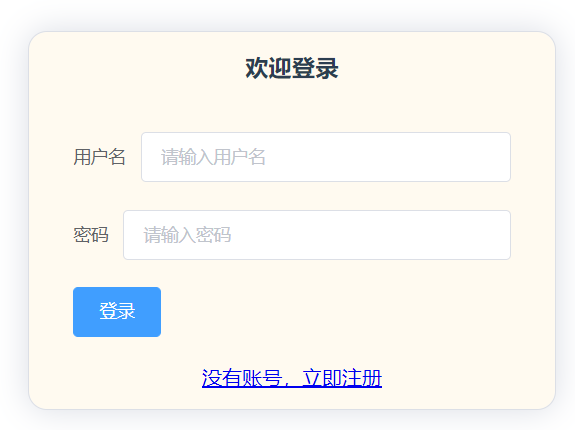
登录页面:
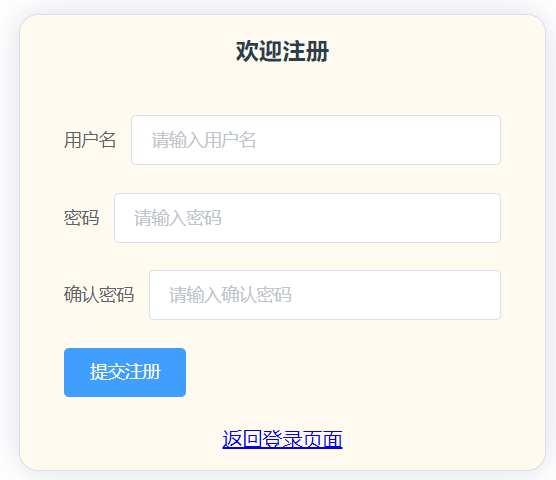
注册页面:
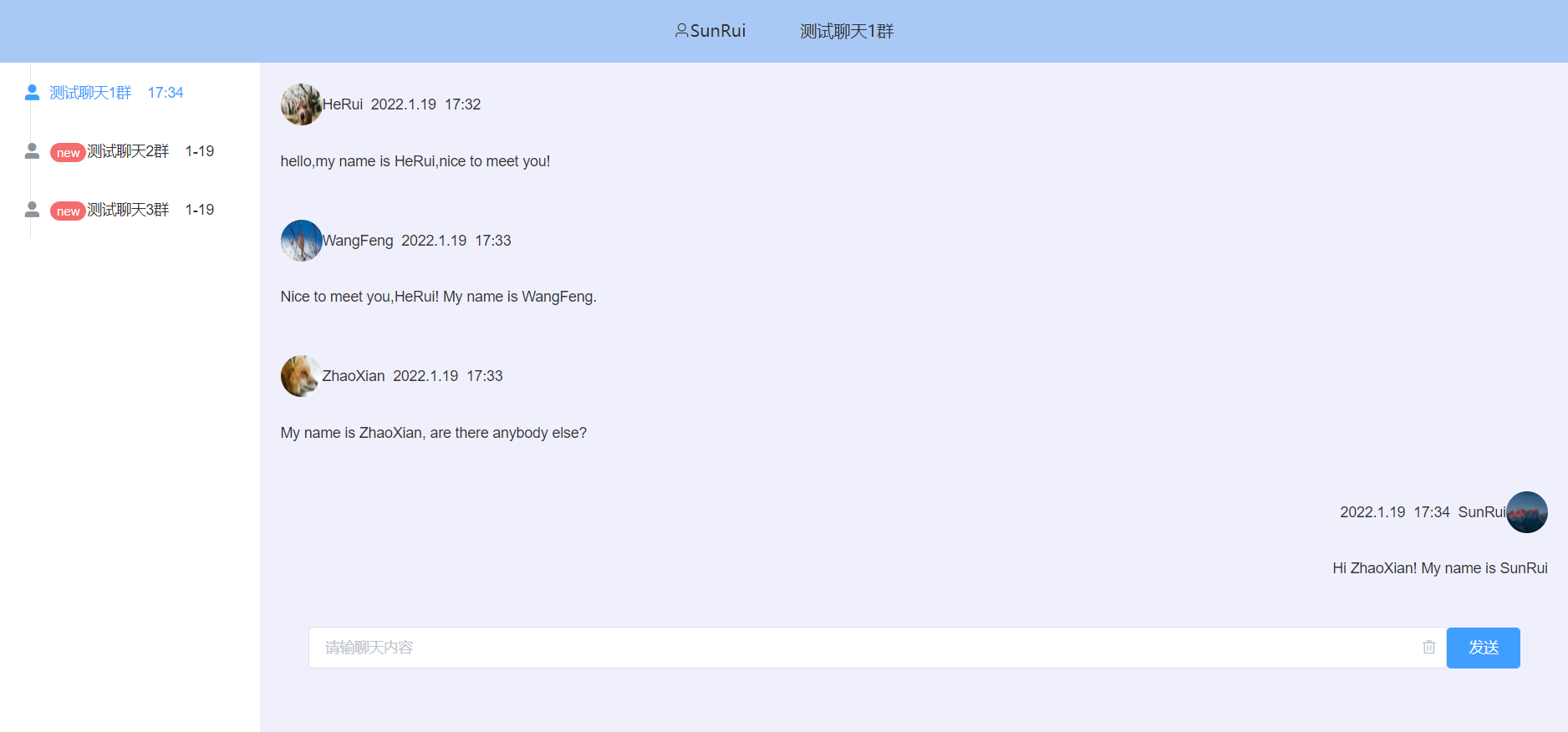
聊天室:
本次因为时间比较仓促,所以做的界面和功能还有很多不完善的地方,希望在之后有时间能够将这个项目继续完善下去。

恭喜本篇文章入选了本周的社区周刊:https://t.csdn.cn/dKAtE
等你更新更多好文哦!

