111,128
社区成员
 发帖
发帖 与我相关
与我相关 我的任务
我的任务
 分享
分享用VisionMaster4.1.0进行二次开发,加载方案时弹出如下错误:
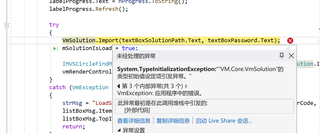
从其他专业毕业,种种原因转到了机器视觉方向,刚开始学习VM,有不专业的表述请各位见谅。
代码如下:
public partial class Form1 : Form
{
bool mSolutionIsLoad = false; //true 代表方案加载成功,false 代表方案关闭
public Form1()
{
InitializeComponent();
}
/****************************************************************************
* @fn 选择方案路径
* @fn Select solution's path
****************************************************************************/
private void buttonChooseSoluPath_Click(object sender, EventArgs e)
{
OpenFileDialog openFileDialog = new OpenFileDialog();
openFileDialog.Filter = "VM Sol File|*.sol*";
DialogResult openFileRes = openFileDialog.ShowDialog();
if (DialogResult.OK == openFileRes)
{
textBoxSolutionPath.Text = openFileDialog.FileName;
}
}
/****************************************************************************
* @fn 加载方案
* @fn Load solution
****************************************************************************/
private void buttonLoadSolution_Click(object sender, EventArgs e)
{
string strMsg = null;
int nProgress = 0;
progressBarSaveAndLoad.Value = nProgress;
labelProgress.Text = nProgress.ToString();
labelProgress.Refresh();
try
{
VmSolution.Import(textBoxSolutionPath.Text, textBoxPassword.Text);
mSolutionIsLoad = true;
IMVSCircleFindModuTool circleFindModule = (IMVSCircleFindModuTool)VmSolution.Instance["流程1.圆查找1"];
vmRenderControl1.ModuleSource = circleFindModule;
}
catch (VmException ex)
{
strMsg = "LoadSolution failed. Error Code: " + Convert.ToString(ex.errorCode, 16);
listBoxMsg.Items.Add(strMsg);
listBoxMsg.TopIndex = listBoxMsg.Items.Count - 1;
return;
}
strMsg = "LoadSolution success";
listBoxMsg.Items.Add(strMsg);
listBoxMsg.TopIndex = listBoxMsg.Items.Count - 1;
nProgress = 100;
labelProgress.Text = nProgress.ToString();
labelProgress.Refresh();
progressBarSaveAndLoad.Value = Convert.ToInt32(nProgress);
}
下面是app.config的代码,百度了很多解决方法都是app.config里的名称有问题,但这个问题我没找出来。
<?xml version="1.0" encoding="utf-8"?>
<configuration>
<appSettings>
<!--启动服务形式(0代表默认系统服务, 1代表exe方式启动)-->
<add key="StartServerByExe" value="0"/>
<!--服务绝对路径,用于拉起服务(value为""时默认拉起系统服务,value为服务路径时为以进程方式启动)-->
<add key="ServerPath" value=""/>
<!--<add key="ServerPath" value="E:\Program Files\VisionMaster\VisionMaster4.1.0\Applications\Server\VisionMasterServer.exe"/>-->
<add key="ClientSettingsProvider.ServiceUri" value=""/>
</appSettings>
<startup>
<supportedRuntime version="v4.0" sku=".NETFramework,Version=v4.8"/>
</startup>
<runtime>
<assemblyBinding xmlns="urn:schemas-microsoft-com:asm.v1">
<probing privatePath="myLibs;myLibs\Newtonsoft.Json;3rdLib;3rdLib\System;3rdLib\MsgPack;3rdLib\Log4Net;3rdLib\ICSharpCode;3rdLib\OpenCv;GateWay;Module(sp)\x64;Module(sp)\x64\Collection\ImageSourceModule;Module(sp)\x64\Location\IMVSCircleFindModu"/>
<dependentAssembly>
<assemblyIdentity name="System.Threading.Tasks.Extensions" publicKeyToken="cc7b13ffcd2ddd51" culture="neutral"/>
<bindingRedirect oldVersion="0.0.0.0-4.2.0.1" newVersion="4.2.0.1"/>
</dependentAssembly>
</assemblyBinding>
</runtime>
<system.web>
<membership defaultProvider="ClientAuthenticationMembershipProvider">
<providers>
<add name="ClientAuthenticationMembershipProvider" type="System.Web.ClientServices.Providers.ClientFormsAuthenticationMembershipProvider, System.Web.Extensions, Version=4.0.0.0, Culture=neutral, PublicKeyToken=31bf3856ad364e35" serviceUri=""/>
</providers>
</membership>
<roleManager defaultProvider="ClientRoleProvider" enabled="true">
<providers>
<add name="ClientRoleProvider" type="System.Web.ClientServices.Providers.ClientRoleProvider, System.Web.Extensions, Version=4.0.0.0, Culture=neutral, PublicKeyToken=31bf3856ad364e35" serviceUri="" cacheTimeout="86400"/>
</providers>
</roleManager>
</system.web>
</configuration>
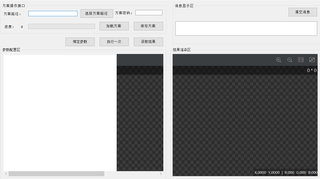
Form窗口可以运行,选择方案路径也可以选择,但到了加载方案时就报错
检查了很多次引用的dll和配置环境,都没找到问题
大手子们帮忙看看,谢谢!

另外在异常的时候,请查看详细,里面有内联详细异常详细,他会告诉你到底是那个静态变量异常了
知道是啥异常了,你就可以具体百度了
没办法帮你
只能告诉你检查方法
请检查你项目里所有 staitc 字段或者属性
问题产生原因,静态字段初始化 错误,因为静态字段初始化时候依赖了一些外部环境,而这个外部环境异常
常见的错误
我们可以随便简单写个例子,当然我只是演示这个异常是因为静态变量产生,而不是你这个问题的具体解决(因为我们没办法解决,这个必须你自己去检查所有的静态变量)
/
/我这里故意让一个静态变量产生异常
//我故意让这个静态stream访问一个压根不存在的文件,你就可以模拟出你这个异常了
//当然我是模拟,具体你的代码,你需要自己检查所有依赖静态变量的地方,任何静态变量,任何静态变量初始化异常都可以引发
//所以我们不能帮你排错,错误原因太多,但一定在发生在静态变量上
 public static Stream xx = new FileInfo(@"d:\abbbbb.dd").OpenRead();