FZU-SE-EE308-2022秋









EE308 Lab 2-2
 墨衍会员 · AI 创作全网分发 墨衍智能分发 通过墨衍一键同步至各平台 可同步平台 CSDN微信公众号微博知乎掘金百家号博客园抖音小红书 你的文章也可以这样分发 墨衍会员 ¥399起/年,写一次发全网
我也要 关注 + 加入社区
EE306 Lab 2-2
Description of problem-solving ideas
First of all, for this homework, we should know that the last game is a game, so we chose the unity engine that may be used in the final project to complete this homework.
The game is a BoBing game.The BoBing game has two steps: throwing dice and judging rewards.
The first first step is to throw the dice. The throwing dice function will rely on random number generation. Clicking the throw button will generate six dice and random numbers, and pass the random numbers to the dice, the dice completes the preset animation based on the accepted random number, and then destroyed. The above is the solution to finish throwing the dice.
The second part is the judgment reward,There are initially two ideas for the realization of this function, first with regular expressions for judgment, and second with if nesting.Given only the less effort to judge six dice, the second method was chosen to achieve functionality.We count the points by establishing the counter, and judge the reward by the number of points within the counter.
Finally, the multiplayer part. For this part of the function we used photon pun2 to implement.
Here we make the prefabricated dice that need to be synchronized in the room and put them into the photon's resource file to easily synchronize the object at the interface of all players when throwing. Then you rely on the PhotonView components to synchronize the animation.We plan to use photon RPC to achieve simple message transfer in the same room.
Design and implementation process
——————————————Overall structural design————————————————————
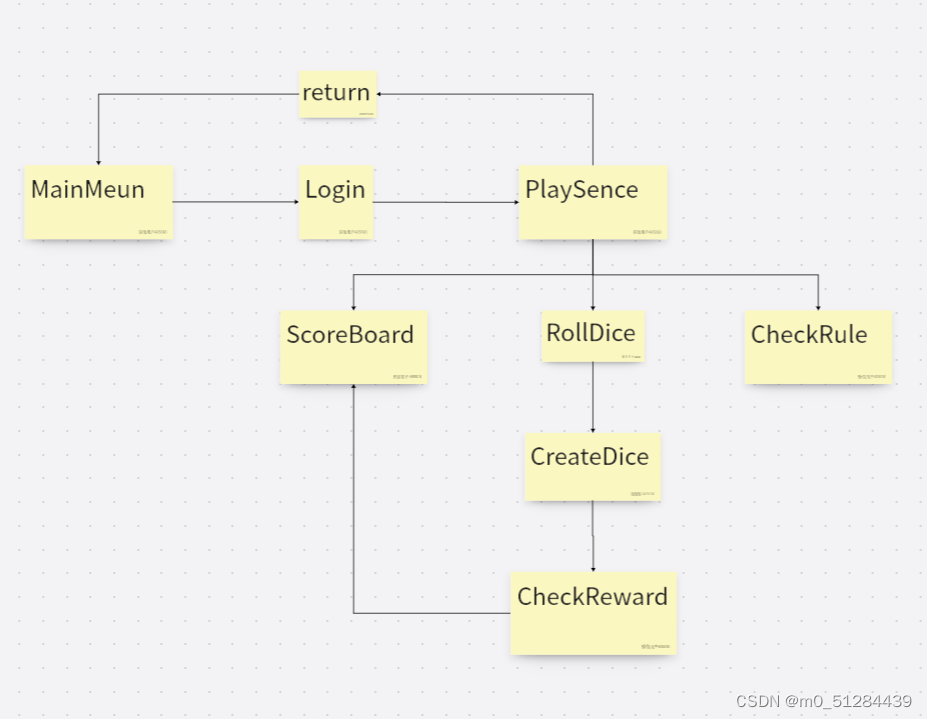
The overall structure mainly includes the main menu and the UI design of the game interface.
The main menu section will include both the exit and login features.
The main game interface will contain most of the important features. Like view the rules, throw the dice, view the scoreboard, empty the scoreboard, and return to the main menu.
———————Throw dice function—————————————————————————————
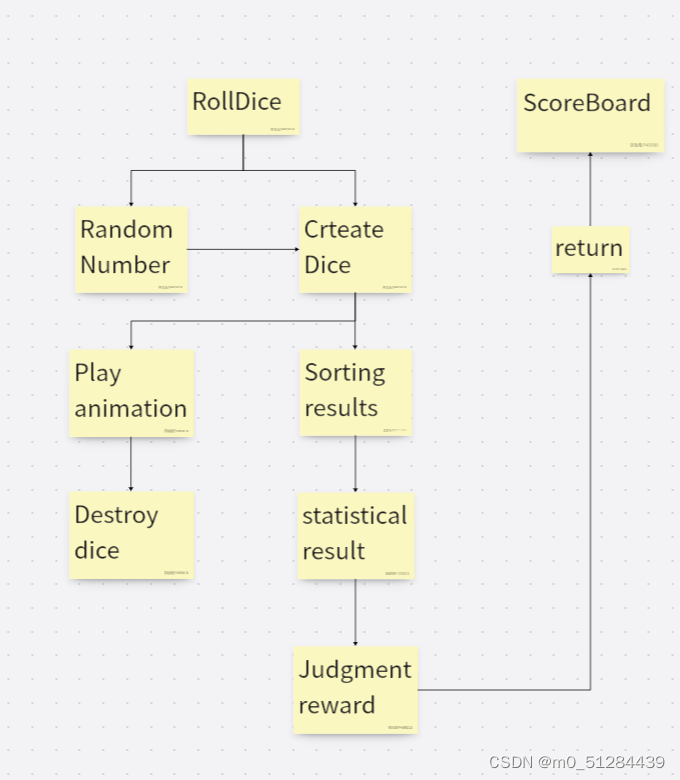
The partial functional implementation of throwing dice, is shown in Fig.
Specifically to obtain random numbers, transmit to the generated dice that play the animation and destroy in seconds.
The obtained numbers are stored in order and counted, and a series of judgments produce the results.(The implementation will be detailed in the code explanation section below)
—————————————Online part of the function implementation————————————

The online part is mainly implemented through photon, and through the photonview component, the dice prefabricated of the photon resource folder is generated in the game interface of the members of the same room.
Adding room functions also depends on photon. Details will be displayed in the code section.
Code description
Connect the Room section code
public void Start()
    {
        PhotonNetwork.ConnectUsingSettings();//Start the connection when the game starts
    }
   public override void OnConnectedToMaster()
   {
        play.SetActive(true);//Login is allowed when the connection is successful
    }

    public void playButton()
    {
        nameUI.SetActive(false);
        PhotonNetwork.NickName = playername.text;//Get the username
        loginUI.SetActive(true);
    }

    public void joinorcreate()//Get the room number and create or connect the room.
    {
       load.SetActive(true);
       SceneManager.LoadScene(1);
        if (roomID.text.Length < 2)
            return;
        loginUI.SetActive(false);

    RoomOptions options = new RoomOptions { MaxPlayers = 4 };
    PhotonNetwork.JoinOrCreateRoom(roomID.text, options,default);
    }

   public override void OnJoinedRoom()//Jump to the game interface after the successful connection
   {
    PhotonNetwork.LoadLevel(1);
   }
Generate the Dice section code
public void creatdice(int sc)
{
    diceplace.position = diceplace.position + Vector3.right * 100;//Modify the Dice Generation Location
    //Generate the dice on the full room via the photon server
    GameObject newdice = PhotonNetwork.Instantiate("dice", diceplace.position, diceplace.rotation);
    newdice.transform.parent = this.transform;
    newdice.GetComponent<dice>().setnumber(sc);//Accept random numbers
}
Throw part of the code
public void roll()
{
    int[] sct = new int[6];
    System.Random rd = new System.Random();

    for (int i = 0; i < 6; i++)
    {
        int sc = rd.Next(1, 7);//Get random numbers

        creatdice(sc);//Call the above method to generate the dice

        sct[i] = sc;
    }
    diceplace.position = diceplace.position + Vector3.left * 600;//Investment generation position is back to positive
    sortsct(sct);
    string kg = checkpoint(sct);// Judge the reward result
    newsc.text = kg;
    showsct(sct, kg); //Transfer the results to the scoreboard
    Invoke("cleansc", 5);

}
Award Winning Judgment partial code
   public string checkpoint(int[] sct)//Reward judgment was made by the priority of the points
{
    string kg = "";
    string name = "";
    int[] total = new int[6];
    for (int i = 0; i < sct.Length; i++)
        total[sct[i] - 1]++;
    if (total[1] == 4)
    {
        kg = "JinShi";
        name = "SiJin";
    }
    else if (total[3] == 4 && total[0] == 2)
    {
        kg = "ZhuangYuan";
        name = "ZhuangYuanChaJinHua";
    }
    else if (total[3] == 6)
    {
        kg = "ZhuangYuan";
        name = "LiuBeiHong";
    }
    else if (total[5] == 6)
    {
        kg = "ZhuangYuan";
        name = "LiuBeiHei";
    }
    else if (total[3] == 5)
    {
        kg = "ZhuangYuan";
        name = "WuWang";
    }
    else if (total[5] == 5)
    {
        kg = "ZhuangYuan";
        name = "WuZiDengKe";
    }
    else if (total[3] == 4)
    {
        kg = "ZhuangYuan";
        name = "ZhuangYuan";
    }
    else if (total[3] == 3)
    {
        kg = "TanHua";
        name = "SanHong";
    }
    else if (total[3] == 2)
    {
        kg = "JuRen";
        name = "ErJu";
    }
    else if (total[3] == 1)
    {
        bool b = true;
        for (int i = 0; i < total.Length; i++)
        {
            if (total[i] != 1)
            {
                b = false;
                break;
            }
        }
        if (b == true)
        {
            kg = "BangYan";
            name = "DuiTang";
        }
        else
        {
            kg = "XiuCai";
            name = "YiJu";
        }
    }
    else
    {
        kg = "No Reward";
    }
    kg = string.Concat(kg, " ", name);
    return kg;
}
PSP
| Personal SoftwareProcess Stages | Estimated time (minutes) | Real time (minutes) |
|---|---|---|
| Planning | 10 | 20 |
| Estimate | - | - |
| Development | 300 | 600 |
| Analysis | 30 | 40 |
| Design Spec | 60 | 90 |
| Design Review | 30 | 30 |
| Coding Standard | 10 | 10 |
| Design | 30 | 60 |
| Coding | 600 | 800 |
| Code Review | 30 | 60 |
| Test | 60 | 60 |
| Reporting | - | - |
| Test Report | 20 | 20 |
| Size Measurement | 10 | 20 |
| Postmortem & Process Improvement Plan | 20 | 60 |
| total | 1210 | 1870 |
summary
The project uses the basic operations of unity2d and how to achieve multiplayer games through photo. Exercise the project organization ability and teamwork ability.
The Link Your Class | https://bbs.csdn.net/forums/MUEE308FZU202201
| ----------- | ----------- |
The Link of Requirement of This Assignment | https://bbs.csdn.net/topics/608734907
MU STU ID and FZU STU ID | 20124635-832002210
Teammate's MU STU ID and FZU STU ID | 20122900-832002207
Teammate's blog link | https://blog.csdn.net/m0_54015927?type=bbs
GitHub link | https://github.com/Aiorang/Lab2
Video demo link | https://www.bilibili.com/video/BV1GW4y1x71B/?vd_source=3b4274550a75f47f7a429318c7bff80c
相关推荐
EE-308 LAB4 final version.7z
这是本次实验的压缩包
研发流程后端开发工具,提示功能开发效率
后端开发工具
Screenshot_2026-11-03-16-23-09-34.jpg
Screenshot_2026-11-03-16-23-09-34.jpg
机器人具有扰动抑制功能的有限时间基于方位角的领航者-跟随者编队控制(Matlab代码实现)
内容概要:本文档标题为《Plecs全桥LLC谐振变换器仿真模型.txt》,但实际内容并未涉及该主题的具体技术细节或仿真建模过程。相反,文档实质是一份由科研服务团队发布的跨学科资源目录,集中展示了大量基于Matlab、Simulink、Python、PSCAD等平台实现的科研项目与算法开发案例,涵盖电力系统、无人机路径规划、微电网优化、状态估计、信号处理、车间调度、图像处理、通信技术、雷达追踪、智能优化算法等多个工程技术领域。每个条目以“【】”标注研究主题,并注明“Matlab代码实现”“Python代码实现”等形式,表明其为可提供技术支持与代码资源的服务项目。文档末尾频繁出现“完整资源下载:公众号——荔枝科研社”及百度网盘链接,明确体现出其作为科研辅助服务推广与引流工具的功能属性。; 适合人群:面向电气工程、自动化、控制科学与工程、计算机科学、智能制造、新能源、航空航天、通信工程及相关交叉学科的研究生、高校教师、科研人员及企业研发工程师。; 使用场景及目标:①为科研人员提供课题选题、技术路线设计与算法实现的参考范例;②辅助学生或研究人员完成课程设计、毕业论文、项目仿真与算法复现任务;③作为第三方技术服务团队的能力展示目录,便于潜在客户快速了解其在多领域提供的定制化仿真与算法开发服务范围。; 阅读建议:此文档并非传统意义上的学术论文或技术教程,而是一份高度碎片化、广告性质浓厚的资源索引清单。读者应忽略其误导性的文件名,将其视为一个综合性科研技术服务目录,重点关注自身研究方向相关的条目,并通过文末提供的公众号或网盘链接进一步获取具体代码与资料。同时,需注意甄别资源的技术质量、原创性与适用性,避免盲目依赖外部服务。
科技中介服务机构如何打造高效、可复制的技术交易服务流程?.docx
科易网基于AI模型+行业大数据,在技术转移、成果转化、技术经纪、知识产权、产业创新、科技招商等垂直领域的多样化应用场景,推出科技创新领域的AI+工具与数智化解决方案,推动科技创新与产业创新智能化发展。