



11
社区成员
 发帖
发帖 与我相关
与我相关 我的任务
我的任务
 分享
分享所用硬件
ESP32
Arduino mega2560
红绿灯模块
连线:
mega2560 ESP32 红绿灯模块 OLED
RX1 TX2
TX1 RX2
3.3V VIN
GND GND
5V VCC
SDA SDA
SCL SCL
11 G
12 Y
13 R
代码
ESP32端:
//This example code is in the Public Domain (or CC0 licensed, at your option.)
//By Evandro Copercini - 2018
//
//This example creates a bridge between Serial and Classical Bluetooth (SPP)
//and also demonstrate that SerialBT have the same functionalities of a normal Serial

#include "BluetoothSerial.h"

#if !defined(CONFIG_BT_ENABLED) || !defined(CONFIG_BLUEDROID_ENABLED)
#error Bluetooth is not enabled! Please run `make menuconfig` to and enable it
#endif

BluetoothSerial SerialBT;

void setup() {
  Serial.begin(115200);
  Serial2.begin(115200);
  SerialBT.begin("ESP32test"); //Bluetooth device name
  Serial.println("The device started, now you can pair it with bluetooth!");
}

void loop() {
  /*if (Serial.available()) {
    SerialBT.write(Serial.read());//将串口收到的数据,再通过蓝牙串口转发出去
    Serial.println("由SerialBT打印");
  }*/
  if (SerialBT.available()) {//将蓝牙串口收到的数据,再通过串口把信息发回给电脑
    Serial2.write(SerialBT.read());
     Serial.println("由Serial打印");
  }
  delay(20);
}
Arduino mega2560端:
#include<dht.h>
#include <SPI.h>
#include <Wire.h>
#include <Adafruit_GFX.h>
#include <Adafruit_SSD1306.h>
#include <SdFat.h>
#include <ArduinoJson.h>
#include<NewPing.h>

#define OLED_RESET 4   //2560开发板
//Adafruit_SSD1306 display(OLED_RESET);
#define SCREEN_WIDTH 128 // OLED display width, in pixels
#define SCREEN_HEIGHT 64 // OLED display height, in pixels
String input_string;
int tt;
int state=0;
void GetSerialStuff(String& input_string)
{
  String temp_string = ""; // 声明变量 temp_string,用于临时存储串口输入的数据
  while(Serial1.available())
  { // 当串口有数据时,循环执行
  temp_string += (char)Serial1.read(); // 把读取的串口数据,逐个组合到inStr变量里
  delay(2);
  }
  input_string = temp_string; // 把引用指针的变量赋值为 tempStr
}
//#define OLED_RESET     -1 // Reset pin # (or -1 if sharing Arduino reset pin)uno开发板
#define SCREEN_ADDRESS 0x3C ///< See datasheet for Address; 0x3D for 128x64, 0x3C for 128x32
Adafruit_SSD1306 display(SCREEN_WIDTH, SCREEN_HEIGHT, &Wire, OLED_RESET);
const uint8_t cn_xin [] PROGMEM =
{ 0x00, 0x00, 0x10, 0x00, 0x08, 0x04, 0x7F, 0x78, 0x00, 0x40, 0x22, 0x40, 0x14, 0x40, 0xFF, 0x7E,
  0x08, 0x48, 0x08, 0x48, 0x7F, 0x48, 0x08, 0x48, 0x2A, 0x48, 0x49, 0x48, 0x88, 0x88, 0x28, 0x88,
  0x11, 0x08
};/*"新",0*/
const uint8_t cn_jiang [] PROGMEM =
{ 0x00, 0x00, 0x00, 0x00, 0xFB, 0xFE, 0x08, 0x00, 0x09, 0xFC, 0xF9, 0x24, 0x81, 0xFC, 0x81, 0x24,
  0xFB, 0xFE, 0x48, 0x00, 0x49, 0xFC, 0xE9, 0x24, 0x49, 0xFC, 0x69, 0x24, 0x89, 0xFC, 0x50, 0x00,
  0x23, 0xFE
};/*"疆",1*/
const uint8_t cn_li [] PROGMEM =
{ 0x00, 0x00, 0x00, 0x00, 0x01, 0xFC, 0xFD, 0x24, 0x11, 0x24, 0x11, 0xFC, 0x11, 0x24, 0x11, 0x24,
  0x7D, 0xFC, 0x10, 0x20, 0x10, 0x20, 0x11, 0xFC, 0x10, 0x20, 0x1C, 0x20, 0xE0, 0x20, 0x43, 0xFE,
  0x00, 0x00
};/*"理",2*/
const uint8_t cn_gong [] PROGMEM =
{ 0x00, 0x00, 0x00, 0x00, 0x00, 0x00, 0x7F, 0xFC, 0x01, 0x00, 0x01, 0x00, 0x01, 0x00, 0x01, 0x00,
  0x01, 0x00, 0x01, 0x00, 0x01, 0x00, 0x01, 0x00, 0x01, 0x00, 0x01, 0x00, 0xFF, 0xFE, 0x00, 0x00,
  0x00, 0x00
};/*"工",3*/
const uint8_t cn_xue [] PROGMEM =
{ 0x00, 0x00, 0x22, 0x08, 0x11, 0x08, 0x11, 0x10, 0x00, 0x20, 0x7F, 0xFE, 0x40, 0x02, 0x80, 0x04,
  0x1F, 0xE0, 0x00, 0x40, 0x01, 0x80, 0xFF, 0xFE, 0x01, 0x00, 0x01, 0x00, 0x01, 0x00, 0x05, 0x00,
  0x02, 0x00
};/*"学",4*/
const uint8_t cn_yuan [] PROGMEM =
{ 0x00, 0x00, 0x00, 0x40, 0x78, 0x20, 0x4B, 0xFE, 0x52, 0x02, 0x54, 0x04, 0x61, 0xF8, 0x50, 0x00,
  0x48, 0x00, 0x4B, 0xFE, 0x48, 0x90, 0x68, 0x90, 0x50, 0x90, 0x41, 0x12, 0x41, 0x12, 0x42, 0x0E,
  0x44, 0x00
};/*"院",5*/

#define G 11
#define Y 12
#define R 13
    char ss[5];

    char s[3];
    String sss;
int RT=0;
int GT=0;

void setup() {
  // put your setup code here, to run once:
Serial.begin(115200);
Serial1.begin(115200);
display.display();
  // Clear the buffer
  display.clearDisplay();
pinMode(G,OUTPUT);
pinMode(Y,OUTPUT);
pinMode(R,OUTPUT);
 if (!display.begin(SSD1306_SWITCHCAPVCC, SCREEN_ADDRESS)) {
    Serial.println(F("SSD1306 allocation failed"));
    for (;;); // Don't proceed, loop forever
}}

const int cn_allArray_LEN = 6;
const uint8_t* cn_allArray[6] = {
  cn_xin, cn_jiang, cn_li, cn_gong, cn_xue, cn_yuan
};

void loop() {
  int len;

 GetSerialStuff(input_string); // 获取串口的数据
  len=input_string.length();
  Serial.println(len);
 //  Serial.println(intput_string);
   display.clearDisplay();
   if(input_string != ""&&len==5)
   {
   tt = input_string.substring(0, 3).toInt(); // 从字符串中截取 秒 的数据并转换成int数据类型
   state=input_string.substring(4).toInt();//状态
   }
   if(state==1)
   {
    RT=tt;
   }
   if(state==2)
   {
    GT=tt;
   }
   Serial.println(tt);
display.setTextSize(1); //设置字体大小
  display.setTextColor(SSD1306_WHITE);//开像素点发光

  // testdrawbitmap(cn_allArray[0],16,16);
  for (int i = 0; i < 6; i++) {                                            //新疆理工学院第一行
    display.drawBitmap(i * 16, 0, cn_allArray[i], 16, 16, 1);
    delay(1);
  }
  display.setTextColor(SSD1306_WHITE);//开像素点发光


  // put your main code here, to run repeatedly:
  digitalWrite(G,HIGH);
  for(unsigned int i=GT;i>0;i--)
  {
    display.clearDisplay();
    display.setTextSize(1); //设置字体大小
  display.setTextColor(SSD1306_WHITE);//开像素点发光

  // testdrawbitmap(cn_allArray[0],16,16);
  for (int i = 0; i < 6; i++) {                                            //新疆理工学院第一行
    display.drawBitmap(i * 16, 0, cn_allArray[i], 16, 16, 1);
    delay(1);
  }
  //  delay(1000);

      display.setCursor(0, 0);
  display.setTextSize(2); //设置字体大小
  display.println();
  display.println();
    display.print(i);
    display.print('s');
     display.display();
   delay(1000);
  }
  digitalWrite(G,LOW);
  digitalWrite(Y,HIGH);
    for(unsigned int i=3;i>0;i--)
  {
       display.clearDisplay();
   // delay(1000);
    display.setTextSize(1); //设置字体大小
  display.setTextColor(SSD1306_WHITE);//开像素点发光

  // testdrawbitmap(cn_allArray[0],16,16);
  for (int i = 0; i < 6; i++) {                                            //新疆理工学院第一行
    display.drawBitmap(i * 16, 0, cn_allArray[i], 16, 16, 1);
    delay(1);
  }

         display.setCursor(0, 0);
  display.setTextSize(2); //设置字体大小
  display.println();
  display.println();
    display.print(i);
    display.print('s');
     display.display();
       delay(1000);

  }
   GetSerialStuff(input_string); // 获取串口的数据
  len=input_string.length();
  Serial.println(len);
 //  Serial.println(intput_string);
   display.clearDisplay();
   if(input_string != ""&&len==5)
   {
   tt = input_string.substring(0, 3).toInt(); // 从字符串中截取 秒 的数据并转换成int数据类型
   state=input_string.substring(4).toInt();//状态
   }
   if(state==1)
   {
    RT=tt;
   }
   if(state==2)
   {
    GT=tt;
   }
   Serial.println(tt);
  digitalWrite(Y,LOW);
  digitalWrite(R,HIGH);
    for(unsigned int i=RT;i>0;i--)
  {
       display.clearDisplay();
   // delay(1000);
    display.setTextSize(1); //设置字体大小
  display.setTextColor(SSD1306_WHITE);//开像素点发光

  // testdrawbitmap(cn_allArray[0],16,16);
  for (int i = 0; i < 6; i++) {                                            //新疆理工学院第一行
    display.drawBitmap(i * 16, 0, cn_allArray[i], 16, 16, 1);
    delay(1);
  }
    // display.clearDisplay();
         display.setCursor(0, 0);
  display.setTextSize(2); //设置字体大小
  display.println();
  display.println();
    display.print(i);
    display.print('s');
     display.display();
       delay(1000);

  }
  digitalWrite(R,LOW);
  digitalWrite(Y,HIGH);
  for(unsigned int i=3;i>0;i--)
  {
       display.clearDisplay();

    display.setTextSize(1); //设置字体大小
  display.setTextColor(SSD1306_WHITE);//开像素点发光

  // testdrawbitmap(cn_allArray[0],16,16);
  for (int i = 0; i < 6; i++) {                                            //新疆理工学院第一行
    display.drawBitmap(i * 16, 0, cn_allArray[i], 16, 16, 1);
    delay(1);
  }
    // display.clearDisplay();
         display.setCursor(0, 0);
  display.setTextSize(2); //设置字体大小
  display.println();
  display.println();
    display.print(i);
    display.print('s');
     display.display();
       delay(1000);

  }
  digitalWrite(Y,LOW);

   display.display();
  delay(20);
}
实验连接图:
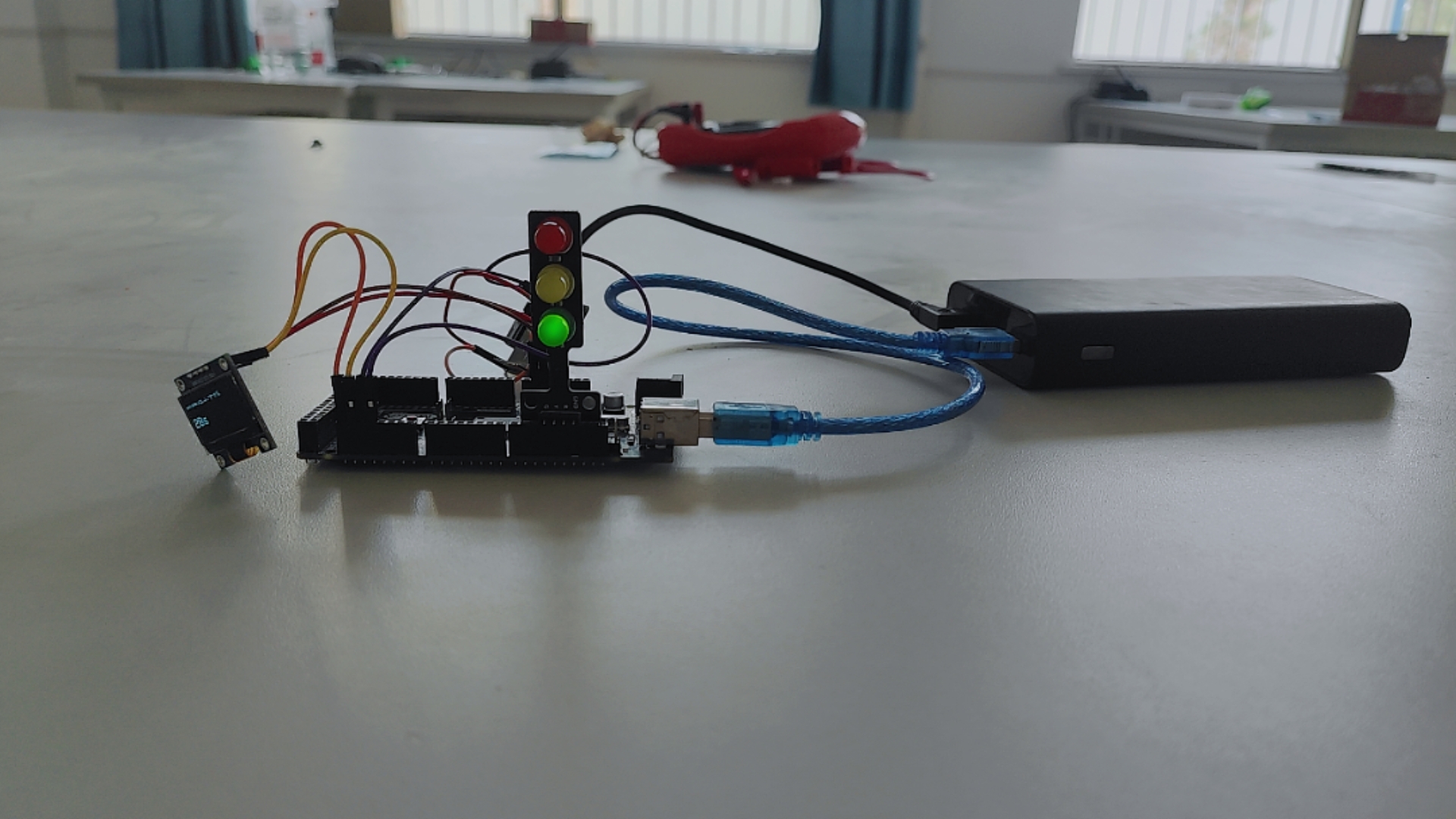
实验结果:
设备通电后
用电脑连接蓝牙
设置虚拟蓝牙端口
用蓝牙调试助手连接蓝牙端口
发送032-1设置红灯时间32s
发送042-2设置绿灯时间42s
***-*
0-2字符设置时间
1代表设置红灯
2代表设置绿灯
也就是我们通过串口字符串蓝牙设置红绿灯时间,在oled上显示倒计时读秒
黄灯时间3s不变
OK,实验确实验证可行

