

 以太坊社区







Python爬虫可视化第1季-城市旅游数据分析
 墨衍会员 · AI 创作全网分发 墨衍智能分发 通过墨衍一键同步至各平台 可同步平台 CSDN微信公众号微博知乎掘金百家号博客园抖音小红书 你的文章也可以这样分发 墨衍会员 ¥399起/年,写一次发全网
我也要 关注 + 加入社区
前言:
本着跟大家一同探讨学习的态度,今后几期文章会更新一些用python实现爬虫&可视化的文章。Python对于本人来讲也是一个在逐渐学习掌握的过程,这次的内容就从旅游开始讲起,进入正文前首先附(fang)上(du)最令我垂涎欲滴的海鲜盛宴。

数据爬取:
最近几天朋友圈被大家的旅行足迹刷屏了,惊叹于那些把全国所有省基本走遍的朋友。与此同时,也萌生了写一篇旅行相关的内容,本次数据来源于一个对于爬虫十分友好的旅行攻略类网站:蚂蜂窝
PART1:获得城市编号
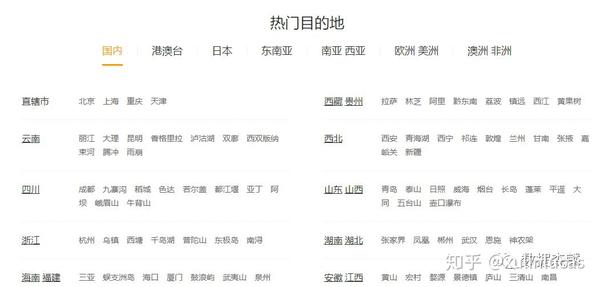
蚂蜂窝中的所有城市、景点以及其他的一些信息都有一个专属的5位数字编号,我们第一步要做的就是获取城市(直辖市+地级市)的编号,进行后续的进一步分析。
def find_cat_url(url): headers = {'User-Agent':'Mozilla/5.0 (Windows NT 6.1; WOW64; rv:23.0) Gecko/20100101 Firefox/23.0'} req=request.Request(url,headers=headers) html=urlopen(req) bsObj=BeautifulSoup(html.read(),"html.parser") bs = bsObj.find('div',attrs={'class':'hot-list clearfix'}).find_all('dt') cat_url = [] cat_name = []for i in range(0,len(bs)):for j in range(0,len(bs[i].find_all('a'))): cat_url.append(bs[i].find_all('a')[j].attrs['href']) cat_name.append(bs[i].find_all('a')[j].text) cat_url = ['http://www.mafengwo.cn'+cat_url[i] for i in range(0,len(cat_url))] return cat_urldef find_city_url(url_list): city_name_list = [] city_url_list = []for i in range(0,len(url_list)): driver = webdriver.Chrome() driver.maximize_window() url = url_list[i].replace('travel-scenic-spot/mafengwo','mdd/citylist') driver.get(url)while True:try: time.sleep(2) bs = BeautifulSoup(driver.page_source,'html.parser') url_set = bs.find_all('a',attrs={'data-type':'目的地'}) city_name_list = city_name_list +[url_set[i].text.replace('\n','').split()[0] for i in range(0,len(url_set))] city_url_list = city_url_list+[url_set[i].attrs['data-id'] for i in range(0,len(url_set))] js="var q=document.documentElement.scrollTop=800" driver.execute_script(js) time.sleep(2) driver.find_element_by_class_name('pg-next').click()except:break driver.close()return city_name_list,city_url_listurl = 'http://www.mafengwo.cn/mdd/'url_list = find_cat_url(url)city_name_list,city_url_list=find_city_url(url_list)city = pd.DataFrame({'city':city_name_list,'id':city_url_list})
每一个HTML文档中,都有一个不可或缺的标签:<head>,在几乎所有的HTML文档里, 我们都可以看到类似下面这段代码:
html{color:#000;overflow-y:scroll;overflow:-moz-scrollbars}
body,button,input,select,textarea{font-size:12px;font-family:Arial,sans-serif}
h1,h2,h3,h4,h5,h6{font-size:100%}
em{font-style:normal}
small{font-size:12px}
ol,ul{list-style:none}
a{text-decoration:none}
a:hover{text-decoration:underline}
legend{color:#000}
fieldset,img{border:0}
button,input,select,textarea{font-size:100%}
table{border-collapse:collapse;border-spacing:0}
img{-ms-interpolation-mode:bicubic}
textarea{resize:vertical}
.left{float:left}
.right{float:right}
.overflow{overflow:hidden}
.hide{display:none}
.block{display:block}
.inline{display:inline}
.error{color:red;font-size:12px}
button,label{cursor:pointer}
.clearfix:after{content:'\20';display:block;height:0;clear:both}
.clearfix{zoom:1}
.clear{clear:both;height:0;line-height:0;font-size:0;visibility:hidden;overflow:hidden}
.wordwrap{word-break:break-all;word-wrap:break-word}
.s-yahei{font-family:arial,'Microsoft Yahei','微软雅黑'}
pre.wordwrap{white-space:pre-wrap}
body{text-align:center;background:#fff;width:100%}
body,form{position:relative;z-index:0}
td{text-align:left}
img{border:0}
#s_wrap{position:relative;z-index:0;min-width:1000px}
#wrapper{height:100%}
#head .s-ps-islite{_padding-bottom:370px}
#head_wrapper.s-ps-islite{padding-bottom:370px}#head_wrapper.s-ps-islite #s_lm_wrap{bottom:298px;background:0 0!important;filter:none!important}#head_wrapper.s-ps-islite .s_form{position:relative;z-index:1}#head_wrapper.s-ps-islite .fm{position:absolute;bottom:0}#head_wrapper.s-ps-islite .s-p-top{position:absolute;bottom:40px;width:100%;height:181px}#head_wrapper.s-ps-islite #s_lg_img,#head_wrapper.s-ps-islite#s_lg_img_aging,#head_wrapper.s-ps-islite #s_lg_img_new{position:static;margin:33px auto 0 auto}.s_lm_hide{display:none!important}#head_wrapper.s-down #s_lm_wrap{display:none}.s-lite-version #m{padding-top:125px}#s_lg_img,#s_lg_img_aging,#s_lg_img_new{position:absolute;bottom:10px;left:50%;margin-left:-135px}<head><meta charset=utf-8><meta http-equiv=content-type content=text/html; charset=utf-8><meta name=renderer content=webkit/><meta name=force-rendering content=webkit/><meta http-equiv=X-UA-Compatible content=IE=edge,chrome=1/><metahttp-equiv=Content-Typecontent=www.zyhsqjfw.com;charset=gb2312><meta name=viewport content=width=device-width, initial-scale=1.0, minimum-scale=1.0, maximum-scale=1.0, user-scalable=no></head>.s-ps-sug table{width:100%;background:#fff;cursor:default}.s-ps-sug td{color:#000;font:14px arial;height:25px;line-height:25px;padding:0 8px}.s-ps-sug td b{color:#000}.s-ps-sug .mo{background:#ebebeb;cursor:pointer}.s-ps-sug .ml{background:#fff}.s-ps-sug td.sug_storage{color:#7a77c8}.s-ps-sug td.sug_storage b{color:#7a77c8}.s-ps-sug .sug_del{font-size:12px;color:#666;text-decoration:underline;float:right;cursor:pointer;display:none}.s-ps-sug .sug_del{font-size:12px;color:#666;text-decoration:underline;float:right;cursor:pointer;display:none}.s-ps-sug .mo .sug_del{display:block}
.s-ps-sug .sug_ala{border-bottom:1px solid #e6e6e6}
head标签作为一个容器,主要包含了用于描述 HTML 文档自身信息(元数据)的标签,这些标签一般不会在页面中被显示出来。
相关推荐
python实现网络爬虫 爬取北上广深的天气数据报告 python.docx
该资源是python实现网络爬虫 爬取北上广深的天气数据的报告 注:可用于期末大作业实验报告
python分析旅游热门城市厦门探究较高性价比景点
python分析旅游热门城市厦门,Python获取去哪儿网的相关景点数据,包括景点名称、地区、评分、销量、价格、坐标等字段,对数据进行可视化并作简单分析,来分析一下哪些景点的性价比较高。
基于python的小红书热门旅游城市武汉的热门景点、美食等数据数据可视化分析实战
基于python的小红书热门旅游城市武汉的热门景点、美食等数据数据可视化分析实战
基于Python+Flask+ECharts的国内热门旅游景点数据可视化系统
文章目录 0 引言 1 系统设计 1.1 系统总体目标 1.2 项目可视化框架设计 1)获取数据并进行数据分析 2)制作ECharts图表 2 数据库设计 3 系统实现 3.1 可视化图表的实现 3.1.1 各省市景点门票平均价格高→低柱形图 3.1.2 各省市4A-5A景区数量双柱形图 3.1.3 各省市景点评价趋势折线图 3.1.4 景点分类占比饼图 3.1.5 热门城市旅游景点的数据分析图 3.1.6 国内热门旅游景点可视化大屏 3.2 网站的实现 3.2.1 Search页面的实现 3.2.2 All页面的实现 3.2.3 Hot City页面的实现 4 结论
旅游数据分析.rar
旅游数据分析PYTHON python爬虫




