


688
社区成员
 发帖
发帖 与我相关
与我相关 我的任务
我的任务
 分享
分享如果把游戏比作一道菜的话,那么游戏中的故事就是盐,盐的量刚刚好,菜会非常美味,盐放多了,菜就毁了。游戏性和故事性的权重,一直是设计师们争辩已久的话题,有些游戏完全没有剧情,但不妨碍诸如俄罗斯方块等游戏成为经典,但是随着玩家审美水平的上升和游戏质量的提高,越来越多的游戏会用一个或宏大、或轻巧的故事背景来支撑游戏的整体叙事结构,游戏中多种多样的对话剧情,不仅能够增加玩家的代入感,也能推动剧情的发展。如果你想开发一款优秀的RPG游戏,那么对话系统将是不可或缺的,如果你有这方面的需要,不妨看看我的这篇文章。
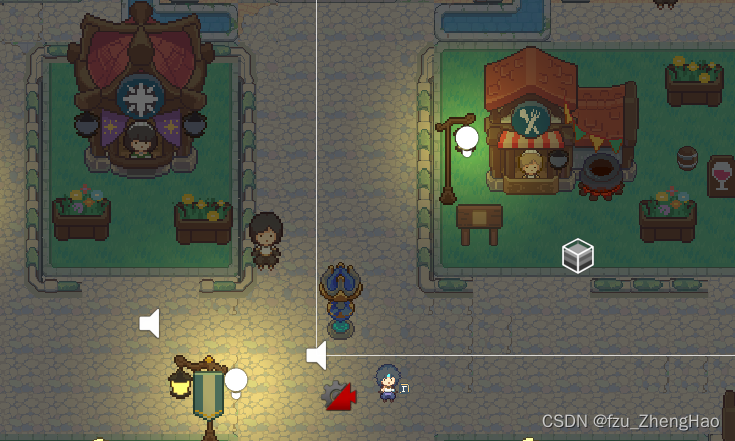
首先,我们先准备一个已经搭建好的Unity地图,地图中包含一个可以由玩家控制的角色,和若干个NPC。
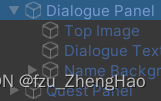
设计对话UI。首先创建一个Dialogue Panel,其中,Top Image 是对话框的顶部图片,用来使我们的对话框看起来更好看。Dialogue Text是对话框中的文本。Name Background是对话框显示对话者姓名的背景图片,也是为了使我们的对话框看起来更好看。
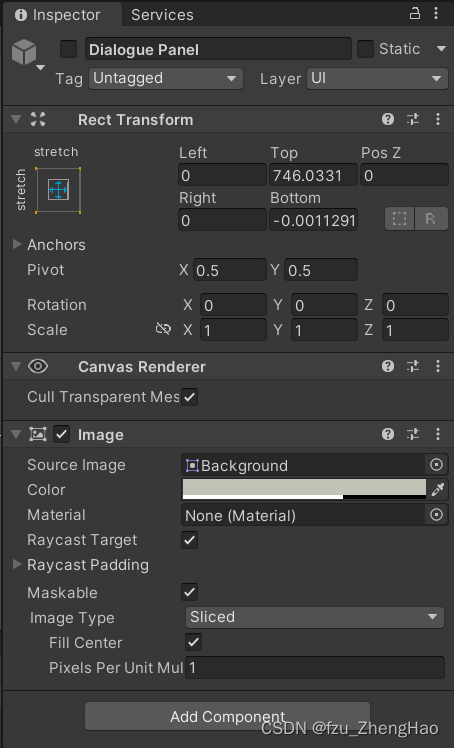
Diaglogue Panel 的相关配置如下:
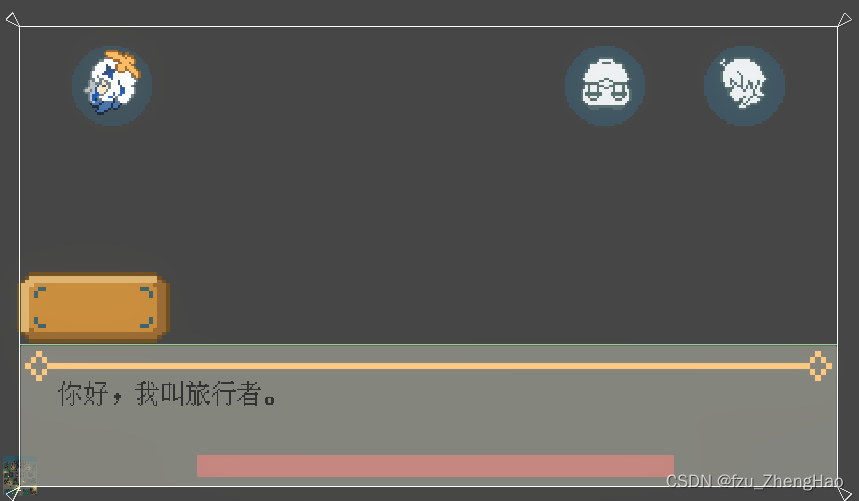
这是我最后设计出来的效果,您可以根据您游戏的具体风格进行自定义:
-
public class DialogueManager : MonoBehaviour
{
public static DialogueManager instance;
public GameObject dialogueBox;//显示或隐藏
public Text dialogueText, nameText;
[TextArea(1, 3)]
public string[] dialogueLines;
[SerializeField] private int currentLine;

private bool isScrolling;
[SerializeField] private float textSpeed;

public Questable currentQuestable;

public QuestTarget questTarget;

public Talkable talkable;

public void Awake()
{
    if(instance == null)
    {
        instance = this;
    }
    else
    {
        if (instance != this)
        {
            Destroy(gameObject);
        }
    }
    DontDestroyOnLoad(gameObject);
}

// Start is called before the first frame update
private void Start()
{
    dialogueText.text=dialogueLines[currentLine];
}

// Update is called once per frame
private void Update()
{
    if (dialogueBox.activeInHierarchy)
    {
        FindObjectOfType<QuestManager>().questPanel.SetActive(false);

        if (Input.GetMouseButtonUp(0) && dialogueText.text == dialogueLines[currentLine])
        {
            if (isScrolling == false)
            {
                currentLine++;

                if (currentLine < dialogueLines.Length)
                {
                    CheckName();
                    StartCoroutine(ScrollingText());
                }
                else
                {
                    if (CheckQuestComplete() && currentQuestable.isFinished == false)
                    {
                        showDialogue(talkable.congratslines);
                        currentQuestable.isFinished = true;
                    }
                    else
                    {
                        dialogueBox.SetActive(false);
                        FindObjectOfType<PlayerControllerBase>().canMove = true;

                        if (currentQuestable == null)
                        {
                            Debug.Log("There is no Quest in this person.");
                        }
                        else
                        {
                            currentQuestable.DelegateQuest();

                            QuestManager.instance.UpdateQuestList();

                            if (CheckQuestComplete() && currentQuestable.isFinished == false)
                            {
                                showDialogue(talkable.congratslines);
                                currentQuestable.isFinished = true;
                            }
                        }

                        if (questTarget != null)
                        {
                            for (int i = 0; i < Player.instance.questList.Count; i++)
                            {
                                if (Player.instance.questList[i].questName == questTarget.questName)
                                {
                                    questTarget.hasTalked = true;
                                    questTarget.QuestComplete();
                                }
                            }
                        }
                    }
                }
            }
        }
    }
}

public void showDialogue(string[] _newLines)
{
    dialogueLines = _newLines;
    currentLine = 0;

    CheckName();
    StartCoroutine(ScrollingText());
    dialogueBox.SetActive(true);

    FindObjectOfType<PlayerControllerBase>().canMove = false;
}

private void CheckName()
{
    if (dialogueLines[currentLine].StartsWith("n-"))
    {
        nameText.text = dialogueLines[currentLine].Replace("n-","");
        currentLine++;
    }
}

private IEnumerator ScrollingText()
{
    isScrolling = true;
    dialogueText.text = "";

    foreach(char letter in dialogueLines[currentLine].ToCharArray() )
    {
        dialogueText.text += letter;
        yield return new WaitForSeconds(textSpeed);
    }

    isScrolling = false;
}

public bool CheckQuestComplete()
{
    if (currentQuestable == null)
    {
        return false;
    }

    for(int i = 0; i < Player.instance.questList.Count; i++)
    {
        if (currentQuestable.quest.questName == Player.instance.questList[i].questName
            && Player.instance.questList[i].questStatus == Quest.QuestStatus.Completed)
        {
            currentQuestable.quest.questStatus = Quest.QuestStatus.Completed;
            return true;
        }
    }
    return false;
}
}
## 2.2 ShowFIn脚本编写
       编写完ShowFIn脚本后,将其挂载在玩家角色上,使得角色靠近可对话的NPC时,会显示按键提示:
```csharp
using System.Collections;
using System.Collections.Generic;
using UnityEngine;

public class showFIn : MonoBehaviour
{
    private PlayerIdentity player;//角色


    void OnTriggerEnter2D(Collider2D other)//角色进入触发器打开交互状态
    {
        player = other.GetComponent<PlayerIdentity>();
        if (player != null)
        {
            player.OpenInteract();

        }
    }

    void OnTriggerExit2D(Collider2D other)//角色离开触发器
    {
        player = other.GetComponent<PlayerIdentity>();
        if (player != null)
        {
            player.CloseInteract();

        }
        player = null;//角色为空
    }
}
编写完Talkable脚本后,将其挂载到NPC上,使得场景中的对象可对话:
using System.Collections;
using System.Collections.Generic;
using UnityEngine;

public class Talkable : MonoBehaviour
{
    [SerializeField] private bool isEntered;
    [TextArea(1, 5)]
    public string[] lines;

    [TextArea(1, 4)]
    public string[] congratslines;

    [TextArea(1, 4)]
    public string[] completedlines;

    public Questable questable;

    public QuestTarget questTarget;


    private void OnTriggerEnter2D(Collider2D other)
    {
        if (other.CompareTag("Player"))
        {
            isEntered = true;

            DialogueManager.instance.currentQuestable = questable;
            DialogueManager.instance.questTarget = questTarget;
            DialogueManager.instance.talkable = this;
        }
    }

    private void OnTriggerExit2D(Collider2D other)
    {
        if (other.CompareTag("Player"))
        {
            isEntered = false;

            DialogueManager.instance.currentQuestable = null;
        }
    }


    // Update is called once per frame
    private void Update()
    {
        if(isEntered && Input.GetKeyDown(KeyCode.F) && DialogueManager.instance.dialogueBox.activeInHierarchy == false)
        {
            if (questable == null)
            {
                DialogueManager.instance.showDialogue(lines);
            }
            else
            {
                if (questable.quest.questStatus == Quest.QuestStatus.Completed)
                {
                    DialogueManager.instance.showDialogue(completedlines);
                }
                else
                {
                    DialogueManager.instance.showDialogue(lines);
                }
            }
        }
    }
}
难点1:如何识别每句话中对话者姓名的部分?
我们可以在每次要切换对话者姓名时,在句子的开始使用n-加上对话者姓名的方式来标识出姓名的部分:
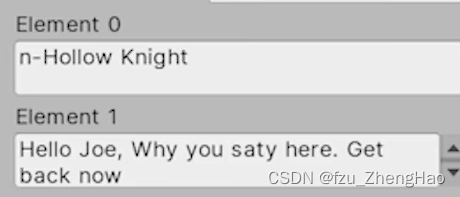
StartWith方法,来判断该行对话是否需要进行名字的切换,如果需要切换,再把n-替换为空,具体通过编写一个CheckName()函数进行实现:
private void CheckName()
    {
        if (dialogueLines[currentLine].StartsWith("n-"))
        {
            nameText.text = dialogueLines[currentLine].Replace("n-","");
            currentLine++;
        }
    }
难点2:如何实现对话内容逐字显示?
我们可以通过开启协程函数,将对话中的每个字母,按照相同的时间间隔,一个个地显示到对话窗口中。我们这里将当前行的字符串,通过ToCharArray方法赋值字符串中的所有字符,到一个统一的数组中。
private IEnumerator ScrollingText()
    {
        isScrolling = true;
        dialogueText.text = "";

        foreach(char letter in dialogueLines[currentLine].ToCharArray() )
        {
            dialogueText.text += letter;
            yield return new WaitForSeconds(textSpeed);
        }

        isScrolling = false;
    }
然后我们要在开始对话处通过StartCoroutine开启协程函数调用这个方法:
public void showDialogue(string[] _newLines)
    {
        dialogueLines = _newLines;
        currentLine = 0;

        CheckName();
        StartCoroutine(ScrollingText());
        dialogueBox.SetActive(true);

        FindObjectOfType<PlayerControllerBase>().canMove = false;
    }
同时我们需要在Update()函数中也调用这个方法:
private void Update()
    {
        if (dialogueBox.activeInHierarchy)
        {
            FindObjectOfType<QuestManager>().questPanel.SetActive(false);

            if (Input.GetMouseButtonUp(0) && dialogueText.text == dialogueLines[currentLine])
            {
                if (isScrolling == false)
                {
                    currentLine++;

                    if (currentLine < dialogueLines.Length)
                    {
                        CheckName();
                        StartCoroutine(ScrollingText());
                    }
                    else
                    {
                        if (CheckQuestComplete() && currentQuestable.isFinished == false)
                        {
                            showDialogue(talkable.congratslines);
                            currentQuestable.isFinished = true;
                        }
                        else
                        {
                            dialogueBox.SetActive(false);
                            FindObjectOfType<PlayerControllerBase>().canMove = true;

                            if (currentQuestable == null)
                            {
                                Debug.Log("There is no Quest in this person.");
                            }
                            else
                            {
                                currentQuestable.DelegateQuest();

                                QuestManager.instance.UpdateQuestList();

                                if (CheckQuestComplete() && currentQuestable.isFinished == false)
                                {
                                    showDialogue(talkable.congratslines);
                                    currentQuestable.isFinished = true;
                                }
                            }

                            if (questTarget != null)
                            {
                                for (int i = 0; i < Player.instance.questList.Count; i++)
                                {
                                    if (Player.instance.questList[i].questName == questTarget.questName)
                                    {
                                        questTarget.hasTalked = true;
                                        questTarget.QuestComplete();
                                    }
                                }
                            }
                        }
                    }
                }
            }
        }
    }


