


688
社区成员
 发帖
发帖 与我相关
与我相关 我的任务
我的任务
 分享
分享| 这个作业属于哪个课程 | 2023年福大-软件工程实践-W班 |
|---|---|
| 这个作业要求在哪里 | 软件工程实践总结&个人技术博客 |
| 这个作业的目标 | 个人技术博客 |
| 其他参考文献 | 见下 |
Unity背包系统是一个用于管理和存储玩家物品和道具的重要组件。它提供了一种有效的方式来跟踪、显示和交互玩家的背包内容。是游戏中一个比较重要的组件。
这里在按钮组件上绘制背包单元格,可以实现在点击时有“按下”的动作效果,绘制结束后将组件转为预制件,方便使用

在这里设置按钮按下时显示的图片

使用按钮,panel,文本框等UI组件完成对界面的如下设计,左右各为一个panel,左侧主要为了根据物品数量绘制背包格,右侧为了在点击相应背包格时显示相应信息
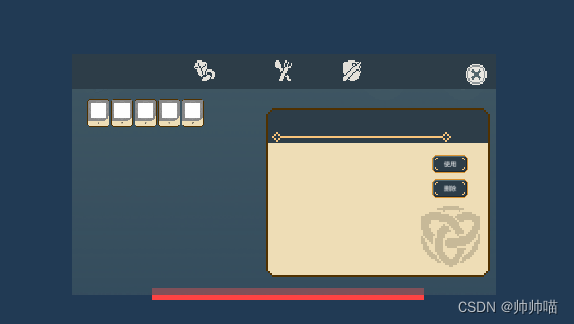
这里通过编写脚本实现
using System.Collections;
using System.Collections.Generic;
using UnityEngine;
using UnityEngine.UI;
using System.IO;
using System;
#if UNITY_EDITOR
using UnityEditor;
#endif


public class Inventory : MonoBehaviour
{
    private GameObject selected;
    public Text first;
    public Text second;
    public GameObject slotPrefab;
    GameObject[] items;
    public int slotNum = 0;

    private void Awake()
    {
        //确定数组大小
        items = new GameObject[slotNum];
        //获取数组元素并重命名
        for (int i = 0; i < slotNum; i++)
        {
            items[i] = transform.GetChild(i).gameObject;
            items[i].name = "slot" + i;
        }
    }

    //更新背包
    public void renew(int type)
    {

        second.text = "";
        first.text = "";
        var chileNum = transform.childCount;

        //清空原有的格子
        for (int i = 0; i < chileNum; i++)
        {
            DestroyImmediate(transform.GetChild(0).gameObject);
        }
        Dictionary<int, BagBase> food;
        if (MyBag.myBag.TryGetValue(type, out food))
        {
            slotNum = food.Count;

            //根据新数量生成格子,并使格子作为子级
            foreach (var item in food)
            {
                Image[] image = slotPrefab.GetComponentsInChildren<Image>();
                Text[] text = slotPrefab.GetComponentsInChildren<Text>();
                Sprite img = LoadByIo(item.Value.Uri);
                string count = Convert.ToString(item.Value.Number);
                if (img != null)
                    image[1].sprite = img;
                if (count != null)
                    text[0].text = count;
                SetDetail scrip = slotPrefab.GetComponentInChildren<SetDetail>();
                scrip.title = first;
                scrip.word = second;
                scrip.names = item.Value.Name;
                scrip.introduce = item.Value.Detail;

                GameObject go = Instantiate(slotPrefab, transform);
            }
        }
    }
    private Sprite LoadByIo(string url)
    {
        //创建文件读取流
        FileStream fileStream = new FileStream(url, FileMode.Open, FileAccess.Read);
        //创建文件长度缓冲区
        byte[] bytes = new byte[fileStream.Length];
        //读取文件
        fileStream.Read(bytes, 0, (int)fileStream.Length);

        //释放文件读取流
        fileStream.Close();
        //释放本机屏幕资源
        fileStream.Dispose();
        fileStream = null;

        //创建Texture
        int width = 300;
        int height = 372;
        Texture2D texture = new Texture2D(width, height);
        texture.LoadImage(bytes);

        //创建Sprite
        Sprite sprite = Sprite.Create(texture, new Rect(0, 0, texture.width, texture.height), new Vector2(0.5f, 0.5f));
        return sprite;

    }

}


#if UNITY_EDITOR//仅在编辑器中生效
[CustomEditor(typeof(Inventory))]
public class InventoryEditor : Editor
{
    public override void OnInspectorGUI()
    {
        //获取当前选择对象实例
        Inventory inventory = target as Inventory;
        //创建并判断如果按下生成按键
        if (GUILayout.Button("生成"))
        {
            //获取原有格子数量
            var chileNum = Selection.activeTransform.childCount;
            //清空原有的格子
            for (int i = 0; i < chileNum; i++)
            {
                DestroyImmediate( Selection.activeTransform.GetChild(0).gameObject);
            }
            //根据新数量生成格子,并使格子作为子级
            for (int i = 0; i < inventory.slotNum; i++)
            {
                GameObject go = Instantiate(inventory.slotPrefab, Selection.activeTransform);
            }
        }
        base.OnInspectorGUI();//原有的UI界面
    }
}
#endif
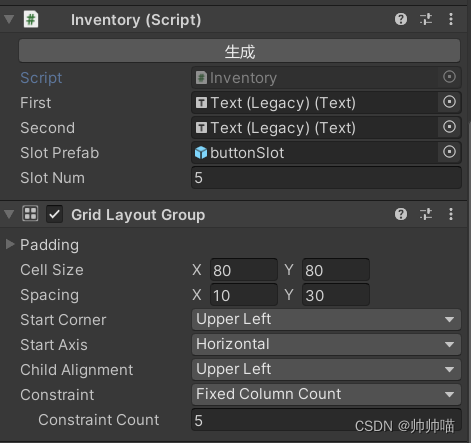
然后将脚本挂载到panel上,同时增加网格布局组件(用来自定义格子的上下左右间距)调试排列时可以通过写好格子初始数量,点击生成来查看生成格子后的排列
using System.Collections;
using System.Collections.Generic;
using UnityEngine;
using UnityEngine.UI;
public class SetDetail : MonoBehaviour
{
    public Text title;
    public Text word;
    public string names = "";
    public string introduce = "";

    public void fillin()
    {
        title.text = names;
        word.text = introduce;
    }

}
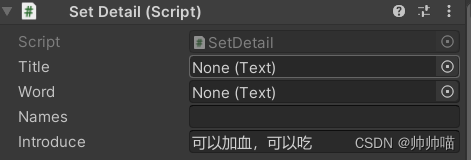
挂载到按钮上,同时设置点击事件
slotPrefab.GetComponentInChildren<SetDetail>();
scrip.title = first;
scrip.word = second;
scrip.names = item.Value.Name;
scrip.introduce = item.Value.Detail;
UI设计中,会出现当屏占比改变时界面变形的情况,当时被这个问题困扰了很久,但解决起来比较简单,只需要将Canvas中UI scale mode设为scale with screen size即可
unity有很多东西需要学习,一轮实践下来也只是知道了一点皮毛,只能说稍微摸到了门槛,UI界面作为游戏玩家对一个游戏第一眼的印象,需要更好的设计方式以及更精美的画面来吸引玩家,还需要不断努力来学习UI设计。


