


176
社区成员
 发帖
发帖 与我相关
与我相关 我的任务
我的任务
 分享
分享| The Link Your Class | https://bbs.csdn.net/forums/ssynkqtd-04 |
|---|---|
| The Link of Requirement of This Assignment | https://bbs.csdn.net/topics/617332156 |
| The Aim of This Assignment | Back-end separation calculator programming |
| MU STU ID and FZU STU ID | MU:21125546 FZU:832101228 |
contents
I. Introduction
II. PSP table
III. Problem-solving ideas
IV. Design and implementation
V. Code description
VI. Displaying result functions
VII. Summary
This blog will show how I use the WeChat mini program to build an calculator which including addition, subtraction, multiplication, division and clear functions. I will introduce some relevant background and design process and code description, and finally a product display in the next part.
| Personal Software Process Stages | Estimated Time(minutes) | Actual Time(minutes) |
|---|---|---|
| planning | 单元格 | 单元格 |
| Estimate | 40 | 60 |
| Development | \ | \ |
| Analysis | 30 | 25 |
| Design Spec | 10 | 10 |
| Design Review | 5 | 10 |
| Coding Standard | 2 | 3 |
| Design | 20 | 15 |
| Coding | 180 | 200 |
| Code Review | 60 | 80 |
| Test | 10 | 10 |
| Reporting | / | / |
| Test Report | 40 | 60 |
| Size Measurement | 10 | 8 |
| Postmortem & Process Improvement Plan | 10 | 15 |
| Sum | 417 | 491 |
First of all, we need to make a visual interface, for which I chose the most familiar Wechat mini program to make. But I didn't know how to start an event when I clicked a button in the interface, so I chose to look for a tutorial on Bilibili. Then, the logic writing part, simple operations I choose to write myself. The more complicated trigonometric functions and exponential operations can not solve so far. One of the backspace function at first did not think of a solution, and then I wanted to use the string to remove the end of the character to achieve, so I looked for the use of slice function on the Internet to solve the problem.
Design and implementation
Front-end
I use wxss designer to design the surface. I create 2 windows, which are the calculator and history. Style sheet is used to make the interface more beautiful.
In the calculator, perform different functions according to different click events. For example, digits and dot are different from operators. There are also other function buttons.
Back-end
I used to use mysql to connect the database directly but failed many times. So to be replaced I use wxjs to connect the database.
The table is manipulated bt executing sql statements.
Next is the process.
When calculator is open, clear the table “history” in the database “calculator”.
When users push “=”, expression is sented to the table “history” in the database"calculator".
When users push “ANS”, read the latest field in the table and display it in the lineEdit.
When users push “history”, the window of history is shown and showEvent is triggered. In the showEvent, database is connected and the latest 10 fields of the table are read in turn and then displayed in the lineEdits in the window one by one.
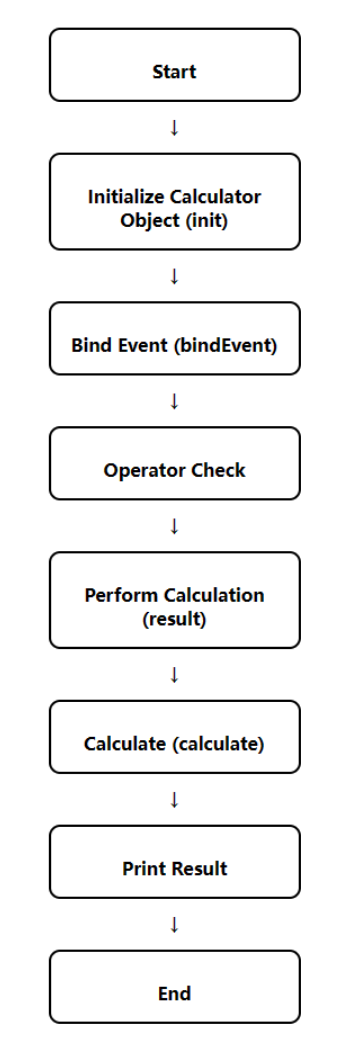
3.Flowchart
// pages/index/index.js
Page({
  data: {
    num1:"",
    numStr:"0",
    op:""
  },
  clear(){
    this.setData({numStr:"0"});
  },
  op(e){
    var v = e.currentTarget.dataset.op;
    this.setData({
      op:v,
      num1:this.data.numStr,
      numStr:""
    });
  },
  cal(){
    if(!this.data.num1 || !this.data.op || !this.data.numStr){
      wx.showToast({
        title: '计算条件不完整',icon:"none"
      });
      return;
    }
    var rs = 0;
    var v1 = parseFloat(this.data.num1);
    var v2 = parseFloat(this.data.numStr);
    switch(this.data.op){
      case "+":
        rs = v1+v2;
        break;
      case "/":
        rs = v1/v2;
        break;
      case "×":
        rs = v1*v2;
        break;
      case "-":
        rs = v1-v2;
        break;
      case "%":
        rs = v1%v2;
        break;
    }
    this.setData({
      numStr:rs
    });
  },
  numBtn(e){
    var v = e.currentTarget.dataset.num;
    this.setData({
      numStr: this.data.numStr == "0" ? v: this.data.numStr + v
    });
  },
  click(e){
    var index = e.currentTarget.dataset.index;
    if(index == 0){
       var num1=this.data.num1;
       var num1=data.substr(0,num1.length-1);
       this.setData({
         num1:num1
       })
    }
  }
})
.info{
  min-height: 380rpx;
  display: flex;
  align-content: flex-end;
  text-align: right;
  flex-direction: column;
  justify-content: flex-end;
  background-color: #eee;
  font-size: 64rpx;
}
.op{
  text-align: right;
  background-color: #eee;
}
.btns{
  border-left: solid 1px #ccc;
  border-right: solid 1px #ccc ;
}
.btns > view{
  display: flex;
}
.btns > view>view{
  flex: 1;
  text-align: center;
  height: 150rpx;
  line-height: 150rpx;
  outline: solid 1px #ccc;
}
Above is the code part, I learned a small program front and back end links.
In this assignment, I designed a calculator with a visual interface using Wechat developer tools. Here are the steps and procedures for me to complete this assignment:
(1) download a Wechat developer tools: I registered an account and passed the platform audit.
(2) Create the main window: I used the build-in library to create a main window and set the title and size of the window.
(3) Create display: I created a text box on the main window to display the calculation result and the expression entered by the user.
(4) Create buttons: I used the
(5) Add button function: I added corresponding function for each button, such as when clicking the number button, the corresponding number will be displayed on the display screen; When you click the operator button, the corresponding operator is displayed on the display.
(6) Implement the calculation function: I use the "switch case" conditional judgment statement to evaluate the expression entered by the user and display the result on the display screen.
(7) Testing and debugging: I tested the calculator and fixed some possible bugs.
By doing this assignment, I learned how to use Wechat developer tools and some programming knowledge to design a calculator with a simple visual interface. I learned the basic concepts and techniques of front and back end development and improved my programming skills.


