Assignment Description
This project is used to improve the calculator I have built in the last task. Give it some new functions like: finding the history, the sin,cos,tan functions, returning the previous and so on. And I add the connection of the front and back end to make its data more stable.
Basic information
PSP
| Personal Software Process Stages |
|---|
|
|
|
| Planning | 30 | 30 |
|
| 25 | 30 |
| Development | | |
| Analysis | 60 | 70 |
|
| 50 | 45 |
|
| 30 | 20 |
|
| 30 | 40 |
|
| 20 | 30 |
|
| 70 | 80 |
|
| 10 | 10 |
|
| 10 | 20 |
|
| | |
|
| 15 | 20 |
|
| 10 | 10 |
| Postmortem &Process Improvement Plan |
| | |
|
| 360 | 405 |
Graph

Presentation of the Finished Product
This is the ability to read the prevous calculate answers and let it to calculate whith the other numbers.
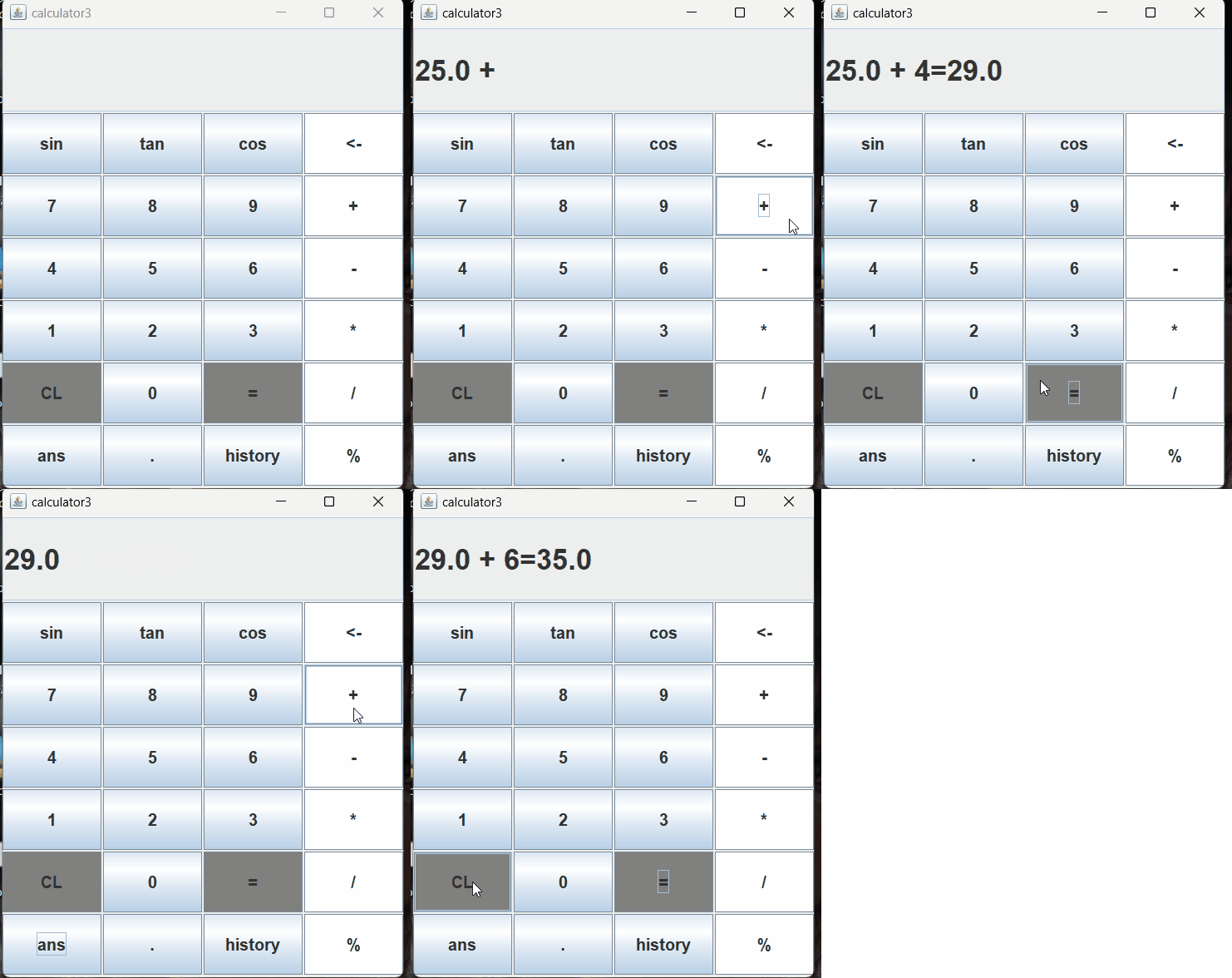
This is for the reading of history, as well as the calculation of some trigonometric functions, and the implementation of the previous click error button deletion function.
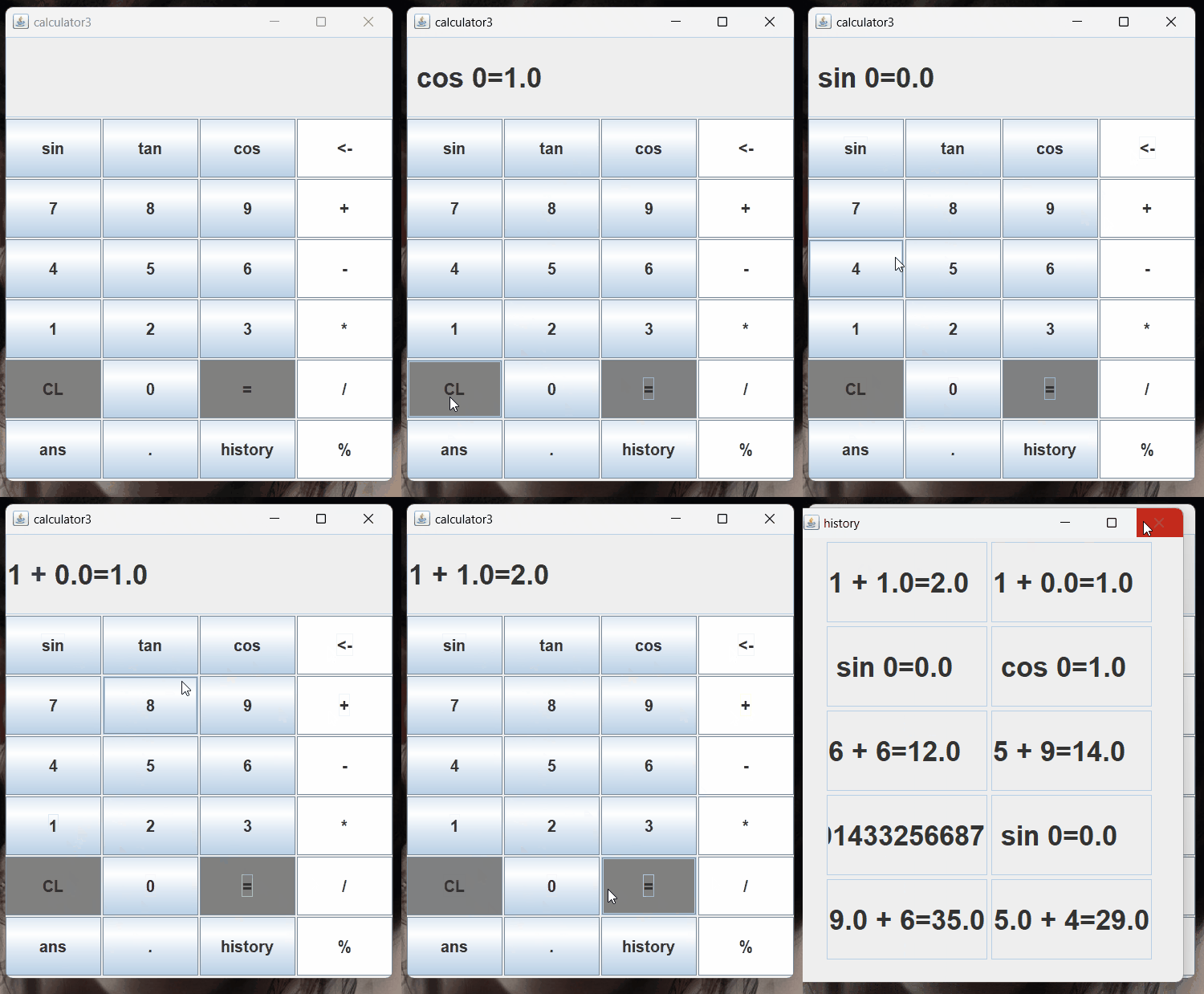
Design and Implementation Process
The first I did was to anaylise the funcitons that I should put in my calculator and design what the page should I made and know the software I need and the technology I should learn.
Then I divided the code that needed to be modified hierarchically, first of all, I solved the most important requirement of history, which is to be able to interact with the database, and to be able to read data in different places, the first thing that came to mind was to build a cloud server, connect with the server through Java and perform a series of operations through a graphical interface. And it worked.
Code Explanation
Front
This is how to use Java to create a visual window for front-end operations:
 input = "";
      operator = "";

      JPanel panel = new JPanel();
      textField = new JTextField(100);
      textField.setEditable(false);
      textField.setHorizontalAlignment(JTextField.LEFT);
      //textField.setBounds(100, 100, 20, 20);
      textField.setPreferredSize(new Dimension(200,100));
      Font font=new Font("",Font.BOLD,35);
      textField.setFont(font);
      this.add(textField, BorderLayout.NORTH);

      String[] name= {"sin","tan","cos","<-","7","8","9","+","4","5","6","-","1","2","3","*","CL","0","=","/","ans",".","history","%"};

      panel.setLayout(new GridLayout(6,4,2,2));
      int i=0;
      while(i<name.length) {
          JButton button = new JButton(name[i]);
          Font f=new Font("", Font.BOLD,20);
          button.setFont(f);
          button.addActionListener(new MyActionListener());
          if(i==3||i==7||i==11||i==15||i==19||i==23) {
          	button.setBackground(Color.WHITE);
          }else if(i==18||i==16) {
          	button.setBackground(Color.GRAY);
          }

          panel.add(button);
      i++;
      }
      this.add(panel,BorderLayout.CENTER);
This is an implementation of the interaction with the user, and when the user presses a button, the corresponding function will be satisfied.
	        public void actionPerformed(ActionEvent e) {
	            int cnt=0;
	            String actionCommand = e.getActionCommand();
	            if(actionCommand.equals("+") || actionCommand.equals("-") || actionCommand.equals("*")
	                || actionCommand.equals("/")||actionCommand.equals("%")||actionCommand.equals("tan")
	                ||actionCommand.equals("sin")||actionCommand.equals("cos")) {
	                input += " " + actionCommand + " ";
	            }
	            else if(actionCommand.equals("CL")) {
	                input = "";
	            }
	            else if(actionCommand.equals("=")) {
	            	String result1="";
	                try {
	                	result1=calculate(input);
	                    input+= "="+result1;
	                } catch (MyException e1) {
	                    if(e1.getMessage().equals("false"))
	                        input = e1.getMessage();
	                    else
	                        input = e1.getMessage();
	                }
	                textField.setText(input);
	                Font f=new Font("",Font.BOLD,35);
	                textField.setFont(f);
	                //----------------
	                try {
						DriverManager.deregisterDriver(new Driver()); //创建一个引擎使下面的代码可以进行驱动
						//2.获取连接
	            		String url="jdbc:mysql://127.0.0.1:3306/calculator"; //这是数据库的地址,可以将其改为云服务数据库就可以实现在不同设备之上读取到相同的数据。
	            		String username="root";
	            		String password="832102130";
	            		Connection conn=DriverManager.getConnection(url, username, password);
	            		//3.定义sql
	            		String s1="'"+input+"'";
	            		int t=0;
	            		String sql="update calculatordata1 set data = "+result1+" where id = "+t;
	            		Statement stmt= conn.createStatement();
	            			stmt.executeUpdate(sql);
	            			t++;
	            			//--------------------------------------------------
		            		//3.创建Statement对象
		            		Statement statement= conn.createStatement();
		            		//编写sql代码,进行读取.
		            		String sql1="select * from calculatordata1";
		            		ResultSet rs=statement.executeQuery(sql1);
		            		//4.获取执行sql的对象
		            		rs.next();
		            	    sql="update calculatordata1 set data = "+s1+" where id = "+t;
		            		while(rs.next()) {
		            			String history1=rs.getString("data");
			            		stmt.executeUpdate(sql);
			            		t++;
		            			s1="'"+history1+"'";;
			            	    sql="update calculatordata1 set data = "+s1+" where id = "+t;
		            		}
	            			//==================================================
            	    //释放资源
	            	  stmt.close();
            		  conn.close();
	                    } catch (SQLException e1) {
						// TODO Auto-generated catch block
						e1.printStackTrace();
					   }
	                //----------------
	                input="";
	                cnt = 1;
	            }else if(actionCommand.equals("history")){
            		String [] hi= new String [10];
	            		//1.注册驱动
	            		try {
							DriverManager.deregisterDriver(new Driver());
							//2.获取连接
		            		String url="jdbc:mysql://127.0.0.1:3306/calculator";
		            		String username="root";
		            		String password="832102130";
		            		Connection conn=DriverManager.getConnection(url, username, password);

		            		//3.创建Statement对象
		            		Statement statement= conn.createStatement();
		            		//编写sql代码,进行读取.
		            		String sql="select * from calculatordata1";
		            		ResultSet rs=statement.executeQuery(sql);
		            		//4.获取执行sql的对象
		            		Statement stmt= conn.createStatement();
		            		rs.next();
		            		int i=0;
		            		while(rs.next()) {
		            			String history=rs.getString("data");
		            			hi[i]=history;
		            			i++;
		            		}
		            		rs.close();
	            	    //释放资源
	            		stmt.close();
	            		conn.close();

						} catch (SQLException e1) {
							// TODO Auto-generated catch block
							e1.printStackTrace();
						}
            	//----------------------------------------------------进行新窗口的创建工作,并将用其进行对历史记录的展示。
        		JFrame jf = new JFrame();
        		jf.setTitle("history");
        		JPanel panel = new JPanel();
        		JTextField txtfield[]= new JTextField[10];//创建文本框
        		for(int j=0;j<10;j++) {
        			txtfield[j]=new JTextField();
        		    txtfield[j].setEditable(false);
        		    txtfield[j].setHorizontalAlignment(JTextField.LEFT);
        		      txtfield[j].setPreferredSize(new Dimension(200,100));
        		      Font font=new Font("",Font.BOLD,35);
        		      txtfield[j].setFont(font);
        		      txtfield[j].setText(hi[j]);
        		     panel.add(txtfield[j],BorderLayout.NORTH);
        		}
        		jf.add(panel);
        	    jf.setBounds(600, 200, 500, 600);
        	    jf.setDefaultCloseOperation(JFrame.EXIT_ON_CLOSE);
        	    jf.setVisible(true);
        		//---------------------------------------------------
	            }else if(actionCommand.equals("ans")) {
	            	//----------------------------------------------------==========================
	            	try {
						DriverManager.deregisterDriver(new Driver());
						//2.获取连接
	            		String url="jdbc:mysql://127.0.0.1:3306/calculator";
	            		String username="root";
	            		String password="832102130";
	            		Connection conn=DriverManager.getConnection(url, username, password);
	            		//3.创建Statement对象
	            		Statement statement= conn.createStatement();
	            		//编写sql代码,进行读取.
	            		String sql="select * from calculatordata1";
	            		ResultSet rs=statement.executeQuery(sql);
	            		//4.获取执行sql的对象
	            		Statement stmt= conn.createStatement();
	            		rs.next();
	            		String l=rs.getString("data");
	            		input+=l;
	            		rs.close();
            	    //释放资源
            		stmt.close();
            		conn.close();
					} catch (SQLException e1) {
						e1.printStackTrace();
	            	}
	            	//====================================================-----------------------------------------------
	            }else if(actionCommand.equals("<-")) {  //这是用来将之前点错的符号或字母进行删除
	            	input=input.substring(0,input.length()-1);
	            }
	            else
	                input += actionCommand;

	            if(cnt == 0)
	                textField.setText(input);
	        }
back end
This is a connection to the back-end and the code written out of SQL through Java is passed into MySQL for running, enabling interaction and reading of data.
	            	//----------------------------------------------------==========================
	            	try {
						DriverManager.deregisterDriver(new Driver());
						//2.获取连接
	            		String url="jdbc:mysql://127.0.0.1:3306/calculator";
	            		String username="root";
	            		String password="832102130";
	            		Connection conn=DriverManager.getConnection(url, username, password);
	            		//3.创建Statement对象
	            		Statement statement= conn.createStatement();
	            		//编写sql代码,进行读取.
	            		String sql="select * from calculatordata1";
	            		ResultSet rs=statement.executeQuery(sql);
	            		//4.获取执行sql的对象
	            		Statement stmt= conn.createStatement();
	            		rs.next();
	            		String l=rs.getString("data");
	            		input+=l;
	            		rs.close();
            	    //释放资源
            		stmt.close();
            		conn.close();
					} catch (SQLException e1) {
						e1.printStackTrace();
	            	}
	            	//====================================================-----------------------------------------------
This is a connection to the back-end and the code written out of SQL through Java is passed into MySQL for running, so that the interaction and the writing and reading of data are implemented together.
						DriverManager.deregisterDriver(new Driver()); //创建一个引擎使下面的代码可以进行驱动
						//2.获取连接
	            		String url="jdbc:mysql://127.0.0.1:3306/calculator";
	            		String username="root";
	            		String password="832102130";
	            		Connection conn=DriverManager.getConnection(url, username, password);
	            		//3.定义sql
	            		String s1="'"+input+"'";
	            		int t=0;
	            		String sql="update calculatordata1 set data = "+result1+" where id = "+t;//这是sql中的更新语句,更新数据库calculatordata1中的data表下数据在id是几之下。
	            		Statement stmt= conn.createStatement();
	            			stmt.executeUpdate(sql);
	            			t++;
	            			//--------------------------------------------------
		            		//3.创建Statement对象
		            		Statement statement= conn.createStatement();
		            		//编写sql代码,进行读取.
		            		String sql1="select * from calculatordata1";//这是sql中进行数据读取的代码.
		            		ResultSet rs=statement.executeQuery(sql1);//创建了一个通道类似于read操作.
		            		//4.获取执行sql的对象
		            		rs.next();
		            	    sql="update calculatordata1 set data = "+s1+" where id = "+t;
		            		while(rs.next()) {
		            			String history1=rs.getString("data");
			            		stmt.executeUpdate(sql);
			            		t++;
		            			s1="'"+history1+"'";;
			            	    sql="update calculatordata1 set data = "+s1+" where id = "+t;
		            		}
	            			//==================================================
            	    //释放资源
	            	  stmt.close();
            		  conn.close();
Implementation of the calculation
  private String calculate(String input) throws MyException{
      String[] comput = input.split(" ");
      //System.out.println(input);
      int k=0;
      if(comput[0].equals("")) {  //这是用来防止第一个字符为空。
    	  k++;
      }
      Stack<Double> stack = new Stack<>();
	  if((!comput[0+k].equals("tan"))&&(!comput[0+k].equals("sin"))&&(!comput[0+k].equals("cos"))) { //这是用来判断开头的类型是否三角函数类
      Double m = Double.parseDouble(comput[0]);
      stack.push(m);
	  }
      int j=0;
      for(int i = 0+k; i < comput.length; i++) {
    	  if(comput[i].equals("tan")||comput[i].equals("sin")||comput[i].equals("cos")) { //这是用来计算三角函数的方法
    		 double t=Double.parseDouble(comput[i+1]);
    		 double b=Math.toRadians(t); //将你输入的在三角函数后的数字改为角度。
    		 double number1;
    		 if(comput[i].equals("tan")) {
    			 number1=Math.tan(b);
    		 }else if(comput[i].equals("sin")) {
    			 number1=Math.sin(b);
    		 }else {
    			 number1=Math.cos(b);
    		 }
    		 comput[i+1]=""+number1;
    		 stack.push(Double.parseDouble(comput[i+1])); //将计算完的值替代comput[i+1]内的值为已经计算完全的数值。
    		 i++;
    		 j++;
    	  }
          if((i+j+k)%2==1) {
              if(comput[i].equals("+")) {
                  stack.push(Double.parseDouble(comput[i+1]));
              }else if(comput[i].equals("-")) {
                  stack.push(-Double.parseDouble(comput[i+1]));
              }else if(comput[i].equals("*")) {
                  Double d = stack.peek();
                  stack.pop();
                  stack.push(d*Double.parseDouble(comput[i+1]));
              }
              if(comput[i].equals("/")) {
                  double help = Double.parseDouble(comput[i+1]);
                  if(help == 0)
                      throw new MyException("false");
                  double d = stack.peek();
                  stack.pop();
                  stack.push(d/help);
              }
              if(comput[i].equals("%")) {
            	  double l= Double.parseDouble(comput[i+1]);
            	  if(l==0) {
            		  throw new MyException("false");
            	  }
            	  double l1=stack.peek();
            	  stack.pop();
            	  stack.push(l1%l);
              }
          }
      }

      double d = 0d;

      while(!stack.isEmpty()) {
          d += stack.peek();
          stack.pop();
      }
      String result = String.valueOf(d);
      return result;
  }
aJourney and Learnings
In this practical process, I have a preliminary understanding of how to use Java for visual implementation and how Java and MySQL can interact synchronously. Based on this, I realized the historical storage of the calculator, and also understood how to connect and operate the front and back end of the software.


 发帖
发帖 与我相关
与我相关 我的任务
我的任务
 分享
分享


