


176
社区成员
 发帖
发帖 与我相关
与我相关 我的任务
我的任务
 分享
分享| Course for This Assignment | https://bbs.csdn.net/forums/ssynkqtd-04 |
|---|---|
| Assignment Requirements | https://bbs.csdn.net/topics/617378696 |
| Objectives of This Assignment | Complete a visual calculator with front end separation |
| Other References | ------ |
| MU STU ID and FZU STU ID | 21125341_832101123 |
GitHub_Frontend_code
GitHub_Backend_code
| Personal Software Process Stages | Estimated Time (minutes) | Actual Time (minutes) |
|---|---|---|
| Planning | 30 | 36 |
| • Estimate | 15 | 18 |
| Development | 300 | 300 |
| • Analysis | 30 | 36 |
| • Design Spec | 40 | 48 |
| • Coding Standard | 15 | 18 |
| • Design | 60 | 72 |
| • Coding | 120 | 300 |
| • Code Review | 20 | 24 |
| • Test | 15 | 18 |
| Reporting | 30 | 36 |
| • Test Report | 15 | 18 |
| • Postmortem & Process Improvement Plan | 15 | 18 |
| Sum | 330 | 426 |
This assignment involves implementing a separated frontend and backend calculator. In the previous assignment, I utilized the WeChat Mini Program Developer Tools for a visual calculator. Due to my limited knowledge of backend aspects in WeChat Mini Program, I opted for js+html+css for the frontend and MySQL database, Node.js environment, and the express framework for the backend. The frontend features a calculator with a content box and buttons, including a screen displaying historical data. To facilitate network communication, I employed fetch to transmit frontend data to the backend.
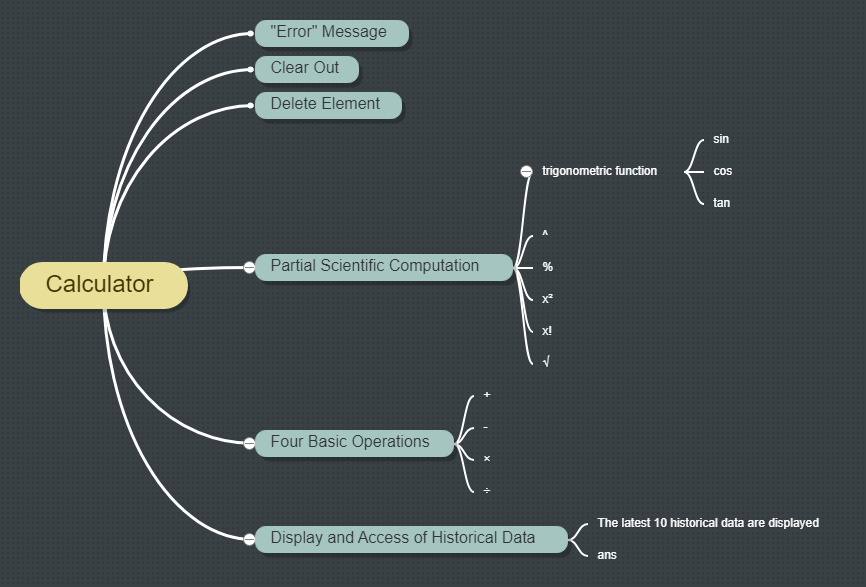

This part of the code defines a set of functions for a calculator application. These functions collectively provide the basic calculator functionalities, including arithmetic operations, exponentiation, factorial, and trigonometric functions. The calculate() function uses eval() to evaluate expressions, and there's error handling for invalid calculations. Additionally, the code replaces π with Math.PI for accurate evaluation.
function appendToDisplay(value) {
  display.value += value;
  currentExpression += value;
}

// Function to handle multiplication operation
function multiply() {
  display.value += '×';
  currentExpression += '*';
}

// Function to handle division operation
function divide() {
  display.value += '÷';
  currentExpression += '/';
}

// Function to handle power/exponentiation operation
function power() {
  display.value += '^';
  currentExpression += '**';
}

// Function to handle complementation operation
function complementation() {
  display.value += '%';
  currentExpression += '%';
}

// Function to clear the display and current expression
function clearDisplay() {
  display.value = '';
  currentExpression = '';
}

// Function to delete the last element from the display and current expression
function deleteElement() {
  display.value = display.value.slice(0, -1);
  currentExpression = currentExpression.slice(0, -1);
}

// Function to perform calculation
function calculate() {
  try {
    // Replace π with Math.PI to prevent eval issues with π
    var expression = currentExpression.replace(/π/g, 'Math.PI');
    // Evaluate the expression and update the display
    display.value = eval(expression);
    // Check if there's a valid expression and it's not 'undefined'
    if (currentExpression && currentExpression !== 'undefined') {
      // Add the calculation history record
      addHistory({ note: `${currentExpression} = ${display.value.toString()}` });
    }
    // Update the current expression with the calculated result
    currentExpression = display.value.toString();
  } catch (error) {
    // Handle calculation errors by displaying 'Error'
    display.value = 'Error';
  }
}

// Function to calculate factorial
function factorial() {
  var num = parseFloat(display.value);

  if (isNaN(num) || num < 0) {
    // Display 'Error' for invalid input or negative numbers
    display.value = 'Error';
    return;
  }

  var result = 1;

  // Calculate factorial
  for (var i = 2; i <= num; i++) {
    result *= i;
  }

  // Update display and current expression with the result
  display.value = result;
  currentExpression = result.toString();
}

// Function to add square to the expression
function square() {
  display.value += '²';
  currentExpression += '**2';
}

// Function to handle square root
function squareRoot() {
  if (currentExpression.endsWith('Math.sqrt(')) {
    // If already dealing with square root, complete the expression
    display.value = display.value.slice(0, -1) + ')';
    currentExpression = currentExpression.slice(0, -9) + ')';
  } else {
    // If not, add the square root function to the expression
    display.value += '√(';
    currentExpression += 'Math.sqrt(';
  }
}

// Functions to handle trigonometric functions
function sine() {
  display.value += 'sin(';
  currentExpression += 'Math.sin(';
}

function cosine() {
  display.value += 'cos(';
  currentExpression += 'Math.cos(';
}

function tangent() {
  display.value += 'tan(';
  currentExpression += 'Math.tan(';
}
Next part of the code handles communication with a server through API calls for managing calculator history.
baseUrl: Defines the base URL for API calls, pointing to 'http://localhost:3000'/.getData(limit, type): Fetches data from the server using the /api/get_history endpoint with specified limits. It handles the response, updates the noteList variable, and modifies the display based on the provided type ('input' or default). If 'input' is specified, it updates the calculator display with the last calculation result from the history.addHistory(data): Sends a POST request to the server's /api/add_history endpoint to add a new history record. It expects a JSON response and triggers a data refresh using getData(10).renderList(): Renders the history list by creating HTML elements for each history record and updating the content of the .history_container element.Event listener for #ans element: Listens for a click on the 'ans' element and triggers a call to getData(1, 'input'), updating the display with the last calculation result.
The code relies on the Fetch API to perform asynchronous requests to the server. It also includes error handling for both fetching and adding history records. Additionally, there's an event listener for the ans element to retrieve and display the last calculation result when clicked.
// Base URL for API calls
const baseUrl = 'http://localhost:3000';

// Function to fetch data from the server
function getData(limit, type) {
  fetch(baseUrl + `/api/get_history?limit=${limit}`)
    .then(response => {
      if (!response.ok) {
        throw new Error('Network response was not ok');
      }
      return response.json();
    })
    .then(data => {
      console.log(data);
      noteList = data;
      if (type === 'input') {
        display.value = noteList.length ? noteList[noteList.length - 1]['note'].split('=')[1].trim() : '';
        currentExpression = display.value;
      } else {
        renderList();
      }
    })
    .catch(error => {
      console.log('Fetch error: ', error);
      noteList = [];
      renderList();
    });
}

// Function to add history record
function addHistory(data) {
  fetch(baseUrl + '/api/add_history', {
    method: 'POST',
    headers: {
      'Content-Type': 'application/json'
    },
    body: JSON.stringify(data)
  })
    .then(response => response.json())
    .then(data => {
      console.log(data);
      if (data && data.id) {
        getData(10);
      }
    })
    .catch(error => {
      console.error('Error:', error);
    });
}

// Function to render history list
function renderList() {
  let html = '';
  noteList.forEach((i, j) => {
    html += `<p>${j + 1}. ${i.note}</p>`;
  });
  document.querySelector('.history_container').innerHTML = html;
}

// Event listener for 'ans' element click event
document.querySelector('#ans').addEventListener('click', function () {
  getData(1, 'input');
});
<!DOCTYPE html>
<html lang="en">
  <head>
    <!-- Document metadata -->
    <meta charset="UTF-8" />
    <meta name="viewport" content="width=device-width, initial-scale=1.0" />
    <title>Dark Simple Calculator</title>
    <!-- External stylesheet link -->
    <link rel="stylesheet" href="styles.css" />
  </head>

  <body>
    <!-- Calculator container -->
    <div class="container">
      <div id="calculator">
        <!-- Display input container -->
        <div class="input-container">
          <input type="text" id="display" disabled />
        </div>
        <!-- Button rows -->
        <div class="button-row">
          <!-- Trigonometric functions and constants -->
          <input type="button" value="sin" onclick="sine()" />
          <input type="button" value="cos" onclick="cosine()" />
          <input type="button" value="tan" onclick="tangent()" />
          <input type="button" value="π" onclick="appendToDisplay('π')" />
          <input type="button" value="C" onclick="clearDisplay()" />
        </div>
        <div class="button-row">
          <!-- Basic arithmetic operations -->
          <input type="button" value="+" onclick="appendToDisplay('+')" />
          <input type="button" value="-" onclick="appendToDisplay('-')" />
          <input type="button" value="×" onclick="multiply()" />
          <input type="button" value="÷" onclick="divide()" />
          <input type="button" value="^" onclick="power()" />
        </div>
        <div class="button-row">
          <!-- Percentage, numbers, and backspace -->
          <input type="button" value="%" onclick="complementation()" />
          <input type="button" value="7" class="hover" onclick="appendToDisplay('7')" />
          <input type="button" value="8" class="hover" onclick="appendToDisplay('8')" />
          <input type="button" value="9" class="hover" onclick="appendToDisplay('9')" />
          <input type="button" value="⌫" onclick="deleteElement()" />
        </div>
        <div class="button-row">
          <!-- Squaring, more numbers, and parentheses -->
          <input type="button" value="x²" onclick="square()" />
          <input type="button" value="4" class="hover" onclick="appendToDisplay('4')" />
          <input type="button" value="5" class="hover" onclick="appendToDisplay('5')" />
          <input type="button" value="6" class="hover" onclick="appendToDisplay('6')" />
          <input type="button" value="(" onclick="appendToDisplay('(')" />
        </div>
        <div class="button-row">
          <!-- Factorial, more numbers, and parentheses -->
          <input type="button" value="x!" onclick="factorial()" />
          <input type="button" value="1" class="hover" onclick="appendToDisplay('1')" />
          <input type="button" value="2" class="hover" onclick="appendToDisplay('2')" />
          <input type="button" value="3" class="hover" onclick="appendToDisplay('3')" />
          <input type="button" value=")" onclick="appendToDisplay(')')" />
        </div>
        <div class="button-row">
          <!-- Square root, decimal point, zero, equals, and answer -->
          <input type="button" value="√" onclick="squareRoot()" />
          <input type="button" value="." onclick="appendToDisplay('.')" />
          <input type="button" value="0" onclick="appendToDisplay('0')" />
          <input type="button" value="=" onclick="calculate()" />
          <input type="button" value="ans" id="ans" />
        </div>
      </div>
      <!-- History container -->
      <div class="history_container"></div>
    </div>

    <!-- JavaScript file inclusion -->
    <script src="calculator.js"></script>
  </body>
</html>
/* Body styling */
body {
    background-color: #383838;
    height: 100vh;
    margin: 0;
    display: flex;
    justify-content: center;
    align-items: center;
}

/* Main container styling */
.container {
    display: flex;
    justify-content: center;
    /* align-items: center; */
}

/* Calculator styling */
#calculator {
    background-color: #333333;
    border: 2px solid #ffffff75;
    border-radius: 20px;
    padding: 40px;
    width: 500px;
    margin-right: 20px;
    /* Adjust spacing as needed */
    height: fit-content;
}

/* Input container styling */
.input-container {
    display: flex;
    justify-content: center;
    align-items: center;
}

/* Text input styling */
input[type="text"] {
    width: 100%;
    padding: 40px;
    font-size: 30px;
    margin-bottom: 20px;
    text-align: right;
}

/* Button row styling */
.button-row {
    display: grid;
    grid-template-columns: repeat(5, 1fr);
    grid-gap: 10px;
}

/* Button styling */
input[type="button"] {
    padding: 10px;
    font-size: 20px;
    background-color: #333333;
    /* Modify color */
    border: none;
    color: #cfcfc4;
    /* Modify color */
    cursor: pointer;
}

/* Button hover effect */
input[type="button"]:hover {
    background-color: #8a8686a8;
    /* Modify color */
}

/* Display screen styling */
#display-screen {
    background-color: #000000;
    border: 2px solid #ffffff75;
    border-radius: 10px;
    padding: 10px;
    width: 200px;
    /* Adjust width as needed */
    text-align: right;
    font-size: 24px;
    color: #ffffff;
}

/* History container styling */
.history_container {
    background-color: #333333;
    border: 2px solid #ffffff75;
    border-radius: 20px;
    padding: 15px 40px 0 40px;
    width: 400px;
    margin-right: 20px;
    display: flex;
    flex-direction: column;
    color: #fff;
    min-height: 450px;
}

/* History paragraph styling */
.history_container p{
    line-height: 24px;
    margin: 10px 0;
}
This is a Node.js server using Express, serving as the backend for the calculator application.
Dependencies: The server uses several npm packages, including express for the web server, body-parser for handling POST data, cors for Cross-Origin Resource Sharing, and mysql for interacting with a MySQL database.
const express = require('express');
const bodyParser = require('body-parser');
const cors = require('cors');
const mysql = require('mysql');
Express Setup: Initializes the Express application and sets the port to 3000.
const app = express();
const PORT = 3000;
app.use(cors());
MySQL Connection: Establishes a connection to a MySQL database using the mysql package. Connection details (hostname, username, password, and database name) are specified.
// MySQL connection settings
const db = mysql.createConnection({
host: 'localhost',   // Replace with your MySQL server hostname
user: 'root',        // Replace with your MySQL database username
password: 'root',    // Replace with your MySQL database password
database: 'cal'      // Replace with your MySQL database name
});
// Connect to the MySQL database
db.connect((err) => {
if (err) throw err;
console.log('Connected to the database.');
});
Body-Parser Middleware: Configures Express to use body-parser middleware for handling POST data.
// Use body-parser middleware to handle POST data
app.use(bodyParser.urlencoded({ extended: true }));
app.use(bodyParser.json());
API Endpoints:/api/get_history: Responds to GET requests, retrieves history records from the t_history table in the database, and sends them as a JSON response. It accepts a limit query parameter to specify the number of records to retrieve./api/add_history: Responds to POST requests, expects a JSON payload with a note property, inserts a new record into the t_history table, and responds with a success message and the ID of the inserted record.
// API endpoint to get history records
app.get('/api/get_history', (req, res) => {
// Get the 'limit' value from the query parameters of the request. Default to 10 if not provided.
let limit = req.query.limit ? parseInt(req.query.limit) : 10;
// Prevent SQL injection: Ensure the limit value is a number
if (isNaN(limit)) {
 res.status(400).json({ error: 'Invalid limit value' });
 return;
}
// Query the database with the specified limit
db.query('SELECT * FROM t_history ORDER BY update_time DESC LIMIT ?', [limit], (err, rows) => {
 if (err) {
   res.status(500).json({ error: err.message });
   return;
 }
 res.json(rows);
});
});
// API endpoint to add a new history record
app.post('/api/add_history', (req, res) => {
const { note } = req.body;
if (!note) {
 res.status(400).json({ error: 'Please provide a history record' });
 return;
}
const history = { note };
const query = 'INSERT INTO t_history SET ?';
// Insert the new history record into the database
db.query(query, history, (err, result) => {
 if (err) {
   res.status(500).json({ error: err.message });
   return;
 }
 // Respond with a success message and the ID of the inserted record
 res.json({ message: 'Record added successfully!', id: result.insertId });
});
});
Server Start: Finally, the server is started, listening on port 3000.
// Start the server
app.listen(PORT, () => {
console.log(`Server is running at http://localhost:${PORT}`);
});
In tackling this assignment, the challenge lay in creating a frontend and backend calculator. While I had prior experience designing a visual calculator using the WeChat Mini Program Developer Tools, my knowledge of the backend aspects in the WeChat Mini Program was limited. Consequently, I chose to implement the frontend using js+html+css. For the backend, I opted for a MySQL database, Node.js environment, and the Express framework. The frontend component comprises a calculator with a content box and buttons, along with a screen displaying historical data. To achieve seamless communication between the frontend and backend, I delved into and applied the fetch function to transmit frontend data to the backend.
Through this process, I gained a deeper understanding of the frontend-backend separation development approach, clarifying the collaborative nature of frontend and backend work. Additionally, my proficiency in utilizing MySQL databases and the Node.js environment was strengthened. Overall, this assignment provided valuable insights into building comprehensive applications, positively impacting my skill set for future development projects.


