


176
社区成员
 发帖
发帖 与我相关
与我相关 我的任务
我的任务
 分享
分享| Course for This Assignment | Software Engineering |
| Assignment Requirements | https://bbs.csdn.net/topics/617378696 |
| Objectives of This Assignment | Implement the basic functions and extension functions of the calculator, and store the results in the back-end database, use the ans button to return the previous calculation results and view the history to read the most recent ten string formula and the corresponding calculation results. |
| Other References | Springboot+Mybatis连接mysql数据库_springboot使用mysql与mybatis数据库交互-CSDN博客 |
CATALOGUE
2. Presentation of the Finished Product
Back-end Functionality Implementation
3. Design and Implementation Process
(3) Functional structure diagram
5. Personal Journey and Learnings
| Personal Software Process Stages | Estimated Time(minutes) | Actual Time(minutes) |
| Planning | 30 | 30 |
| Estimate | 30 | 30 |
| Development | 430 | 695 |
| Analysis | 30 | 30 |
| Design Spec | 30 | 30 |
| Design Review | 30 | 35 |
| Coding Standard | 20 | 20 |
| Design | 60 | 80 |
| Coding | 180 | 360 |
| Code Review | 20 | 40 |
| Test | 60 | 100 |
| Reporting | 120 | 120 |
| Test Repor | 40 | 40 |
| Size Measurement | 40 | 40 |
| Postmortem & Process Improvement Plan | 40 | 40 |
| Sum | 580 | 845 |
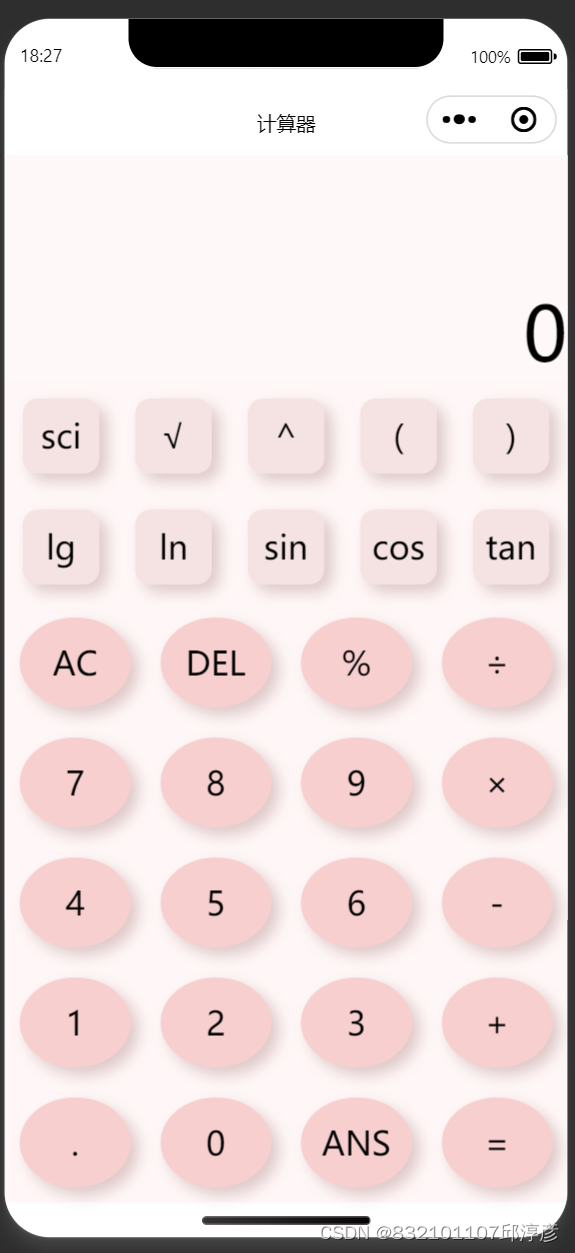

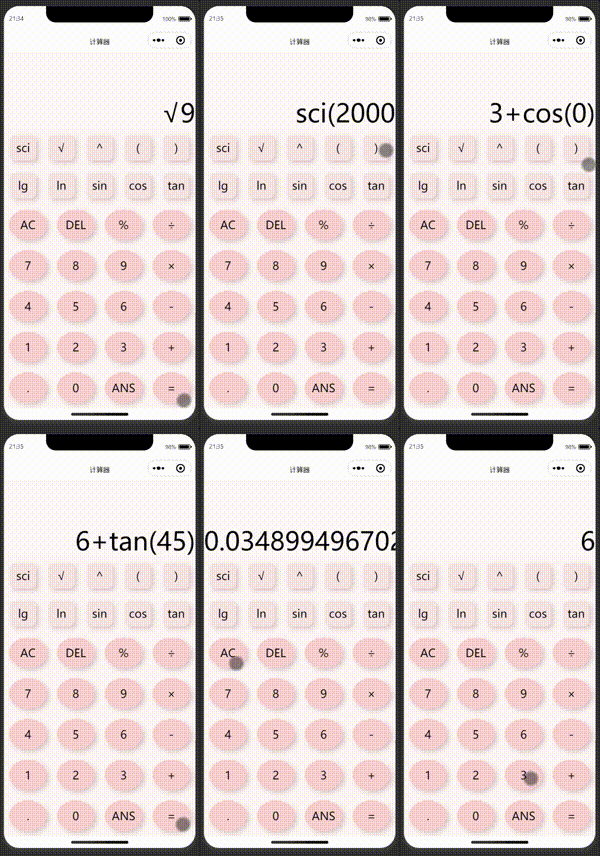
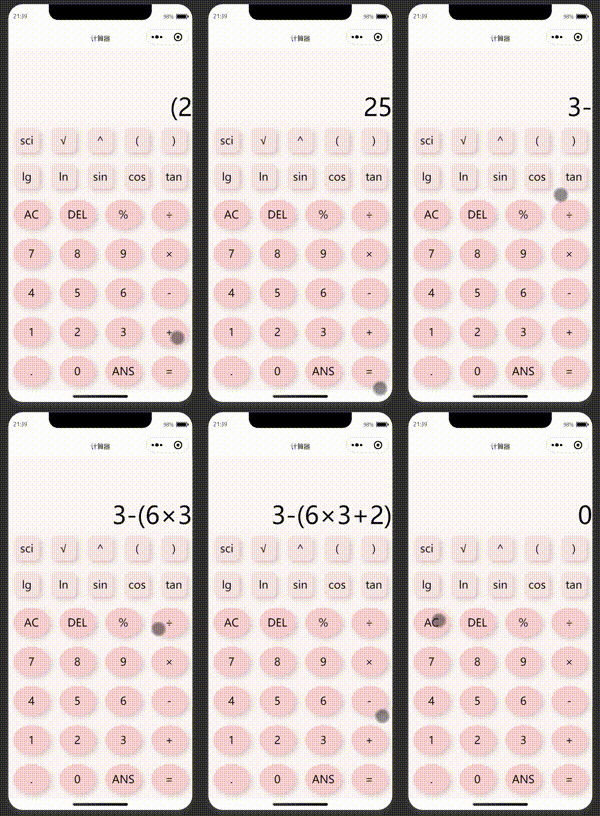
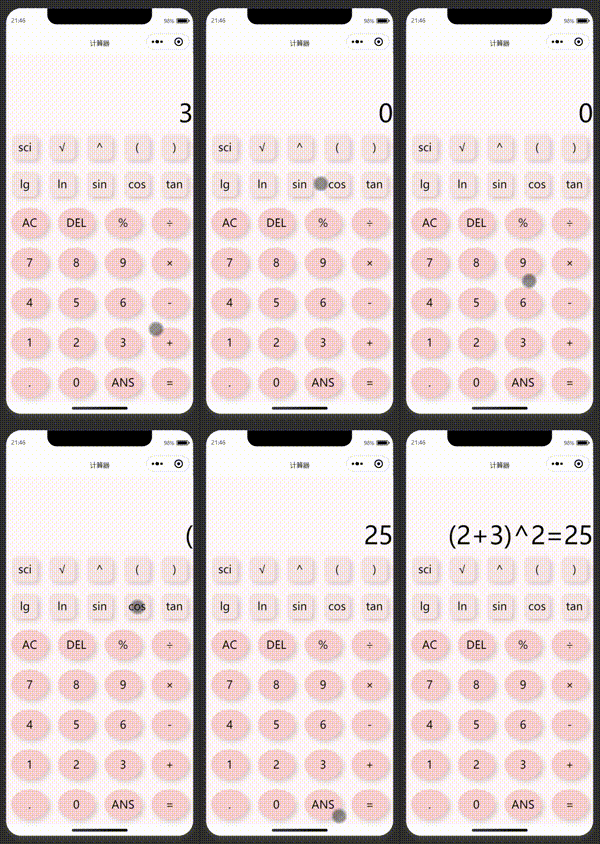
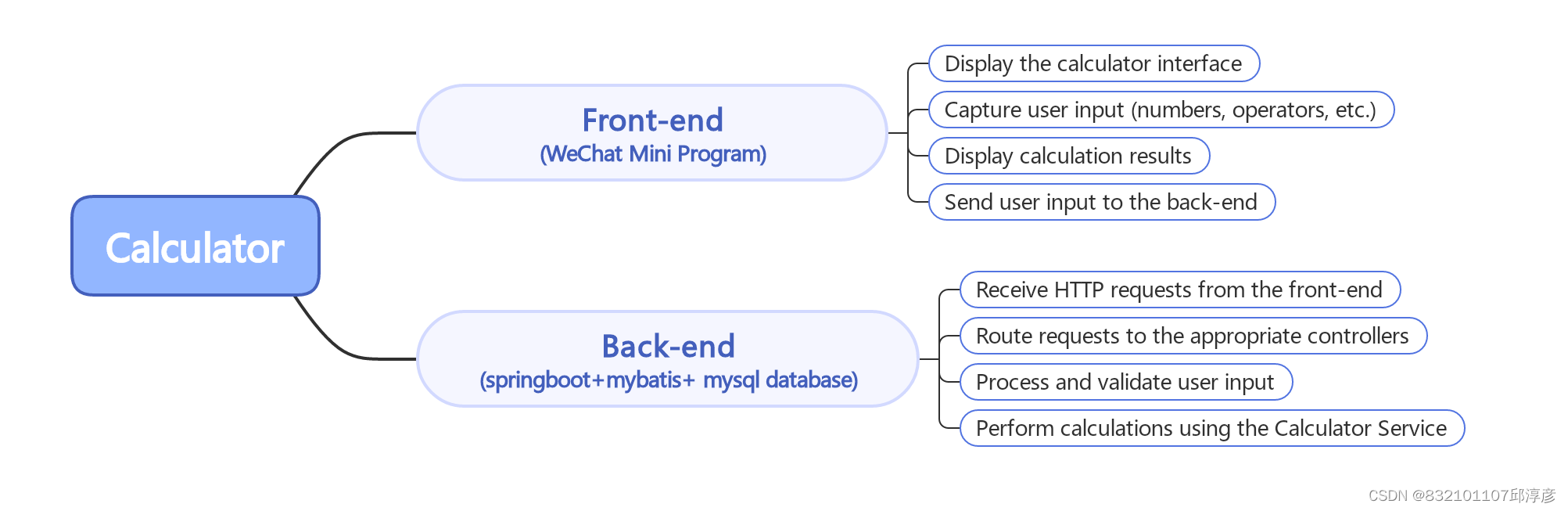
(1) In the wxss file, I updated the style layout to make the top two rows of buttons different from the rest of the buttons, and I changed the color of the calculator to make it more aesthetically pleasing. Here is the code for the major cuts.
/* 顶部两行按钮的样式 */
.buttons > view:nth-child(1),
.buttons > view:nth-child(2) {
  display: flex;
  font-size: 45rpx;
  background-color: rgb(255, 247, 247);
  justify-content: center;
}

.buttons > view:nth-child(1) > view,
.buttons > view:nth-child(2) > view {
  flex: 1;
  text-align: center;
  width: 300rpx;
  height: 100rpx;
  line-height: 100rpx;
  border: none;
  background-color: rgb(245, 227, 227);
  box-shadow: 5px 5px 10px rgba(83, 5, 5, 0.2);
  transition: background-color 0.3s, transform 0.2s;
  margin: 12px;
  border-radius: 20%;
}

/* 其余按钮的样式 */
.buttons > view:not(:nth-child(1)):not(:nth-child(2)) > view {
  flex: 1;
  text-align: center;
  width: 80rpx;
  height: 120rpx;
  line-height: 120rpx;
  border: none;
  background-color: rgb(247, 207, 207);
  box-shadow: 5px 5px 10px rgba(83, 5, 5, 0.2);
  transition: background-color 0.3s, transform 0.2s;
  margin: 10px;
  border-radius: 75%;
}
(2) In the wxml file, I added the top two lines of buttons to make the calculator more functional.
    <view>
      <view bindtap="op" data-op="sci">sci</view>
      <view bindtap="op" data-op="√">√</view>
      <view bindtap="op" data-op="^">^</view>
      <view bindtap="op" data-op="(">(</view>
      <view bindtap="op" data-op=")">)</view>
    </view>

    <view>
      <view bindtap="op" data-op="log">lg</view>
      <view bindtap="op" data-op="ln">ln</view>
      <view bindtap="op" data-op="sin">sin</view>
      <view bindtap="op" data-op="cos">cos</view>
      <view bindtap="op" data-op="tan">tan</view>
    </view>
(3) In the js file, on the basis of the first implementation of basic calculator functions, I added trigonometric functions, logarithms, scientific counting methods and other expanded functions, as well as the function of querying history records.
Page({
  data: {
    result: '0',
    history: [],
    valiBackOfArray: [
      '+',
      '-',
      '×',
      '÷',
      '.',
      '√',
      '^',
      'log',
      'sci',
      'cos',
      'sin',
      'tan',
      'ln',
      'sci',
      '%',
      '(',
      ')',
    ],
    completeCalculate: false,
    openedParentheses: 0,
    hadleFlag:false,
    ansIndex:0
  },

  calculate: function (str) {
    const precedence = {
      '+': 1,
      '-': 1,
      '×': 2,
      '÷': 2,
      '%': 2,
      '^': 3,
      '√': 4,
      log: 4,
      sin: 4,
      cos: 4,
      tan: 4,
      ln:4,
      sci:4
    }

    const operators = []
    const operands = []
    const tokens = str.split(/([+\-×÷^()√%])/)
    console.log(tokens);
    tokens.forEach((token) => {
      if (token != '') {
        if (
          token in precedence ||
          token === '√' ||
          token === 'log' ||
          token === 'sin' ||
          token === 'cos' ||
          token === 'tan' ||
          token === 'ln' ||
          token === '%'
        ) {
          while (
            operators.length > 0 &&
            precedence[operators[operators.length - 1]] >= precedence[token] &&
            operators[operators.length - 1] !== '('
          ) {
            console.log(operators);
            const operator = operators.pop()
            const b = operands.pop()
            const a = operands.pop()
            operands.push(this.performOperation(a, b, operator))
          }
          console.log(token);
          operators.push(token)
        } else if (token === '(') {
          operators.push(token)
        } else if (token === ')') {
          console.log(operators);
          while (
            operators.length > 0 &&
            operators[operators.length - 1] !== '('
          ) {
            console.log(operators);
            const operator = operators.pop()
            const b = operands.pop()
            const a = operands.pop()
            operands.push(this.performOperation(a, b, operator))
          }
          if (operators.length > 0 && operators[operators.length - 1] === '(') {
            operators.pop()
          }
        } else {
          if (token.toLowerCase() === 'sci') {
            // 处理科学计数法
            const coefficient = parseFloat(operands.pop())
            const exponent = parseFloat(operands.pop())
            const result = coefficient * Math.pow(10, exponent)
            operands.push(result)
          } else {
            operands.push(parseFloat(token))
          }
        }
      }
    })
    while (operators.length > 0) {
      const operator = operators.pop()
      if (operator == 'sci') {
        const coefficient = parseFloat(operands.pop())
        const p = Math.floor(Math.log(coefficient) / Math.LN10);
        const n = coefficient * (10 ** -p);
        operands.push(`${n}e${p}`)
      }else{
        const b = operands.pop()
        let a = null
        console.log(operator);
        if (operator  != 'log' && operator  != 'sin' && operator  != 'cos'&& operator  != 'tan' && operator != 'ln') {
          a = operands.pop()
        }
        operands.push(this.performOperation(a, b, operator))
      }
    }
    return operands[0].toString()
  },

  op: function (event) {
    const operator = event.currentTarget.dataset.op
    if(operator == 'ANS'){
      /**
       * 查看结果
       */
      if (!this.hadleFlag) {
        this.hadleFlag = true
        var that=this;
        wx.request({
          url: 'http://localhost:8088/calculator/getData',
          method:'POST',
          data: {
            index: that.ansIndex
          },
          header: {
            'content-type': 'application/json'
          },
          success (res) {
            that.hadleFlag = false
            if (that.ansIndex < 9) {
              that.ansIndex++
            }else{
              that.ansIndex = 0
            }
            if (res.data.message != null) {
              that.setData({
                result: res.data.message,
                completeCalculate: true,
              })
            }
          }
        })
      }
    }else if (!this.isOperatorEnd(this.data.result)) {
      if (this.data.result == 0) {
        this.setData({
          result: operator,
          completeCalculate: false,
        })
      }else{
        this.setData({
          result: this.data.result + operator,
          completeCalculate: false,
        })
      }
    }
  },

  performOperation: function (a, b, operator) {
    console.log(a,b,operator);
    switch (operator) {
      case '+':
        return parseFloat(a) + parseFloat(b)
      case '-':
        return parseFloat(a) - parseFloat(b)
      case '×':
        return parseFloat(a) * parseFloat(b)
      case '÷':
        return parseFloat(a) / parseFloat(b)
      case '%':
        return parseFloat(a) % parseFloat(b)
      case '^':
        return Math.pow(parseFloat(a), parseFloat(b))
      case '√':
        return Math.pow(parseFloat(b), 0.5)
      case 'sin':
        return Math.sin(parseFloat(b) * (Math.PI / 180))
      case 'cos':
        return Math.cos(parseFloat(b) * (Math.PI / 180))
      case 'tan':
        return Math.tan(parseFloat(b) * (Math.PI / 180))
      case 'log':
        return Math.log10(parseFloat(b))
      case 'ln':
        return Math.log(parseFloat(b))
      default:
        return 0
    }
  },

  isOperatorEnd: function (str) {
    if (typeof str !== 'string' || str.length === 0) {
      return false
    }
    const lastChar = str.charAt(str.length - 1)
    return false
  },

  numBtn: function (event) {
    const num = event.currentTarget.dataset.num
    if (this.data.completeCalculate) {
      this.setData({
        result: num,
        completeCalculate: false,
      })
    } else {
      if (this.data.result === '0' || this.data.result === 'Error: ') {
        this.setData({
          result: num,
        })
      } else {
        this.setData({
          result: this.data.result +''+ num,
        })
      }
    }
  },

  dot: function () {
    if (!this.data.result.includes('.') && !this.data.completeCalculate) {
      this.setData({
        result: this.data.result + '.',
      })
    }
  },

  cal: function () {
    if (!this.isOperatorEnd(this.data.result)) {
      const result = this.data.result
      try {
        const calculatedResult = this.calculate(result).toString()
        if (!this.hadleFlag) {
          this.hadleFlag = true
          var that=this;
          wx.request({
            url: 'http://localhost:8088/calculator/insertData',
            method:'POST',
            data: {
              formula: result,
              answer: calculatedResult
            },
            header: {
              'content-type': 'application/json'
            },
            success (res) {
              that.hadleFlag = false
              console.log(res.data)
            }
          })
        }

        this.setData({
          result: calculatedResult,
          completeCalculate: true,
          lastResult: calculatedResult,
        })
        this.data.history.push({ expression: result, result: calculatedResult })
        if (this.data.history.length > 10) {
          this.data.history.shift()
        }
        this.setData({ history: this.data.history })
      } catch (error) {
        this.setData({
          result: 'Error: ' + error.message,
          completeCalculate: true,
        })
      }
    }
  },

  clear: function () {
    this.setData({
      result: '0',
      completeCalculate: false,
      openedParentheses: 0,
      closedParentheses: 0,
    })
    this.ansIndex = 0
  },

  del: function () {
    if (this.data.result.length > 1) {
      this.setData({
        result: this.data.result.slice(0, -1),
      })
    } else {
      this.setData({
        result: '0',
      })
    }
  },
})
(1) I am a Java back-end controller based on the Spring Boot framework, which is used by HTTP interface for receiving front-end requests and storing and reading data. The insertData method in CalculatorService is used to write calculation records into the database, and the getData method is used to query historical records. Use a ResultBean object to encapsulate the results of an operation, including status codes and messages, and return them to the front end.
package com.example.calculatordemo.controller;

import com.example.calculatordemo.bean.Record;
import com.example.calculatordemo.domain.GetDataParam;
import com.example.calculatordemo.domain.ResultBean;
import com.example.calculatordemo.service.CalculatorService;
import org.springframework.beans.factory.annotation.Autowired;
import org.springframework.web.bind.annotation.PostMapping;
import org.springframework.web.bind.annotation.RequestBody;
import org.springframework.web.bind.annotation.RestController;

@RestController
public class CalculatorController {

    @Autowired
    private CalculatorService calculatorService;


    /**
     * 写入数据
     * @param record
     * @return
     */
    @PostMapping("/insertData")
    public ResultBean insertData(@RequestBody Record record) {
        return calculatorService.insertData(record);
    }

    /**
     * 查询数据
     * @param getDataParam
     * @return
     */
    @PostMapping("/getData")
    public ResultBean getData(@RequestBody GetDataParam getDataParam) {
        return calculatorService.getData(getDataParam);
    }
}
package com.example.calculatordemo.service.imp;

import com.example.calculatordemo.bean.Record;
import com.example.calculatordemo.domain.GetDataParam;
import com.example.calculatordemo.domain.ResultBean;
import com.example.calculatordemo.mapper.CalculatorMapper;
import com.example.calculatordemo.service.CalculatorService;
import org.slf4j.Logger;
import org.slf4j.LoggerFactory;
import org.springframework.beans.factory.annotation.Autowired;
import org.springframework.stereotype.Service;
import org.springframework.transaction.annotation.Transactional;

import java.util.List;

@Service
public class CalculatorServiceImp implements CalculatorService {

    private static final Logger log = LoggerFactory.getLogger(CalculatorServiceImp.class);
    @Autowired
    private CalculatorMapper calculatorMapper;

    @Override
    @Transactional
    public ResultBean insertData(Record record) {
        ResultBean resultBean = new ResultBean();
        try {
            int raw = calculatorMapper.insertData(record);
            if (raw > 0) {
                resultBean.setCode(200);
            } else {
                resultBean.setCode(500);
                resultBean.setMessage("写入失败");
            }
        } catch (Exception e) {
            log.error(e.getMessage(), e);
            resultBean.setCode(500);
            resultBean.setMessage(e.getMessage());
        }
        return resultBean;
    }


    @Override
    public ResultBean getData(GetDataParam getDataParam) {
        ResultBean resultBean = new ResultBean();
        try {
            resultBean.setCode(200);
            List<Record> recordList = calculatorMapper.getData();
            if (getDataParam.getIndex() < recordList.size()) {
                Record record = recordList.get(getDataParam.getIndex());
                resultBean.setMessage(record.getFormula() + "=" + record.getAnswer());
            }
        } catch (Exception e) {
            log.error(e.getMessage(), e);
            resultBean.setCode(500);
            resultBean.setMessage(e.getMessage());
        }
        return resultBean;
    }
}
(2) I integrated the MySQL database as the back-end data store, while using MyBatis as the data access framework, so that the button returned the last calculation result, and view the history read the last ten string formula and the corresponding calculation result.
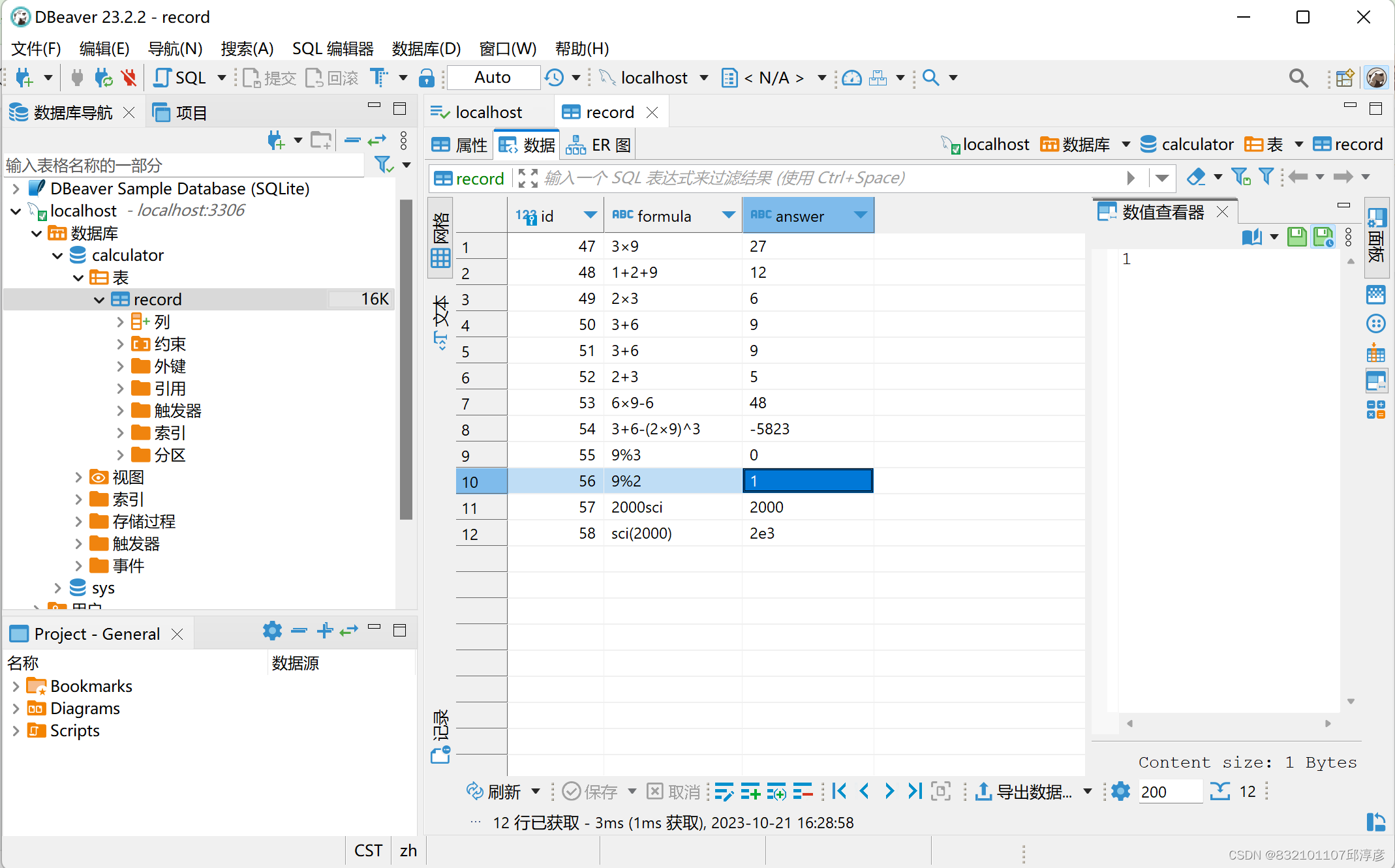
Through this assignment, I gained valuable experience and skills and successfully made a computer application with front end separation. In this process, I have mastered the integration and use of Spring Boot framework, MyBatis data access framework and MySQL database. I successfully integrated the MySQL database into the application and realized the persistence of the data. This provides users with the ability to store calculation records, and also provides support for historical query.
In summary, this assignment gave me a deep understanding of the application architecture of front-end separation, how to handle HTTP requests, store data in a database, and how to implement a powerful calculator application using different technical components. This is an important step for me in the field of full stack development, and I look forward to applying this knowledge and skills to future projects to continuously improve my development capabilities.


