

 机器人开发者社区

我写了一个手势识别控制小海龟移动的节点,但是发现节点无法运行,摄像头刚打开就关了。
 墨衍会员 · AI 创作全网分发 墨衍智能分发 通过墨衍一键同步至各平台 可同步平台 CSDN微信公众号微博知乎掘金百家号博客园抖音小红书 你的文章也可以这样分发 墨衍会员 ¥399起/年,写一次发全网
我也要 关注 + 加入社区
墨衍会员 · AI 创作全网分发 墨衍智能分发 通过墨衍一键同步至各平台 可同步平台 CSDN微信公众号微博知乎掘金百家号博客园抖音小红书 你的文章也可以这样分发 墨衍会员 ¥399起/年,写一次发全网
我也要 关注 + 加入社区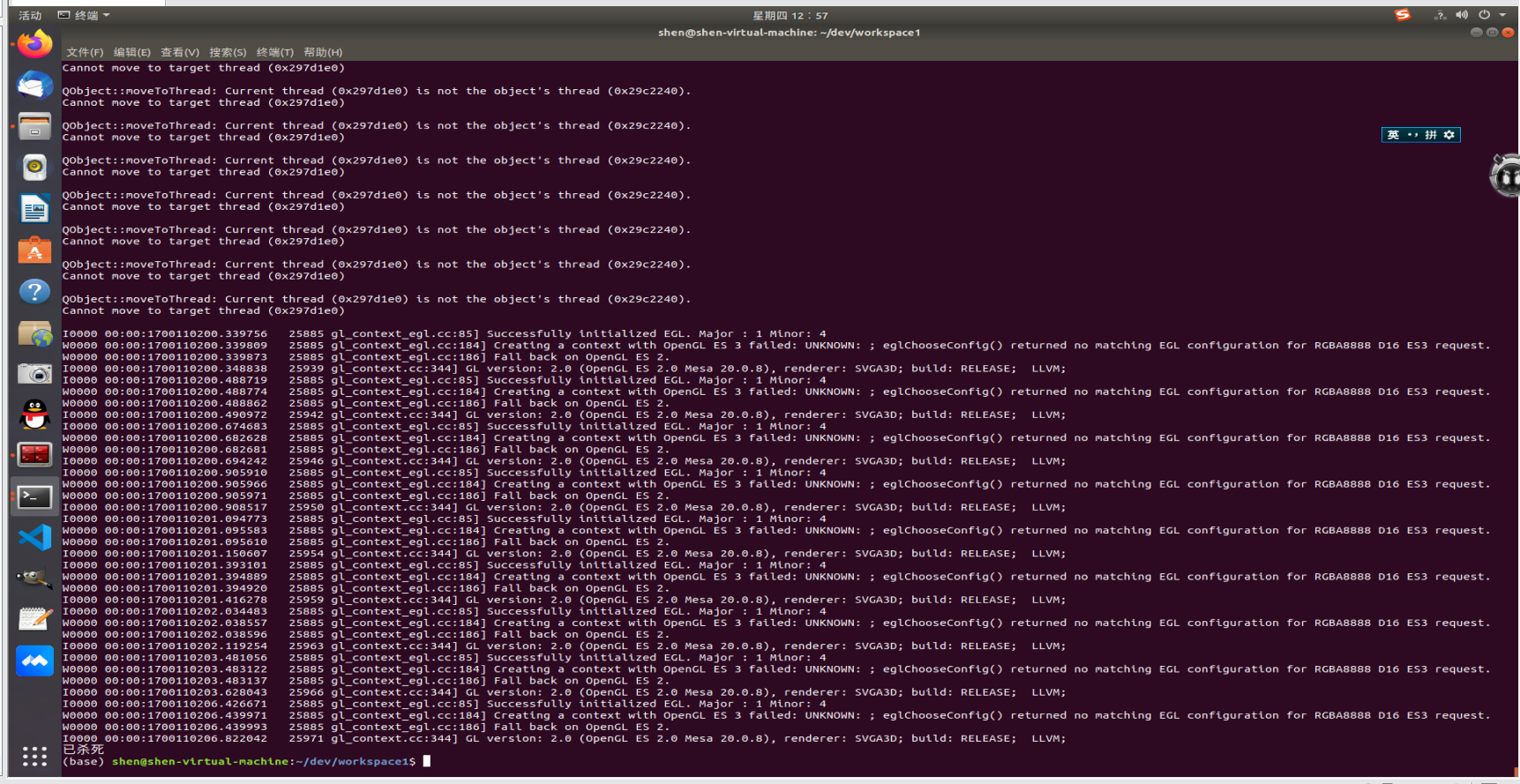
以下附代码:
#!/usr/bin/env python
# license removed for brevity
import rospy
from std_msgs.msg import String
import cv2
import mediapipe as mp
from geometry_msgs.msg import Twist
class HandDetector():
def __init__(self):
self.hand_detector = mp.solutions.hands.Hands()
self.drawer = mp.solutions.drawing_utils
def process(self, img, draw=True):
img_rgb = cv2.cvtColor(img, cv2.COLOR_BGR2RGB)
self.hands_data = self.hand_detector.process(img_rgb)
if draw:
if self.hands_data.multi_hand_landmarks:
for handlms in self.hands_data.multi_hand_landmarks:
self.drawer.draw_landmarks(img, handlms, mp.solutions.hands.HAND_CONNECTIONS)
def find_position(self, img):
h, w, c = img.shape
self.position = {'Left': {}, 'Right': {}}
if self.hands_data.multi_hand_landmarks:
i = 0
for point in self.hands_data.multi_handedness:
score = point.classification[0].score
if score >= 0.8:
label = point.classification[0].label
hand_lms = self.hands_data.multi_hand_landmarks[i].landmark
for id, lm in enumerate(hand_lms):
x, y = int(lm.x * w), int(lm.y * h)
self.position[label][id] = (x, y)
i = i + 1
return self.position
def fingers_count(self, hand='Left'):
tips = [4, 8, 12, 16, 20]
tip_data = {4:0, 8:0, 12:0, 16:0, 20:0}
for tip in tips:
ltp1 = self.position[hand].get(tip, None)
ltp2 = self.position[hand].get(tip-2, None)
if ltp1 and ltp2:
if tip == 4:
if ltp1[0] > ltp2[0]:
if hand == 'Left':
tip_data[tip] = 1
else:
tip_data[tip] = 0
else:
if hand == 'Left':
tip_data[tip] = 0
else:
tip_data[tip] = 1
else:
if ltp1[1] > ltp2[1]:
tip_data[tip] = 0
else:
tip_data[tip] = 1
return list(tip_data.values()).count(1)
def talker():
cmd_vel_pub = rospy.Publisher('/turtle1/cmd_vel', Twist, queue_size=10)
rospy.init_node('gesture_recognition', anonymous=True)
rate = rospy.Rate(10) # 10hz
camera = cv2.VideoCapture(0)
while(camera.isOpened):
while not rospy.is_shutdown():
hand_detector = HandDetector()
success, img = camera.read()
if success:
img = cv2.flip(img, 1)
h, w, c = img.shape
hand_detector.process(img, draw=False)
position = hand_detector.find_position(img)
left_fingers = hand_detector.fingers_count('Left')
# print('左手: ', left_fingers)
cv2.putText(img, str(left_fingers), (100, 150), cv2.FONT_HERSHEY_DUPLEX, 5, (0, 255, 0))
right_fingers = hand_detector.fingers_count('Right')
# print('右手:', right_fingers)
cv2.putText(img, str(right_fingers), (w-200, 150), cv2.FONT_HERSHEY_DUPLEX, 5, (255, 0, 0))
cv2.imshow('Video', img)
send_data = Twist()
if left_fingers == '1':
send_data.linear.x =1.0
send_data.angular.z = 1.0
cmd_vel_pub.publish(send_data)
k = cv2.waitKey(1)
if k == ord('q'):
break
rate.sleep()
camera.release()
cv2.destroyAllWindows()
if __name__ == '__main__':
# try:
talker()
# except rospy.ROSInterruptException:
# pass
感谢各路大神回答!!!
相关推荐
手势控制小海龟.zip
ros 手势动作控制小海龟移动
ros小海龟定点移动(程序)
此文件包为控制ros中小海龟的定点移动,其中有两个程序,大同小异。一个需要输入目标点的xy坐标,一个是在程序中固定了xy的坐标。具体情感博客:note-ros-控制小海龟到达指定点 (https://blog.csdn.net/qq_33168256/article/details/82950222)
ros系统中,手势识别控制乌龟运动
在linux操作系统中,常常会用到ros系统中,这里面会涉及到节点通信和功能包的使用。尤其是opencv的手势识别及其应用。本文件是利用手势识别控制乌龟运动
01 ROS的安装和小海龟例程运行
任务 1.安装ROS,推荐ROS kinetic/indigo版本 2.运行小海龟例程,通过键盘控制小海龟运动 3.通过小海龟仿真器熟悉ros命令 过程 ROS的版本 首先ubuntu不同的版本对应ROS不同的版本,我们需要在安装过程中找到对应的版本进行在终端里的安装操作; ubuntu的版本为18.04, 选择ros版本Melodic Morenia 安装 官方安装教程 设置你的软件来源列表sudo sh -c 'echo deb http://packages.ros.org/ros/ubuntu $(lsb_release -sc) main > /etc/apt/sources.
ROS小海龟控制教程[代码]
本文详细介绍了如何在ROS环境下安装和运行小海龟模拟器,并通过命令行和代码两种方式控制小海龟的运动。首先,需要根据ROS版本安装对应的turtlesim包,然后运行roscore和turtlesim_node启动模拟器。通过turtle_teleop_key程序可以使用键盘控制小海龟移动。此外,文章还提供了通过rostopic发布命令使小海龟转圈的方法,并详细展示了使用C++和Python编写代码控制小海龟的步骤,包括创建功能包、编写代码、设置权限、编译和运行等。最后,介绍了如何使用rqt工具查看系统功能和发布的话题。




