

 2301-MUSE

MUYU —— Beta Sprint Essay 3
 墨衍会员 · AI 创作全网分发 墨衍智能分发 通过墨衍一键同步至各平台 可同步平台 CSDN微信公众号微博知乎掘金百家号博客园抖音小红书 你的文章也可以这样分发 墨衍会员 ¥399起/年,写一次发全网
我也要 关注 + 加入社区
墨衍会员 · AI 创作全网分发 墨衍智能分发 通过墨衍一键同步至各平台 可同步平台 CSDN微信公众号微博知乎掘金百家号博客园抖音小红书 你的文章也可以这样分发 墨衍会员 ¥399起/年,写一次发全网
我也要 关注 + 加入社区1. SCRUM Section
1.1 Team Achievements
| Team Member | Completed Tasks | Time Spent | Issues Encountered | Tomorrow's Schedule |
|---|---|---|---|---|
| Zehuang Lin | Defense PPT completed | 2h | None | None |
| Xinyu Wu | Defense PPT completed | 2h | None | None |
| Chongzheng Lin | Backend testing completed | 1h | None | None |
| Peiyan Zheng | Backend testing completed | 1h | None | None |
| Yihui Chen | Defense PPT completed | 2h | None | None |
| Jiacheng Lin | Defense PPT completed | 2h | None | None |
| Wenrui Wang | Defense PPT completed | 2h | None | None |
| An Fu | Backend testing completed | 6h | None | None |
| Huihuang Lv | Frontend improvement completed | 2h | None | None |
| Shaowei Hua | Team member task assignment | 2h | None | None |
| Yuxiang Zheng | Frontend improvement completed | 4h | None | None |
| Lingfei Wei | Beta Sprint blog completed | 2h | None | None |
| Yixuan Chen | Beta Sprint blog completed | 2h | None | None |
| Chunyan Qiu | Beta Sprint blog completed | 2h | None | None |
| Shujie Xu | Frontend improvement completed | 2h | None | None |
1.2 Results Display
1.2.1 Front-end Results
Section 1
User page interaction upgrade. In this front end operation, we absorbed the shortcomings of the last sprint. For example, in the user's main page, the user's avatar started with a square image, and we changed it to a square image this time. The user's nickname may be set too long to reflect, we modify it to make it more perfect. At the same time, the user's headwear dressing function is also added. Make the user feel the warmth and humanity of the application.
Code Section
<template>
  <view class="page">
    <view class="top">
      <view class="background"></view>
    </view>
    <view class="user-card">
      <view class="card">
        <view class="top">
          <view class="userImage">
            <u-avatar size="145" :src="userInfo.avatarUrl"></u-avatar>
          </view>
        </view>
        <view class="bottom">
          <view class="left">
            <view class="user-text">
              <view>{{userInfo.nickName}}</view>
            </view>
          </view>
        </view>
      </view>
    </view>
    <u-cell-group>
      <u-cell-item v-if="!login" @click="loginShow = true" icon="account" title="登录"></u-cell-item>
      <u-cell-item v-if="login" @click="goUserInfo" title="我的信息"></u-cell-item>
    </u-cell-group>
    <u-popup :mask-close-able="false" border-radius="10" v-model="loginShow" mode="center">
      <view style="padding: 20rpx;">
        <u-form label-width="200" :model="form" ref="uForm" >
          <view style="padding: 20rpx 40rpx;">
            <u-form-item :label-style="{fontWeight:'bold'}" :required="true" label="昵称" prop="nickName">
              <input type="nickname" :value="form.nickName" @blur="bindBlur" :border="true" placeholder="请输入昵称" @input="bindInput"/>
            </u-form-item>
            <u-form-item :label-style="{fontWeight:'bold'}" :required="true" label="头像" prop="avatarUrl">
              <view>
                <u-avatar v-if="form.avatarUrl" :src="form.avatarUrl" size="70"></u-avatar>
                <view v-else style="color: grey">请选择头像</view>
              </view>
              <button class="contact-button" open-type="chooseAvatar" @chooseavatar="onChooseAvatar">a</button>
            </u-form-item>
          </view>
        </u-form>
        <view @click="userLogin" style="width: 320rpx;height: 100rpx;border-radius: 20rpx;margin-top: 50rpx;margin-left: 130rpx;background-color:#4790f4;color: white " >
          <view style="height: 100rpx;text-align: center;line-height: 100rpx;font-weight: bold">登录</view>
        </view>
      </view>
    </u-popup>
  </view>
</template>

<script>
import {appid, request} from "../../request/request";

export default {
  data() {
    return {
      action: 'https://www.jianfeng2021.top/prod-api/common/upload/qiniu?preName=secondhand',
      fileList: [],
      loginShow:false,
      userInfo:{},
      login:false,
      form: {
        avatarUrl:'',
        nickName:''
      },
      userId:'',
      openid:"",
      sessionKey:"",
      rules: {
        avatarUrl: [
          {
            required: true,
            message: '请选择头像',
            trigger: ['change','blur'],
          }
        ],
        nickName: [
          {
            required: true,
            message: '请输入昵称',
            trigger: ['change','blur'],
          },
        ],
      }
    };
  },
  onReady() {
    this.$refs.uForm.setRules(this.rules);
  },
  onShow(){
    let userId = uni.getStorageSync('userId')
    let login = uni.getStorageSync('login')
    let userInfo = uni.getStorageSync('userInfo')
    this.login =login
    this.userId =userId
    this.userInfo =userInfo

    if (!this.login){
      let that = this
      wx.login({
        success (res) {
          if (res.code) {
            request({url: '/wx/user/login', method: 'GET',data:{appid:appid,code:res.code}})
                .then(res =>{
                  that.openid = res.openid
                  that.sessionKey = res.sessionKey
                  uni.setStorageSync('openid',res.openid)
                })
          } else {
            console.log('登录失败!' + res.errMsg)
          }
        }
      })
    }else{
      request({url:'/secondhand/user/'+uni.getStorageSync('userId')})
          .then(res=>{
            this.userInfo = res.data
          })
    }
  },
  methods: {
    bindBlur(e) {
      this.form.nickName = e.detail.value;
    },
    bindInput(e){
      this.form.nickName = e.detail.value;
    },
    onChooseAvatar(e) {
      let that = this;
      let {
        avatarUrl
      } = e.detail;
      uni.uploadFile({
        url: this.action,
        filePath: avatarUrl,
        name: 'file',
        success: uploadFileRes => {
          console.log(uploadFileRes.data)
          let data = JSON.parse(uploadFileRes.data);
          that.form.avatarUrl = data.url;
        },
        fail: (error) => {
        },
        complete: () => {
        }
      });
    },
    userLogin() {
      this.$refs.uForm.validate(valid => {
        if (valid) {
          if (this.fileList.length === 0 && this.form.imageUrl === '') {
            this.$refs.uToast.show({
              title: '请上传图片',
              type: 'error',
            })
            return
          }

          request({url: '/secondhand/user',method: 'POST',data: {appid: appid, openid: uni.getStorageSync('openid'), avatarUrl: this.form.avatarUrl, nickName: this.form.nickName}})
              .then(res => {
                if (res.code === 200) {
                  this.loginShow = false
                  this.login = true;
                  this.userInfo = res.data
                  uni.setStorageSync('login', true)
                  uni.setStorageSync('userId', res.data.userId)
                }
              })
        }
      });
    },
    goUserInfo(){
      uni.navigateTo({url:'/pages/userInfo/form'})
    },
  },
};
</script>
<style lang="scss" scoped>

.top {
  height: 250rpx;
  position: relative;
  .background {
    background-color: #f67952;
    border-bottom-left-radius: 22px;
    border-bottom-right-radius: 22px;
    position: absolute;
    height: 160rpx;
    width: 100%;
  }
}
.icon {
  color: #96a1ae;
  font-size: 40rpx;
}
.user-card {
  height: 170rpx;
  padding: 0 15px;
  .card {
    position: relative;
    bottom: 62px;
    height: 250rpx;
    background-color: white;
    border-radius: 5px;
    .top {
      height: 30%;
      position: relative;
      .userImage {
        position: absolute;
        bottom: 24%;
        left: 10%;
        width: 150rpx;
        height: 150rpx;
        overflow: hidden;
        border-radius: 50%;
        border: 2px solid white;
      }
    }
    .bottom {
      display: flex;
      height: 70%;
      .left {
        width: 80%;
        height: 100%;
        position: relative;
        .user-text {
          width: 100%;
          font-size: 1.6em;
          padding-left: 60rpx;
          height: 50%;
        }
        .user-phone {
          color: #96a1ae;
          padding-left: 60rpx;
          height: 50%;
          width: 100%;
          font-size: 0.9em;
        }
      }
      .right {
        width: 20%;
        height: 50%;
      }
    }
  }
}
.list-card {
  padding: 0 15px;
  .card {
    border-radius: 5px;
    position: relative;
    background-color: white;
    border-radius: 5px;
    padding: 5px 30px;
    .item {
      display: flex;
      height: 120rpx;
      .left {
        width: 15%;
        image {
          width: 70rpx;
          height: 70rpx;
        }
      }
      .center {
        width: 65%;
        display: flex;
        justify-content: start;
        align-items: center;
        font-size: 1.1em;
      }
      .right {
        width: 20%;
        justify-content: flex-end;
      }
    }
  }
}
.item-bottom-solid {
  border-bottom: 1px solid #d4d6da;
}
.quit{
  height: 60rpx;
  margin-top: 50px;
  .btn{
    background-color: #f67952;
    border-radius: 30px;
    width: 80%;
    color: white;
    font-size: 1.2em;
    height: 100%;
  }
}
.flex-center{
  display: flex;
  justify-content: center;
  align-items: center;
}
.contact-button {
  display: inline-block;
  position: absolute;
  width: 300rpx;
  height: 100rpx;
  bottom: 10rpx;
  background: salmon;
  opacity: 0;
  z-index: 10;
}
</style>
Section 2
Considering that the program may be upgraded, in order to write the UI about the upgrade, when it is detected that wechat needs to be upgraded or the small program version is too low, it will jump out "The current wechat version is too low, can not use the function, please upgrade to the latest wechat version and try again" to remind users to upgrade. Make the program closer to everyday use
<script>
    export default {
        onLaunch: function() {
      //判断微信版本是否 兼容小程序更新机制API的使用
      if (wx.canIUse('getUpdateManager')) {
        //创建 UpdateManager 实例
        const updateManager = wx.getUpdateManager();
        //检测版本更新
        updateManager.onCheckForUpdate(function(res) {
          // 请求完新版本信息的回调
          if (res.hasUpdate) {
            //监听小程序有版本更新事件
            updateManager.onUpdateReady(function() {

              //TODO 新的版本已经下载好,调用 applyUpdate 应用新版本并重启 ( 此处进行了自动更新操作)
              updateManager.applyUpdate();
            })
            updateManager.onUpdateFailed(function() {
              // 新版本下载失败
              wx.showModal({
                title: '已经有新版本喽~',
                content: '请您删除当前小程序,到微信 “发现-小程序” 页,重新搜索打开哦~',
              })
            })
          }
        })
      } else {
        //TODO 此时微信版本太低(一般而言版本都是支持的)
        wx.showModal({
          title: '溫馨提示',
          content: '当前微信版本过低,无法使用该功能,请升级到最新微信版本后重试。'
        })
      }
        },
        onShow: function() {
            console.log('App Show')
        },
        onHide: function() {
            console.log('App Hide')
        }
    }
</script>

<style lang="scss">
    /* 注意要写在第一行,同时给style标签加入lang="scss"属性 */
    @import "uview-ui/index.scss";
     page {
        background-color: #F8F7F7;
      }
</style>
Summary
In the latest front-end operation, we've implemented several enhancements based on user feedback and identified shortcomings from the previous sprint. Notably, we've refined the user's main page to offer a more visually appealing experience. Previously, the user's avatar began as a square image, and we've made a positive adjustment to maintain a square format. Additionally, we've addressed the issue where longer user nicknames weren't fully reflecting on the page, ensuring a more seamless and perfect display.
To further enhance the user experience and inject a sense of warmth and humanity into the application, we've introduced a new feature allowing users to customize their avatars with various headwear options. This personalization feature aims to make users feel more connected and engaged with the application.
Looking ahead, we've proactively considered future upgrades to the program. In the event that WeChat needs an upgrade or the small program version is too outdated, a user-friendly notification will prompt users: "The current WeChat version is too low; the function cannot be used. Please upgrade to the latest WeChat version and try again." This proactive approach ensures users are aware of potential issues and encourages them to keep their applications up-to-date, fostering a seamless and everyday user experience.
These improvements collectively contribute to a more polished and user-centric application, aligning with our commitment to delivering an enjoyable and intuitive interface for our users.
1.2.2 Backend testing
Test purpose: To assess the product's performance and responsiveness under varying user volumes.
Test content:
Simulated load testing using JMeter under different user volumes.
Evaluated response times for critical interfaces with high priority.
Monitored database and network utilization.
Test configuration:
Hardware: 8-core processor with 16GB of RAM
Software: JMeter version 6.2.1
Interfaces: User registration/login, homepage data retrieval
Test cases:
One user simultaneously accessing the registration interface, sending one request every second for six seconds.
Five users simultaneously accessing the login interface, sending one request every half-second for 12 seconds.
Ten users simultaneously accessing the homepage data interface, sending one request every 0.2 seconds for 30 seconds.
Test results:
User registration with one user: Response time below 30ms, with a 100% pass rate.
User login with five users: Average response time of 60ms, maximum of 1.2s, and a pass rate of 98%.
Homepage with ten users: Average response time of 90ms, maximum of 2.5s, and a pass rate of 95%.
Analysis:
The main process passed the stress test with good performance. The response time for the login interface increased under high concurrency. The utilization rate of the database connection pool consistently stayed between 70-80%. Suggestions for improvement are as follows:)
1.2.3 Collection function
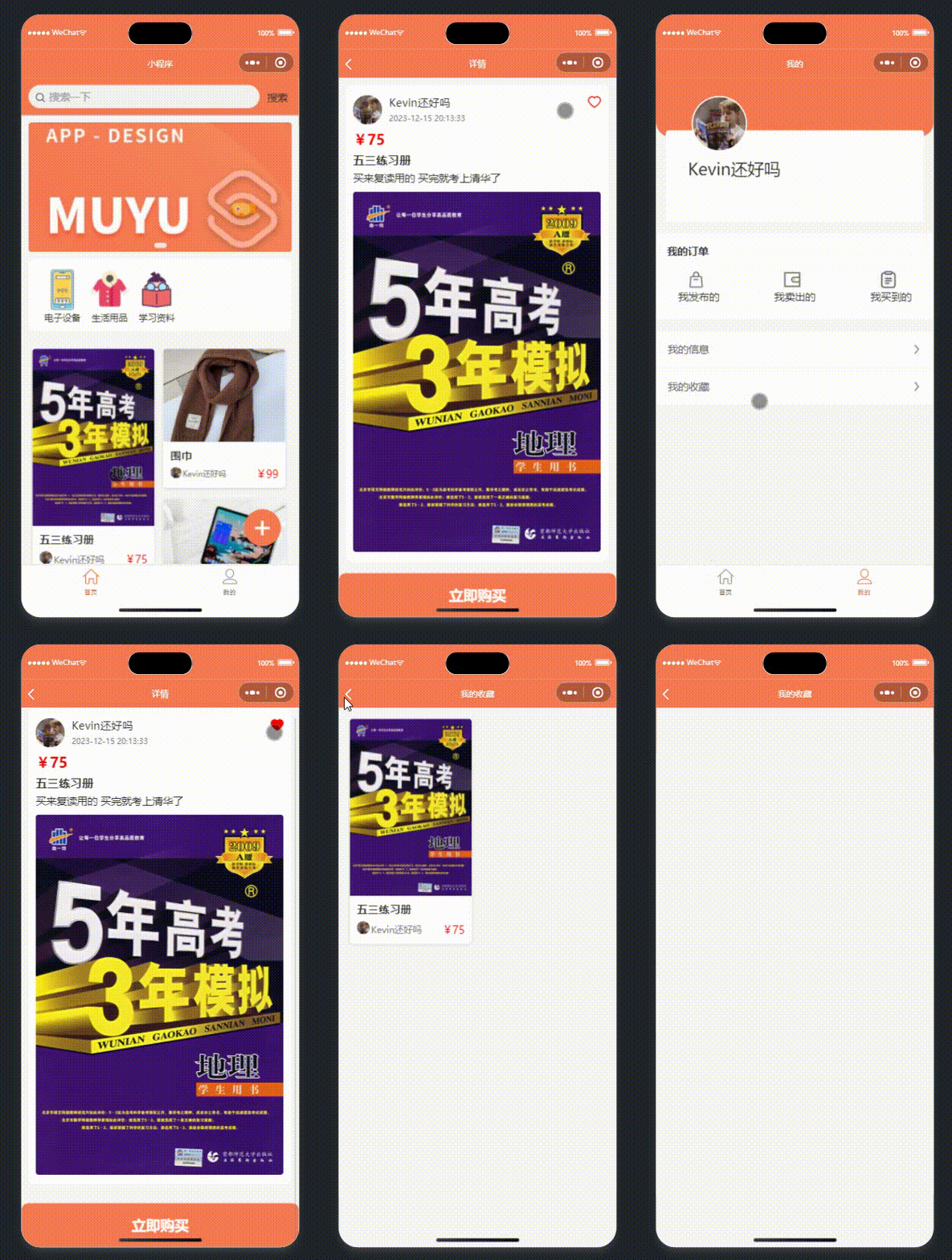
In the Alpha Sprint and previous tasks, we did not mean to add separate favorites and UI interaction options for users, but in this task, we designed the user's favorites function
1.3 Photo of the Scrum meeting
2. PM Report
2.1 Expected tasks and completed tasks
| Overall Project Prediction Tasks | Completed? |
|---|---|
| Adding Search | Yes |
| More User-friendly Interaction | Yes |
| More Aesthetically Pleasing UI | Yes |
| Software Stability Testing | Yes |
| Improving Order Interface & Interaction | Yes |
| Backstage management system | Yes |
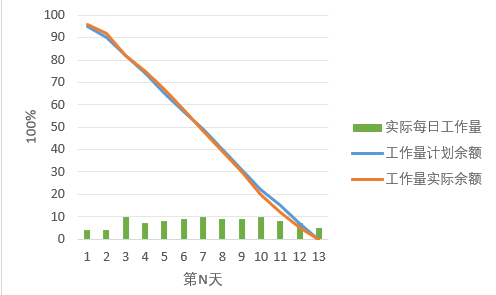
2.2 Project Burn-Up Chart
相关推荐
PDF发票内容提取排版并结构化导出xlsx/cvs嵌入式ptyhon
【本地发票提取工具】 核心优势:不依赖传统粗糙 OCR,基于文字排版结构进行精准提取。仅“税网”下载及税网邮件发送的原版 PDF 发票(开票软件发送的不太支持)能实现开票明细级的秒级本地提取,告别只能提抬头、总额的尴尬。 可免费试用 3 天! 【用前须知】 去微软官网下载VC_redist.x64.exe运行修复运行库(必要的前置操作),之后再解压本工具rar,运行本exe即可。 VC_redist.x64.exe官网永久下载地址 https://learn.microsoft.com/zh-cn/cpp/windows/latest-supported-vc-redist 【安全须知】 个人开发暂未做代码签名,杀软可能会有误报拦截。遇到拦截请在杀软中添加信任/白名单即可。 VirusTotal扫描结果 2/61,主流杀软均通过,个别引擎因无签名误报。官网 virustotal.com 点击页面中间显眼的 “Choose file”(选择文件)按钮上传扫描。
110KV单电源电网三段式电流保护+距离继电保护整定计算说明报告(23页+6000字)
内容概要:本文是一份针对110kV单电源电网继电保护系统的综合性技术报告,系统阐述了三段式电流保护与距离保护的整定计算原理及工程应用方法。报告深入分析了电力系统短路故障的电气特征,依据国家及行业相关继电保护规程,详细推导并计算了各段保护的动作电流、动作时限及灵敏度系数,实现了主保护与后备保护之间的选择性配合。文中不仅涵盖了保护配置原则、整定计算公式的理论推导,还结合具体算例进行验证,对比分析了两种保护方式的优缺点、适用场景及协同工作机制,具有较强的理论深度与实践指导价值。; 适合人群:电气工程及其自动化专业的高年级本科生、研究生,以及从事电力系统规划设计、继电保护整定计算、变电站运维等工作的工程技术人员。; 使用场景及目标:①掌握高压输电线路三段式电流保护与距离保护的核心原理及整定流程;②用于实际电网中保护定值的计算、校验与优化调整;③作为高校电力系统继电保护课程设计、毕业设计或科研项目的参考技术资料。; 阅读建议:建议结合《电力系统分析》《继电保护原理》等教材同步研读,重点理解整定计算的逻辑步骤与参数选取依据,并推荐使用MATLAB或电力系统仿真软件对文中的算例进行建模验证,以加深对保护动作特性的理解。
基于Matlab的35KV三段式电流保护仿真设计
内容概要:本文系统阐述了基于Matlab/Simulink平台开展35KV三段式电流保护的仿真设计方法,深入剖析电力系统中短路故障特性及继电保护动作逻辑,重点实现瞬时速断、限时速断与过电流保护三段式保护的整定计算与协同配合。通过构建完整的35KV输电线路仿真模型,模拟多种故障工况下的电气量变化,验证保护装置的动作选择性、速动性、灵敏性和可靠性,全面展示从理论分析、参数整定到仿真建模与结果验证的完整设计流程,旨在深化对继电保护原理的理解与工程应用能力。; 适合人群:适用于具备电力系统分析、继电保护基本理论知识,且熟悉Matlab/Simulink仿真工具的电气工程专业本科生、研究生,以及从事电力系统规划设计、继电保护整定计算与运维工作的工程技术人员。; 使用场景及目标:①作为高等院校电力系统继电保护课程设计、毕业设计或实验教学的仿真实践参考;②服务于实际工程中35KV线路保护方案的前期验证与参数优化;③帮助学习者系统掌握三段式电流保护的整定原则、时限配合机制及仿真调试技巧。; 阅读建议:建议结合经典继电保护教材进行对照学习,先透彻理解保护原理与整定计算方法,再动手搭建仿真模型。应重点关注故障类型设置、保护定值计算、仿真波形分析等关键环节,并尝试改变系统参数或故障位置,观察保护动作行为的变化,以深入理解保护逻辑与系统特性的相互关系。
智能仓库管理系统V3.6 仓库管理系统 仓管系统 进销存
软件定位:为现场人员做的仓库管理工具 智能仓库管理系统 V3.6 是一套面向中小型工厂、仓库、车间和贸易公司的 Windows 单机版进销存管理软件。它不追求复杂的企业级配置,而是把仓库现场最常做的事——商品建档、入库、出库、查库存、查流水、导报表——做成一套打开就能用、现场人员容易上手的工具。 软件采用本地数据存储,不需要购买服务器、不需要联网、不需要安装数据库,也不需要专职 IT 人员维护。所有数据保存在安装目录的 Data 文件夹中,复制 Data 文件夹即可完成备份或迁移。对于没有信息部门、但又不愿继续用 Excel 手工记账的仓库来说,这种“一台电脑、一套软件、一个数据文件夹”的方式,反而更稳定、更容易长期使用。 适合哪些用户 商品种类多、型号多、品牌多,靠 Excel 容易重复、漏记、对不上账的仓库。 每天有多次入库、出库,需要知道每一笔是谁操作、什么时候操作、对应哪张单的仓库。 需要给主管或客户导出流水报表,但又不想购买复杂 ERP 的小型工厂和贸易公司。 希望把商品图片、单据图片、操作记录一起留档,出现数量或责任争议时能查得清的用户。 V3.6 的优势: 1.单机运行,无需服务器、数据库和网络; 2.一张入库/出库单最多录入 10 项不同商品或型号; 3.数量直接输入,支持 100、1000 等大批量; 4.商品编号支持一级代码、二级代码、6 位数字自定义; 5.库存实时重算、安全库存预警; 6.物资流水按商品—月份—单条三级展开; 7.流水图片可预览、可另存; 8.报表先预览再导出,导出字段可追溯; 9.操作记录加密隐藏、软件内不可删除; 10.软删除保留历史、主管/仓管权限清晰; 11.数据、LOGO、图片、操作记录一键迁移;
chrome-headless-shell-win64-156.0.8078.80(Stable).zip
chrome-headless-shell-win64-156.0.8078.80(Stable).zip




