

 2301-MUSE

OutOfTheOrdinary--The Beta Summary Essay
 墨衍会员 · AI 创作全网分发 墨衍智能分发 通过墨衍一键同步至各平台 可同步平台 CSDN微信公众号微博知乎掘金百家号博客园抖音小红书 你的文章也可以这样分发 墨衍会员 ¥399起/年,写一次发全网
我也要 关注 + 加入社区
墨衍会员 · AI 创作全网分发 墨衍智能分发 通过墨衍一键同步至各平台 可同步平台 CSDN微信公众号微博知乎掘金百家号博客园抖音小红书 你的文章也可以这样分发 墨衍会员 ¥399起/年,写一次发全网
我也要 关注 + 加入社区| Which course does this assignment belong to | 2301-MUSE Community |
|---|---|
| Assignment Requirement | Teamwork——Beta Sprint |
| Team name | OutOfTheOrdinary |
| The goal of this assignment | Finish the last beta summary essay |
| Other references | No reference |
目录
- 1.Introduction
- 2.Task Competition
- 3.Improvement comparing to Alpha and Completion of Beta stage
- The automated test of back-end is below:
- 4. Project links
- 5. Running pictures, gifs or videos
- 6. Each member's experiences, gains, and insights
- 1.Yiting Wang
- 2.Zhengxiang Sun
- 3.Qinghong Ma
- 4.Zhuoran Chen
- 5. Taoran Lin
- 6.Kaixiang Xiao
- 7.Zhengyang Cai
- 8.Jinjie Huang
- 9.Yuankui Huang
- 10.Shuhan Cai
- 11.Zhehan Huang
- 7.The contribution of each member
1.Introduction
In the beta sprint, we summarized some of the problems in the Alpha sprint and conducted the Beta sprint, planned the rest of the work, and developed the software. The software was called Face_Rolling, which was a face recognition camera system based on face recognition technology. It is suitable for the scene of class attendance in colleges and universities and attendance at company meetings. When the activity starts, open the software and take photos to compare with the data in the back-end database, so as to achieve the function of check-in and attendance.
2.Task Competition
| Tasks | Finished percentage |
|---|---|
| Finishing the blog on CSDN and some related document. | 100% |
| Analyze the market demand, reasonable user needs, put forward the appropriate product demand. | 100% |
| Changing the products' requirements according to the developing task. | 100% |
| Design the total UI/UX pages. | 100% |
| Improve some elements and pages of UI to meet the actual developers and users's sense and requirement. | 100% |
| Front-end developer makes out all Android pages to finish the main tasks. | 80% |
| Front-end developer improve the Android pages according to the UI, the Back-end. | 100% |
| Back-end developer finish the Back-end code, figure out all interface of tha back-end. | 100% |
| Achieving the connection between the frond-end and back end. | 100% |
| Test worker using related automatic testing tool to finish the testing task. | 100% |
3.Improvement comparing to Alpha and Completion of Beta stage
Comparing to the Alpha stage, The backend staff completed all the interfaces of its functions, and the testers carried out automated tests on these interfaces to ensure that these interfaces can work normally. At the same time, the UI designer modified the UI interface according to the needs of the product manager, making the UI interface style more simple, which is convenient for front-end developers to understand and develop the page. The product manager fully participated in the market research, understood the market demand, and deleted the functions with low cost performance in the original product, which fully reflected the convenience and accuracy of our face check-in and attendance system. Finally, the front-end developers used the latest technology of Compose to greatly reduce the amount of front-end development code and improve the efficiency of front-end development. And it fully embodies the goal of "learning while doing". Finally, compared with the Alpha phase, the software was successfully run, and the function of face recognition was carried out.
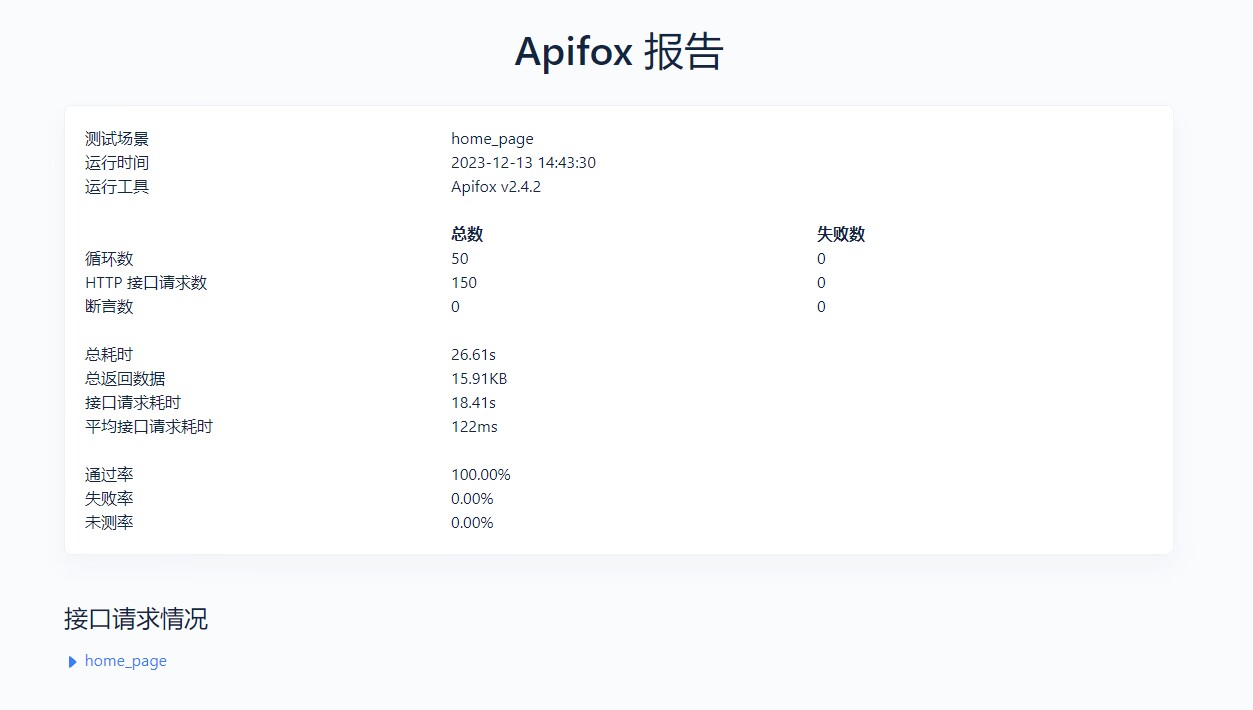
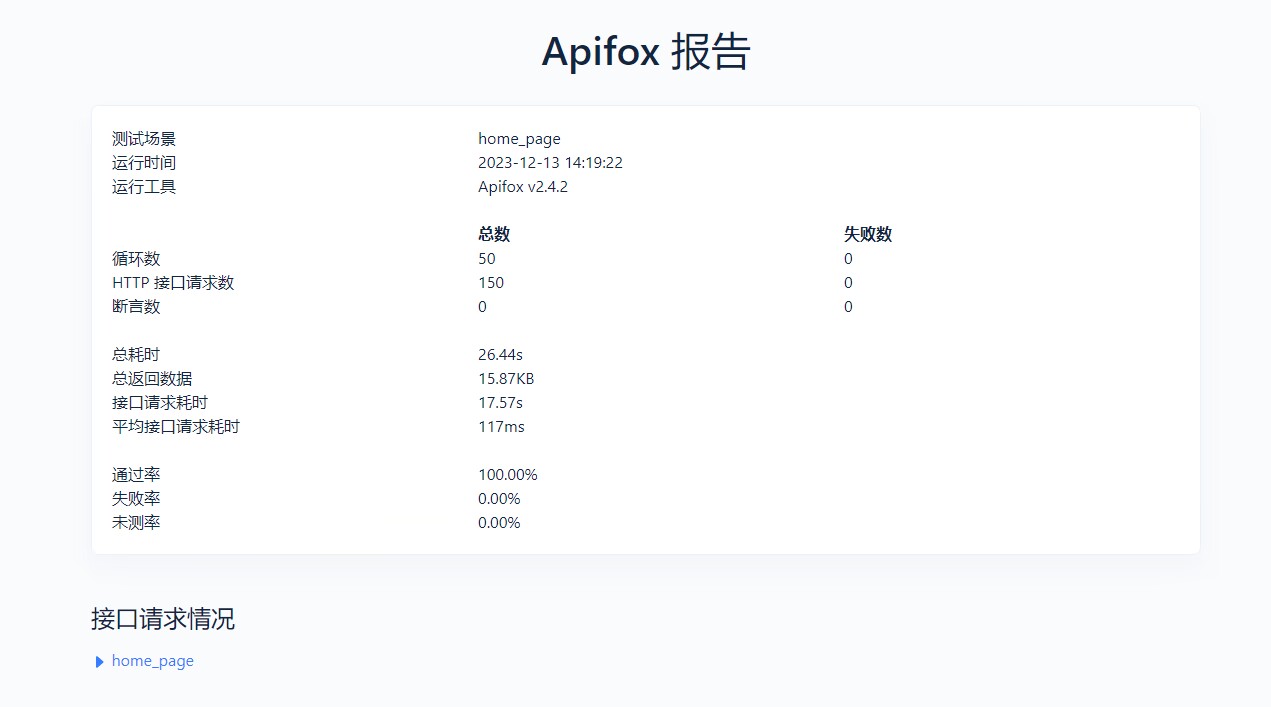
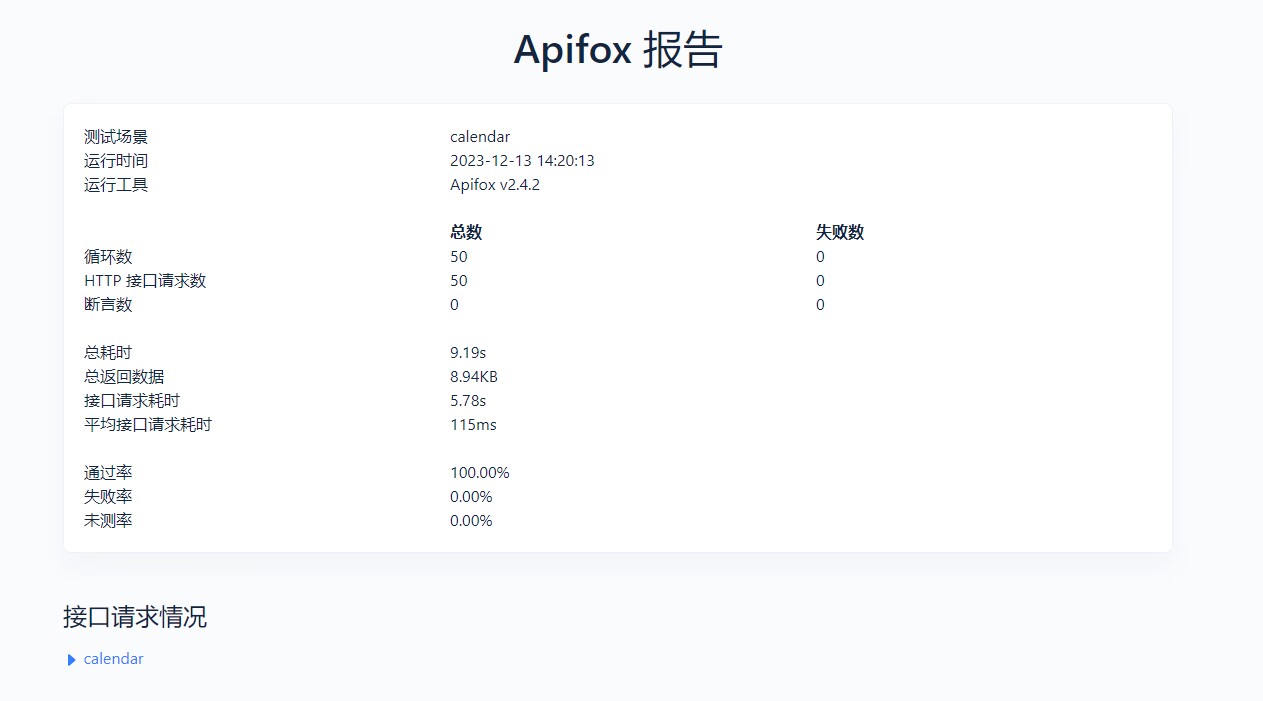
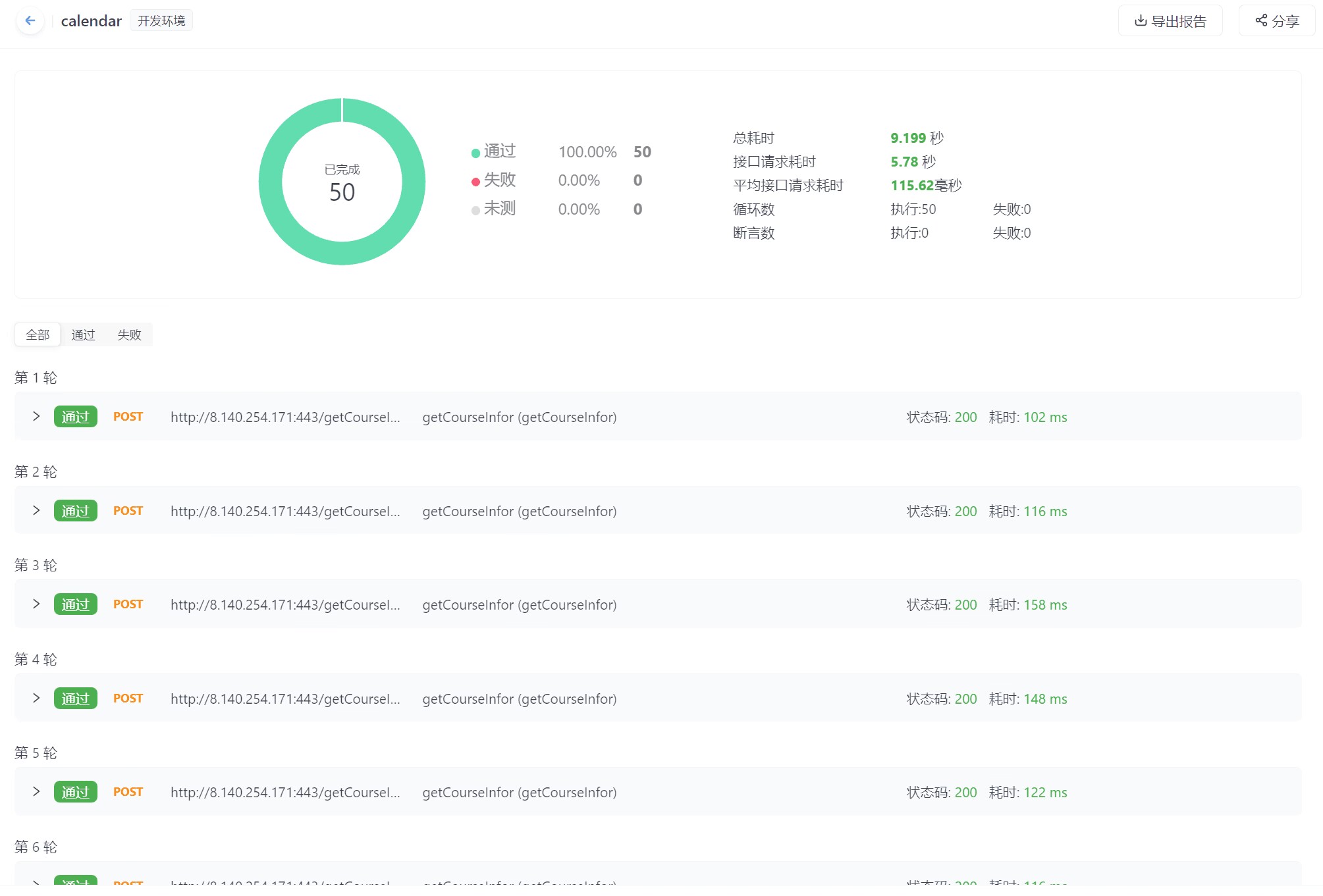
The automated test of back-end is below:
Comparing to the Alpha Sprint, We changed our testing tools to automate our backend interface to test the stability of our interface.
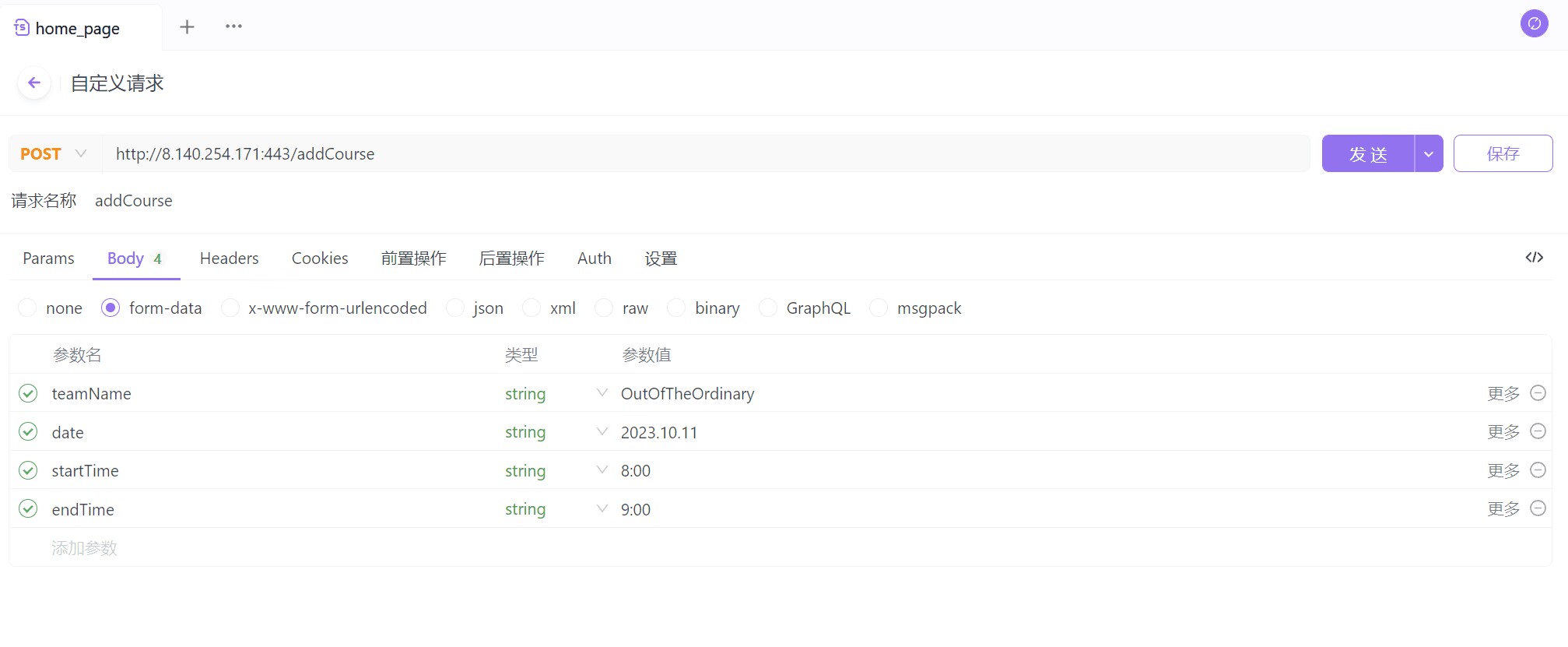
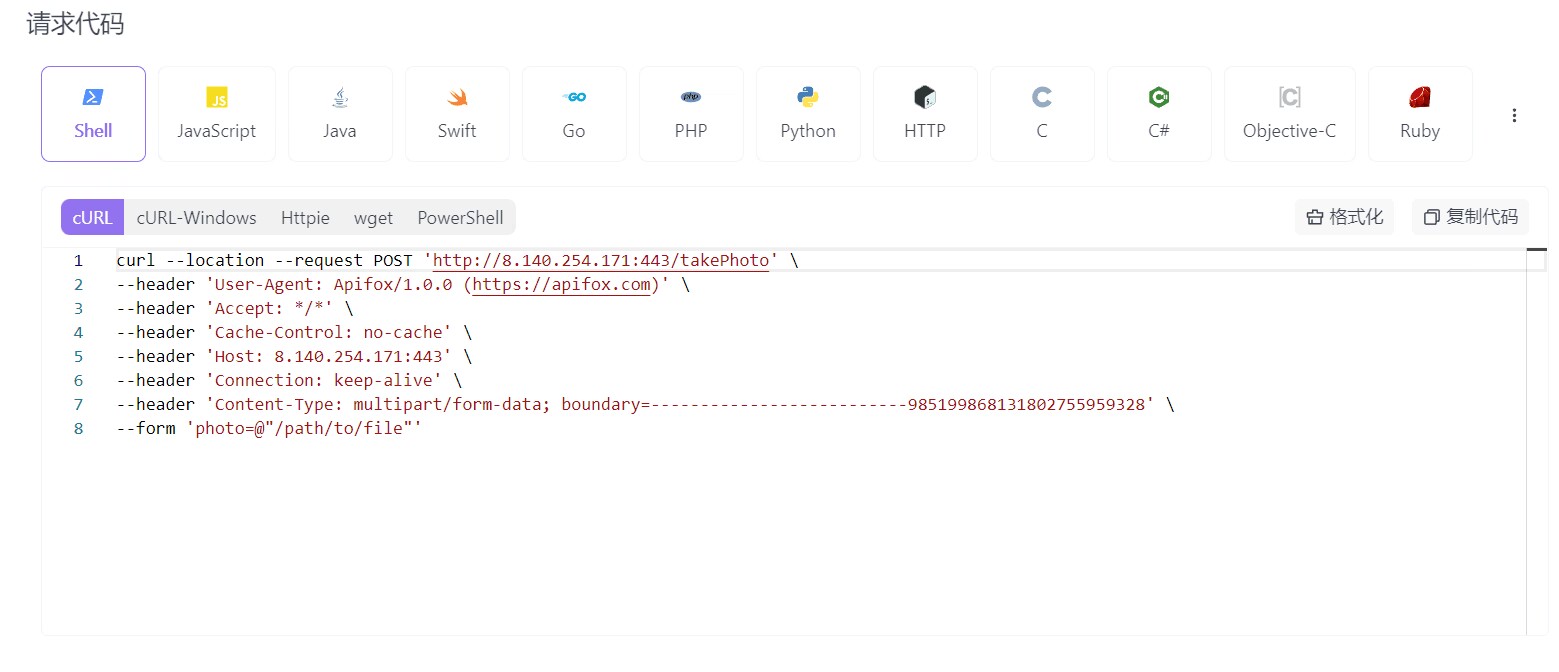
(1)According to the interface document, the interface file is established for each module, and the priority is set separately
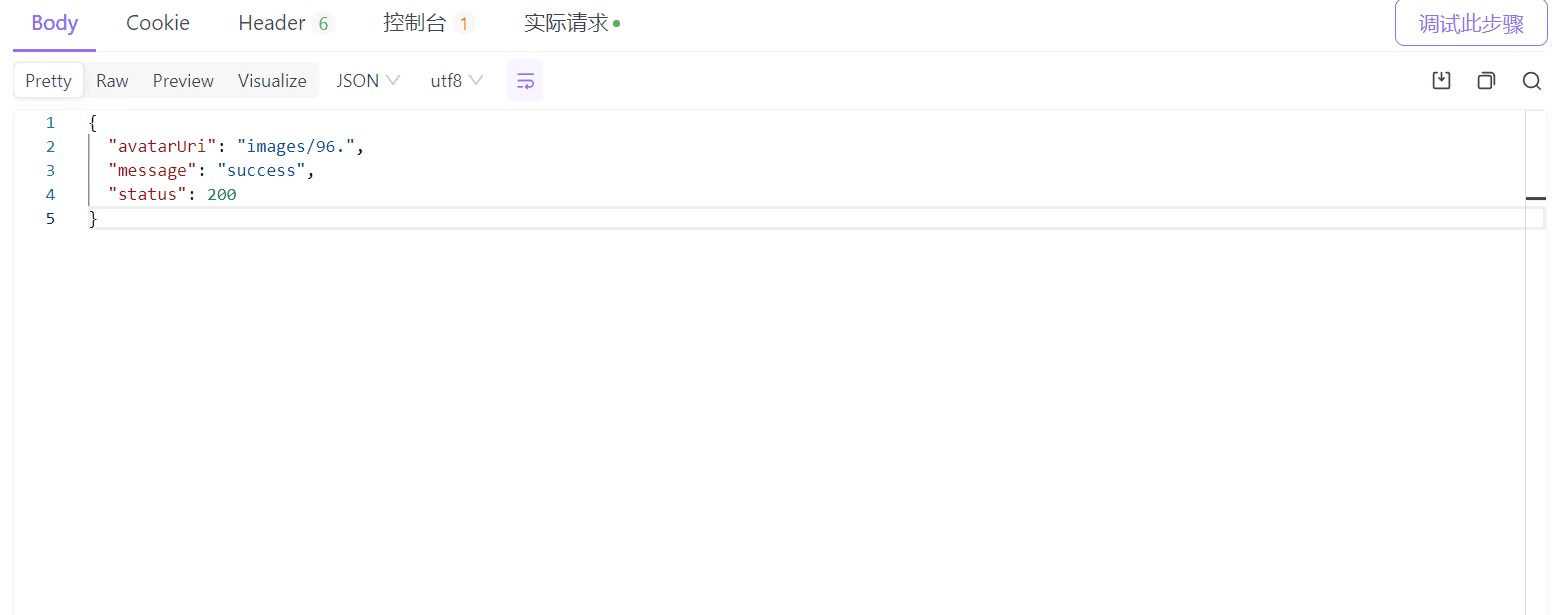
(2)Set the interface address, parameter name and parameter type of the test according to the address, interface communication method (POST/GET) and parameter description of each module in the interface document
(3)Set the run configuration of the test (number of loops, interval to send requests to each interface, number of threads)
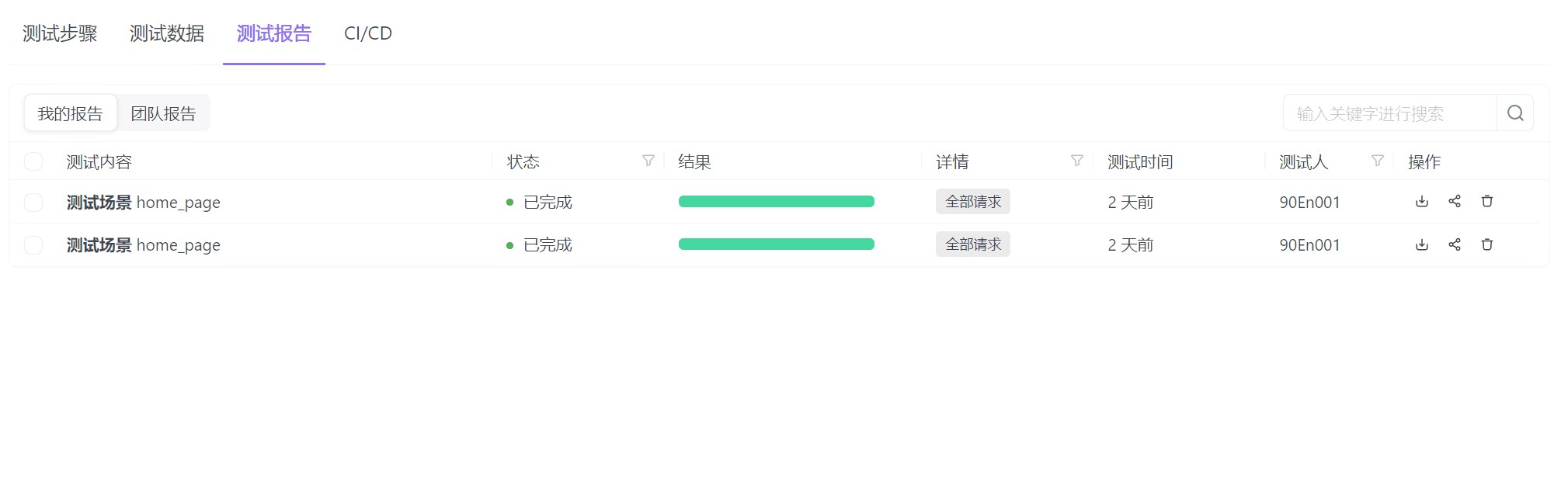
(4)Run the data request corresponding to each interface of a module to obtain the test report
(5)According to the report results, the interface work is analyzed
(6)Establish a file to save the interface parameters that have been sent (because the server has a database for storing data, some data are not allowed to be repeated, and the secondary transmission will not be stored, resulting in changes in the interface response time; Corresponding changes are taken into account)
4. Project links
The github links:https://github.com/Will-OutOfTheOrdinary/Face_Rolling
https://github.com/Will-OutOfTheOrdinary/Face_Rolling_Front_end
5. Running pictures, gifs or videos
In this part, we will run us spftware to show our project and the main page is below
And below video show how to use our software:
6. Each member's experiences, gains, and insights
1.Yiting Wang
Throughout the project, I assumed the role of product manager, responsible for ensuring the successful launch and continuous improvement of the product to meet the needs of users and the business. I learned the following:
Discuss product design with the development team: Ensure that the development team fully understands and correctly implements product requirements and design. Through communication and collaboration, I was able to communicate the product vision and goals to the development team to ensure that the product was delivered on time.
Participate in the development plan: follow up the project progress and solve the possible problems. Through effective planning and coordination, I was able to ensure that the development team completed the various stages of work on time, and ensured the quality and functional integrity of the product.
Work with marketing team to develop promotion strategy: develop product launch promotion strategy and plan. By working with the marketing team, I was able to ensure that the team fully understood the value and characteristics of the product and achieved a competitive advantage in the market.
Work with data analytics team to evaluate product performance: Use user data and analytics results to evaluate product performance and suggest improvements. Through data-driven decision making, I am able to timely understand user needs and behavior patterns, and adjust product strategies according to market trends.
2.Zhengxiang Sun
In this stage, I formulated the long-term roadmap and short-term plan of the product, coordinated the work of the development team, the design team and other relevant departments, and made the user's data flow diagram and flow chart. In addition, I learned how to develop a product roadmap, complete a competitive analysis of the product, and perform product optimization and iteration. I also participated in the formulation of test standards, and gained a deeper understanding of how to evaluate software reliability and verify functions. I also learned how to use data analytics to support product decisions. Analyze user behavior data and market trends to make more informed decisions and optimize product features and user experience. In general, through this team project, I have greatly improved and accumulated experience in product management, team cooperation, competitive analysis, test standard formulation and data analysis.
3.Qinghong Ma
During this sprint, I learned the importance of feedback. At this stage, the new design idea needs to be transformed into a visual prototype as soon as possible on the original basis, and the communication and feedback with the team and users are carried out. Through feedback loops, we can find and fix problems and ensure that our design meets our users' needs. In addition to the basic functional interface, it is also important to focus on the user experience. During the design of the prototype, we always put the user experience first. By paying attention to user needs and studying user behavior and expectations, we can create more intuitive, easy to use, and beautiful interface designs. At the same time, we learned to conduct user testing and feedback to verify and improve the design to ensure that the final product meets users' expectations.
4.Zhuoran Chen
In the beta sprint phase, I completed and identified market requirements and customer expectations; Made, constantly updated user time sequence diagram, data flow diagram and other thought map; Evaluated the existing products in time, collected relevant paper and research results, and predicted the future of the product; Discussed and planned the future business model with the creator; Synchronized with the main developers of the project, and followed up the implementation difficulty and development progress.
In addition, I was involved in developing test standards (including assessing reliability, validating functionality, ensuring safety), additionally learned automated testing and jemeter software, helped the front and back end to confirm interface addresses and interface documents, and verified the stability of interfaces and the ability to withstand pressure in multi-user scenarios.
In this team project, I learned the basic process of developing a software (application) and got familiar with the complete process of taking over tasks as a product manager; The only small regret is that I have always wanted to participate in the UI interaction design work, but it could not be realized because of the personnel arrangement. If there is such a development opportunity in the future, I think I will definitely try the front-end and UI operation part without hesitation.
5. Taoran Lin
During the beta spring stage, I took part in the task group. The mainly job of mine was to make use of the automatic tasting tool to apply response test / pressure test on the software APIs(from server to client) of our group. The results varied(in one test several response failed due to too long request-posting, while in another all samples passed quickly), and the main problem I found was the quality of Internet connection(external factor). That gives a conclusion that the software APIs would work well without Internet interference.
The experiences I’ve got from these stage under the work of testing are:
To start with, though the test job does not require too much coding, it still needs one to master basic back-end knowledge so that he knows what data of which format to send to the server to run the data flow. If not, testing might become a tough job.
Moreover, under the test of APIs from a server with its database, it’s necessary for the tester to create a document of what data has been sent during the procedure. As the data will be memorized in the database where some of the can not be duplicated(like the user login data and information of a team), it will be a mass as one might not remember what have been sent. Under this situation, the data of average testing time would become inaccurate, since the response time of a server with data saving will be different from that without data saving.
6.Kaixiang Xiao
Efficient team handoff-Through proper communication and clear documentation, we ensure that information flows smoothly.
Report analysis and collation: Through regular communication with team members, I had an in-depth understanding of the progress of the whole project and improved the team work efficiency.
Putting together the final report: Integrating the various parts of the report, showing the team's collaborative results, learning editorial skills and taking a holistic view.
Programming skills improvement: In the process of learning programming, through the practice of actual projects, I have continuously improved my programming ability and deepened my understanding of software development. At the same time, skilled use of CSDN and GitHub platform, effectively communicate progress, share experience, improve the visibility of the team in the open source community.
7.Zhengyang Cai
In this project, I played the role of UI designer and front-end development assistant. Through this period of learning and improvement, I have gained a lot:
1.First of all, I understand what UI is and the importance of UI in software development. At the same time, I learn the method of making UI interface diagram and the method of designing advanced dynamic interaction. I understood and mastered the best UI design software "Instant Design" in China. I used this software to complete the home page module and calendar module at that time, and realized and modified good interactive functions.Make sure that the front-end developers can correctly understand the specific role of the UI interface, so as to carry out the front-end development correctly and in the end, I finished the half of all pages of this software.
2.Secondly, I am also a front-end developer assistant. Under the leadership of Huang Yuankui, I have learned a lot of Android knowledge. For example, how to realize the function of popup window, how to use javaBean to add elements to itemlist and so on. These successful experiences give me the courage to learn the front end of Android2. In the future, I will continue to learn Android to improve my personal ability when I have free time.
Summary:
In this project, I completed half of the UI design tasks, which greatly improved my personal ability. At the same time, I mastered a lot of knowledge about front-end Android. With the help of Huang Yuankui, I assisted the front-end to beautify the page, and assisted the main front-end developer to troubleshose the bugs of the front-end code to ensure the safe operation of the software.
8.Jinjie Huang
UI Design Work Summary
During this period, the UI design team completed the following work:
1.Designed the overall layout of the user center interface, including the navigation bar, personal profile, suggestions and feedback, and historical data.
2.Set the corresponding styles for each section to make the interface more beautiful and user-friendly.
3.Designed the interface for modifying personal profiles, including input boxes for information such as name, position, and contact information.
4.Set the corresponding styles for the input boxes to make it easier to enter information.
5.Designed the interface for submitting suggestions and feedback, including input boxes for suggestions and feedback.
6.Set the corresponding styles for the input boxes to make it easier to enter information.
7.Set the corresponding styles for the information table to make the information clearer and easier to read.
8.Added the “group chat” option, “messages, members, files” options, and “favorites, sharing, files” plugins in the team interface.
9.Improved the functions of the user center interface and the team interface, and solved the problems reported by users.
10.Exported all UI slices, organized documents, and completed front-end integration.
Issues
1.The overall layout of the team interface is reasonable and the style is beautiful, but some details need to be optimized.
2.The group chat function is easy to operate, but some functions need to be further improved.
3.The “favorites, sharing, files” plugins are powerful, but documentation needs to be added.
Follow-up Work
1.Further optimize the layout and style of the interface to make the interface more beautiful and user-friendly.
2.Improve the group chat function to make the group chat more convenient and efficient.
3.Add documentation for the group chat function to facilitate user use.
4.Add documentation for the “favorites, sharing, files” plugins to facilitate user use.
UI Design Details
1.In terms of interaction design, the scrolling function of the UI interface was improved, and the corresponding technical problems were solved.
2.The interaction method of the calendar interface was changed, and the scrolling function of the “historical data” interface and the team interface were added.
3.The prototype design of the bottom navigation bar interface was completed, and the color conversion interaction was used in the add personnel interface.
4.In terms of detailed layout, the incorrect positions of some icons were adjusted, the position of the bottom navigation bar was adjusted, and the deficiencies in the UI prototype pages were checked in time.
5.The design of the new user registration interface, as well as the design and improvement of the “historical data” interface and the “face binding” interface, were completed.
6.The original logo and the second version logo were designed, and the documents and slice files were organized. Communication was conducted with the product manager and the front end.
Summary
The UI design team completed the assigned tasks on time and within budget. The team worked closely with the product manager and the front end to ensure that the designs were user-friendly and met the needs of the users. The team also identified some areas for improvement, and plans to address these issues in the future.
9.Yuankui Huang
In my previous experience, I learned the design of xml interface of Android Studio and small-scale actual combat. In the alpha and Beta sprints, I relearned the compose technology of Android. Experience actual combat projects with teammates. In addition, Jetpack's materialDesign, the life cycle of compose, the concurrent call of interface, the interaction between data and interface in the form of MVP, mobile phone rights and file acquisition. And how to test the software, how to debug it, and how to check the log carefully to find the error. There is also the most painful lesson of this sprint. It is very important to read the interface documents carefully and observe the data provided by the back-end personnel for the separation of front and back-end development.
Personal experience: software development is a team task, and communication is very important. The more face-to-face communication and problem solving, the better. For teamwork, communicate with others as much as possible, find problems together and solve problems together. In this cooperation, although not everyone works together, it is most exciting to work together with those who work hard and not give up when the final problem is solved. This kind of fun, pain and difficulty of teamwork can only be realized if we really put in and try our best. When I saw the stagnant progress, I thought about giving up. At the last moment, when I encountered problems, I also thought about giving up, but I was unwilling. I have been working for so long, so I have to hand in a scrap. At this time, it was the team members' perseverance and encouragement that made me overcome my sadness and continue to improve. The victory of the team is that everyone does not give up in teamwork, and will not stop until the last moment.
10.Shuhan Cai
This sprint cannot be said to be a perfect sprint, but at least we have finally completed the main functions, although it comes at the cost of removing some features. This sprint has made me deeply realize the importance of project schedule management and team member communication and collaboration.
In the final sprint, I modified the data type and added a batch import information method using Excel files as the basic data carrier, and successfully connected the face recognition interface with the front-end. In addition, I have also made some improvements to the interface for reading personal information and processing images according to the requirements of the front-end.
Unfortunately, we had to delete some modules because the project progress was slightly delayed. I think the reason for the single progress of the project is due to communication and coordination issues among team members, which makes it difficult to achieve efficient and accurate communication. For example, when I was writing face. py, the front-end requirement was to provide list returns. However, due to the inconsistent names of data types between Python and Compose, I was not aware that data packages based on the dictionary dict needed to be added to the list. This resulted in us spending a lot of time adjusting other issues, which delayed the project progress.
Due to the lack of a graphics card for deep learning on our server, our demonstration did not demonstrate the efficiency of our software very well. However, I at least achieved pulling and copying from open-source deep learning models, and successfully embedded them into the Flask framework and integrated APIs, which allowed me to gain a lot of experience in applying deep learning models to commercial software.
Finally, I realize that adjusting the project plan according to the situation is very important, especially in projects developed by multiple people. It is important to constantly monitor the progress of the project and adjust the project plan according to the execution ability and skill level of the current team members, so as to ensure the smooth operation of the project.
In addition, some writing methods about pre response and post response functions have also provided me with more flexible methods for building backend interfaces.
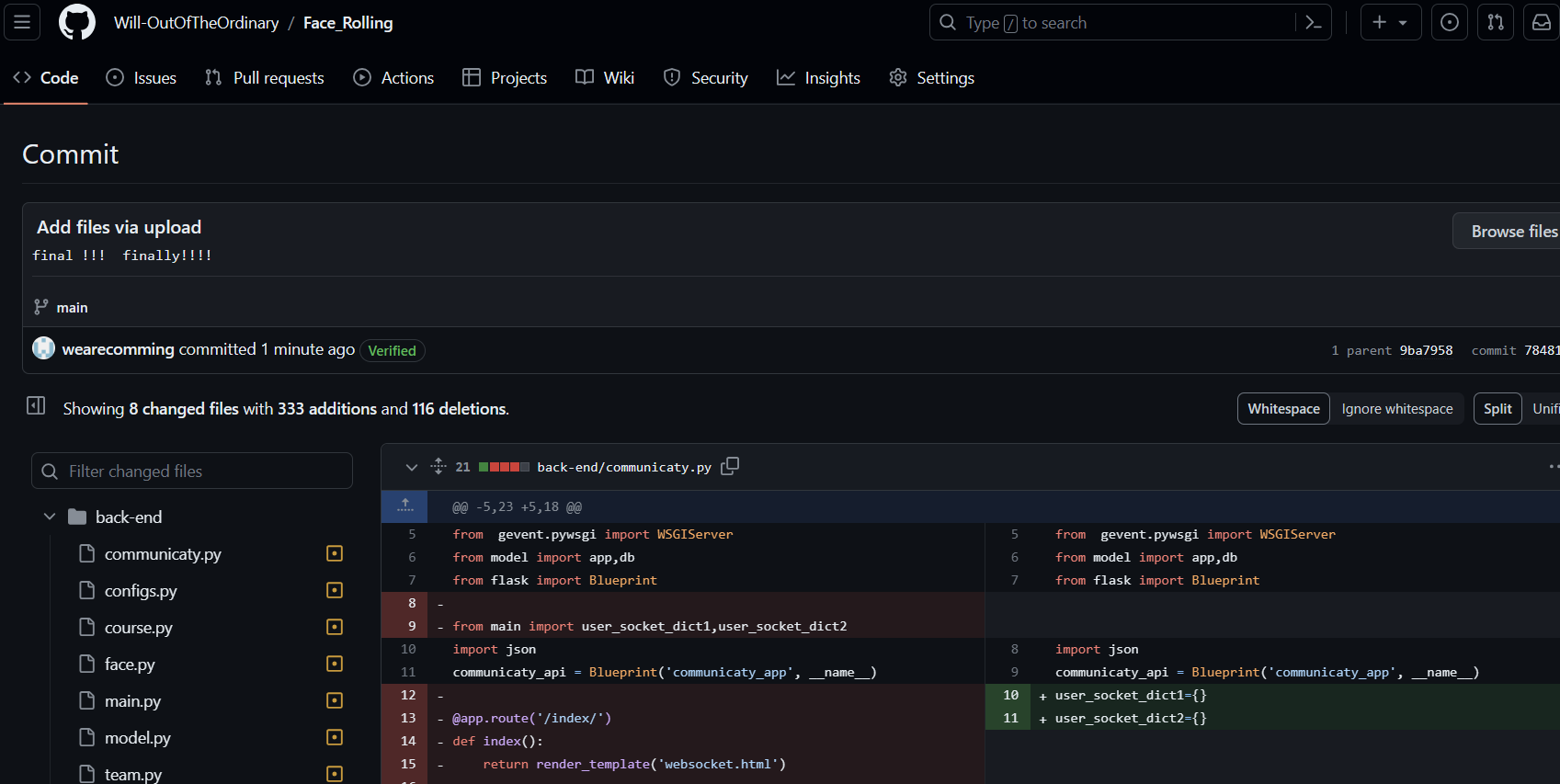
In summary, this was an impressive experience where we overcame difficulties, gained growth, and gained a clearer understanding of how good software should be developed, how a good team should be managed, and how team members should coordinate and communicate. I will attach the code submission record and link for the last update to GitHub at the end of the article.
11.Zhehan Huang
In the beta sprint, I assign testing work. I learned jmeter automated testing through the Internet, how to write test cases and results according to projects, and how to write HTML reports. According to our project and the progress of the developers, Apifox was finally selected for testing. Apifox combined with jmeter, it is more convenient to fill in parameters directly for debugging without writing scripting language. Its automated test is also fast to test the interface, and it can automatically generate test cases and execute tests, which greatly improves the test efficiency. Secondly, Apifox can automatically generate test reports, including test case execution results, defect statistics and analysis, so that we can view and share test results. In the process of learning apifox, I found it easy to use, as a beginner can quickly get started with apifox. I used apifox to create the project and filled in our team project name and test plan. Find the interface to be tested in the project, fill in the request method, URL, request header, request body, etc. Apifox automatically performs the test, displays the results on the interface, and generates the corresponding test report, you can view the request parameters, response parameters, performance indicators.
7.The contribution of each member
| Student Name | Student ID | Task Description | Contribution |
|---|---|---|---|
| Yuankui Huang | 832102224 | The Frontend Developer | 25% |
| Shuhan Cai | 832102229 | The Backend Developer | 25% |
| Zhengyang Cai | 832102230 | The Frontend Asistant,UI Designer | 18% |
| Jinjie Huang | 832102226 | UI Designer | 9% |
| Zhengxiang Sun | 832102207 | Product Manager | 3% |
| Qinghong Ma | 832002226 | UI Designer | 3% |
| Yiting Wang | 832102203 | Product Manager | 2% |
| Taoran Lin | 832102122 | The Backend Developer,Test Engineer | 5% |
| Zhuoran Chen | 832102216 | Product Manager | 2% |
| Zhehan Huang | 832102225 | Product Manager, Test Engineer | 5% |
| Kaixiang Xiao | 832102111 | Product Manager | 3% |
相关推荐
无人机固定翼无人机简化燃油燃烧仿真的模拟模型(Matlab代码实现)
内容概要:本文提出了一种面向固定翼无人机的简化燃油燃烧仿真模拟模型,该模型基于Matlab平台实现,旨在对无人机在飞行过程中的燃油消耗行为进行高效、准确的模拟与分析。模型在保证工程实用性的前提下,对复杂的燃烧化学反应和热力学过程进行了合理简化,重点保留了燃料消耗速率、发动机效率与飞行状态(如高度、速度、迎角等)之间的动态耦合关系,构建了一个轻量化且具备良好泛化能力的燃油经济性评估工具。该模型可用于不同飞行剖面下的续航能力预测、任务航程规划以及能源管理策略的初步设计与验证,为无人机系统级仿真与优化提供关键支撑。; 适合人群:具备Matlab编程与仿真实践能力,从事固定翼无人机总体设计、飞行任务规划、航空动力系统或绿色航空技术研究的科研人员与工程师。; 使用场景及目标:①支撑固定翼无人机在多种工况(巡航、爬升、机动等)下的燃油消耗预测与航程评估;②服务于无人机能源管理系统的概念设计与性能优化,提升任务可靠性和飞行经济性; 阅读建议:建议读者结合Matlab代码深入理解模型结构,通过调整飞行参数(空速、海拔、推力设定等)开展仿真实验,观察燃油流量与累积消耗的变化趋势,进而掌握模型的响应特性与适用边界。
风光储协同并网发电系统仿真(Simulink仿真实现)
内容概要:本文系统介绍了基于Simulink的风光储协同并网发电系统的仿真研究,聚焦风能、光伏与储能系统的多能互补协调控制策略,涵盖并网逆变器控制、虚拟同步发电机(VSG)、下垂控制、模型预测控制(MPC)、中点电位平衡、孤岛检测、低电压穿越(LVRT)等多项核心技术的建模与仿真实现。文档列举了多个典型应用场景,如风光储交直流微电网一体化控制、PEM电解槽制氢耦合系统、VSG预同步切换控制等,并强调结合参考文献与仿真模型进行SCI级别论文的复现,突出其科研指导性与工程实用性。资源包还提供详尽的设计文档、建模报告、Mathcad计算书及配套程序,支持深入理解与二次开发; 适合人群:面向具备电力系统、新能源发电、自动控制等相关专业知识背景的研究生、科研人员及工程技术人员,尤其适用于从事MATLAB/Simulink仿真实践、需完成高水平学术论文或参与实际能源系统设计的研发人员; 使用场景及目标:①用于风光储多能互补系统的并网特性分析、动态响应评估与先进控制策略验证;②支撑SCI论文复现、科研项目攻关与创新方法提出,提升科研竞争力;③服务于高校毕业设计、课程课题研究及实际工程项目中的系统优化、性能测试与方案论证; 阅读建议:建议读者结合提供的参考文献与仿真模型同步操作,优先掌握VSG、MPC、双闭环控制等核心模块的建模逻辑与参数整定方法,注重理论推导与仿真实践相结合,循序渐进地从单一单元扩展至复杂系统集成仿真,全面提升建模能力与科研素养。
基于三次谐波注入法的Z源升压逆变器仿真、更优升压能力【有参考文献】
内容概要:本文围绕基于三次谐波注入法的Z源升压逆变器展开仿真研究,重点分析该方法在提升逆变器电压增益方面的优越性。通过Simulink仿真平台构建系统模型,详细探讨三次谐波注入的作用机理,并与传统四种基本升压控制策略进行对比,验证其在相同条件下实现更高升压比的有效性。研究还结合LCL滤波器设计以优化输出电能质量,抑制高频谐波干扰,提升系统稳定性与动态响应性能。文档配套提供完整的参考资料和可复现的仿真模型,增强了研究成果的可信度与实用性,对推动新能源发电系统中高效、高可靠逆变技术的发展具有重要参考价值。; 适合人群:电力电子、电气工程及其自动化等相关专业的高校师生、科研人员及从事新能源发电系统研发的工程技术人员。; 使用场景及目标:①用于教学与科研中对Z源逆变器工作原理与先进控制策略的深入理解与实验验证;②为实际工程应用中提升逆变器升压性能提供理论支持与技术方案;③支撑SCI级别论文的复现、改进与创新性课题研究。; 阅读建议:建议结合文中提供的仿真模型与参考文献进行系统学习,重点关注三次谐波注入的实现方式及其对系统稳态精度与动态响应的影响,鼓励通过调整调制度、谐波注入比例等参数开展拓展性仿真实验,以深化对Z源网络特性和控制策略优化的理解。
基于小波分析的小电流接地系统单相接地故障选线仿真【仿真+说明文档+说明PPT】
内容概要:本文围绕基于小波分析的小电流接地系统单相接地故障选线方法展开研究,依托Simulink仿真平台构建系统模型,配套提供详细的说明文档与教学PPT,系统阐述了在中性点不接地或经消弧线圈接地的配电网中发生单相接地故障时,如何利用小波变换对故障后的暂态零序电流信号进行多尺度分解与特征提取。通过分析各线路故障电流的高频暂态分量极性和幅值差异,实现故障线路的准确识别,有效克服传统稳态量选线方法受过渡电阻大、信号微弱等因素影响导致误判的问题,显著提升选线的灵敏度与可靠性。该方法具有较强的工程应用价值,适用于中低压配电网的自动化故障检测与定位场景。; 适合人群:电气工程及其自动化、电力系统继电保护方向的高校本科生、研究生,以及从事配电网故障诊断、继保装置研发的工程技术人员和科研人员。; 使用场景及目标:①掌握小波变换在电力系统暂态信号处理中的具体应用方法;②完成小电流接地系统故障选线算法的研究与仿真验证;③支撑毕业设计、科研项目或实际工程中故障定位模块的技术开发;④深入理解暂态量选线原理及其相较于传统方法的优势。; 阅读建议:建议结合所提供的Simulink仿真模型、说明文档和PPT进行三位一体的学习,重点理解小波变换的选线判据设计原理,动手运行并调试仿真模型,观察不同故障条件下的选线效果,从而深化对算法鲁棒性与适应性的认识。
风光储PEM电解制氢+虚拟同步发电机VSG控制并网发电系统仿真【附参考文献】
内容概要:本文详细介绍了一套基于Simulink平台构建的风光储-PEM电解水制氢与虚拟同步发电机(VSG)协同控制的并网发电系统仿真模型。该模型深度融合风能、光伏、储能及质子交换膜(PEM)电解制氢技术,实现多能互补协调运行,并重点实现了VSG控制策略下的惯量模拟、阻尼调节、预同步机制与离并网无缝切换功能。系统涵盖风光出力波动性建模、PEM电解槽动态响应特性、储能系统能量管理以及VSG功率环控制等核心模块,支持高比例可再生能源接入场景下电力系统频率稳定与惯量支撑能力的研究。文档配套提供详实的参考文献与建模报告,适用于SCI级论文复现与工程化前期验证。; 适合人群:面向从事新能源发电、微电网控制、电力系统稳定性分析等相关领域的研究生、科研人员及工程技术人员,要求具备扎实的电力电子、自动控制理论基础和MATLAB/Simulink仿真能力; 使用场景及目标:①开展风光储氢多能耦合系统的协同运行与能量管理策略研究;②掌握PEM电解制氢系统建模方法及其电网互动特性;③深入理解并实现虚拟同步机的惯量阻尼模拟、功率调节与并离网平滑切换控制;④支撑高水平学术论文复现、科研课题攻关或实际项目的技术可行性验证; 阅读建议:建议结合所提供的参考文献与建模报告,按照目录结构循序渐进地学习,重点关注VSG控制算法的设计逻辑与系统动态响应的仿真结果分析,鼓励动手调试模型参数、优化控制策略以深化对系统运行机理的理解。




