


122
社区成员
 发帖
发帖 与我相关
与我相关 我的任务
我的任务
 分享
分享| 这个作业属于哪个课程 | 2302软件工程 |
|---|---|
| 这个作业要求在哪里 | 结对第二次作业——编程实现 |
| 这个作业的目标 | 实现原型中的部分功能 |
| 其他参考文献 | 《构建之法》 |
@
| PSP | Personal Software Process Stages | 预估耗时(分钟) | 实际耗时(分钟) |
|---|---|---|---|
| Planning | 计划 | 10 | 10 |
| • Estimate | 估计这个任务需要多少时间 | 20 | 10 |
| Development | 开发 | 600 | 740 |
| • Analysis | 需求分析 (包括学习新技术) | 200 | 100 |
| • Design Spec | 生成设计文档 | 30 | 60 |
| • Design Review | 设计复审 | 15 | 10 |
| • Coding Standard | 代码规范 (为目前的开发制定合适的规范) | 15 | 13 |
| • Design | 具体设计 | 45 | 60 |
| • Coding | 具体编码 | 400 | 480 |
| • Code Review | 代码复审 | 25 | 50 |
| • Test | 测试(自我测试,修改代码,提交修改) | 60 | 45 |
| Reporting | 报告 | 45 | 60 |
| • Test Report | 测试报告 | 20 | 10 |
| • Size Measurement | 计算工作量 | 10 | 20 |
| • Postmortem & Process Improvement Plan | 事后总结, 并提出过程改进计划 | 30 | 30 |
| 合计 | 1525 | 1698 |
1.整体:
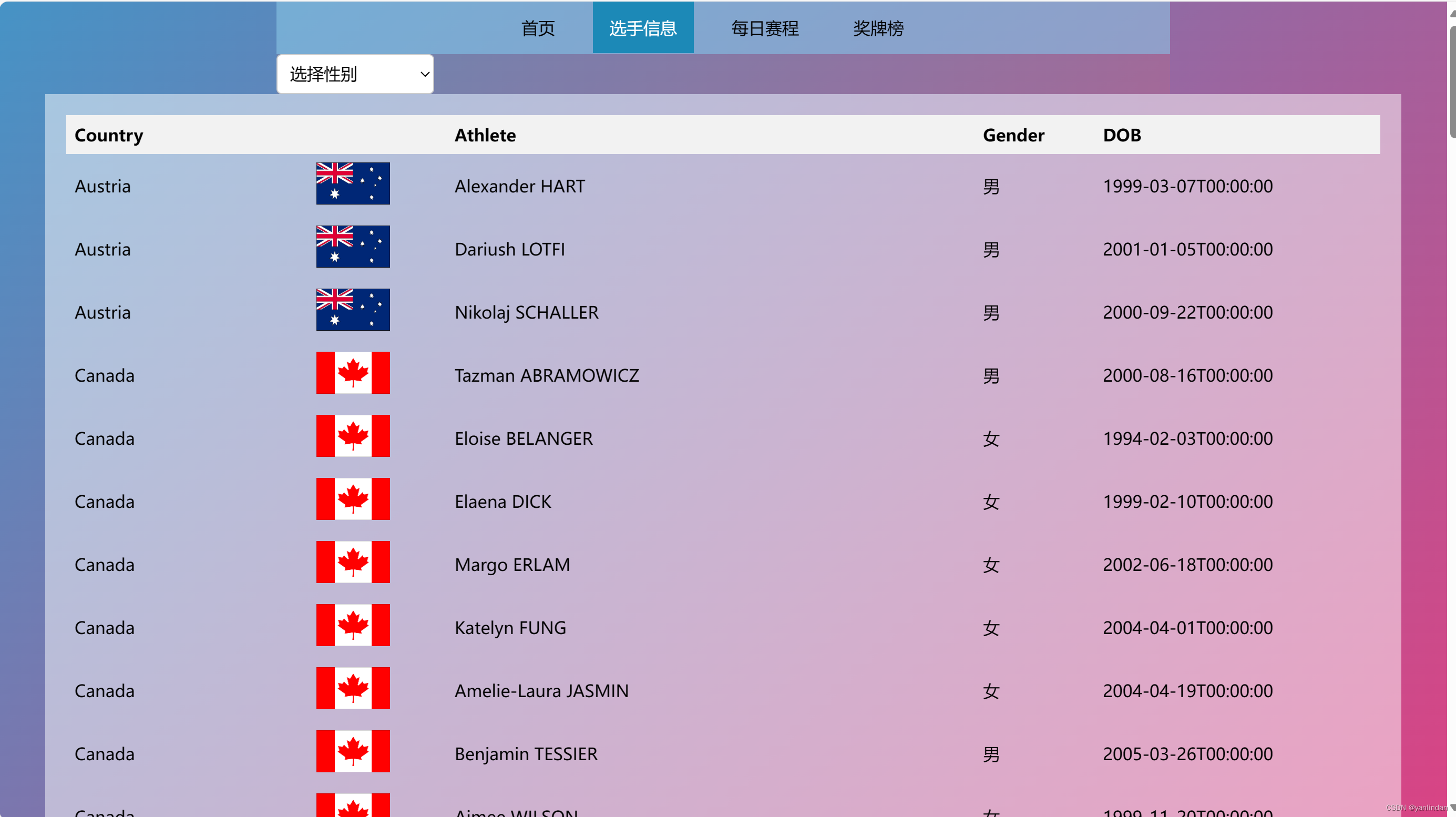
在每个页面顶部都添加了导航栏,鼠标悬停的时候字体变白,方便用户查看其他页面。每个界面都使用动态渐变色的背景,提高组件透明度,使整体页面高级美观,简洁大方。


6.奖牌榜
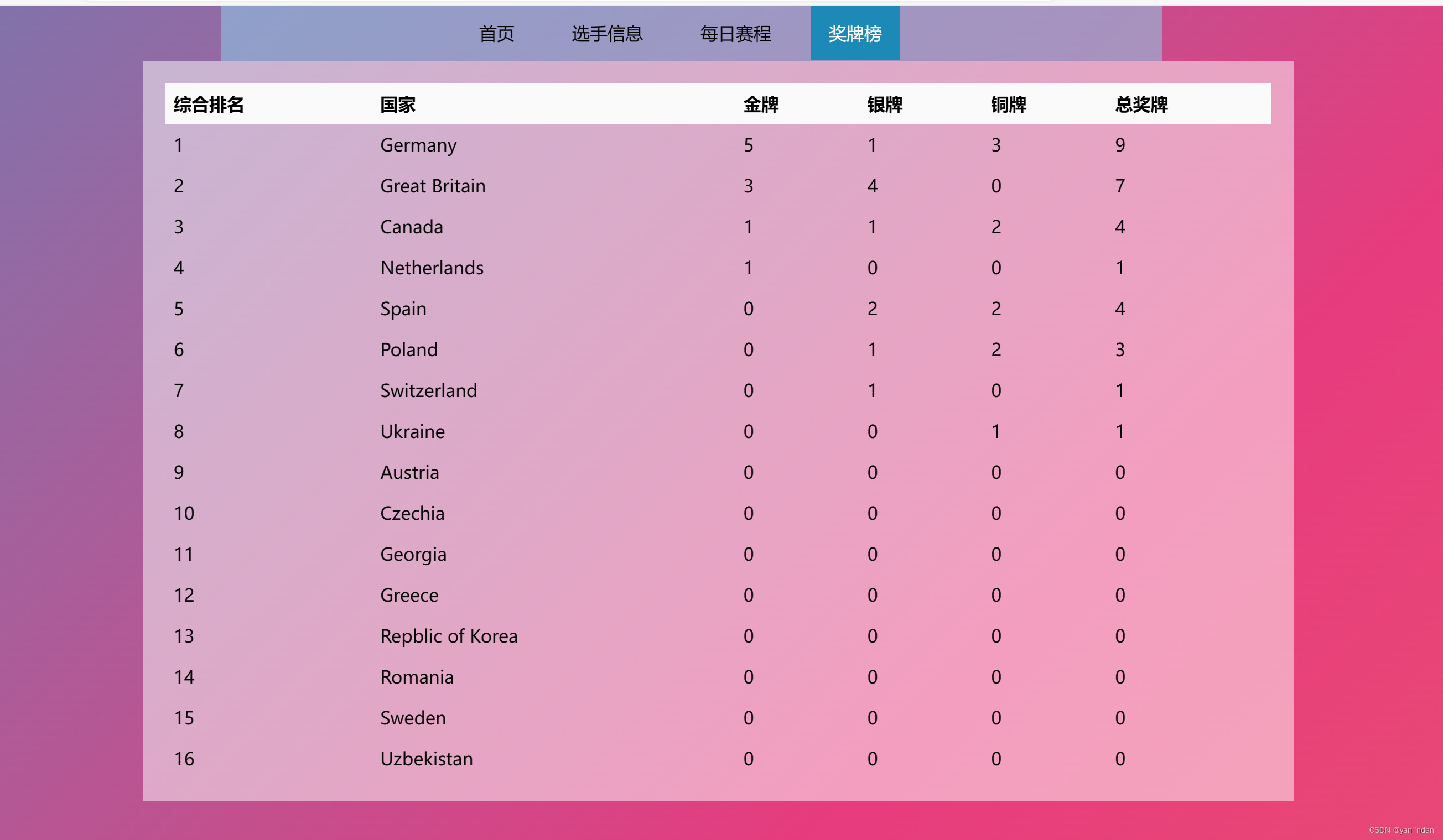
直观友好地展示各个参赛国的获奖情况。
线上交流部分截图


1.整体:
先写一个自定义的整体网页布局和导航栏的css样式文件和处理导航栏点击事件的js文件,并在每个页面都引入这个css和js。
2.基础功能:
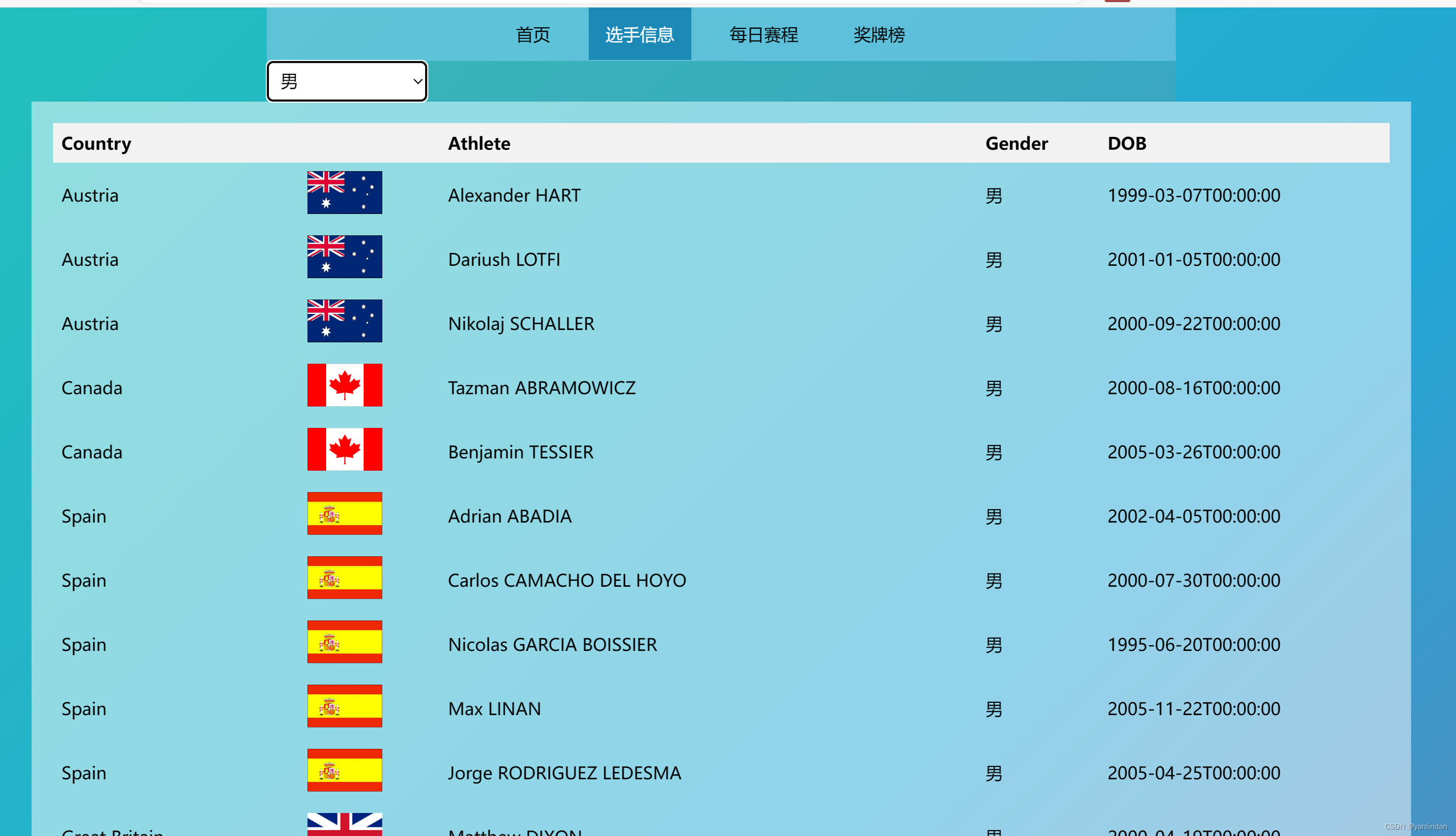
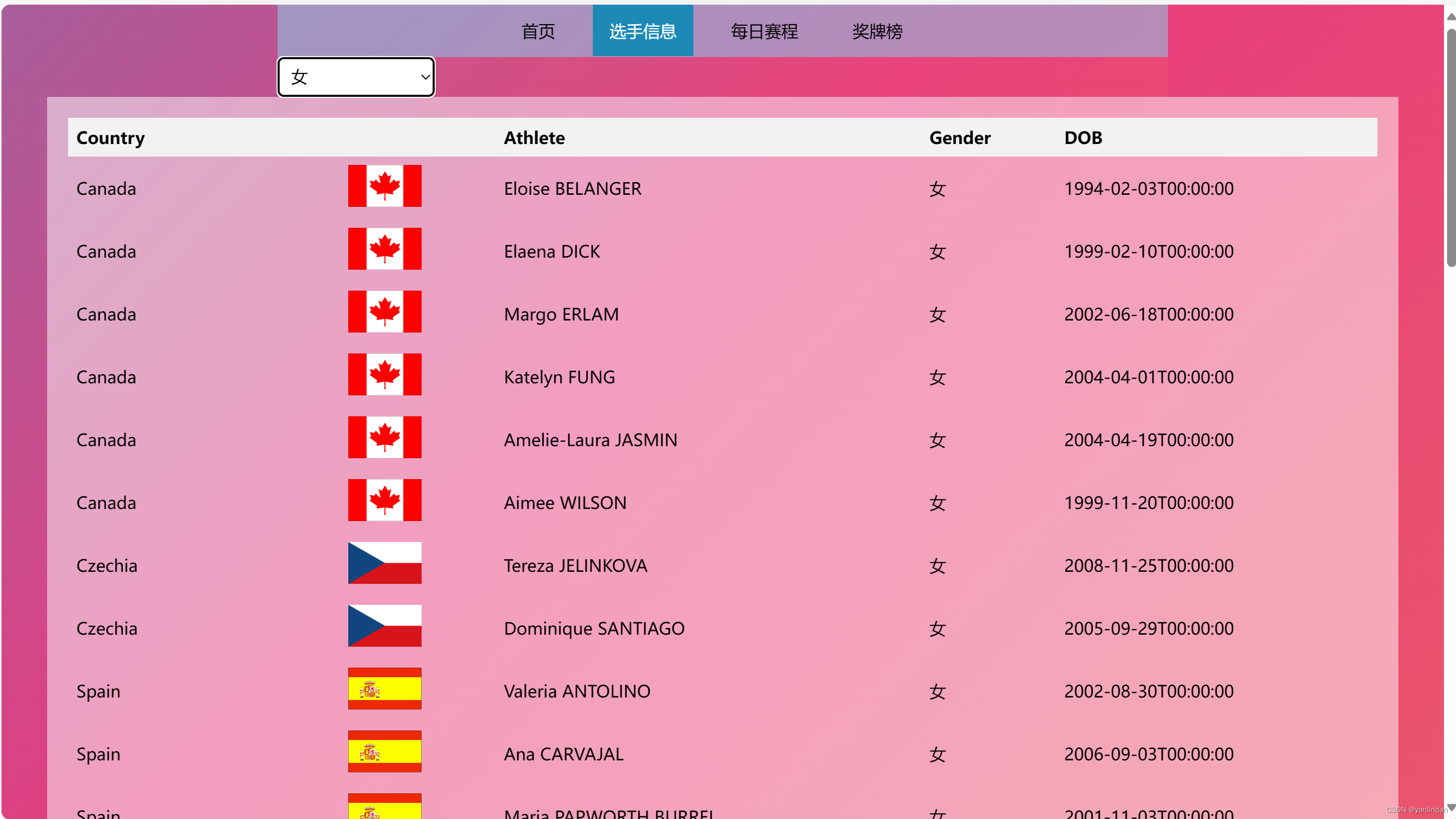
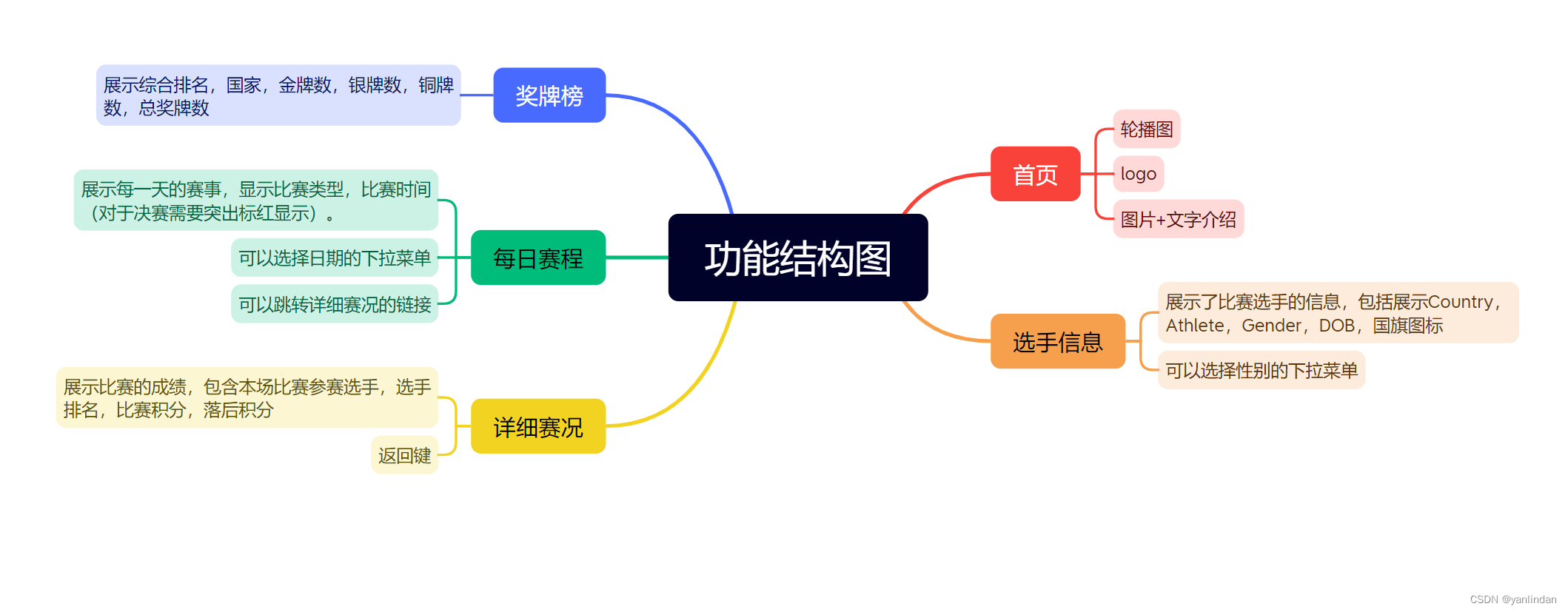
选手信息:使用XMLHttpRequest对象读取并解析JSON文件,把json解析成对象数组后,调用自定义函数将选手信息动态的显示在表格中;监听用户选择,根据用户选择显示相应信息。
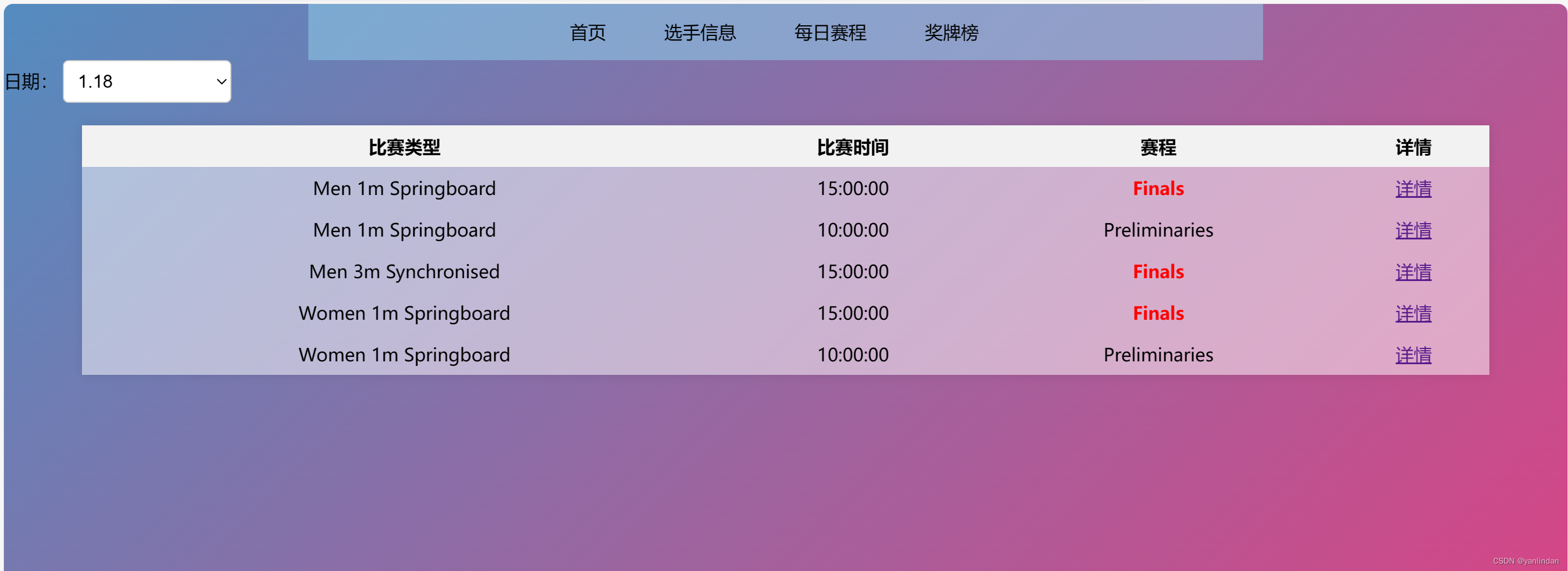
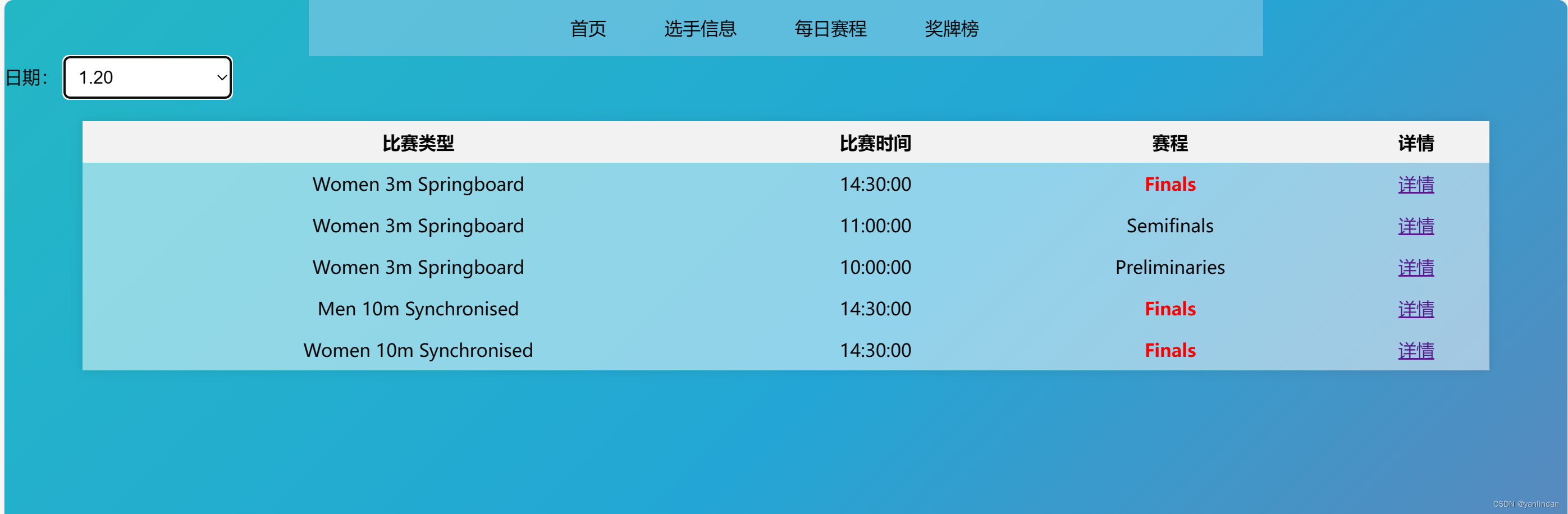
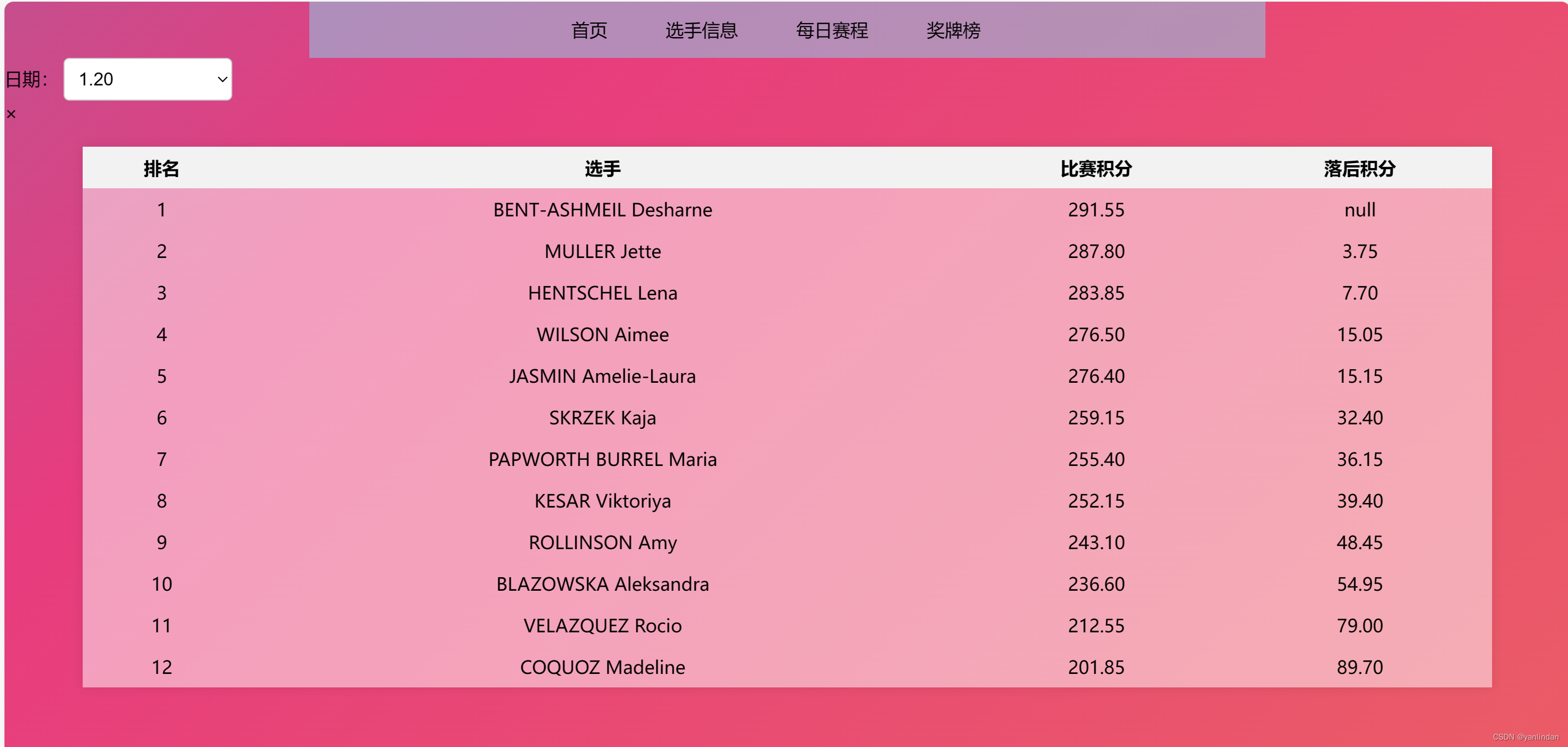
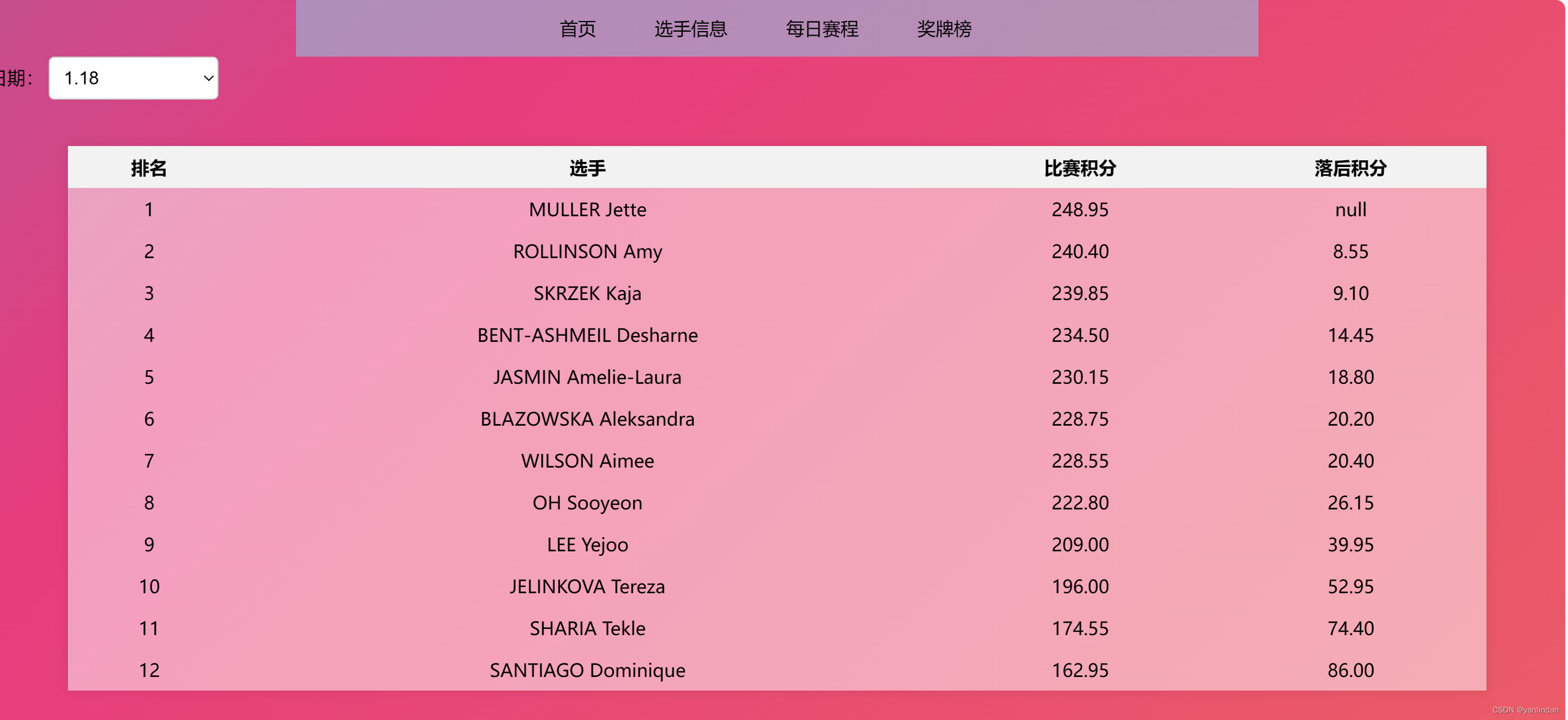
每日赛程:在页面加载完成后,通过监听下拉列表的改变事件,根据不同的日期选项读取对应的 JSON 文件并显示比赛信息。同时,页面加载完成后会默认选择 1.18 作为初始日期选项,并触发相应的事件显示该日期的比赛信息。在显示比赛信息时动态添加详情链接及链接的监听处理函数,用户点击详情链接后,利用模态框,显示该比赛的详细赛况。
奖牌榜:根据解析的json对象,使用数组存储各国的获奖情况,调用自定义函数对各国进行排名,最后将获奖情况显示在表格里。
3.附加功能
1.选手信息:
使用 XMLHttpRequest 对象发送GET请求来获取json文件的内容,并在请求成功后调用回调函数,根据解析后的json对象,显示选手信息,监听用户下拉框选择事件。
<script>
    var selectDate = document.getElementById('Date');
    var selectedIndex = selectDate.selectedIndex;
    var selectedOption = selectDate.options[selectedIndex];
    var selectedText = selectedOption.text;
    var selectedValue = selectedOption.value;
    //检查下拉列表里有无相同选项
    function optionExist(selectElement, value) {
        for (var i = 0; i < selectElement.options.length; i++) {
            if (selectElement.options[i].value === value) {
                return true;
            }
        }
        return false;
    }

    function addOption(jsonArray) {
        jsonArray.forEach(function (jsonObject, index) {
            if (jsonObject.Participations && jsonObject.Participations.length > 0) {
                jsonObject.Participations.forEach(function (participation) {
                    var gender = (participation.Gender === 0 ? '男' : '女');
                    if (optionExist(selectDate, gender) === false) {
                        var optionItem = new Option(gender, gender);
                        selectDate.options.add(optionItem);
                    }
                });
            }
            else {
                alert('No participations found for');
            }
        });
    }

    // 读取JSON文件并解析为对象
    function readJSONFile(file, callback) {
        var xhr = new XMLHttpRequest();
        xhr.overrideMimeType("application/json");
        xhr.open('GET', file, true);
        xhr.onreadystatechange = function () {
            if (xhr.readyState === 4 && xhr.status == "200") {
                callback(JSON.parse(xhr.responseText));
            }
        };
        xhr.send(null);
    }

    // 在页面上显示JSON对象
    function displayJSONObject(jsonArray) {
        var jsonOutputDiv = document.getElementById('jsonOutput');
        var html = '<table>';
        html += '<tr><th colspan="2">Country</th><th>Athlete</th><th>Gender</th><th>DOB</th></tr>';
        jsonArray.forEach(function (jsonObject, index) {
            if (jsonObject.Participations && jsonObject.Participations.length > 0) {
                jsonObject.Participations.forEach(function (participation) {
                    var gender = (participation.Gender === 0 ? '男' : '女');
                    console.log('Selected text:', selectedText);
                    console.log('Selected value:', selectedValue);
                    console.log('gender:', gender);
                    if ((gender === selectedText) || selectedText === '选择性别') {
                        html += '<tr>';
                        html += '<td>' + jsonObject.CountryName + '</td>';
                        var imgsrc = 'datas/countryImg/';
                        imgsrc += jsonObject.CountryName + '.png';
                        html += '<td><img src="' + imgsrc + '" width="70" height="40"></td>';
                        html += '<td>' + participation.PreferredFirstName + ' ' + participation.PreferredLastName + '</td>';
                        html += '<td>' + gender + '</td>';
                        html += '<td>' + participation.DOB + '</td>';
                        html += '</tr>';
                    }
                });
            } else {
                html += '<tr><td colspan="4">No participations found for ' + jsonObject.CountryName + '</td></tr>';
            }
        });
        html += '</table>';
        jsonOutputDiv.innerHTML = html;
    }

    readJSONFile('datas/athletes.json', function (jsonArray) {
        addOption(jsonArray);
        displayJSONObject(jsonArray);
        selectDate.addEventListener('change', function () {
            selectedIndex = this.selectedIndex;
            selectedOption = this.options[selectedIndex];
            selectedText = selectedOption.text;
            selectedValue = selectedOption.value;
            displayJSONObject(jsonArray);
        });
    });
</script>
2.每日赛程
读取解析json文件的方式和选手信息一样。
页面加载完成后,默认选择下拉列表的值为 "1.18",并触发下拉列表的改变事件,展示对应的 JSON 数据。在监听下拉列表的改变事件里,根据选择的值读取相应的 JSON 文件,并调用 displayJSONObject 函数展示信息。
  // 监听下拉框的改变事件
  document.getElementById('jsonSelect').addEventListener('change', function () {
      var selectedDate = this.value;
      if (selectedDate === "1.18") {
          readJSONFile('datas/results/732633c2-7fcd-40f3-b3bc-203d8eec161c.json', function (data1) {
              readJSONFile('datas/results/6119565c-9b6a-429a-ac0d-183a7fd37e55.json', function (data2) {
                  readJSONFile('datas/results/108c795d-5e4f-4dc6-acea-0bc70bfd1928.json', function (data3) {
                      displayJSONObject([data1, data2, data3]);
                  });
              });
          });
      } else if (selectedDate === "1.19") {
          readJSONFile('datas/results/7b2f14f7-5e6b-44e0-8bb4-f78591e9545b.json', function (data1) {
              readJSONFile('datas/results/e85aed35-be49-4251-9558-a4b651f57266.json', function (data2) {
                  displayJSONObject([data1, data2]);
              });
          });
      } else if (selectedDate === "1.20") {
          readJSONFile('datas/results/7e6bbfb2-54c8-4083-845e-ca7fc6932d7f.json', function (data1) {
              readJSONFile('datas/results/96662b5e-200e-4f05-9565-154456cd21e4.json', function (data2) {
                  readJSONFile('datas/results/f73a2ff2-96c1-4075-8a69-21d513aebfa9.json', function (data3) {
                      displayJSONObject([data1, data2, data3]);
                  });
              });
          });
      } else {
          readJSONFile('datas/results/26f2e7ae-fc1a-4a5e-9653-858c1dc9e95f.json', function (data1) {
              readJSONFile('datas/results/d545954e-8e8a-4841-8ab4-a5ea0e188380.json', function (data2) {
                  displayJSONObject([data1, data2]);
              });
          });
      }
  });

  // 页面加载时触发默认选择 1.18
  window.onload = function () {
      document.getElementById('jsonSelect').value = "1.18";
      document.getElementById('jsonSelect').dispatchEvent(new Event('change'));
  };
在displayJSONObject函数,遍历传入的 JSON 对象数组,构建HTML表格,并为详情链接的点击事件绑定处理函数。
function displayJSONObject(jsonObjects) {
var html = '<table>';
html += '<tr><th>比赛类型</th><th>比赛时间</th><th>赛程</th><th>详情</th></tr>';
for (var i = 0; i < jsonObjects.length; i++) {
var jsonObject = jsonObjects[i];
for (var j = 0; j < jsonObject.Heats.length; j++) {
heat = jsonObject.Heats[j];
html += '<tr>';
html += '<td>' + jsonObject.DisciplineName + '</td>';
html += '<td>' + heat.Time + '</td>';
if (heat.PhaseName === "Finals") {
html += '<td class="final">' + heat.PhaseName + '</td>';
} else {
html += '<td>' + heat.PhaseName + '</td>';
}
//html += '<td><a href="#" class="detailsButton" onclick="showDetails(heat)">详情</a></td>';
html += '<td><a href="#" class="detailsButton" onclick="showDetails(' + JSON.stringify(heat).replace(/"/g, '"') + ')">详情</a></td>';
//html += '<td>' + showDetails(heat) + '</td>';
html += '</tr>';
}
}
html += '</table>';
document.getElementById('eventTable').innerHTML = html;
}
用户点击详情链接后,在处理函数里根据比赛对象,利用模态框显示该比赛的详细信息。
  function showDetails(heat) {
      var results = heat.Results;
      var detailsHtml = '<table>';
      detailsHtml += '<tr><th>排名</th><th>选手</th><th>比赛积分</th><th>落后积分</th></tr>';
      for (var i = 0; i < results.length; i++) {
          var result = results[i];
          detailsHtml += '<tr>';
          detailsHtml += '<td>' + result.Rank + '</td>';
          detailsHtml += '<td>' + result.FullName + '</td>';
          detailsHtml += '<td>' + result.TotalPoints + '</td>';
          detailsHtml += '<td>' + result.PointsBehind + '</td>';
          detailsHtml += '</tr>';
      }
      detailsHtml += '</table>';
      document.getElementById('detailsContent').innerHTML = detailsHtml;
      document.getElementById('detailsModal').style.display = 'block'; // 显示模态框
      document.getElementById('eventTable').style.display = 'none'; // 隐藏表格
  };
  document.querySelector('.modal .close').onclick = function () {
      document.getElementById('detailsModal').style.display = 'none'; // 隐藏模态框
      document.getElementById('eventTable').style.display = 'block'; // 显示表格
  };
222100205鄢林丹:web的知识都忘得差不多了,通过这次作业又重新学习了一遍,果然技术就是要经常使用,不然太生疏了拖慢作业进度。在这次结对作业中,我深刻地体会到了团队合作的好处,对于繁重的任务,只要相互合作、共同努力,一切都能迎刃而解。自己想很久解决不了的问题,队友换个思路就能看出来,合作好bug坏!
222100206蒙欣:这次原型实现第一个想到的是前后端分离,但是没有学过所以只能采取纯前端的方法。但是即使是纯前端也有很多困难,主要在于前端知识太多以及对知识运用的生疏不熟练,不清楚都有哪些函数,怎么使用那些函数和属性什么的。但是两人合作还是好处很多,队友能弥补自己的不足,也能发现问题并提出更好的建议,从而收获很多。
222100205鄢林丹:队友情绪稳定,有耐心又细心,帮我解决我死磕很久的问题,在我做出来什么功能的时候猛猛吹我,给我很多情绪价值,队友好!
222100206蒙欣:队友动手能力很强,我有不明白的事情时都能很快得到解答和处理,和队友交流也很愉快,队友是个特别特别特别棒的好队友!


