


110
社区成员
 发帖
发帖 与我相关
与我相关 我的任务
我的任务
 分享
分享课程:《Python程序设计》
班级: 2333
姓名: 江天明
学号:20233311
实验教师:王志强
实验日期:2024年3月27日
必修/选修: 公选课
设计并完成一个完整的应用程序,完成加减乘除模等运算,功能多多益善。
壹、 编写实验代码
(1) 实验代码1
import math
def sum(a, b):
    return (a + b)


def sub(a, b):
    return (a - b)


def mul(a, b):
    return (a * b)


def div(a, b):
    if b == 0:
        return b
    return (a / b)

def pysin(a):
    return math.sin(a*3.14/180)

def pycomplex(a,b):
    if input("请输入复数的运算:+-*/") == "+":
        print("a + b = ",a + b)
        return a + b
    elif input("请输入复数的运算:+-*/") == "-":
        print("a - b = ",a - b)
        return a - b
    elif input("请输入复数的运算:+-*/") == "*":
        print("a * b = ",a * b)
        return a * b
    elif input("请输入复数的运算:+-*/") == "/":
        print("a / b = ",a / b)
        return a / b
    else:
        print("输入有误,返回0")


def pylog(a,b):
    return math.log(b,a)
print("============================欢迎使用Besti计算器=========================================")
print("|                           作者:jiang                                               |")
print("|                           开发时间:20240327                                         |")
print("|                           你干嘛哎呦~~~~~~~~~                                        |")
print("======================================================================================")
flag = True
while flag:
    a = eval(input("请输入a:"))
    b = eval(input("请输入b:"))
    operator = input("请输入运算符(+-*/ sin com):")
    if operator == "+":
        print("a+b=", sum(a, b))
    elif operator == "-":
        print("a-b=", sub(a, b))
    elif operator == "*":
        print("a*b=", mul(a, b))
    elif operator == "/":
        print("a/b=", div(a, b))
    elif operator == "sin":
        print("sin(a)=", pysin(a),"sin(b)=",pysin(b))
    elif operator == "com":
        pycomplex(a,b)
    elif operator == "log":
        print("logab = ",pylog(a,b))
    else:
        print("输入有误!")
    flag = False if input("是否要继续?Y or N") == "N" else True
(2) 实验代码2
import math
import tkinter#tkinter是一个GUI工具包
root  = tkinter.Tk()#创建窗口,root是窗口的名字
root.geometry("350x500+630+260")
root.title("jiang在BESTI创建的计算器")
#1.界面布局
#显示面板
result = tkinter.StringVar()
result.set(0)                      #显示面板显示结果1,用于显示默认数字0
result2 = tkinter.StringVar()
#显示版
label = tkinter.Label(root,font = ('微软雅黑',20),bg = '#EEE9E9',bd ='9',fg = '#828282',anchor = 'se',textvariable
= result2)
label.place(width = 350,height = 170)
label2 = tkinter.Label(root,font = ('微软雅黑',30),bg = '#EEE9E9',bd ='9',fg = 'black',anchor = 'se',textvariable
= result)
label2.place(y = 170,width = 350,height = 60)
# 数字键按钮

btn7 = tkinter.Button(root, text='7', font=('仿宋', 20), fg=('#4F4F4F'), bd=0.5, command=lambda:
pressNum('7'))
btn7.place(x=0, y=285, width=70, height=55)
btn8 = tkinter.Button(root, text='8', font=('仿宋', 20), fg=('#4F4F4F'), bd=0.5, command=lambda:
pressNum('8'))
btn8.place(x=70, y=285, width=70, height=55)
btn9 = tkinter.Button(root, text='9', font=('仿宋', 20), fg=('#4F4F4F'), bd=0.5, command=lambda:
pressNum('9'))
btn9.place(x=140, y=285, width=70, height=55)

btn4 = tkinter.Button(root, text='4', font=('仿宋', 20), fg=('#4F4F4F'), bd=0.5, command=lambda:
pressNum('4'))
btn4.place(x=0, y=340, width=70, height=55)
btn5 = tkinter.Button(root, text='5', font=('仿宋', 20), fg=('#4F4F4F'), bd=0.5, command=lambda:
pressNum('5'))
btn5.place(x=70, y=340, width=70, height=55)
btn6 = tkinter.Button(root, text='6', font=('仿宋', 20), fg=('#4F4F4F'), bd=0.5, command=lambda:
pressNum('6'))
btn6.place(x=140, y=340, width=70, height=55)

btn1 = tkinter.Button(root, text='1', font=('仿宋', 20), fg=('#4F4F4F'), bd=0.5, command=lambda:
pressNum('1'))
btn1.place(x=0, y=395, width=70, height=55)
btn2 = tkinter.Button(root, text='2', font=('仿宋', 20), fg=('#4F4F4F'), bd=0.5, command=lambda:
pressNum('2'))
btn2.place(x=70, y=395, width=70, height=55)
btn3 = tkinter.Button(root, text='3', font=('仿宋', 20), fg=('#4F4F4F'), bd=0.5, command=lambda:
pressNum('3'))
btn3.place(x=140, y=395, width=70, height=55)
btn0 = tkinter.Button(root, text='0', font=('仿宋', 20), fg=('#4F4F4F'), bd=0.5, command=lambda:
pressNum('0'))
btn0.place(x=70, y=450, width=70, height=55)
#运算符号按钮
btnac = tkinter.Button(root,text = 'AC',bd = 0.5,font = ('黑体',20),fg = 'orange',command = lambda :pressCompute('AC'))
btnac.place(x = 0,y = 230,width = 70,height = 55)
btnback = tkinter.Button(root,text = '←',font = ('微软雅黑',20),fg = '#4F4F4F',bd = 0.5,command = lambda:
pressCompute('b'))
btnback.place(x = 70,y = 230,width = 70,height = 55)
btndivi = tkinter.Button(root,text = '÷',font = ('微软雅黑',20),fg = '#4F4F4F',bd = 0.5,command = lambda:
pressCompute('/'))
btndivi.place(x = 140,y = 230,width = 70,height = 55)
btnmul = tkinter.Button(root,text ='×',font = ('微软雅黑',20),fg = "#4F4F4F",bd = 0.5,command = lambda:
pressCompute('*'))
btnmul.place(x = 210,y = 230,width = 70,height = 55)
btnsub = tkinter.Button(root,text = '-',font = ('微软雅黑',20),fg = ('#4F4F4F'),bd = 0.5,command = lambda:
pressCompute('-'))
btnsub.place(x = 210,y = 285,width = 70,height = 55)
btnadd = tkinter.Button(root,text = '+',font = ('微软雅黑',20),fg = ('#4F4F4F'),bd = 0.5,command = lambda:
pressCompute('+'))
btnadd.place(x = 210,y = 340,width = 70,height = 55)
btnequ = tkinter.Button(root,text = '=',bg = 'orange',font = ('微软雅黑',20),fg = ('#4F4F4F'),bd = 0.5,command =
lambda :pressEqual())
btnequ.place(x = 280,y = 395,width = 70,height = 110)
btnper = tkinter.Button(root,text = '%',font = ('微软雅黑',20),fg = ('#4F4F4F'),bd = 0.5,command = lambda:
pressCompute('%'))
btnper.place(x = 0,y = 450,width = 70,height = 55)
btnpoint = tkinter.Button(root,text = '.',font = ('微软雅黑',20),fg = ('#4F4F4F'),bd = 0.5,command = lambda:
pressCompute('.'))
btnpoint.place(x = 140,y = 450,width = 70,height = 55)
btlog = tkinter.Button(root,text = 'log10',font = ('微软雅黑',11),fg = ('#4F4F4F'),bd = 0.5,command = lambda:
pressCompute('log10'))
btlog.place(x = 210,y = 450,width = 70,height = 55)
btnln = tkinter.Button(root, text='e', font=('微软雅黑', 11), fg=('#4F4F4F'), bd=0.5, command=lambda:
pressCompute('e'))
btnln.place(x=210, y=395, width=70, height=55)


lists = []
isPressSign = False
isPressNum = False

def pressNum(num):
    global lists
    global isPressSign
    if isPressSign == False:
        pass
    else:
        result.set(0)
        isPressSign = False


    oldnum = result.get()
    if oldnum == '0':
        result.set(num)
    else:
        newnum = oldnum + num
        result.set(newnum)


def pressCompute(sign):
    global lists
    global isPressSign
    num = result.get()
    lists.append(num)

    lists.append(sign)
    isPressSign = True

    if sign == 'AC':
        lists.clear()
        result.set(0)
    if sign == 'b':
        a = num[0:-1]
        lists.clear()
        result.set(a)

    if sign == 'ln':
        result.set(math.log10(int(num)))


def pressEqual():
    global lists
    global isPressSign

    curnum = result.get()
    lists.append(curnum)

    computrStr = ''.join(lists)
    endNum = eval(computrStr)
    result.set(endNum)
    result2.set(computrStr)
    lists.clear()
root.mainloop()
貳、 实验要求
创建工程项目,使用Python语言实现具体的操作运算,并完成程序调试和运行,代码托管到码云。
注:在华为ECS服务器(OpenOuler系统)和物理机(Windows/Linux系统)上使用VIM、IDLE、Pycharm等工具编程实现。
參、 实验内容及结果
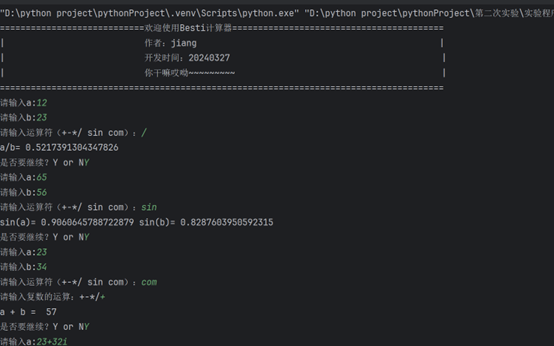
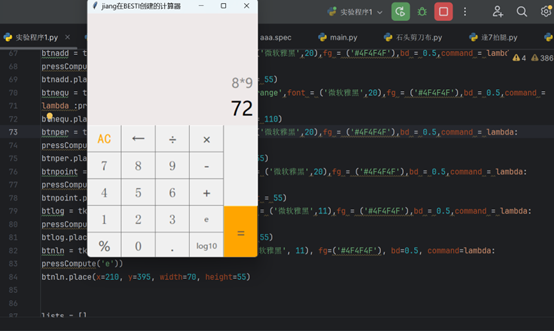
(1) 实验代码的使用
A. 代码1的使用
B. 代码2的使用
肆、 上传到gitee
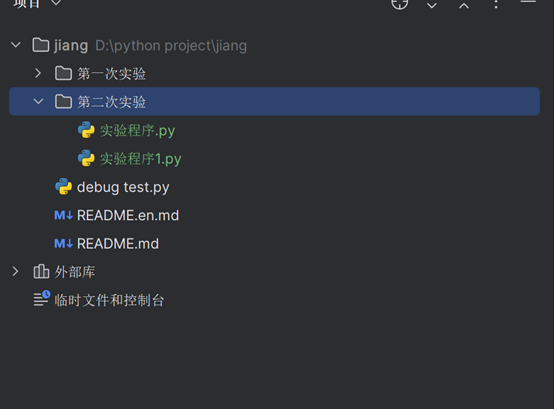
(1) 将所写的py程序移入
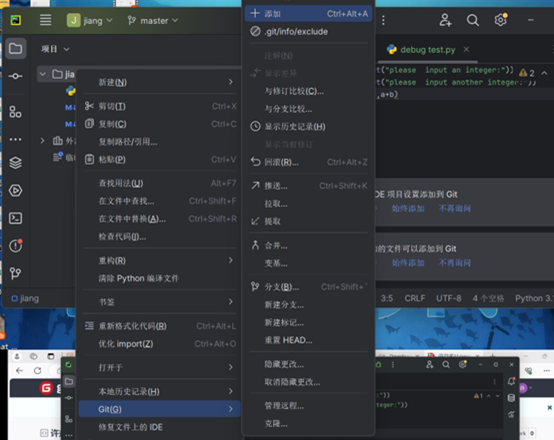
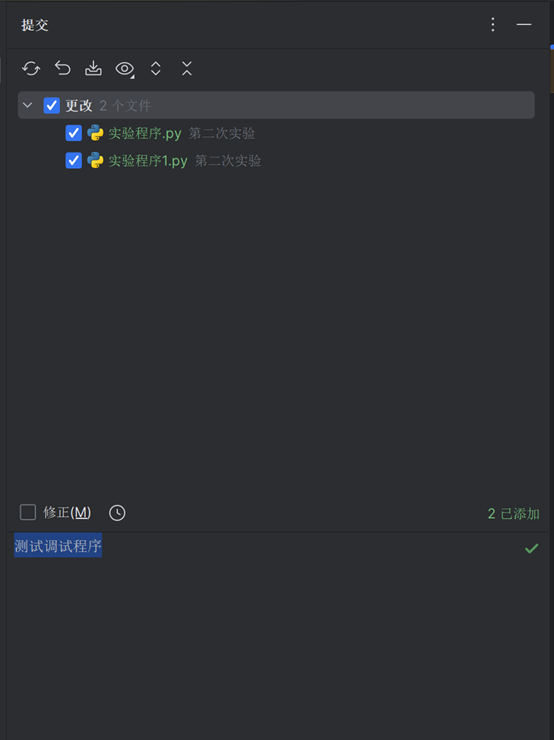
(2) add与comission
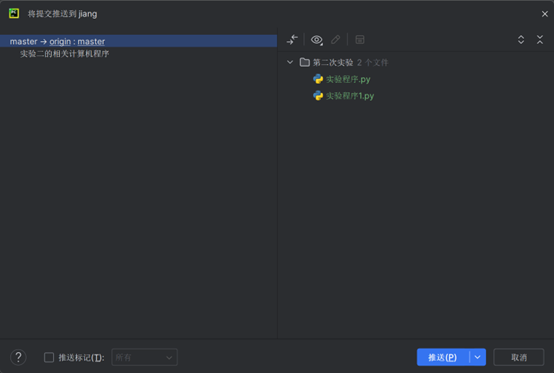
(3) 推送
python真的很强大,丰富的库简单的语法降低了编程难度,但是Python 对于变量的理解与其它许多编程语言有所不同,无需定义类型的特性使得代码简洁且方便,BUT在一定程度上会混淆程序员对变量定义与赋值。
