



93
社区成员
 发帖
发帖 与我相关
与我相关 我的任务
我的任务
 分享
分享
课程:《Python程序设计》
班级:2342
姓名: 罗国淦
学号:20234219
实验教师:王志强
实验日期:2024年5月25日
必修/选修: 公选课
Python综合应用:爬虫、数据处理、可视化、机器学习、神经网络、游戏、网络安全等。
(1)项目方向构思
首先思考要做个什么类型的项目,本着学以致用的理念,再结合自己学委的职责,我决定做一个程序,该程序有两个功能。一是可以根据表格内填写的内容、时间在微信群里提醒同学们作业截止时间。为了减少每次手动运行程序的工作量,程序增加了开机启动选项,可以自由选择是否开机启动。二是可以根据设置输入内容和发送对象进行定时、定次数的批量发送消息。
注1:在实验过程中本人不会的东西都是在网上学习,在下文不过多阐述。
注2:本报告所有展示图片、代码均为编写完成后的结果。
注3:本程序除了一些函数是边做边学的,其余均100%为自己原创。
(2)确定程序结构
为了方便代码的修改,我以界面或功能为标准划分,将整个程序分成了多个文件来写。
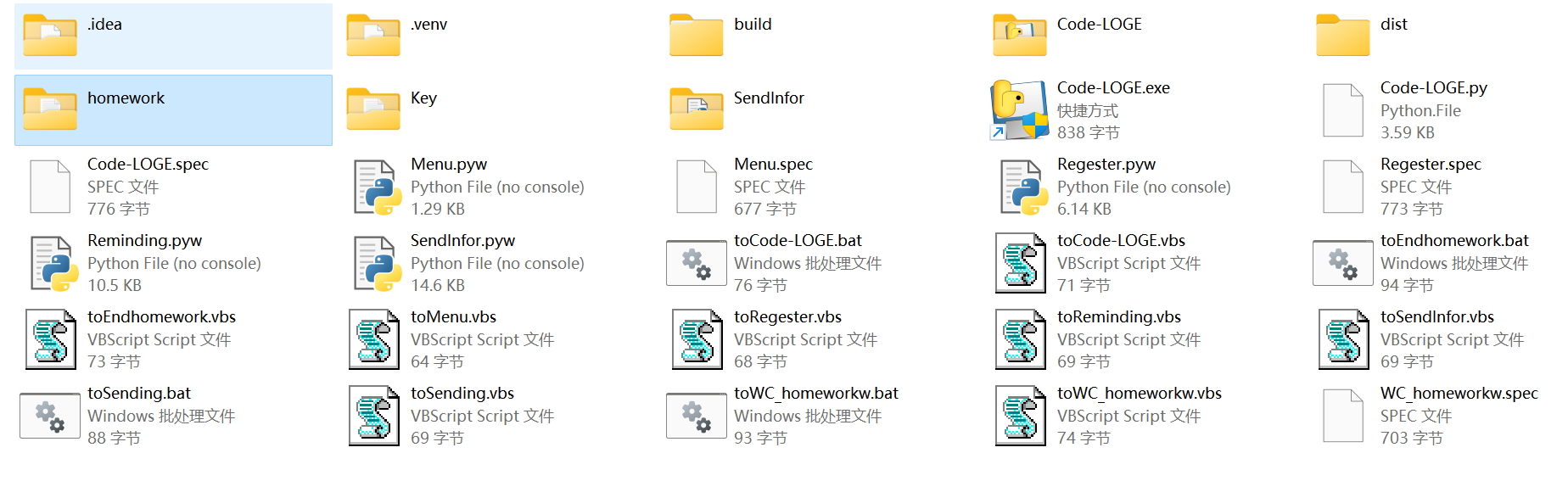
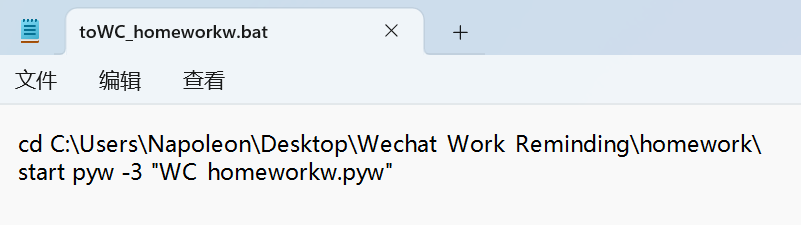
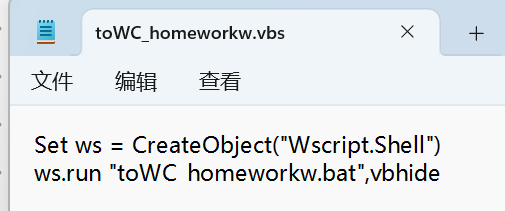
其中,为了方便代码运行时没有黑色控制台出现,将代码文件的“.py”后缀改为“.pyw”。".bat"后缀文件用来启动指定路径下的代码。“.vbs”后缀文件用来保证启动“.bat”后缀文件时没有黑色控制台出现。
“Code-LOGE”文件夹是使用“pyinstaller -w Code-LOGE.py”打包成“exe”文件的首文件。
(3)编写登录界面
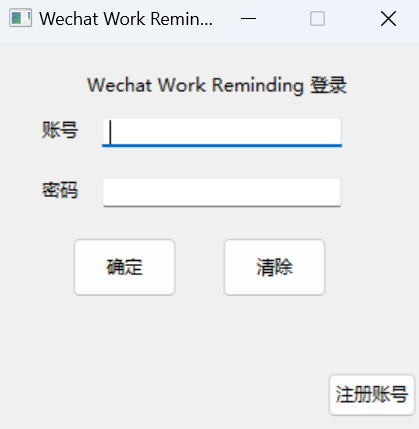
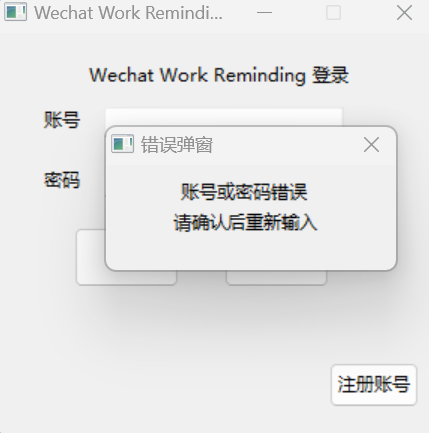
为了发送消息的安全性,防止他人利用本程序乱发消息,我们需要一个登录界面来设置门槛。所以我编写了“Code-LOGE.py”文件作为登录界面,根据储存在txt文件中的信息判断账号和密码是否正确,代码如下:
import wx
import os
import sys
import subprocess

ipath=os.getcwd()
#pyinstaller -w Code-LOGE.py
class MyFrame(wx.Frame):
    def __init__(self):
        wx.Frame.__init__(self, parent=None,id=1,title="Wechat Work Reminding Loging", pos=(500,500), size=(300,300),style=wx.MINIMIZE_BOX | wx.CLOSE_BOX | wx.CAPTION)
        panel=wx.Panel(self)

        self.title=wx.StaticText(panel,label="Wechat Work Reminding 登录",pos=(60,20))
        self.account=wx.StaticText(panel,label="账号",pos=(30,50))
        self.accountinput=wx.TextCtrl(panel,pos=(70,50),size=(160,20),style=wx.TE_LEFT)
        self.secret = wx.StaticText(panel, label="密码", pos=(30, 90))
        self.secretinput = wx.TextCtrl(panel, pos=(70, 90), size=(160, 20), style=wx.TE_LEFT | wx.TE_PASSWORD)
        self.confirm=wx.Button(panel,label="确定",pos=(50,130),size=(70,40))
        self.cancel=wx.Button(panel,label="清除",pos=(150,130),size=(70,40))
        self.regist=wx.Button(panel,label="注册账号",pos=(220,220),size=(60,30))

        self.cancel.Bind(wx.EVT_BUTTON,self.Allcancell)
        self.confirm.Bind(wx.EVT_BUTTON,self.A_C_In)
        self.regist.Bind(wx.EVT_BUTTON,self.Register)
    def Allcancell(self,event):
        self.accountinput.SetValue("")
        self.secretinput.SetValue("")

    def A_C_In(self,event):
        username=self.accountinput.GetValue()
        password=self.secretinput.GetValue()
        Ap=open(ipath+"\A_Store.txt","r")
        Cp=open(ipath+"\C_Store.txt","r")
        Alist=[]
        Clist=[]
        Alist.extend(Ap.read().split())
        Clist.extend(Cp.read().split())
        Ap.close()
        Cp.close()
        username1=" ".join(Alist)
        password1=" ".join(Clist)
        l=len(username1)
        o=0
        o1=0
        o2=0
        o5=1
        o3=0
        o4=0
        username2=""
        password2=""
        for i in range(l):
            if i==l-1:
                o3=1
                o4=1
            if username1[i] != " ":
                username2+=username1[i]
            else:
                o3=1
            if o2<o5:
                while o1<=len(password1)-1 and password1[o1]!=" " and o4!=1:
                    password2+=(password1[o1])
                    o1+=1
                o2+=1
                o1+=1
                o4=1

            if o3==1 and o4==1 and o5==o2:
                if username==username2 and password==password2:
                    o=1
                    break
                o5+=1
                o3=0
                o4=0
                username2=""
                password2=""
        if o==1:
            self.accountinput.SetValue("")
            self.secretinput.SetValue("")
            #frame.Show(False)
            #os.system("Menu\Menu.exe")
            frame.Show(False)
            #os.system("toMenu.vbs")
            subprocess.Popen(["start", "toMenu.vbs"], shell=True)

        else:
            E1TW = wx.Frame(parent=None, id=-1, title="错误弹窗", pos=(500, 500), size=(200, 100),style=wx.CLOSE_BOX | wx.CAPTION)
            panel = wx.Panel(E1TW)
            self.account = wx.StaticText(panel, label="账号或密码错误", pos=(50, 10))
            self.account = wx.StaticText(panel, label="请确认后重新输入", pos=(45, 30))
            self.accountinput.SetValue("")
            self.secretinput.SetValue("")
            E1TW.Show(True)
    def Register(self,event):
        subprocess.Popen(["start", "toRegester.vbs"], shell=True)
if __name__=='__main__':
    app=wx.App()
    frame=MyFrame()
    frame.Show()
    app.MainLoop()
    sys.exit()
本程序中,每部分代码运行时都会首先用os.getcwd()函数获取自己所在路径,并将其存在ipath变量中,后面的文本存储这些也利用了该变量中的路径。这样可以保证无论该程序放在电脑哪个文件夹下都能成功运行。如果写成“C:\XXX”这种固定路径,那么如果移动了程序的位置,就无法成功地储存、读取信息了。
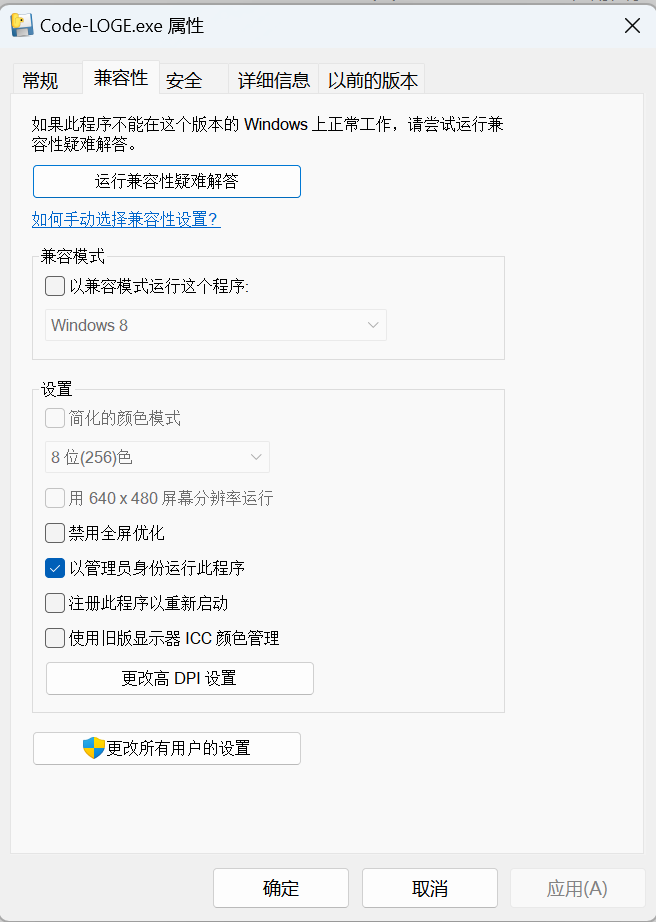
同时,因为该程序可以选择开机启动,所以需要以管理员权限运行,可在“属性”处设置
(4)编写注册界面
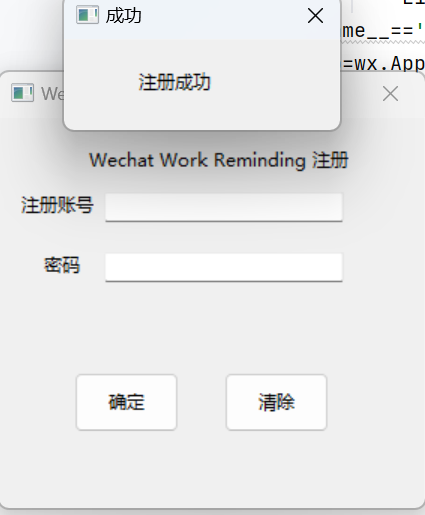
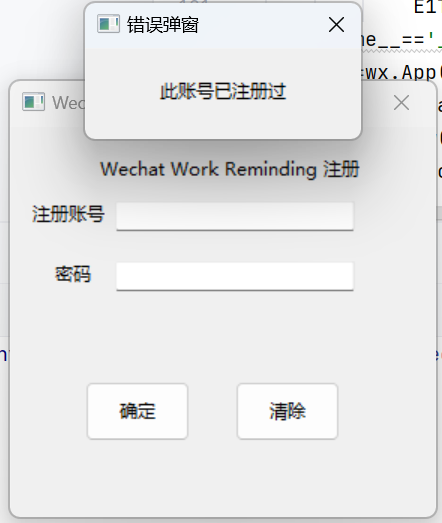
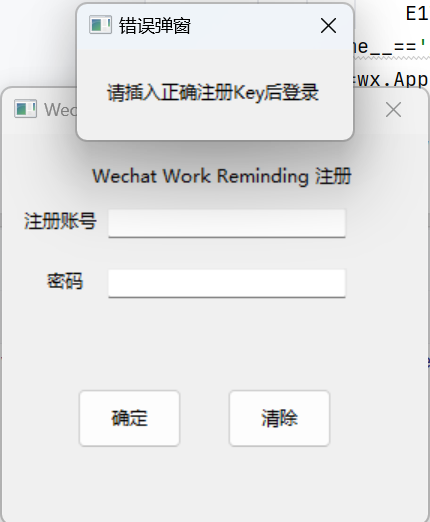
有登陆当然也要有注册。但也不是什么人都能注册,最初我设置了一个注册码,需要输入正确注册码才能成功注册,后面我将注册码改成了一个文件,当文件夹里有这个文件时才能成功注册。代码如下:
import wx
import os
#pyinstaller -w Regester.py
ipath=os.getcwd()
class MyFrame(wx.Frame):
    def Allcancell(self, event):
        self.accountinput.SetValue("")
        self.secretinput.SetValue("")

    def __init__(self):
        wx.Frame.__init__(self,parent=None,id=-1,title="Wechat Work Reminding Register", pos=(500,500), size=(300,300),style=wx.MINIMIZE_BOX | wx.CLOSE_BOX | wx.CAPTION)
        panel=wx.Panel(self)
        self.title = wx.StaticText(panel, label="Wechat Work Reminding 注册", pos=(60, 20))
        self.account = wx.StaticText(panel, label="注册账号", pos=(15, 50))
        self.accountinput = wx.TextCtrl(panel, pos=(70, 50), size=(160, 20), style=wx.TE_LEFT)
        self.secret = wx.StaticText(panel, label="密码", pos=(30, 90))
        self.secretinput = wx.TextCtrl(panel, pos=(70, 90), size=(160, 20), style=wx.TE_LEFT | wx.TE_PASSWORD)
        self.confirm = wx.Button(panel, label="确定", pos=(50, 170), size=(70, 40))
        self.cancel = wx.Button(panel, label="清除", pos=(150, 170), size=(70, 40))
        self.cancel.Bind(wx.EVT_BUTTON, self.Allcancell)
        self.confirm.Bind(wx.EVT_BUTTON, self.Register_confirm)

    def Register_confirm(self,event):
        username=self.accountinput.GetValue()
        password=self.secretinput.GetValue()
        try:
            key1=open(ipath+"\Key\Key.txt","r")
            if(key1.read()=="150"):
                if username == "" or password == "":
                    E1TW = wx.Frame(parent=None, id=-1, title="错误弹窗", pos=(500, 500), size=(200, 100),
                                    style=wx.CLOSE_BOX | wx.CAPTION)
                    panel = wx.Panel(E1TW)
                    self.account = wx.StaticText(panel, label="请确认输入", pos=(50, 20))
                    self.accountinput.SetValue("")
                    self.secretinput.SetValue("")
                    E1TW.Show(True)
                else:
                    username = self.accountinput.GetValue()
                    password = self.secretinput.GetValue()
                    Ap = open(ipath + "\Code-LOGE\A_Store.txt", "r")
                    Cp = open(ipath + "\Code-LOGE\C_Store.txt", "r")
                    Alist = []
                    Clist = []
                    Alist.extend(Ap.read().split())
                    Clist.extend(Cp.read().split())
                    Ap.close()
                    Cp.close()
                    username1 = " ".join(Alist)
                    password1 = " ".join(Clist)
                    l = len(username1)
                    o = 0
                    o1 = 0
                    o2 = 0
                    o5 = 1
                    o3 = 0
                    o4 = 0
                    username2 = ""
                    password2 = ""
                    for i in range(l):
                        if i == l - 1:
                            o3 = 1
                            o4 = 1
                        if username1[i] != " ":
                            username2 += username1[i]
                        else:
                            o3 = 1
                        if o2 < o5:
                            while o1 <= len(password1) - 1 and password1[o1] != " " and o4 != 1:
                                password2 += (password1[o1])
                                o1 += 1
                            o2 += 1
                            o1 += 1
                            o4 = 1

                        if o3 == 1 and o4 == 1 and o5 == o2:
                            if username == username2 and password == password2:
                                o = 1
                                break
                            o5 += 1
                            o3 = 0
                            o4 = 0
                            username2 = ""
                            password2 = ""
                    if o != 1:
                        Ap = open(ipath+"\Code-LOGE\A_Store.txt", "a")
                        Cp = open(ipath+"\Code-LOGE\C_Store.txt", "a")
                        Ap.write(" " + username)
                        Cp.write(" " + password)
                        Ap.close()
                        Cp.close()
                        E1TW = wx.Frame(parent=None, id=-1, title="成功", pos=(500, 500), size=(200, 100),
                                        style=wx.CLOSE_BOX | wx.CAPTION)
                        panel = wx.Panel(E1TW)
                        self.account = wx.StaticText(panel, label="注册成功", pos=(50, 20))
                        self.accountinput.SetValue("")
                        self.secretinput.SetValue("")
                        E1TW.Show(True)
                    else:
                        E1TW = wx.Frame(parent=None, id=-1, title="错误弹窗", pos=(500, 500), size=(200, 100),
                                        style=wx.CLOSE_BOX | wx.CAPTION)
                        panel = wx.Panel(E1TW)
                        self.account = wx.StaticText(panel, label="此账号已注册过", pos=(50, 20))
                        self.accountinput.SetValue("")
                        self.secretinput.SetValue("")
                        E1TW.Show(True)
            else:
                E1TW = wx.Frame(parent=None, id=-1, title="错误弹窗", pos=(500, 500), size=(200, 100),
                                style=wx.CLOSE_BOX | wx.CAPTION)
                panel = wx.Panel(E1TW)
                self.account = wx.StaticText(panel, label="请插入正确注册Key后登录", pos=(20, 20))
                self.accountinput.SetValue("")
                self.secretinput.SetValue("")
                E1TW.Show(True)
        except:
            E1TW = wx.Frame(parent=None, id=-1, title="错误弹窗", pos=(500, 500), size=(200, 100),
                            style=wx.CLOSE_BOX | wx.CAPTION)
            panel = wx.Panel(E1TW)
            self.account = wx.StaticText(panel, label="请插入正确注册Key后登录", pos=(20, 20))
            self.accountinput.SetValue("")
            self.secretinput.SetValue("")
            E1TW.Show(True)
if __name__=='__main__':
    app=wx.App()
    frame=MyFrame()
    frame.Show()
    app.MainLoop()
成功截图如下:
(5)编写菜单界面
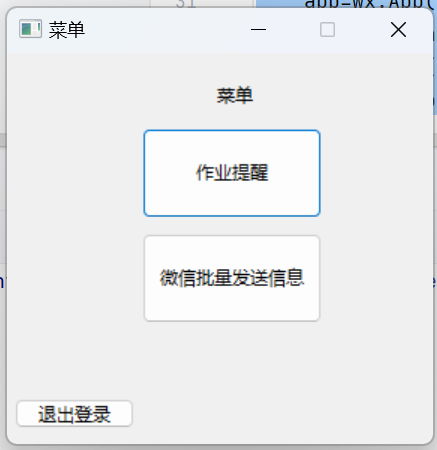
成功登录后进入菜单界面,可在此选择作业提醒功能或者消息批量发送功能,代码如下:
import wx
import os
import subprocess

ipath=os.getcwd()
#pyinstaller -F Menu.py
class OXFrame(wx.Frame):
    def __init__(self):
        wx.Frame.__init__(self, parent=None,id=1,title="菜单", pos=(500,500), size=(300,300),style=wx.MINIMIZE_BOX | wx.CLOSE_BOX | wx.CAPTION)
        panel=wx.Panel(self)

        self.title = wx.StaticText(panel, label="菜单", pos=(140, 20))
        self.button1 = wx.Button(panel, label="作业提醒", pos=(90, 50), size=(120, 60))
        self.button2 = wx.Button(panel, label="微信批量发送信息", pos=(90, 120), size=(120, 60))
        self.button3 = wx.Button(panel, label="退出登录", pos=(5, 230), size=(80, 20))

        self.button1.Bind(wx.EVT_BUTTON, self.homwork)
        self.button2.Bind(wx.EVT_BUTTON, self.WIS)
        self.button3.Bind(wx.EVT_BUTTON, self.buttons3)
    def homwork(self,event):
        self.Show(False)
        subprocess.Popen(["start", "toReminding.vbs"], shell=True)
    def WIS(self,event):
        self.Show(False)
        subprocess.Popen(["start", "toSendInfor.vbs"], shell=True)
    def buttons3(self,event):
        self.Show(False)
        subprocess.Popen(["start", "toCode-LOGE.vbs"], shell=True)

if __name__=='__main__':
    app=wx.App()
    frame=OXFrame()
    frame.Show()
    app.MainLoop()
从菜单界面开始,为了方便登录后的使用,避免更换功能时需要重新登陆,所以设置了“返回”按钮(菜单界面是“退出登录”按钮)。
成果截图如下:
(6)编写作业提醒界面及其设置界面
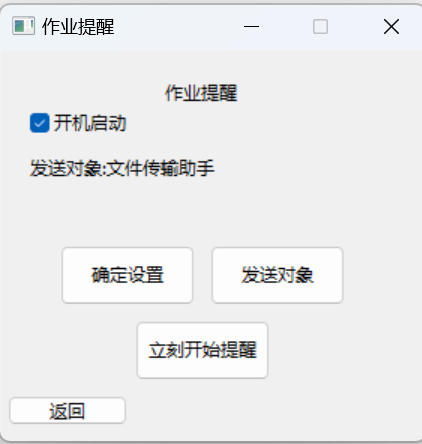
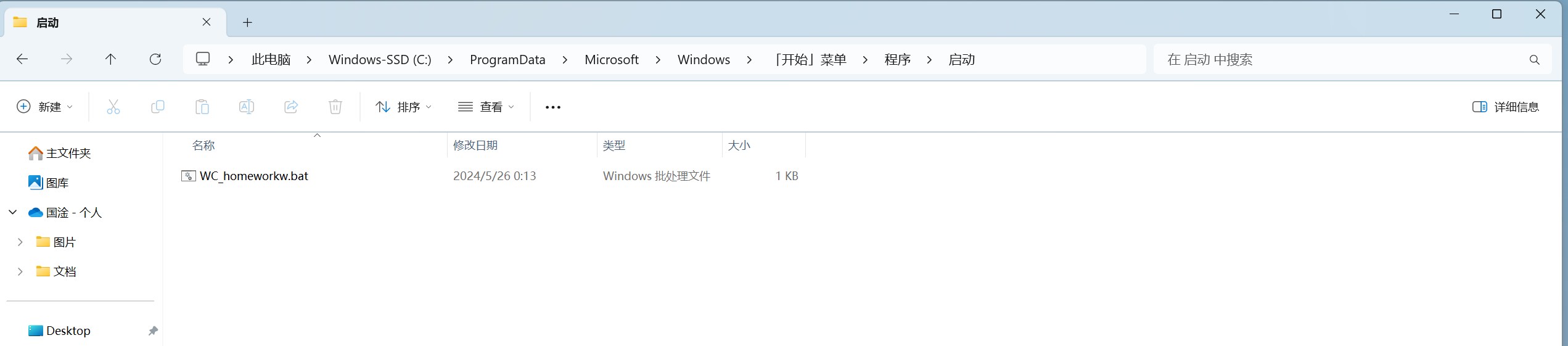
进行作业提醒的设置以及开始按钮。设置分为“是否开机启动”的设置、发送对象的设置。提醒的依据则来自一个表格,其中有手动填写的项目、内容、截止时间,程序运行后自动计算距离截止日期还有几天,分别在距离截止日期前15天、7天、3天、1天以及截止当日发送提醒消息。当勾选开机启动选项后,程序会在C盘一目录下写一个bat文件以达到开机启动效果。
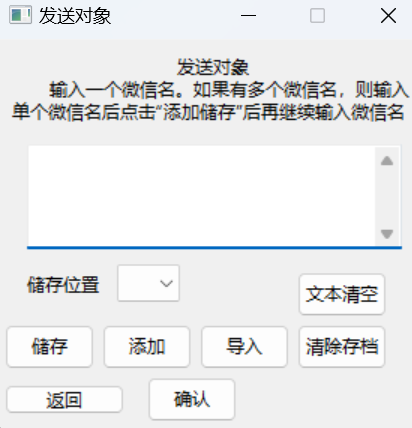
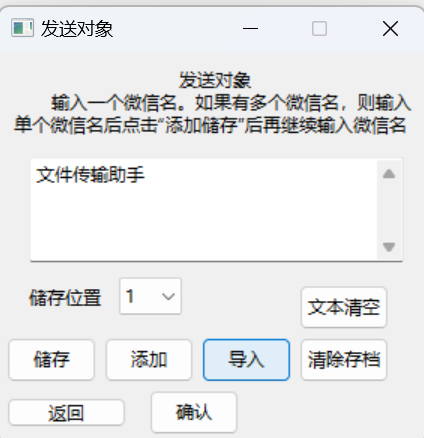
设置界面中可以设置需要提醒的人,并可以进行保存和导入,共有10个存档位。该界面和消息批量发送的对象设置界面一样,后面则不过多介绍。代码如下:
import wx
import os
import subprocess

ipath=os.getcwd()
class homeworkframe(wx.Frame):
    def __init__(self):
        wx.Frame.__init__(self, parent=None, id=1, title="作业提醒", pos=(500, 500), size=(300, 300),
                          style=wx.MINIMIZE_BOX | wx.CLOSE_BOX | wx.CAPTION)
        panel = wx.Panel(self)

        obje=open(ipath+"\homework\object.txt","r")
        self.title = wx.StaticText(panel, label="作业提醒", pos=(110, 20))
        self.checkb1=wx.CheckBox(panel, -1, '开机启动',pos=(20,40), style=wx.RB_GROUP)
        self.button3 = wx.Button(panel, label="确定设置", pos=(40, 130), size=(90, 40))
        self.button11 = wx.Button(panel, label="发送对象", pos=(140, 130), size=(90, 40))
        self.button4 = wx.Button(panel,label="立刻开始提醒", pos=(90, 180), size=(90, 40))
        self.button5 = wx.Button(panel, label="返回", pos=(5, 230), size=(80, 20))
        self.title1= wx.StaticText(panel, label="发送对象:"+obje.read(), pos=(20, 70))
        Swc=open(ipath+"\homework\start with computer.txt", "r+")
        swc=Swc.read()
        if swc=="1":
            self.checkb1.SetValue(True)
        else:self.checkb1.SetValue(False)

        self.button3.Bind(wx.EVT_BUTTON, self.buttons3)
        self.button4.Bind(wx.EVT_BUTTON, self.buttons4)
        self.button5.Bind(wx.EVT_BUTTON, self.buttons5)
        self.button11.Bind(wx.EVT_BUTTON, self.buttons11)
    def buttons3(self,event):
        global ipath
        Swc=open(ipath+"\homework\start with computer.txt", "r")
        Swcl=Swc.read()
        Swc.close()
        if self.checkb1.GetValue()==True and Swcl=="0":
            Swc=open(ipath+"\homework\start with computer.txt", "w")
            Swc.write("1")
            Swc.close()
            cpath=open("C:\\ProgramData\\Microsoft\\Windows\\Start Menu\\Programs\\Startup\\WC_homeworkw.bat","w+")
            if ipath[0]=="C":
                cpath.write("cd "+ipath+"\homework\nstart py -3 WC_homeworkw.pyw")
            else:
                cpath.write(ipath[0]+":\n"+"cd "+ipath+"\nstart py -3 WC_homeworkw.py")
            cpath.close()
            E1TW = wx.Frame(parent=None, id=-1, title="设置", pos=(500, 500), size=(200, 100),
                            style=wx.CLOSE_BOX | wx.CAPTION)
            panel = wx.Panel(E1TW)
            self.account = wx.StaticText(panel, label="设置完成", pos=(70, 20))
            E1TW.Show(True)
        else:
                if self.checkb1.GetValue()==False and Swcl=="1":
                    Swc=open(ipath + "\homework\start with computer.txt", "w")
                    Swc.write("0")
                    Swc.close()
                    os.remove("C:\\ProgramData\\Microsoft\\Windows\\Start Menu\\Programs\\Startup\\WC_homeworkw.bat")
                E1TW = wx.Frame(parent=None, id=-1, title="设置", pos=(500, 500), size=(200, 100),
                                style=wx.CLOSE_BOX | wx.CAPTION)
                panel = wx.Panel(E1TW)
                self.account = wx.StaticText(panel, label="设置完成", pos=(70, 20))
                E1TW.Show(True)
        Swc.close()
    def buttons4(self,event):
        subprocess.Popen(["start", "toWC_homeworkw.vbs"], shell=True)
    def buttons5(self,event):
        self.Show(False)
        subprocess.Popen(["start", "toMenu.vbs"], shell=True)
    def buttons11(self,event):
        self.Show(False)
        frame1=Sendobject()
        frame1.Show(True)
class Sendobject(wx.Frame):
    def __init__(self):

        global lidecivalue
        lidecivalue=""
        wx.Frame.__init__(self, parent=None,id=1,title="发送对象", pos=(500,500), size=(300,300),style=wx.MINIMIZE_BOX | wx.CLOSE_BOX | wx.CAPTION)
        panel=wx.Panel(self)
        self.title1 = wx.StaticText(panel, label="发送对象", pos=(120, 10))
        self.title2 = wx.StaticText(panel, label="输入一个微信名。如果有多个微信名,则输入", pos=(35, 25))
        self.title3 = wx.StaticText(panel, label="单个微信名后点击“添加储存”后再继续输入微信名", pos=(10, 40))
        self.informationinput = wx.TextCtrl(panel, pos=(20, 70), size=(250, 70), style=wx.TE_LEFT | wx.TE_MULTILINE)
        list1 = ["1", "2", "3", "4", "5", "6", "7", "8", "9", "10"]
        self.contxt1 = wx.StaticText(panel, label="储存位置", pos=(20, 155))
        self.lidecide = wx.Choice(panel, -1, choices=list1, pos=(80, 150))
        self.button1 = wx.Button(panel, label="文本清空", pos=(200, 155), size=(60, 30))
        self.button2 = wx.Button(panel, label="储存", pos=(5, 190), size=(60, 30))
        self.button3 = wx.Button(panel, label="添加", pos=(70, 190), size=(60, 30))
        self.button4 = wx.Button(panel, label="导入", pos=(135, 190), size=(60, 30))
        self.button5 = wx.Button(panel, label="清除存档", pos=(200, 190), size=(60, 30))
        self.button6 = wx.Button(panel, label="确认", pos=(100, 225), size=(60, 30))
        self.button10 = wx.Button(panel, label="返回", pos=(5, 230), size=(80, 20))

        self.Bind(wx.EVT_CHOICE, self.KnCh1, self.lidecide)
        self.button1.Bind(wx.EVT_BUTTON, self.buttons1)
        self.button2.Bind(wx.EVT_BUTTON, self.buttons2)
        self.button3.Bind(wx.EVT_BUTTON, self.buttons3)
        self.button4.Bind(wx.EVT_BUTTON, self.buttons4)
        self.button5.Bind(wx.EVT_BUTTON, self.buttons5)
        self.button6.Bind(wx.EVT_BUTTON, self.buttons6)
        self.button10.Bind(wx.EVT_BUTTON, self.buttons10)
    def buttons1(self,event):
        self.informationinput.SetValue("")
    def buttons2(self,event):
        if lidecivalue == "":
            E1TW = wx.Frame(parent=None, id=-1, title="错误弹窗", pos=(500, 500), size=(200, 100),
                            style=wx.CLOSE_BOX | wx.CAPTION)
            panel = wx.Panel(E1TW)
            self.account = wx.StaticText(panel, label="请选择储存位置!", pos=(50, 10))
            E1TW.Show(True)
        else:
            global confirm1
            confirm1 = wx.Frame(parent=None, id=-1, title="储存", pos=(500, 500), size=(200, 150),
                                style=wx.CLOSE_BOX | wx.CAPTION)
            panel = wx.Panel(confirm1)
            self.account = wx.StaticText(panel, label="确认要覆盖该储存位置吗?", pos=(20, 10))
            self.button7 = wx.Button(panel, label="确认", pos=(20, 50), size=(60, 30))
            self.button8 = wx.Button(panel, label="取消", pos=(90, 50), size=(60, 30))
            confirm1.Show(True)
            self.button7.Bind(wx.EVT_BUTTON, self.buttons7)
            self.button8.Bind(wx.EVT_BUTTON, self.buttons8)
    def buttons3(self,event):
        if lidecivalue == "":
            E1TW = wx.Frame(parent=None, id=-1, title="错误弹窗", pos=(500, 500), size=(200, 100),
                            style=wx.CLOSE_BOX | wx.CAPTION)
            panel = wx.Panel(E1TW)
            self.account = wx.StaticText(panel, label="请选择储存位置!", pos=(50, 10))
            E1TW.Show(True)
        else:
            global confirm1
            confirm1 = wx.Frame(parent=None, id=-1, title="添加储存", pos=(500, 500), size=(200, 150),
                                style=wx.CLOSE_BOX | wx.CAPTION)
            panel = wx.Panel(confirm1)
            self.account = wx.StaticText(panel, label="确认要添加吗?", pos=(20, 10))
            self.button9 = wx.Button(panel, label="确认", pos=(20, 50), size=(60, 30))
            self.button8 = wx.Button(panel, label="取消", pos=(90, 50), size=(60, 30))
            confirm1.Show(True)
            self.button9.Bind(wx.EVT_BUTTON, self.buttons9)
            self.button8.Bind(wx.EVT_BUTTON, self.buttons8)
    def buttons4(self,event):
        if lidecivalue=="":
            E1TW = wx.Frame(parent=None, id=-1, title="错误弹窗", pos=(500, 500), size=(200, 100),
                            style=wx.CLOSE_BOX | wx.CAPTION)
            panel = wx.Panel(E1TW)
            self.account = wx.StaticText(panel, label="请选择储存位置!", pos=(50, 10))
            E1TW.Show(True)
        else:
            fstore = open(ipath + "\homework\store\store" + lidecivalue + ".txt", "r")
            a=fstore.read()
            fstore.close()
            if a==" ":
                E1TW = wx.Frame(parent=None, id=-1, title="错误弹窗", pos=(500, 500), size=(200, 100),
                                style=wx.CLOSE_BOX | wx.CAPTION)
                panel = wx.Panel(E1TW)
                self.account = wx.StaticText(panel, label="该存档为空", pos=(50, 10))
                E1TW.Show(True)
            else:
                self.informationinput.SetValue(a)
    def buttons5(self,event):
        if lidecivalue=="":
            E1TW = wx.Frame(parent=None, id=-1, title="错误弹窗", pos=(500, 500), size=(200, 100),
                            style=wx.CLOSE_BOX | wx.CAPTION)
            panel = wx.Panel(E1TW)
            self.account = wx.StaticText(panel, label="请选择储存位置!", pos=(50, 10))
            E1TW.Show(True)
        else:
            fstore = open(ipath + "\homework\store\store" + lidecivalue + ".txt", "w")
            fstore.write("")
            fstore.close()
            E1TW = wx.Frame(parent=None, id=-1, title="成功", pos=(500, 500), size=(200, 100),
                            style=wx.CLOSE_BOX | wx.CAPTION)
            panel = wx.Panel(E1TW)
            self.account = wx.StaticText(panel, label="删除成功!", pos=(70, 10))
            E1TW.Show(True)
    def KnCh1(self,event):
        global lidecivalue
        getlideci=event.GetString()
        lidecivalue=getlideci
    def buttons6(self,event):
        fstore = open(ipath + "\homework\object.txt", "w")
        fstore.write(self.informationinput.GetValue())
        fstore.close()
        frame1 = homeworkframe()
        frame1.Show(True)
        self.Show(False)
    def buttons7(self,event):
        confirm1.Show(False)
        fstore = open(ipath + "\homework\store\store" + lidecivalue + ".txt", "w")
        fstore.write(self.informationinput.GetValue())
        fstore.close()
    def buttons8(self,event):
        confirm1.Show(False)
    def buttons9(self, event):
        confirm1.Show(False)
        fstore = open(ipath + "\homework\store\store" + lidecivalue + ".txt", "r+")
        fstore.seek(0,2)
        fstore.write(self.informationinput.GetValue())
        fstore.close()
        self.informationinput.SetValue("")
    def buttons10(self,event):
        self.Show(False)
        frame2=homeworkframe()
        frame2.Show()
if __name__=='__main__':
    app=wx.App()
    frame=homeworkframe()
    frame.Show()
    app.MainLoop()
点击“确定设置”即可保存“是否开机启动”选项结果。成果截图如下:
import openpyxl
import datetime
import pyautogui
import pyperclip
import time
import os
import subprocess

ipath=os.getcwd()
#pyinstaller -F homework\WC_homeworkw.py

who=""
ty=""
et=-1
a=None
nu=""
op=0
content=""
wha=""
firstopen=0

def get_msg():
    if firstopen==0:
        if et>0:
            if et==15 or et==7 or et==3 or et==1:
                contents="穹妹提醒您:"+str(who)+"的🌟🌟"+str(ty)+"科目🌟🌟“"+str(wha)+"”项目还有🌟"+str(et)+"天🌟截止。该项目序号为:"+str(nu)+"。截止时间为:"+str(content)+"。请注意及时完成(*^▽^*)"  # 空格表示的是下一条短信
        else:
            contents= "穹妹提醒您:"+str(who)+"的🌟🌟"+str(ty)+"科目🌟🌟“"+str(wha)+"”项目今天截止。该项目序号为:"+str(nu)+"。请注意及时完成(*^▽^*)"  # 空格表示的是下一条短信
    else:
        contents="穹妹提醒您:"+str(who)+"今天新加入🌟🌟"+str(ty)+"科目🌟🌟“"+str(wha)+"”项目,还有🌟"+str(et)+"天🌟截止。该项目序号为:"+str(nu)+"。截止时间为:"+str(content)+"。请注意及时完成(*^▽^*)"
    return contents.split(" ")
    #return contents
def send(msg):
    pyperclip.copy(msg)
    pyautogui.hotkey('ctrl', 'v')
    pyautogui.press('enter')

def send_msg(friend):
    global op
    if firstopen != 0 or (firstopen == 0 and et <= 0) or (firstopen == 0 and et > 0 and (et == 15 or et == 7 or et == 3 or et == 1)):
        if op==0:
            op=1
            os.startfile("C:\\Users\Public\Desktop\微信.lnk")
            time.sleep(1)
            pyautogui.hotkey('enter')
            time.sleep(5)
            pyautogui.hotkey('backspace')
            #pyautogui.hotkey('ctrl', 'alt', 'w')
            #time.sleep(1)
            pyautogui.hotkey('ctrl', 'f')
            time.sleep(0.5)
            pyperclip.copy(friend)
            time.sleep(0.7)
            pyautogui.hotkey('ctrl', 'v')
            time.sleep(0.7)
            pyautogui.press('enter')
            #for i in range(1,2):
            for msg in get_msg():
                send(msg)
                pyautogui.hotkey('ctrl','enter')
def get_table():
    global ty
    global who
    global nu
    global content
    global et
    global wha
    global firstopen
    ph=os.getcwd()
    wb = openpyxl.load_workbook(ipath+'\联合学业备忘录.xlsx')

    sheet1 = wb['数学']
    row_num1 = sheet1.max_row
    for row in range(4, row_num1 + 1):
        hi1=sheet1.cell(row, 7)
        content=hi1.value
        oi1=sheet1.cell(row, 9)
        bc=sheet1.cell(row, 8).value
        if content != None and bc!="是":
            if oi1.value == None:
                firstopen = 1
            senwc(content,a)
            if oi1.value!= et and et>=0:
                oi1.value =et
                wi=sheet1.cell(row, 2)
                wha=sheet1.cell(row, 3).value
                who=wi.value
                nu=row-3
                ty="数学"
                for i in objectslist:
                    send_msg(i)
            firstopen = 0

    sheet2 = wb['英语']
    row_num2 = sheet2.max_row
    for row in range(4, row_num2 + 1):
        hi2 = sheet2.cell(row, 7)
        content = hi2.value
        oi2 = sheet2.cell(row, 9)
        bc = sheet2.cell(row, 8).value
        if content != None and bc != "是":
            if oi2.value == None:
                firstopen = 1
            senwc(content,a)
            if oi2.value != et and et>=0:
                oi2.value = et
                wi = sheet2.cell(row, 2)
                wha = sheet2.cell(row, 3).value
                who = wi.value
                nu = row-3
                ty = "英语"
                for i in objectslist:
                    send_msg(i)
            firstopen = 0

    sheet3 = wb['社会学概论']
    row_num3 = sheet3.max_row
    for row in range(4, row_num3 + 1):
        hi3 = sheet3.cell(row, 7)
        content = hi3.value
        oi3 = sheet3.cell(row, 9)
        bc = sheet3.cell(row, 8).value
        if content != None and bc != "是":
            if oi3.value == None:
                firstopen = 1
            senwc(content,a)
            if oi3.value != et and et>=0:
                oi3.value = et
                wi = sheet3.cell(row, 2)
                wha = sheet3.cell(row, 3).value
                who = wi.value
                nu = row-3
                ty = "社会学概论"
                for i in objectslist:
                    send_msg(i)
            firstopen = 0

    sheet4 = wb['管理学原理']
    row_num4 = sheet4.max_row
    for row in range(4, row_num4 + 1):
        hi4 = sheet4.cell(row, 7)
        content = hi4.value
        oi4 = sheet4.cell(row, 9)
        bc = sheet4.cell(row, 8).value
        if content != None and bc != "是":
            if oi4.value == None:
                firstopen = 1
            senwc(content,a)
            if oi4.value != et and et >= 0:
                oi4.value = et
                wi = sheet4.cell(row, 2)
                wha = sheet4.cell(row, 3).value
                who = wi.value
                nu = row-3
                ty = "管理学原理"
                for i in objectslist:
                    send_msg(i)
            firstopen = 0

    sheet5 = wb['政治学原理']
    row_num5 = sheet5.max_row
    for row in range(4, row_num5 + 1):
        hi5 = sheet5.cell(row, 7)
        content = hi5.value
        oi5 = sheet5.cell(row, 9)
        bc = sheet5.cell(row, 8).value
        if content != None and bc != "是":
            if oi5.value == None:
                firstopen = 1
            senwc(content,a)
            if oi5.value != et and et>=0:
                oi5.value=et
                wi = sheet5.cell(row, 2)
                wha = sheet5.cell(row, 3).value
                who = wi.value
                nu = row-3
                ty = "政治学原理"
                for i in objectslist:
                    send_msg(i)
            firstopen = 0

    sheet6 = wb['中国近现代史纲要']
    row_num6 = sheet6.max_row
    for row in range(4, row_num6 + 1):
        hi6 = sheet6.cell(row, 7)
        content = hi6.value
        oi6 = sheet6.cell(row, 9)
        bc = sheet6.cell(row, 8).value
        if content != None and bc != "是":
            if oi6.value == None:
                firstopen = 1
            senwc(content,a)
            if oi6.value != et and et>=0:
                oi6.value = et
                wi = sheet6.cell(row, 2)
                wha = sheet6.cell(row, 3).value
                who = wi.value
                nu = row-3
                ty = "中国近现代史纲要"
                for i in objectslist:
                    send_msg(i)
            firstopen = 0

    sheet7 = wb['体育']
    row_num7 = sheet7.max_row
    for row in range(4, row_num7 + 1):
        hi7 = sheet7.cell(row, 7)
        content = hi7.value
        oi7 = sheet7.cell(row, 9)
        bc = sheet7.cell(row, 8).value
        if content != None and bc != "是":
            if oi7.value == None:
                firstopen = 1
            senwc(content,a)
            if oi7.value != et and et>=0:
                oi7.value = et
                wi = sheet7.cell(row, 2)
                wha = sheet7.cell(row, 3).value
                who = wi.value
                nu = row-3
                ty = "体育"
                for i in objectslist:
                    send_msg(i)
            firstopen = 0

    sheet8 = wb['Python程序设计']
    row_num8 = sheet8.max_row
    for row in range(4, row_num8 + 1):
        hi8 = sheet8.cell(row, 7)
        content = hi8.value
        oi8 = sheet8.cell(row, 9)
        bc = sheet8.cell(row, 8).value
        if content != None and bc != "是":
            if oi8.value == None:
                firstopen = 1
            senwc(content,a)
            if oi8.value != et and et>=0:
                oi8.value = et
                wi = sheet8.cell(row, 2)
                wha = sheet8.cell(row, 3).value
                who = wi.value
                nu = row-3
                ty = "Python程序设计"
                for i in objectslist:
                    send_msg(i)
            firstopen = 0

    sheet9 = wb['心理健康']
    row_num9 = sheet9.max_row
    for row in range(4, row_num9 + 1):
        hi9 = sheet9.cell(row, 7)
        content = hi9.value
        oi9 = sheet9.cell(row, 9)
        bc = sheet9.cell(row, 8).value
        if content != None and bc != "是":
            if oi9.value==None:
                firstopen=1
            senwc(content,a)
            if oi9.value != et and et>=0:
                oi9.value = et
                wi = sheet9.cell(row, 2)
                wha = sheet9.cell(row, 3).value
                who = wi.value
                nu = row - 3
                ty = "心理健康"
                for i in objectslist:
                    send_msg(i)
            firstopen=0

    sheet10 = wb['其他']
    row_num10 = sheet10.max_row
    for row in range(4, row_num10 + 1):
        hi10 = sheet10.cell(row, 7)
        content = hi10.value
        oi10 = sheet10.cell(row, 9)
        bc = sheet10.cell(row, 8).value
        if content != None and bc != "是":
            if oi10.value == None:
                firstopen = 1
            senwc(content,a)
            if oi10.value != et and et>=0:
                oi10.value = et
                wi = sheet10.cell(row, 2)
                wha = sheet10.cell(row, 3).value
                who = wi.value
                nu = row - 3
                ty = "学习、竞赛活动"
                for i in objectslist:
                    send_msg(i)
            firstopen = 0
    pyautogui.hotkey('Ctrl', 'S')
    wb.save('联合学业备忘录.xlsx')
    subprocess.Popen(["start", "toEndhomework.vbs"], shell=True)
def get_time():
    global s
    now = datetime.datetime.now()
    s = now.strftime('%Y%m%d')
    return s

def resetting():
    get_table()

def senwc(tab,am):
    global et
    y1=tab//10000
    tab-=y1*10000
    m1=tab//100
    tab-=m1*100
    d1=tab
    y2 = am // 10000
    am -= y2 * 10000
    m2 = am // 100
    am -= m2 * 100
    d2 = am
    yx=y1-y2
    mx=m1-m2
    dx=d1-d2
    if y2/4==0:i=366
    else:i=365
    if m2==2 and i==366:o=29
    elif m2==2 and i==365:o=28
    elif m2==1 or m2==3 or m2==5 or m2==7 or m2==8 or m2==10 or m2==12:o=31
    else:o=30
    et=yx*i+mx*o+dx

if __name__ == '__main__':
    ipath=os.getcwd()
    objectl = open("object.txt")
    objects = objectl.read()
    objectslist = list(objects.split(" "))
    a=int(get_time())
    resetting()
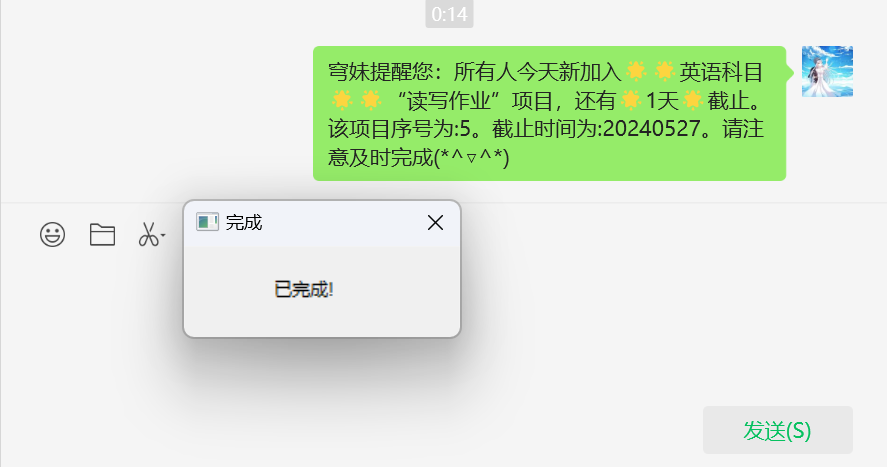
作业提醒和消息批量发送程序都一样,因为是模拟键盘输入进行操作,当开始打开微信、发送信息时请勿操作电脑。成果截图如下:
(8)编写批量发送消息界面以及三个设置界面
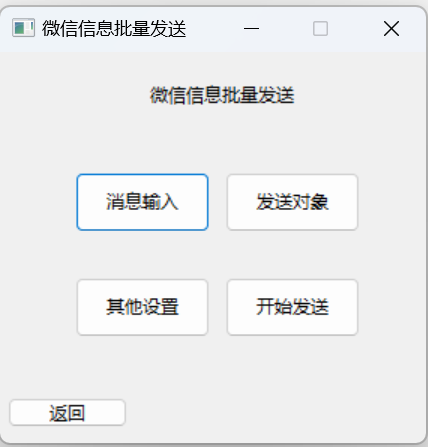
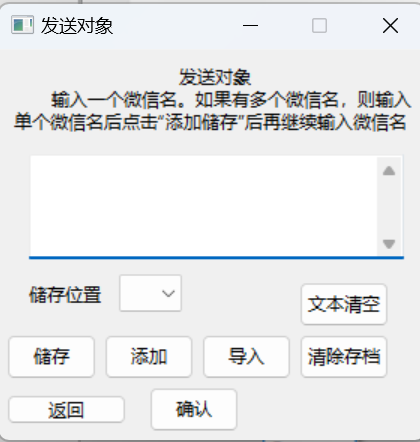
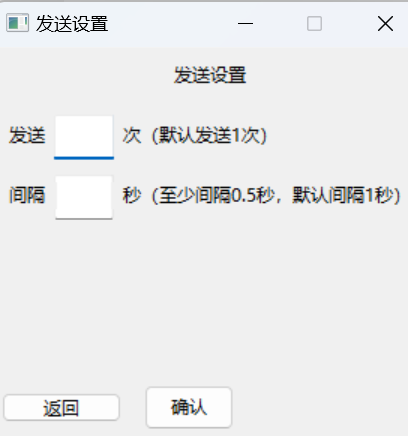
分为消息输入、发送对象输入、其他设置以及开始运行按钮。输入内容、发送对象均可进行本地保存。代码如下:
import wx
import os
import subprocess

ipath=os.getcwd()
class WICP(wx.Frame):
    def __init__(self):
        wx.Frame.__init__(self, parent=None, id=1, title="微信信息批量发送", pos=(500, 500), size=(300, 300),
                          style=wx.MINIMIZE_BOX | wx.CLOSE_BOX | wx.CAPTION)
        panel = wx.Panel(self)
        self.title = wx.StaticText(panel, label="微信信息批量发送", pos=(100, 20))
        self.button1 = wx.Button(panel, label="消息输入", pos=(50, 80), size=(90, 40))
        self.button2 = wx.Button(panel, label="发送对象", pos=(150, 80), size=(90, 40))
        self.button3 = wx.Button(panel, label="其他设置", pos=(50, 150), size=(90, 40))
        self.button4 = wx.Button(panel, label="开始发送", pos=(150, 150), size=(90, 40))
        self.button5 = wx.Button(panel, label="返回", pos=(5, 230), size=(80, 20))

        self.button1.Bind(wx.EVT_BUTTON, self.buttons1)
        self.button2.Bind(wx.EVT_BUTTON, self.buttons2)
        self.button3.Bind(wx.EVT_BUTTON, self.buttons3)
        self.button4.Bind(wx.EVT_BUTTON, self.buttons4)
        self.button5.Bind(wx.EVT_BUTTON, self.buttons5)
    def buttons1(self,event):
        self.Show(False)
        frame2=Informationinput()
        frame2.Show()
    def buttons2(self,event):
        self.Show(False)
        frame2=Sendobject()
        frame2.Show()
    def buttons3(self,event):
        self.Show(False)
        frame3=Setting()
        frame3.Show()
    def buttons4(self,event):
        self.Show(False)
        subprocess.Popen(["start", "toSending.vbs"], shell=True)
    def buttons5(self,event):
        self.Show(False)
        subprocess.Popen(["start", "toMenu.vbs"], shell=True)
class Informationinput(wx.Frame):
    def __init__(self):
        global lidecivalue
        lidecivalue=""
        wx.Frame.__init__(self, parent=None,id=1,title="发送消息", pos=(500,500), size=(300,300),style=wx.MINIMIZE_BOX | wx.CLOSE_BOX | wx.CAPTION)
        panel=wx.Panel(self)
        self.title = wx.StaticText(panel, label="发送消息", pos=(110, 20))
        self.informationinput = wx.TextCtrl(panel, pos=(20, 50), size=(250, 70), style=wx.TE_LEFT | wx.TE_MULTILINE)
        list1=["1","2","3","4","5","6","7","8","9","10"]
        self.contxt1 = wx.StaticText(panel, label="储存位置", pos=(20, 135))
        self.lidecide= wx.Choice(panel, -1, choices=list1,pos=(80,130))
        self.button8=wx.Button(panel, label="文本清空", pos=(200, 135), size=(60, 30))
        self.button4=wx.Button(panel, label="储存", pos=(5, 180), size=(80, 40))
        self.button9=wx.Button(panel, label="导入", pos=(100, 180), size=(80, 40))
        self.button5=wx.Button(panel, label="确认", pos=(195, 180), size=(80, 40))
        self.button10=wx.Button(panel, label="返回", pos=(5, 230), size=(80, 20))

        self.button4.Bind(wx.EVT_BUTTON, self.buttons4)
        self.Bind(wx.EVT_CHOICE, self.KnCh1, self.lidecide)  # 绑定事件
        self.button5.Bind(wx.EVT_BUTTON, self.buttons5)
        self.button8.Bind(wx.EVT_BUTTON, self.buttons8)
        self.button9.Bind(wx.EVT_BUTTON, self.buttons9)
        self.button10.Bind(wx.EVT_BUTTON, self.buttons10)
    def KnCh1(self,event):
        global lidecivalue
        getlideci=event.GetString()
        lidecivalue=getlideci
    def buttons4(self,event):
        if lidecivalue=="":
            E1TW = wx.Frame(parent=None, id=-1, title="错误弹窗", pos=(500, 500), size=(200, 100),
                            style=wx.CLOSE_BOX | wx.CAPTION)
            panel = wx.Panel(E1TW)
            self.account = wx.StaticText(panel, label="请选择储存位置!", pos=(50, 10))
            E1TW.Show(True)
        else:
            global confirm1
            confirm1 = wx.Frame(parent=None, id=-1, title="储存", pos=(500, 500), size=(200, 150),
                            style=wx.CLOSE_BOX | wx.CAPTION)
            panel = wx.Panel(confirm1)
            self.account = wx.StaticText(panel, label="确认要覆盖该储存位置吗?", pos=(20, 10))
            self.button6 = wx.Button(panel, label="确认", pos=(20, 50), size=(60, 30))
            self.button7 = wx.Button(panel, label="取消", pos=(90, 50), size=(60, 30))
            confirm1.Show(True)
            self.button6.Bind(wx.EVT_BUTTON, self.buttons6)
            self.button7.Bind(wx.EVT_BUTTON, self.buttons7)
    def buttons5(self,event):
        fstore=open(ipath+"\SendInfor\context.txt","w")
        fstore.write(self.informationinput.GetValue())
        fstore.close()
        frame1=WICP()
        frame1.Show(True)
        self.Show(False)
    def buttons6(self,event):
        confirm1.Show(False)
        fstore=open(ipath+"\SendInfor\contextstore\store"+lidecivalue+".txt","w")
        fstore.write(self.informationinput.GetValue())
        fstore.close()
    def buttons7(self,event):
        confirm1.Show(False)
    def buttons8(self,event):
        self.informationinput.SetValue("")
    def buttons9(self,event):
        if lidecivalue=="":
            E1TW = wx.Frame(parent=None, id=-1, title="错误弹窗", pos=(500, 500), size=(200, 100),
                            style=wx.CLOSE_BOX | wx.CAPTION)
            panel = wx.Panel(E1TW)
            self.account = wx.StaticText(panel, label="请选择储存位置!", pos=(50, 10))
            E1TW.Show(True)
        else:
            fstore = open(ipath + "\SendInfor\contextstore\store" + lidecivalue + ".txt", "r")
            a=fstore.read()
            fstore.close()
            if a==" ":
                E1TW = wx.Frame(parent=None, id=-1, title="错误弹窗", pos=(500, 500), size=(200, 100),
                                style=wx.CLOSE_BOX | wx.CAPTION)
                panel = wx.Panel(E1TW)
                self.account = wx.StaticText(panel, label="该存档为空", pos=(50, 10))
                E1TW.Show(True)
            else:
                self.informationinput.SetValue(a)
    def buttons10(self,event):
        self.Show(False)
        frame2=WICP()
        frame2.Show()
class Sendobject(wx.Frame):
    def __init__(self):
        global lidecivalue
        lidecivalue=""
        wx.Frame.__init__(self, parent=None,id=1,title="发送对象", pos=(500,500), size=(300,300),style=wx.MINIMIZE_BOX | wx.CLOSE_BOX | wx.CAPTION)
        panel=wx.Panel(self)

        self.title1 = wx.StaticText(panel, label="发送对象", pos=(120, 10))
        self.title2 = wx.StaticText(panel, label="输入一个微信名。如果有多个微信名,则输入", pos=(35, 25))
        self.title3 = wx.StaticText(panel, label="单个微信名后点击“添加储存”后再继续输入微信名", pos=(10, 40))
        self.informationinput = wx.TextCtrl(panel, pos=(20, 70), size=(250, 70), style=wx.TE_LEFT | wx.TE_MULTILINE)
        list1 = ["1", "2", "3", "4", "5", "6", "7", "8", "9", "10"]
        self.contxt1 = wx.StaticText(panel, label="储存位置", pos=(20, 155))
        self.lidecide = wx.Choice(panel, -1, choices=list1, pos=(80, 150))
        self.button1 = wx.Button(panel, label="文本清空", pos=(200, 155), size=(60, 30))
        self.button2 = wx.Button(panel, label="储存", pos=(5, 190), size=(60, 30))
        self.button3 = wx.Button(panel, label="添加", pos=(70, 190), size=(60, 30))
        self.button4 = wx.Button(panel, label="导入", pos=(135, 190), size=(60, 30))
        self.button5 = wx.Button(panel, label="清除存档", pos=(200, 190), size=(60, 30))
        self.button6 = wx.Button(panel, label="确认", pos=(100, 225), size=(60, 30))
        self.button10 = wx.Button(panel, label="返回", pos=(5, 230), size=(80, 20))

        self.Bind(wx.EVT_CHOICE, self.KnCh1, self.lidecide)
        self.button1.Bind(wx.EVT_BUTTON, self.buttons1)
        self.button2.Bind(wx.EVT_BUTTON, self.buttons2)
        self.button3.Bind(wx.EVT_BUTTON, self.buttons3)
        self.button4.Bind(wx.EVT_BUTTON, self.buttons4)
        self.button5.Bind(wx.EVT_BUTTON, self.buttons5)
        self.button6.Bind(wx.EVT_BUTTON, self.buttons6)
        self.button10.Bind(wx.EVT_BUTTON, self.buttons10)
    def buttons1(self,event):
        self.informationinput.SetValue("")
    def buttons2(self,event):
        if lidecivalue == "":
            E1TW = wx.Frame(parent=None, id=-1, title="错误弹窗", pos=(500, 500), size=(200, 100),
                            style=wx.CLOSE_BOX | wx.CAPTION)
            panel = wx.Panel(E1TW)
            self.account = wx.StaticText(panel, label="请选择储存位置!", pos=(50, 10))
            E1TW.Show(True)
        else:
            global confirm1
            confirm1 = wx.Frame(parent=None, id=-1, title="储存", pos=(500, 500), size=(200, 150),
                                style=wx.CLOSE_BOX | wx.CAPTION)
            panel = wx.Panel(confirm1)
            self.account = wx.StaticText(panel, label="确认要覆盖该储存位置吗?", pos=(20, 10))
            self.button7 = wx.Button(panel, label="确认", pos=(20, 50), size=(60, 30))
            self.button8 = wx.Button(panel, label="取消", pos=(90, 50), size=(60, 30))
            confirm1.Show(True)
            self.button7.Bind(wx.EVT_BUTTON, self.buttons7)
            self.button8.Bind(wx.EVT_BUTTON, self.buttons8)
    def buttons3(self,event):
        if lidecivalue == "":
            E1TW = wx.Frame(parent=None, id=-1, title="错误弹窗", pos=(500, 500), size=(200, 100),
                            style=wx.CLOSE_BOX | wx.CAPTION)
            panel = wx.Panel(E1TW)
            self.account = wx.StaticText(panel, label="请选择储存位置!", pos=(50, 10))
            E1TW.Show(True)
        else:
            global confirm1
            confirm1 = wx.Frame(parent=None, id=-1, title="添加储存", pos=(500, 500), size=(200, 150),
                                style=wx.CLOSE_BOX | wx.CAPTION)
            panel = wx.Panel(confirm1)
            self.account = wx.StaticText(panel, label="确认要添加吗?", pos=(20, 10))
            self.button9 = wx.Button(panel, label="确认", pos=(20, 50), size=(60, 30))
            self.button8 = wx.Button(panel, label="取消", pos=(90, 50), size=(60, 30))
            confirm1.Show(True)
            self.button9.Bind(wx.EVT_BUTTON, self.buttons9)
            self.button8.Bind(wx.EVT_BUTTON, self.buttons8)
    def buttons4(self,event):
        if lidecivalue=="":
            E1TW = wx.Frame(parent=None, id=-1, title="错误弹窗", pos=(500, 500), size=(200, 100),
                            style=wx.CLOSE_BOX | wx.CAPTION)
            panel = wx.Panel(E1TW)
            self.account = wx.StaticText(panel, label="请选择储存位置!", pos=(50, 10))
            E1TW.Show(True)
        else:
            fstore = open(ipath + "\SendInfor\objectstore\store" + lidecivalue + ".txt", "r")
            a=fstore.read()
            fstore.close()
            if a==" ":
                E1TW = wx.Frame(parent=None, id=-1, title="错误弹窗", pos=(500, 500), size=(200, 100),
                                style=wx.CLOSE_BOX | wx.CAPTION)
                panel = wx.Panel(E1TW)
                self.account = wx.StaticText(panel, label="该存档为空", pos=(50, 10))
                E1TW.Show(True)
            else:
                self.informationinput.SetValue(a)
    def buttons5(self,event):
        if lidecivalue=="":
            E1TW = wx.Frame(parent=None, id=-1, title="错误弹窗", pos=(500, 500), size=(200, 100),
                            style=wx.CLOSE_BOX | wx.CAPTION)
            panel = wx.Panel(E1TW)
            self.account = wx.StaticText(panel, label="请选择储存位置!", pos=(50, 10))
            E1TW.Show(True)
        else:
            fstore = open(ipath + "\SendInfor\objectstore\store" + lidecivalue + ".txt", "w")
            fstore.write("")
            fstore.close()
            E1TW = wx.Frame(parent=None, id=-1, title="成功", pos=(500, 500), size=(200, 100),
                            style=wx.CLOSE_BOX | wx.CAPTION)
            panel = wx.Panel(E1TW)
            self.account = wx.StaticText(panel, label="删除成功!", pos=(70, 10))
            E1TW.Show(True)
    def KnCh1(self,event):
        global lidecivalue
        getlideci=event.GetString()
        lidecivalue=getlideci
    def buttons6(self,event):
        fstore = open(ipath + "\SendInfor\object.txt", "w")
        fstore.write(self.informationinput.GetValue())
        fstore.close()
        frame1 = WICP()
        frame1.Show(True)
        self.Show(False)
    def buttons7(self,event):
        confirm1.Show(False)
        fstore = open(ipath + "\SendInfor\objectstore\store" + lidecivalue + ".txt", "w")
        fstore.write(self.informationinput.GetValue())
        fstore.close()
    def buttons8(self,event):
        confirm1.Show(False)
    def buttons9(self, event):
        confirm1.Show(False)
        fstore = open(ipath + "\SendInfor\objectstore\store" + lidecivalue + ".txt", "r+")
        fstore.seek(0,2)
        fstore.write(self.informationinput.GetValue())
        fstore.close()
        self.informationinput.SetValue("")
    def buttons10(self,event):
        self.Show(False)
        frame2=WICP()
        frame2.Show()
class Setting(wx.Frame):
    def __init__(self):
        wx.Frame.__init__(self, parent=None,id=1,title="发送设置", pos=(500,500), size=(300,300),style=wx.MINIMIZE_BOX | wx.CLOSE_BOX | wx.CAPTION)
        panel=wx.Panel(self)

        self.title1 = wx.StaticText(panel, label="发送设置", pos=(120, 10))
        self.con1=wx.StaticText(panel, label="发送             次(默认发送1次)", pos=(10, 50))
        self.inpution1=wx.TextCtrl(panel, pos=(40, 45), size=(40, 30), style=wx.TE_LEFT)
        self.con2=wx.StaticText(panel, label="间隔             秒(至少间隔0.5秒,默认间隔1秒)", pos=(10, 90))
        self.inpution2=wx.TextCtrl(panel, pos=(40, 85), size=(40, 30), style=wx.TE_LEFT)
        self.button1 = wx.Button(panel, label="确认", pos=(100, 225), size=(60, 30))
        self.button2 = wx.Button(panel, label="返回", pos=(5, 230), size=(80, 20))

        self.button1.Bind(wx.EVT_BUTTON, self.buttons1)
        self.button2.Bind(wx.EVT_BUTTON, self.buttons2)
    def buttons1(self,event):
        ssotre2=open(ipath + "\SendInfor\waittime.txt", "w")
        ssotre1=open(ipath + "\SendInfor\sendnumber.txt", "w")
        ssotre1.write(self.inpution1.GetValue())
        ssotre2.write(self.inpution2.GetValue())
        ssotre1.close()
        ssotre2.close()
        self.Show(False)
        frame2=WICP()
        frame2.Show()
    def buttons2(self,event):
        self.Show(False)
        frame2=WICP()
        frame2.Show()
if __name__=='__main__':
    app=wx.App()
    frame1=WICP()
    frame1.Show()
    app.MainLoop()
成果截图如下:
(9)编写发送程序
与作业提醒功能大同小异,代码如下:
import wx
import os
import pyautogui
import pyperclip
import time
import subprocess
def sendl(u):
    import pyautogui
    import pyperclip
    pyperclip.copy(u)
    pyautogui.hotkey('ctrl', 'v')
    pyautogui.press('enter')
    del pyautogui
    del pyperclip
class OXFrame(wx.Frame):
    def __init__(self):
        wx.Frame.__init__(self,parent=None, id=-1, title="错误弹窗", pos=(500, 500), size=(250, 150),
                        style=wx.CLOSE_BOX | wx.CAPTION)
        panel=wx.Panel(self)
        account1 = wx.StaticText(panel, label="请重新填写发送内容", pos=(45, 10))
        account2 = wx.StaticText(panel, label="和发送对象!", pos=(10, 30))

        subprocess.Popen(["start", "toSendInfor.vbs"], shell=True)
        self.Show(True)
if __name__ == '__main__':
    ipath=os.getcwd()
    cs=open(ipath+"\context.txt","r")
    contexts=cs.read()
    cs.close()
    object=open(ipath+"\object.txt","r")
    objects=object.read()
    object.close()
    wt=open(ipath+"\waittime.txt","r")
    wts=wt.read()
    wt.close()
    sendnu=open(ipath+"\sendnumber.txt","r")
    sends=sendnu.read()
    sendnu.close()
    if wts=="":
        wts=1
    if sends=="":
        sends=1
    if contexts=="" or objects=="":
        app = wx.App()
        frame = OXFrame()
        frame.Show()
        app.MainLoop()
    else:
        objectslist=list(objects.split(" "))
        contextslist=list(contexts.split("\n"))
        #subprocess.Popen(["start", "toSendInfor.vbs"], shell=True)
        os.startfile("C:\\Users\Public\Desktop\微信.lnk")
        time.sleep(1)
        pyautogui.hotkey('enter')
        time.sleep(5)
        os.startfile("C:\\Users\Public\Desktop\微信.lnk")
        pyautogui.hotkey('backspace')
        pyautogui.hotkey('ctrl', 'f')
        time.sleep(0.5)
        for ij in range(int(sends)):
            for j in objectslist:
                pyperclip.copy(j)
                time.sleep(0.7)
                pyautogui.hotkey('ctrl', 'v')
                time.sleep(0.7)
                pyautogui.press('enter')
                for u in contextslist:
                    sendl(u)
                    pyautogui.hotkey('ctrl', 'enter')
            time.sleep(int(wts))
    cs = open(ipath + "\context.txt", "w")
    cs.write("")
    cs.close()
    object = open(ipath + "\object.txt", "w")
    object.write("")
    object.close()
    wt = open(ipath + "\waittime.txt", "w")
    wts = wt.write("1")
    wt.close()
    sendnu = open(ipath + "\sendnumber.txt", "w")
    sends = sendnu.write("1")
    sendnu.close()
    subprocess.Popen(["start", "toEndhomework.vbs"], shell=True)
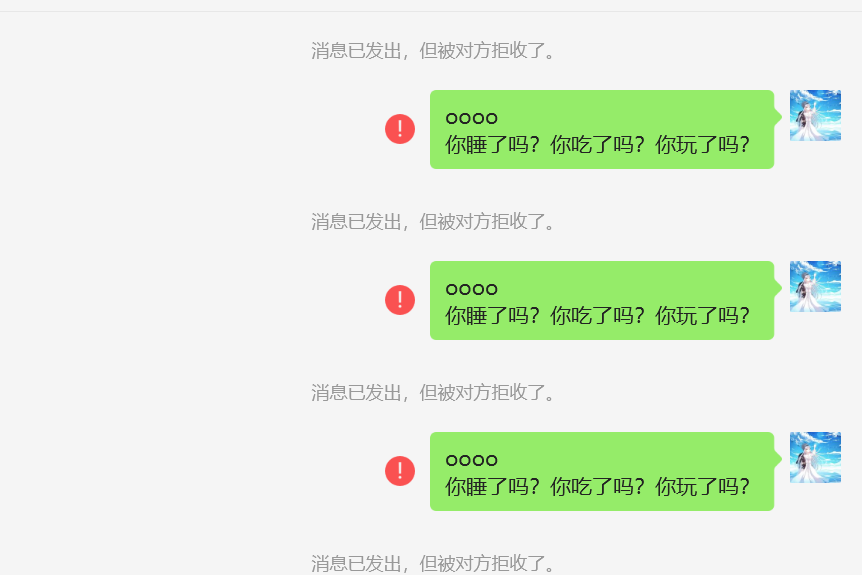
成功截图展示(为了防止打扰同学,同学把我拉黑了):
import wx
import os
import subprocess
class End(wx.Frame):
    def __init__(self):
        wx.Frame.__init__(self, parent=None, id=-1, title="完成", pos=(500, 500), size=(200, 100),
                        style=wx.CLOSE_BOX | wx.CAPTION)
        panel=wx.Panel(self)
        E1TW = wx.Frame()
        self.account=wx.StaticText(panel, label="已完成!", pos=(60, 20))
        E1TW.Show(True)
if __name__=='__main__':
    app=wx.App()
    frame=End()
    frame.Show()
    app.MainLoop()
(11).vbs和.bat文件内容展示
以一个文件为例展示其内部代码:

(12)成果视频展示
##其他(感悟、思考等)
学编程是一个积累的过程,成长在于每一次好奇的探索,在于每一次大胆的尝试。没遇到一个想法不知道如何去实现,我都会在网上大量查阅资料,并从中找出自己需要的那部分,将其转化为自己的代码。一颗充满求知欲的心以及将一切付诸于实践的强大精神力量是我能不断前行的条件。活到老,学到老,不断思考,不断探索,不断实践,不断创造,必将活出灿烂的人生,做出卓越的成绩。
同时,我深刻体会到了“学以致用”的含义。计算机被发明出来就是为了助力人类计算的,那么我们学习编程也是为了利用计算机来方便我们工作、学习和生活的。将编程技能应用于实践,写出代替一些人力的程序来让自己更轻松、更高效是我们学习Python的意义和追求。
最后,感谢老师一个学期的谆谆教诲和耐心指导。在轻松愉快的课堂学习氛围中我有了不少的收获。想给老师提一点点小建议,因为选这门课的都是文科班,大家几乎都是在编程方面零基础的,也许老师可以把教学进度放慢一点,给大家更充足的时间去慢慢了解、学习、爱上Python,去慢慢积累、记住遇见的每一条函数、结构。
总之,Python有着简洁的美,有如一朵白色茉莉花在我生命中悄然绽放。
