



110
社区成员
 发帖
发帖 与我相关
与我相关 我的任务
我的任务
 分享
分享课程:《Python程序设计》
班级: 2314
姓名: 李冰昱
学号:20231424
实验教师:王志强
实验日期:2024年5月26日
必修/选修: 公选课
Python综合应用:爬虫、数据处理、可视化、机器学习、神经网络、游戏、网络安全等
本次实验我使用第三方库pygame来更美观地实现贪吃蛇小游戏
(1)在pycharm上安装第三方库pygame
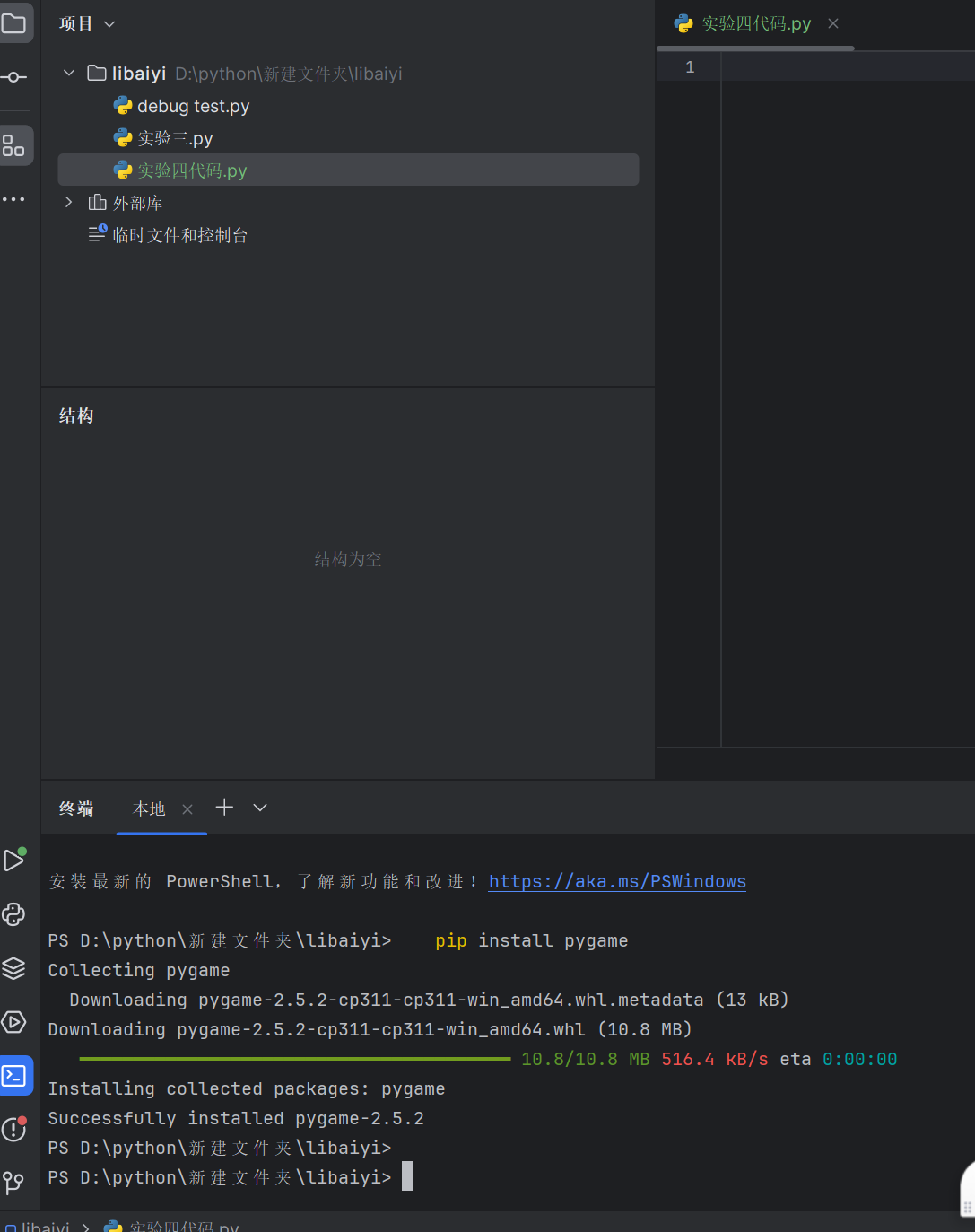
(2)导入所需的库和模块,如random、sys、time、pygame等
import random
import sys
import time
import pygame
from pygame.locals import *
from collections import deque
(3)定义一些基本设置,如屏幕高度、宽度、小方格大小、线宽等。
# 基础设置
Screen_Height = 480
Screen_Width = 600
Size = 20  # 小方格大小
Line_Width = 1
# 游戏区域的坐标范围
Area_x = (0, Screen_Width // Size - 1)  # 0是左边界,1是右边界
Area_y = (2, Screen_Height // Size - 1)
(4)定义文本输出格式设置的函数Print_Txt。
def Print_Txt(screen, font, x, y, text, fcolor=(255, 255, 255)):
    Text = font.render(text, True, fcolor)
    screen.blit(Text, (x, y))
(5)初始化蛇的位置和食物的位置。
def init_snake():
    snake = deque()
    snake.append((2, Area_y[0]))
    snake.append((1, Area_y[0]))
    snake.append((0, Area_y[0]))
    return snake
(6)定义食物设置的函数Creat_Food,注意需要考虑到食物出现在蛇身上的情况进行判断。
def Creat_Food(snake):
    food_x = random.randint(Area_x[0], Area_x[1])  # 此处有疑问
    food_y = random.randint(Area_y[0], Area_y[1])
    # 如果食物出现在蛇上,重来;
    while (food_x, food_y) in snake:
        food_x = random.randint(Area_x[0], Area_x[1])
        food_y = random.randint(Area_y[[0], Area_y[1]])
    return food_x, food_y
(7)定义食物风格函数Food_Style。
# 食物的分值+颜色
Food_Style_List = [(10, (255, 100, 100)), (20, (100, 255, 100)), (30, (100, 100, 255))]
# 整体颜色设置
Light = (100, 100, 100)
Dark = (200, 200, 200)
Black = (0, 0, 0)
Red = (200, 30, 30)
Back_Ground = (40, 40, 60)
def Food_Style():
    return Food_Style_List[random.randint(0, 2)]  # 返回随机的分值和颜色
(8)定义主函数main,包括游戏的初始化、事件处理、蛇的移动、食物的绘制、蛇的绘制、得分显示、游戏结束显示等。
def main():
    pygame.init()
    screen = pygame.display.set_mode((Screen_Width, Screen_Height))  # 初始化一个准备显示的窗口或屏幕
    pygame.display.set_caption('贪吃蛇')  # Set the current window caption
    # 得分字体设置
    font1 = pygame.font.SysFont('SimHei', 24)
    # GO字体设置
    font2 = pygame.font.SysFont(None, 72)
    fwidth, fheight = font2.size('GAME OVER')  ###
    # 程序bug修复:如果蛇在向右移动,快速点击分别施加向下、向左的命令,向下的命令会被覆盖,只有向左的命令被接受,直接GameOver
    # b变量为了防止这个情况发生
    b = True
    # 蛇
    snake = init_snake()
    # 食物
    food = Creat_Food(snake)
    food_style = Food_Style()
    # 方向控制
    pos = (1, 0)  ###
    # 启动游戏相关变量初始化
    game_over = True  # 结束标志 # 是否开始,当start = True,game_over = True 时,才显示 GAME OVER
    game_start = False  # 开始标志
    score = 0  # 得分
    orispeed = 0.3  # 蛇初始速度
    speed = orispeed  # 蛇速度
    last_move_time = None
    pause = False  # 暂停
(9)在主函数中,使用while循环不断更新游戏画面,直到游戏结束。
while True:
        for event in pygame.event.get():
            if event.type == QUIT:
                sys.exit()
            elif event.type == KEYDOWN:
                if event.key == K_RETURN:
                    if game_over:
                        game_start = True
                        game_over = False
                        b = True
                        snake = init_snake()
                        food = Creat_Food(snake)
                        food_style = Food_Style()
                        pos = (1, 0)
                        # 得分
                        score = 0
                        last_move_time = time.time()
                elif event.key == K_SPACE:
                    if not game_over:
                        pause = not pause
                # 以下为防止蛇在向右移动时按向左键,导致GameOver
                elif event.key in (K_UP, K_w):
                    if b and not pos[1]:  ###
                        pos = (0, -1)
                        b = False
                elif event.key in (K_DOWN, K_s):
                    if b and not pos[1]:
                        pos = (0, 1)
                        b = False
                elif event.key in (K_LEFT, K_a):
                    if b and not pos[0]:
                        pos = (-1, 0)
                        b = False
                elif event.key in (K_RIGHT, K_d):
                    if b and not pos[0]:
                        pos = (1, 0)
                        b = False
        # 填充背景色
        screen.fill(Back_Ground)
        ###
        # 画网格线、竖线
        for x in range(Size, Screen_Width, Size):
            pygame.draw.line(screen, Black, (x, Area_y[0] * Size), (x, Screen_Height), Line_Width)
        # 画网格线、横线
        for y in range(Area_y[0] * Size, Screen_Height, Size):
            pygame.draw.line(screen, Black, (0, y), (Screen_Width, y), Line_Width)
        # 蛇的爬行过程
        if not game_over:
            curTime = time.time()
            if curTime - last_move_time > speed:  ###
                if not pause:
                    b = True
                    last_move_time = curTime
                    next_s = (snake[0][0] + pos[0], snake[0][1] + pos[1])
                    # 如果吃到了食物
                    if next_s == food:
                        snake.appendleft(next_s)
                        score += food_style[0]
                        speed = orispeed - 0.03 * (score // 100)
                        food = Creat_Food(snake)
                        food_style = Food_Style()
                    else:
                        # 在区域内
                        if Area_x[0] <= next_s[0] <= Area_x[1] and Area_y[0] <= next_s[1] <= Area_y[
                            1] and next_s not in snake:
                            snake.appendleft(next_s)
                            snake.pop()
                        else:
                            game_over = True
        # 画食物
        if not game_over:
            '''
           rect(Surface,color,Rect,width=0)
   第一个参数指定矩形绘制到哪个Surface对象上
   第二个参数指定颜色
   第三个参数指定矩形的范围(left,top,width,height)
   第四个参数指定矩形边框的大小(0表示填充矩形)
   例如绘制三个矩形:
       pygame.draw.rect(screen, BLACK, (50, 50, 150, 50), 0)
       pygame.draw.rect(screen, BLACK, (250, 50, 150, 50), 1)
       pygame.draw.rect(screen, BLACK, (450, 50, 150, 50), 10)
            '''
        # 避免 GAME OVER 的时候把 GAME OVER 的字给遮住了
        pygame.draw.rect(screen, food_style[1], (food[0] * Size, food[1] * Size, Size, Size), 0)
        # 画蛇
        for s in snake:
            pygame.draw.rect(screen, Dark, (s[0] * Size + Line_Width, s[1] * Size + Line_Width,
                                            Size - Line_Width * 2, Size - Line_Width * 2), 0)
        Print_Txt(screen, font1, 30, 7, f'速度: {score // 100}')
        Print_Txt(screen, font1, 450, 7, f'得分: {score}')
        # 画GameOver
        if game_over:

            if game_start:
                # print('GameOver')
                Print_Txt(screen, font2, (Screen_Width - fwidth) // 2, (Screen_Height - fheight) // 2, 'GAME OVER', Red)
        pygame.display.update()


if __name__ == '__main__':
    main()
import random
import sys
import time
import pygame
from pygame.locals import *
from collections import deque

# 基础设置
Screen_Height = 480
Screen_Width = 600
Size = 20  # 小方格大小
Line_Width = 1
# 游戏区域的坐标范围
Area_x = (0, Screen_Width // Size - 1)  # 0是左边界,1是右边界
Area_y = (2, Screen_Height // Size - 1)
# 食物的初步设置
# 食物的分值+颜色
Food_Style_List = [(10, (255, 100, 100)), (20, (100, 255, 100)), (30, (100, 100, 255))]
# 整体颜色设置
Light = (100, 100, 100)
Dark = (200, 200, 200)
Black = (0, 0, 0)
Red = (200, 30, 30)
Back_Ground = (40, 40, 60)


# 文本输出格式设置
def Print_Txt(screen, font, x, y, text, fcolor=(255, 255, 255)):
    # font.render参数意义:.render(内容,是否抗锯齿,字体颜色,字体背景颜色)
    Text = font.render(text, True, fcolor)
    screen.blit(Text, (x, y))


# 初始化蛇
def init_snake():
    snake = deque()
    snake.append((2, Area_y[0]))
    snake.append((1, Area_y[0]))
    snake.append((0, Area_y[0]))
    return snake


# 食物设置
# 注意需要对食物出现在蛇身上的情况进行判断
def Creat_Food(snake):

    food_x = random.randint(Area_x[0], Area_x[1])  # 此处有疑问
    food_y = random.randint(Area_y[0], Area_y[1])
    # 如果食物出现在蛇上,重来;
    while (food_x, food_y) in snake:
        food_x = random.randint(Area_x[0], Area_x[1])
        food_y = random.randint(Area_y[[0], Area_y[1]])
    return food_x, food_y


# 食物风格
def Food_Style():
    return Food_Style_List[random.randint(0, 2)]  # 返回随机的分值和颜色


def main():
    pygame.init()
    screen = pygame.display.set_mode((Screen_Width, Screen_Height))  # 初始化一个准备显示的窗口或屏幕
    pygame.display.set_caption('贪吃蛇')  # Set the current window caption
    # 得分字体设置
    font1 = pygame.font.SysFont('SimHei', 24)
    # GO字体设置
    font2 = pygame.font.SysFont(None, 72)
    fwidth, fheight = font2.size('GAME OVER')  ###
    # 程序bug修复:如果蛇在向右移动,快速点击分别施加向下、向左的命令,向下的命令会被覆盖,只有向左的命令被接受,直接GameOver
    # b变量为了防止这个情况发生
    b = True
    # 蛇
    snake = init_snake()
    # 食物
    food = Creat_Food(snake)
    food_style = Food_Style()
    # 方向控制
    pos = (1, 0)  ###
    # 启动游戏相关变量初始化
    game_over = True  # 结束标志 # 是否开始,当start = True,game_over = True 时,才显示 GAME OVER
    game_start = False  # 开始标志
    score = 0  # 得分
    orispeed = 0.3  # 蛇初始速度
    speed = orispeed  # 蛇速度
    last_move_time = None
    pause = False  # 暂停
    while True:
        for event in pygame.event.get():
            if event.type == QUIT:
                sys.exit()
            elif event.type == KEYDOWN:
                if event.key == K_RETURN:
                    if game_over:
                        game_start = True
                        game_over = False
                        b = True
                        snake = init_snake()
                        food = Creat_Food(snake)
                        food_style = Food_Style()
                        pos = (1, 0)
                        # 得分
                        score = 0
                        last_move_time = time.time()
                elif event.key == K_SPACE:
                    if not game_over:
                        pause = not pause
                # 以下为防止蛇在向右移动时按向左键,导致GameOver
                elif event.key in (K_UP, K_w):
                    if b and not pos[1]:  ###
                        pos = (0, -1)
                        b = False
                elif event.key in (K_DOWN, K_s):
                    if b and not pos[1]:
                        pos = (0, 1)
                        b = False
                elif event.key in (K_LEFT, K_a):
                    if b and not pos[0]:
                        pos = (-1, 0)
                        b = False
                elif event.key in (K_RIGHT, K_d):
                    if b and not pos[0]:
                        pos = (1, 0)
                        b = False
        # 填充背景色
        screen.fill(Back_Ground)
        ###
        # 画网格线、竖线
        for x in range(Size, Screen_Width, Size):
            pygame.draw.line(screen, Black, (x, Area_y[0] * Size), (x, Screen_Height), Line_Width)
        # 画网格线、横线
        for y in range(Area_y[0] * Size, Screen_Height, Size):
            pygame.draw.line(screen, Black, (0, y), (Screen_Width, y), Line_Width)
        # 蛇的爬行过程
        if not game_over:
            curTime = time.time()
            if curTime - last_move_time > speed:  ###
                if not pause:
                    b = True
                    last_move_time = curTime
                    next_s = (snake[0][0] + pos[0], snake[0][1] + pos[1])
                    # 如果吃到了食物
                    if next_s == food:
                        snake.appendleft(next_s)
                        score += food_style[0]
                        speed = orispeed - 0.03 * (score // 100)
                        food = Creat_Food(snake)
                        food_style = Food_Style()
                    else:
                        # 在区域内
                        if Area_x[0] <= next_s[0] <= Area_x[1] and Area_y[0] <= next_s[1] <= Area_y[
                            1] and next_s not in snake:
                            snake.appendleft(next_s)
                            snake.pop()
                        else:
                            game_over = True
        # 画食物
        if not game_over:
            '''
           rect(Surface,color,Rect,width=0)
   第一个参数指定矩形绘制到哪个Surface对象上
   第二个参数指定颜色
   第三个参数指定矩形的范围(left,top,width,height)
   第四个参数指定矩形边框的大小(0表示填充矩形)
   例如绘制三个矩形:
       pygame.draw.rect(screen, BLACK, (50, 50, 150, 50), 0)
       pygame.draw.rect(screen, BLACK, (250, 50, 150, 50), 1)
       pygame.draw.rect(screen, BLACK, (450, 50, 150, 50), 10)
            '''
        # 避免 GAME OVER 的时候把 GAME OVER 的字给遮住了
        pygame.draw.rect(screen, food_style[1], (food[0] * Size, food[1] * Size, Size, Size), 0)
        # 画蛇
        for s in snake:
            pygame.draw.rect(screen, Dark, (s[0] * Size + Line_Width, s[1] * Size + Line_Width,
                                            Size - Line_Width * 2, Size - Line_Width * 2), 0)
        Print_Txt(screen, font1, 30, 7, f'速度: {score // 100}')
        Print_Txt(screen, font1, 450, 7, f'得分: {score}')
        # 画GameOver
        if game_over:

            if game_start:
                # print('GameOver')
                Print_Txt(screen, font2, (Screen_Width - fwidth) // 2, (Screen_Height - fheight) // 2, 'GAME OVER', Red)
        pygame.display.update()


if __name__ == '__main__':
    main()
问题1:食物有时候会出现在蛇身上
问题1解决方案:在Creat_Food(snake)函数中,在生成食物的位置后,检查这个位置是否在蛇的身体中。如果是,就重新生成一个新的位置
问题2:当蛇向右移动时,如果用户快速点击向左键,可能会导致蛇直接GameOver
问题2解决方案:在main()函数中,添加一个变量b,当蛇向右移动时,只有当b为True时,才会接受向左的键盘事件。当蛇向左移动时,将b设置为False
通过在实验四编写这段代码,我对Python的基本语法和数据结构有了更深入的了解。我对于如何使用列表、元组和字典等数据结构来存储和操作数据有了更进一步的理解,我也学习了pygame库的基本用法,包括初始化游戏窗口、设置窗口标题、绘制图形以及处理用户输入事件等。在贪吃蛇游戏中,我了解了如何控制蛇的移动、吃食物以及判断游戏结束等基本逻辑,而且学会了如何根据用户的键盘输入来改变蛇的移动方向,并且当蛇吃到食物时,如何增加蛇的长度并更新得分。
在过去的几个月里,我有幸参与了Python程序设计这门课程的学习,这一经历对我而言是一段非常宝贵的时光。通过对这门课程的深入学习,我不仅掌握了Python的重要基础知识,还对编程有了更深刻的理解。我最开始学习的是Python的基本语法。在学习过程中,我逐渐熟悉了变量、数据类型、运算符、条件语句、循环语句等基础概念。这些知识点构成了编程的基石,为我后续的学习打下了坚实的基础。同时,我也学会了函数的定义、调用、参数传递、返回值等高级知识,这让我在编程时能够更加灵活地组织代码,提高代码的可读性和可维护性。我还学习了导入、使用、自定义模块等知识,这让我在编程时能够更好地利用已有的资源,提高工作效率,我也掌握了try-except语句、捕获异常、自定义异常等异常处理方法。在学习过程中,我发现Python是一门非常易学的编程语言。与C语言相比,Python的语法简洁明了,更适合初学者入门,这使得我在学习的过程中,不仅能够掌握一门编程语言,还能够为未来的职业发展积累宝贵的技能。在学习过程中,我也遇到了许多困难。有时我会对某个知识点感到困惑,或者在编程实践中遇到难以解决的问题。面对这些困难,我没有放弃,而是通过查阅资料、向老师请教和与同学讨论等方式,逐渐克服了这些困难。回顾这段学习经历,我深感Python程序设计这门课程让我受益匪浅。我相信,在未来的学习和工作中,我会继续努力将所学知识运用到未来的大创项目中,为社会创造价值。我也会继续深入学习Python这门语言,不断提升自己的编程能力,为未来的职业发展奠定坚实的基础。最后用一句名言来结束我的课程总结:“人生苦短,我用python!”

