


122
社区成员
 发帖
发帖 与我相关
与我相关 我的任务
我的任务
 分享
分享| 这个作业属于哪个课程 | 2302软件工程 |
|---|---|
| 这个作业要求在哪里 | 软件工程实践总结&个人技术博客 |
| 这个作业的目标 | 完成对软件工程实践课程的总结、个人技术的总结 |
| 其他参考文献 | 《构建之法》、CSDN |
学习路线: 很遗憾,在准备篇指定的学习路线,在这一段时间里因为其他课程安排较满以及考取研究生等种种事项没能如期学习。
新收获的技术栈: 但是在软件工程实践这门课程里,我为了完成课程的任务,努力去学习了自己之前没有学过,没有尝试过的技术与框架:
- Vue3前端框架
- java SpringBoot后端框架
- maven工具使用
- Gsonformat解析json文件
- fastjson解析处理json数据
- 微信小程序原生开发与云开发
- 项目部署服务器(nginx管理代理,axios网络请求访问,java SpringBoot注解)
团队开发角色: 部分全栈开发(可以这么说吗= =) ,在团队项目中,我做了以下事项:
- 需求分析
- 前后端接口设计
- 前端部分结构、样式设计
- 后端大部分云函数代码实现
- 部分测试
本篇博客,我将主要讲解微信云开发数据库多表连接查询的技术
对于多表连接查询,有两种做法
第一种: 查完一表,再查一表,不用到微信小程序开发的聚合aggregate() 函数
第二种: 进行表的连接,用到微信小程序开发的聚合aggregate() 函数
const cloud = require('wx-server-sdk');
cloud.init();

const db = cloud.database();

exports.main = async (event, context) => {
  try {
  const result = await db.collection('post').where({
    _id: event._id
}).get();

  const userResult = await db.collection('user').where({
    number: result.data[0].user_id
  }).get();
  const commentResult= await db.collection('comment').aggregate()
  .match({
    post_id: event._id,
    status:2
  })
  .lookup({
    from: 'user',
    localField: 'author_id',
    foreignField: 'number',
    as: 'author_user',
  })
  .sort({send_time:-1})
  .end()

  const postWithMetaData={
    data:result,
    nickname:userResult.data[0].nickname,
    avatar:userResult.data[0].avatar,
    comments:commentResult.list
  }

  if (result.errMsg === 'collection.get:ok') {
    // 查询成功
    return {
      errMsg: 'cloud.callFunction:ok',
      data: postWithMetaData
    };
  } else {
    // 查询失败,这种情况通常不会发生,因为错误会抛出异常
    return {
      result,
      errMsg: 'cloud.callFunction:fail',
      message: '查询失败'
    };
  }
 } catch (e) {
   console.log(e)
 }
};
  getPostDetails:function(){
    // 根据任务ID查询任务详情,可能涉及到调用云函数或查询数据库
    // 此处示例省略具体查询逻辑
    wx.cloud.callFunction({
      name: 'getPostDetails',
      data: {
        _id:this.data.taskId
      },
    }).then(res => {
      if (res.result.errMsg === 'cloud.callFunction:ok') {
       var app=getApp()
       this.setData({
        postDetail: res.result.data.data.data[0], // 假设云函数返回的任务数组字段为 tasks
        nickname:res.result.data.nickname,
        comments:res.result.data.comments,
        currentId:app.globalData.number
      });
      if(res.result.data.avatar===undefined){
        this.setData({
          isAvatarUndefined:true
        })
      }
      else{
        this.setData({
          avatar:res.result.data.avatar,
        })
      }
      const isCreator = this.data.postDetail.user_id === this.data.currentId;
      } else {
        wx.showToast({
          title: '出错了TAT'
        });
      }
    })
  },
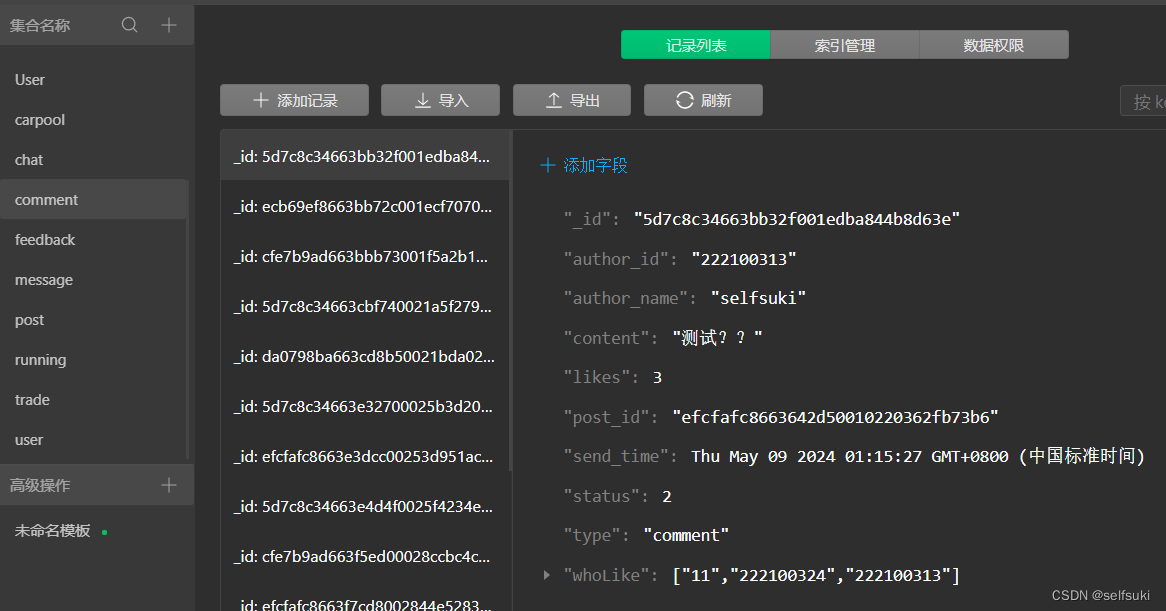
comment表中存储着post表的_id作为外键post_id,author_id作为user表的number字段的外键。
- 第一步:找到表与表的外键关系
- 要在post页面显示评论,要去找comment对应哪个post。
- 所以我们这时候要获得post_id
- post_id怎么获得呢?(要去想办法获得)
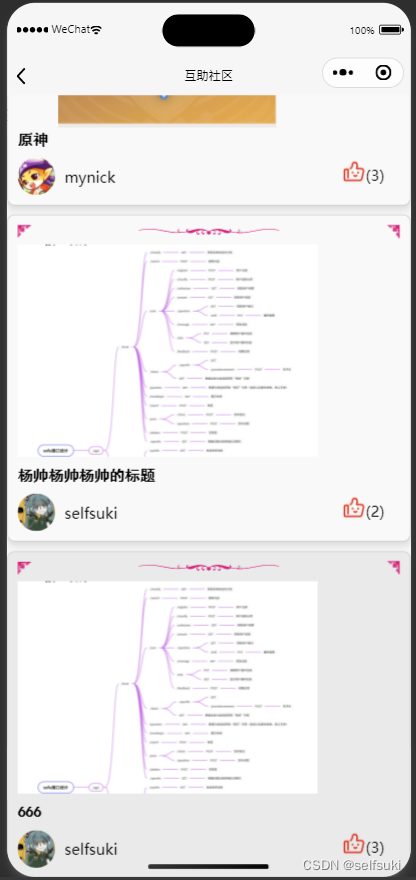
- 我们在帖子列表页面点击具体的帖子,会传输帖子的_id参数给到云函数getPostDetails
- 例如这里点击666这个帖子
- 点击完以后,传入的参数是
event._idconst commentResult= await db.collection('comment').aggregate() .match({ post_id: event._id, status:2 })- 用传入的参数
event._id去匹配post_id(用到aggregate()函数的时候匹配要用match()函数)- 这样获得的comment就全是当前选中post下的comment
- 要在comment中显示user的昵称和头像,就要连接user表进行查询
- comment中的
author_id作为外键与user表的number匹配
- 第二步:根据外键关系,连接表
- 这时候就要用到aggregate()函数下的lookup()方法,进行两个表的连接
const commentResult= await db.collection('comment').aggregate() .match({ post_id: event._id, status:2 }).lookup({ from: 'user', localField: 'author_id', foreignField: 'number', as: 'author_user', })- 从而可以进行两个表的连接,其中
- from:从user表获取user的数据
- localField:当前这个表能够与另一个表匹配的字段
- foreignField:另一个表与localField匹配的字段
- as:两个表连接以后组成的新字段的名称
- 第三步:数据返回与接收
const postWithMetaData={
 data:result,
 nickname:userResult.data[0].nickname,
 avatar:userResult.data[0].avatar,
 comments:commentResult.list
}
- return 一个数据结构或者查询
- 不能漏掉
await的异步声明- 使用到
aggregate()的查询结果,一般返回的是list字段,可以通过.list来访问- 在云函数里面,就是通过
commentResult.list来访问,commentResult是之前设置的数据结构,由await声明接收的数据库聚合查询。- 在前端js代码里面,通过类似这样的代码来获得这个数据。
- 在res的花括号里可以搞很多事情,具体参照我的代码。
- res.result就会获得你的数据,后面的那个data是在云函数里命名的返回值。
.then(res => {
  this.setData({
   comments:res.result.data.comments
 })
 })
解决过程:
解决过程:
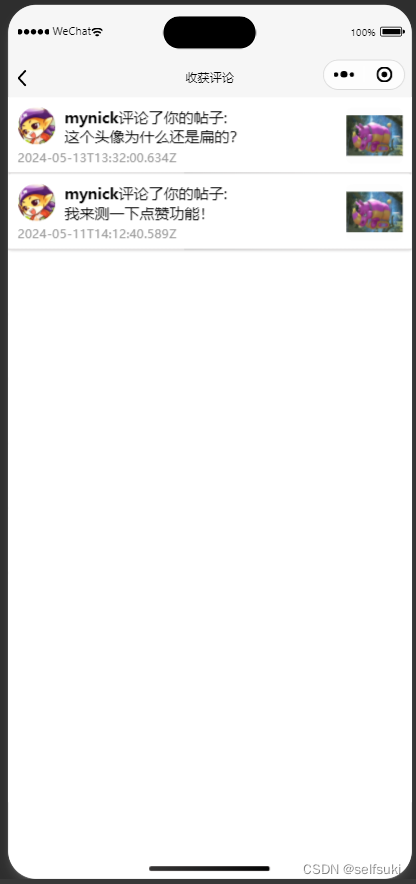
解决过程:要处理我收获的评论这个功能,涉及到三个表的查询
在本次的团队项目中,只有帖子下面存在评论
“我”:我的贴子
“收获的”:有评论
“评论”:评论内容,评论者的头像昵称
从上述例子来看,我们需要连接post表,comment表,user表,是不是很熟悉?(没有你想象那么简单)
重点在于,选择一个中间部分,能够连接其他两个表
在这里,很容易就能想到,comment表既有post表的外键post_id又有user表的外键author_id
因此,选择使用两个lookup()函数来完成连接
代码如下:
const cloud = require('wx-server-sdk')
cloud.init({ env: cloud.DYNAMIC_CURRENT_ENV }) // 使用当前云环境
const db = cloud.database();
const _ = db.command
var postid=[]
// 云函数入口函数
exports.main = async (event, context) => {
try {

  const post = await db.collection('post').where({
    user_id:event.number
  }).get()

  for(let i=0;i<post.data.length;i++){
    postid.push(post.data[i]._id)
  }
  return db.collection('comment').aggregate()
  .match({
    status:2,
    post_id:_.in(postid)
  })
  .lookup({
    from: 'user',
    localField: 'author_id',
    foreignField: 'number',
    as: 'comments'
  })
  .lookup({
    from: 'post',
    localField: 'post_id',
    foreignField: '_id',
    as: 'post'
  })
  .sort({send_time:-1})
  .end()
  .then(res => {return res})
  .catch(err => console.error(err))
 } catch (e) {
   console.log(e)
 }
}
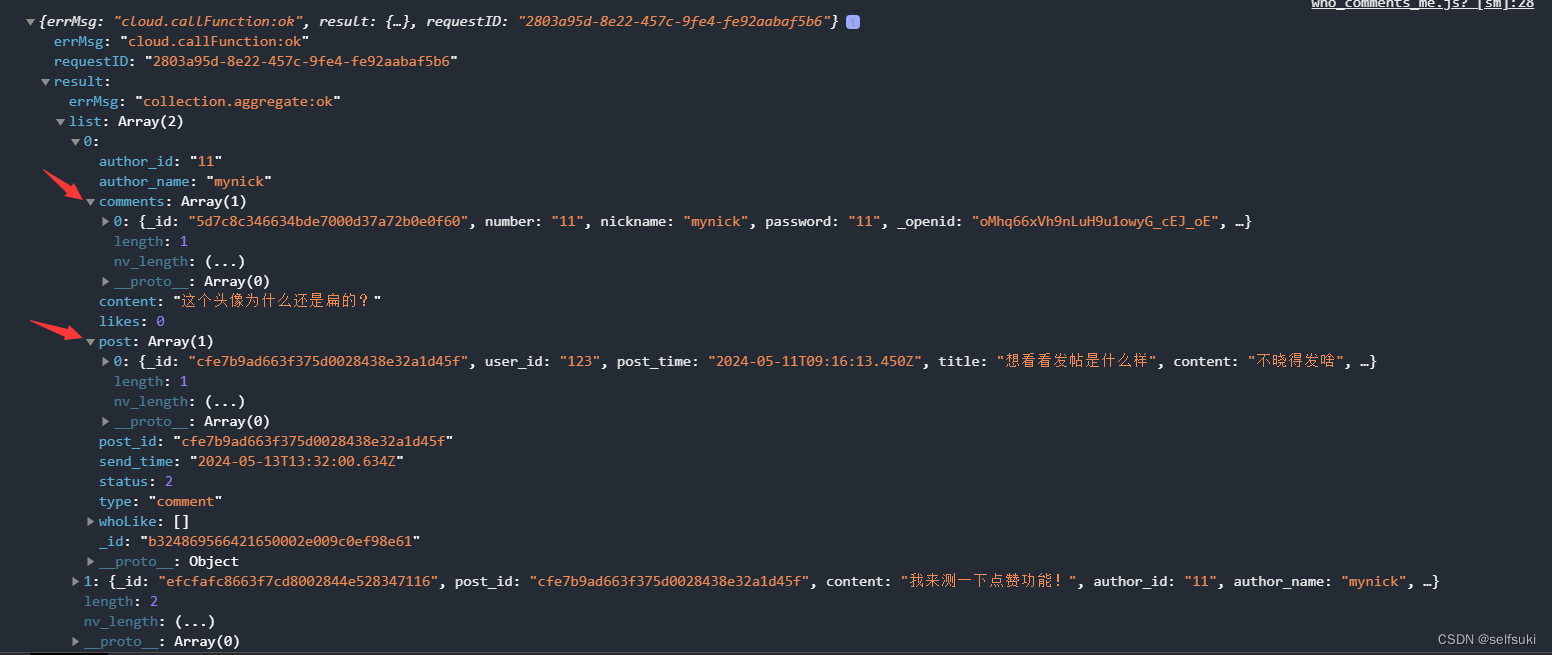
可以看到在返回的信息里,一条comment作为中间件,存着另外两个表的信息。
newRoot,project三个API的用法。非常感谢林老师、三位助教、还有结对编程开发的伙伴、团队项目开发的七位伙伴们,本门课程的学习,使我受益匪浅。这些收获,必将活用于我今后的工作学习生活中。
Mon Jun 03 2024 00:56:30 GMT+0800(at FZU)


