


122
社区成员
 发帖
发帖 与我相关
与我相关 我的任务
我的任务
 分享
分享| 这个作业属于哪个课程 | 2302软件工程 |
|---|---|
| 这个作业要求在哪里 | 软件工程实践总结&个人技术博客 |
| 这个作业的目标 | 对自己这学期所学的内容做总结 |
| 其他参考文献 | 《构建之法》 |
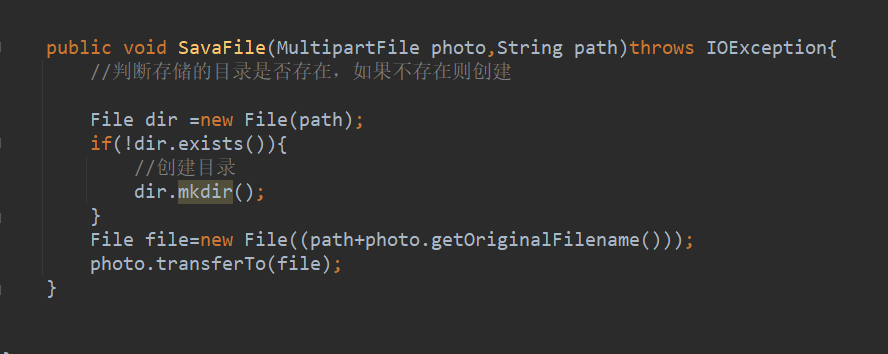
首先创建up函数,获取文件各种信息,将文件内容传入到SaveFile函数,SaveFile函数负责检验目录并创建目录,通过up函数传入的文件信息创建目录,并将文件在本地目录下创建

MyBatis支持使用注解来实现SQL映射。使用注解的方式可以使代码更加简洁。
使用注解方式实现SQL映射的原理如下:
在Java方法上使用注解来定义SQL语句。MyBatis提供了一些注解,例如@Select、@Insert、@Update和@Delete,用于定义SQL语句。
在注解中使用OGNL表达式来将Java方法中的参数和变量映射到SQL语句中的占位符。
UserController的实现
package com.example.demo.controller;

import com.example.demo.Mapper.UserMapper;
import com.example.demo.entity.User;
import org.apache.ibatis.annotations.Select;
import org.springframework.beans.factory.annotation.Autowired;
import org.springframework.web.bind.annotation.GetMapping;
import org.springframework.web.bind.annotation.Mapping;
import org.springframework.web.bind.annotation.PostMapping;
import org.springframework.web.bind.annotation.RestController;

import java.sql.ClientInfoStatus;
import java.util.List;

@RestController
public class UserController {

    @Autowired
    private  UserMapper userMapper;

    @GetMapping("user")
    public List query(){

        List<User> list=userMapper.selectList(null);
        System.out.println(list);
        return list;
    }

    @PostMapping("user")
    public String save(User user){
        int i=userMapper.insert(user);
        if(i>0){
            return "insert success";
        }
        else
            return "insert wrong";
    }
/*
    @PostMapping("user/delete")
    public String delete(String userName){
        userMapper.delete(userName);
        return "delete success";
    }

    @PostMapping("user/update")
    public String update(String userName,String password){
        userMapper.update(userName,password);
        return "update success";
    }
    @PostMapping("user/select")
    public List select(String userName)
    {
        List<User> list=userMapper.select(userName);
        System.out.println(list);
        return list;
    }

 */
}
实体User的实现
package com.example.demo.entity;

public class User {
    private String userName;

    public String getPassword() {
        return password;
    }

    public void setPassword(String password) {
        this.password = password;
    }

    private String password;

    public String getUserName() {
        return userName;
    }

    public void setUserName(String userName) {
        this.userName = userName;
    }

    @Override
    public String toString() {
        return "User{" +
                "userName=" + userName +
                ", password='" + password + '\'' +
                '}';
    }
}
Mapper包内的UserMapper实现
package com.example.demo.Mapper;
import com.baomidou.mybatisplus.core.mapper.BaseMapper;
import com.example.demo.entity.User;
import org.apache.ibatis.annotations.*;
import org.springframework.stereotype.Repository;

import java.util.List;

@Mapper
@Repository
public interface UserMapper extends BaseMapper<User> {
    /**
@Select("select * from [user]")
    public List<User> find();
@Insert("insert into [user] values (#{userName},#{password})")
    public int insert(User user);//插入失败返回值0
@Delete("delete from [user] where userName=#{userName}")
    public int delete(String userName);
@Update("update [user] set password=#{password} where userName=#{userName}")
    public  int update(String userName,String password);
@Select("select * from [user] where userName=#{userName}")
    public List<User> select(String userName);**/
}
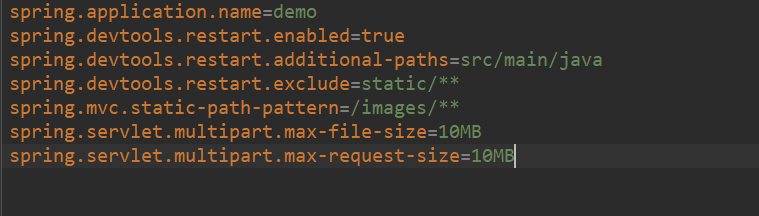
在实现文件上传功能时,有些文件上传会报错,经过资料查找发现是有些文件过大,无法上传,因此在application.properies文件里修改了配置才得以上传。
在使用mybatis的时候配置文件总报错,通过查找资料发现是配置文件有问题,版本不适配导致的,最后经过不少时间的测试才找到正确的版本。
刚开始使用mybatis的时候,我用的是sqlserver,但是上传数据的时候显示无法找到数据库,通过查找资料发现我原先所使用的是mysql连接数据库的格式,同时配置文件的数据库端口号出错,需要修改成sqlserver所使用的格式以及端口号。
之前没有使用过后端,对springboot的理解比较少,通过实现Springboot的上传文件功能让我对springboot的理解加深,
MyBatis的SQL映射功能是其最核心的功能之一,它可以将Java对象映射到关系型数据库中的表中,并提供了一些方便的查询和更新数据的方法。以下是MyBatis的SQL映射功能的主要特点:
SQL语句的定义:MyBatis使用注解来定义SQL映射规则。可以使用@Select、@Insert、@Update、@Delete等注解来定义SQL语句。
参数的映射:MyBatis使用OGNL表达式来将Java方法中的参数和变量映射到SQL语句中的占位符。在注解中,可以使用@Param注解来指定参数的名称,以便在SQL语句中引用它。
结果的映射:MyBatis可以将查询结果映射到Java对象中


