


102
社区成员
 发帖
发帖 与我相关
与我相关 我的任务
我的任务
 分享
分享一、实验目的
1.Activity组件实践(注:完成3.3,实现从firstActivity跳转到secondActivity即可)
(1)创建一个简单的Activity,并在其中添加UI元素。
(2)实现Activity之间的跳转与传值。
(3)了解Activity的生命周期,并编写代码验证。
2.Service组件实践(注:完成10.3,启动和停止Service即可)
(1)创建一个Service,用于在后台执行长时间运行的任务。
(2)通过Intent启动和停止Service。
(3)实现Service与Activity之间的通信。(可不做)
3.BroadcastReceiver组件实践(注:完成6.4,实现强制下线功能)
4.ContentProvider组件实践(注:完成8.3,P329-P333的实践)
(1)创建一个ContentProvider,用于共享数据给其他应用程序。
(2)在另一个应用程序中访问该ContentProvider,实现数据操作。
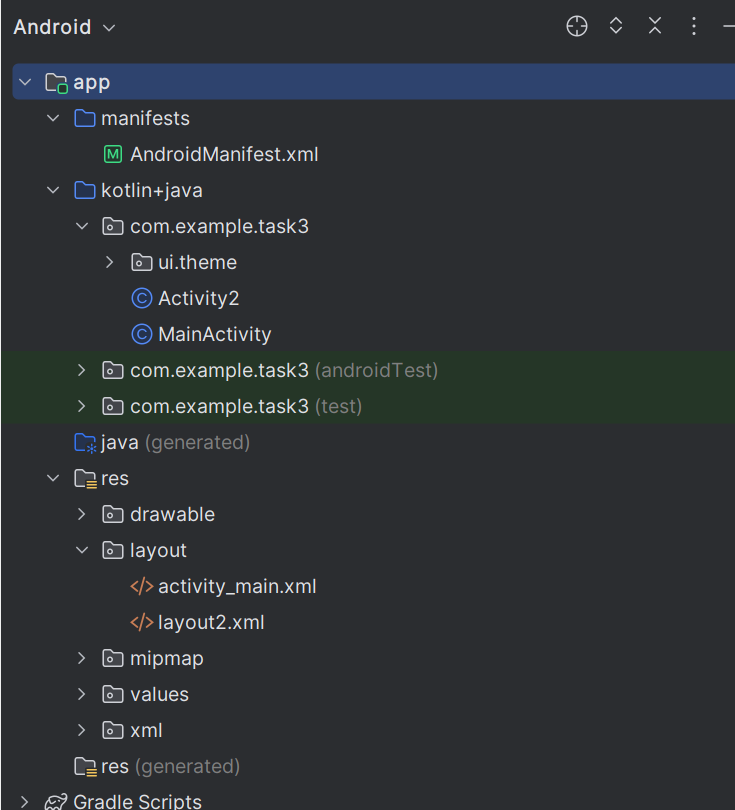
2.1.2 创建并编写activity_main.xml
添加button
<?xml version="1.0" encoding="utf-8"?>
<LinearLayout xmlns:android="http://schemas.android.com/apk/res/android"
    android:orientation="vertical"
    android:layout_width="match_parent"
    android:layout_height="match_parent">
    <Button
        android:id="@+id/button1"
        android:layout_width="match_parent"
        android:layout_height="wrap_content"
        android:text="button1" />
</LinearLayout>
添加按钮事件并添加intent,实现跳转
package com.example.task3;

import android.annotation.SuppressLint;
import android.content.Intent;
import android.os.Bundle;
import android.widget.TextView;
import android.widget.Button;
import android.util.Log;
import android.view.MotionEvent;
import android.view.View;
import androidx.activity.ComponentActivity;
import androidx.compose.material3.MaterialTheme;
import androidx.compose.runtime.Composable;
import androidx.compose.ui.Modifier;
import androidx.compose.ui.tooling.preview.Preview;
import java.text.BreakIterator;
import kotlin.text.UStringsKt;

public class MainActivity extends ComponentActivity {

    @SuppressLint("MissingInflatedId")
    @Override
    protected void onCreate(Bundle savedInstanceState){
        super.onCreate(savedInstanceState);
        setContentView(R.layout.activity_main);

        String temp = "转到\nActivity2";
        Button but1 = findViewById(R.id.button1); // 按钮1
        but1.setText(temp);
        but1.setTextSize(50);
        but1.setOnClickListener(new View.OnClickListener(){
            @Override
            public void onClick(View v){
                Intent intent = new Intent(MainActivity.this, Activity2.class);
                intent.putExtra("NAME","shenye");
                startActivity(intent);
            }
        });
    }
}
<?xml version="1.0" encoding="utf-8"?>
<LinearLayout xmlns:android="http://schemas.android.com/apk/res/android"
    android:orientation="vertical"
    android:layout_width="match_parent"
    android:layout_height="match_parent">

    <TextView
        android:id="@+id/textview2"
        android:layout_width="match_parent"
        android:layout_height="wrap_content"
        android:text="name" />

    <Button
        android:id="@+id/turn"
        android:layout_width="match_parent"
        android:layout_height="wrap_content"
        android:text="turn" />

    <Button
        android:id="@+id/destroy"
        android:layout_width="match_parent"
        android:layout_height="wrap_content"
        android:text="destroy" />
</LinearLayout>
package com.example.task3;

import android.annotation.SuppressLint;
import android.content.Intent;
import android.os.Bundle;
import android.widget.TextView;
import android.widget.Button;
import android.util.Log;
import android.view.MotionEvent;
import android.view.View;
import androidx.activity.ComponentActivity;
import androidx.compose.material3.MaterialTheme;
import androidx.compose.runtime.Composable;
import androidx.compose.ui.Modifier;
import androidx.compose.ui.tooling.preview.Preview;
import java.text.BreakIterator;
import kotlin.text.UStringsKt;

public class Activity2 extends ComponentActivity {

    @SuppressLint("MissingInflatedId")
    @Override
    protected void onCreate(Bundle savedInstanceState) {
        super.onCreate(savedInstanceState);
        setContentView(R.layout.layout2);

        TextView textview = findViewById(R.id.textview2);
        Intent intent = getIntent();
        textview.setText(intent.getStringExtra("NAME"));
        textview.setTextSize(50);

        Button turn = findViewById(R.id.turn); // 按钮2
        turn.setText("转到\nMainActivity");
        turn.setTextSize(50);
        turn.setOnClickListener(new View.OnClickListener() {
            @Override
            public void onClick(View v) {
                Intent intent = new Intent(Activity2.this, MainActivity.class);
                textview.setText(intent.getStringExtra("NAME"));
                startActivity(intent);
            }

        });

        Button destroy = findViewById(R.id.destroy);
        destroy.setText("销毁");
        destroy.setTextSize(50);
        destroy.setOnClickListener(new View.OnClickListener() {
            @Override
            public void onClick(View v) {
                finish();
            }
        });

    }
}
对activity进行注册
<?xml version="1.0" encoding="utf-8"?>
<manifest xmlns:android="http://schemas.android.com/apk/res/android"
    xmlns:tools="http://schemas.android.com/tools">

    <application
        android:allowBackup="true"
        android:dataExtractionRules="@xml/data_extraction_rules"
        android:fullBackupContent="@xml/backup_rules"
        android:icon="@mipmap/ic_launcher"
        android:label="@string/app_name"
        android:roundIcon="@mipmap/ic_launcher_round"
        android:supportsRtl="true"
        android:theme="@style/Theme.Task3"
        tools:targetApi="31">

        <activity
            android:name=".MainActivity"
            android:exported="true"
            android:label="this is MainActivity"
            android:theme="@style/Theme.Task3">
            <intent-filter>
                <action android:name="android.intent.action.MAIN" />

                <category android:name="android.intent.category.LAUNCHER" />
            </intent-filter>
        </activity>
        <activity
            android:name=".Activity2"
            android:label="This is FirstActivity"
            android:exported="true">
        </activity>
    </application>

</manifest>
package com.example.task3_2

import android.content.Intent
import android.os.Bundle
import android.widget.Button
import androidx.activity.ComponentActivity
import androidx.activity.compose.setContent
import androidx.compose.foundation.layout.fillMaxSize
import androidx.compose.material3.MaterialTheme
import androidx.compose.material3.Surface
import androidx.compose.material3.Text
import androidx.compose.runtime.Composable
import androidx.compose.ui.Modifier
import androidx.compose.ui.tooling.preview.Preview
import com.example.task3_2.ui.theme.Task3_2Theme
class MainActivity : ComponentActivity() {
    override fun onCreate(savedInstanceState: Bundle?) {
        super.onCreate(savedInstanceState)
        setContentView(R.layout.activity_main)
        val startService = findViewById<Button>(R.id.startService)
        val stopService = findViewById<Button>(R.id.stopService)
        startService.setOnClickListener {
            val intent = Intent(this,MyService::class.java)
            startService(intent)
        }
        stopService.setOnClickListener {
            val intent = Intent(this, MyService::class.java)
            stopService(intent)
        }
    }
}
<?xml version="1.0" encoding="utf-8"?>
<LinearLayout xmlns:android="http://schemas.android.com/apk/res/android"
    android:orientation="vertical"
    android:layout_width="match_parent"
    android:layout_height="match_parent">
    <Button
        android:id="@+id/startService"
        android:layout_width="match_parent"
        android:layout_height="wrap_content"
        android:text="Start Service" />
    <Button
        android:id="@+id/stopService"
        android:layout_width="match_parent"
        android:layout_height="wrap_content"
        android:text="Stop Service" />
</LinearLayout>
package com.example.task3_2

import android.app.Service
import android.content.Intent
import android.os.IBinder
import android.util.Log

class MyService : Service() {

    override fun onBind(intent: Intent): IBinder {
        TODO("Return the communication channel to the service.")
    }

    override fun onCreate() {
        super.onCreate()
        Log.d("MyService", "创建")
    }

    override fun onStartCommand(intent: Intent?, flags: Int, startId: Int): Int {
        Log.d("MyService", "开启")
        return super.onStartCommand(intent, flags, startId)
    }

    override fun onDestroy() {
        Log.d("MyService", "摧毁")
        super.onDestroy()
    }
}
<?xml version="1.0" encoding="utf-8"?>
<manifest xmlns:android="http://schemas.android.com/apk/res/android"
    xmlns:tools="http://schemas.android.com/tools">

    <application
        android:allowBackup="true"
        android:dataExtractionRules="@xml/data_extraction_rules"
        android:fullBackupContent="@xml/backup_rules"
        android:icon="@mipmap/ic_launcher"
        android:label="@string/app_name"
        android:roundIcon="@mipmap/ic_launcher_round"
        android:supportsRtl="true"
        android:theme="@style/Theme.Task3_2"
        tools:targetApi="31">

        <service
            android:name=".MyService"
            android:enabled="true"
            android:exported="true">

        </service>

        <activity
            android:name=".MainActivity"
            android:exported="true"
            android:label="@string/app_name"
            android:theme="@style/Theme.Task3_2">
            <intent-filter>
                <action android:name="android.intent.action.MAIN" />

                <category android:name="android.intent.category.LAUNCHER" />
            </intent-filter>
        </activity>
    </application>

</manifest>
package com.example.task3_3_1

import android.content.BroadcastReceiver
import android.content.Context
import android.content.Intent
import android.content.IntentFilter
import android.os.Build
import android.os.Bundle
import androidx.annotation.RequiresApi
import androidx.appcompat.app.AlertDialog
import androidx.appcompat.app.AppCompatActivity

open class BaseActivity : AppCompatActivity() {
    lateinit var receiver: ForceOfflineReceiver
    override fun onCreate(savedInstanceState: Bundle?) {
        super.onCreate(savedInstanceState)
        ActivityCollector.addActivity(this)
    }
    @RequiresApi(Build.VERSION_CODES.TIRAMISU)
    override fun onResume() {
        super.onResume()
        val intentFilter = IntentFilter()
        intentFilter.addAction("com.example.broadcastbestpractice.FORCE_OFFLINE")
        receiver = ForceOfflineReceiver()
        registerReceiver(receiver, intentFilter, RECEIVER_EXPORTED)
    }
    override fun onPause() {
        super.onPause()
        unregisterReceiver(receiver)
    }
    override fun onDestroy() {
        super.onDestroy()
        ActivityCollector.removeActivity(this)
    }
    inner class ForceOfflineReceiver : BroadcastReceiver() {
        override fun onReceive(context: Context, intent: Intent) {
            AlertDialog.Builder(context).apply {
                setTitle("Warning")
                setMessage("You are forced to be offline. Please try to login again.")
                setCancelable(false)
                setPositiveButton("OK") { _, _ ->
                    ActivityCollector.finishAll() // 销毁所有Activity
                    val i = Intent(context, LoginActivity::class.java)
                    context.startActivity(i) // 重新启动LoginActivity
                }
                show()
            }
        }
    }
}
package com.example.task3_3_1

import android.content.Intent
import android.os.Bundle
import android.widget.Button
import com.example.task3_3_1.R

class MainActivity : BaseActivity() {
    override fun onCreate(savedInstanceState: Bundle?) {
        super.onCreate(savedInstanceState)
        setContentView(R.layout.activity_main)

        val forceOffline:Button=findViewById(R.id.forceOffline)
        forceOffline.setOnClickListener {
            val intent = Intent("com.example.broadcastbestpractice.FORCE_OFFLINE")
            sendBroadcast(intent)
        }
    }
}
<?xml version="1.0" encoding="utf-8"?>
<LinearLayout xmlns:android="http://schemas.android.com/apk/res/android"
    android:orientation="vertical"
    android:layout_width="match_parent"
    android:layout_height="match_parent" >
    <Button
        android:id="@+id/forceOffline"
        android:layout_width="match_parent"
        android:layout_height="wrap_content"
        android:text="Send force offline broadcast" />
</LinearLayout>
2.3.4 loginactivity、
package com.example.task3_3_1

import android.content.Intent
import android.os.Bundle
import android.widget.Button
import android.widget.EditText
import android.widget.Toast
import com.example.task3_3_1.R

class LoginActivity : BaseActivity() {
    override fun onCreate(savedInstanceState: Bundle?) {
        super.onCreate(savedInstanceState)
        setContentView(R.layout.activity_login)
        val login:Button=findViewById(R.id.login)
        val accountEdit:EditText=findViewById(R.id.accountEdit)
        val passwordEdit:EditText=findViewById(R.id.passwordEdit)
        login.setOnClickListener {
            val account = accountEdit.text.toString()
            val password = passwordEdit.text.toString()
            // 如果账号是admin且密码是123456,就认为登录成功
            if (account == "admin" && password == "123456") {
                val intent = Intent(this, MainActivity::class.java)
                startActivity(intent)
                finish()
            } else {
                Toast.makeText(this, "account or password is invalid",
                    Toast.LENGTH_SHORT).show()
            }
        }
    }
}
<LinearLayout xmlns:android="http://schemas.android.com/apk/res/android"
    android:orientation="vertical"
    android:layout_width="match_parent"
    android:layout_height="match_parent">
    <LinearLayout
        android:orientation="horizontal"
        android:layout_width="match_parent"
        android:layout_height="60dp">
        <TextView
            android:layout_width="90dp"
            android:layout_height="wrap_content"
            android:layout_gravity="center_vertical"
            android:textSize="18sp"
            android:text="Account:" />
        <EditText
            android:id="@+id/accountEdit"
            android:layout_width="0dp"
            android:layout_height="wrap_content"
            android:layout_weight="1"
            android:layout_gravity="center_vertical" />
    </LinearLayout>
    <LinearLayout
        android:orientation="horizontal"
        android:layout_width="match_parent"
        android:layout_height="60dp">
        <TextView
            android:layout_width="90dp"
            android:layout_height="wrap_content"
            android:layout_gravity="center_vertical"
            android:textSize="18sp"
            android:text="Password:" />
        <EditText
            android:id="@+id/passwordEdit"
            android:layout_width="0dp"
            android:layout_height="wrap_content"
            android:layout_weight="1"
            android:layout_gravity="center_vertical"
            android:inputType="textPassword" />
    </LinearLayout>
    <Button
        android:id="@+id/login"
        android:layout_width="200dp"
        android:layout_height="60dp"
        android:layout_gravity="center_horizontal"
        android:text="Login" />
</LinearLayout>
package com.example.task3_3_1

import android.app.Activity

object ActivityCollector {
    private val activities = ArrayList<Activity>()
    fun addActivity(activity: Activity) {
        activities.add(activity)
    }
    fun removeActivity(activity: Activity) {
        activities.remove(activity)
    }
    fun finishAll() {
        for (activity in activities) {
            if (!activity.isFinishing) {
                activity.finish()
            }
        }
        activities.clear()
    }
}
<?xml version="1.0" encoding="utf-8"?>
<manifest xmlns:android="http://schemas.android.com/apk/res/android"
    xmlns:tools="http://schemas.android.com/tools"
    package="com.example.task3_3_1">

    <application
        android:allowBackup="true"
        android:dataExtractionRules="@xml/data_extraction_rules"
        android:fullBackupContent="@xml/backup_rules"
        android:icon="@mipmap/ic_launcher"
        android:label="@string/app_name"
        android:roundIcon="@mipmap/ic_launcher_round"
        android:supportsRtl="true"
        android:theme="@style/Theme.Task3_3_1"
        tools:targetApi="31">
        <activity
            android:name=".BaseActivity"
            android:exported="false"
            android:label="@string/title_activity_base"
            android:theme="@style/Theme.Task3_3_1" />
        <activity
            android:name=".LoginActivity"
            android:exported="false"
            android:label="@string/title_activity_login"
            android:theme="@style/Theme.Task3_3_1" />
        <activity
            android:name=".ActivityCollector"
            android:exported="false"
            android:label="@string/title_activity_collector"
            android:theme="@style/Theme.Task3_3_1"
            tools:ignore="Instantiatable" />
        <activity
            android:name=".MainActivity"
            android:exported="true"
            android:label="@string/title_activity_basic"
            android:theme="@style/Theme.AppCompat.Light.NoActionBar">
            <intent-filter>
                <action android:name="android.intent.action.MAIN" />

                <category android:name="android.intent.category.LAUNCHER" />
            </intent-filter>
        </activity>
    </application>

</manifest>
package com.example.task3_4

import android.annotation.SuppressLint
import android.content.pm.PackageManager
import androidx.appcompat.app.AppCompatActivity
import android.os.Bundle
import android.provider.ContactsContract
import android.widget.ArrayAdapter
import android.widget.EditText
import android.widget.ListView
import android.widget.Toast
import androidx.core.app.ActivityCompat
import androidx.core.content.ContextCompat

class MainActivity : AppCompatActivity() {
    private val contactsList = ArrayList<String>()
    private lateinit var adapter: ArrayAdapter<String>
    override fun onCreate(savedInstanceState: Bundle?) {
        super.onCreate(savedInstanceState)
        setContentView(R.layout.activity_main)
        adapter = ArrayAdapter(this, android.R.layout.simple_list_item_1, contactsList)

        var contactsView: ListView = findViewById(R.id.contactsView)

        contactsView.adapter = adapter
        if (ContextCompat.checkSelfPermission(this, android.Manifest.permission.READ_CONTACTS)
            != PackageManager.PERMISSION_GRANTED) {
            ActivityCompat.requestPermissions(this,
                arrayOf(android.Manifest.permission.READ_CONTACTS), 1)
        } else {
            readContacts()
        }
    }
    override fun onRequestPermissionsResult(requestCode: Int, permissions: Array<String>,
                                            grantResults: IntArray) {
        super.onRequestPermissionsResult(requestCode, permissions, grantResults)
        when (requestCode) {
            1 -> {
                if (grantResults.isNotEmpty()
                    && grantResults[0] == PackageManager.PERMISSION_GRANTED) {
                    readContacts()
                } else {
                    Toast.makeText(this, "You denied the permission",
                        Toast.LENGTH_SHORT).show()
                }
            }
        }
    }
    @SuppressLint("Range")
    private fun readContacts() {
        // 查询联系人数据
        contentResolver.query(
            ContactsContract.CommonDataKinds.Phone.CONTENT_URI,
            null, null, null, null)?.apply {
            while (moveToNext()) {
                // 获取联系人姓名
                val displayName = getString(getColumnIndex(ContactsContract.CommonDataKinds.Phone.DISPLAY_NAME))
                // 获取联系人手机号
                val number = getString(getColumnIndex(ContactsContract.CommonDataKinds.Phone.NUMBER))
                contactsList.add("$displayName\n$number")
            }
            adapter.notifyDataSetChanged()
            close()
        }
    }
}
<?xml version="1.0" encoding="utf-8"?>
<LinearLayout xmlns:android="http://schemas.android.com/apk/res/android"
    xmlns:tools="http://schemas.android.com/tools"
    android:orientation="vertical"
    android:layout_width="wrap_content"
    android:layout_height="wrap_content"
    tools:ignore="ExtraText">

    <ListView
        android:id="@+id/contactsView"
        android:layout_width="match_parent"
        android:layout_height="match_parent">

    </ListView>

</LinearLayout>
<?xml version="1.0" encoding="utf-8"?>
<manifest xmlns:android="http://schemas.android.com/apk/res/android"
    package="com.example.task3_4"
    xmlns:tools="http://schemas.android.com/tools">

    <uses-permission android:name="android.permission.READ_CONTACTS"/>

    <application
        android:allowBackup="true"
        android:dataExtractionRules="@xml/data_extraction_rules"
        android:fullBackupContent="@xml/backup_rules"
        android:icon="@mipmap/ic_launcher"
        android:label="@string/app_name"
        android:roundIcon="@mipmap/ic_launcher_round"
        android:supportsRtl="true"
        android:theme="@style/Theme.Task3_4"
        tools:targetApi="31">
        <activity
            android:name=".MainActivity"
            android:exported="true"
            android:theme="@style/Theme.AppCompat.Light.NoActionBar">
            <intent-filter>
                <action android:name="android.intent.action.MAIN" />

                <category android:name="android.intent.category.LAUNCHER" />
            </intent-filter>
        </activity>
    </application>

</manifest>
问题1:Android Studio报错主题相关报错
问题1解决方案:在mainfist中把主题更改从而解决
本次实验通过完成Activity、Service、BroadcastReceiver和ContentProvider组件的实践,深入考察了Android应用的核心组件的应用能力。通过Activity实践,掌握了UI元素的添加和Activity之间的跳转与传值等操作;通过Service实践,进一步了解了如何在后台执行长时间任务,实践了通过Intent启动和停止Service;通过BroadcastReceiver实践实现强制下线功能;通过ContentProvider实践,进一步了解了如何创建共享据给其他应用程序的ContentProvider,并在另一个应用程序中进行数据操作。通过完成本次实践我对移动平台开发中的四大组件有了完善的了解,也将使我的移动平台开发的实践能力进一步补足。
