237,313
社区成员
 发帖
发帖 与我相关
与我相关 我的任务
我的任务
 分享
分享
 在日常的工作当中,http 请求中使用最多的就是 GET 和 POST 这两种请求方式。那么掌握这两种请求方式的原理,以及两种请求方式的异同,也是之后做接口测试一个重要基础。
GET、POST的区别总结
电商接口请求方法不同
post 可以附加 body,可以支持 form、json、xml、binary 等各种数据格式
从行业通用规范的角度来说,如果对数据库不会产生数据变化的,比如查询操作,建议使用 GET 请求,数据的写入与状态建议用 POST 请求
演示环境搭建
为了避免其他因素的干扰,使用 flask 编写一个简单的 demo server。
安装 flask
pip install flask
2. 创建一个 hello.py 文件
from flask import Flask, requestapp = Flask(__name__)@app.route('/')def hello_world():return 'Hello, World!'@app.route("/request", methods=['POST', 'GET'])def hellp():#拿到request参数query = request.args#拿到request formpost = request.form#分别打印拿到的参数和formreturn f"query: {query}\n"\f"post: {post}"
3. 启动服务
export FLASK_APP=hello.pyflask run
提示下面信息则表示搭建成功
* Serving Flask app "hello.py"* Environment: productionWARNING: Do not use the development server in a production environment.Use a production WSGI server instead.* Debug mode: off* Running on http://127.0.0.1:5000/ (Press CTRL+C to quit)
cURL命令发起GET、POST请求
发起 GET 请求,a、b 参数放入 URL 中发送,并保存在 get 文件中
curl 'http://127.0.0.1:5000/request?a=1&b=2' -v -s &>get
发起 POST 请求,a、b 参数以 form-data 格式发送,并保存在 post 文件中
curl 'http://127.0.0.1:5000/request?' -d "a=1&b=2" -v -s &>post
GET、POST 请求对比
注意:>的右边为请求内容,<右边为响应内容
GET 请求过程
* Trying 127.0.0.1...* TCP_NODELAY set* Connected to 127.0.0.1 (127.0.0.1) port 5000 (#0)> GET /request?a=1&b=2 HTTP/1.1> Host: 127.0.0.1:5000> User-Agent: curl/7.64.1> Accept: */*>* HTTP 1.0, assume close after body< HTTP/1.0 200 OK< Content-Type: text/html; charset=utf-8< Content-Length: 80< Server: Werkzeug/0.14.1 Python/3.7.5< Date: Wed, 01 Apr 2020 07:35:42 GMT<{ [80 bytes data]* Closing connection 0query: ImmutableMultiDict([('a', '1'), ('b', '2')])post: ImmutableMultiDict([])
POST 请求过程
* Trying 127.0.0.1...* TCP_NODELAY set* Connected to 127.0.0.1 (127.0.0.1) port 5000 (#0)> POST /request?a=1&b=2 HTTP/1.1> Host: 127.0.0.1:5000> User-Agent: curl/7.64.1> Accept: */*> Content-Length: 7> Content-Type: application/x-www-form-urlencoded>} [7 bytes data]* upload completely sent off: 7 out of 7 bytes* HTTP 1.0, assume close after body< HTTP/1.0 200 OK< Content-Type: text/html; charset=utf-8< Content-Length: 102< Server: Werkzeug/0.14.1 Python/3.7.5< Date: Wed, 01 Apr 2020 08:15:08 GMT<{ [102 bytes data]* Closing connection 0query: ImmutableMultiDict([('a', '1'), ('b', '2')])post: ImmutableMultiDict([('c', '3'), ('d', '4')])
对两个文件进行对比:
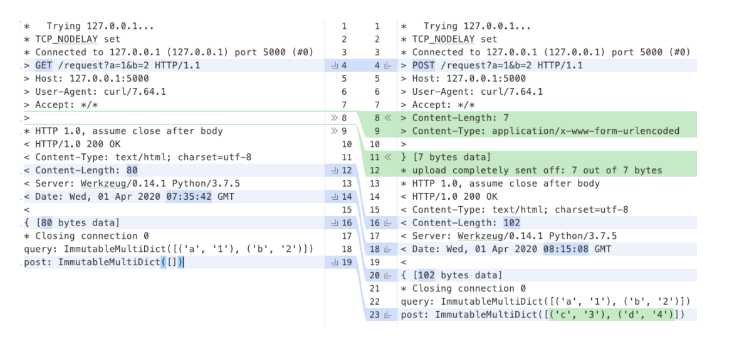
从图中可以清楚看到 GET 请求的 method 为 GET,POST 请求的 method 为 POST,此外,GET 请求没有 Content-Type 以及 Content-Length 这两个字段,而请求行中的 URL 带有 query 参数是两种请求都允许的格式。