

 2401_MU_SE_FZU

Team Natus Vincere - Beta Sprint Log 1
 墨衍会员 · AI 创作全网分发 墨衍智能分发 通过墨衍一键同步至各平台 可同步平台 CSDN微信公众号微博知乎掘金百家号博客园抖音小红书 你的文章也可以这样分发 墨衍会员 ¥399起/年,写一次发全网
我也要 关注 + 加入社区
墨衍会员 · AI 创作全网分发 墨衍智能分发 通过墨衍一键同步至各平台 可同步平台 CSDN微信公众号微博知乎掘金百家号博客园抖音小红书 你的文章也可以这样分发 墨衍会员 ¥399起/年,写一次发全网
我也要 关注 + 加入社区| Question | Answer |
|---|---|
| Which course does this assignment belong to | 2401-MUSE社区-CSDN社区云 |
| What are the requirements for this assignment | Teamwork——Beta Sprint-CSDN社区 |
| The goal of this assignment | collect all essays and materials concerning Beta Phase |
| Code Standard Repository | Code Standard Repository |
目录
- SCRUM SECTION
- Achievements
- Commit record
- Meeting photo
- PM REPORT
- Burn up map
- Running image of our current program
- Expected task of the entire project
- Work that has been completed so far
SCRUM SECTION
Achievements
| Member | Completed Tasks (Yesterday to Present) | Time Spent (hrs) | Time Left (hrs) | Existing Problems/Difficulties | Arrangements (Stand-up Plan) for Tomorrow |
|---|---|---|---|---|---|
| Liu Ruiyu, Wu Lingyuan, and Wang Xiaoye | UI overhaul for Task and Announcement Calendar, designing and styling UI, assigning design tasks. | 3 | 5 | Ensuring seamless integration between front-end and back-end. | Finalize front-end UI design for Calendar, work on task assignments, and review visual aspects. |
| Lai Zhengpeng | Designed API for File Upload and Download System with focus on RBAC, finalized API specifications. | 2 | 6 | Finalizing RBAC permissions for different roles and testing APIs. | Start developing the backend for RBAC system, implement file upload and download APIs. |
| Song Jiazheng | Finalized check-in logic, designed logic for abnormal situation , including late arrival and missing card. | 2 | 6 | Handling edge cases for abnormal check-in detection. | Refine system and handle specific error scenarios. |
| Zhang Zhuorui and Li Yilin | Docked front-end with back-end, assisted with API design, contributed to the RBAC system. | 3 | 5 | Ensuring proper data flow between front-end and back-end for accurate display. | Continue front-end integration, finalize backend API integration, ensure data sync. |
| Shi Yison and Guo Yongzhen | Prepared for logging system, planned logging details for file operations. | 2 | 6 | Defining clear logging criteria for each file operation. | Implement logging system, develop scripts for file operation tracking, and monitor system output. |
| Cao Mingrui and Cai Shaoen | Prepared for file upload and download testing, created test cases for functional and permission testing. | 2 | 6 | Need to finalize testing environment and permission levels. | Conduct functional and permission testing, ensure system behaves as expected for all user types. |
Commit record

Meeting photo

PM REPORT
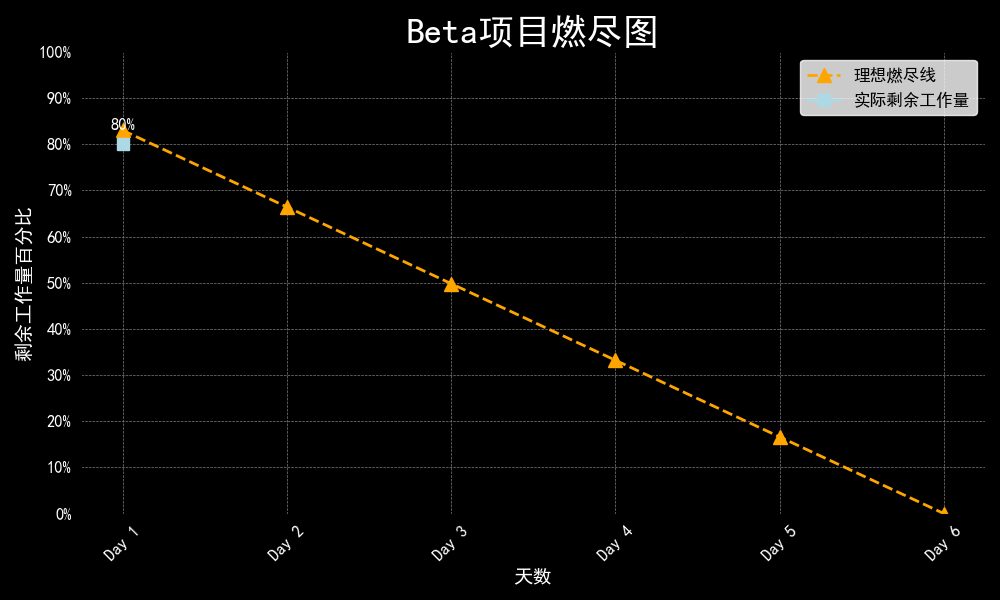
Burn up map
Running image of our current program
UI changed:

Expected task of the entire project
File Upload and Download System Enhancement
Redesign File System Architecture: Implement role-based access control (RBAC) to improve file handling efficiency.
Develop Permission Management Module: Create a module to streamline access control, enhancing system security and usability.Clock-In System Improvement
Integrate Data Visualization Tools: Use advanced tools to display clock-in data through visual representations like pie charts.
Develop Attendance Analysis Algorithms: Create algorithms to analyze attendance patterns and offer actionable insights to administrators.Task and Announcement Calendar Enhancement
Redesign Calendar Interface: Improve usability and ensure effective information dissemination.
Implement Task Management Features: Add features that facilitate better task management and seamless integration of announcements.
Additional Sprint Tasks
Refine Punch Card Logic: Ensure accurate and efficient time tracking for employees.
Develop Activity Likes and Favorites Features: Enhance user engagement and interaction within the platform.
Strengthen Software Stability: Address potential bugs and performance issues for a smooth user experience.
Optimize Data Handling and Storage Solutions: Improve the application's responsiveness and reliability.
Add User-side Calendar Function: Facilitate users to view dates and manage tasks.
Work that has been completed so far
Finalize the requirements for the File Upload and Download System with a focus on RBAC.
Design the initial architecture for the enhanced Clock-In System with data visualization in mind.
Plan the user interface (UI) overhaul for the Task and Announcement Calendar.
Conduct a team meeting to align on sprint goals, daily tasks, and responsibilities.
相关推荐
Microsoft.WinDbg-1.2610.1001.0-x64
Microsoft.WinDbg-1.2610.1001.0-x64
Claude 代码超强能力:核心技能库
Superpowers 是一套面向你的编码智能体的完整软件开发方法论,由一组可组合技能和若干初始指令构建而成,用以确保智能体真正使用这些技能。
PDF发票内容提取排版并结构化导出xlsx/cvs嵌入式ptyhon
【本地发票提取工具】 核心优势:不依赖传统粗糙 OCR,基于文字排版结构进行精准提取。仅“税网”下载及税网邮件发送的原版 PDF 发票(开票软件发送的不太支持)能实现开票明细级的秒级本地提取,告别只能提抬头、总额的尴尬。 可免费试用 3 天! 【用前须知】 去微软官网下载VC_redist.x64.exe运行修复运行库(必要的前置操作),之后再解压本工具rar,运行本exe即可。 VC_redist.x64.exe官网永久下载地址 https://learn.microsoft.com/zh-cn/cpp/windows/latest-supported-vc-redist 【安全须知】 个人开发暂未做代码签名,杀软可能会有误报拦截。遇到拦截请在杀软中添加信任/白名单即可。 VirusTotal扫描结果 2/61,主流杀软均通过,个别引擎因无签名误报。官网 virustotal.com 点击页面中间显眼的 “Choose file”(选择文件)按钮上传扫描。
Flask校园二手交易平台课设
这是一份基于 Flask + SQLite 的校园二手交易平台课程设计完整资料,包含实验报告(Markdown、HTML、PDF 三种格式)、全部 Python 源码、8 个 Jinja2 页面模板、5 张运行截图、答辩 PPT。学生注册账号后发布闲置物品,同校同学按分类翻、按关键词搜,看中了在详情页留言咨询,管理员能下架违规商品。不接支付不做物流,买卖双方线下交易,平台只负责信息展示和沟通,一个学期课设能做完。 系统功能:用户注册登录登出,session 维持登录态;发布商品填标题、描述、价格、选六类分类,图片可选上传不强制;首页卡片网格展示在售商品,顶部搜索框按标题描述模糊匹配,下方分类按钮筛选,搜索和筛选可组合;商品详情页展示大图、完整描述、卖家昵称,登录用户能留言咨询;我的发布页能看自己挂过的所有商品并删除;管理员后台能看全部商品,一键下架违规品或恢复在售。 几个值得参考的实现点:密码用 Werkzeug 哈希加盐存储;登录接口不区分"用户不存在"和"密码错误",防枚举用户名;图片上传限制后缀和 2MB,文件名随机串重命名,防覆盖和传脚本;分类和搜索筛选组合用动态拼 SQL;首次启动自动建表写管理员账号;Bootstrap 5 栅格,手机浏览器也能看。 适合正在做 Web 课程设计、Python 后端入门的学生,以及想学习"Flask 蓝图 + SQLite + 登录鉴权 + 文件上传"完整小项目的自学者。拿到手后 cd src,pip install -r requirements.txt,python app.py,浏览器开 http://127.0.0.1:5000 即可,管理员账号 admin/admin123,普通用户自行注册。
《低秩加稀疏模型的高效动态平行MRI重建.zip
1.版本:matlab2014a/2019b/2024b 2.附赠案例数据可直接运行。 3.代码特点:参数化编程、参数可方便更改、代码编程思路清晰、注释明细。 4.适用对象:计算机,电子信息工程、数学等专业的大学生课程设计、期末大作业和毕业设计。




