


5,943
社区成员
 发帖
发帖 与我相关
与我相关 我的任务
我的任务
 分享
分享窗口组件显示不出,鼠标拖动窗口大小又会显示,但是鼠标进入窗口又会消失,其中的一个监听器会霸占整个窗口
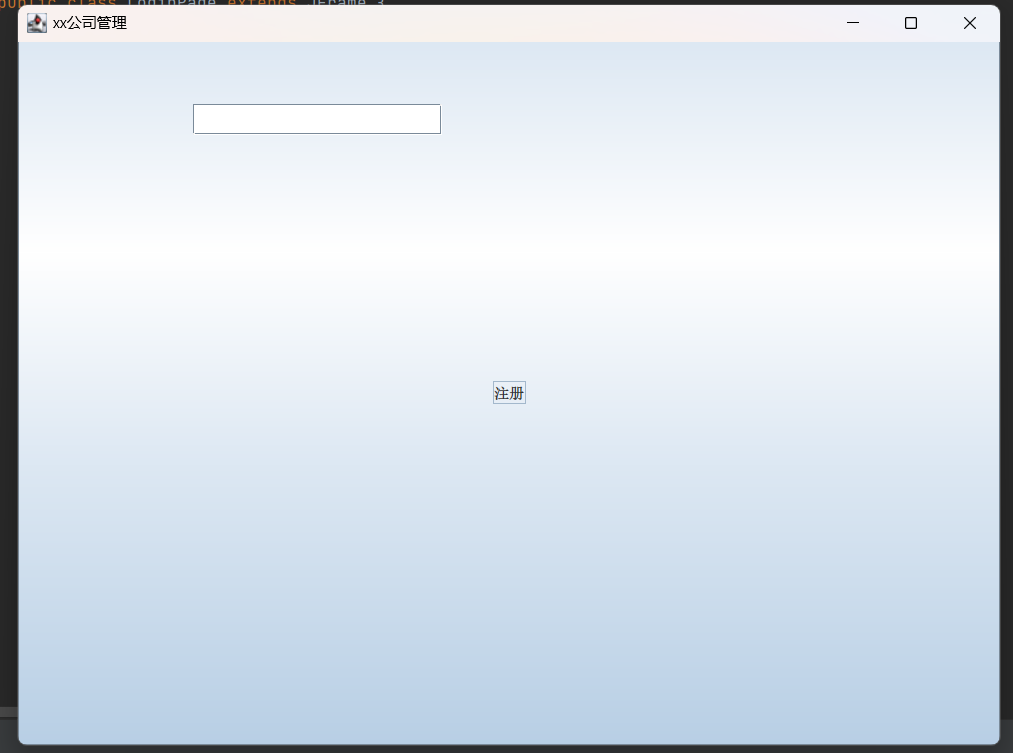
import javax.swing.*;
import java.awt.*;
import java.awt.event.ActionEvent;
import java.awt.event.ActionListener;
public class LoginPage extends JFrame {
    private JLabel usernameLabel, passwordLabel;
    private JTextField usernameField;
    private JPasswordField passwordField;
    private JButton loginButton;
    private JButton resetButton;
    private final JButton registerButton;

    public LoginPage() {
        // 设置窗口标题
        setTitle("xx公司管理");
        // 获取屏幕大小
        Dimension screenSize=Toolkit.getDefaultToolkit().getScreenSize();
        //计算窗口在屏幕中间的位置
        int x=(screenSize.width-800)/2;
        int y=(screenSize.height-600)/2;
        setLocation(x,y);

        // 创建和设置用户名标签和文本框
        usernameLabel = new JLabel("用户名:");
        usernameLabel.setBounds(50, 50, 120                                                                                                                                                                                                                                                          , 25);
        usernameField = new JTextField();
        usernameField.setBounds(140, 50, 200, 25);

        // 创建和设置密码标签和密码框
        passwordLabel = new JLabel("密码:");
        passwordLabel.setBounds(50, 100, 80, 25);
        passwordField = new JPasswordField();
        passwordField.setBounds(140, 100, 200, 25);

        // 创建和设置登录按钮
        loginButton = new JButton("登录");
        loginButton.setBounds(40, 150, 80, 25);

        // 创建和设置重置按钮
        resetButton = new JButton("重置");
        resetButton.setBounds(160, 150, 80, 25);

        //创建注册按钮
        registerButton =new JButton("注册");
        registerButton.setBounds(280,150,80,25);

        // 添加组件到窗口
        add(usernameLabel);
        add(usernameField);
        add(passwordLabel);
        add(passwordField);
        add(loginButton);
        add(resetButton);
        add(registerButton);

        // 设置窗口大小和可见性
        setSize(800, 600);
        setVisible(true);
        setDefaultCloseOperation(JFrame.EXIT_ON_CLOSE);

        // 为登录按钮添加事件监听器
        loginButton.addActionListener(e -> {
            String username = usernameField.getText();
            char[] passwordChars = passwordField.getPassword();
            String password = new String(passwordChars);
            // 在这里添加登录验证逻辑
            int t;
            //创建fit实例fit
            Fit Iad= new Fit();
            //调用fit方法
            t= Iad.fitIdAndPassword(username,password);
            System.out.println(t);
            if (t==1) {
                JOptionPane.showMessageDialog(null, "登录成功");
                dispose();
                ProfilePage profilepage=new ProfilePage();
                profilepage.profilePage();
            } else {
                if (t==2)
                JOptionPane.showMessageDialog(null, "用户名或密码错误");
            }
        });

        // 为重置按钮添加事件监听器
        resetButton.addActionListener(e -> {
            usernameField.setText("");
            passwordField.setText("");
        });

        //为注册按钮添加事件监听器
        registerButton.addActionListener(e -> {
            RegistrationPage registrationPage=new RegistrationPage();
            registrationPage.registrationPage();
            dispose();
        });
    }
}
主类没有其他方法,只有用了这一个方法,想问问这个是哪里有问题该怎么修改啊

你这JAVA的,发到这个DELPHI的分类里,怎么会有人知道啊。
