


164
社区成员
 发帖
发帖 与我相关
与我相关 我的任务
我的任务
 分享
分享Course: EE308FZ Software Engineering
Student ID: 832302225
Assignment: First Assignment - Contacts App with Frontend/Backend Separation
This post details my process, design choices, and the (many) lessons learned while building a full-stack, cloud-deployed contacts application from scratch.
This table reflects my planning versus the actual time spent. The development phase, especially debugging the deployment and fixing API/library issues, took significantly longer than anticipated.
| Personal Software Process Stages | Time Planning (Estimate) | Time Spending (Actual) |
|---|---|---|
| Planning | 1.0h | 1.0h |
| · Estimate | 1.0h | 1.0h |
| Development | 12.0h | 13.5h |
| · Analysis | 1.0h | 1.5h |
| · Design Spec | 1.0h | 1.0h |
| · Design Review | 0.5h | 0.5h |
| · Coding Standard | 0.5h | 0.5h |
| · Design | 1.5h | 2.5h |
| · Coding | 5.0h | 6.5h |
| · Code Review | 1.0h | 0.5h |
| · Test (Debug) | 1.5h | 3.5h |
| Reporting | 3.0h | 3.0h |
| · Test Report | 1.0h | 1.0h |
| · Size Measurement | 0.5h | 0.5h |
| · Post-mortem & Process Imp Plan | 1.5h | 1.5h |
| Total | 16.0h | 22.0h |
The application is fully deployed and functional. The final UI is clean, modern, and implements all core and advanced features.
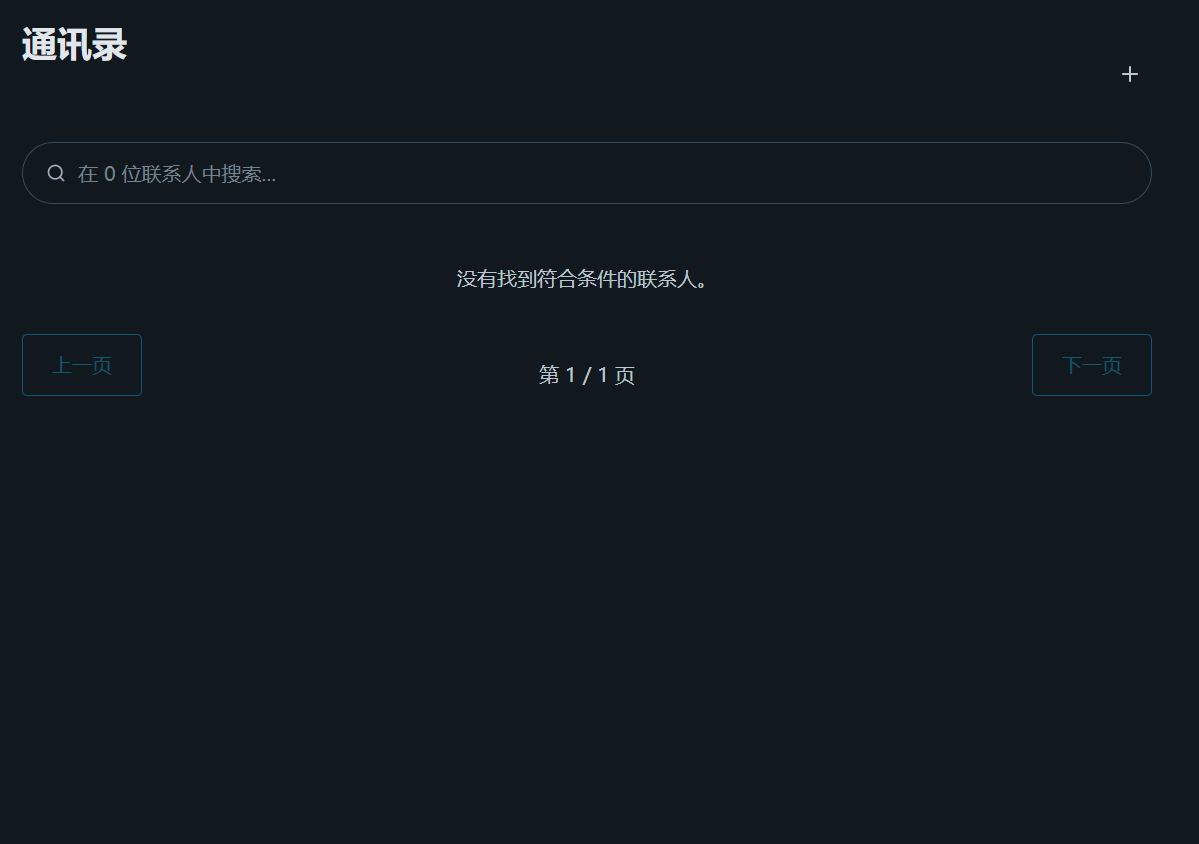
The main interface is built with Pico.css and forced into a dark theme to resemble a native mobile application. It features the main title, an "Add" icon button, the dynamic search bar, and the main contact list.
Contacts are automatically sorted by pinyin using the pinyin-pro library. Each group is separated by a clear, stylized header (e.g., '#', 'G', 'M').
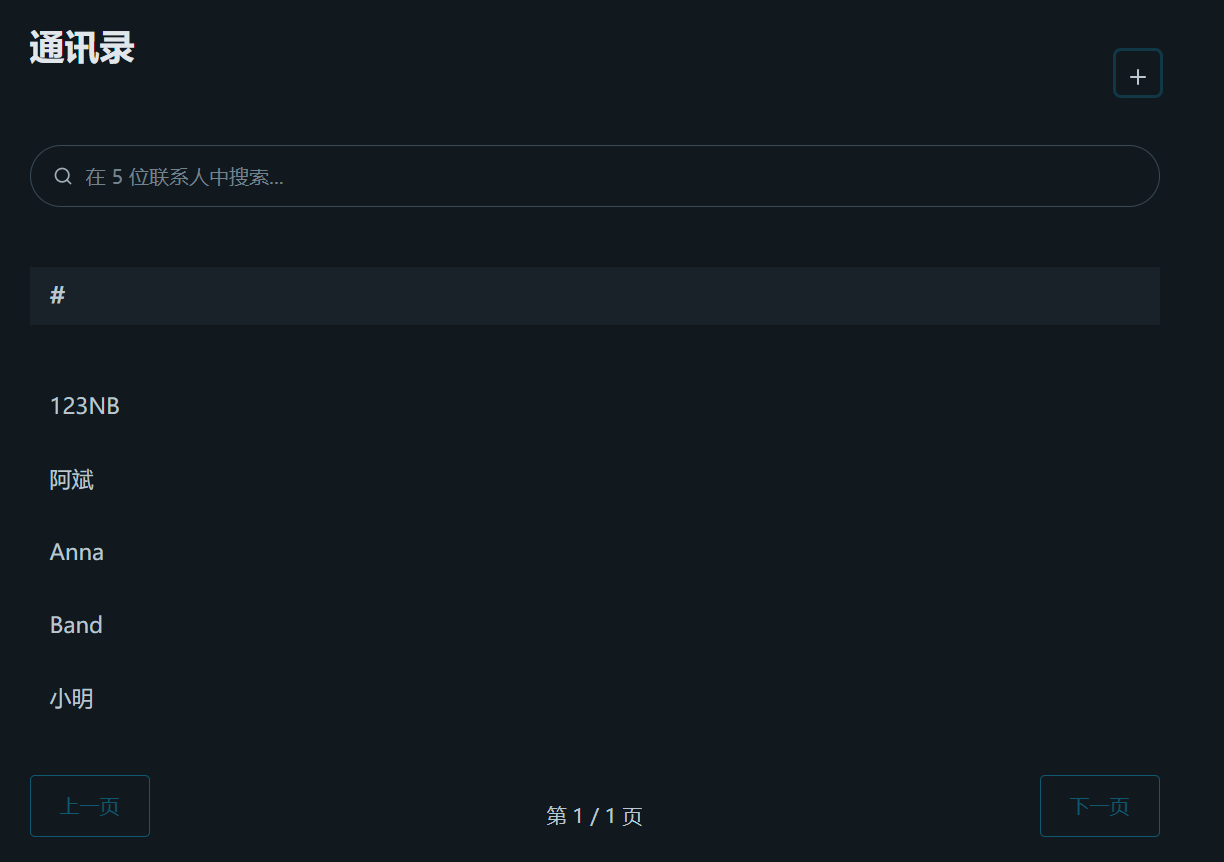
The placeholder text in the search bar is dynamically updated on page load to reflect the total number of contacts (e.g., "在 15 位联系人中搜索...").
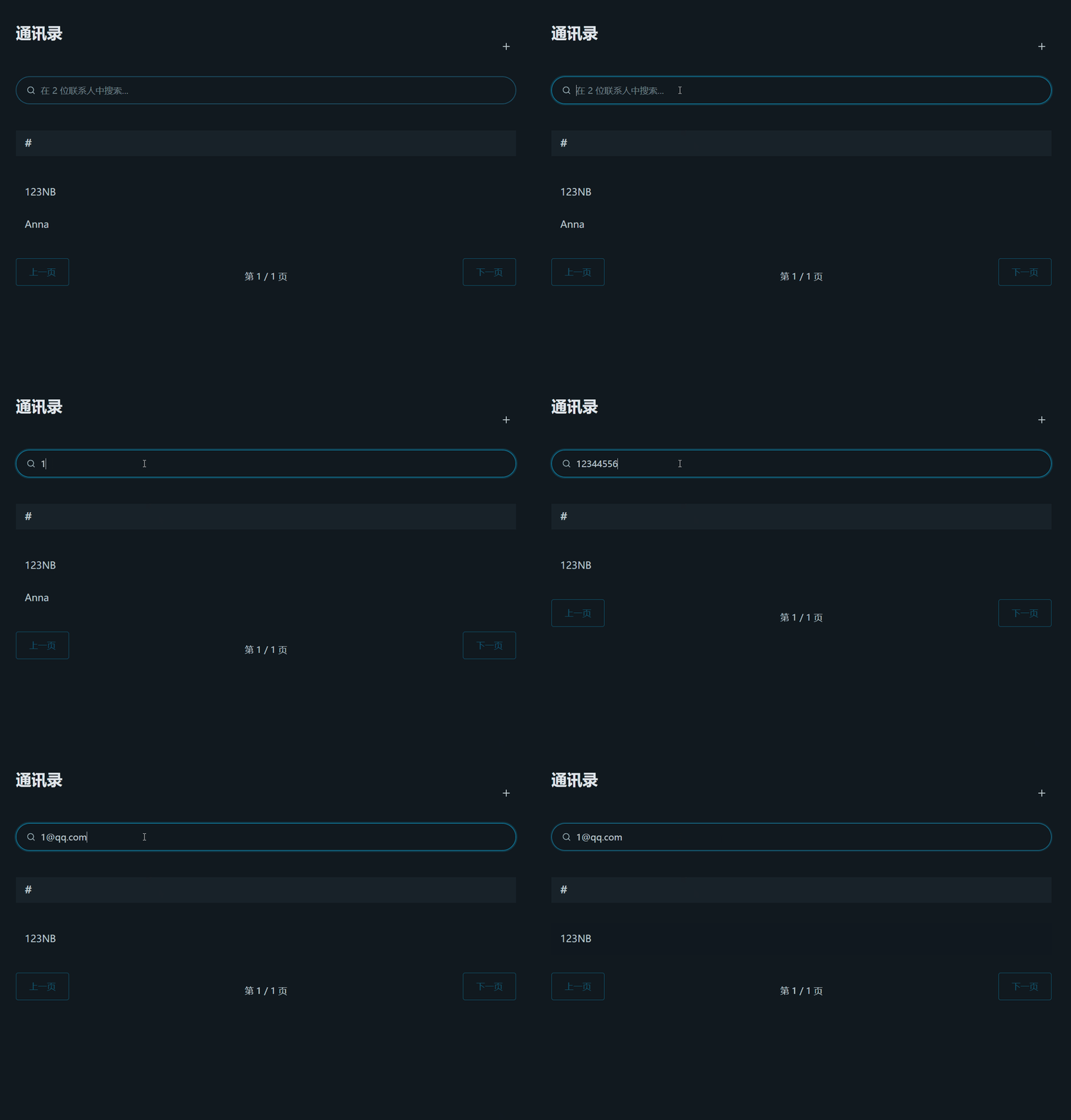
The search bar filters the list in real-time. This works for name, phone, and the newly added email field.
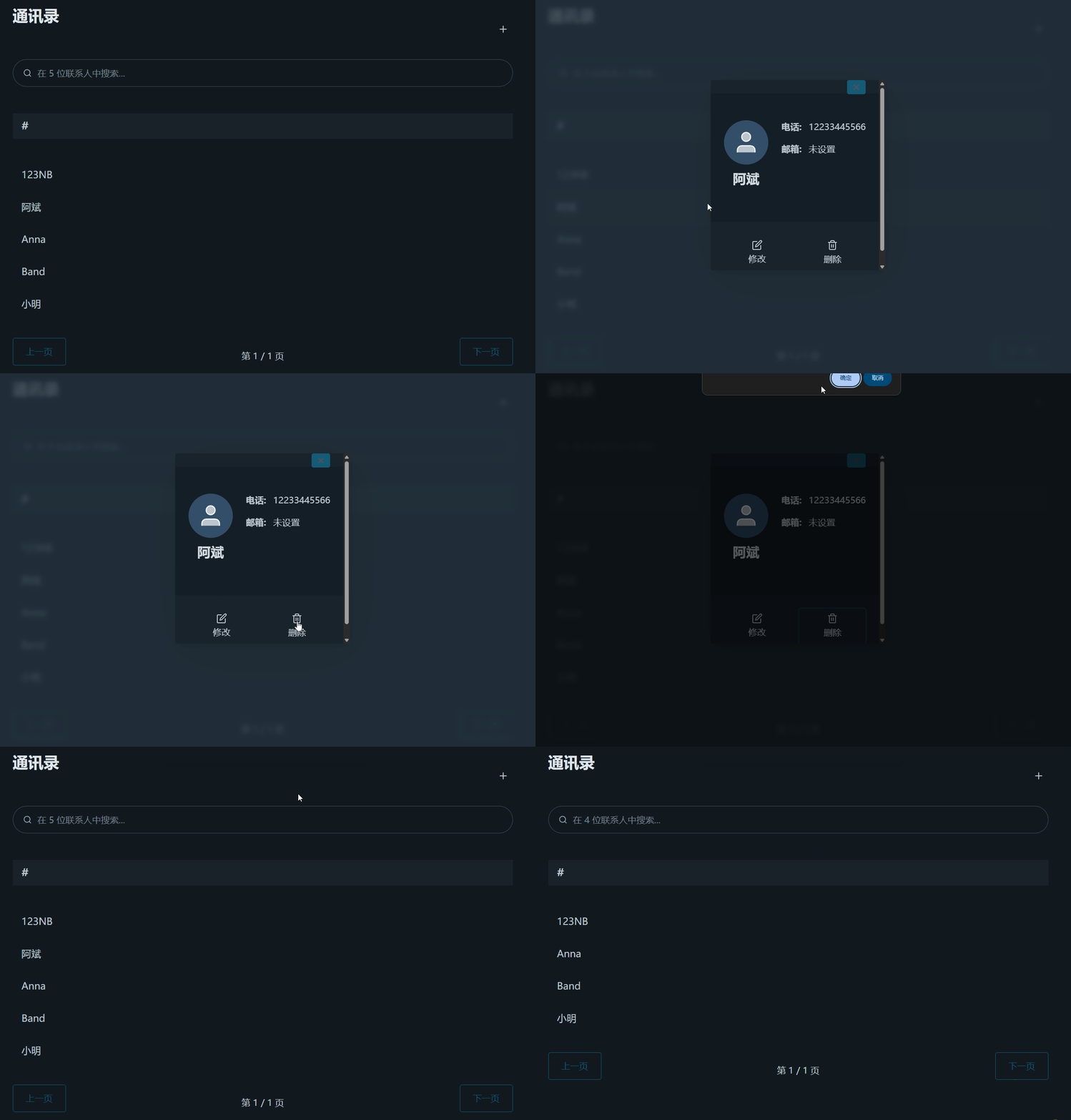
The main list is simplified to show only the contact's name. To see more information, the user must click the name.When a contact is clicked, a new detail modal appears, featuring the requested two-column layout: Left Side (Avatar, Name) and Right Side (Info).Inspired by the exemplar, the "Edit" and "Delete" buttons in the detail modal feature clear icons above the text for an intuitive, app-like feel.
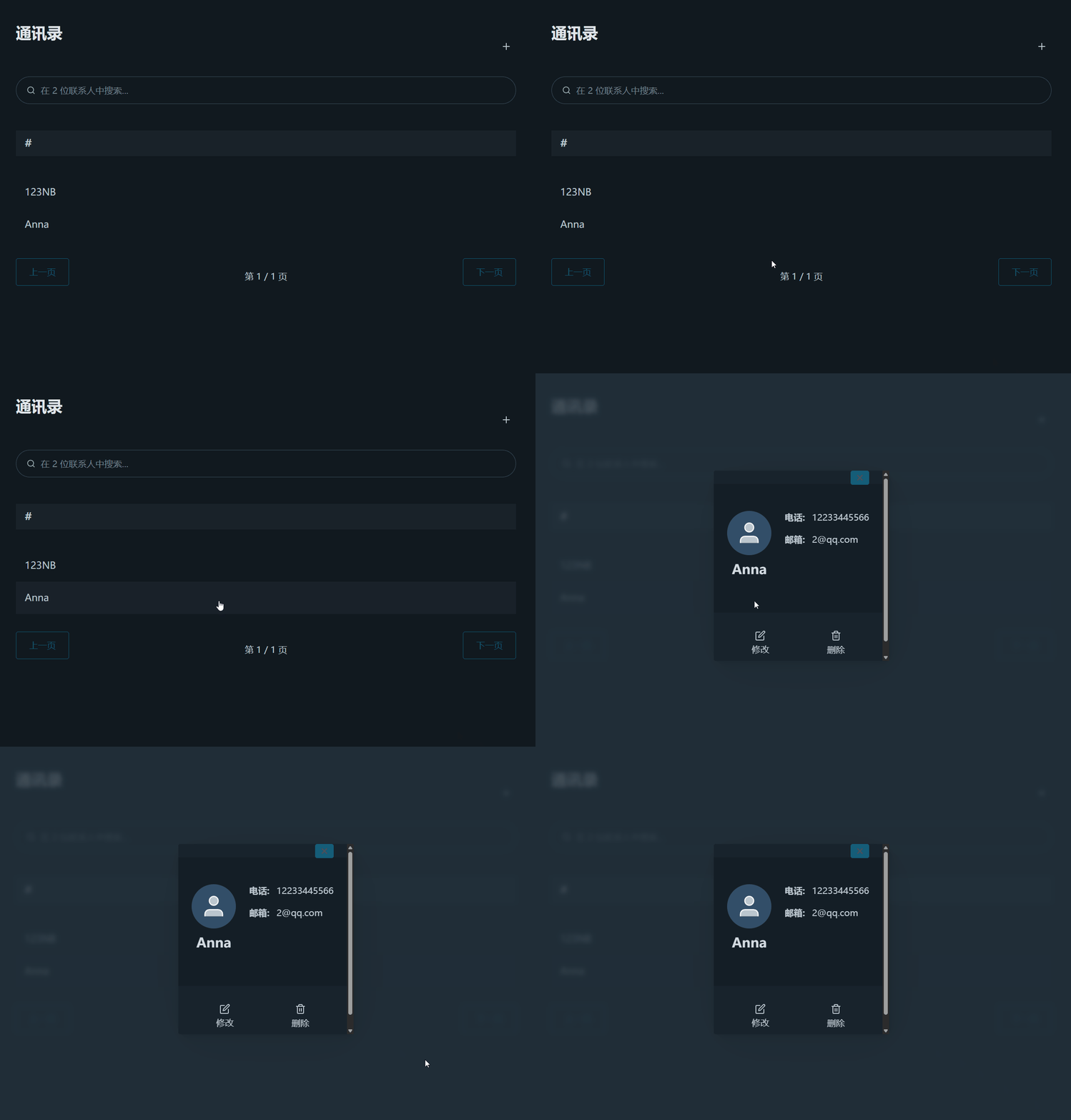
The "Add Contact" form is no longer static, but accessed by clicking the "+" icon in the header, which opens a modal.

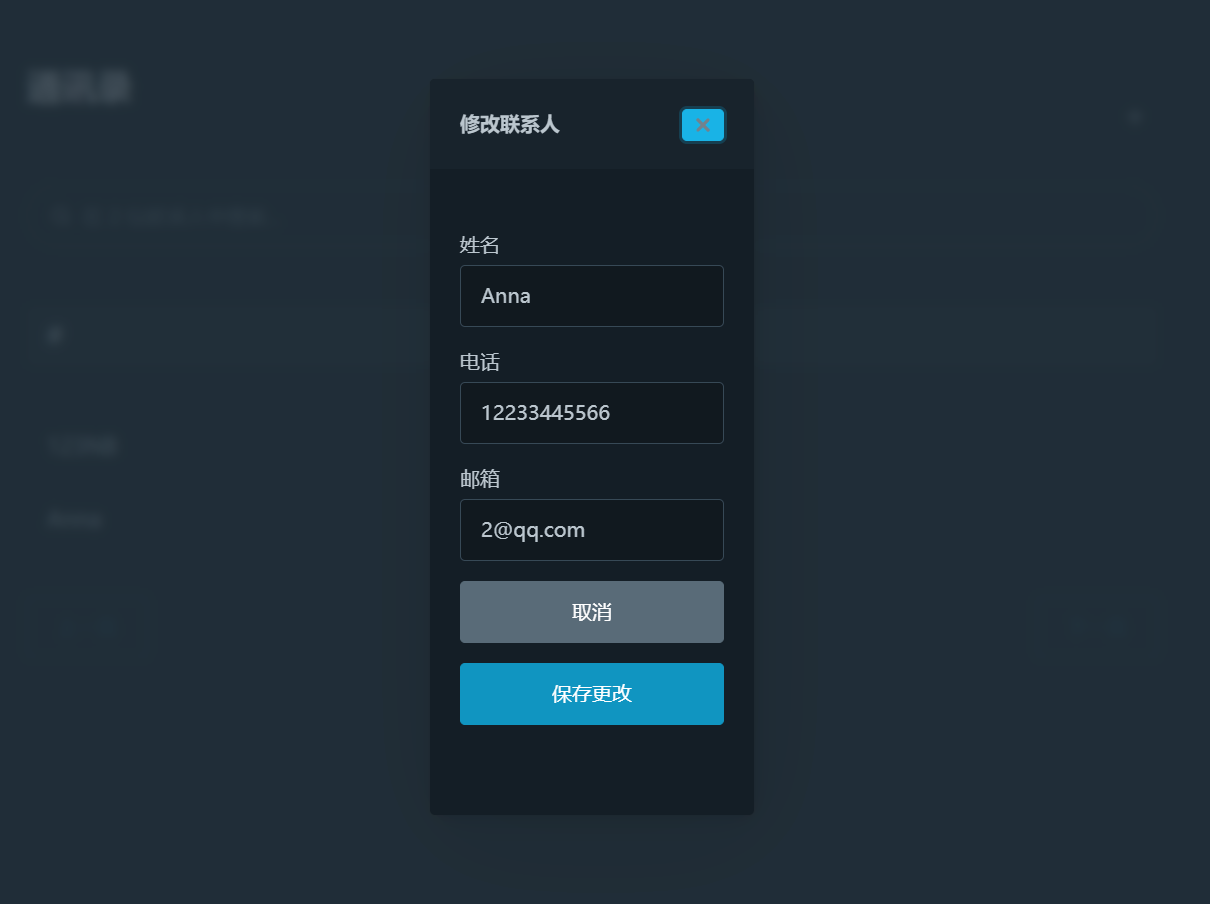
Clicking the "Edit" icon opens the "Edit" modal, which comes pre-filled with all the contact's information (including email).
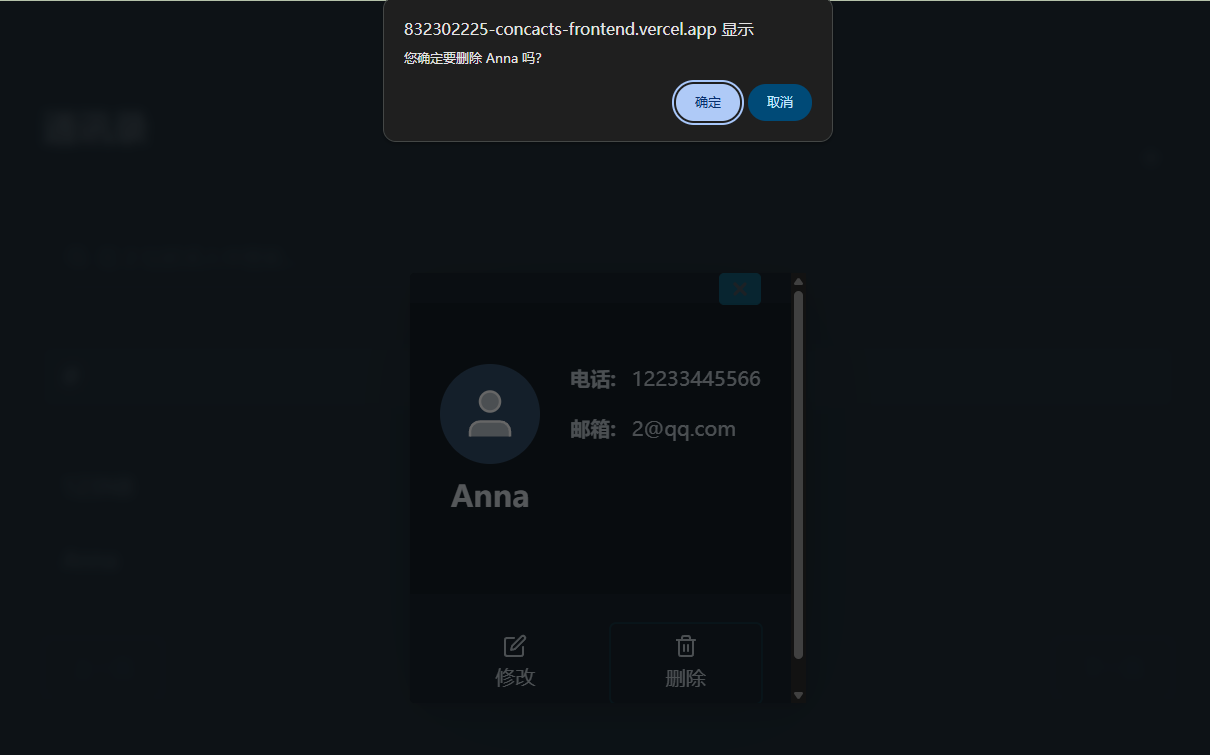
To prevent accidental deletions, clicking the "Delete" icon triggers a native browser confirm() dialog.
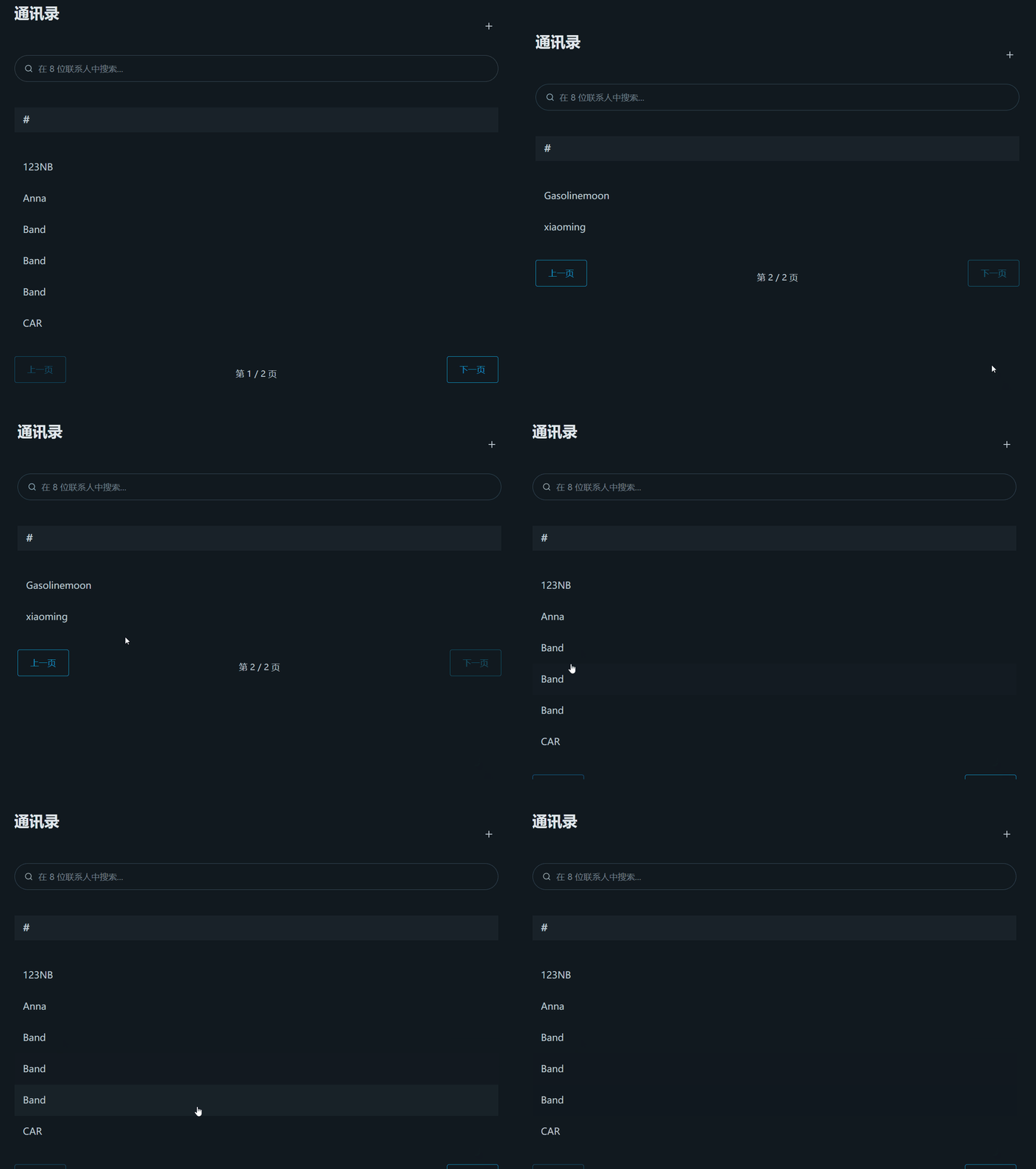
The pagination controls are correctly placed at the bottom and use Flexbox to ensure the "Previous" button, "Page X / Y" text, and "Next" button are perfectly aligned and balanced.
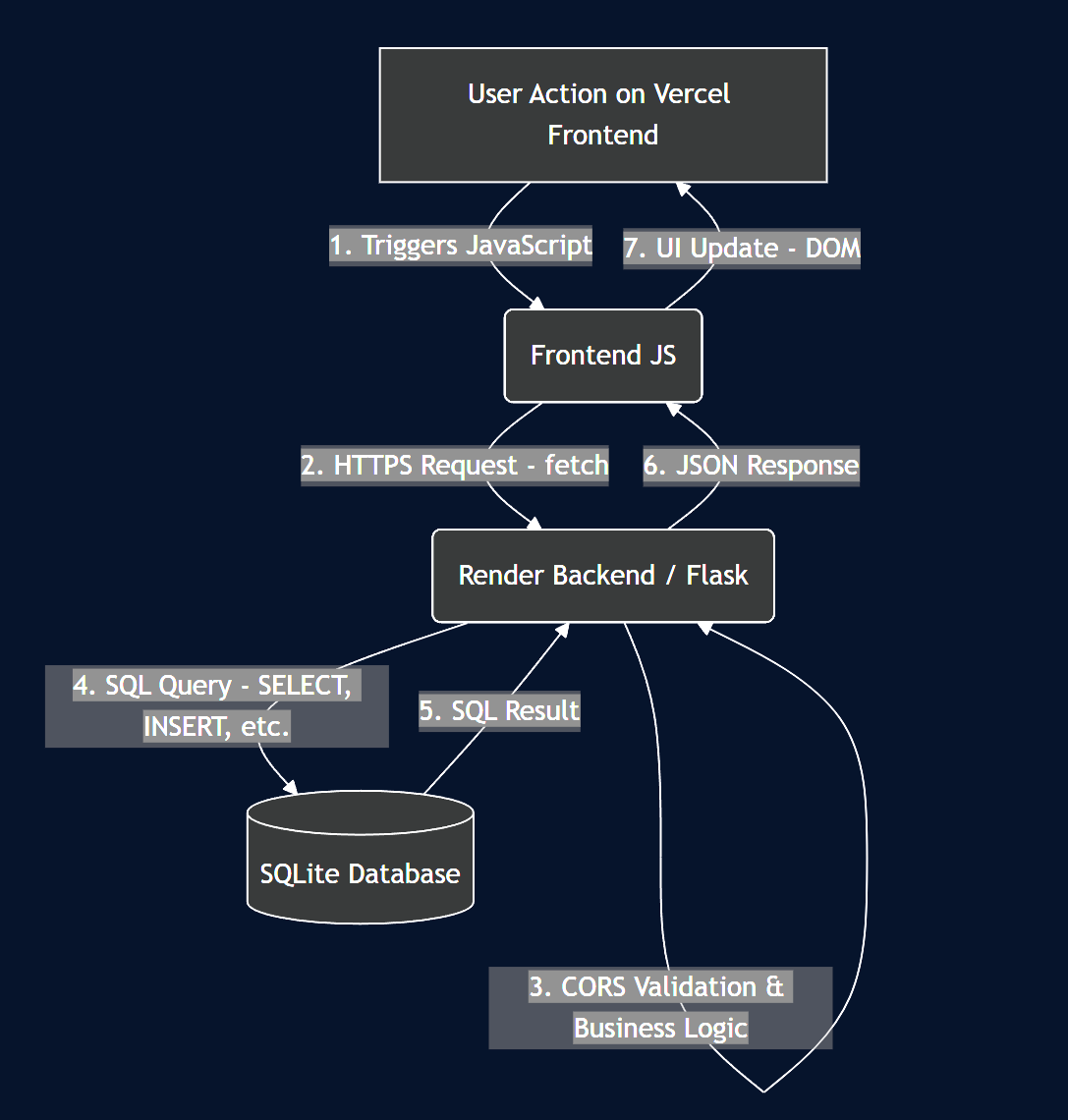
This project was built from the ground up using a classic, decoupled frontend/backend architecture. This separation is crucial for modern web development, allowing each part to be developed, deployed, and scaled independently.
Frontend (The "Client"): A static, single-page application (SPA) built with vanilla JavaScript, HTML5, and CSS. It contains all the UI logic and is responsible for rendering the interface the user sees. It was deployed on Vercel, which is optimized for high-performance static site hosting and provides seamless continuous deployment from a GitHub repository.
Backend (The "Server"): A Python-based RESTful API built with Flask. This server handles all business logic, data validation, and database interactions. It was deployed on Render, a platform well-suited for running web services like a Flask app.
Database (The "Persistence Layer"): A persistent SQLite database file. Unlike larger databases (like PostgreSQL or MySQL), SQLite is serverless and stores the entire database in a single file on the server's file system. This simplicity was perfect for this project, and Render's persistent disk service ensures the database file is not lost between deployments.
Here is a data flow diagram for the application, generated using Mermaid:
Backend:
...vercel.app) and backend (...onrender.com) live on different domains.Frontend:
fetch, async/await for API calls, and direct DOM manipulation for updating the UI.pinyin-pro: A crucial third-party library used to correctly sort Chinese names by their pinyin, which is a key feature of this contacts app.Deployment & DevOps:
git push to the main branch automatically triggered a new build and deployment of the static site.gunicorn command on startup and provided a persistent disk to store the SQLite database file permanently.A critical part of the backend wasn't just the API routes, but ensuring the app could start reliably on a new server. The init_database function was key, especially the part that handles "schema migration" (adding the email column).
Using CREATE TABLE IF NOT EXISTS ensures the table is ready. More importantly, the try...except block for ALTER TABLE makes the app robust. If the app restarts or redeploys after the email column is added, it will simply catch the (expected) sqlite3.OperationalError and continue, instead of crashing the server. This was essential for solving the initial deployment failures.
def init_database():
    conn = sqlite3.connect('database.db')
    cursor = conn.cursor()
    cursor.execute("""
                   CREATE TABLE IF NOT EXISTS contacts
                   (
                       id
                       INTEGER
                       PRIMARY
                       KEY
                       AUTOINCREMENT,
                       name
                       TEXT
                       NOT
                       NULL,
                       phone
                       TEXT
                       NOT
                       NULL,
                       email
                       TEXT
                   );
                   """)

    try:
        cursor.execute("ALTER TABLE contacts ADD COLUMN email TEXT")
    except sqlite3.OperationalError:
        pass
    conn.commit()
    conn.close()
To support the search feature, I upgraded the get_contacts endpoint. It now checks for a URL query parameter q. If one is present, it uses a SQL LIKE query to filter by name, phone, and email.
# GET /api/contacts
@app.route('/api/contacts', methods=['GET'])
def get_contacts():
    query = request.args.get('q', '')
    conn = get_db_connection()
    if query:
        search_term = f"%{query}%"
        contacts_rows = conn.execute(
            'SELECT * FROM contacts WHERE name LIKE ? OR phone LIKE ? OR email LIKE ?',
            (search_term, search_term, search_term)
        ).fetchall()
    else:
        contacts_rows = conn.execute('SELECT * FROM contacts').fetchall()
    conn.close()
    contacts = [dict(row) for row in contacts_rows]
    return jsonify(contacts)
The renderPage function is the heart of the frontend. It's responsible for filtering, sorting, paginating, grouping, and finally rendering the contact list every time a change occurs. This single function ensures all state changes are correctly reflected in the UI.
function renderPage() {
  const searchTerm = searchInput.value.toLowerCase();
  const filteredContacts = allContacts.filter(contact =>
    contact.name.toLowerCase().includes(searchTerm) ||
    contact.phone.includes(searchTerm) ||
    (contact.email && contact.email.toLowerCase().includes(searchTerm))
  );

  filteredContacts.sort((a, b) => {
    return pinyinPro.pinyin(a.name, { toneType: 'none' }).localeCompare(pinyinPro.pinyin(b.name, { toneType: 'none' }));
  });

  const startIndex = (currentPage - 1) * CONTACTS_PER_PAGE;
  const endIndex = startIndex + CONTACTS_PER_PAGE;
  const paginatedContacts = filteredContacts.slice(startIndex, endIndex);

  const groupedContacts = groupContacts(paginatedContacts);
  renderGroupedContacts(groupedContacts);
  updatePaginationControls(filteredContacts.length);
}
While renderPage handles the sorting, the groupContacts function is what creates the alphabetical "A", "B", "C" headers. It uses pinyinPro a second time, but with the { pattern: 'first' } option to get just the first letter of the name's pinyin. It also includes important logic to group any non-alphabetical names (like those starting with numbers or symbols) under a single "#" group.
function groupContacts(contacts) {
    if (contacts.length === 0) return {};
    const groups = {};
    contacts.forEach(contact => {
        // Use pinyin-pro to get the first letter of the pinyin
        let firstLetter = pinyinPro.pinyin(contact.name, { pattern: 'first', toneType: 'none' }).toUpperCase();

        // Group non-alphabetical names under '#'
        if (!/^[A-Z]$/.test(firstLetter)) firstLetter = '#';

        if (!groups[firstLetter]) groups[firstLetter] = [];
        groups[firstLetter].push(contact);
    });
    return groups;
}
This project was a fantastic lesson in the difference between "it works on my machine" and "it works in production." The real learning happened not during the initial coding, but during the deployment and debugging phase.
My first backend deployment on Render was the first major nightmare. The app failed immediately, greeting me with 500 and 404 errors. By reading the Render logs, I tracked the 500 error to a fatal sqlite3.OperationalError: no such table: contacts. My app was trying to read a database that simply didn't exist on the server yet. The fix was to make the app more robust. I added an init_database() function that runs on startup and executes CREATE TABLE IF NOT EXISTS..., which solved the crash. The 404 error, amusingly, was simpler: I was just visiting the root URL (/) instead of the correct /api/contacts endpoint.
Once the backend was live, the frontend presented its own mysteries. My sorting feature suddenly failed with a ReferenceError: pinyinPro is not defined. My first CDN link was unstable, and when I tried to download the library locally, I found the new version had a complex TypeScript structure I wasn't prepared for. The solution, it turned out, was to stop guessing and read the official README.md on GitHub. It provided the stable unpkg.com link, which solved the problem instantly. Always read the official docs.
Perhaps the most confusing bug was when my new "email" feature wasn't saving. The code was correct, but the data wouldn't persist. The issue was environmental: my local frontend was still sending data to my old, outdated Render backend (which didn't support email) instead of my new local backend. I had forgotten to change the API_BASE_URL in script.js back to http://127.0.0.1:5000/api for local testing. This taught me to be extremely careful about my environment variables and to always verify which API my frontend is actually talking to.
This project was a comprehensive journey from a blank editor to a fully deployed, full-stack application. Building this contacts app was about more than just writing code; it was a practical lesson in system architecture, frontend-backend separation, and the critical, often-overlooked challenges of deployment. Overcoming the bugs and configuration issues was the most valuable part of the experience, solidifying my understanding of how modern web applications are built and maintained in the real world.

