


164
社区成员
 发帖
发帖 与我相关
与我相关 我的任务
我的任务
 分享
分享
|
项目 |
内容 |
|
本作业所属课程 |
软件工程 |
|
作业要求链接 |
First assignment-- front-end and back-end separation contacts programming-CSDN社区 |
|
本作业目标 |
实现通讯录添加、修改、删除核心功能,完成前后端分离开发与部署 |
|
其他参考资料 |
Airbnb JavaScript Style Guide、Node.js 最佳实践、Express 官方文档、MongoDB 指南 |
|
任务模块 |
预估时间(分钟) |
实际时间(分钟) |
|
需求分析 |
30 |
25 |
|
设计 |
60 |
70 |
|
前端开发 |
180 |
200 |
|
后端开发 |
150 |
180 |
|
集成测试 |
60 |
80 |
|
部署 |
30 |
40 |
|
文档编写 |
60 |
65 |
|
总计 |
570 |
660 |
- 系统首页,含添加表单与空列表提示
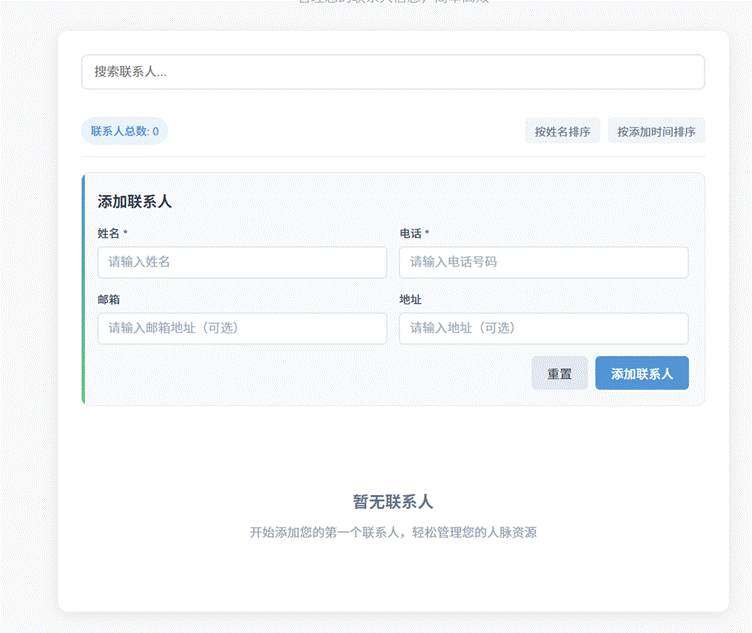
- 输入姓名、电话完成添加,
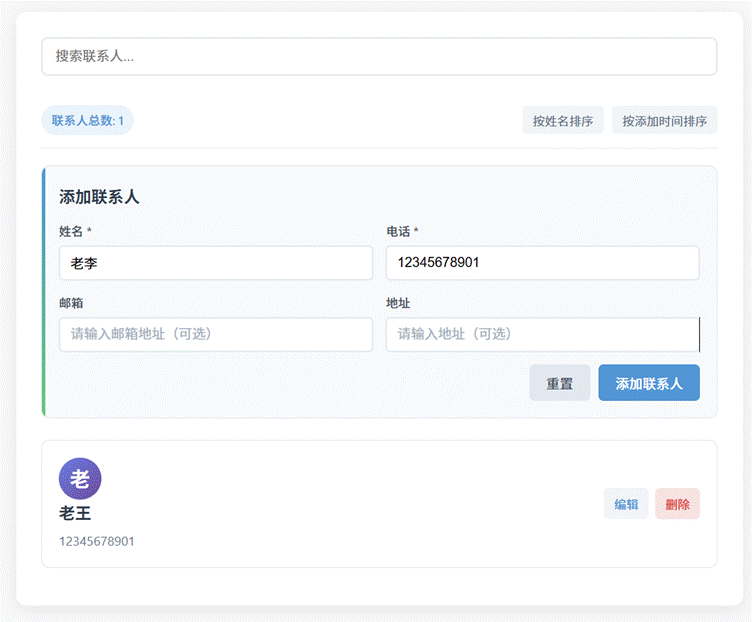
- 成功添加后实时展示联系人信息
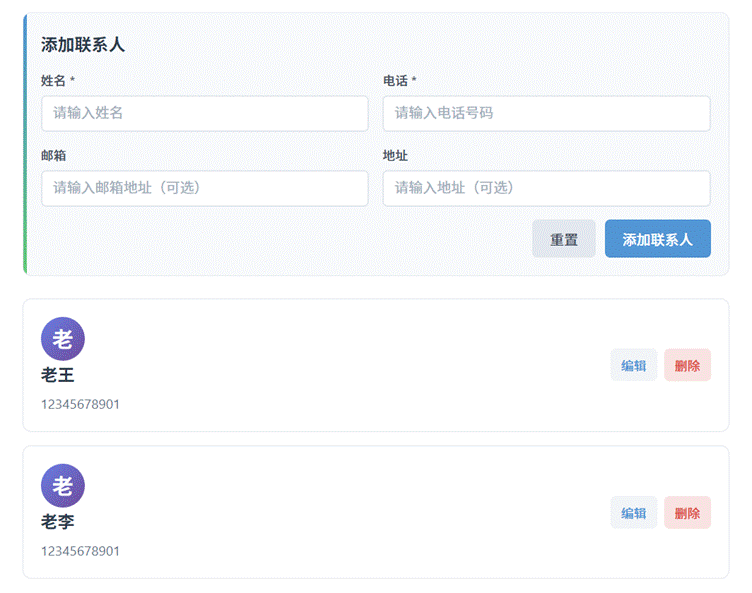
- 点击删除按钮执行删除操作
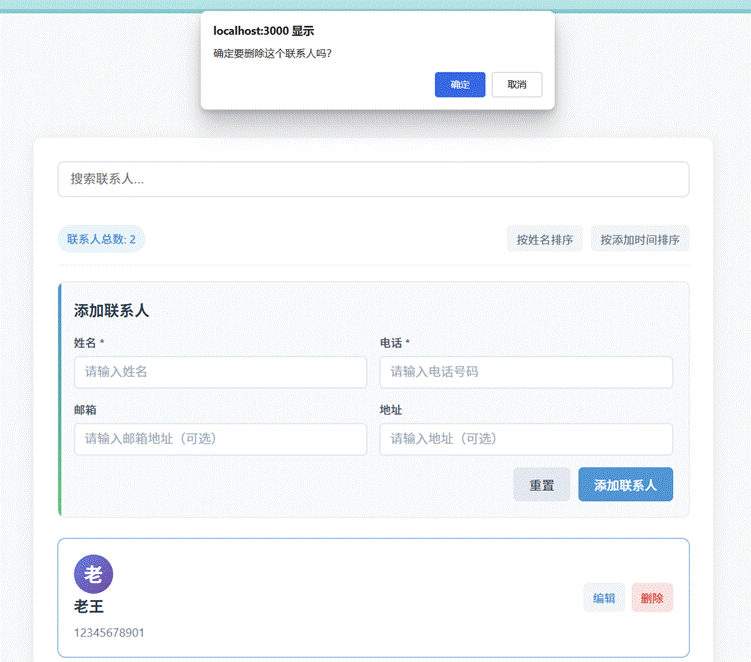
|
前端界面(用户操作层) ↓ ↑(JSON数据) 后端API(业务逻辑层) ↓ ↑(Mongoose映射) MongoDB数据库(数据存储层) (添加/修改/删除) (CRUD接口) (文档存储) |
|
// 全局联系人数据(与后端同步) let contacts = []; // 编辑状态标记(区分添加/修改) let editingId = null; // 手机号格式校验正则 const PHONE_REGEX = /^1[3-9]\d{9}$/; // 页面加载时从后端获取数据 window.onload = async () => { await fetchContacts(); renderContacts(); }; // 从后端获取所有联系人 async function fetchContacts() { const res = await fetch('/api/contacts'); contacts = await res.json(); } // 添加/修改联系人逻辑(合并功能) async function handleContactSubmit(e) { e.preventDefault(); const name = document.getElementById('name').value.trim(); const phone = document.getElementById('phone').value.trim(); const email = document.getElementById('email').value.trim(); // 基础校验 if (!name) { alert('姓名必填'); return; } if (!phone) { alert('电话必填'); return; } // 手机号格式校验 if (!PHONE_REGEX.test(phone)) { alert('手机号格式错误(需为11位有效号码)'); return; } const contactData = { name, phone, email }; if (editingId) { // 编辑模式:调用后端修改接口 await fetch(`/api/contacts/${editingId}`, { method: 'PUT', headers: { 'Content-Type': 'application/json' }, body: JSON.stringify(contactData) }); editingId = null; document.getElementById('submitBtn').textContent = '添加联系人'; } else { // 添加模式:调用后端添加接口 await fetch('/api/contacts', { method: 'POST', headers: { 'Content-Type': 'application/json' }, body: JSON.stringify(contactData) }); } // 重新获取数据并渲染 await fetchContacts(); renderContacts(); document.getElementById('contactForm').reset(); } // 进入编辑模式 function editContact(id) { const contact = contacts.find(c => c._id === id); // 注意:MongoDB默认ID为_id if (!contact) return; document.getElementById('name').value = contact.name; document.getElementById('phone').value = contact.phone; document.getElementById('email').value = contact.email || ''; editingId = id; document.getElementById('submitBtn').textContent = '保存修改'; } // 删除联系人(调用后端接口) async function deleteContact(id) { if (!confirm('确定要删除该联系人吗?')) return;
await fetch(`/api/contacts/${id}`, { method: 'DELETE' }); // 重新获取数据并渲染 await fetchContacts(); renderContacts(); } // 渲染联系人列表 function renderContacts() { const list = document.getElementById('contactList'); if (contacts.length === 0) { list.innerHTML = '<li class="empty-tip">暂无联系人,请添加</li>'; return; } list.innerHTML = contacts.map(c => ` <li class="contact-item"> <div class="contact-info"> <span class="name">${c.name}</span> <span class="phone">${c.phone}</span> ${c.email ? `<span class="email">${c.email}</span>` : ''} </div> <div class="contact-actions"> <button onclick="editContact('${c._id}')">修改</button> <button onclick="deleteContact('${c._id}')">删除</button> </div> </li> `).join(''); } |
|
// 1. 依赖引入与基础配置 const express = require('express'); const mongoose = require('mongoose'); const cors = require('cors'); const app = express(); const PORT = 3000; // 中间件配置 app.use(cors()); // 允许跨域 app.use(express.json()); // 解析JSON请求体 app.use(express.static('public')); // 提供前端静态文件 // 2. MongoDB数据模型定义(Contact Schema) const contactSchema = new mongoose.Schema({ name: { type: String, required: true, trim: true }, // 姓名(必填,去空格) phone: { type: String, required: true, trim: true, match: /^1[3-9]\d{9}$/ // 手机号格式校验(后端双重保障) }, email: { type: String, trim: true, default: '' }, // 邮箱(可选,默认空) createTime: { type: Date, default: Date.now } // 创建时间(自动生成) }); const Contact = mongoose.model('Contact', contactSchema); // 3. 数据库连接 mongoose.connect('mongodb://localhost:27017/contactsapp', { // 消除过时警告的配置 useNewUrlParser: true, useUnifiedTopology: true }) .then(() => console.log('MongoDB 连接成功')) .catch(err => console.error('MongoDB 连接失败:', err)); // 4. RESTful API接口(增删改查) // 4.1 获取所有联系人 app.get('/api/contacts', async (req, res) => { try { const contacts = await Contact.find().sort({ createTime: -1 }); // 按创建时间倒序 res.json(contacts); } catch (err) { res.status(500).json({ msg: '获取联系人失败:' + err.message }); } }); // 4.2 添加联系人 app.post('/api/contacts', async (req, res) => { try { const contact = new Contact(req.body); await contact.save(); res.status(201).json(contact); // 201表示创建成功 } catch (err) { res.status(400).json({ msg: '添加联系人失败:' + err.message }); // 400表示请求参数错误 } }); // 4.3 修改联系人(新增接口) app.put('/api/contacts/:id', async (req, res) => { try { const contact = await Contact.findByIdAndUpdate( req.params.id, req.body, { new: true, runValidators: true } // new:返回修改后的数据;runValidators:触发校验 ); if (!contact) { return res.status(404).json({ msg: '联系人不存在' }); } res.json(contact); } catch (err) { res.status(400).json({ msg: '修改联系人失败:' + err.message }); } }); // 4.4 删除联系人 app.delete('/api/contacts/:id', async (req, res) => { try { const contact = await Contact.findByIdAndDelete(req.params.id); if (!contact) { return res.status(404).json({ msg: '联系人不存在' }); } res.json({ msg: '联系人已删除' }); } catch (err) { res.status(500).json({ msg: '删除联系人失败:' + err.message }); } }); // 5. 启动服务器 app.listen(PORT, () => { console.log(`服务器运行在 http://localhost:${PORT}`); }); |

