


164
社区成员
 发帖
发帖 与我相关
与我相关 我的任务
我的任务
 分享
分享| Course for This Assignment | 2501_MU_SE_FZU |
|---|---|
| Assignment Requirements | Extreme Programming |
| Author | Jiayao Hu (832301310); Hantao Wu (832302129) |
| Objectives of This Assignment | Learn team collaboration, practice software development lifecycle, implement full-stack web application |
| Other References | Flask Documentation, Bootstrap Documentation, Pandas Documentation |
Note:
1. Please use Watt Toolkit in case that the GitHub repositories are blocked by the GFW.
2. This project site will be expired after 5/6/2026.
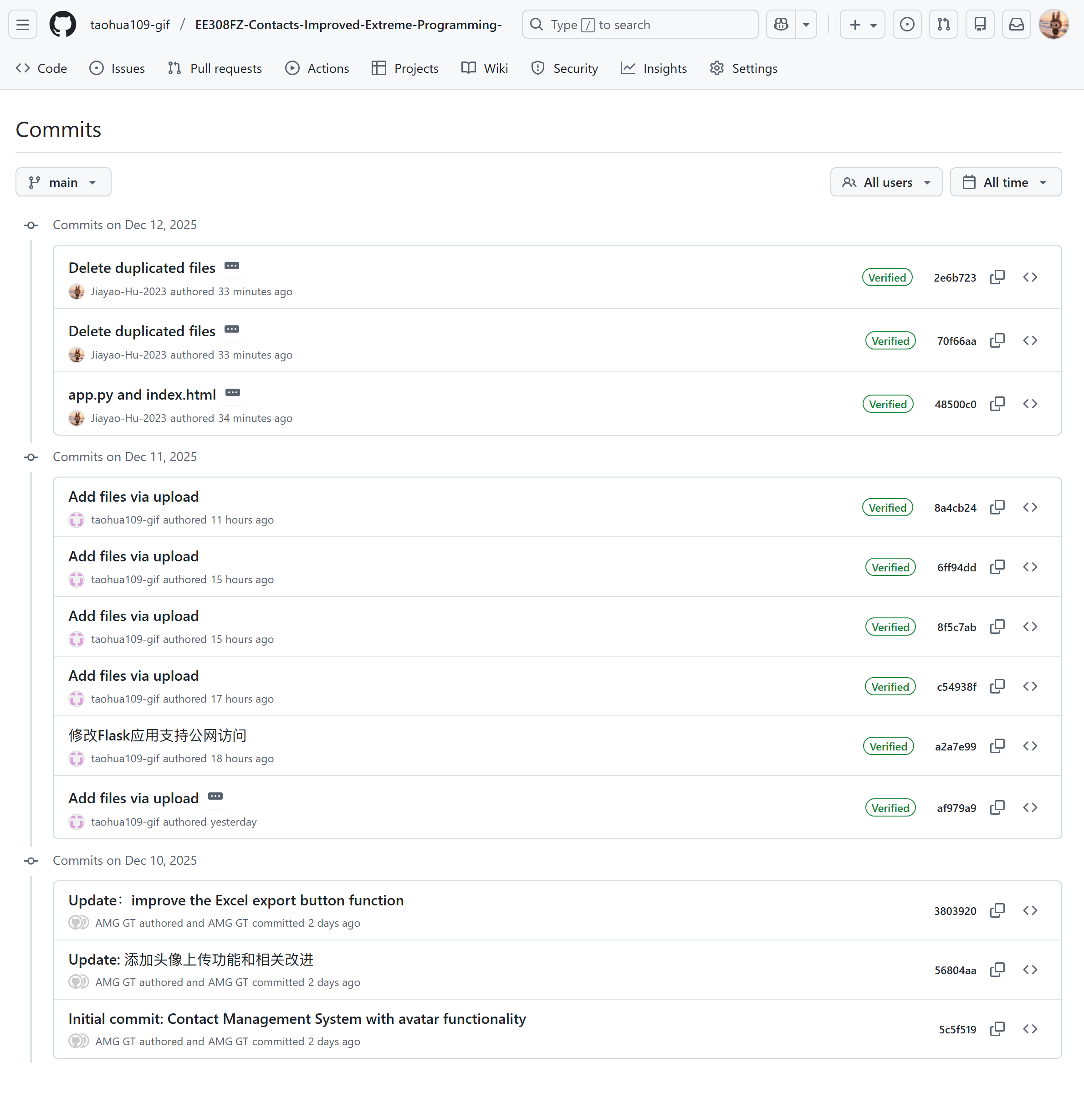
This project implements a comprehensive Contact Management System with the following features:
This Contact Management System is a web-based application built with Python/Flask backend and a Bootstrap frontend. It provides users with a comprehensive set of tools to manage their contacts efficiently, including bookmarking important contacts, adding multiple contact methods, and importing/exporting data in Excel format.
The bookmarking functionality allows users to mark important contacts for quick access. Star icons are displayed next to each contact, and users can toggle the starred status with a single click.
Implementation Details:
is_starred field in the contacts table (boolean type)Users can add multiple phone numbers, email addresses, and social media handles for each contact.
Implementation Details:
Contacts can be exported to an Excel spreadsheet with properly formatted columns for each contact attribute.
Implementation Details:
pandas library to create Excel filesThe system can import contacts from Excel files with the correct format.
Implementation Details:
pandas and openpyxlThe application features a responsive web interface built with Bootstrap, providing an intuitive user experience across devices.
Key Interface Elements:

The home page provides a clean, organized interface with navigation options, search functionality, and quick access to all main features. The contact list is displayed in the main content area with star indicators for bookmarked contacts.
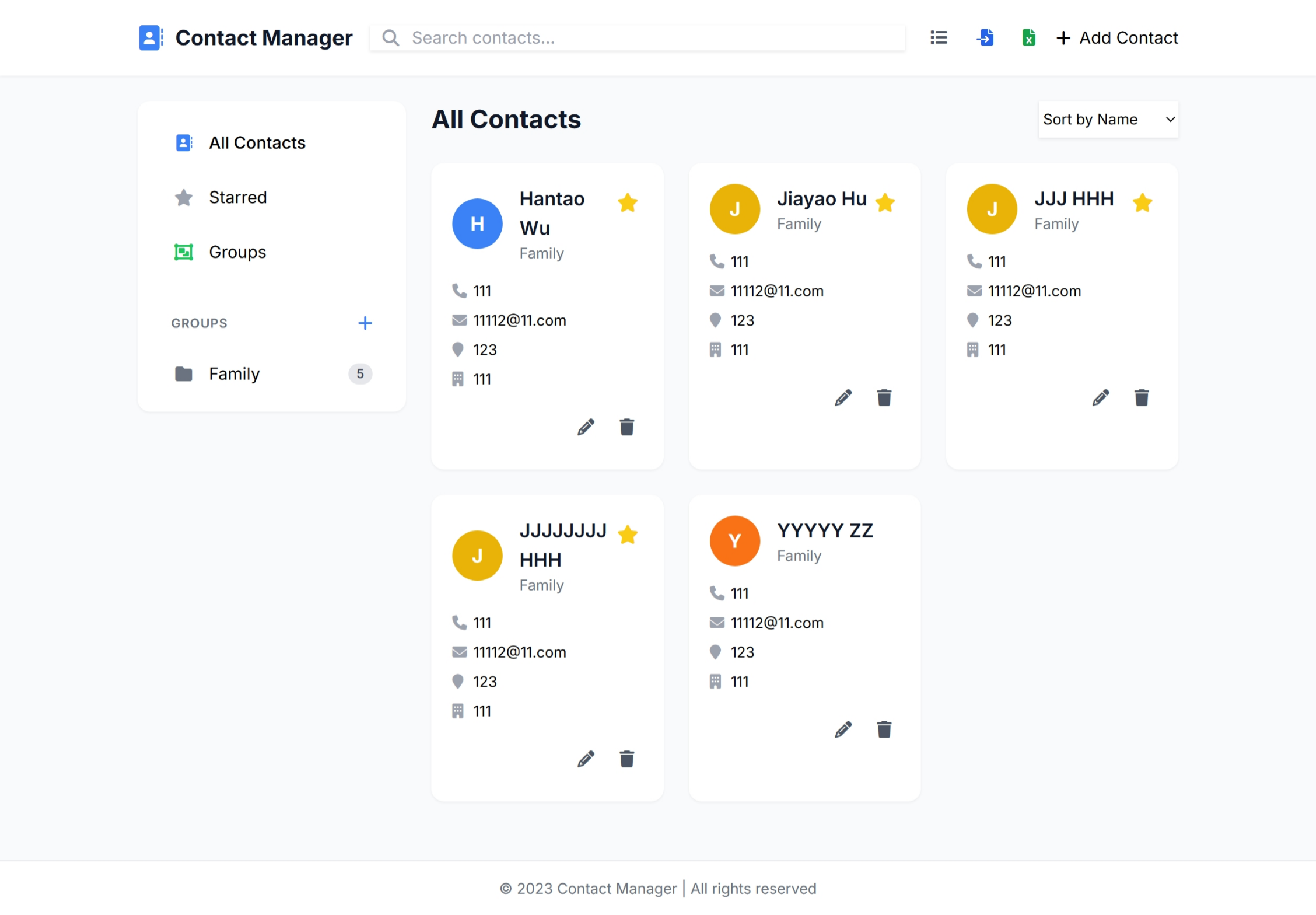
All contacts are displayed in a responsive table format. Each row includes contact information, star status, and action buttons (edit, delete, star). Starred contacts appear at the top of the list for easy access.
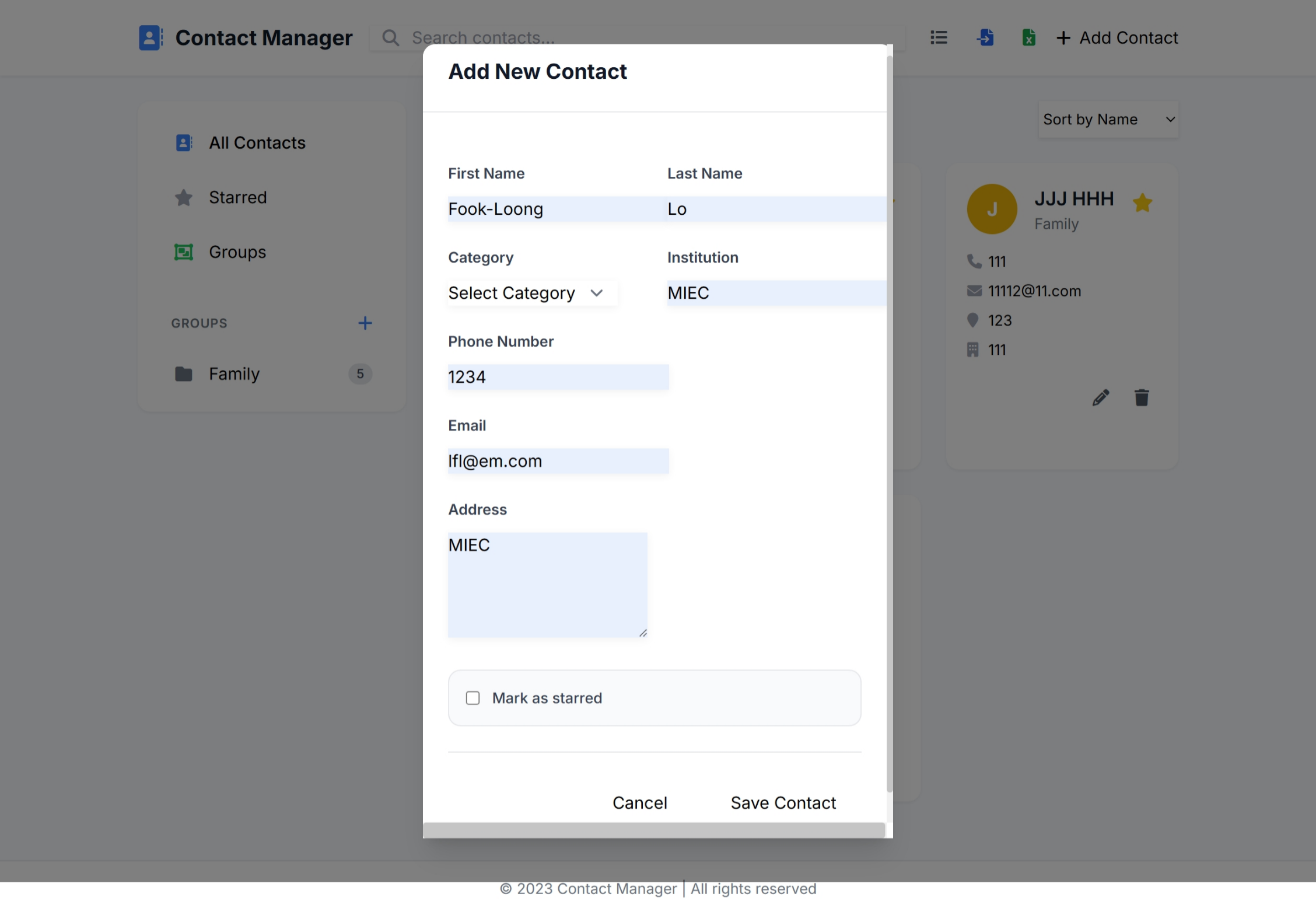

The add contact form allows users to enter basic contact information including first name, last name, category, institution, and address. The form includes validation to ensure required fields are completed. Users can add multiple phone numbers, email addresses, and social media handles for each contact. The form dynamically adds fields as needed, allowing flexible contact information management.

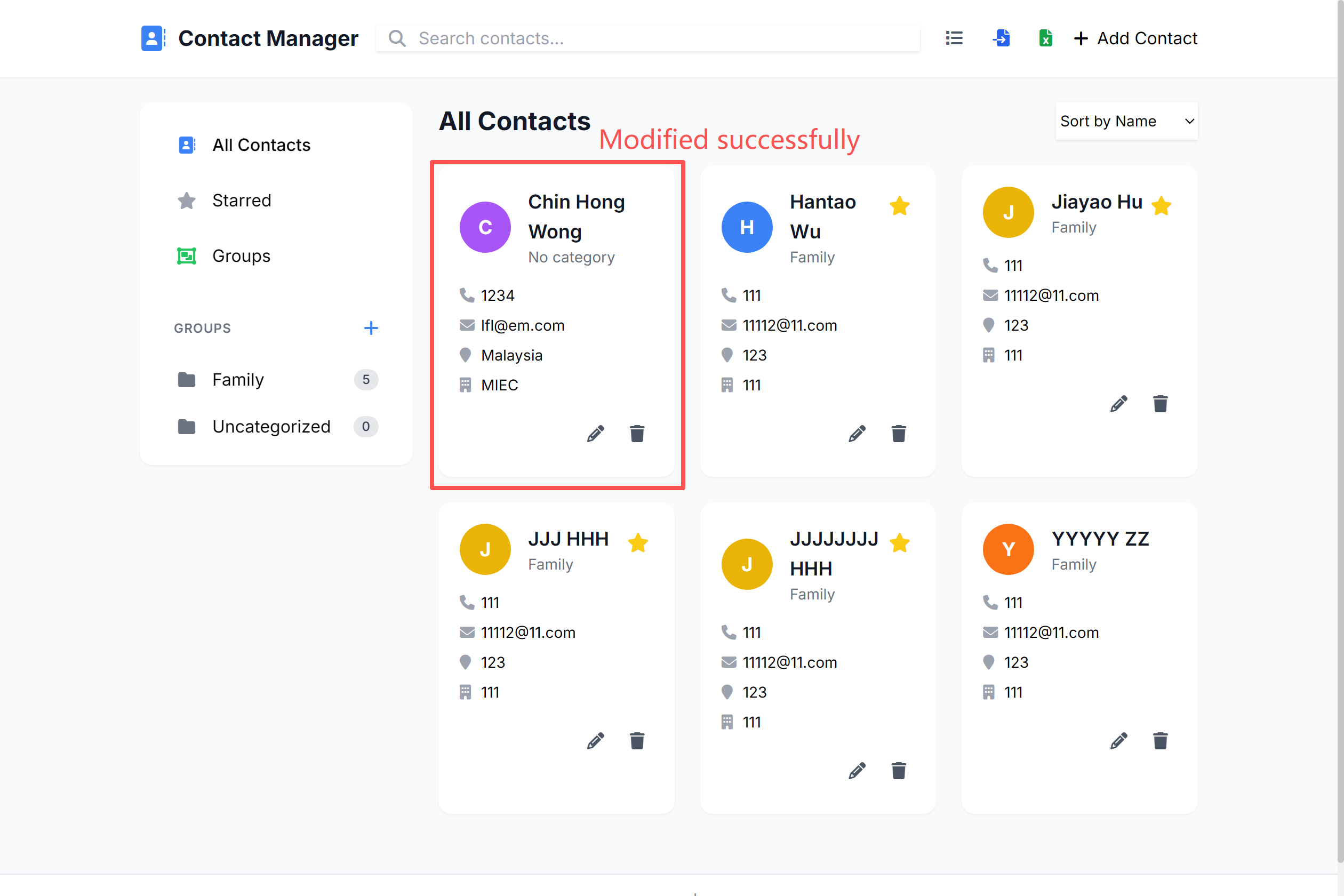
The edit form pre-populates with existing contact information, making it easy to update details. Users can modify any field including basic information and contact methods.
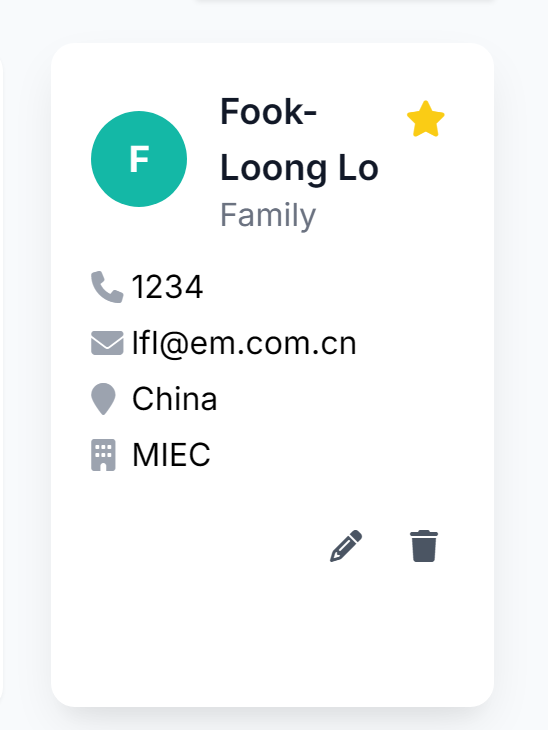
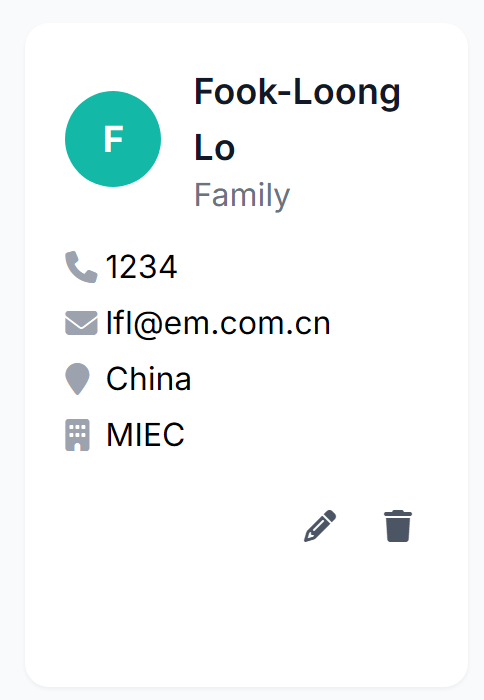
Users can click the star icon next to any contact to toggle its starred status. Starred contacts are visually highlighted with a yellow star and appear at the top of the contact list.

The filter option allows users to view only starred contacts, making it easy to find important contacts quickly.
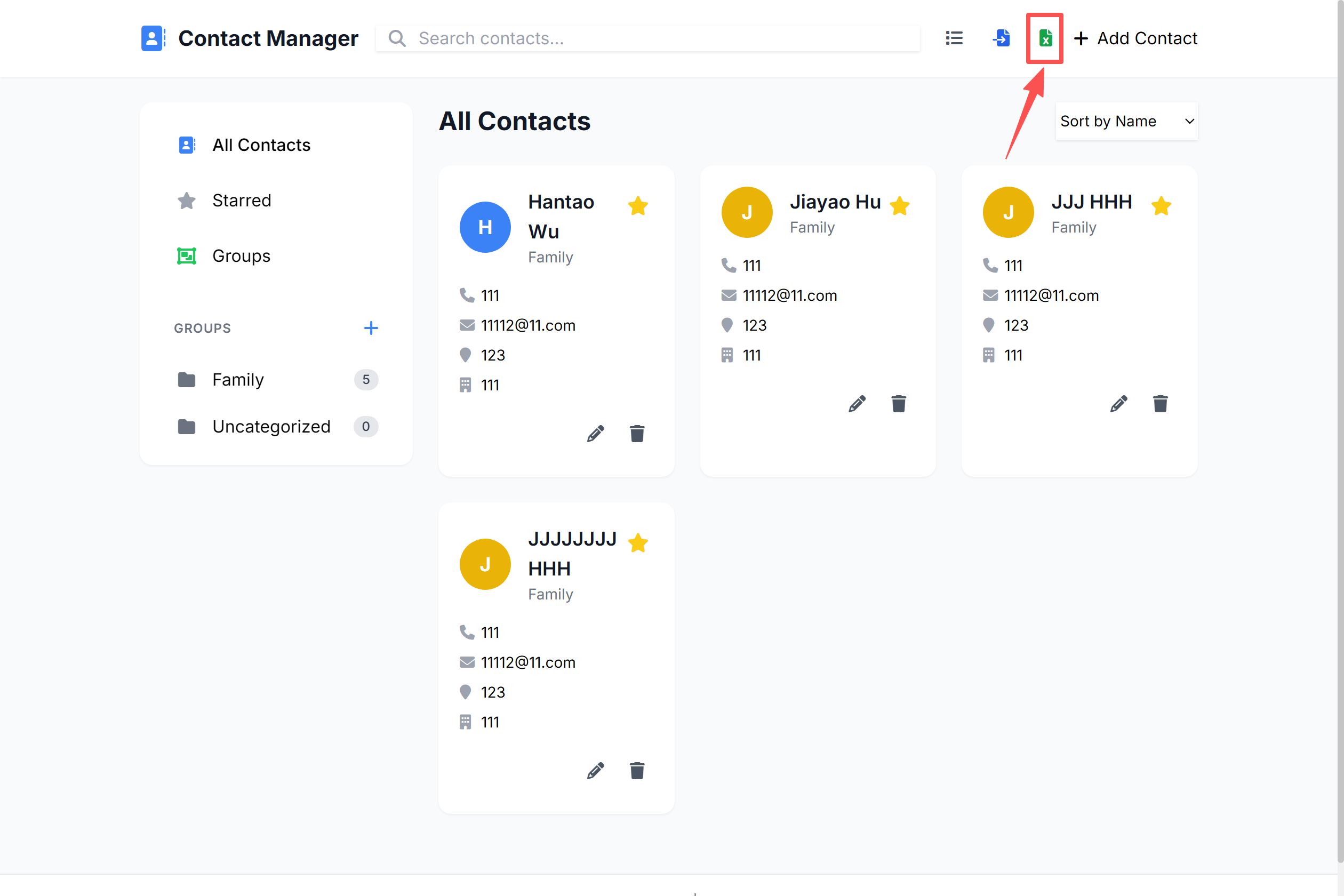
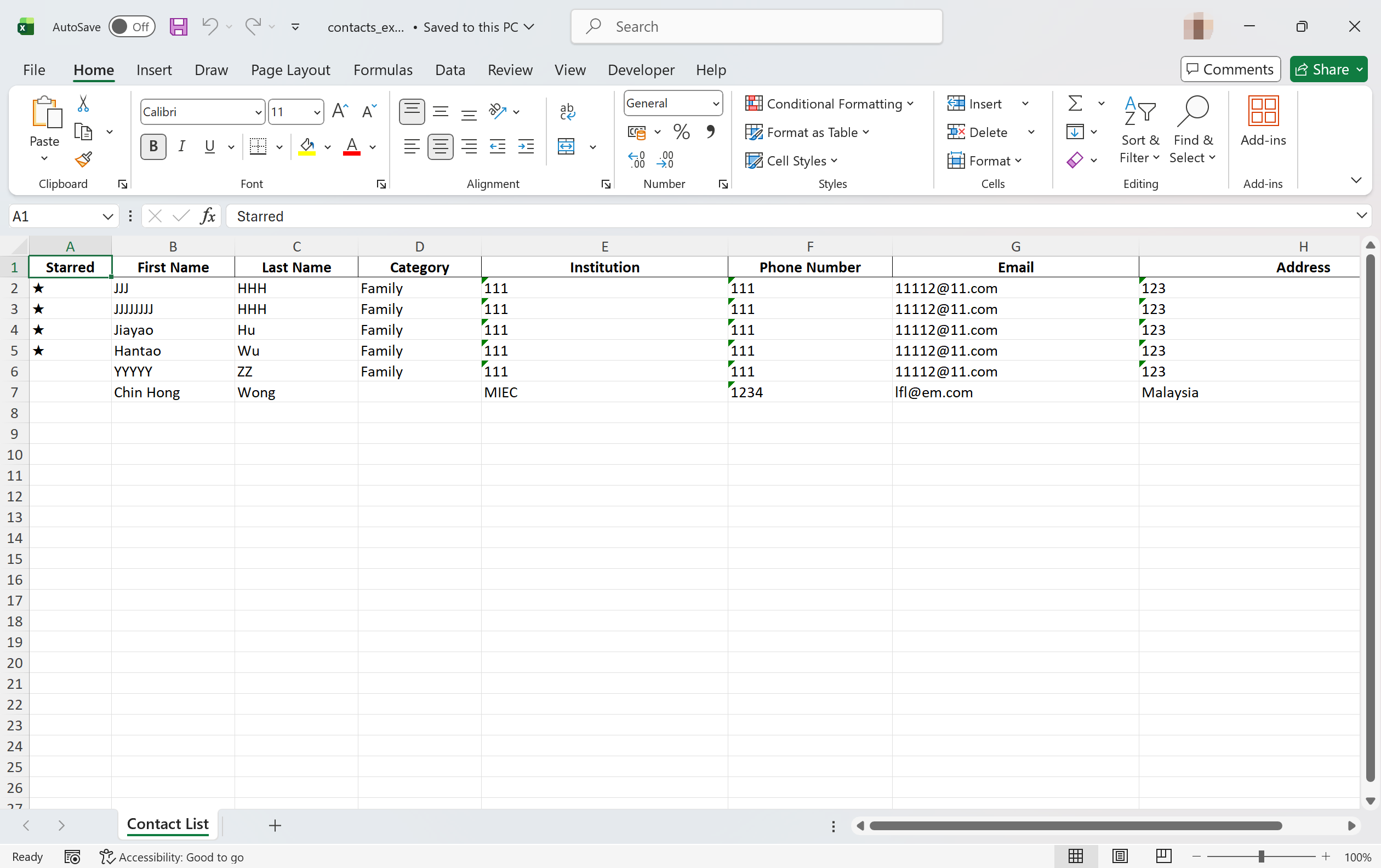
The export feature generates an Excel file with all contacts and their information properly formatted in columns. Users can download the file with a single click.
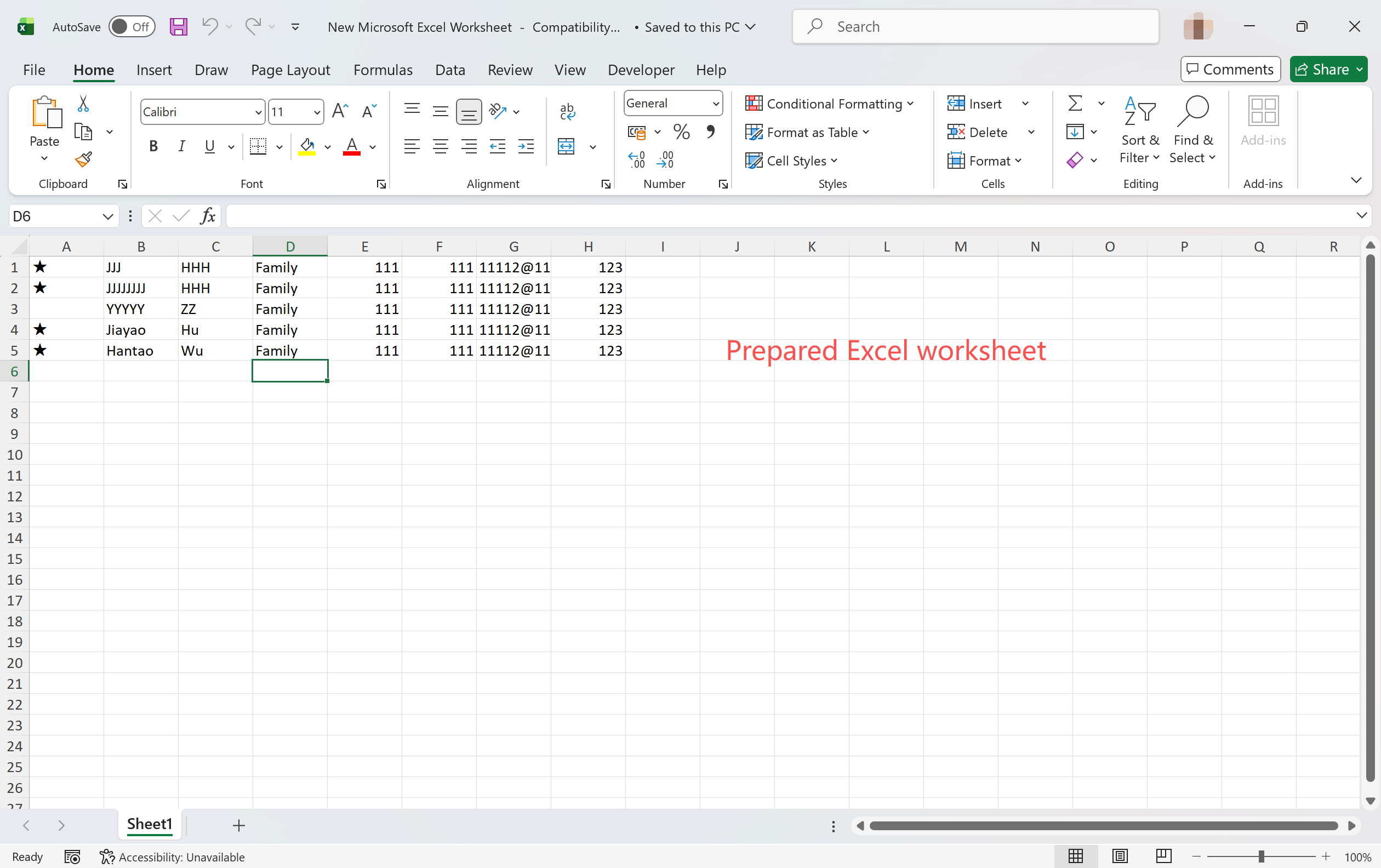
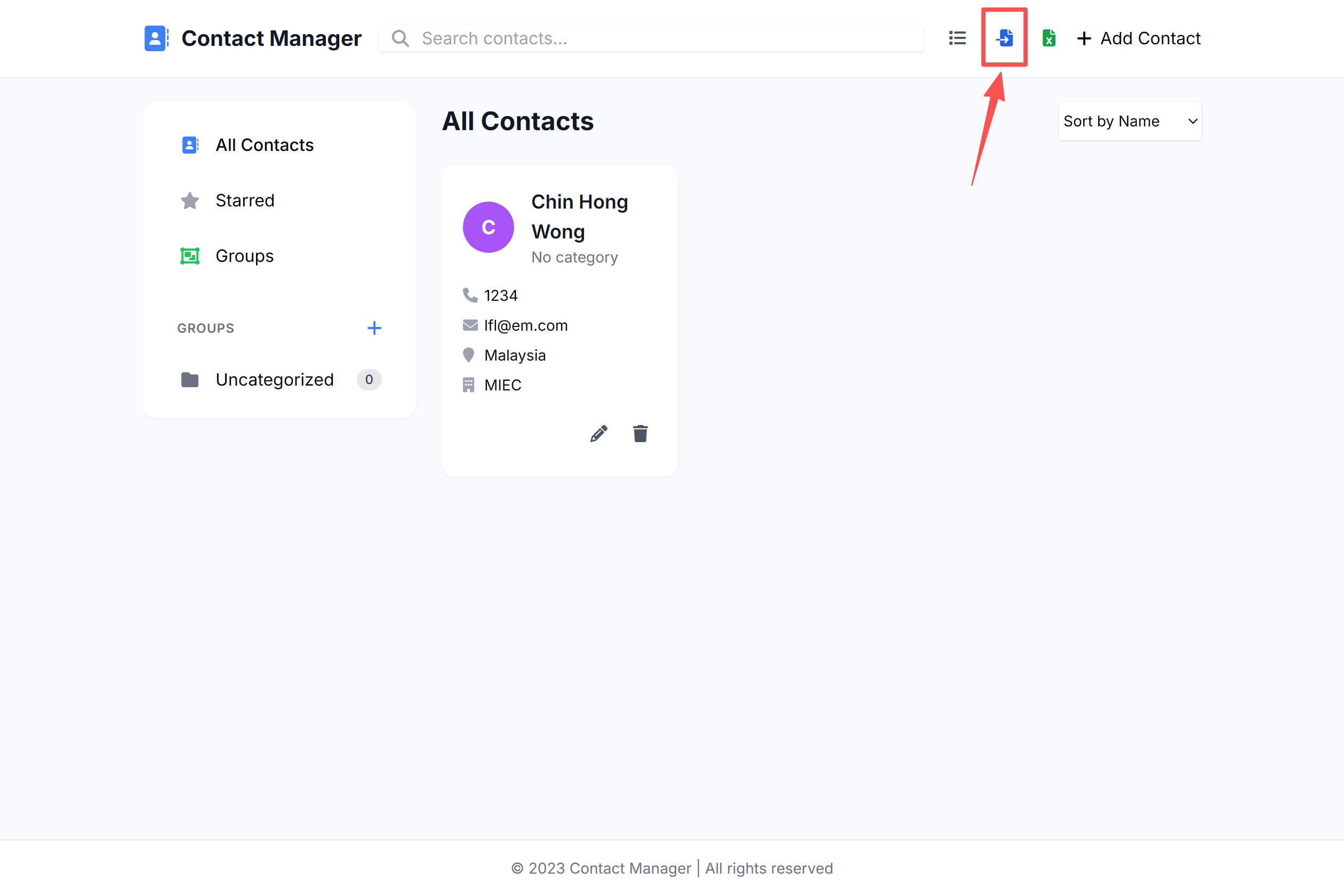
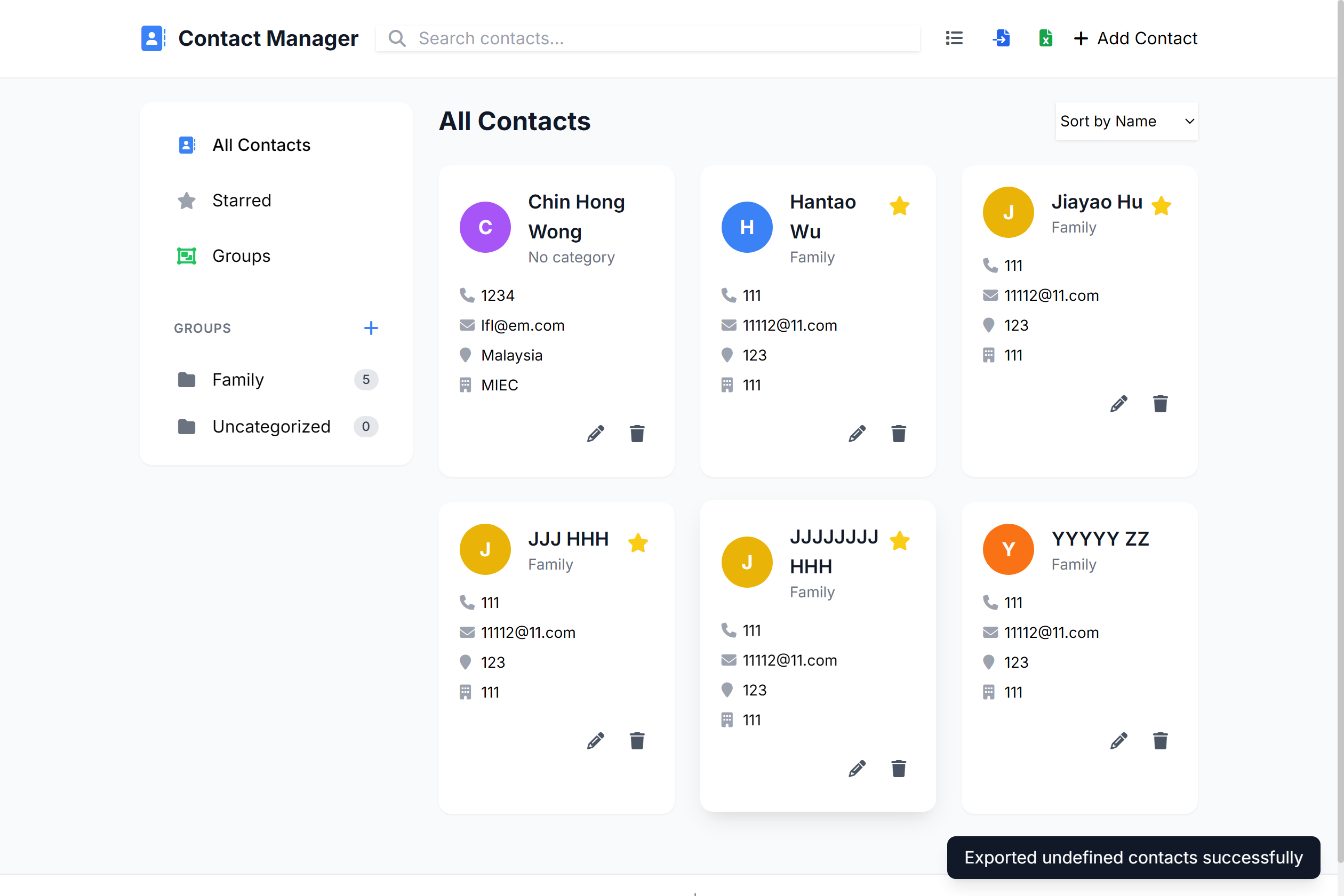
Users can upload Excel files containing contact information. The system validates the data format and imports all valid contacts into the database.
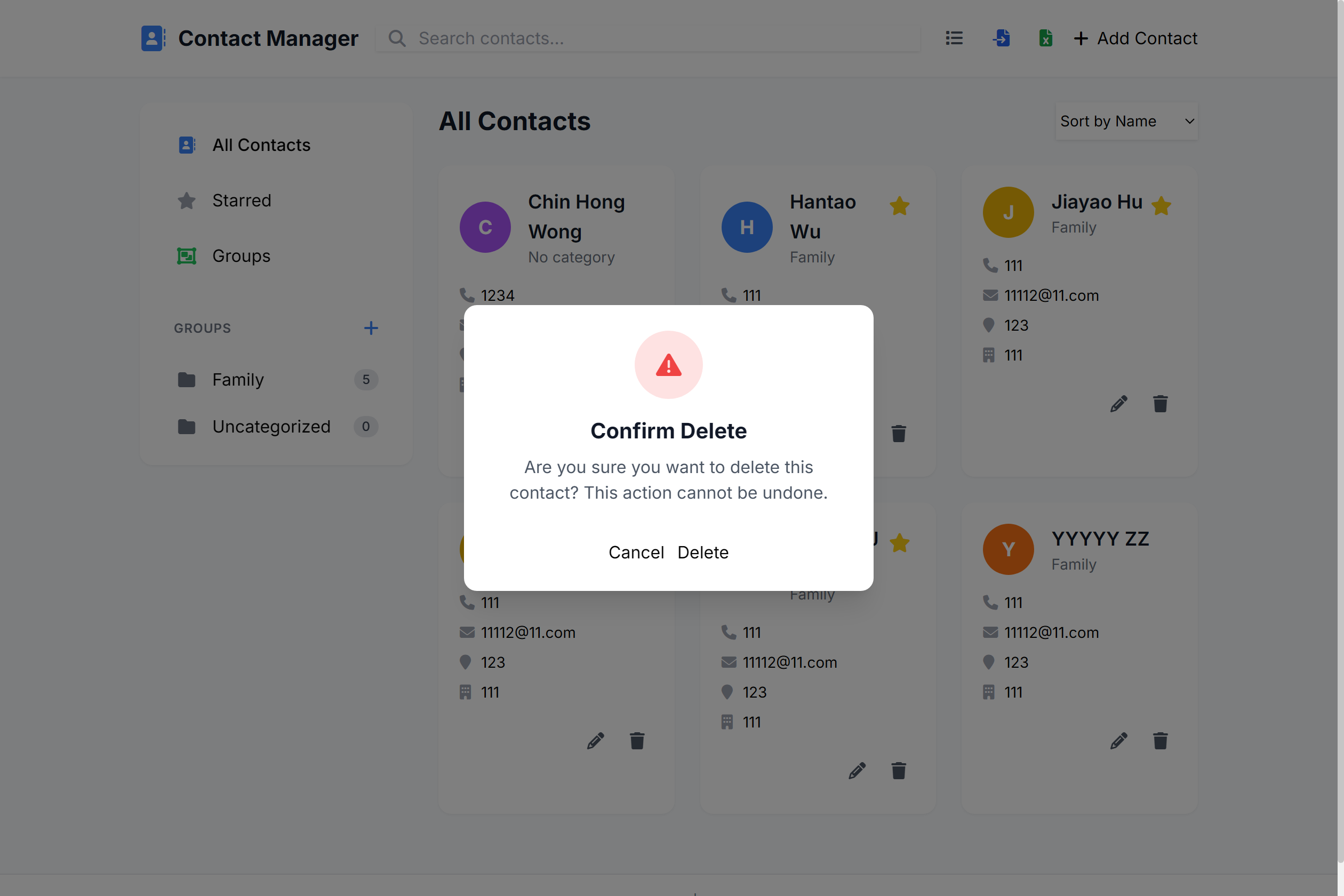
A confirmation dialog appears when users attempt to delete a contact, preventing accidental deletions. Users must confirm their action before the contact is removed.
To watch the project demo video to show how this project operates, please click HERE for more information.
The system follows a client-server architecture with clear separation of concerns:
┌─────────────────┐     HTTP Requests     ┌─────────────────┐
│   Frontend                 │─────────────>│   Backend                   │
│   (HTML/CSS/JS)            │<─────────────│   (Python/Flask)            │
└─────────────────┘                       └──────────┬──────┘
                                                                         │
                                                            ┌───────▼───────┐
                                                            │  SQLite                 │
                                                            │  Database               │
                                                            └───────────────┘
The database uses a normalized structure with two main tables:
contacts table:
contact_methods table:
The backend is built with Flask and provides RESTful API endpoints for all contact management operations:
The frontend uses Bootstrap for responsive design and JavaScript for interactive features:
Backend API (App.py)
# Toggle contact starred status
@app.route('/contacts/<first_name>/<last_name>/star', methods=['PUT'])
def toggle_star(first_name, last_name):
    if address_book.toggle_starred(first_name, last_name):
        return jsonify({'message': f'Contact {first_name} {last_name} starred status toggled successfully'})
    else:
        return jsonify({'error': f'Contact {first_name} {last_name} not found'}), 404
Database Implementation (database.py)
# Update contact starred status
def toggle_starred(self, first_name, last_name):
    conn = sqlite3.connect(self.db_file)
    cursor = conn.cursor()

    # Get current starred status
    cursor.execute('SELECT is_starred FROM contacts WHERE first_name=? AND last_name=?', (first_name, last_name))
    row = cursor.fetchone()

    if not row:
        conn.close()
        return False

    # Toggle the status
    new_starred = 0 if row[0] else 1
    cursor.execute('UPDATE contacts SET is_starred=? WHERE first_name=? AND last_name=?',
                  (new_starred, first_name, last_name))
    conn.commit()
    conn.close()
    return True
# Export contacts to Excel
@app.route('/contacts/export', methods=['GET'])
def export_contacts():
    contacts = address_book.load_contacts()

    # Convert contacts to export format
    export_data = []
    for contact in contacts:
        export_data.append({
            'Starred': '★' if contact['is_starred'] else '',
            'Name': f"{contact['first_name']} {contact['last_name']}",
            'Category': contact['category'],
            'Institution': contact['institution'],
            'Phone Number': contact['phone_number'],
            'Email': contact['email'],
            'Address': contact['address']
        })

    # Create DataFrame and Excel file
    df = pd.DataFrame(export_data)
    output = BytesIO()

    with pd.ExcelWriter(output, engine='openpyxl') as writer:
        df.to_excel(writer, index=False, sheet_name='Contact List')

        # Adjust column widths
        worksheet = writer.sheets['Contact List']
        worksheet.column_dimensions['A'].width = 10
        worksheet.column_dimensions['B'].width = 20
        worksheet.column_dimensions['C'].width = 15
        worksheet.column_dimensions['D'].width = 30
        worksheet.column_dimensions['E'].width = 20
        worksheet.column_dimensions['F'].width = 30
        worksheet.column_dimensions['G'].width = 40

    output.seek(0)

    # Return Excel file as response
    response = make_response(output.getvalue())
    response.headers["Content-Disposition"] = "attachment; filename=contacts_export.xlsx"
    response.headers["Content-type"] = "application/vnd.openxmlformats-officedocument.spreadsheetml.sheet"

    return response
@app.route('/contacts/import', methods=['POST'])
def import_contacts():
    if 'file' not in request.files:
        return jsonify({'success': False, 'error': 'No file part in the request'}), 400

    file = request.files['file']
    if file.filename == '':
        return jsonify({'success': False, 'error': 'No file selected for uploading'}), 400

    if not (file.filename.endswith('.xlsx') or file.filename.endswith('.xls')):
        return jsonify({'success': False, 'error': 'Only Excel files (.xlsx or .xls) are allowed'}), 400

    try:
        df = pd.read_excel(file, header=None)
        if df.shape[1] != 8:
            return jsonify({'success': False, 'error': f'Excel file must have exactly 8 columns, but found {df.shape[1]} columns'}), 400
        contacts_data = []
        invalid_count = 0
        for index, row in df.iterrows():
            try:
                is_starred = 1 if row[0] == '★' else 0
                contact_data = {
                    'first_name': str(row[1]) if pd.notna(row[1]) else '',
                    'last_name': str(row[2]) if pd.notna(row[2]) else '',
                    'category': str(row[3]) if pd.notna(row[3]) else '',
                    'institution': str(row[4]) if pd.notna(row[4]) else '',
                    'phone_number': str(row[5]) if pd.notna(row[5]) else '',
                    'email': str(row[6]) if pd.notna(row[6]) else '',
                    'address': str(row[7]) if pd.notna(row[7]) else '',
                    'is_starred': is_starred
                }
                if not (contact_data['first_name'] or contact_data['last_name']):
                    invalid_count += 1
                    continue

                contacts_data.append(contact_data)
            except Exception as e:
                invalid_count += 1
                continue

        if contacts_data:
            if hasattr(address_book.db, 'bulk_add_contacts'):
                added_count, duplicate_contacts = address_book.db.bulk_add_contacts(contacts_data)
            else:
                added_count = 0
                duplicate_contacts = []
                for contact_data in contacts_data:
                    contact = Contacts(
                        contact_data['first_name'],
                        contact_data['last_name'],
                        contact_data['category'],
                        contact_data['phone_number'],
                        contact_data['email'],
                        contact_data['address'],
                        contact_data['institution'],
                        contact_data['is_starred']
                    )
                    if address_book.add_contact(contact):
                        added_count += 1
                    else:
                        duplicate_contacts.append(f"{contact_data['first_name']} {contact_data['last_name']}")

            return jsonify({
                'success': True,
                'imported': added_count,
                'duplicates': len(duplicate_contacts),
                'invalid': invalid_count
            }), 200
        else:
            return jsonify({
                'success': False,
                'error': 'No valid contacts found in the Excel file'
            }), 400

    except Exception as e:
        print(f"Import error: {str(e)}")
        return jsonify({
            'success': False,
            'error': f'Error processing Excel file: {str(e)}'
        }), 500
The system allows users to store multiple contact methods per contact, including phone numbers and email addresses. Here's how this functionality is implemented:
Database Design (database.py)
def init_db(self):
    conn = sqlite3.connect(self.db_file)
    cursor = conn.cursor()

    # Create contacts table with fields for multiple contact methods
    cursor.execute("""
        CREATE TABLE contacts (
            id INTEGER PRIMARY KEY AUTOINCREMENT,
            first_name TEXT NOT NULL,
            last_name TEXT NOT NULL,
            category TEXT,
            phone_number TEXT,  -- Primary phone number
            email TEXT,         -- Primary email address
            address TEXT,
            institution TEXT,
            is_starred INTEGER DEFAULT 0,
            UNIQUE(first_name, last_name)
        )
    """)
    conn.commit()
    conn.close()
Contact Model (app.py)
class Contacts:
    def __init__(self, first_name, last_name, category="", phone_number="", email="", address="", institution="", is_starred=False):
        self.first_name = first_name
        self.last_name = last_name
        self.category = category
        self.phone_number = phone_number  # Store primary phone number
        self.email = email                # Store primary email address
        self.address = address
        self.institution = institution
        self.is_starred = is_starred

    def to_dict(self):
        return {
            "first_name": self.first_name,
            "last_name": self.last_name,
            "category": self.category,
            "phone_number": self.phone_number,
            "email": self.email,
            "address": self.address,
            "institution": self.institution,
            "is_starred": self.is_starred
        }
Challenge: Implementing the Excel import functionality with proper data validation
Solution: Used pandas to read the Excel file, then implemented a validation layer to check for required fields and proper data formats before inserting into the database.
Challenge: Creating a responsive design that works well on both desktop and mobile devices
Solution: Utilized Bootstrap's grid system and responsive utilities, and tested the interface on multiple device sizes to ensure consistent user experience.
| Task | Estimated Time | Actual Time | Notes |
|---|---|---|---|
| Project Setup | 0.5 hour | 0.5 hours | Initialized repository and virtual environment |
| Database Design | 0.5 hours | 0.5 hours | Created tables and relationships for contacts and methods |
| Backend Implementation | 1 hour | 0.5 hours | Implemented API endpoints and business logic |
| Excel Import/Export | 0.5 hours | 0.5 hours | Used pandas for file processing and validation |
| Testing | 1 hour | 1.5 hours | Tested API endpoints and database operations |
| Documentation | 0.5 hours | 0.5 hours | Wrote technical documentation |
| Total | 4 hours | 4 hours | - |
| Task | Estimated Time | Actual Time | Notes |
|---|---|---|---|
| UI Design | 0.5 hours | 0.5 hours | Created wireframes and design mockups |
| Frontend Implementation | 1 hour | 0.5 hours | Built HTML/CSS/JS interface with Bootstrap |
| API Integration | 1 hour | 1 hour | Connected frontend to backend APIs |
| Optimization | 0.5 hours | 1 hour | Ensured compatibility |
| Testing & Debugging | 0.5 hours | 0.5 hours | Tested user workflows and interface |
| Documentation | 0.5 hours | 0.5 hours | Created user documentation and blog content |
| Total | 4 hours | 4 hours | - |
This Contact Management System successfully implements all the required features, providing users with a robust tool for managing their contacts. The project demonstrates effective team collaboration, proper software engineering practices, and the ability to integrate multiple technologies to create a functional application.
Key achievements include:
Future enhancements could include user authentication, contact groups, and more advanced search capabilities.
If you like this project, please give it 5 stars for this blog and on GitHub, and donate a few to give us great support and confidence in the coming software development.


