

 2501_MU_SE_FZU

FocusFlow α Sprint Blog Series (Part 4) - Homepage check-in & Overview
 墨衍会员 · AI 创作全网分发 墨衍智能分发 通过墨衍一键同步至各平台 可同步平台 CSDN微信公众号微博知乎掘金百家号博客园抖音小红书 你的文章也可以这样分发 墨衍会员 ¥399起/年,写一次发全网
我也要 关注 + 加入社区
墨衍会员 · AI 创作全网分发 墨衍智能分发 通过墨衍一键同步至各平台 可同步平台 CSDN微信公众号微博知乎掘金百家号博客园抖音小红书 你的文章也可以这样分发 墨衍会员 ¥399起/年,写一次发全网
我也要 关注 + 加入社区目录
- 1. Overview
- 2. Function Realization Demonstration
- 2.1 Daily check-in system
- 2.2 Data Overview Panel
- 3. Code Check-in Records (GitHub Commits)
- 4. Core Code Analysis
- 5.Sprint Summary
- 5.1 Completed Deliverables
- 5.2Technical Challenges and Resolutions:
1. Overview
| Course | https://bbs.csdn.net/forums/2501_MU_SE_FZU |
|---|---|
| Assignment Requirement | https://bbs.csdn.net/topics/620061759 |
| Team name | FocusFlow |
| Author | Hongzhi He(FZU:832302220 MU:23125390 |
| Goal of this Assignment | Showcase the Alpha Sprint progress, including homepage check-in, homepage overview, etc. |
| Other References | IEEE Std 830-1998, GB/T 8567-2006 |
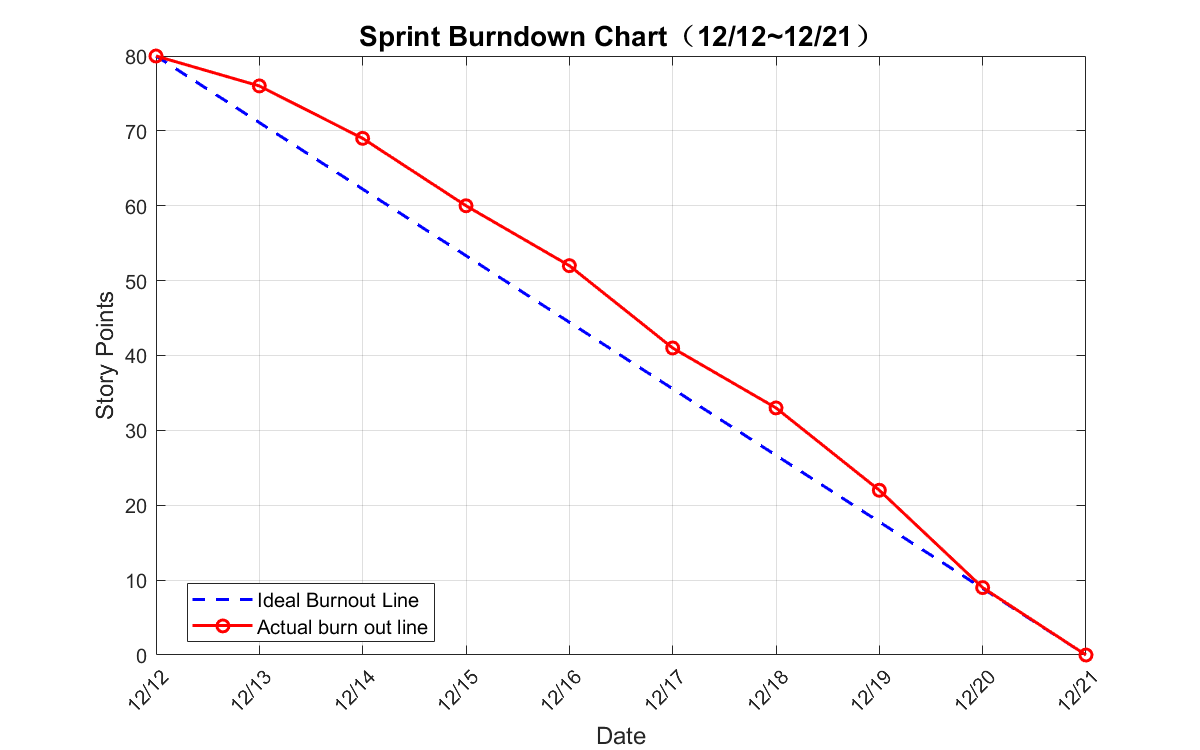
Sprint Burndown Chart
We tracked our progress meticulously throughout the sprint. The chart below illustrates our team's velocity in completing the task management user stories against our estimated timeline.
2. Function Realization Demonstration
We have implemented functions such as homepage check-in and homepage overview
2.1 Daily check-in system
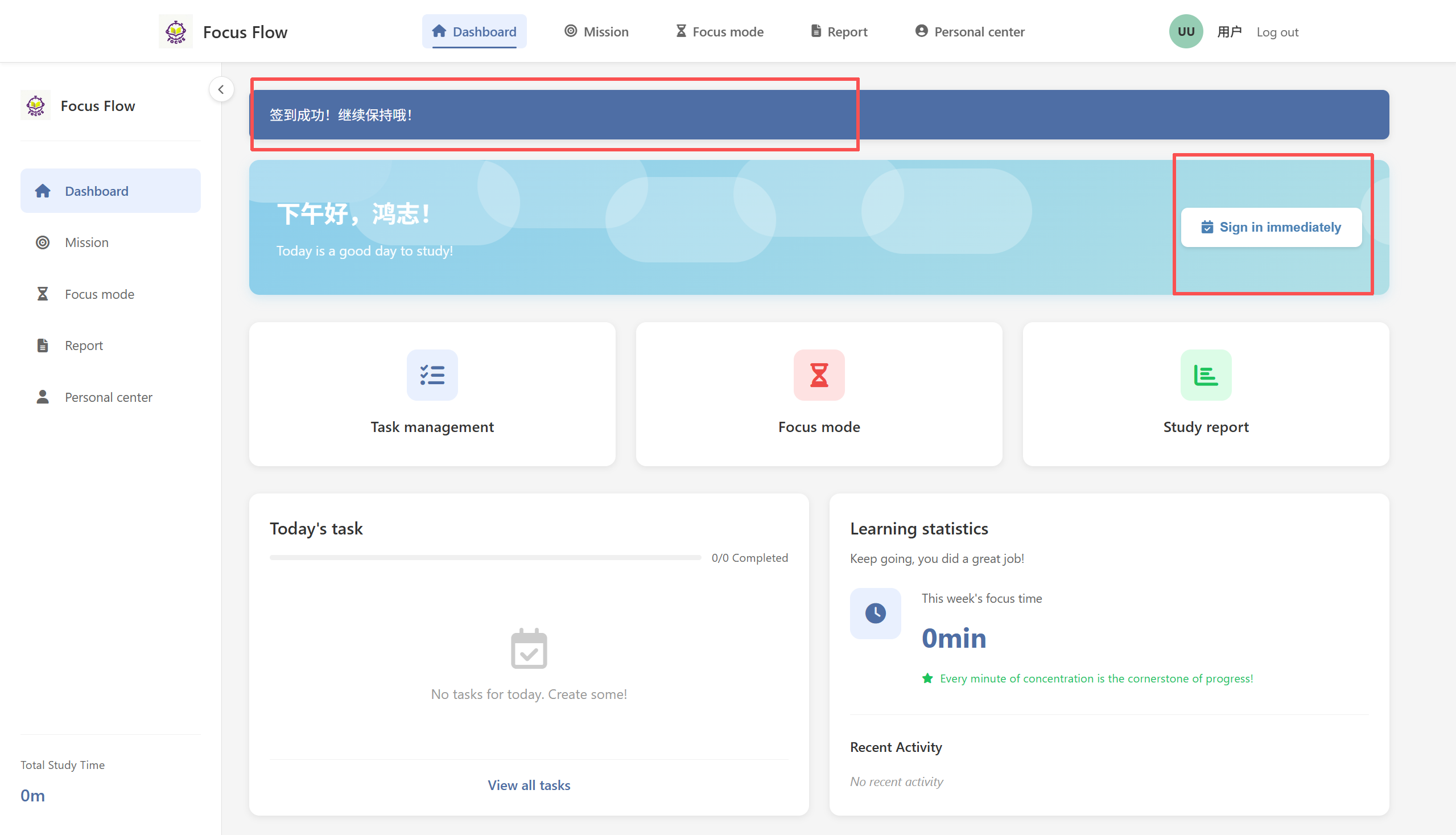
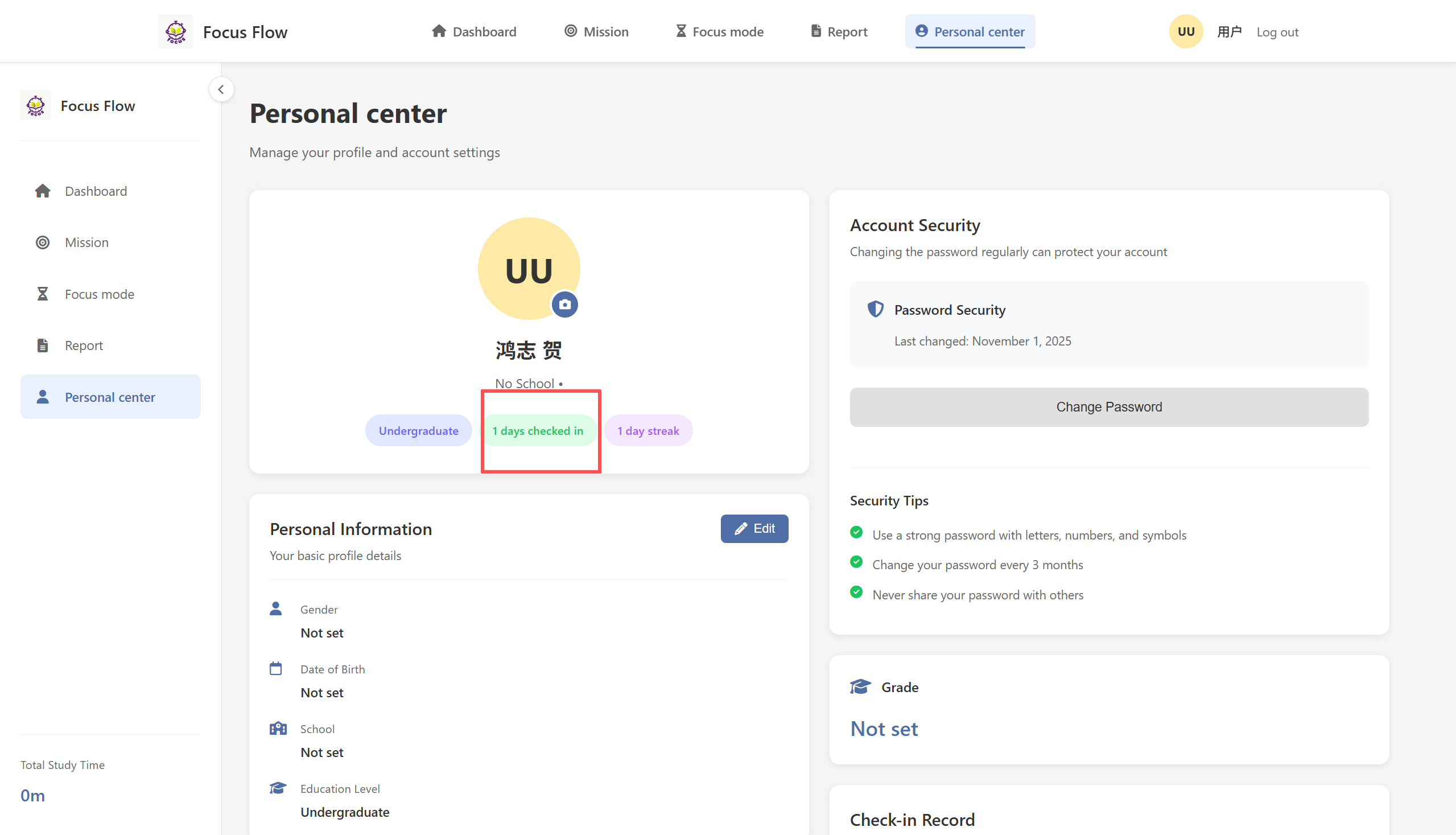
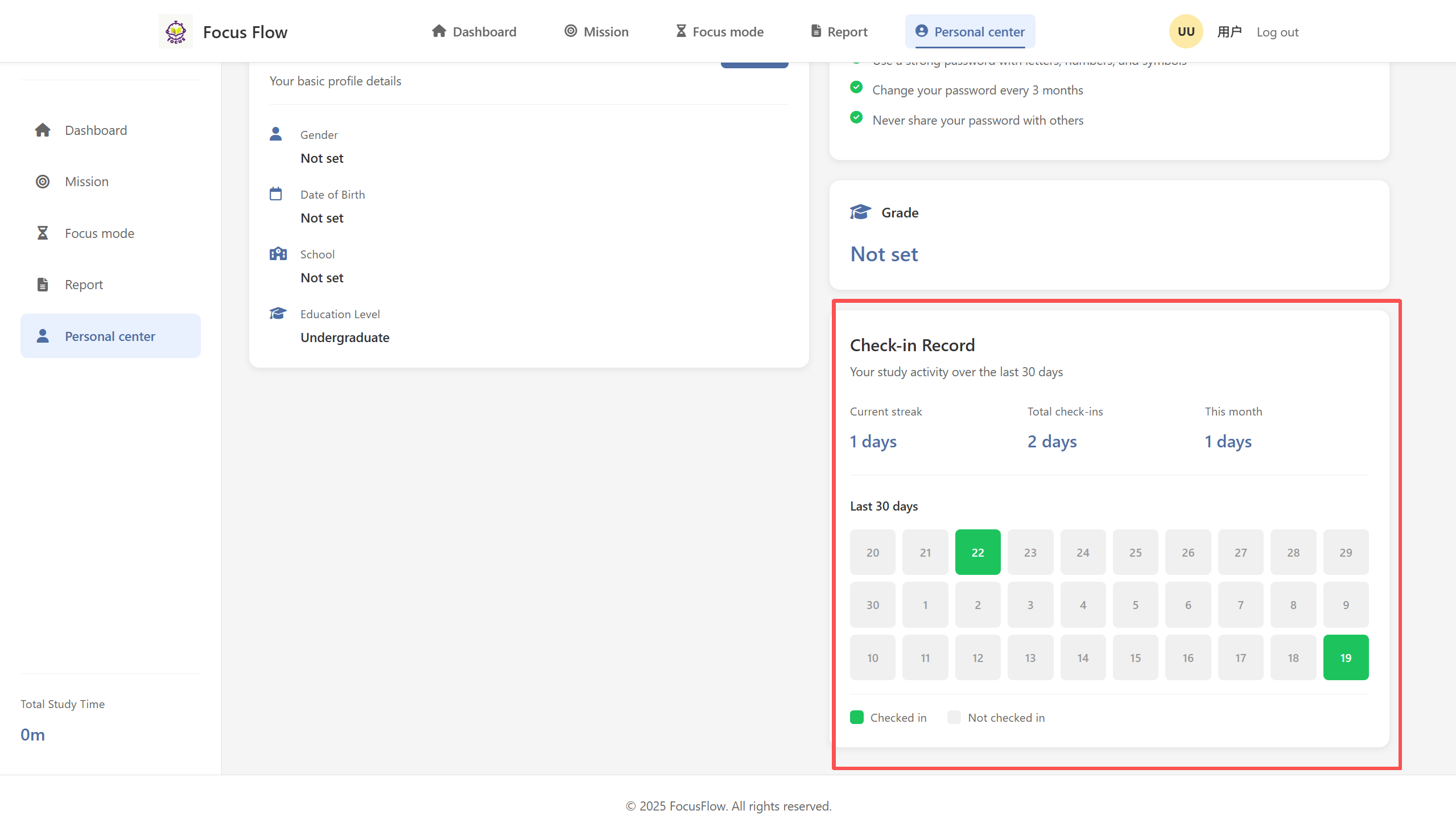
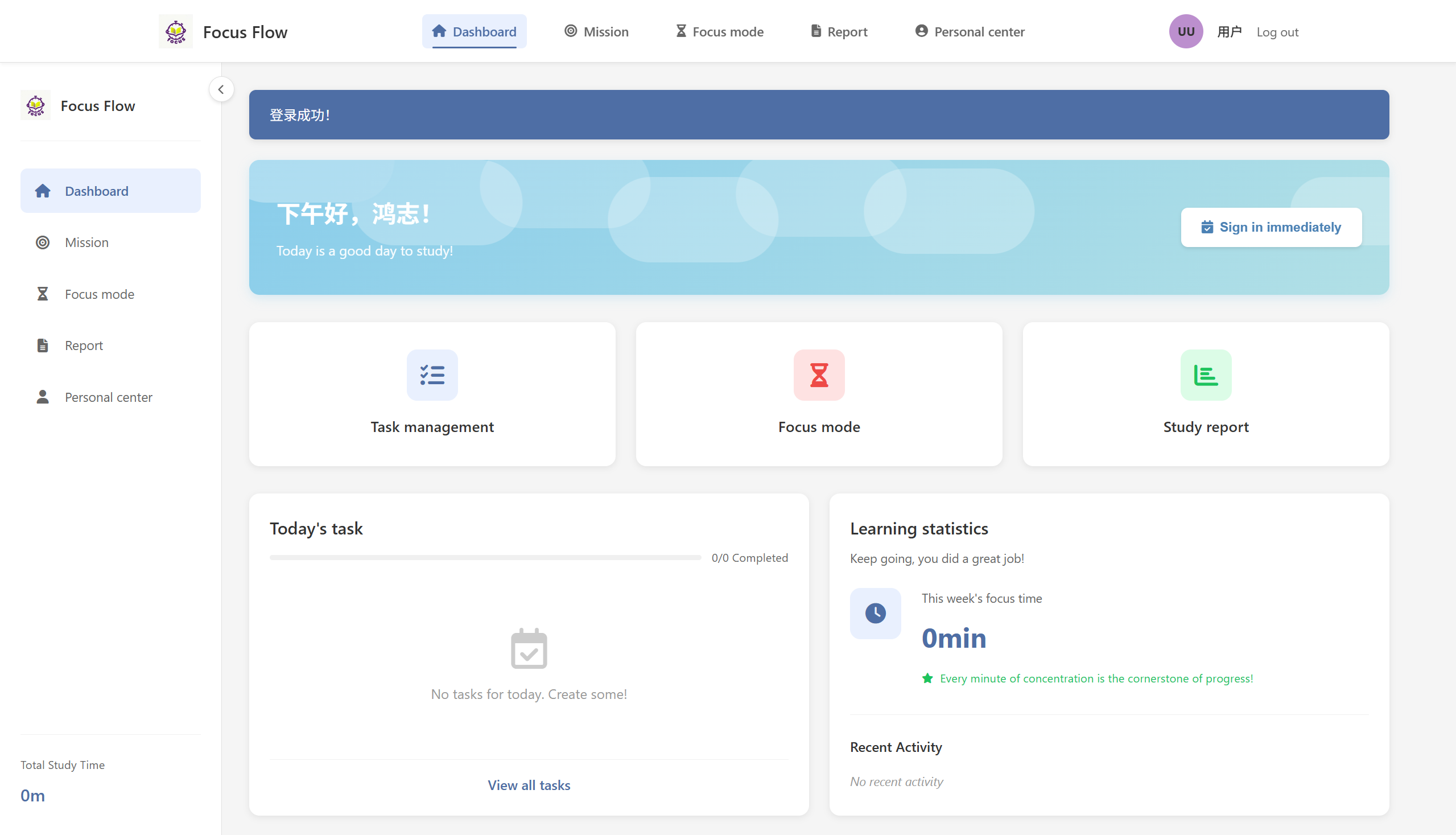
In FocusFlow, the check-in function is not only a record of user login, but also an important incentive mechanism for cultivating study habits. Users gain a sense of achievement through continuous check-in, forming a positive feedback loop.
2.2 Data Overview Panel
The data overview panel can visually display learning progress, making users' goals clearer and their actions faster
3. Code Check-in Records (GitHub Commits)
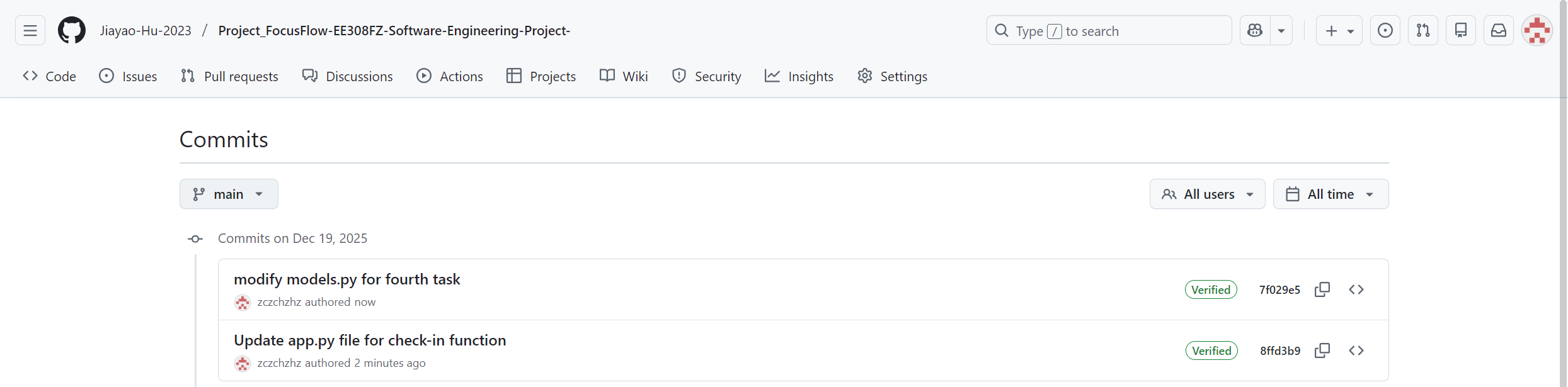
Our development process is backed by regular code commits ensuring version control and collaboration.
4. Core Code Analysis
This task involves some core code, and the key parts will be presented below for analysis.
Firstly, the core code of the check-in function belongs to the data layer design
models.py
class Checkin:
    def __init__(self, id=None, user_id=None, date=None, created_at=None):
        self.id = id
        self.user_id = user_id
        self.date = date
        self.created_at = created_at
The Checkin class follows the "single responsibility principle" and is only responsible for storing the core information of check-in records By associating the user_id field with the User table, a one to many relationship between users and check-in records can be achieved. The date field is specifically used to store check-in dates (excluding specific times), making it easy to perform statistics and queries based on dates. The created date record is used to record the specific time point of check-in for subsequent auditing and analysis
The next step is the implementation of the check-in logic in the control layer, mainly consisting of the app.py file:
app.py
@app.route('/checkin', methods=['POST'])
@login_required
def checkin():
    user_id = session['user_id']
    today = datetime.now().strftime('%Y-%m-%d')  # 关键:标准化日期格式

    conn = get_db_connection()
    try:
        # 防重签机制:检查今天是否已经签到
        existing_checkin = conn.execute(
            'SELECT * FROM checkins WHERE user_id = ? AND date = ?',
            (user_id, today)
        ).fetchone()

        if existing_checkin:
            flash('You have already signed in today!', 'info')
        else:
            # 执行签到:插入新记录
            conn.execute(
                'INSERT INTO checkins (user_id, date) VALUES (?, ?)',
                (user_id, today)
            )
            conn.commit()
            flash('Sign in successful! Keep up the good work!', 'success')
    finally:
        conn.close()

    return redirect(url_for('dashboard'))
Ensure that the same user can only check in once on the same day through UNIQUE (user_id, date) database constraints and pre checks Perform operations in database transactions to ensure data consistency Provide instant feedback through flash messages to enhance user experience Store dates in% Y -% m -% d format to avoid time zone issues.
In addition, we have also implemented the function of continuous check-in, and the key part of it is also in the app.py file:
app.py
# 获取连续签到天数
streak_days = 0
checkin_dates = conn.execute('''
    SELECT date FROM checkins WHERE user_id = ? ORDER BY date DESC
''', (user_id,)).fetchall()

if checkin_dates:
    current_date = datetime.now().date()
    for checkin_date in checkin_dates:
        checkin_date_obj = datetime.strptime(checkin_date['date'], '%Y-%m-%d').date()
        if (current_date - checkin_date_obj).days == streak_days:
            streak_days += 1
        else:
            break
Calculate the consecutive days by checking the most recent check-in records in a loop Use (Current_date checkin_date_obj). days to calculate the date interval Sort by date DESC in descending order, starting from the most recent Terminate the loop immediately when discontinuous dates are detected.
In order to achieve real-time display of today's check-in status and task completion percentage, provide weekly learning trends, highlight consecutive check-in days, and other homepage functions, we still implement homepage aggregation in app.py. Some of the code is as follows:
app.py
# 获取签到信息
today = datetime.now().strftime('%Y-%m-%d')
has_checked_in = conn.execute('SELECT * FROM checkins WHERE user_id = ? AND date = ?',
                              (user_id, today)).fetchone() is not None

# 获取本周专注时长
week_start = (datetime.now() - timedelta(days=datetime.now().weekday())).strftime('%Y-%m-%d')
focus_time_query = conn.execute('''
    SELECT SUM(duration) as total_minutes
    FROM focus_sessions
    WHERE user_id = ? AND date(start_time) >= ?
''', (user_id, week_start)).fetchone()

# 获取任务统计
completed_tasks_query = conn.execute('''
    SELECT COUNT(*) as count FROM tasks WHERE user_id = ? AND status = 'completed'
''', (user_id,)).fetchone()
Aggregate data from the checkins, foci sessions, and tasks tables Calculate using relative time (this week, today) Reduce application layer computation by utilizing built-in functions such as SUM and COUNT in databases Only query relevant data when needed to avoid unnecessary database access.
Finally, we present the key code of our database design pattern:
-- 签到表的核心设计
CREATE TABLE checkins (
    id INTEGER PRIMARY KEY,
    user_id INTEGER NOT NULL,
    date DATE NOT NULL,
    created_at TIMESTAMP DEFAULT CURRENT_TIMESTAMP,
    UNIQUE(user_id, date)  -- 防止重复签到
);
The checkins table serves as the fact table, and the users table serves as the dimension table Store summary data such as stream_days in the users table to improve query performance Store check-in records by date partition for easy management of historical data.
5.Sprint Summary
5.1 Completed Deliverables
- Core Homepage Redesign – Implemented dynamic dashboard with real-time data widgets
- Daily Check-in System – Functional check-in button with streak tracking and calendar view
- User Data Overview Panel – Displays pending tasks, study duration, completion rate, and weekly stats
- Personalized Greetings – Time-based greetings (morning/afternoon/evening) with user name
- Weekly Learning Trends – 7-day visual trend chart integrating check-ins and focus sessions
- Database Schema Enhancement – Added checkins table and user statistics fields (current_streak, total_checkins, etc.)
5.2Technical Challenges and Resolutions:
- Consecutive Day Calculation Logic:
Solution:Implemented date-difference iteration algorithm with early termination on break detection - Preventing Duplicate Check-ins:
Solution:Combined database UNIQUE constraint (user_id, date) with pre-check in application logic - Real-time Data Synchronization:
Solution:Used AJAX polling for stats updates and optimistic UI updates for check-in actions - Timezone Handling:
Solution:Stored all dates in UTC and converted to local time only for display purposes - Database Performance with Aggregates:
Solution:Added indexes on user_id, date fields and used SQL aggregation functions (SUM, COUNT) - Responsive Dashboard Layout:
Solution:Applied Bootstrap 5 grid system with conditional card stacking on mobile devices
The sprint successfully delivered a fully functional homepage with integrated check-in system and real-time learning analytics. All core acceptance criteria were met, with particular attention given to data accuracy, user experience, and system performance.
相关推荐
《模式识别与数据挖掘》配套PPT课件
《模式识别与数据挖掘》配套PPT课件
科技成果转化项目进场交易前,评估备案环节需要准备哪些材料?_8.docx
科易网基于AI模型+行业大数据,在技术转移、成果转化、技术经纪、知识产权、产业创新、科技招商等垂直领域的多样化应用场景,推出科技创新领域的AI+工具与数智化解决方案,推动科技创新与产业创新智能化发展。
人工智能通识教育(中职版)课程标准+PPT课件+部分素材+电子活页+在线考核
人工智能通识教育(中职版)课程标准+PPT课件+部分素材+电子活页+在线考核
跨境电商供应链管理(AIGC版)课件+教案+参考答案
跨境电商供应链管理(AIGC版)课件+教案+参考答案
110KV单电源电网三段式电流保护+距离继电保护整定计算说明报告(23页+6000字)
内容概要:本文是一份关于110kV单电源电网继电保护整定计算的综合性技术报告,全文共23页、约6000字,系统阐述了三段式电流保护与距离保护的设计原理及其整定计算方法。报告深入分析了电力系统在短路故障条件下的电流与阻抗特性,详细推导了电流保护Ⅰ、Ⅱ、Ⅲ段的动作范围、整定原则、灵敏度校验及时间配合机制,确保满足继电保护的选择性、速动性、灵敏性和可靠性“四性”要求。同时,针对长距离或重要输电线路,补充介绍了距离保护的阻抗整定计算方法,并可能结合Matlab进行仿真验证与辅助计算,提升整定结果的准确性与工程实用性。; 适合人群:适用于电气工程及其自动化相关专业的高年级本科生、研究生,以及从事电力系统继电保护设计、运行维护的工程技术人员;要求读者具备电力系统分析、短路计算及继电保护的基础理论知识。; 使用场景及目标:①掌握110kV单电源辐射型电网中三段式电流保护的整定流程与实际计算步骤;②理解距离保护的工作原理及其在复杂工况下的应用优势;③完成实际工程项目的保护配置与整定计算任务,或作为课程设计、毕业设计及科研课题的技术参考资料;④结合Matlab工具实现整定计算的程序化处理与动作特性仿真验证。; 阅读建议:建议读者结合《电力系统继电保护原理》等相关教材同步学习,重点研读整定公式的推导过程与典型算例的计算细节,注意区分电流保护与距离保护的适用场景与配置逻辑,有条件时应利用Matlab等工具对保护动作行为进行建模与仿真,以深化对保护协调配合机制的理解。




