FocusFlow User Usage Survey Report

FOCUS_2025_SE 2026-01-05 22:28:01

📊 FocusFlow User Usage Survey Report

ItemContent
Course2501_MU_SE_FZU
Team NameFocus_2025
Assignment GoalUser trial feedback and evaluation after Beta release
Survey ToolWenjuanxing (Questionnaire Star)
Release VersionFocusFlow Beta v1.0

Table of Contents

  1. Background & Overview
  2. Survey Methodology
  3. User Portrait Analysis
  4. Core Function Evaluation
  5. UI/UX Design Evaluation
  6. Issue Feedback & Improvement Plan
  7. Conclusion

1. 🚀 Background & Overview

With the official release of the FocusFlow Beta version, our team recently initiated this user usage survey. The goal was to verify whether the "Minimalist" design concept, established during the prototyping phase, fits the real needs of our target users (university students), and to effectively troubleshoot potential functional defects.

  • Survey Period: December 31, 2025 - January 5, 2026
  • Target Audience: Primarily students from Fuzhou University Maynooth International Engineering College (FZU-MU), while also extending to students of other grades and majors.
  • Sample Size: Collected a total of 500 valid questionnaires.

Core Objective: Validate the usability of core functions (Task Management + Focus Timer) and collect user experience feedback in real-world scenarios.


2. 📝 Survey Methodology

We used the "Wenjuanxing" platform to generate an online questionnaire and distributed it through social media and class groups. On the homepage of the questionnaire, we clearly defined FocusFlow's product positioning—**"Helping students better manage study tasks and improve focus"**—ensuring respondents had a preliminary understanding of the product.

▼ Software Requirements & Feedback Collection Questionnaire Homepage:

Survey Homepage Screenshot


3. 👥 User Portrait Analysis

Based on the 500 valid responses collected, we conducted a detailed analysis of the user portrait to ensure the representativeness of the feedback.

3.1 Grade Distribution

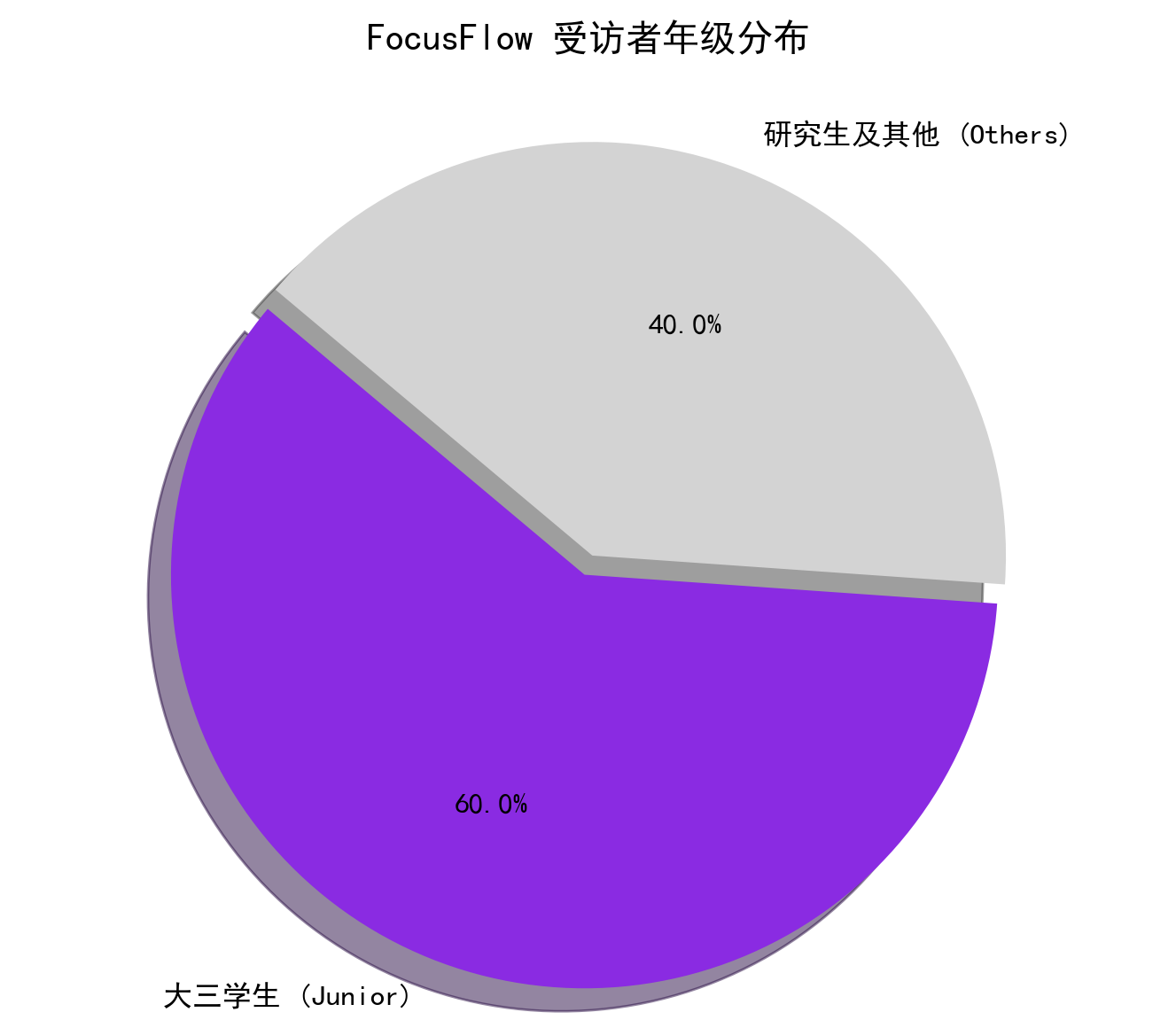
This survey precisely covered the student community. As shown below, Junior students (Year 3) are our main user source, accounting for 60%, followed by postgraduates and other grades. This distribution aligns highly with the promotion scope of FocusFlow as a Software Engineering course project, ensuring the data reflects the needs of our core target users.
Grade Distribution Chart

3.2 Pain Points Analysis

In the multiple-choice question regarding "The biggest difficulties encountered in studying," the data showed a clear trend, validating our original project intent:
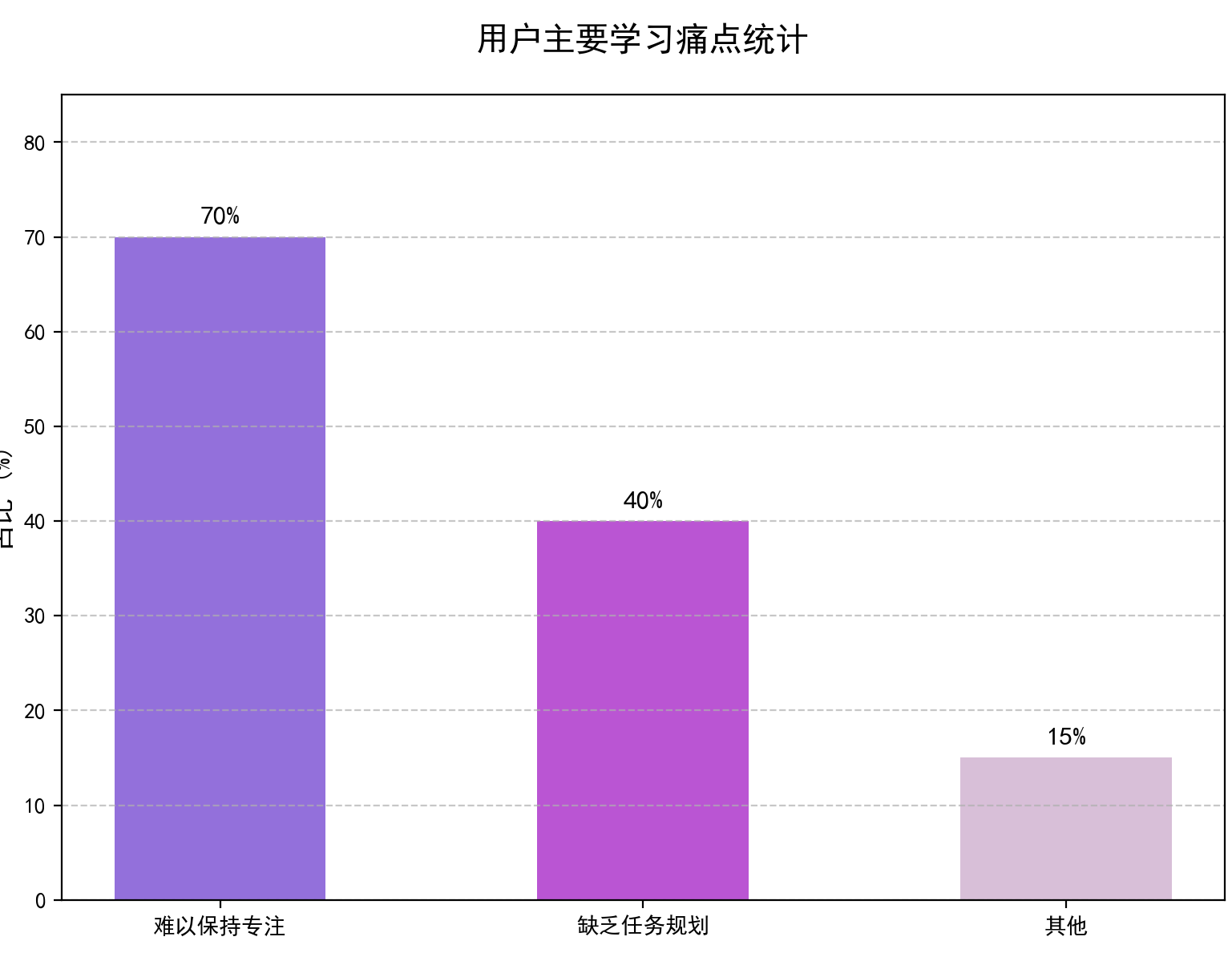
  • 🔴 70% of users indicated it is "Hard to maintain focus for long periods," being easily distracted by phones or other environmental factors.
  • 🟠 40% of users indicated "Too many tasks and lack of effective planning," leading to low learning efficiency.

Pain Points Statistics

Device Preference: The vast majority of users (>90%) used a PC/Laptop (Web) to access our platform. This confirms that our strategy to prioritize the Web platform for the Beta release was correct.


4. 🛠️ Core Function Evaluation

Users provided detailed ratings and qualitative feedback on the four core modules released in the Beta version:

4.1 📋 Task Management

  • Description: Supports task creation, priority setting (red flags), due dates, and tag classification.
  • User Satisfaction: ⭐⭐⭐⭐⭐
  • Feedback Details:
    • Users highly praised the "Color-coded flags", believing the red highlights effectively created a sense of urgency.
    • 94% of users found the List View (To-do List) clear and free of redundant information.
    • 💡 Suggestion: Some users hoped for a "Drag and Drop" sorting feature to adjust task order more flexibly.

4.2 ⏳ Focus Timer

  • Description: Pomodoro timer, full-screen immersive mode.
  • User Satisfaction: ⭐⭐⭐⭐⭐ (Highest Score)
  • Feedback Details:
    • Full-Screen Mode was recognized as the "Most Practical Feature", effectively blocking distractions from other browser tabs.
    • 💡 Suggestion: Hope to add a distinct notification sound when the Break time ends.

4.3 📊 Study Report

  • Description: Statistics on focus duration and task completion trends.
  • User Satisfaction: ⭐⭐⭐⭐
  • Feedback Details:
    • The chart visualization is good, and the color scheme is comfortable.
    • 💡 Suggestion: Currently, it only supports viewing data for the "Last 7 days." Users strongly desire a "Monthly Summary" to review long-term study status.

4.4 🏠 Welcome Dashboard

  • Feedback Details: The "Daily Check-in" button has a very high click rate. Users believe this micro-interaction helps establish a daily study ritual.

5. 🎨 UI/UX Design Evaluation

We established the "Minimalist & Distraction-free" design principle during the prototyping phase, and the survey results show this decision was very successful.

  • Visual Aesthetics: Average Score 4.5 / 5.0.
    • Users particularly loved the current Purple Brand Color, finding it professional yet calm, making it suitable for study scenarios.
  • Interaction Fluidity: 96% of users felt page transitions were smooth.
    • Thanks to frontend performance optimization, there was no obvious lag during operations.
  • Usability:
    • The Onboarding logic is clear. Most users could complete the full loop of "Create Task -> Start Focus -> View Report" independently without reading the manual.

6. 🐛 Issue Feedback & Improvement Plan

Through open-ended questions in the questionnaire, we organized the Top 3 existing issues and formulated an improvement plan for the subsequent Sprint:

CategoryIssue DescriptionSeverityAction Plan
🔴 Functional DefectSome users reported that the timer countdown occasionally displays abnormally in the Firefox browser.HighThe frontend team will conduct cross-browser compatibility testing and fixes for mainstream browsers (Chrome, Edge, Firefox).
🟡 UX OptimizationWhen accessing via mobile, the side navigation bar takes up too much space.MediumOptimize Responsive Layout to implement auto-collapsing sidebar on mobile devices.
🟢 New RequirementUsers wish to write a "Focus Note/Reflection" after a session ends.LowAdd an optional text input field in the post-session modal and sync the record to the Report page.

7. 📌 Conclusion

This user survey provided valuable data support for FocusFlow's subsequent iterations. The results strongly prove that the "Task Planning + Focus Execution" product model effectively solves the core pain points of the student group.

Although there is room for improvement in multi-device adaptation (especially mobile) and some interaction details, the team is satisfied with the overall performance of the Beta version. Next, we will strictly execute the above improvement plan and fully optimize system stability and compatibility in the Final Sprint, striving to deliver a more perfect and productive study tool.

FocusFlow Team
Keep Focus, Keep Flow.

...全文
83 回复 打赏 收藏 转发到动态 举报
写回复
用AI写文章
回复
切换为时间正序
请发表友善的回复…
发表回复
Cisco - 802.11 Wireless Network Site Surveying and Installation.chm Introduction Goals and Methods Part I: Understanding the Prerequisites of a Site Survey Chapter 1. Defining a Wireless Network's Protocols and Components The Evolution of Wireless Standards Introducing 802.11 Additional Wireless Standards Wi-Fi Alliance WLAN Components Summary Chapter 2. Understanding RF Fundamentals Understanding RF Components Understanding RF Power Values Antennas Connectors Cables Understanding RF Site Propagation Summary Chapter 3. Regulating the Use of 802.11 WLANs Early Spread-Spectrum Regulations RF Regulatory Domains WLAN Frequencies of Operation Dynamic Frequency Selection and Transmitter Power Control with 801.11h Regulatory Channel Selections Maximum Transmitter Power Levels Amplifiers Antenna Connectors and Remote Antennas Health and Safety Plenum Locations Summary Recommended Reading Chapter 4. WLAN Applications and Services Typical WLAN Environments Defining the WLAN Requirements Defining Your Technology Requirements Selecting Necessary WLAN Services Building-to-Building Connectivity Summary Chapter 5. Selecting the WLAN Architecture and Hardware Key Features of a WLAN Various WLAN Architectures Selecting the Access Point Selecting the Client Products Summary Part II: The Site Survey Chapter 6. Preparing for a Site Survey Pre-Site Survey Form Information User Input Balancing Wants, Needs, and Capabilities Summary Chapter 7. Site Surveying Equipment WLAN Equipment Site Survey Kits Summary Chapter 8. Discovering Site-Specific Requirements Recommended Facility Documentation Limitations Affecting Equipment Installations Using Cookie Cutter Designs Summary Chapter 9. Discovering Wired Network Requirements Switches, Routers, and Hubs Roaming Deploying VLANs over Wireless QoS for WLANs Cabling Requirements Summary References Chapter 10. Using Site Survey Tools Types of Site Surveys Manual Site Survey Tools Automatic and Assisted Site Survey Tools Theoretical Site Survey Tools Summary Chapter 11. Performing a WLAN Site Survey Steps in the Site Survey Process Surveying with the AirMagnet Tool Assisted Site Surveys Site Surveying for Repeater Usage Dual-Band Surveys Site Surveys for Voice Final Verification Summary Part III: Installing WLAN Components Chapter 12. Installing WLAN Products Understanding Installation Issues Proper AP Mounting Proper Antenna Mounting Ethernet Considerations Summary Chapter 13. Preparing the Proper Documentation Final Site Survey Report Documenting the Work Site Survey Report-Generation Programs Summary Chapter 14. Outdoor Bridge Deployments Understanding Bridge System Characteristics Understanding Bridge Topologies Using Common Applications over Bridges Feasibility Study Interference Study Installing Bridges Summary Part IV: Appendixes Appendix A. WLAN Product References WLAN Equipment: Enterprise Class WLAN Equipment: SOHO and Personal Use WLAN Accessory Vendors Appendix B. Antenna Radiation Patterns Dipole Antennas Ceiling-Mount Antennas Mast-Mount Antennas Pillar- or Wall-Mount Omni Antennas High-Gain Omni Antennas Panel or Patch Wall-Mount Directional Antennas Longer-Range Directional Antennas 5-GHz Antennas Appendix C. Alternative Antennas Leaky Coax Cable Sectorized Panel Antenna Ceiling-Tile Antennas Appendix D. Sample Forms Pre-Site Survey Forms Sample Site Survey Report Section 1.0. Objective Section 2.0. Site Description Section 3.0. Test Procedure Section 4.0. Proposed Components Section 5.0. Existing Wireless Assessment Section 6.0. Wireless Sniffer Trace Analysis Section 7.0. Access Point/Antenna Information Locations Section 8.0. Infrastructure Notes Section 9.0. Site Plan Section 10.0. Required WLAN Hardware Overview Section 11.0. Contact Information Section 12.0. Customer Acceptance

164

社区成员

发帖
与我相关
我的任务
社区描述
2501_MU_SE_FZU
软件工程 高校
社区管理员
  • FZU_SE_LQF
  • 助教_林日臻
  • 朱仕君
加入社区
  • 近7日
  • 近30日
  • 至今
社区公告
暂无公告

试试用AI创作助手写篇文章吧
