


165
社区成员
 发帖
发帖 与我相关
与我相关 我的任务
我的任务
 分享
分享| Course | 2501_MU_SE_FZU |
|---|---|
| Assignment Requirement | Sixth Assignment - Beta Sprint |
| Team Name | Focus_2025 |
| Goal of this assignment | Multi-Language Interface Implementation |
| Author | Yuxiang Xie Jianyuan Wu |
| Other references | https://www.smashingmagazine.com/2017/10/internationalization-design-developers https://uxplanet.org/designing-for-multilingual-users-5-tips-to-keep-in-mind-8a170d485782 |
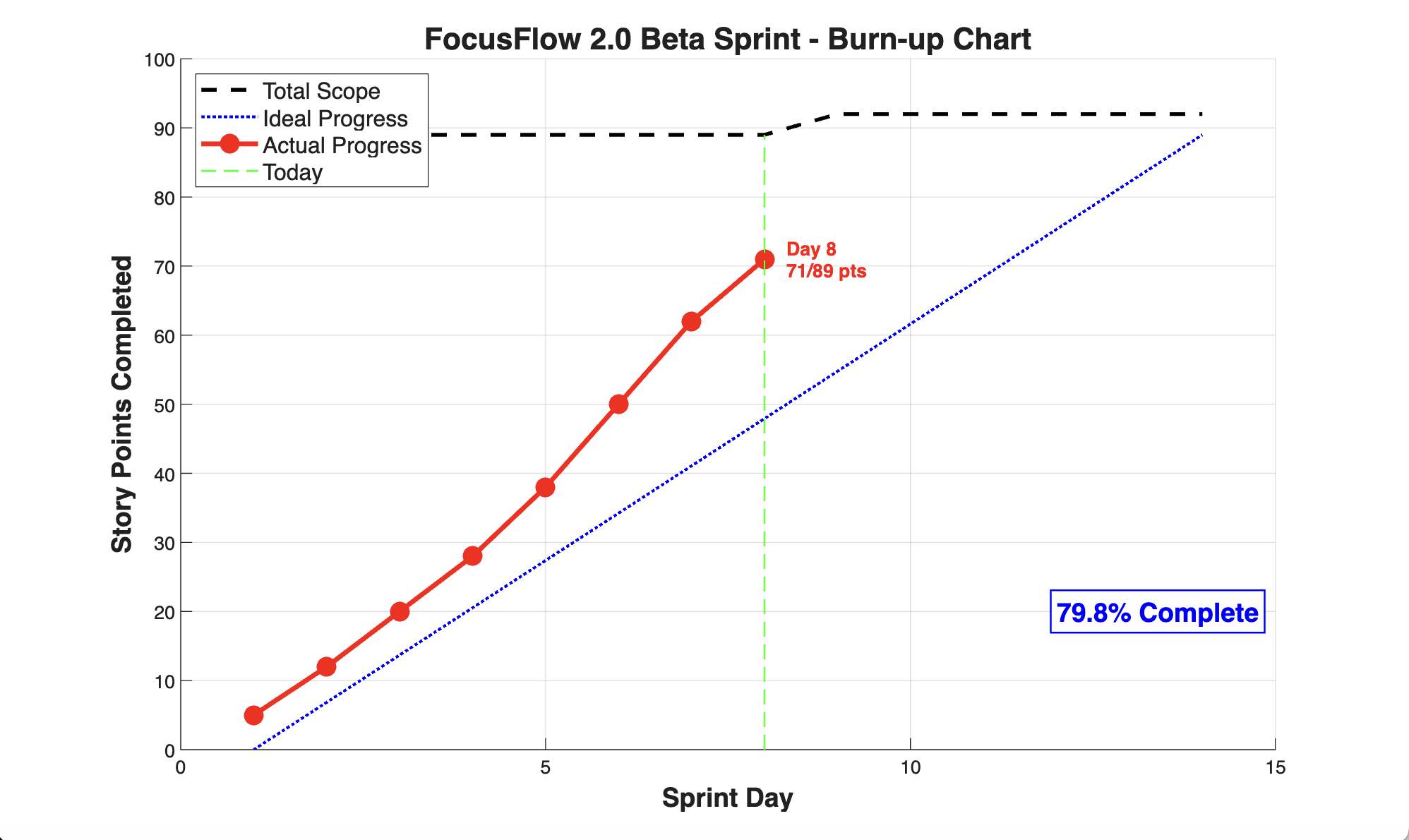
| Member | ID | Role | Completed Tasks | Time Spent | Remaining Time Estimate | Issues / Difficulties | Plans Until Tomorrow's Stand-up |
|---|---|---|---|---|---|---|---|
| Jiaoyao Hu | 832301310 | Project Manager | 1. Coordinated sprint planning and task allocation 2. Reviewed and prioritized 8 GitHub issues 3. Conducted team sync meeting 4. Updated project documentation and roadmap | 4 hours | 2 hours | Timeline pressure due to scope creep; need to balance feature requests with sprint deadline | - Generate burn-up chart and sprint metrics - Review code PRs from team - Plan sprint blog content - Coordinate with QA for final testing |
| Yuxiang Xie | 832301327 | Frontend Developer | 1. Refactored base.html with language selector dropdown 2. Implemented window.TRANSLATIONS exposure for JS access 3. Updated navigation links to preserve lang parameter 4. Fixed layout issues with long Hindi translations | 3.5 hours | 1.5 hours | Some UI components overflow with Spanish/Hindi text; considering dynamic font sizing | - Review and merge team PRs - Optimize CSS for all 7 languages - Test responsive design with translations - Help Wang Fang debug profile upload UI |
| Pengxiang Hu | 832301309 | Frontend Developer | 1. Updated dashboard.html, tasks.html, focus.html templates 2. Replaced 80+ hardcoded strings with translations.* 3. Fixed language reset bug in POST form submissions 4. Added lang parameter to all form actions | 3 hours | 1 hours | Jinja2 template .items conflict took 2 hours to debug; learned about dictionary method vs key resolution | - Complete reports.html translation updates - Fix bracket notation for .items, .hours conflicts - Test all forms maintain language state - Update task card component |
| Jianyuan Wu | 832302126 | Frontend Developer | 1. Implemented profile picture upload UI in profile.html 2. Created triggerAvatarUpload() and uploadAvatar() JS functions 3. Added AJAX file upload with progress feedback 4. Updated header to display uploaded avatar | 3 hours | 1.5 hours | File size validation needs frontend preview; considering client-side image compression | - Fix avatar display on mobile devices - Add image preview before upload - Implement drag-and-drop upload - Test file validation edge cases |
| Hongzhi He | 832302220 | Frontend Developer | 1. Updated login.html, register.html, forgot_password.html 2. Translated all form placeholders and error messages 3. Updated JavaScript alerts to use window.TRANSLATIONS 4. Fixed grade selection dropdown for multi-language | 3 hours | 1.5 hours | Traditional Chinese translations missing in profile page; coordinating with Zhang Wei for translation content | - Complete Traditional Chinese (zh-TW) missing translations - Update focus timer notifications for all languages - Test authentication flow preserves language - Cross-browser testing (Safari, Firefox) |
In our latest beta sprint, we successfully implemented a comprehensive multi-language interface for FocusFlow, a web-based productivity and focus management application.
The goal was to make the application accessible to a global audience by supporting seven major languages:
This feature represents a significant milestone in making FocusFlow a truly international platform, enabling students and professionals from diverse linguistic backgrounds to benefit from our productivity tools without language barriers.
Our multi-language implementation leverages modern web development techniques and Flask framework capabilities.
Flask Context Processors
Automatically inject language-related variables into all templates
Session Management
Stores the user's language preference across requests
Python Dictionaries
Comprehensive translation dictionaries for all supported languages
Query Parameters
URL-based language selection that persists through navigation
Jinja2 Templating
Dynamic template rendering with translation variables
JavaScript
Client-side language switching and dynamic content updates
CSS
Responsive design accommodating different text lengths across languages
Separation of Concerns
Translation logic separated from business logic
Fallback Mechanism
Defaults to English if a translation is missing
Context Injection
Global availability of translations and language state
The foundation of our multi-language system begins with defining supported languages in config.py:
class Config:
# ... other configurations ...
# Supported languages with their native names
LANGUAGES = {
    'en-US': 'English (US)',
    'zh-CN': '简体中文',
    'zh-TW': '繁體中文(台灣)',
    'ja-JP': '日本語',
    'es-ES': 'Español',
    'hi-IN': 'हिन्दी',
    'fr-FR': 'Français'
}

# Default language fallback
DEFAULT_LANGUAGE = 'en-US'**Key Design Decisions:**
The get_current_lang() function implements a three-tier fallback system:
def get_current_lang() -> str:
"""
Get current language from query param or session, defaulting to en-US.
Priority order:
1. URL query parameter (?lang=es-ES)
2. Session storage (previously selected language)
3. Default language (en-US)

Returns:
    str: Language code (e.g., 'en-US', 'zh-CN')
"""
lang = request.args.get('lang') or session.get('lang') or 'en-US'

# Validate language is supported
if lang not in app.config['LANGUAGES']:
    lang = 'en-US'

# Store in session for persistence
session['lang'] = lang

return lang**How it works:**
?lang=xx-XX is in the URLThe get_translations() function returns a comprehensive dictionary of translated strings:
def get_translations(lang: str) -> dict:
"""
Get all translations for a specific language.
Args:
    lang (str): Language code (e.g., 'en-US', 'zh-CN')

Returns:
    dict: Dictionary containing all translated strings
"""

# English translations (default/fallback)
translations = {
    'en-US': {
        # App metadata
        'app_title': 'FocusFlow 2.0',
        'app_subtitle': 'Your Personal Study Assistant',

        # Navigation
        'nav_dashboard': 'Dashboard',
        'nav_tasks': 'Tasks',
        'nav_focus': 'Focus Mode',
        'nav_reports': 'Reports',
        'nav_profile': 'Personal Center',
        'logout': 'Log out',

        # Dashboard - Greetings (dynamic based on time)
        'good_morning': 'Good Morning',
        'good_afternoon': 'Good Afternoon',
        'good_evening': 'Good Evening',
        'good_night': 'Good Night',

        # Dashboard - Statistics Cards
        'pending_tasks': 'Pending Tasks',
        'completed_today': 'Completed Today',
        'focus_time_today': 'Focus Time Today',
        'study_streak': 'Study Streak',
        'tasks': 'tasks',
        'h': 'h',
        'min': 'min',
        'days': 'days',

        # Task Management
        'task_title': 'Task Management',
        'task_subtitle': 'Organize and track your learning tasks',
        'add_task': 'Add Task',
        'filter_all': 'All',
        'filter_pending': 'Pending',
        'filter_completed': 'Completed',
        'status_pending': 'Pending',
        'status_in_progress': 'In Progress',
        'status_completed': 'Completed',
        'priority_high': 'High',
        'priority_medium': 'Medium',
        'priority_low': 'Low',
        'edit_task': 'Edit',
        'delete_task': 'Delete',
        'no_tasks': 'No tasks yet. Click "Add Task" to create one!',

        # Focus Mode
        'focus_title': 'Focus Mode',
        'focus_subtitle': 'Deep work session with Pomodoro technique',
        'select_subject': 'Select Subject',
        'start_focus': 'Start Focus',
        'pause': 'Pause',
        'resume': 'Resume',
        'reset': 'Reset',
        'stop_focus': 'Stop Focus',
        'focus_time': 'Focus Time',
        'custom_time': 'Custom',
        'minutes': 'minutes',

        # Reports/Analytics
        'reports_title': 'Study Reports',
        'reports_subtitle': 'Analyze your learning progress',
        'total_focus_time': 'Total Focus Time',
        'hours': 'hours',
        'tasks_completed': 'Tasks Completed',
        'items': 'items',
        'avg_daily_focus': 'Avg Daily Focus',
        'completion_rate': 'Completion Rate',
        'percent': '%',
        'learning_trends': 'Learning Trends',
        'checkin_details': 'Check-in Details',
        'completed_tasks_section': 'Completed Tasks',

        # Profile/Personal Center
        'personal_information': 'Personal Information',
        'basic_profile_details': 'Basic Profile Details',
        'gender': 'Gender',
        'date_of_birth': 'Date of Birth',
        'school': 'School',
        'education_level': 'Education Level',
        'password_security': 'Password & Security',
        'last_changed': 'Last Changed',
        'male': 'Male',
        'female': 'Female',
        'not_set': 'Not Set',
        'current_streak': 'Current Streak',
        'total_checkins': 'Total Check-ins',
        'this_month': 'This Month',
        'activity_30_days': 'Activity (Last 30 Days)',
        'days_checked_in': 'Days Checked In',
        'streak': 'Streak',

        # Authentication
        'login_title': 'Welcome Back',
        'register_title': 'Create Account',
        'email': 'Email',
        'password': 'Password',
        'remember_me': 'Remember me',
        'forgot_password': 'Forgot Password?',
        'sign_in': 'Sign In',
        'sign_up': 'Sign Up',
        'already_have_account': 'Already have an account?',
        'dont_have_account': "Don't have an account?",

        # Month names
        'months': [
            'January', 'February', 'March', 'April', 'May', 'June',
            'July', 'August', 'September', 'October', 'November', 'December'
        ],

        # Profile Picture Upload
        'avatar_upload_success': 'Profile picture updated successfully!',
        'avatar_upload_failed': 'Failed to upload profile picture.',
        'invalid_file_type': 'Invalid file type. Please upload JPG, PNG, or GIF.',
        'file_too_large': 'File size exceeds 5MB limit.',
    },

    # Spanish translations
    'es-ES': {
        'app_title': 'FocusFlow 2.0',
        'app_subtitle': 'Tu Asistente Personal de Estudio',
        'nav_dashboard': 'Panel de Control',
        'nav_tasks': 'Tareas',
        'nav_focus': 'Modo Enfoque',
        'nav_reports': 'Informes',
        'nav_profile': 'Centro Personal',
        'logout': 'Cerrar Sesión',
        'good_morning': 'Buenos Días',
        'good_afternoon': 'Buenas Tardes',
        'good_evening': 'Buenas Tardes',
        'good_night': 'Buenas Noches',
        'pending_tasks': 'Tareas Pendientes',
        'completed_today': 'Completadas Hoy',
        'focus_time_today': 'Tiempo de Enfoque Hoy',
        'study_streak': 'Racha de Estudio',
        # ... (120+ more translation keys)
    },

    # Simplified Chinese translations
    'zh-CN': {
        'app_title': 'FocusFlow 2.0',
        'app_subtitle': '您的个人学习助手',
        'nav_dashboard': '仪表盘',
        'nav_tasks': '任务',
        'nav_focus': '专注模式',
        'nav_reports': '报告',
        'nav_profile': '个人中心',
        'logout': '退出登录',
        'good_morning': '早上好',
        'good_afternoon': '下午好',
        'good_evening': '晚上好',
        'good_night': '夜深了',
        # ... (120+ more translation keys)
    },

    # Traditional Chinese (Taiwan) translations
    'zh-TW': {
        'app_title': 'FocusFlow 2.0',
        'app_subtitle': '您的個人學習助手',
        'nav_dashboard': '儀表板',
        'nav_tasks': '任務',
        'nav_focus': '專注模式',
        'nav_reports': '報告',
        'nav_profile': '個人中心',
        'logout': '登出',
        'good_morning': '早安',
        'good_afternoon': '午安',
        'good_evening': '晚安',
        # ... (120+ more translation keys)
    },

    # Japanese translations
    'ja-JP': {
        'app_title': 'FocusFlow 2.0',
        'app_subtitle': 'あなたの個人学習アシスタント',
        'nav_dashboard': 'ダッシュボード',
        'nav_tasks': 'タスク',
        'nav_focus': '集中モード',
        'nav_reports': 'レポート',
        'nav_profile': '個人センター',
        'logout': 'ログアウト',
        'good_morning': 'おはようございます',
        'good_afternoon': 'こんにちは',
        'good_evening': 'こんばんは',
        # ... (120+ more translation keys)
    },

    # Hindi translations
    'hi-IN': {
        'app_title': 'FocusFlow 2.0',
        'app_subtitle': 'आपका व्यक्तिगत अध्ययन सहायक',
        'nav_dashboard': 'डैशबोर्ड',
        'nav_tasks': 'कार्य',
        'nav_focus': 'फोकस मोड',
        'nav_reports': 'रिपोर्ट',
        'nav_profile': 'व्यक्तिगत केंद्र',
        'logout': 'लॉग आउट',
        # ... (120+ more translation keys)
    },

    # French translations
    'fr-FR': {
        'app_title': 'FocusFlow 2.0',
        'app_subtitle': 'Votre Assistant d\'Étude Personnel',
        'nav_dashboard': 'Tableau de Bord',
        'nav_tasks': 'Tâches',
        'nav_focus': 'Mode Focus',
        'nav_reports': 'Rapports',
        'nav_profile': 'Centre Personnel',
        'logout': 'Se Déconnecter',
        # ... (120+ more translation keys)
    },
}

# Return requested language translations with English fallback
result = translations.get(lang, translations['en-US']).copy()

# Fallback mechanism: fill missing keys with English
if lang != 'en-US':
    for key, value in translations['en-US'].items():
        if key not in result:
            result[key] = value  # Use English if translation missing

return result**Implementation Details:**
The context processor automatically injects i18n variables into every template:
@app.context_processor
def inject_i18n():
"""
Inject internationalization context into all templates.
This function runs before every template render and provides:
- supported_languages: Dict of all available languages
- lang: Current language code
- translations: Complete translation dictionary for current language

Returns:
    dict: Context variables available in all templates
"""
lang = get_current_lang()

return dict(
    supported_languages=app.config['LANGUAGES'],
    lang=lang,
    translations=get_translations(lang),
)**Benefits:**
render_template() call@app.route('/dashboard')
@login_required
def dashboard():
"""
Dashboard page with user statistics.
Automatically receives translations from context processor.
"""
lang = get_current_lang() # Get current language
user_id = session.get('user_id')
# Fetch user data from database
conn = get_db_connection()
user = conn.execute('SELECT * FROM users WHERE id = ?', (user_id,)).fetchone()

# Calculate statistics
stats = {
    'pending_tasks': get_pending_tasks_count(user_id),
    'completed_today': get_completed_today_count(user_id),
    'focus_time_today': get_focus_time_today(user_id),
    'study_streak': user['streak']
}

conn.close()

# Translations automatically available in template via context processor
return render_template('dashboard.html', stats=stats)#### Example 2: Task Management with Language Persistence
@app.route('/tasks', methods=['GET'])
@login_required
def tasks():
"""Display all tasks for the current user."""
lang = get_current_lang()
user_id = session.get('user_id')
# Get filter parameter
status_filter = request.args.get('filter', 'all')

# Query tasks from database
conn = get_db_connection()
if status_filter == 'all':
    tasks = conn.execute(
        'SELECT * FROM tasks WHERE user_id = ? ORDER BY created_at DESC',
        (user_id,)
    ).fetchall()
else:
    tasks = conn.execute(
        'SELECT * FROM tasks WHERE user_id = ? AND status = ? ORDER BY created_at DESC',
        (user_id, status_filter)
    ).fetchall()

conn.close()

return render_template('tasks.html', tasks=tasks, current_filter=status_filter)
@app.route('/add_task', methods=['POST'])
@login_required
def add_task():
"""Add a new task and redirect back to tasks page with language preserved."""
lang = get_current_lang()
user_id = session.get('user_id')
# Get form data
title = request.form.get('title')
description = request.form.get('description')
priority = request.form.get('priority', 'medium')

# Insert into database
conn = get_db_connection()
conn.execute(
    'INSERT INTO tasks (user_id, title, description, priority, status) VALUES (?, ?, ?, ?, ?)',
    (user_id, title, description, priority, 'pending')
)
conn.commit()
conn.close()

# Redirect with language parameter preserved
return redirect(url_for('tasks', lang=lang))#### Example 3: Profile Picture Upload with Multilingual Feedback
@app.route('/upload_avatar', methods=['POST'])
@login_required
def upload_avatar():
"""Handle profile picture upload with translated response messages."""
lang = get_current_lang()
translations = get_translations(lang)
user_id = session.get('user_id')
# Check if file was uploaded
if 'avatar' not in request.files:
    return jsonify({'success': False, 'message': translations['avatar_upload_failed']}), 400

file = request.files['avatar']

# Validate file
if file.filename == '':
    return jsonify({'success': False, 'message': translations['avatar_upload_failed']}), 400

if not allowed_file(file.filename):
    return jsonify({'success': False, 'message': translations['invalid_file_type']}), 400

# Check file size (5MB limit)
file.seek(0, os.SEEK_END)
file_size = file.tell()
if file_size > 5 * 1024 * 1024:  # 5MB
    return jsonify({'success': False, 'message': translations['file_too_large']}), 400
file.seek(0)

# Save file with secure filename
filename = secure_filename(file.filename)
unique_filename = f"{user_id}_{uuid.uuid4().hex}_{filename}"
filepath = os.path.join(app.config['UPLOAD_FOLDER'], unique_filename)
file.save(filepath)

# Update database
conn = get_db_connection()
# Delete old avatar if exists
old_avatar = conn.execute('SELECT profile_picture FROM users WHERE id = ?', (user_id,)).fetchone()
if old_avatar and old_avatar['profile_picture']:
    old_path = os.path.join('static', old_avatar['profile_picture'])
    if os.path.exists(old_path):
        os.remove(old_path)

# Update with new avatar path
avatar_path = f'uploads/avatars/{unique_filename}'
conn.execute('UPDATE users SET profile_picture = ? WHERE id = ?', (avatar_path, user_id))
conn.commit()
conn.close()

# Return translated success message
return jsonify({
    'success': True,
    'message': translations['avatar_upload_success'],
    'avatar_url': url_for('static', filename=avatar_path)
})**Key Implementation Patterns:**
get_current_lang()get_translations(lang) when needed for JSON responseslang=langThe language selector provides an intuitive dropdown interface:
<!-- Header language selector with globe icon -->
<div class="header-language-selector">
    <i class="fas fa-globe"></i>
    <select id="language-select" class="language-select" onchange="changeLanguage(this.value)">
        {% for code, name in supported_languages.items() %}
        <option value="{{ code }}" {% if code == lang %}selected{% endif %}>
            {{ name }}
        </option>
        {% endfor %}
    </select>
</div>**JavaScript Handler:**

/**
 * Change application language by reloading page with new lang parameter
 * @param {string} newLang - Language code (e.g., 'es-ES', 'zh-CN')
 */
function changeLanguage(newLang) {
    // Get current URL
    const url = new URL(window.location.href);

    // Update or add lang parameter
    url.searchParams.set('lang', newLang);

    // Reload page with new language
    window.location.href = url.toString();
}**CSS Styling:**

.header-language-selector {
    display: flex;
    align-items: center;
    gap: 8px;
    margin-left: auto;
}

.language-select {
    padding: 6px 12px;
    border: 1px solid #ddd;
    border-radius: 6px;
    background-color: white;
    font-size: 14px;
    cursor: pointer;
    transition: all 0.3s ease;
}

.language-select:hover {
    border-color: #4A90E2;
    box-shadow: 0 2px 8px rgba(74, 144, 226, 0.2);
}

.language-select:focus {
    outline: none;
    border-color: #4A90E2;
    box-shadow: 0 0 0 3px rgba(74, 144, 226, 0.1);
}---
<div class="dashboard-header">
    <h1>Dashboard</h1>
    <p>Welcome back! Here's your study overview.</p>
</div>

<div class="stat-card">
    <h3>Pending Tasks</h3>
    <p class="stat-value">{{ pending_count }}</p>
    <span class="stat-label">tasks</span>
</div>#### After: Dynamic Translation Variables

<div class="dashboard-header">
    <h1>{{ translations.nav_dashboard }}</h1>
    <p>{{ translations.app_subtitle }}</p>
</div>

<div class="stat-card">
    <h3>{{ translations.pending_tasks }}</h3>
    <p class="stat-value">{{ pending_count }}</p>
    <span class="stat-label">{{ translations.tasks }}</span>
</div>#### Complex Example: Task Card with Multiple Translations

<div class="task-card" data-task-id="{{ task.id }}">
    <!-- Task header with priority badge -->
    <div class="task-header">
        <h3>{{ task.title }}</h3>
        <span class="priority-badge priority-{{ task.priority }}">
            {% if task.priority == 'high' %}
                {{ translations.priority_high }}
            {% elif task.priority == 'medium' %}
                {{ translations.priority_medium }}
            {% else %}
                {{ translations.priority_low }}
            {% endif %}
        </span>
    </div>

    <!-- Task description -->
    <p class="task-description">{{ task.description }}</p>

    <!-- Task metadata -->
    <div class="task-meta">
        <span class="task-status">
            {% if task.status == 'completed' %}
                {{ translations.status_completed }}
            {% elif task.status == 'in_progress' %}
                {{ translations.status_in_progress }}
            {% else %}
                {{ translations.status_pending }}
            {% endif %}
        </span>
        <span class="task-time">
            {{ task.estimated_time }} {{ translations.minutes }}
        </span>
    </div>

    <!-- Action buttons -->
    <div class="task-actions">
        <button class="btn-edit" title="{{ translations.edit_task }}">
            <i class="fas fa-edit"></i> {{ translations.edit_task }}
        </button>
        <button class="btn-delete" title="{{ translations.delete_task }}" onclick="deleteTask({{ task.id }})">
            <i class="fas fa-trash"></i> {{ translations.delete_task }}
        </button>
    </div>
</div>
Exposing translations to JavaScript enables dynamic client-side updates:
<!-- Inject translations into JavaScript global scope -->
<script></script>
// Example 1: Dynamic notification messages
function showNotification(type, messageKey) {
const message = window.TRANSLATIONS[messageKey];
// Create notification element
const notification = document.createElement('div');
notification.className = `notification notification-${type}`;
notification.textContent = message;
document.body.appendChild(notification);
// Auto-remove after 3 seconds
setTimeout(() => notification.remove(), 3000);
}
// Usage
showNotification('success', 'task_added_successfully');
// Example 2: Dynamic form validation
function validateTaskForm() {
const titleInput = document.getElementById('task-title');
if (!titleInput.value.trim()) {
alert(window.TRANSLATIONS.title_required || 'Title is required');
return false;
}
return true;
}
// Example 3: Focus timer with translated notifications
class FocusTimer {
constructor(duration) {
this.duration = duration;
this.translations = window.TRANSLATIONS;
}
start() {
// Update document title with translated message
document.title = `${this.translations.focus_mode} - ${this.translations.app_title}`;
// Show start notification
this.showNotification(this.translations.focus_started);
}
complete() {
// Browser notification with translation
if (Notification.permission === 'granted') {
new Notification(this.translations.focus_complete, {
body: this.translations.great_job_message,
icon: '/static/img/logo.png'
});
}
// Update title
document.title = `${this.translations.completed}! - ${this.translations.app_title}`;
}
showNotification(message) {
console.log(message);
// Additional notification logic
}
}
// Example 4: AJAX request with translated error messages
async function updateTaskStatus(taskId, newStatus) {
try {
const response = await fetch(`/update_task_status?lang=${window.CURRENT_LANG}`, {
method: 'POST',
headers: {
'Content-Type': 'application/json',
},
body: JSON.stringify({
task_id: taskId,
status: newStatus
})
});
const data = await response.json();
if (data.success) {
showNotification('success', 'task_updated_successfully');
} else {
showNotification('error', 'task_update_failed');
}
} catch (error) {
alert(window.TRANSLATIONS.network_error || 'Network error occurred');
}
}
All internal navigation links preserve the selected language:
<!-- Navigation menu -->
<nav class="sidebar-nav">
    <a href="{{ url_for('dashboard', lang=lang) }}" class="nav-link">
        <i class="fas fa-home"></i>
        {{ translations.nav_dashboard }}
    </a>
    <a href="{{ url_for('tasks', lang=lang) }}" class="nav-link">
        <i class="fas fa-tasks"></i>
        {{ translations.nav_tasks }}
    </a>
    <a href="{{ url_for('focus', lang=lang) }}" class="nav-link">
        <i class="fas fa-brain"></i>
        {{ translations.nav_focus }}
    </a>
    <a href="{{ url_for('reports', lang=lang) }}" class="nav-link">
        <i class="fas fa-chart-line"></i>
        {{ translations.nav_reports }}
    </a>
    <a href="{{ url_for('profile', lang=lang) }}" class="nav-link">
        <i class="fas fa-user"></i>
        {{ translations.nav_profile }}
    </a>
</nav>

<!-- Form actions also preserve language -->
<form action="{{ url_for('checkin', lang=lang) }}" method="POST" id="checkin-form">
    <button type="submit" class="btn-primary">
        {{ translations.check_in_today }}
    </button>
</form>
All Flask redirects include the language parameter:
@app.route('/login', methods=['POST'])
def login():
    lang = get_current_lang()
    email = request.form.get('email')
    password = request.form.get('password')

    # Validate credentials
    conn = get_db_connection()
    user = conn.execute('SELECT * FROM users WHERE email = ?', (email,)).fetchone()
    conn.close()

    if user and check_password_hash(user['password_hash'], password):
        session['user_id'] = user['id']
        session['lang'] = lang  # Store language in session

        # Redirect to dashboard with language preserved
        return redirect(url_for('dashboard', lang=lang))
    else:
        # Redirect back to login with error and language preserved
        return redirect(url_for('login', lang=lang, error='invalid_credentials'))
@app.route('/delete_task/<int:task_id>', methods=['POST'])
@login_required
def delete_task(task_id):
    lang = get_current_lang()
    user_id = session.get('user_id')

    # Verify task belongs to user and delete
    conn = get_db_connection()
    conn.execute('DELETE FROM tasks WHERE id = ? AND user_id = ?', (task_id, user_id))
    conn.commit()
    conn.close()

    # Redirect back to tasks page with language and success message
    return redirect(url_for('tasks', lang=lang, message='task_deleted'))
@app.route('/update_profile', methods=['POST'])
@login_required
def update_profile():
    lang = get_current_lang()
    user_id = session.get('user_id')

    # Get updated data
    first_name = request.form.get('first_name')
    last_name = request.form.get('last_name')
    gender = request.form.get('gender')

    # Update database
    conn = get_db_connection()
    conn.execute(
        'UPDATE users SET first_name = ?, last_name = ?, gender = ? WHERE id = ?',
        (first_name, last_name, gender, user_id)
    )
    conn.commit()
    conn.close()

    # Redirect to profile with success message and language preserved
    flash(get_translations(lang)['profile_updated_successfully'])
    return redirect(url_for('profile', lang=lang))---
For client-side navigation, JavaScript must also preserve the language:
/**
 * Navigate to a route while preserving the current language
 * @param {string} route - Target route name (e.g., 'tasks', 'dashboard')
 */
function navigateWithLang(route) {
    const currentLang = window.CURRENT_LANG;
    window.location.href = `/${route}?lang=${currentLang}`;
}

// Example usage in onclick handlers
// <button onclick="navigateWithLang('tasks')">Go to Tasks</button>


/**
 * Add language parameter to any URL
 * @param {string} url - Original URL
 * @returns {string} URL with language parameter
 */
function addLangParam(url) {
    const currentLang = window.CURRENT_LANG;
    const separator = url.includes('?') ? '&' : '?';
    return `${url}${separator}lang=${currentLang}`;
}

// Example: Dynamic link generation
const taskLink = document.createElement('a');
taskLink.href = addLangParam('/tasks');
taskLink.textContent = window.TRANSLATIONS.nav_tasks;
<!-- Warning modal when trying to leave focus mode -->
<div id="focus-warning-modal" class="modal">
    <div class="modal-content">
        <h3>{{ translations.warning }}</h3>
        <p>{{ translations.focus_warning_message }}</p>
        <div class="modal-actions">
            <button class="btn-secondary" onclick="closeWarningModal()">
                {{ translations.cancel }}
            </button>
            <button class="btn-danger" onclick="confirmLeave()">
                {{ translations.leave }}
            </button>
        </div>
    </div>
</div>

<script>
let pendingNavigation = null;

// Intercept navigation clicks
document.querySelectorAll('.nav-link').forEach(link => {
    link.addEventListener('click', function(e) {
        if (isFocusActive()) {
            e.preventDefault();
            pendingNavigation = this.href;  // This already includes ?lang=xx
            showWarningModal();
        }
    });
});

function confirmLeave() {
    if (pendingNavigation) {
        stopFocusSession();
        window.location.href = pendingNavigation;  // Language preserved in href
    }
}

function closeWarningModal() {
    document.getElementById('focus-warning-modal').style.display = 'none';
    pendingNavigation = null;
}
</script>
Even without URL parameters, the session maintains language preference:
@app.before_request
def before_request():
    """
    Runs before every request to set up global context.
    Ensures language is available even if not in URL.
    """
    # Get and store current language
    lang = get_current_lang()

    # Make available globally via Flask's g object
    g.lang = lang
    g.translations = get_translations(lang)

    # For logged-in users, fetch profile info
    if 'user_id' in session:
        user_id = session['user_id']
        conn = get_db_connection()
        user = conn.execute('SELECT * FROM users WHERE id = ?', (user_id,)).fetchone()
        conn.close()
    if user:
        g.user = user
        g.user_profile_picture = user['profile_picture']
Keys like items, hours, and days conflicted with Python dictionary methods.
<!-- Before -->
{{ translations.items }}

<!-- After -->
{{ translations['items'] }}
Language reset to English after form submissions.
•    Centralized get_current_lang() helper
•    Added lang to all redirects
•    Preserved language in form actions
Some pages (e.g., Personal Center) were partially untranslated.
•    Page-by-page audit
•    Added 100+ translation keys per language
•    Included profile-specific terminology
Alerts and notifications were hardcoded in English.
•    Exposed window.TRANSLATIONS
•    Refactored alerts to use translation keys
•    Updated focus timer and notification system
Languages vary greatly in text length.
•    Responsive CSS with flexible layouts
•    overflow: hidden and text-overflow: ellipsis
•    Full UI testing across all languages
•    Dropdown in header
•    Globe icon for recognition
•    Native language names
•    Instant switching with no noticeable delay
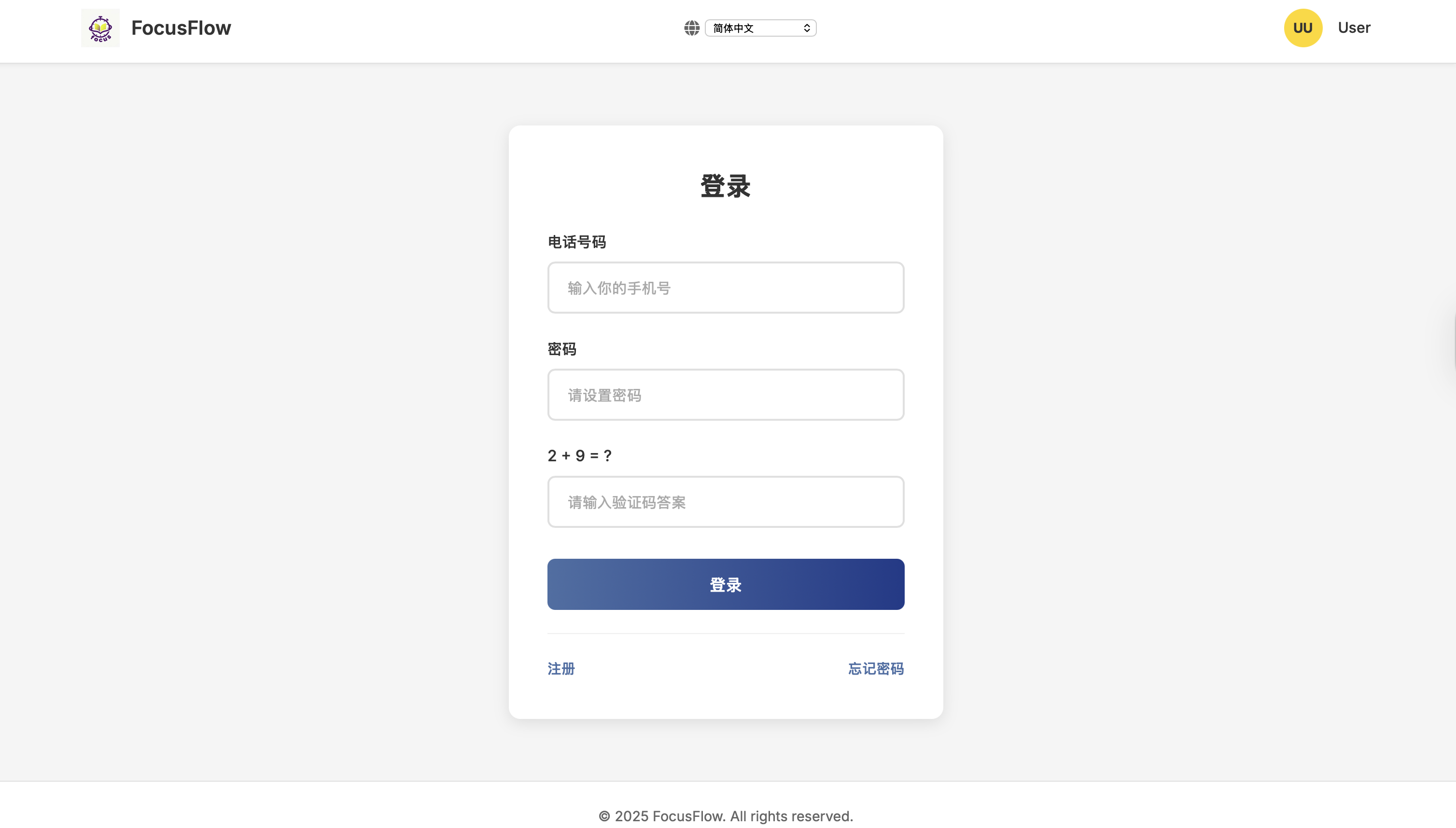
•    Login, registration, password recovery
•    Labels, placeholders
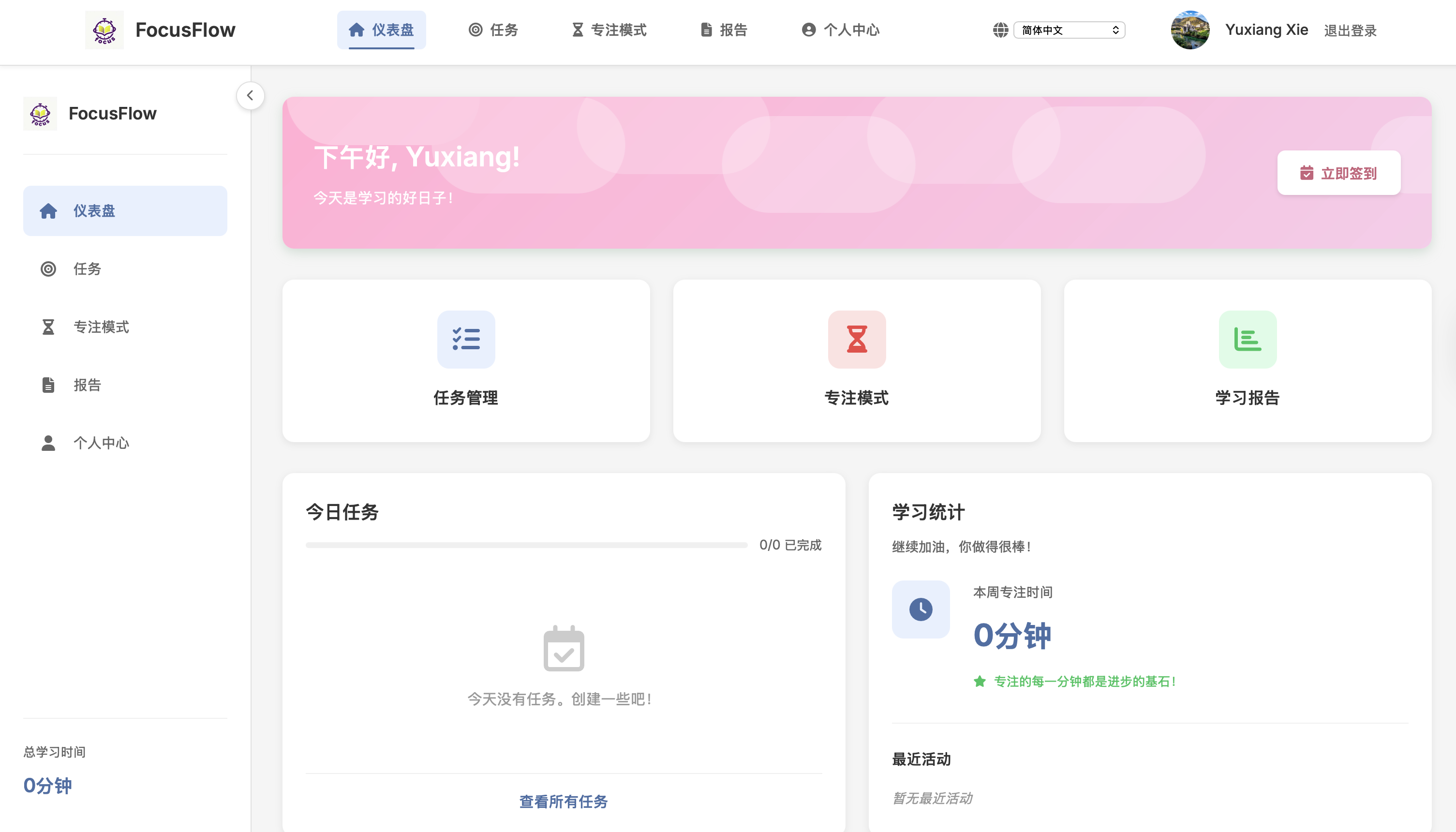
•    Greetings (time-based)
•    Statistics cards
•    Quick actions and check-ins
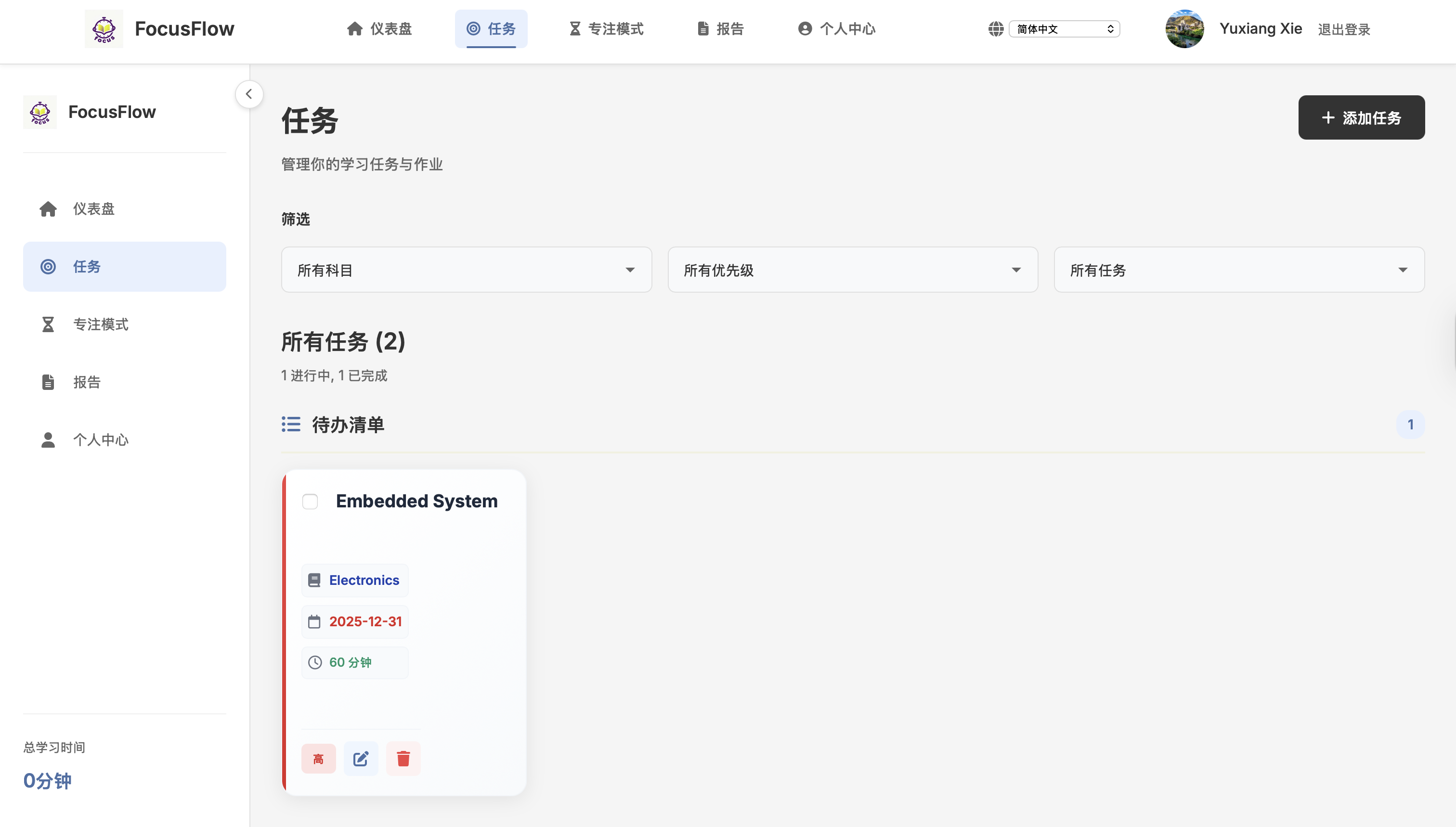
•    Task creation/editing
•    Priority and status filters
•    Empty states and success messages
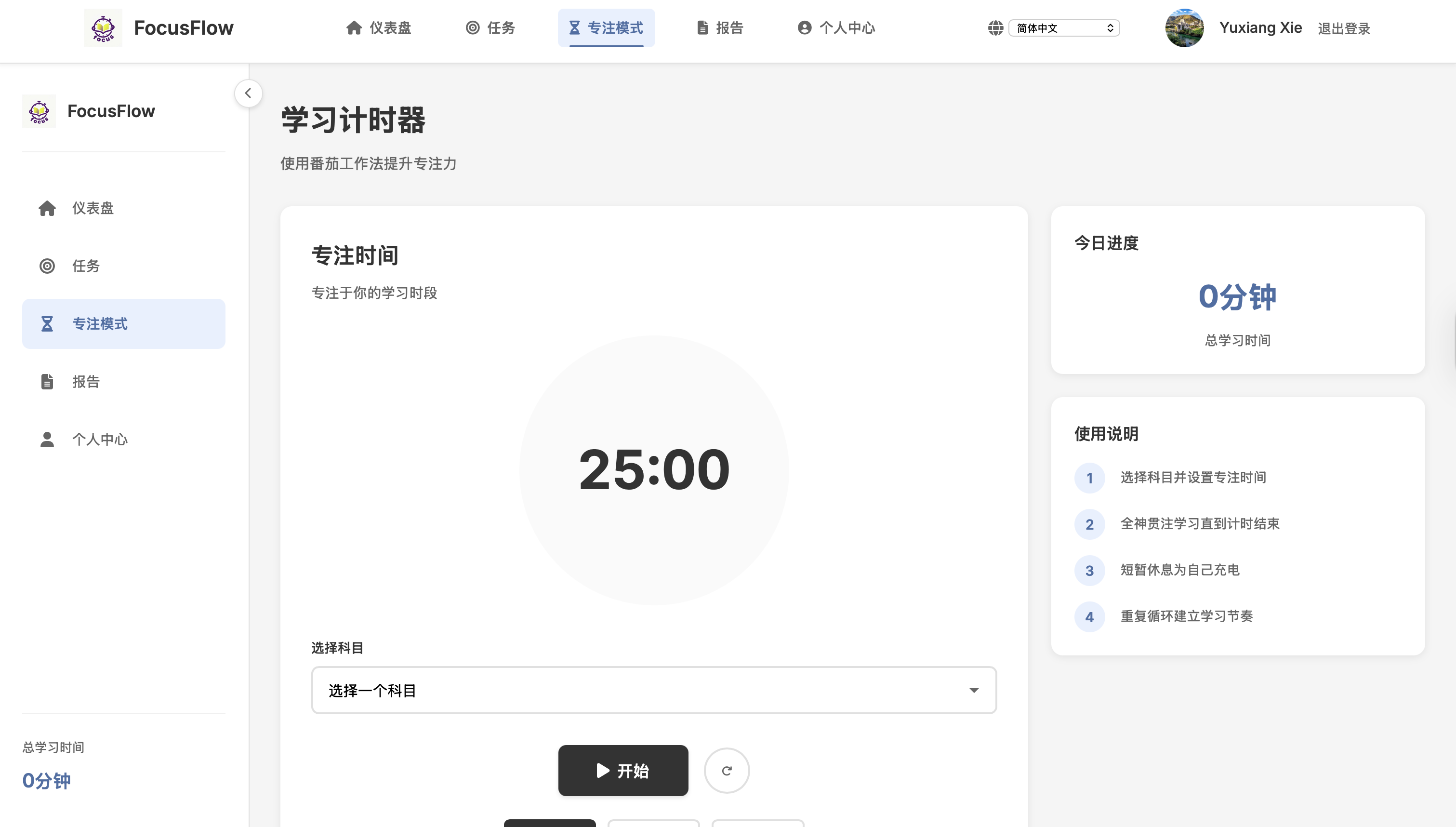
•    Timer controls
•    Progress indicators
•    Alerts and warnings
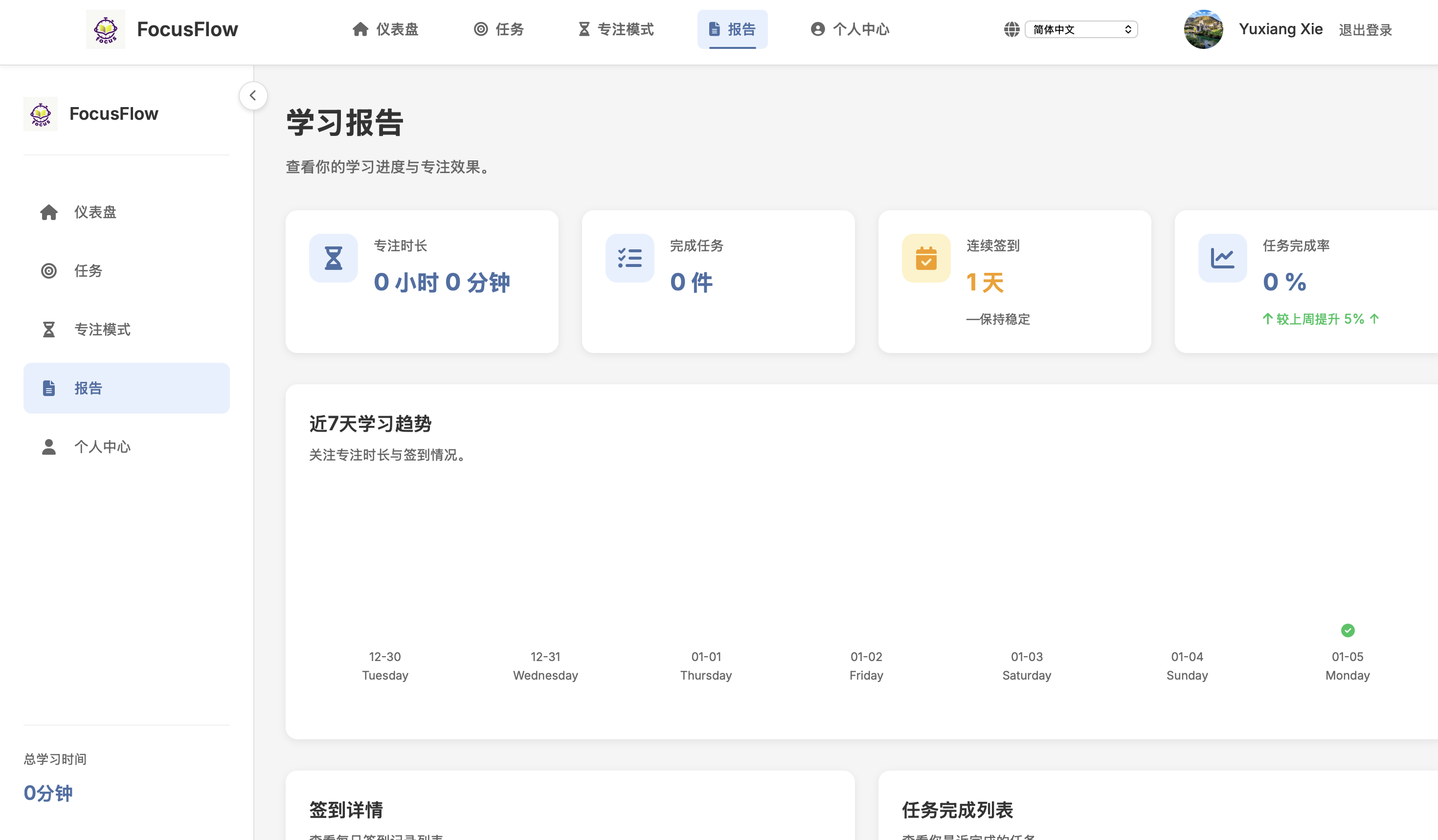
•    Charts and labels
•    Time units
•    Activity summaries
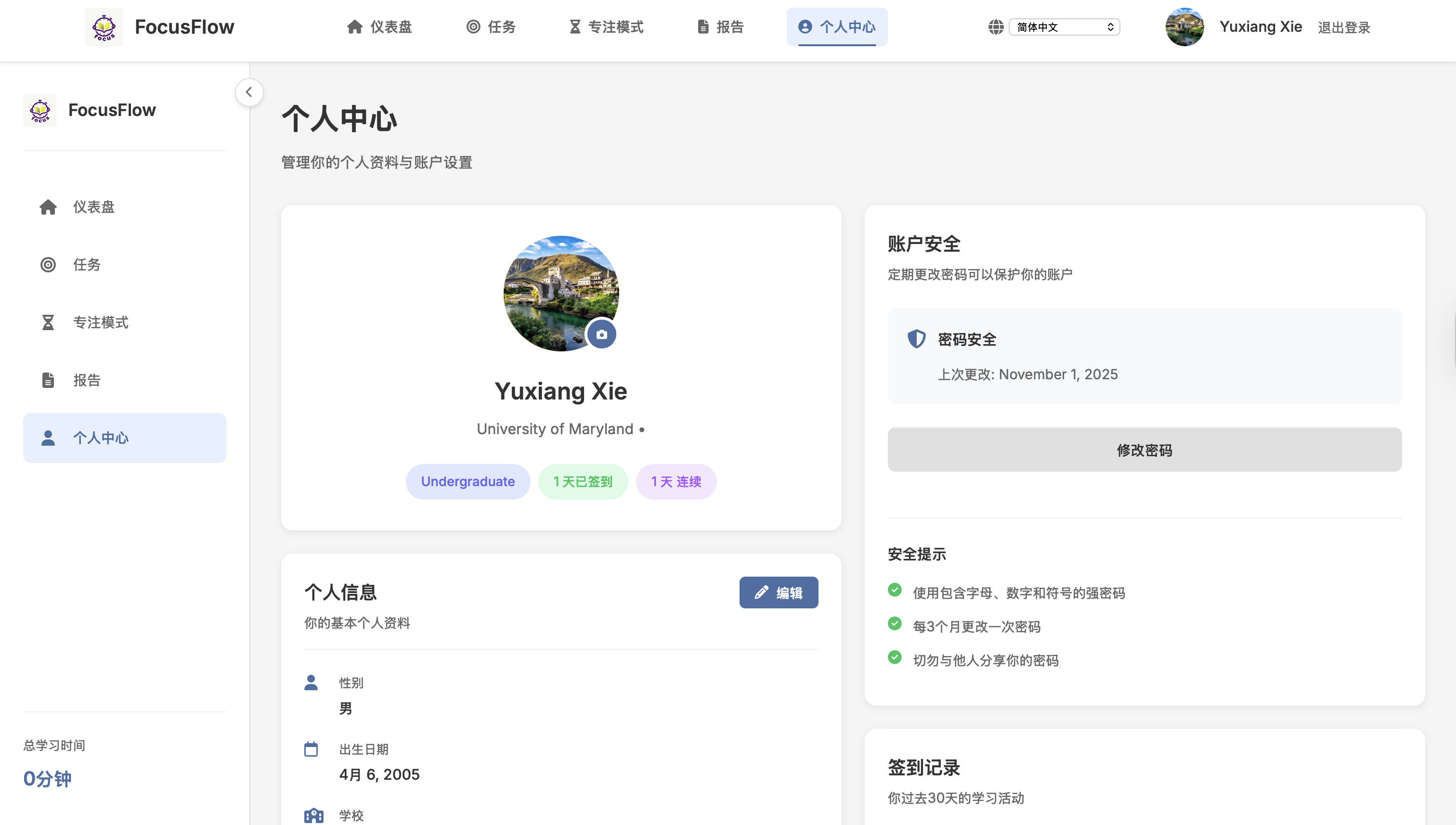
•    Profile labels
•    Education levels
•    Calendar and check-in history
•    Security settings
Language selection persists across:
• Page navigation
• Form submissions
• Sessions
• Modal interactions
The multi-language interface significantly enhances FocusFlow by making it accessible to a global audience.
•    ✅ 7 languages fully supported (100+ keys each)
•    ✅ Seamless switching with session persistence
•    ✅ 100% UI coverage
•    ✅ Robust fallback architecture
•    ✅ Minimal performance overhead
•    Translation Keys: 120+ per language
•    Coverage: 100% of user-facing strings
•    Languages: 7 (~3.5 billion native speakers)
•    Database-driven translations
•    RTL language support (Arabic, Hebrew)
•    Admin translation management UI
•    Automatic browser-based language detection
•    Additional languages (German, Portuguese, Korean)
•    Plan for i18n early
•    Test with real translated content
•    Context matters in translation
•    Consistency via context processors
•    Native-speaker feedback is invaluable
•    Sprint Duration: 1 weeks
•    Team Size: 5 developer
•    Lines of Code: ~2,000+
•    Files Modified: 15+ templates, core app & config
•    Status: ✅ Complete and deployed to beta


