


91
社区成员
 发帖
发帖 与我相关
与我相关 我的任务
我的任务
 分享
分享This project was developed for the Software Engineering course assignment. It implements a browser-based calculator using a separated front-end and back-end architecture.
| PSP Stage | Estimated Time (min) | Actual Time (min) |
|---|---|---|
| Planning | 40 | 50 |
| Development | 710 | 970 |
| ├─ Requirement analysis | 60 | 80 |
| ├─ Design specification | 50 | 65 |
| ├─ Design review | 30 | 40 |
| ├─ Coding standard | 30 | 40 |
| ├─ Detailed design | 70 | 90 |
| ├─ Coding | 300 | 410 |
| ├─ Code review | 60 | 80 |
| └─ Testing | 110 | 165 |
| Reporting | 150 | 180 |
| ├─ Test report | 70 | 85 |
| ├─ Size measurement | 20 | 20 |
| └─ Postmortem and process improvement | 60 | 75 |
| Total | 900 | 1200 |
The project was initially estimated to require fifteen hours but took approximately twenty hours of active work. The additional time was mainly spent debugging API communication, implementing the expression parser, migrating the database from SQLite to PostgreSQL, resolving database connection problems, and deploying the front end and back end separately. Waiting time between development sessions is not included.
The calculator is required to use a separated front-end and back-end architecture. The browser is responsible for collecting user input and displaying the response, while expression validation and calculation are performed by the server. If the back-end service is unavailable, the front end cannot produce a new calculation result.
The calculator must support the following functions:
The interface also provides two small convenience functions: a previous expression can be placed back into the input area, and the current result can be copied to the clipboard.
Each successful calculation is stored with an identifier, the original expression, the result, and the time at which it was created. Failed calculations are not added to the history. The stored records must remain available after the browser is refreshed or the back-end service is restarted.
Communication between the two parts uses HTTP requests and JSON data. The front end sends an expression to the calculation API and displays the returned result or error message. The back end must parse the expression safely and must not use eval, exec, or another method that directly executes user input as program code.
The front-end and back-end source code are maintained in separate GitHub repositories and deployed independently. The completed application must also be accessible through a public URL.
The system consists of three independently managed parts: a static front end, a Node.js back end, and a PostgreSQL database.
User
  │
  ▼
Front end on GitHub Pages
  │  HTTPS requests and JSON responses
  ▼
Express service on Render
  │  SQL queries
  ▼
PostgreSQL database on Neon
The browser never connects directly to the database. All calculations and database operations pass through the back-end API. This arrangement keeps the user interface separate from the calculation and storage logic.
| Component | Responsibility |
|---|---|
| HTML | Defines the calculator, display area, buttons, and history panel |
| CSS | Controls layout, colours, responsive behaviour, and button states |
| Browser-side JavaScript | Handles input, sends API requests, and updates the page |
| Express server | Validates requests, evaluates expressions, and manages history |
| PostgreSQL | Stores successful calculations and their creation times |
| GitHub Pages | Hosts the static front-end files |
| Render | Runs the Node.js back-end service |
| Neon | Provides the hosted PostgreSQL database |
The front end communicates with the server through the following endpoints:
| Method | Endpoint | Purpose |
|---|---|---|
GET | /api/status | Checks whether the server and database are available |
POST | /api/calculate | Validates and evaluates an expression |
GET | /api/history | Returns the stored calculation history |
DELETE | /api/history/:id | Deletes one history record |
DELETE | /api/history | Deletes all history records |
A calculation request contains only the expression:
{
  "expression": "(2+3)*4"
}
For a successful calculation, the server returns the result and the stored record. Invalid input produces an error response and is not inserted into the database.
The server processes expressions in several stages. It first converts the input string into numbers, operators, and parentheses. A recursive-descent parser then evaluates the tokens according to the following order:
This structure gives multiplication and division higher priority than addition and subtraction. Parentheses are evaluated recursively. The parser also checks malformed numbers, unsupported characters, incomplete expressions, unmatched parentheses, and division by zero.
When the user presses the equals button, the browser sends a POST request to /api/calculate. The server validates and evaluates the expression. If the calculation succeeds, the server stores the expression, result, and creation time in PostgreSQL before returning the response. The browser then displays the result and requests the latest history.
Deletion follows the same separation. The browser sends the record identifier to the appropriate API endpoint, while the server performs the database operation and returns the outcome.
The front end is implemented with plain HTML, CSS, and JavaScript. No external user-interface framework is used. The three files have separate responsibilities: index.html defines the page structure, style.css controls the presentation, and script.js manages interaction and communication with the server.
The main page contains two sections. The calculator section includes the expression display, result display, input buttons, and message area. The history section contains the record count, clear button, and a list generated from data returned by the back end.
Buttons use data-value and data-action attributes. This allows JavaScript to identify input buttons and control buttons without assigning a separate event function to every element.
The current expression is stored as a string in the browser. Both mouse clicks and keyboard events pass values to the same input-handling function. The interface supports numbers, decimal points, operators, parentheses, Enter, Backspace, and Escape.
Several small checks are performed before a character is added. For example, the interface prevents repeated decimal points within the same number and limits an expression to 100 characters. It can also insert multiplication automatically between a number and an opening parenthesis. These checks improve input convenience, but the server still performs the final validation.
When the equals button is pressed, the browser sends the expression to the deployed back end:
const response = await fetch(
  `${API_BASE_URL}/api/calculate`,
  {
    method: "POST",
    headers: {
      "Content-Type": "application/json"
    },
    body: JSON.stringify({
      expression: submittedExpression
    })
  }
);
The front end does not calculate the answer. It waits for the JSON response and then displays either the returned result or the error message. The equals button is temporarily disabled while the request is running, which prevents repeated submissions.
If the server cannot be reached, the page reports a connection problem instead of generating a local result. This behaviour preserves the required separation between the two parts of the system.
The history list is loaded through GET /api/history. JavaScript creates the list elements from the returned records rather than placing fixed records in the HTML file. Each item displays the expression, result, and creation time.
A history item provides two actions. The Use button places the saved expression back into the calculator, while the Delete button sends its record identifier to the deletion endpoint. The clear button removes all records after confirmation. After a successful calculation or deletion, the list is requested again so that the displayed state matches the database.
The current result can be copied through the Clipboard API. The button text briefly changes after a successful copy operation to give the user visible feedback.
The page uses CSS Grid for the main layout and calculator buttons. On wider screens, the calculator and history panel appear side by side. Media queries switch the page to a single-column layout on smaller screens, allowing the same interface to remain usable on phones and narrow browser windows.
The back end is implemented with Node.js and Express. It receives JSON requests, validates expressions, performs the calculations, and accesses PostgreSQL through the pg library. The database connection string is loaded from the DATABASE_URL environment variable rather than being written in the source code.
The server reads the port from process.env.PORT, with port 3000 used during local development. This allows the same code to run locally and on Render.
The first stage of calculation is tokenisation. The tokenizer reads the expression from left to right and produces tokens for numbers, operators, and parentheses. Spaces are ignored.
A number may contain one decimal point. Inputs such as 2..5 or a single decimal point are rejected. Any character outside the supported set also produces an error. This step prevents unsupported input from reaching the parser.
The calculator uses a recursive-descent parser rather than eval. Its structure can be represented by the following simplified grammar:
expression → term (("+" | "-") term)*
term       → unary (("*" | "/") unary)*
unary      → ("+" | "-") unary | primary
primary    → number | "(" expression ")"
Each parser function handles one precedence level. readExpression processes addition and subtraction, while readTerm processes multiplication and division. readUnary supports positive and negative signs, and readPrimary reads numbers or recursively evaluates a parenthesised expression.
Division checks the right-hand value before performing the operation. If it is zero, the parser returns a division-by-zero error. The parser also verifies that all tokens have been consumed, which prevents incomplete or incorrectly ordered expressions from being accepted.
JavaScript floating-point arithmetic can produce values such as 0.30000000000000004. Before returning a valid result, the server limits unnecessary floating-point noise with toPrecision(12) and converts the value back to a string. For example, 0.1+0.2 is returned as 0.3.
POST /api/calculate first checks that the request contains a non-empty string no longer than 100 characters. Display symbols such as ×, ÷, and − are normalised to standard operators before parsing.
If parsing succeeds, the server stores the expression and result in PostgreSQL. The created record is then returned with HTTP status 201. If validation fails, the server returns status 400 with a specific message, and no history record is created.
GET /api/history returns the latest records in descending identifier order, with a limit of 100 entries. DELETE /api/history/:id validates the identifier and deletes the matching row. If no row is found, the server returns status 404. The optional clear operation uses DELETE /api/history and reports how many records were removed.
SQL values are passed through parameterised queries such as $1 and $2. User input is therefore kept separate from the SQL statement itself.
Validation errors and database errors are handled separately. Validation problems return a message that can be shown directly by the interface. Database failures return status 500 without exposing the connection string or internal credentials.
The front end and back end use different public domains, so the server includes cross-origin response headers for the required GET, POST, DELETE, and OPTIONS requests. Unknown API paths return a JSON 404 response.
During startup, the server creates the history table if it does not already exist. It begins listening only after this database step succeeds. A failed database connection therefore prevents the service from starting in an invalid state.
The first local version stored calculation history in SQLite. This was suitable for early development because it required little configuration and kept the data in a local file. However, the selected free hosting environment does not provide a persistent local disk for the web service. A SQLite file could therefore be lost when the service is restarted or recreated.
The final version uses PostgreSQL hosted by Neon. The Render service connects to the database through the DATABASE_URL environment variable. This keeps the calculation history separate from the application instance and allows records to remain available after a browser refresh or back-end restart.
The project requires only one table:
CREATE TABLE IF NOT EXISTS history (
  id SERIAL PRIMARY KEY,
  expression TEXT NOT NULL,
  result TEXT NOT NULL,
  created_at TIMESTAMPTZ NOT NULL DEFAULT CURRENT_TIMESTAMP
);
| Field | Type | Description |
|---|---|---|
id | SERIAL | Unique identifier for each history record |
expression | TEXT | Normalised expression submitted for calculation |
result | TEXT | Result returned by the expression parser |
created_at | TIMESTAMPTZ | Time at which the record was inserted |
The result is stored as text because the parser already produces the final display value as a string. The timestamp is generated by PostgreSQL, so the browser does not decide when a record was created.
A successful calculation inserts one row into the history table. Invalid expressions are rejected before the insert query is executed. History retrieval returns the newest records first and limits the response to 100 entries.
Individual deletion uses the record identifier:
DELETE FROM history
WHERE id = $1
RETURNING id, expression, result, created_at;
The placeholder $1 is supplied separately from the SQL text. The insert operation follows the same parameterised-query approach for the expression and result. Clearing the history deletes all rows but keeps the table available for later calculations.
The database address and password are stored in the deployment environment rather than in GitHub. During local development, the same value is loaded from a .env file, which is excluded through .gitignore. The repository contains only .env.example as a description of the required variable.
The application checks for DATABASE_URL when it starts. It then creates the table if necessary and verifies the connection before opening the HTTP server. This prevents the back end from appearing available when the database setup has failed.
Persistence was tested by creating several calculations, refreshing the front-end page, and restarting the back-end service. The same history records remained available because they were stored in Neon rather than application memory or a temporary local file. Single-record deletion and clear-all operations were also checked against the updated history returned by the API.
Testing was carried out through the deployed GitHub Pages application rather than only through the local development files. This checked the complete path from the browser to Render and then to the Neon database.
| No. | Input or action | Expected result | Actual result | Status |
|---|---|---|---|---|
| 1 | Open the application | Calculator and empty history are displayed | Interface loaded correctly | Passed |
| 2 | 12+8 | 20 | 20 | Passed |
| 3 | 2+3*4 | 14 | 14 | Passed |
| 4 | (2+3)*4 | 20 | 20 | Passed |
| 5 | 5*-2 | -10 | -10 | Passed |
| 6 | 0.1+0.2 | 0.3 | 0.3 | Passed |
| 7 | 8/0 | Division-by-zero error | Error message displayed | Passed |
| 8 | (2+3 | Incomplete-parenthesis error | Error message displayed | Passed |
| 9 | Refresh the page | Existing history remains available | Records were loaded again | Passed |
| 10 | Delete one record | Record count decreases by one | Count changed from 5 to 4 | Passed |
| 11 | Clear all records | History becomes empty | Count changed to 0 | Passed |
Failed expressions were not added to the history table. This was checked by comparing the history count before and after the division-by-zero and incomplete-parenthesis tests.
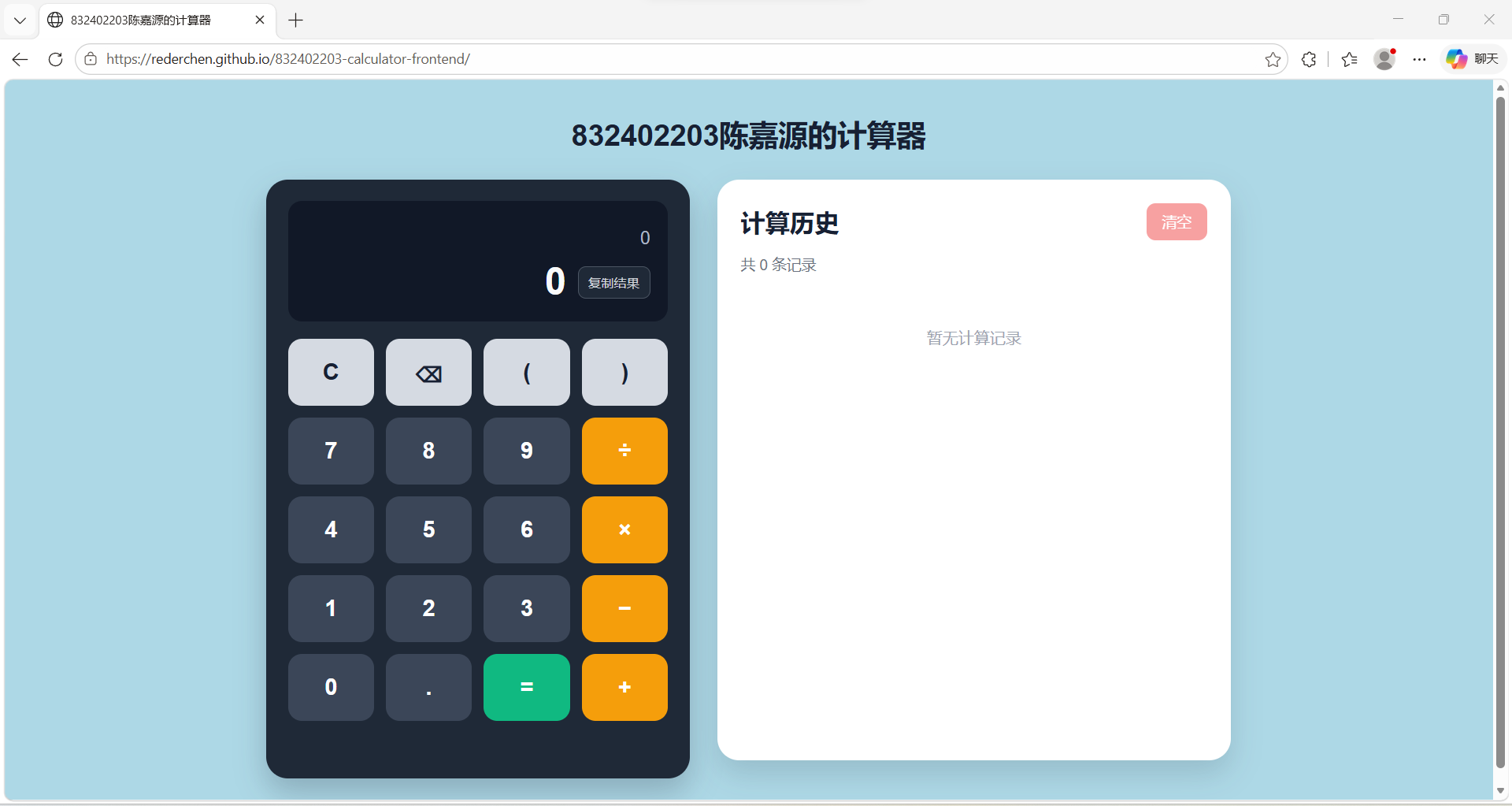
Figure 1. The deployed calculator before any calculation was stored.
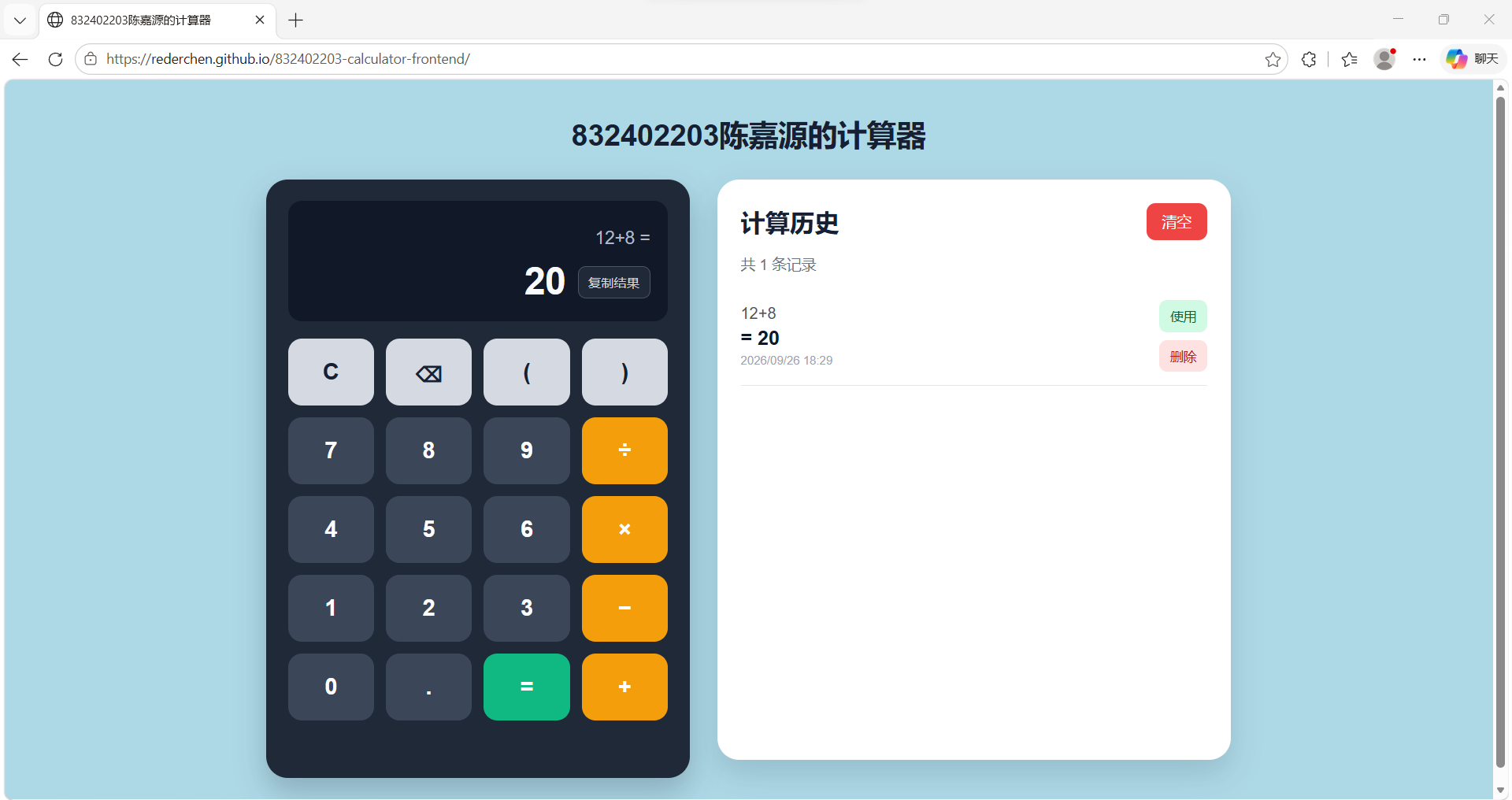
Figure 2. The expression 12+8 returned 20 and created the first history record.
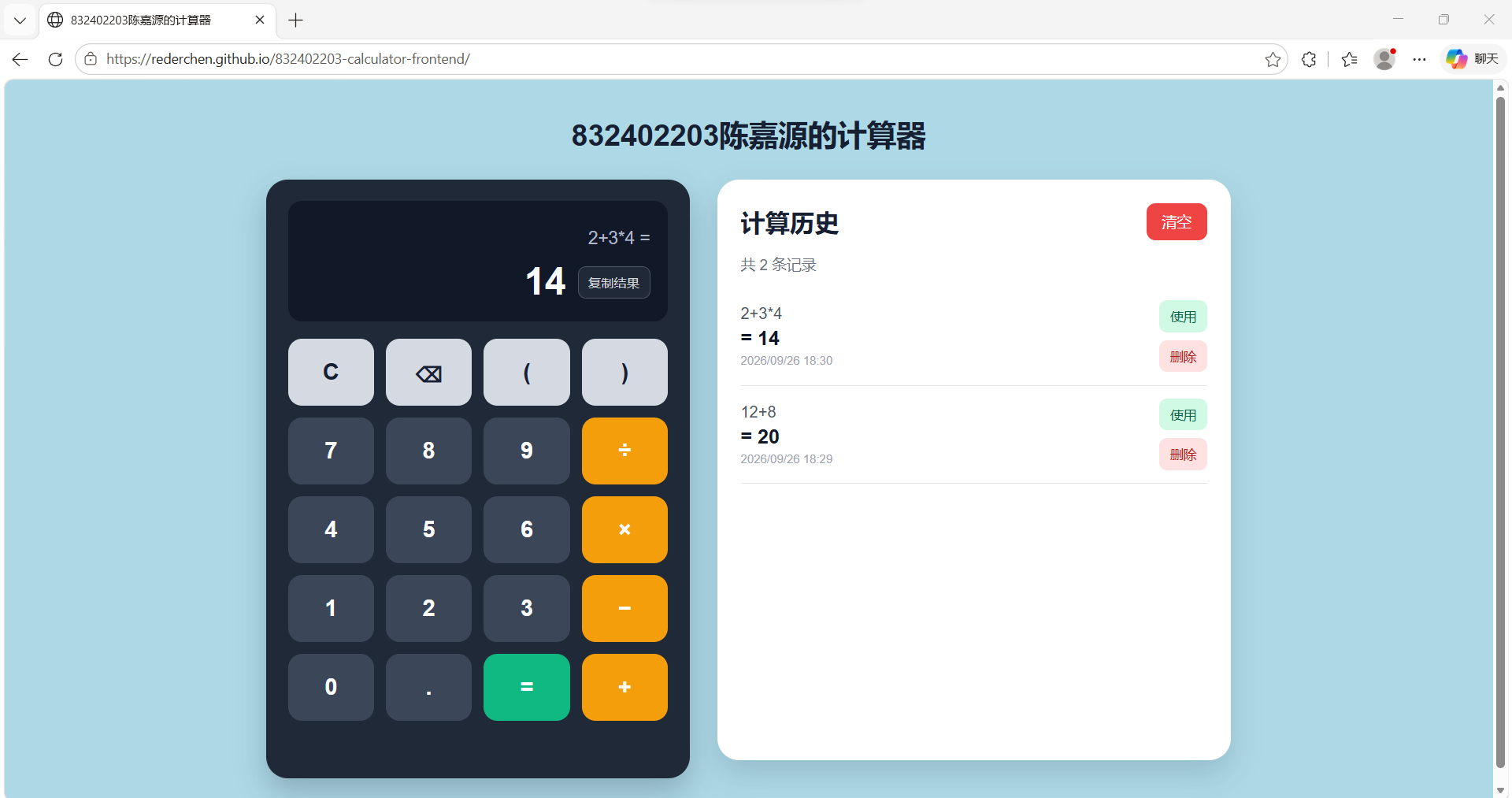
Figure 3. Multiplication was evaluated before addition in 2+3*4, producing 14.
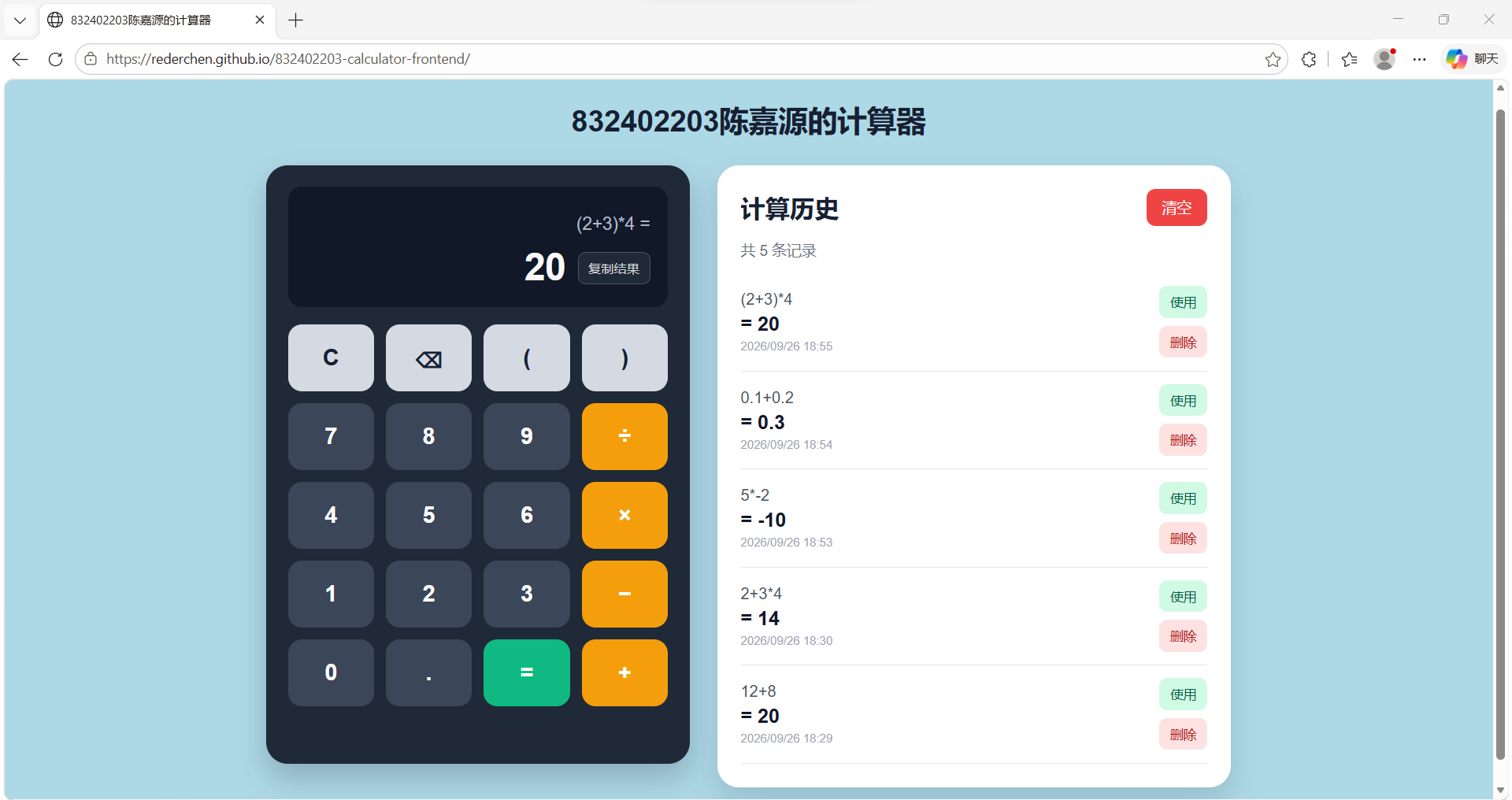
Figure 4. Parentheses changed the evaluation order of (2+3)*4, producing 20.
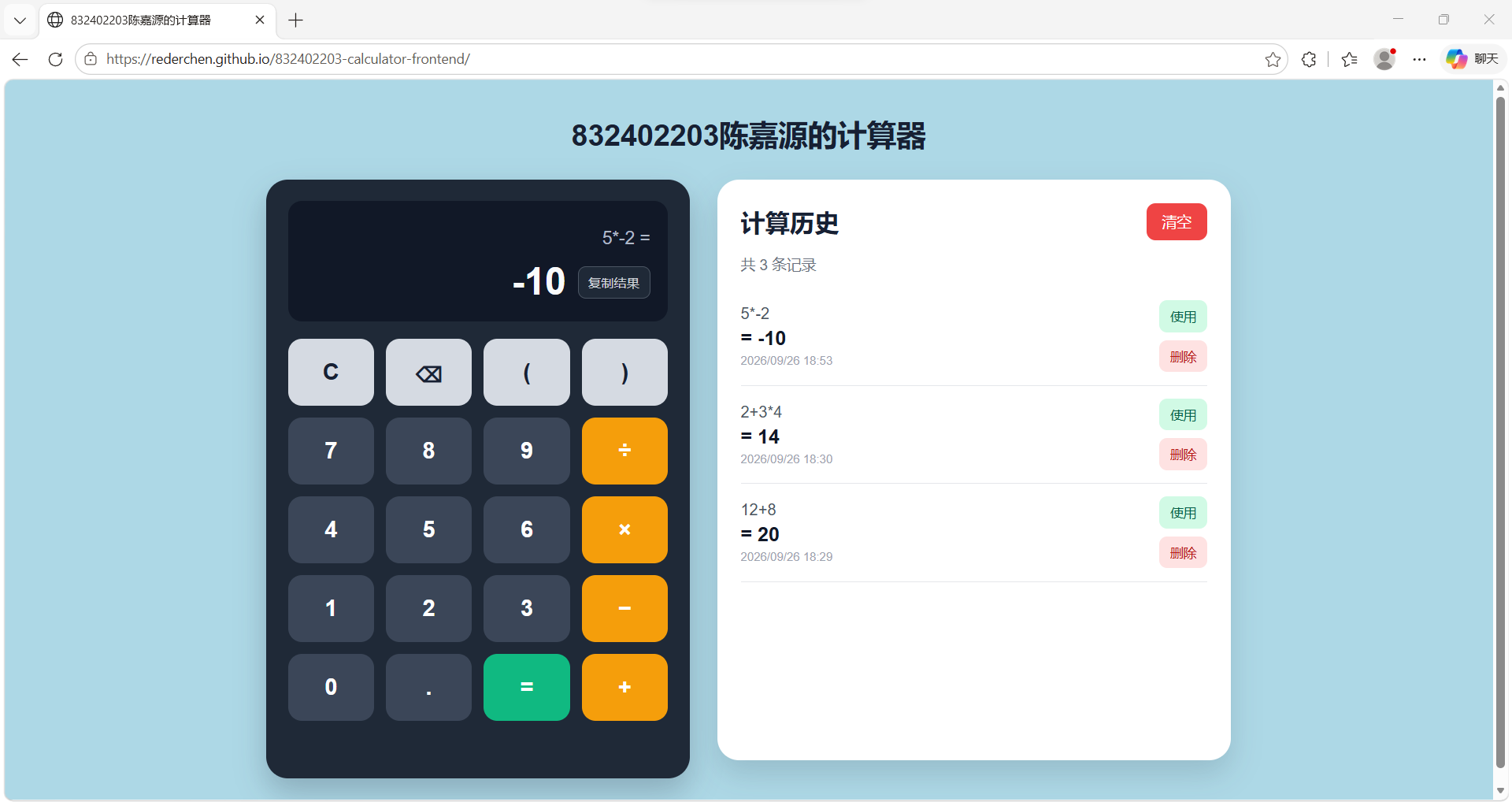
Figure 5. The parser treated the minus sign after multiplication as a unary sign and returned -10.
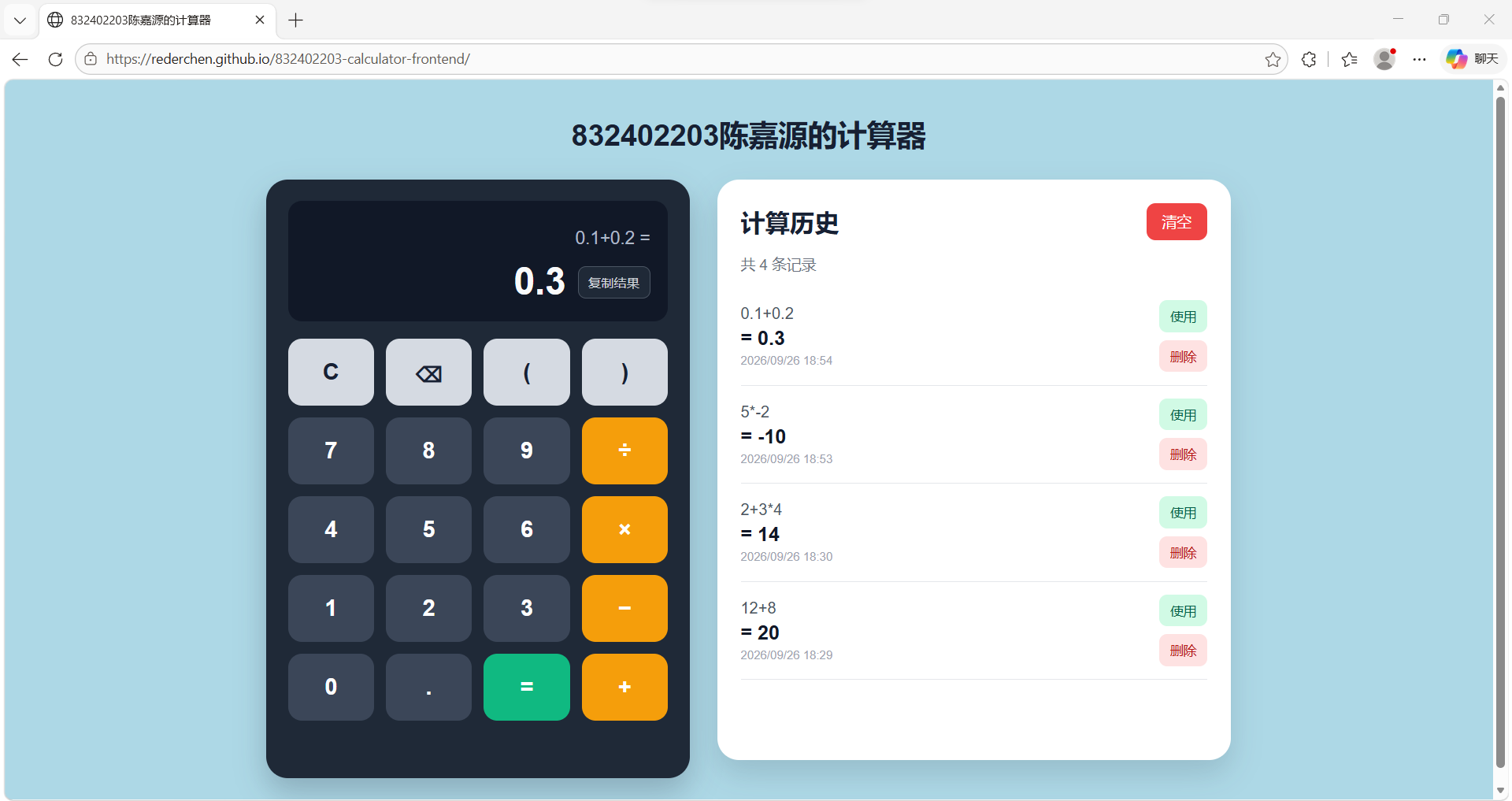
Figure 6. The decimal expression 0.1+0.2 was returned as 0.3.
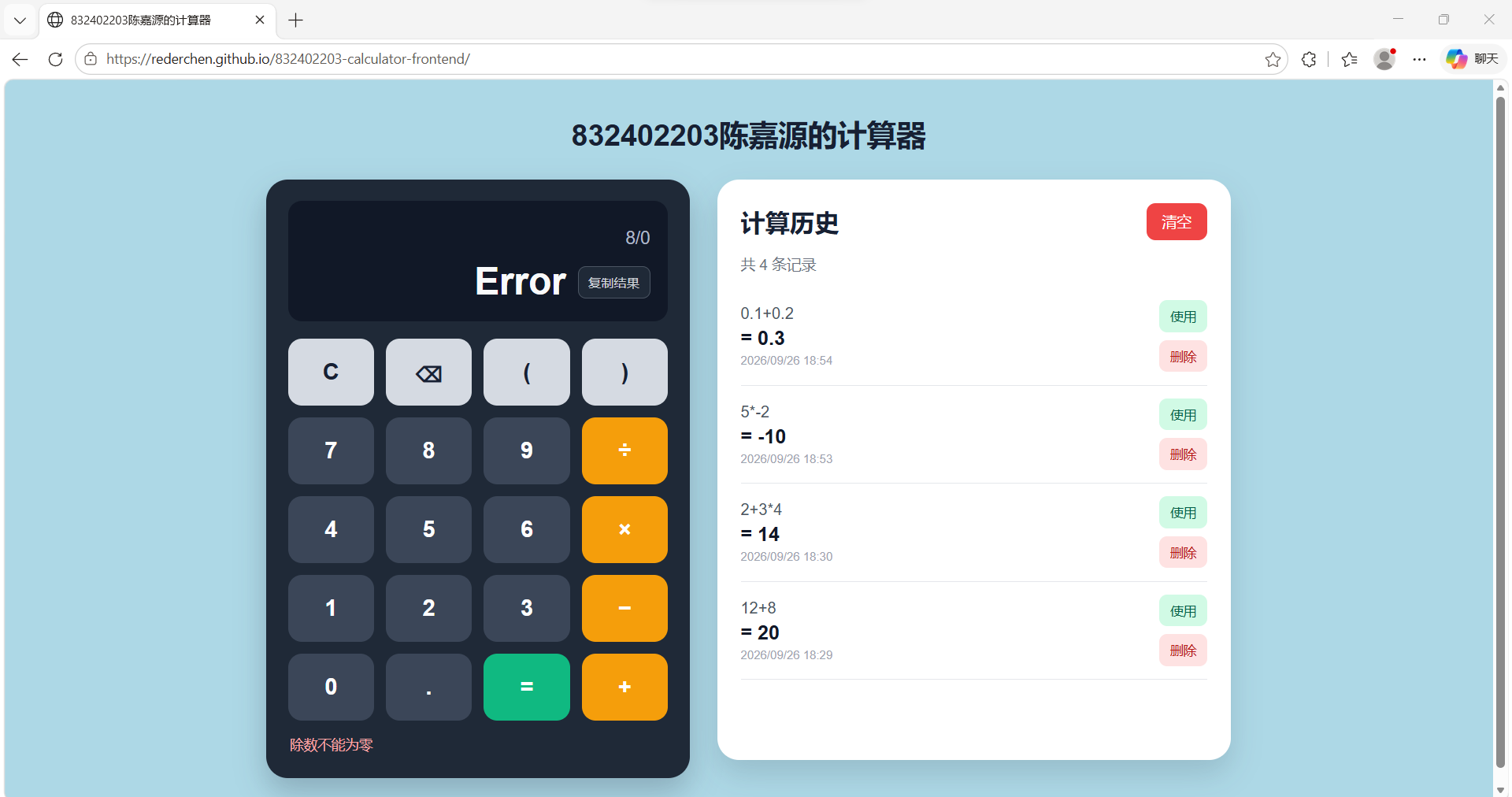
Figure 7. The back end rejected 8/0 and returned a specific division-by-zero message. The failed expression was not stored.
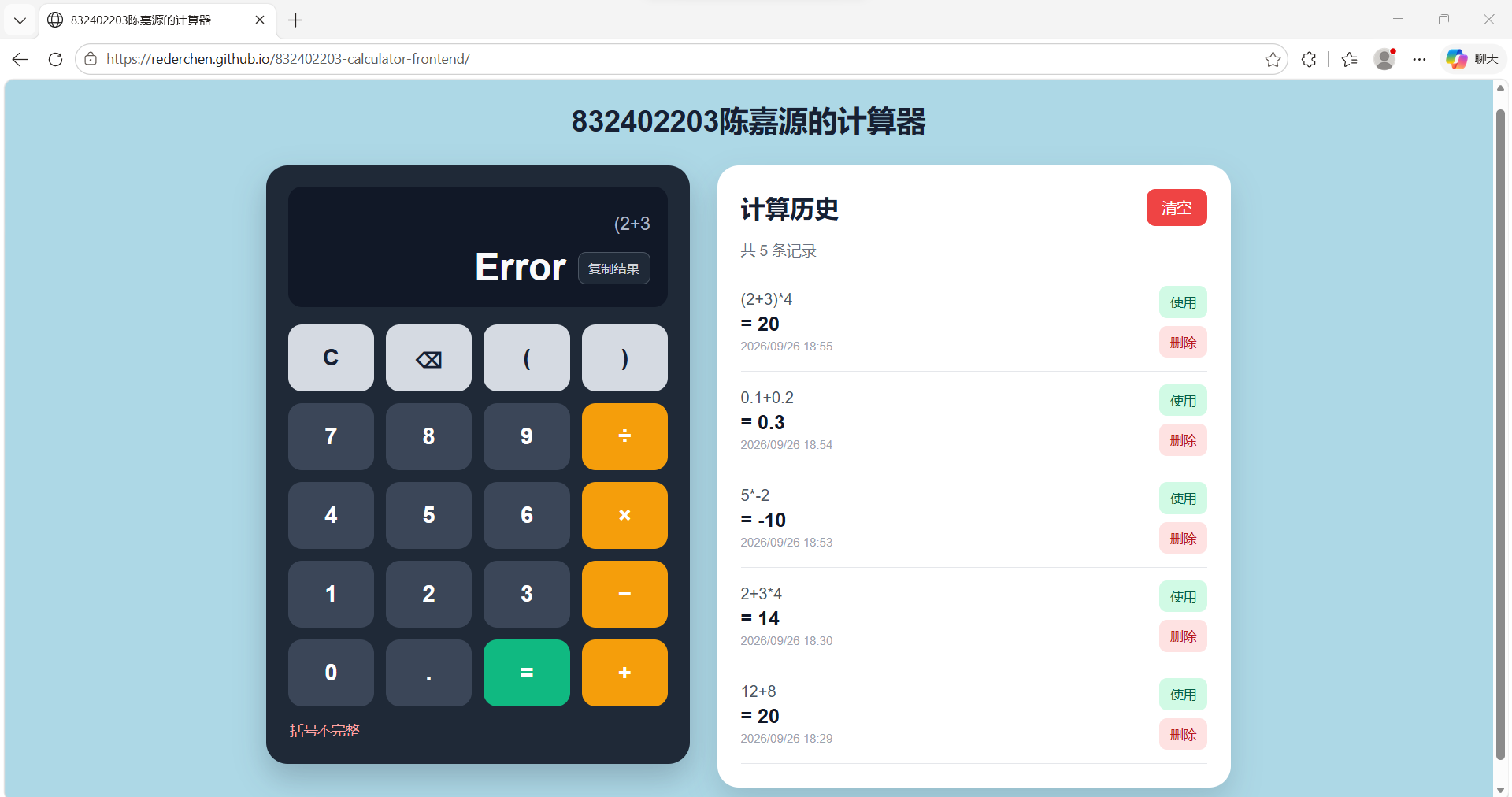
Figure 8. The incomplete expression (2+3 was rejected because its closing parenthesis was missing.
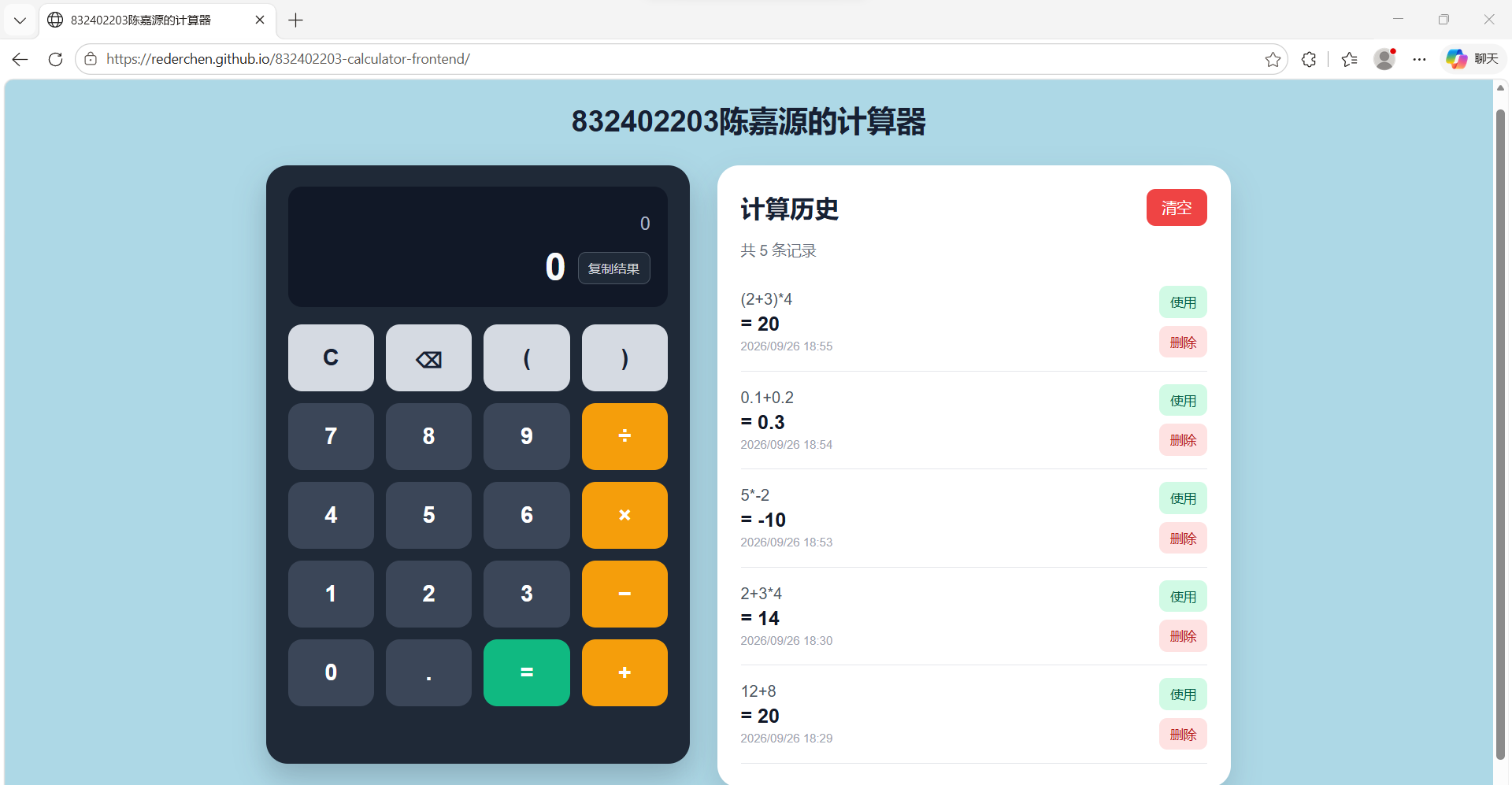
Figure 9. The history records remained available after the browser page was refreshed.
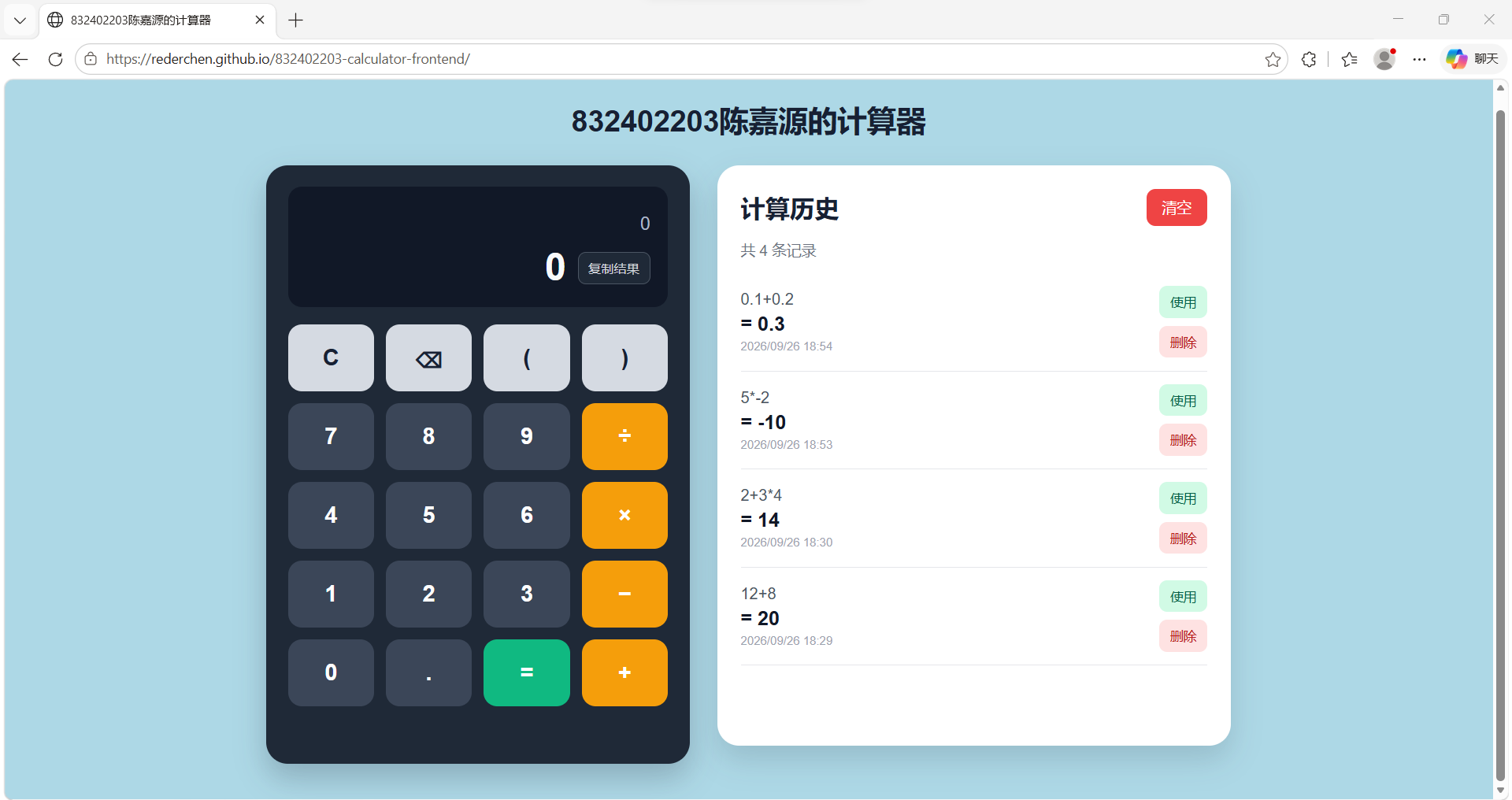
Figure 10. After one record was deleted, the displayed history count decreased from five to four.
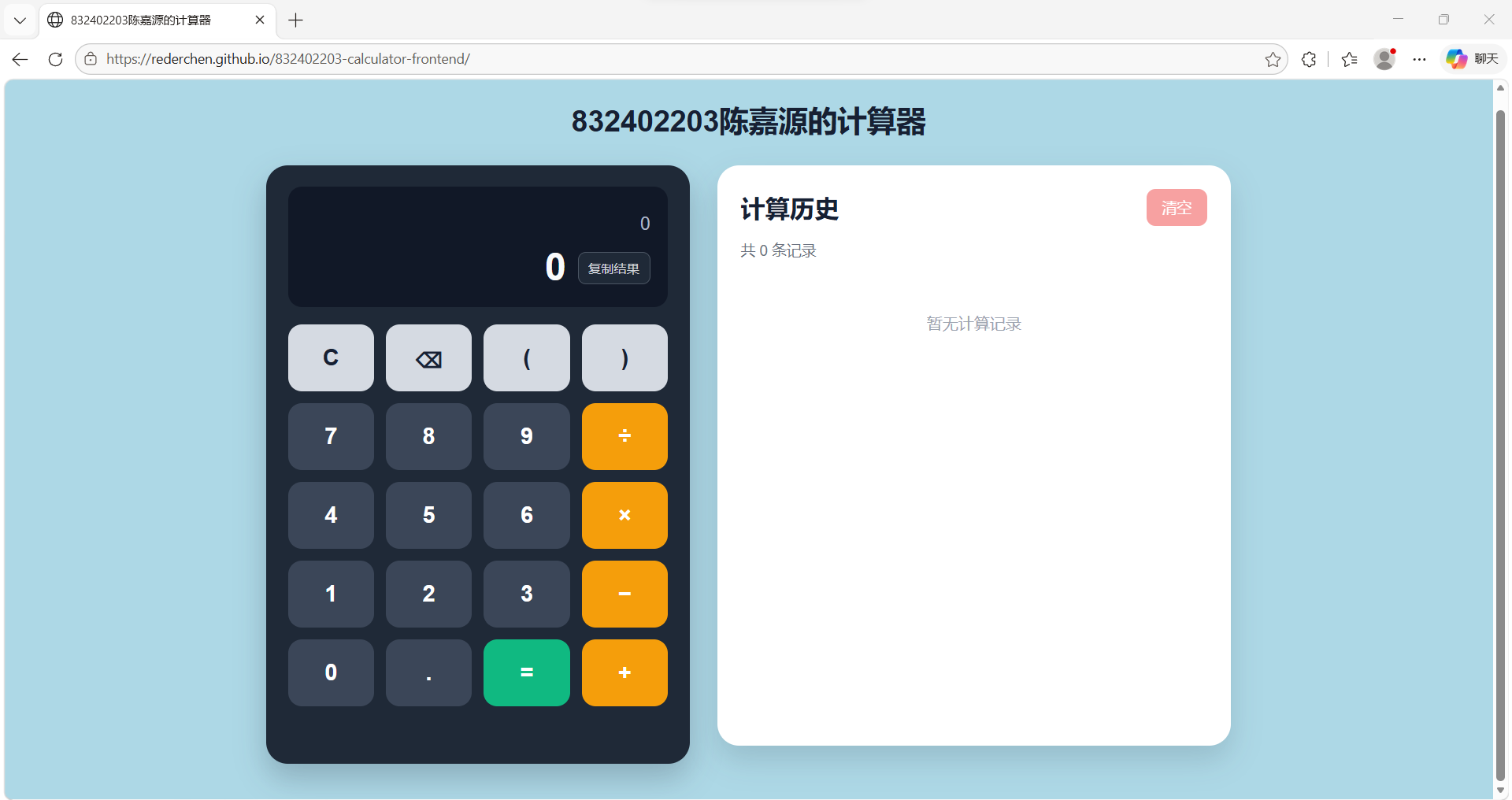
Figure 11. The clear operation removed all remaining records and returned the history panel to its empty state.
The three parts of the project are deployed separately. The front end is hosted by GitHub Pages, the Node.js API runs on Render, and the PostgreSQL database is provided by Neon.
| Part | Platform | Public address |
|---|---|---|
| Front end | GitHub Pages | https://rederchen.github.io/832402203-calculator-frontend/ |
| Back end | Render | https://eight32402203-calculator-backend.onrender.com/ |
| Database | Neon | Not exposed to the browser |
The front-end repository is public on GitHub. GitHub Pages is configured to deploy the main branch from the repository root. Since the project uses plain HTML, CSS, and JavaScript, no build command is required.
The deployed script.js contains the public Render base URL. All calculation and history requests are therefore sent to the online back end rather than to localhost.
The back-end repository is connected to a Render Web Service. The service uses the following configuration:
Language: Node
Branch: main
Region: Singapore
Build command: npm install
Start command: npm start
Health check path: /api/status
Instance type: Free
Render supplies the production port through the PORT environment variable. The server also keeps port 3000 as a fallback for local development.
The free Render instance may stop after a period of inactivity. Its first request after sleeping can therefore take longer than later requests. This affects startup time but does not remove the history records, because the database is hosted separately.
A Neon PostgreSQL project was created in the Singapore region. The back end connects to it using a pooled PostgreSQL connection string stored in Render as the DATABASE_URL environment variable.
The connection value is not written in server.js, README.md, screenshots, or GitHub. The local .env file is also excluded from version control. This keeps the database password outside the public repositories.
After deployment, /api/status was opened through the Render address to confirm that both the HTTP service and PostgreSQL connection were available. /api/history was then checked to confirm that stored records could be retrieved through the public API.
The GitHub Pages application was tested separately using its public address. Calculations, error responses, history retrieval, deletion, and page-refresh persistence all worked through the deployed services.
I began with a small static page and learned the project in stages. The first version contained only a title and basic HTML content. I then added the calculator layout with CSS, connected the buttons with JavaScript, and implemented keyboard input. Building the interface first made it easier to understand how HTML structure, CSS layout, and browser events work together.
The next step was to move the calculation logic to a Node.js server. This part changed the project from a static webpage into a front-end/back-end application. The browser no longer generated the final answer itself; it sent an expression to the API and waited for the server response. This separation was initially less convenient than keeping all logic in one JavaScript file, but it made the responsibilities of each part much clearer.
Several problems occurred during development. Early tests were opened directly through a file:// address, which produced browser security warnings and made debugging requests more difficult. Running the project through an HTTP service and later deploying both parts gave the application a clearer execution environment.
I also encountered Cannot GET /api/history and Cannot POST /api/history responses. These errors showed that a running server is not enough by itself; the request method and route must match the registered Express endpoint. Checking the route definitions and restarting the current server process helped distinguish code problems from an outdated running process.
The first persistent-history implementation used SQLite. It worked locally, but it was not suitable for the selected free Render deployment because the local database file would not provide reliable persistence. I therefore changed the back end to use Neon PostgreSQL. This required a new database driver, asynchronous SQL queries, environment-variable configuration, and additional connection testing.
The Neon connection initially failed with ECONNRESET. Retrying the connection and checking the network helped confirm that the parser and API code were not the cause. A later front-end connection problem was caused by an extra slash at the end of the API base URL, which produced request paths containing //api/.... This was a small mistake, but it showed the value of checking the final request address rather than only reading the surrounding code.
The main lesson from this project was that a complete web application involves more than producing the correct arithmetic result. The request path, HTTP method, response status, JSON structure, database operation, and browser update must all agree.
Implementing the parser also helped me understand why submitted expressions should not be passed directly to eval. Dividing the parser into expression, term, unary, and primary levels provided a safer method and made operator precedence explicit.
Git and GitHub were another important part of the work. The front end and back end were placed in separate repositories, and later changes were committed and pushed independently. Deployment also introduced practical issues that are not visible in local development, including environment variables, cross-origin requests, database persistence, and the delayed first response of a sleeping free service.
The current application meets the assignment requirements, but several parts could be improved. The free Render service may take time to respond after a period of inactivity. The project also relies mainly on manual functional testing. Automated tests for the parser and API routes would make later changes safer.
For a larger public application, cross-origin access should be limited to the actual front-end domain instead of allowing every origin. History pagination, rate limiting, and user-specific records could also be added if the system were extended beyond a single shared calculator.
The completed project supports basic and compound arithmetic, server-side validation, persistent history, single-record deletion, clear-all operation, keyboard input, and a responsive interface. The front end, back end, and database are deployed separately and communicate through public HTTPS endpoints.
More importantly, the development process connected several topics that had previously been learned separately: page layout, JavaScript events, HTTP APIs, expression parsing, SQL, Git, and cloud deployment. The final system is small, but it provides a complete example of how these parts work together.

