


91
社区成员
 发帖
发帖 与我相关
与我相关 我的任务
我的任务
 分享
分享| Item | Description |
|---|---|
| Course | Software Engineering |
| Assignment | First Assignment: Front-End and Back-End Separation Calculator System |
| Objectives of This Assignment | To understand and implement front-end/back-end separation through a native Android client and an independent HTTP API; to develop safe expression parsing, persistent calculation history, and API-based deletion; and to practise testing, deployment, and technical documentation. |
| Other References | Android Developers documentation, Python documentation, SQLite documentation, Google Java Style Guide, PEP 8, and PEP 257. |
| Student | Yihan Wang |
| Front End | Native Android application written in Java |
| Back End | Python standard-library HTTP API |
| Database | SQLite |
| Deployment | Ubuntu 22.04, Nginx, and systemd |
| Public API | http://8.217.14.75/api |
This assignment required the development of a calculator system based on a front-end and back-end separation architecture. The Android front end is responsible for user interaction and information display. The Python back end is responsible for expression validation, parsing, calculation, exception handling, database operations, and history management.
The final result is an Android calculator named Yihan Wang Calculator. The Android client communicates with an independently deployed Python API through HTTP and JSON. The final result is always calculated by the backend and returned to the Android application.
1. Repository Links and Code Standards
4. Presentation of the Finished Product
Figure 1: Main Android Interface
Figure 4: Basic Multiplication
Figure 9: Unary Negative Number
Figure 12: History After Restart
Figure 15: Public Backend Health Check
Figure 16: Backend History Endpoint
Figure 17: Android GitHub Repository
Figure 18: Backend GitHub Repository
Extended and Supporting Features
10. Code Explanation and Implementation Details
10.2 Backend Calculation Handler
11. Android Installation and Testing
11.2 Build and Install a Debug APK
13.7 Front-End and Back-End Separation Test
14. Personal Journey: Problems Encountered and Solutions
Problem 1: Gradle Build Configuration
Problem 2: HTTP Access from Android
Problem 3: Backend Connectivity
Problem 6: Two-Repository Submission
The front-end and back-end projects are stored in two independent GitHub repositories, as required by the assignment.
https://github.com/3785107480/EE308FZ_Yihan_Wang_android_frontend
https://github.com/3785107480/EE308FZ_Yihan_Wang_backend
https://github.com/3785107480/EE308FZ_Yihan_Wang_android_frontend/blob/main/codestyle.md
The Android coding conventions are based on the Google Java Style Guide and Android API guidelines.
https://github.com/3785107480/EE308FZ_Yihan_Wang_backend/blob/main/codestyle.md
The Python coding conventions are based on PEP 8 and PEP 257.
https://github.com/3785107480/EE308FZ_Yihan_Wang_android_frontend/releases/tag/v1.0.0
The release contains the tested debug APK. The APK is intended for assignment demonstration and evaluation.
The assignment requires a calculator system with a separated front end and back end.
The major requirements are:
Support addition, subtraction, multiplication, and division.
Support compound mathematical expressions.
Support operator precedence.
Support parentheses.
Support unary positive and negative numbers.
Support decimal numbers.
Reject invalid expressions.
Reject division by zero.
Perform the final calculation on the backend.
Store successful calculations in a backend database.
Display calculation history in the frontend.
Preserve history after restarting the frontend.
Delete a selected calculation history record.
Provide a publicly accessible backend service.
Submit the frontend and backend projects in separate GitHub repositories.
Provide code standards for both projects.
Provide an English project blog with screenshots, PSP data, design explanations, and testing instructions.
The most important architectural requirement is that the Android client must not calculate the final result locally.
The required flow is:
text
Android sends expression
        |
        v
Python backend validates and parses expression
        |
        v
Python backend calculates the result
        |
        v
Python backend stores the successful calculation
        |
        v
Python backend returns the result
        |
        v
Android displays the backend result
The Android client sends an expression such as:
{
  "expression": "1+2*3"
}
The Android client does not send a pre-calculated result.
The Planned Time column was recorded before implementation began, and the Actual Time column was updated after each corresponding development or testing phase was completed. The planned total effort was 1,950 minutes, while the actual total effort was 2,430 minutes. The additional time was mainly spent on Android–backend integration, error handling, testing and debugging, deployment configuration, and documentation with screenshots. Overall, the project took approximately two calendar weeks: one week focused mainly on the Android frontend and one week focused mainly on the Python backend, SQLite persistence, deployment, and testing.
| Activity | Planned Time (min) | Actual Time (min) | Description |
|---|---|---|---|
| Requirement analysis | 90 | 120 | Studied the assignment and identified functional requirements |
| System architecture design | 90 | 120 | Designed the Android, API, and SQLite architecture |
| Backend parser and API | 300 | 360 | Implemented the parser, HTTP endpoints, and validation |
| SQLite persistence | 150 | 180 | Implemented database initialization, insertion, query, and deletion |
| Android UI development | 360 | 420 | Developed the calculator interface and interaction logic |
| Android and backend integration | 180 | 240 | Connected the Android client to the public API |
| Error handling | 120 | 150 | Implemented invalid-expression and division-by-zero handling |
| Testing and debugging | 240 | 300 | Tested calculations, history persistence, deletion, and deployment |
| Deployment configuration | 180 | 240 | Configured Ubuntu, Nginx, and systemd |
| Documentation and screenshots | 240 | 300 | Prepared the English blog, screenshots, and testing instructions |
| Total | 1950 | 2430 | Approximately two weeks of development |
The actual time was higher than the initial estimate because Android networking, Gradle configuration, cloud deployment, and evidence preparation required additional debugging.
The finished product is a native Android calculator named Yihan Wang Calculator.
The user interface contains:
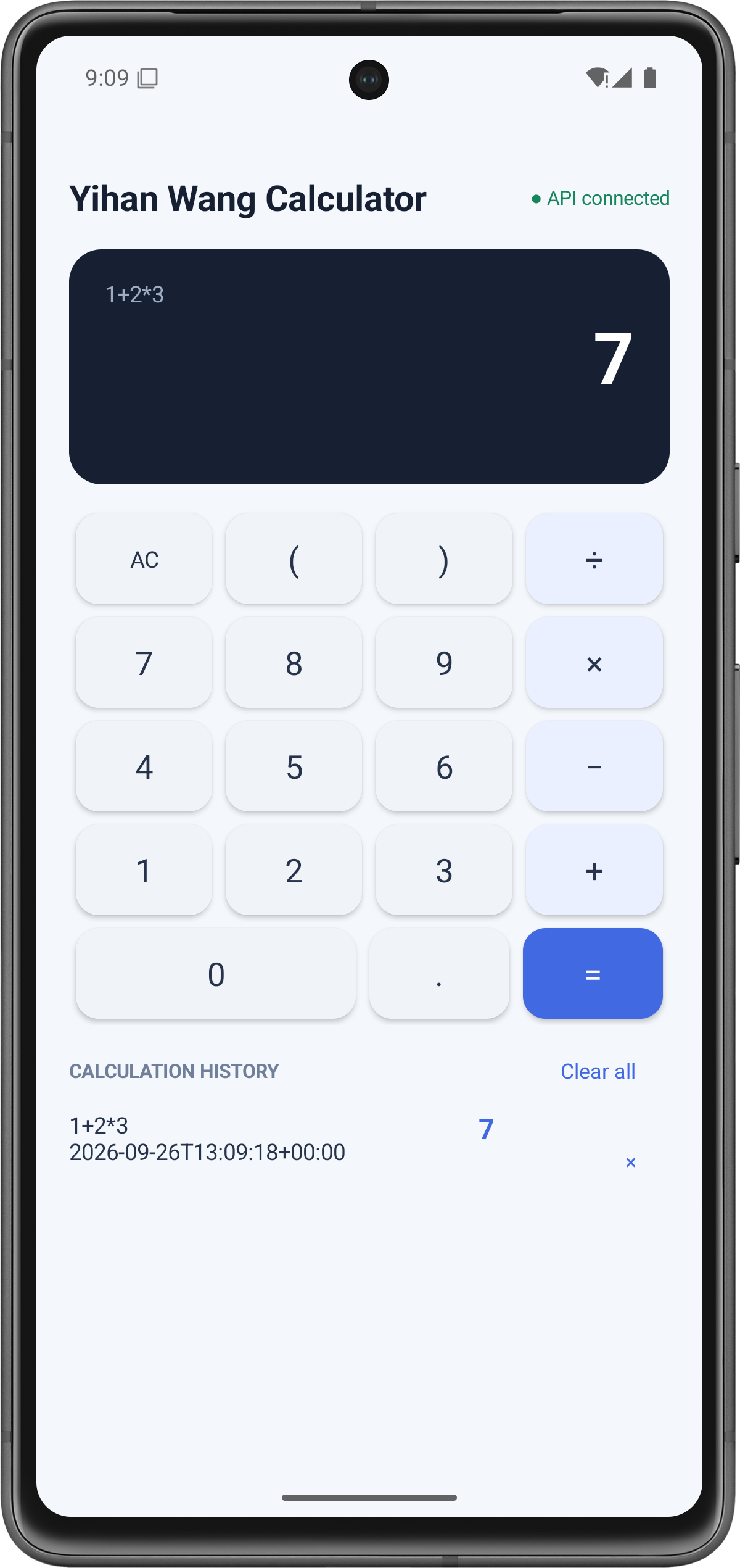
Description:
The screenshot shows the main Android interface. The title is Yihan Wang Calculator, the connection status displays API connected, and the calculator shows the compound expression 1+2*3 with the backend result 7.
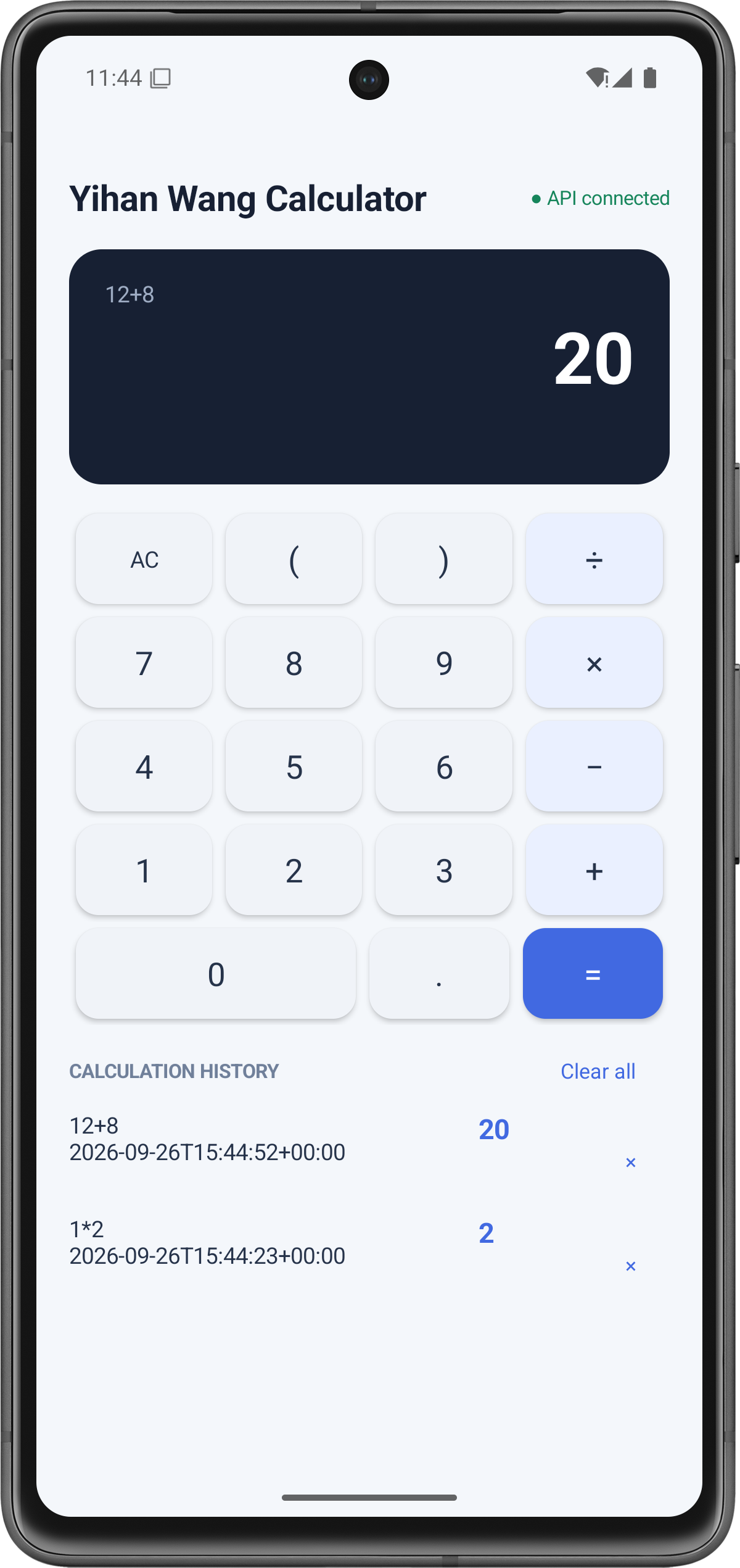
Description:
The Android client sends the expression 12+8 to the backend. The backend calculates the result and returns 20.
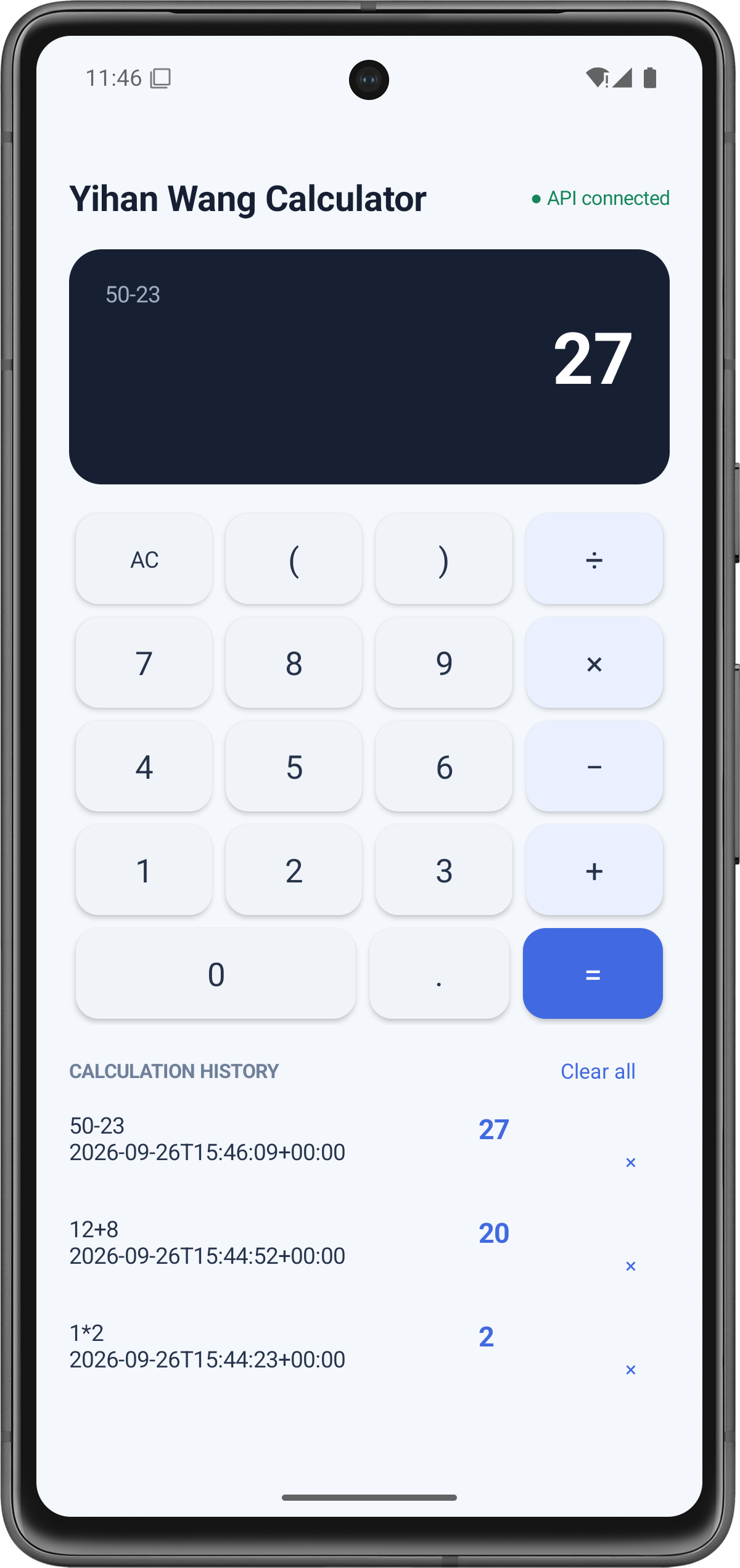
Description:
The subtraction expression is sent to the backend and the returned result is displayed by Android.
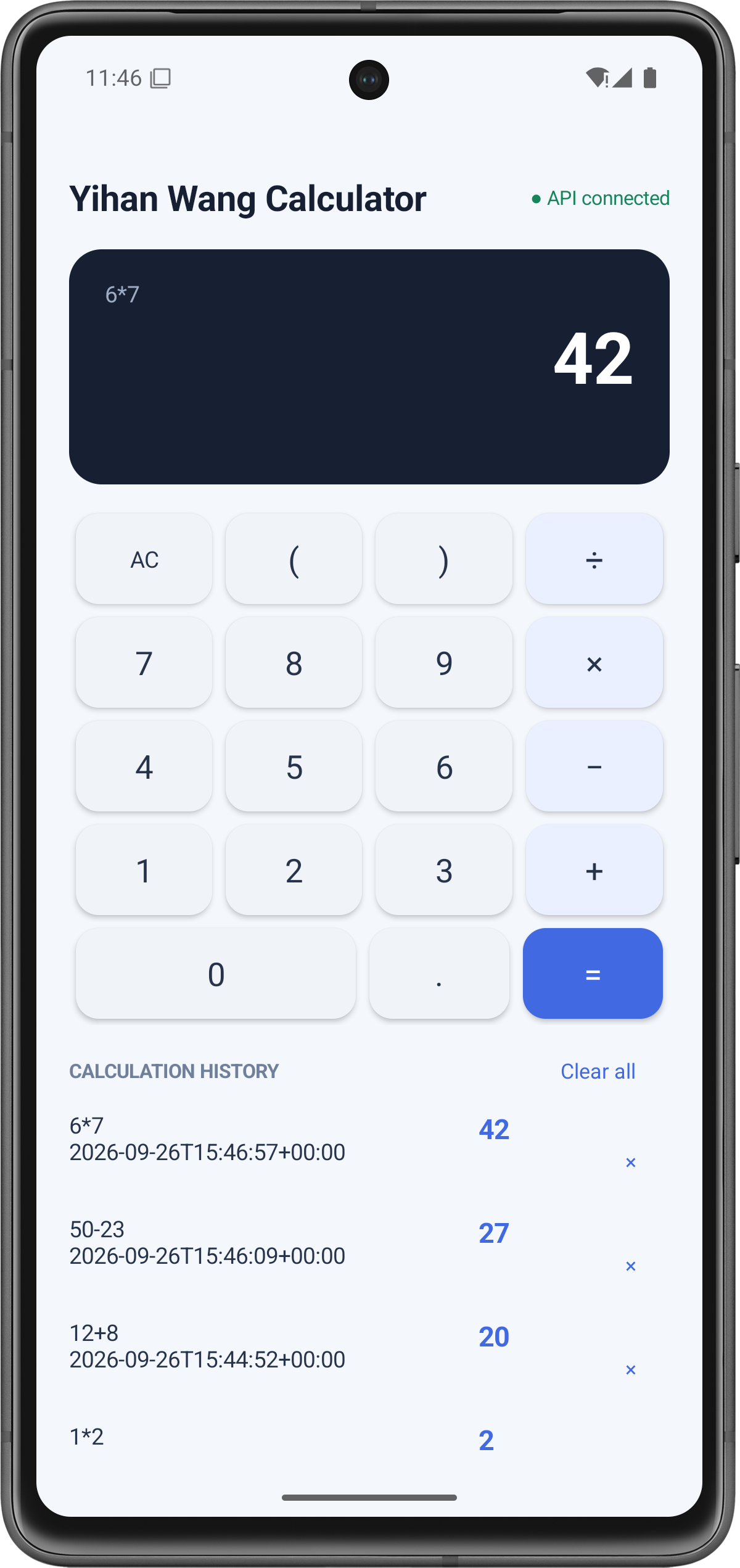
Description:
The multiplication expression is calculated by the backend and displayed by the Android client.
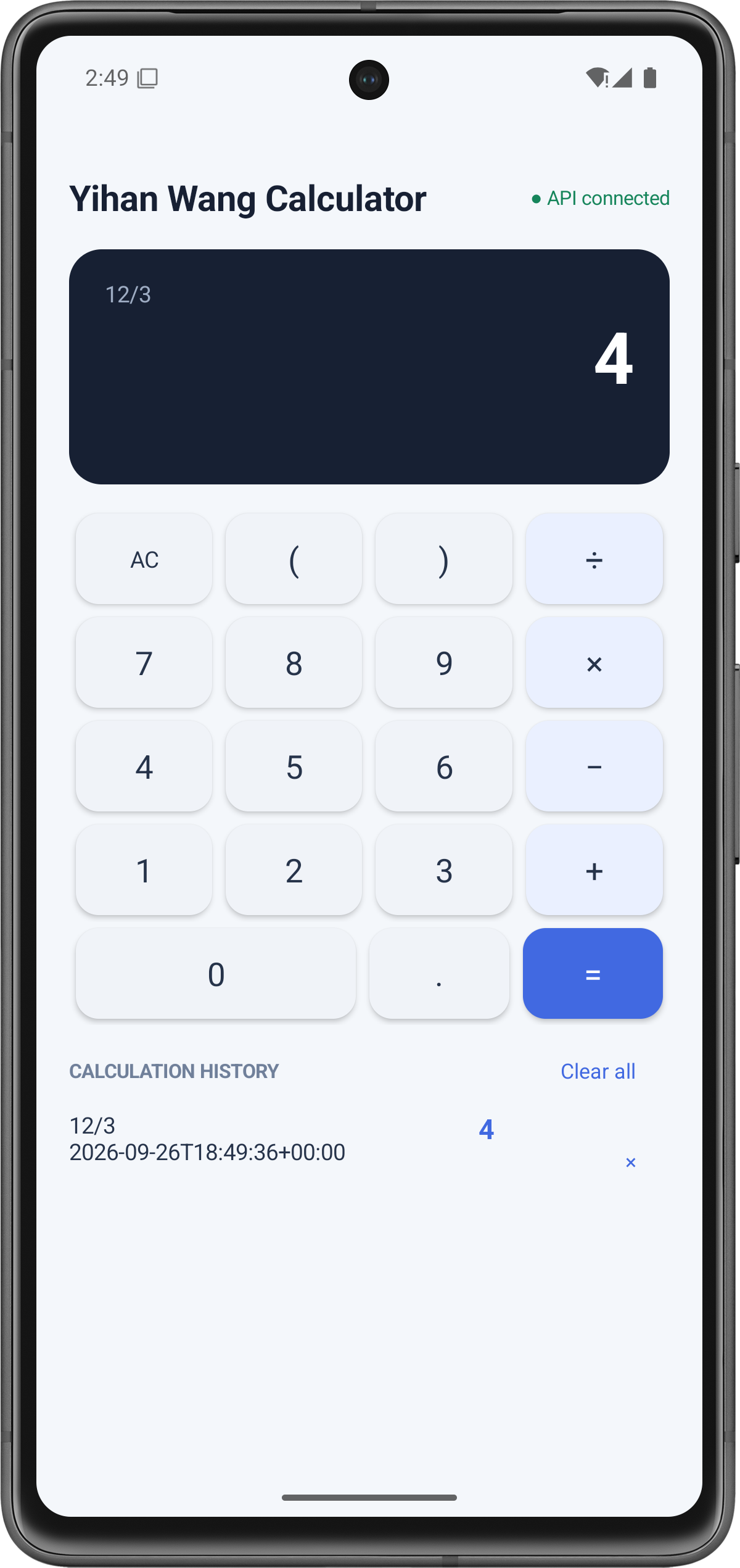
Description:
The division operation is processed by the backend and the result is returned to Android.
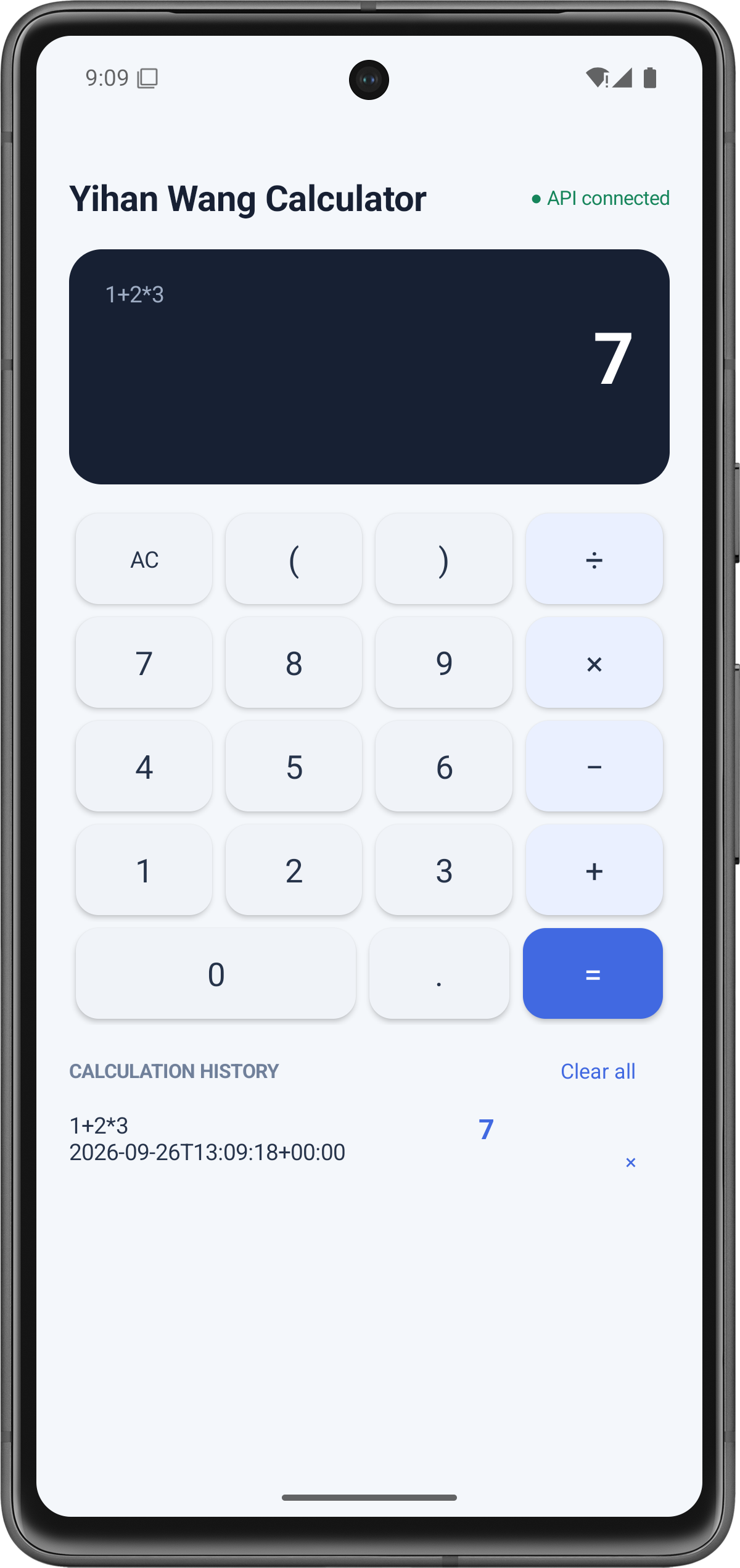
Description:
The expression 1+2*3 returns 7, proving that multiplication is performed before addition.
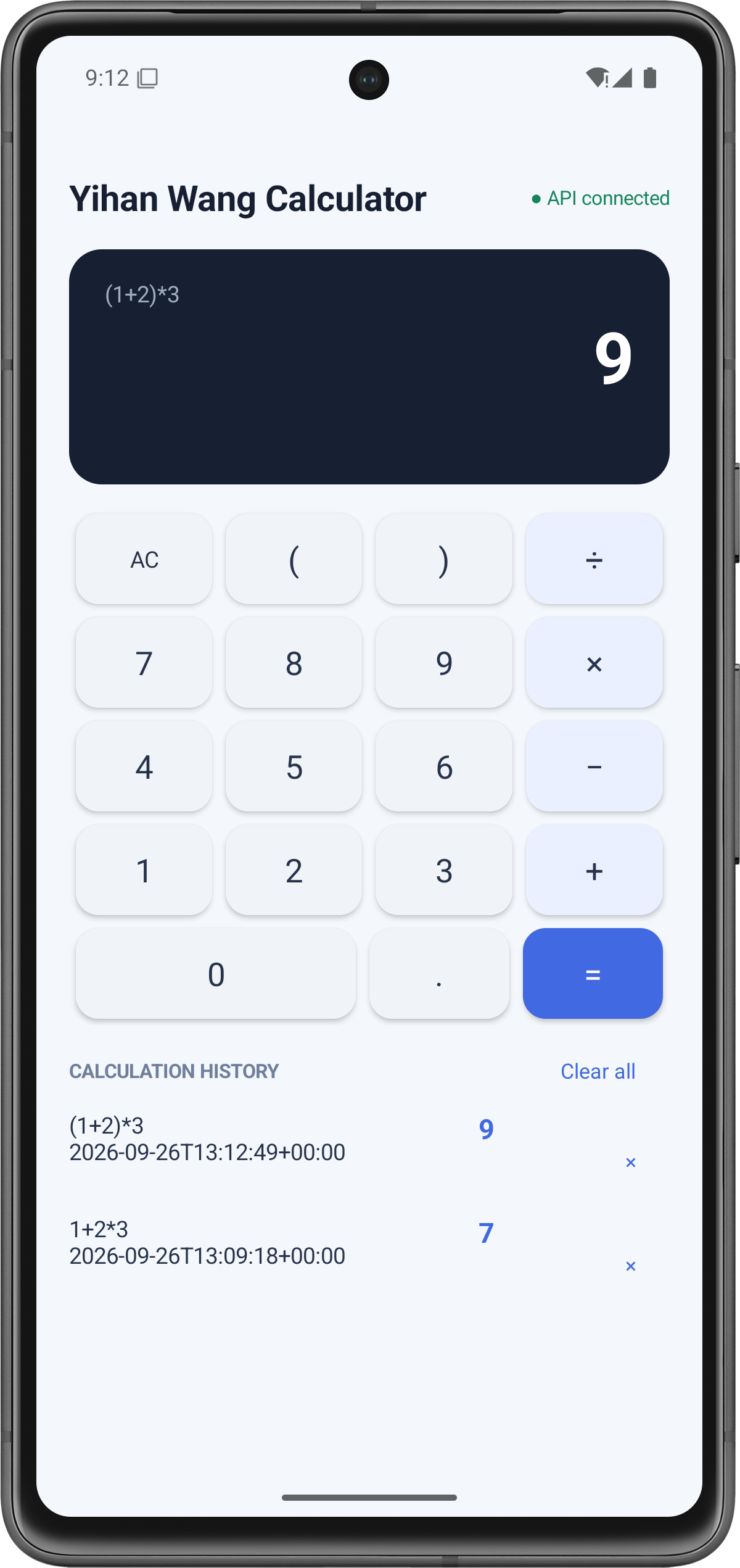
Description:
The expression (1+2)*3 returns 9, proving that parentheses change the normal operation order.
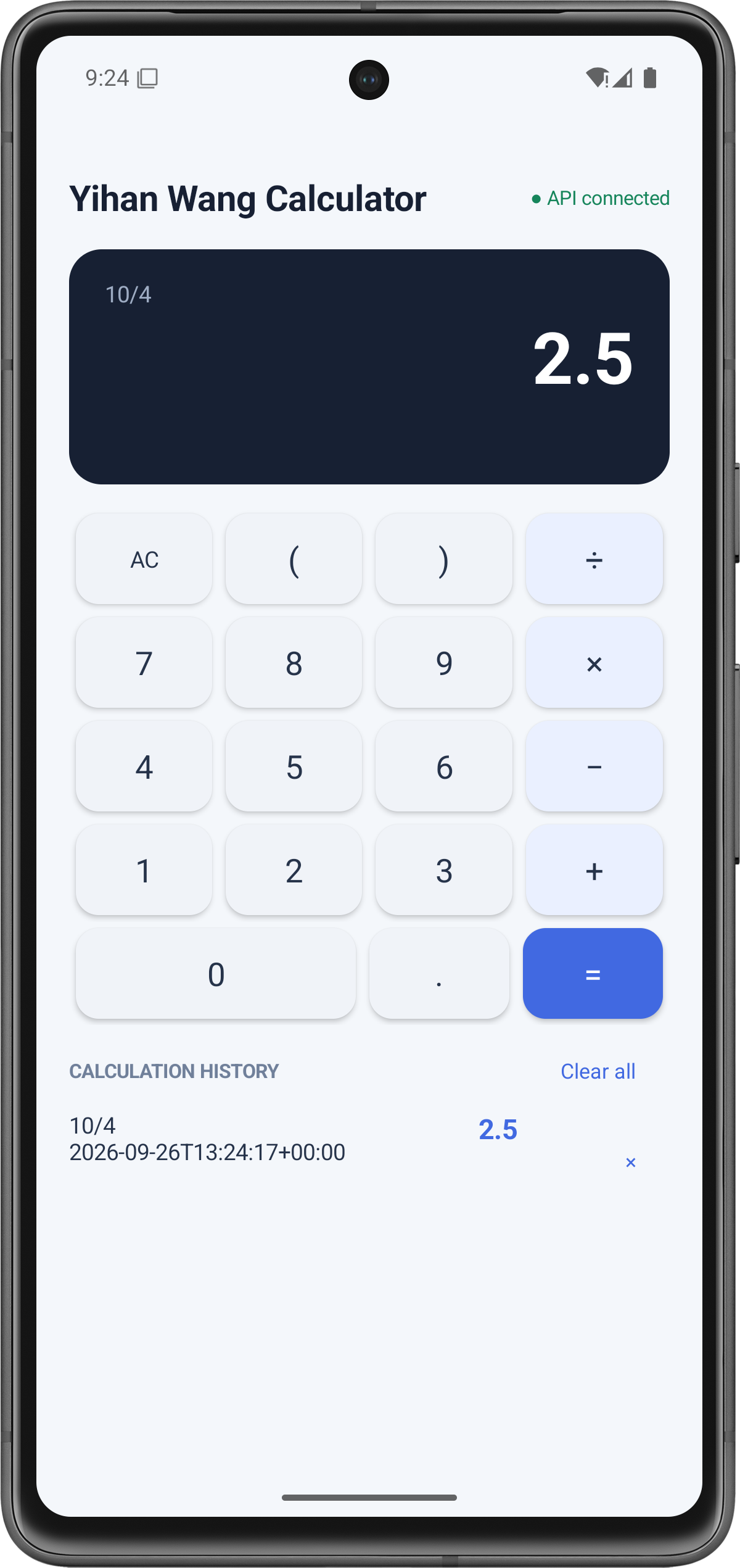
Description:
The expression 10/4 returns 2.5, demonstrating decimal calculation and floating-point result handling.
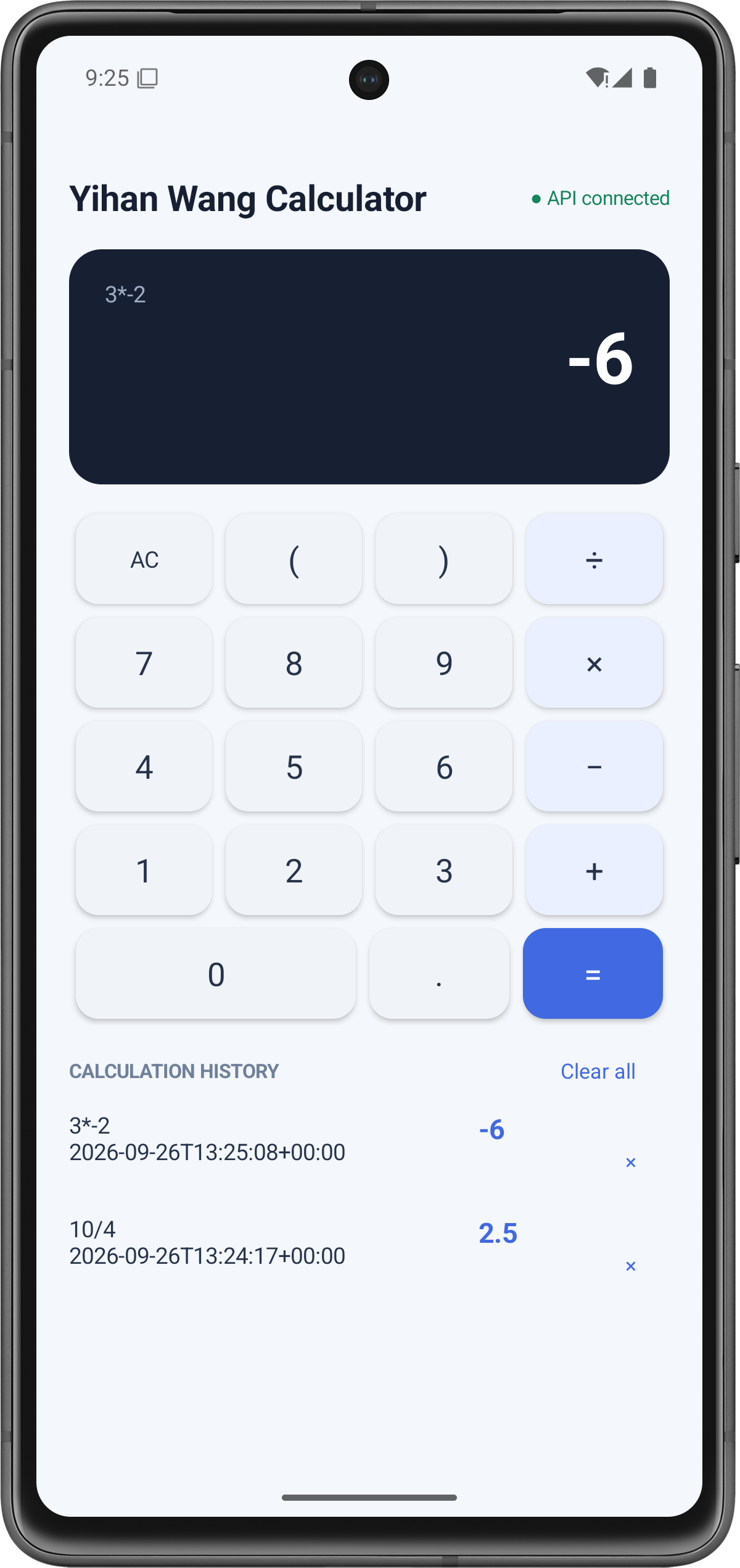
Description:
The expression 3*-2 returns -6, demonstrating support for unary negative numbers after a multiplication operator.
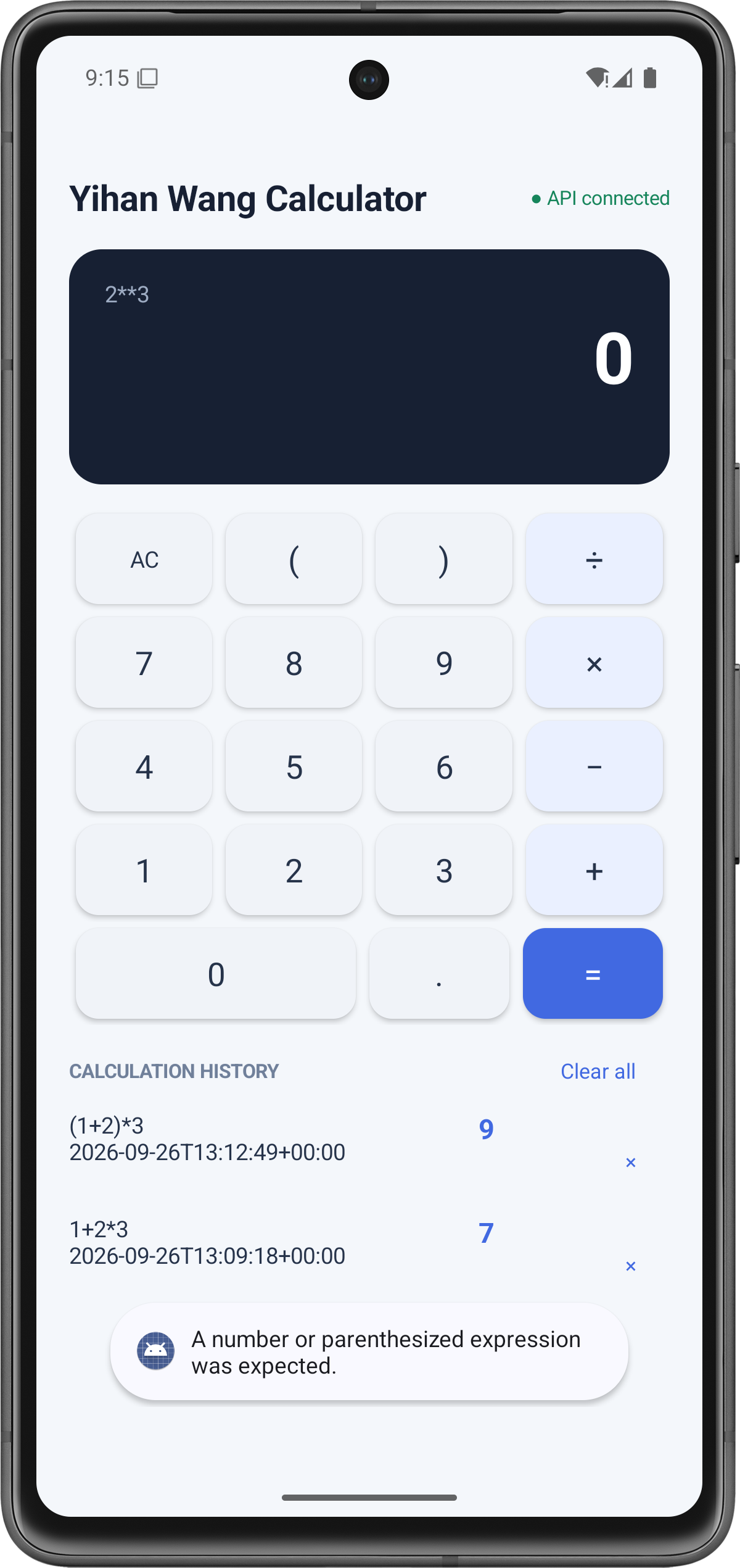
Description:
The expression 2**3 is rejected by the backend. The Android client displays the English error message and does not add the invalid expression to calculation history.
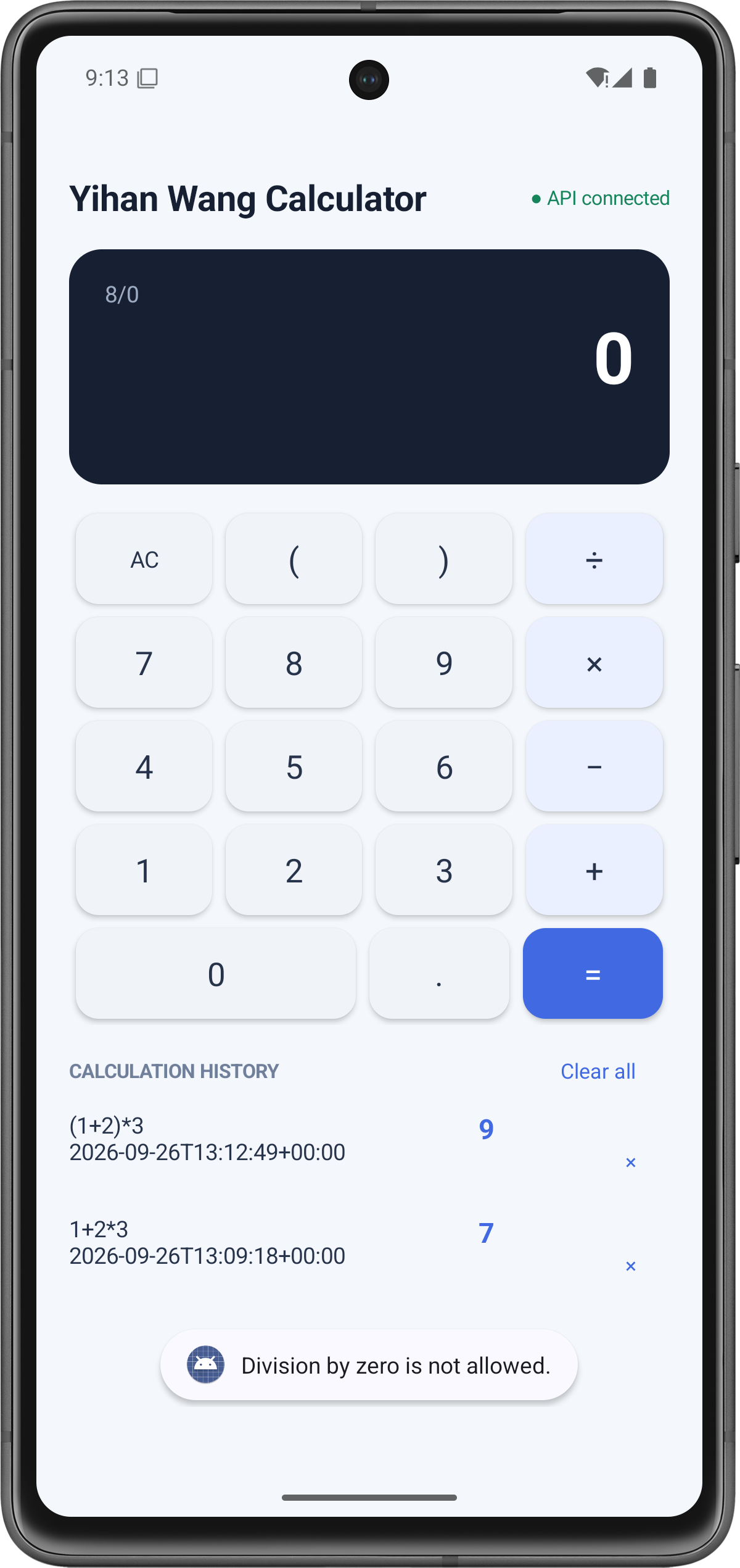
Description:
The expression 8/0 is rejected by the backend. The application displays Division by zero is not allowed. No failed calculation is stored in the database.
Description:
After restarting the Android application, previously stored records remain visible. This proves that history is retrieved from the backend SQLite database instead of temporary frontend memory.
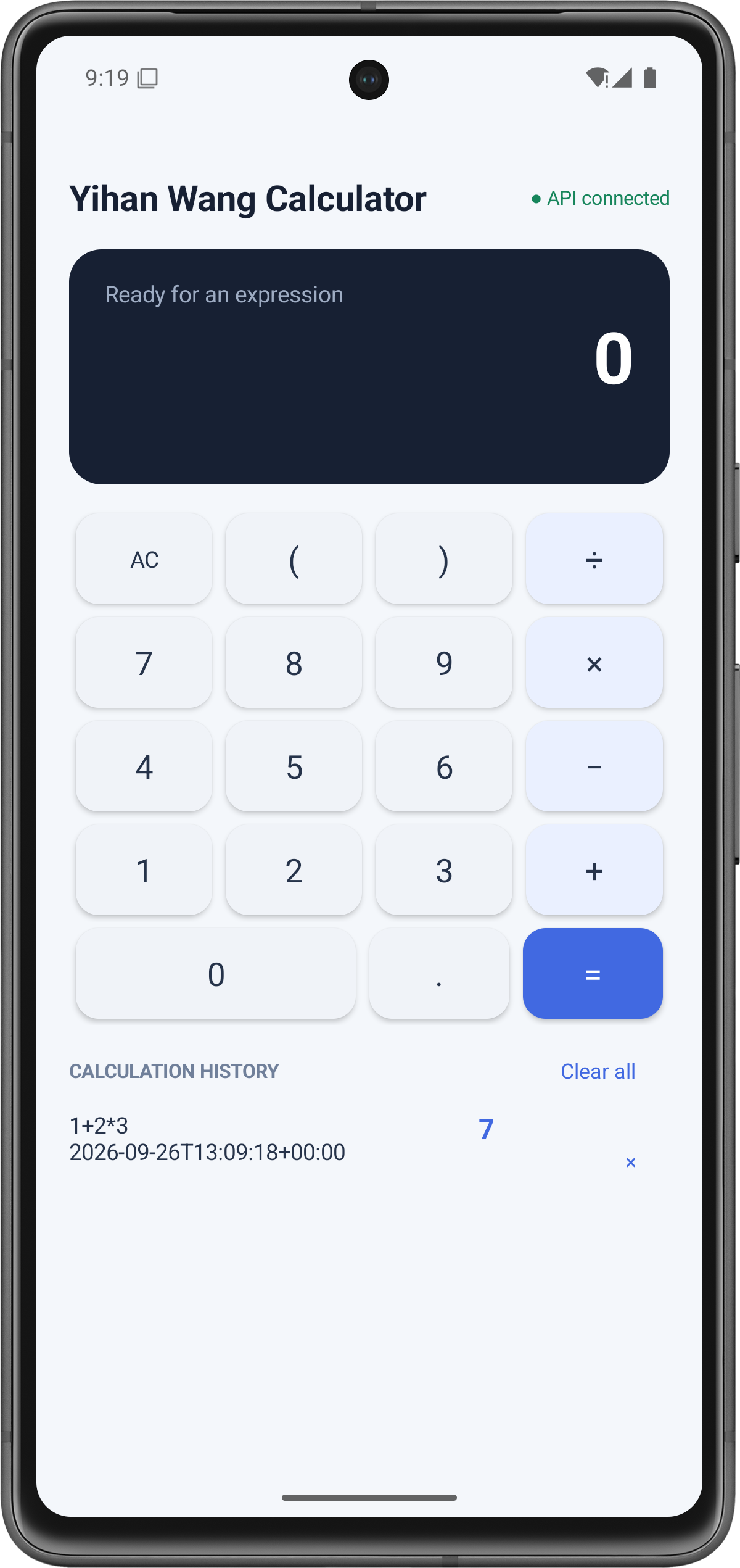
Description:
The selected history record has been deleted. The remaining record is still displayed. The Android client reloads history from the backend after the deletion request.
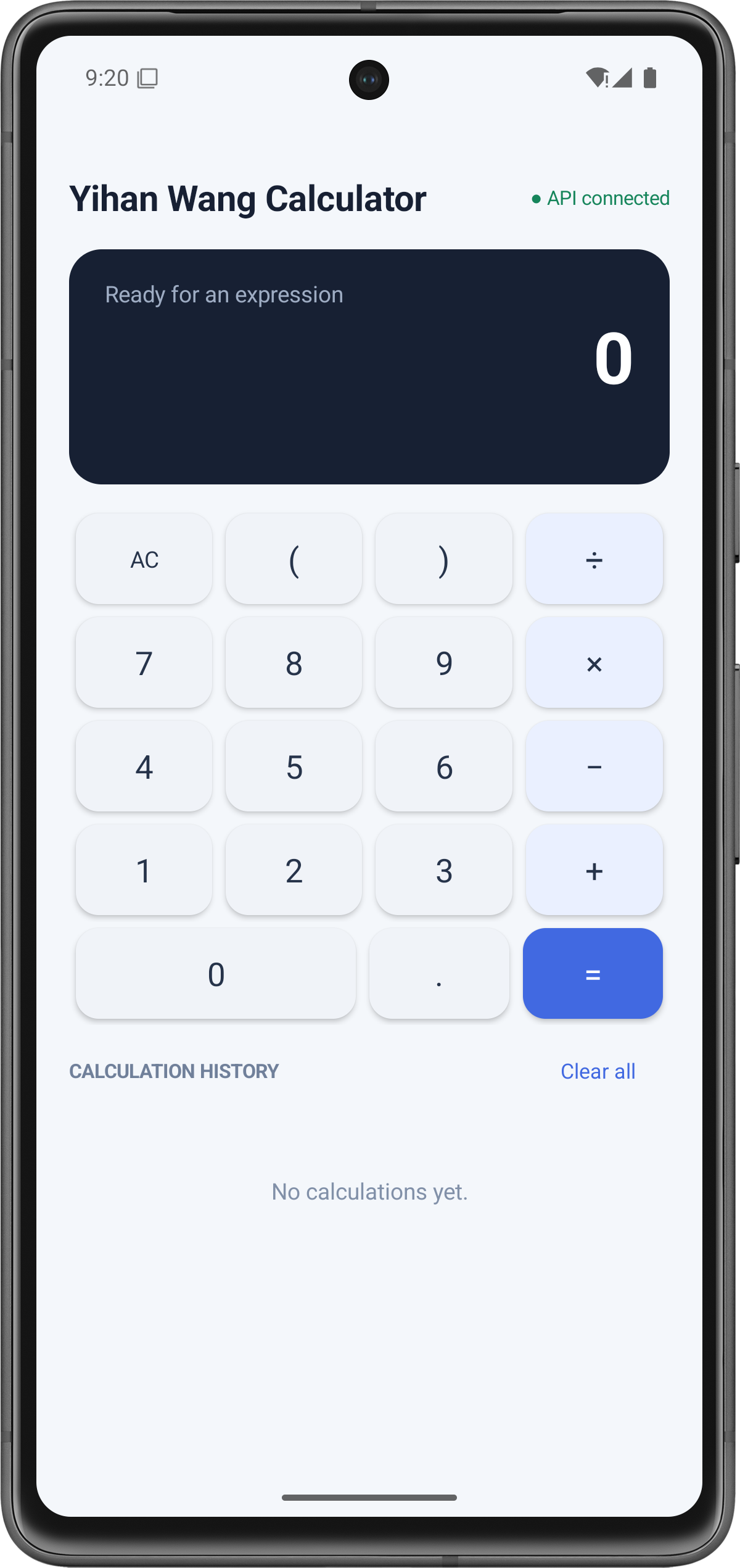
Description:
After selecting Clear all, the history list becomes empty and displays No calculations yet.
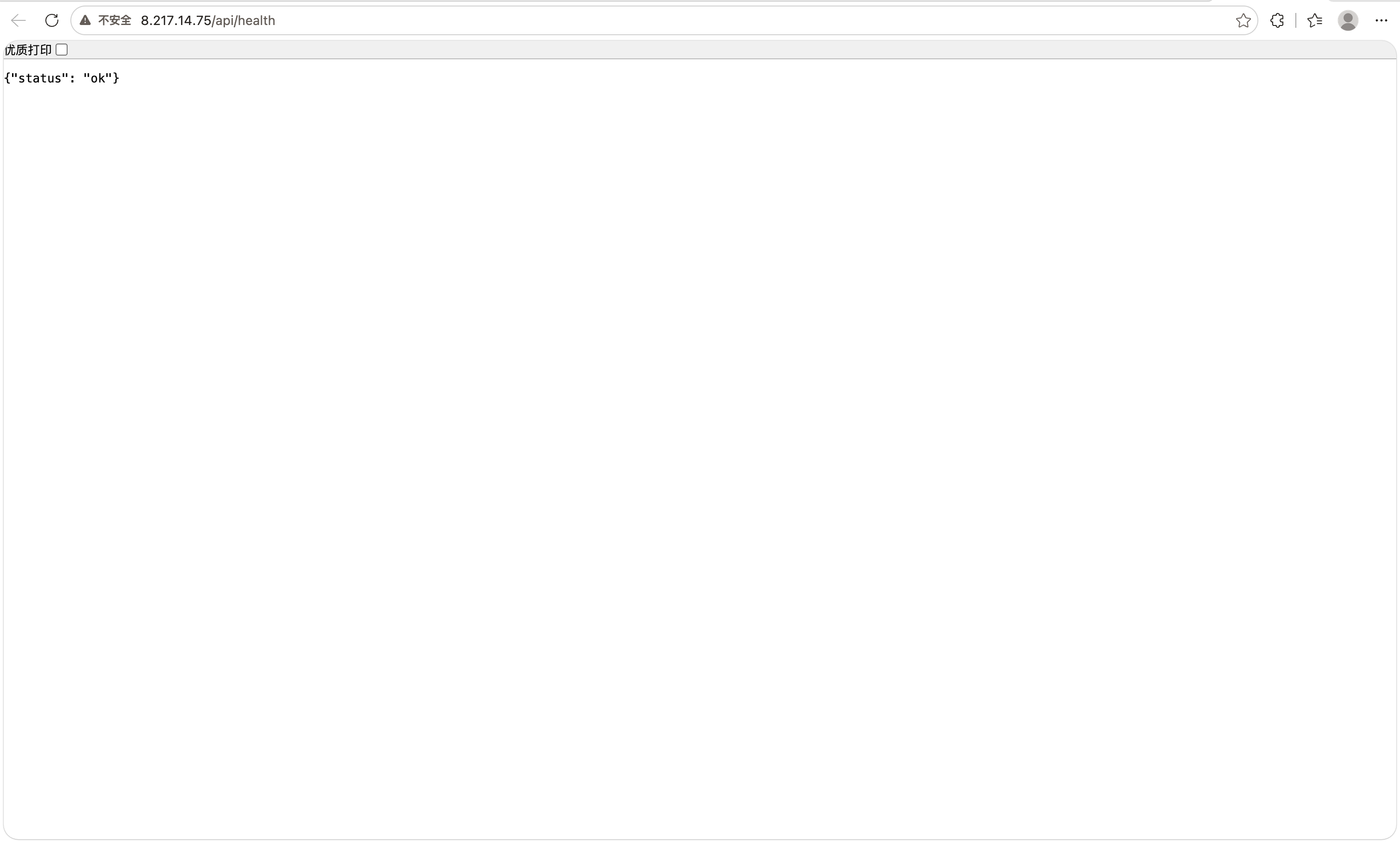
Description:
The browser accesses:
http://8.217.14.75/api/health
The backend returns:
{"status":"ok"}
This proves that the deployed API is publicly accessible.
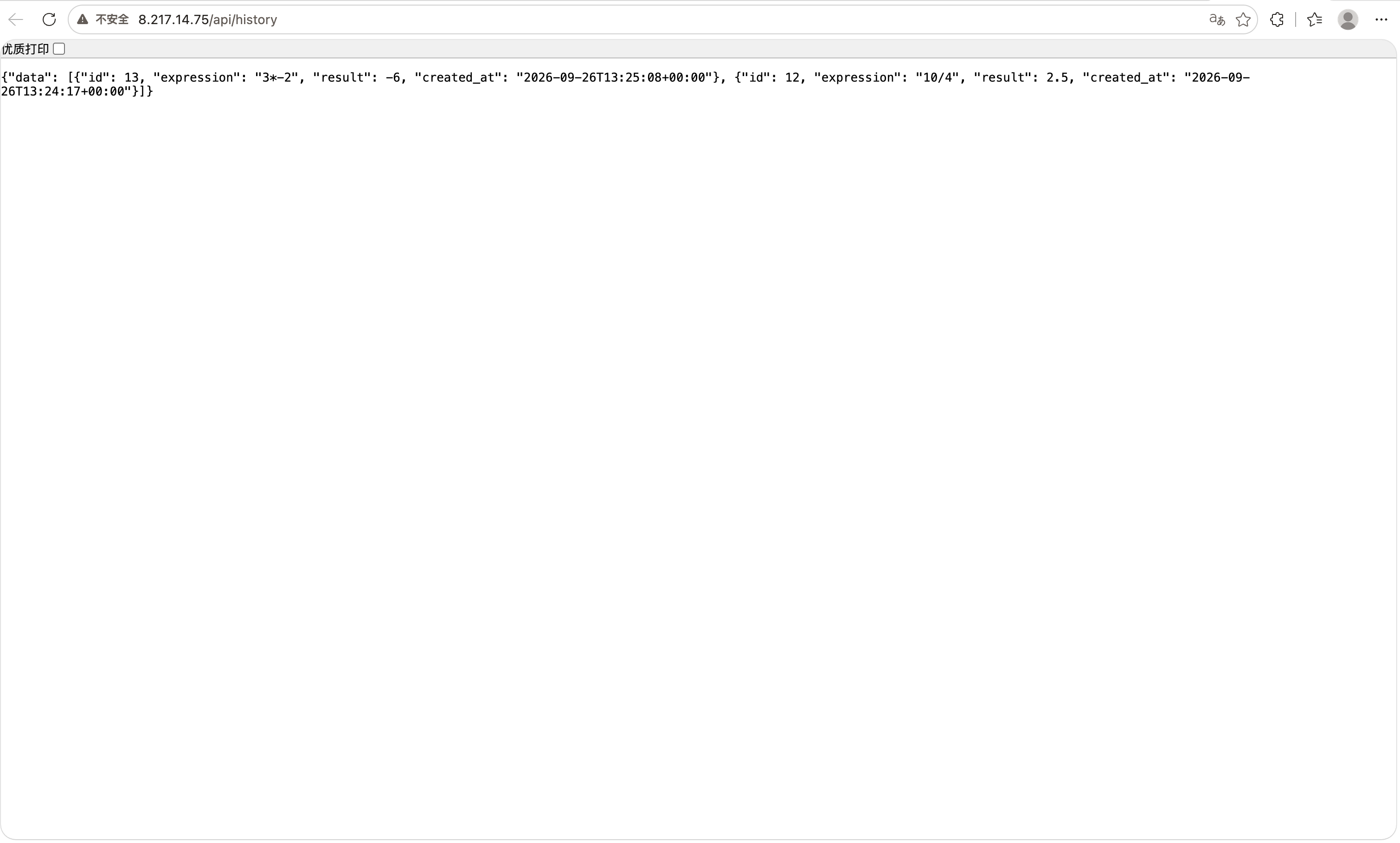
Description:
The browser accesses:
http://8.217.14.75/api/history
The response contains expressions, results, record IDs, and UTC timestamps stored in the backend database.
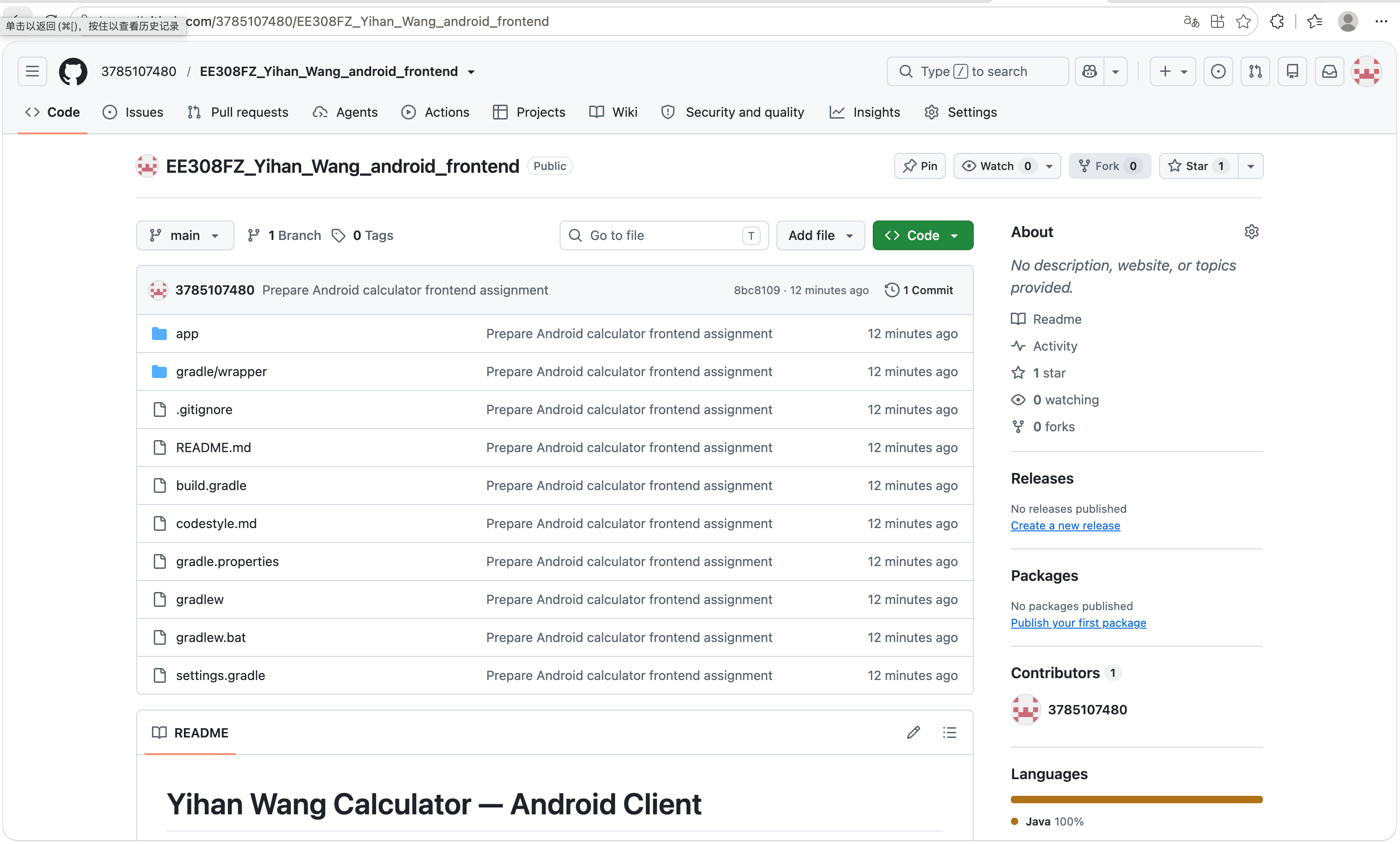
Description:
The Android repository contains the Gradle project, Android source code, README, and codestyle.md.
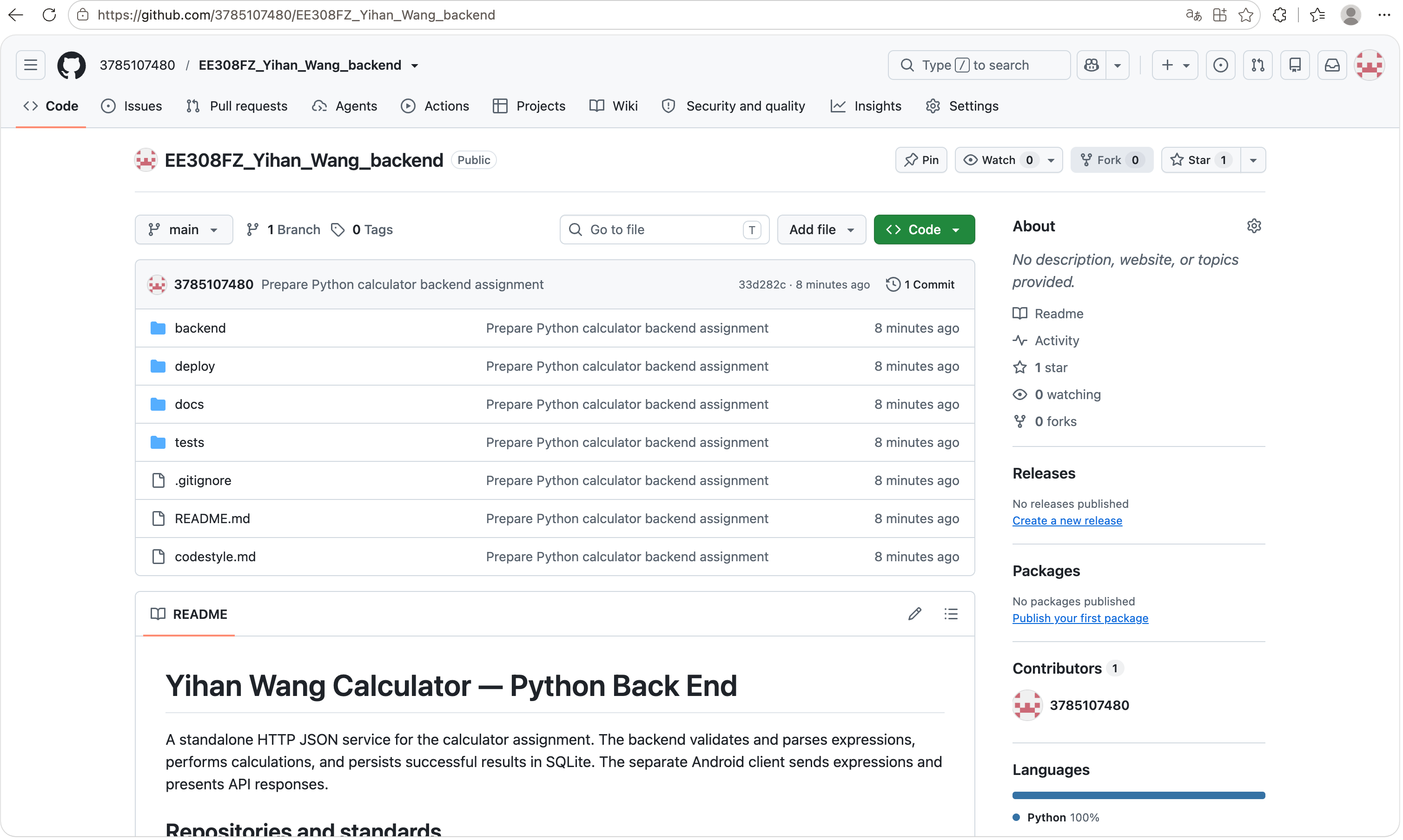
Description:
The backend repository contains the Python service, deployment configuration, tests, documentation, README, and codestyle.md.
Clear All History
In addition to deleting an individual calculation history record, the application provides a Clear all function. When the user selects Clear all, the Android client sends a DELETE /api/history request. The backend deletes all records from the SQLite calculations table and returns a confirmation response. The Android client then requests the latest history through GET /api/history. Figure 14 shows that the history list becomes empty and displays “No calculations yet”.
Backend Connection Status
When the Android activity starts, the client sends a request to GET /api/health. If the backend returns HTTP 200 with {"status":"ok"}, the application displays “API connected”. If the request fails, the application displays “API offline”. This is a startup connectivity check rather than a continuous background monitoring system.
Public backend deployment and APK distribution are described in the deployment and installation sections. They support project evaluation and installation rather than being separate calculator algorithms.
The system was divided into frontend responsibilities and backend responsibilities.
The Android frontend is responsible for:
The Android frontend does not perform the core calculation.
For example, the Android client converts the display symbols:
× -> *
÷ -> /
− -> -
This is only input normalization. The Android client does not evaluate the expression.
The Python backend is responsible for:
The system contains three main layers:
+-----------------------------------------------------------+
| Android Client                                            |
|                                                           |
| Calculator UI | Result Display | History Display          |
| HttpURLConnection | JSON request and response handling    |
+-----------------------------------------------------------+
                            |
                            | HTTP / JSON
                            v
+-----------------------------------------------------------+
| Python Backend                                            |
|                                                           |
| http.server request handlers                              |
| Recursive-descent expression Parser                       |
| Validation and error handling                             |
+-----------------------------------------------------------+
                            |
                            | SQL statements
                            v
+-----------------------------------------------------------+
| SQLite Database                                           |
|                                                           |
| calculations table                                        |
| expression | result | created_at                          |
+-----------------------------------------------------------+
The backend is deployed on an Ubuntu 22.04 server.
Nginx provides the public /api/ path and forwards requests to the Python service running on 127.0.0.1:8000.
The Android application uses:
http://8.217.14.75/api
as the configured backend base URL.
Calculator System
|
|-- Calculator Module
|   |-- Addition
|   |-- Subtraction
|   |-- Multiplication
|   |-- Division
|   |-- Compound Expressions
|   |-- Parentheses
|   |-- Decimal Numbers
|   |-- Unary Plus and Minus
|   |-- Invalid Expression Handling
|   |-- Division by Zero Handling
|
|-- Calculation History Module
|   |-- Save Successful Calculation
|   |-- Query History
|   |-- Delete One Record
|   |-- Clear All Records
|   |-- Persist Data in SQLite
|
|-- Android Front End
|   |-- Calculator Button Input
|   |-- Result Display
|   |-- Error Toast Display
|   |-- History Display
|   |-- Backend Connection Status
|
|-- Python Back End
    |-- HTTP API
    |-- JSON Request Parsing
    |-- Recursive-Descent Parser
    |-- Calculation Logic
    |-- SQLite Operations
The backend API uses JSON over HTTP.
The public base URL is:
http://8.217.14.75/api
| Method | Endpoint | Purpose | Success Response | Error Response |
|---|---|---|---|---|
| GET | /api/health | Check service availability | {"status":"ok"} | - |
| POST | /api/calculate | Calculate and save an expression | HTTP 201 with data | HTTP 400 with error |
| GET | /api/history | Read history records | HTTP 200 with data | - |
| DELETE | /api/history/{id} | Delete one record | HTTP 200 with message | HTTP 404 if missing |
| DELETE | /api/history | Clear all records | HTTP 200 with message | Not applicable |
POST /api/calculate
Content-Type: application/json
Request body:
{
  "expression": "1+2*3"
}
Successful response:
{
  "data": {
    "id": 1,
    "expression": "1+2*3",
    "result": 7,
    "created_at": "2026-09-26T13:09:18+00:00"
  }
}
For division by zero:
{
  "error": "Division by zero is not allowed."
}
For an invalid expression:
{
  "error": "A number or parenthesized expression was expected."
}
{
  "data": [
    {
      "id": 1,
      "expression": "1+2*3",
      "result": 7,
      "created_at": "2026-09-26T13:09:18+00:00"
    }
  ]
}
If there is no history:
{
  "data": []
}
The client checks the HTTP status code and interprets the JSON response according to the endpoint. Calculation responses contain a data object, history responses contain a data array, deletion responses contain a message, and the health endpoint returns a status field. Handled application-level API errors contain an error field. Network failures and errors generated by the reverse proxy may not use this JSON format.
An empty history list is a successful result rather than an error. Therefore, GET /api/history returns HTTP 200 with {"data":[]} when no records exist.
SQLite is used as the backend database.
The SQLite database is created automatically when the Python server starts. The database file is created beside the running server.py file.
During local development, the database path is:
backend/calculator.db
In the documented Ubuntu deployment, the server file is copied to:
/opt/orbit-calculator/server.py
Therefore, the deployed database path is:
/opt/orbit-calculator/calculator.db
The database path is determined by the location of the running server file. The table is initialized automatically at startup, so no manual database import is required.
The table is created automatically with the following schema:
CREATE TABLE IF NOT EXISTS calculations (
    id INTEGER PRIMARY KEY AUTOINCREMENT,
    expression TEXT NOT NULL,
    result REAL NOT NULL,
    created_at TEXT NOT NULL
);
| Field | Type | Description |
|---|---|---|
id | INTEGER | Auto-increment primary key |
expression | TEXT | Original calculation expression |
result | REAL | Backend-generated calculation result |
created_at | TEXT | UTC ISO 8601 calculation time |
Only successful calculations are stored.
Invalid expressions and division-by-zero requests return an error before the database insertion step. Therefore, failed requests do not create history records.
The database is the source of truth for calculation history. The Android application does not use local storage as the primary history store.
The Android client uses HttpURLConnection for HTTP communication and org.json for JSON request and response processing.
The following method shows the calculation request flow, reformatted for readability. It depends on the request helpers and UI components defined in MainActivity.java.
private void calculate() {
if (expression.length() == 0) {
return;
}
resultView.setText("…");
try {
JSONObject payload = new JSONObject();
payload.put("expression", expression.toString());
postJson(
"/calculate",
payload,
response -> {
try {
JSONObject data =
response.getJSONObject("data");
resultView.setText(
String.valueOf(data.get("result"))
);
expressionView.setText(
data.getString("expression")
);
loadHistory();
} catch (Exception error) {
showError(error.getMessage());
}
},
this::showError
);
} catch (Exception error) {
showError(error.getMessage());
}
}
The client sends only the expression field. For example, it sends {"expression":"1+2*3"} rather than sending a pre-calculated result.
The backend validates and evaluates the expression, stores the successful calculation, and returns the record. Android reads data.result, displays the returned value, and requests the latest history.
The request helper runs network operations on a background executor. This prevents a slow network request from blocking calculator button interaction or other UI operations.
The complete request method configures a 5,000-millisecond connection timeout and a 5,000-millisecond read timeout. It writes the request body as JSON, checks the HTTP status code, and reads either the normal response stream or the error stream.
For handled API failures, the client reads the error field and displays its message. Network failures are also passed to the error callback. Callbacks that update the interface are dispatched to the Android main thread.
When a calculation fails while the result display shows the loading indicator, the display resets to 0. This is a UI reset value, not a successful calculation result.
The Android client does not evaluate mathematical expressions locally. Converting × to *, ÷ to /, and − to - is input normalization only.
The backend is implemented in backend/server.py. It uses Python standard-library modules, including http.server, sqlite3, json, math, re, and datetime.
ThreadingHTTPServer accepts HTTP requests, and APIHandler implements the endpoint handlers. The following calculation handler has been reformatted for readability. Imports, constants, the Parser class, and the json_response helper are defined elsewhere in the same file.
def do_POST(self):
if urlparse(self.path).path != "/api/calculate":
json_response(
self,
404,
{"error": "Endpoint not found."},
)
return
try:
length = int(self.headers.get("Content-Length", 0))
if length > MAX_REQUEST_BYTES:
raise ExpressionError("Request body is too large.")
data = json.loads(self.rfile.read(length))
if not isinstance(data, dict):
raise ExpressionError(
"Request body must be a JSON object."
)
expression = data.get("expression")
result = format_result(Parser(expression).parse())
timestamp = datetime.now(timezone.utc).isoformat(
timespec="seconds"
)
with sqlite3.connect(DB_PATH) as db:
record_id = db.execute(
"""
INSERT INTO calculations
(expression, result, created_at)
VALUES (?, ?, ?)
""",
(expression.strip(), result, timestamp),
).lastrowid
json_response(
self,
201,
{
"data": {
"id": record_id,
"expression": expression.strip(),
"result": result,
"created_at": timestamp,
}
},
)
except (
ValueError,
TypeError,
json.JSONDecodeError,
sqlite3.Error,
) as error:
json_response(
self,
400,
{"error": str(error) or "Invalid request."},
)
The handler first verifies the endpoint. It then reads the declared request-body length and rejects a body larger than MAX_REQUEST_BYTES, which is set to 4,096 bytes.
The request must contain a JSON object. The expression field is passed to Parser, which checks its type, length, characters, and mathematical syntax.
Calculation occurs before database insertion. Therefore, an invalid expression or division-by-zero error prevents the INSERT operation from being reached.
A successful request returns HTTP 201 with a data object containing the record ID, expression, result, and UTC timestamp. The calculation handler returns HTTP 400 with an error field for the exceptions handled by its error branch.
The INSERT statement uses placeholders and a separate parameter tuple. User-provided expression text is stored as data rather than concatenated into executable SQL.
The backend implements a custom recursive-descent parser. No third-party expression-evaluation library is required.
User expressions are not passed to eval, exec, shell commands, or another general-purpose code execution mechanism.
The parser uses the following grammar:
expression -> term (("+" | "-") term)*
term -> factor (("*" | "/") factor)*
factor -> number
| "(" expression ")"
| "+" factor
| "-" factor
The expression level processes addition and subtraction. The term level processes multiplication and division. The factor level processes numbers, parentheses, and unary signs.
Because expression calls term, multiplication and division are evaluated before addition and subtraction. Operators at the same level are processed from left to right.
The following excerpt shows the main parsing methods. Tokenization, peek, and take are omitted; their complete implementations are available in backend/server.py.
def parse(self):
result = self.expression()
if self.index != len(self.tokens):
raise ExpressionError(
"Unexpected token in expression."
)
if not math.isfinite(result):
raise ExpressionError(
"Result is outside the supported numeric range."
)
return result
def expression(self):
result = self.term()
while self.peek("+") or self.peek("-"):
operator = self.take()[1]
right = self.term()
if operator == "+":
result += right
else:
result -= right
return result
def term(self):
result = self.factor()
while self.peek("*") or self.peek("/"):
operator = self.take()[1]
right = self.factor()
if operator == "/":
if right == 0:
raise ExpressionError(
"Division by zero is not allowed."
)
result /= right
else:
result *= right
return result
def factor(self):
if self.peek("+"):
self.take("+")
return self.factor()
if self.peek("-"):
self.take("-")
return -self.factor()
if self.peek("("):
self.take("(")
result = self.expression()
self.take(")")
return result
if (
self.index < len(self.tokens)
and self.tokens[self.index][0] == "number"
):
return float(self.take()[1])
raise ExpressionError(
"A number or parenthesized expression was expected."
)
For 1+2*3, the term method evaluates 2*3 before expression performs the addition, producing 7.
For (1+2)*3, factor recursively processes the expression inside the parentheses. The parenthesized result is then multiplied by 3, producing 9.
Unary signs are handled recursively in factor. This supports expressions such as +5, -5+8, and 3*-2.
The tokenizer accepts decimal numbers, parentheses, and the operators +, -, *, and /. Whitespace is allowed between tokens. Unsupported characters are rejected, and invalid token sequences such as 2**3 fail during parsing.
Expressions must be non-empty strings no longer than 200 characters. The parser checks that all tokens have been consumed and that the final result is finite.
The backend uses floating-point arithmetic. The format_result helper returns suitable whole-number results as integers and otherwise rounds results to 12 decimal places. This is a general-purpose assignment calculator, not an arbitrary-precision financial calculation system.
SQLite stores successful calculations on the backend. The calculations table contains a record ID, expression, result, and creation time.
Database initialization is performed at server startup:
def init_db():
with sqlite3.connect(DB_PATH) as db:
db.execute(
"""
CREATE TABLE IF NOT EXISTS calculations (
id INTEGER PRIMARY KEY AUTOINCREMENT,
expression TEXT NOT NULL,
result REAL NOT NULL,
created_at TEXT NOT NULL
)
"""
)
CREATE TABLE IF NOT EXISTS allows the server to initialize a new database without deleting records from an existing database.
The database file is created beside server.py. Its local development path is backend/calculator.db. In the documented Ubuntu deployment, its path is /opt/orbit-calculator/calculator.db.
The history endpoint reads records from SQLite:
with sqlite3.connect(DB_PATH) as db:
db.row_factory = sqlite3.Row
rows = db.execute(
"""
SELECT id, expression, result, created_at
FROM calculations
ORDER BY id DESC
"""
).fetchall()
Records are returned in descending ID order so that newer calculations appear first. The backend converts the rows into JSON objects and returns them in a data array.
If the table is empty, the endpoint returns HTTP 200 with {"data":[]}. An empty history list is a successful response, not an error.
Single-record deletion uses the record ID:
with sqlite3.connect(DB_PATH) as db:
cursor = db.execute(
"DELETE FROM calculations WHERE id = ?",
(record_id,),
)
The placeholder keeps the ID separate from SQL syntax. The handler checks cursor.rowcount to determine whether a record was deleted. It returns HTTP 200 when deletion succeeds and HTTP 404 when the specified record does not exist.
Clearing all history uses:
with sqlite3.connect(DB_PATH) as db:
db.execute("DELETE FROM calculations")
Successful database transactions are committed when their connection context exits normally.
After a successful deletion or clear-all request, Android calls GET /api/history again. It renders the returned list instead of treating a locally modified list as the authoritative database state.
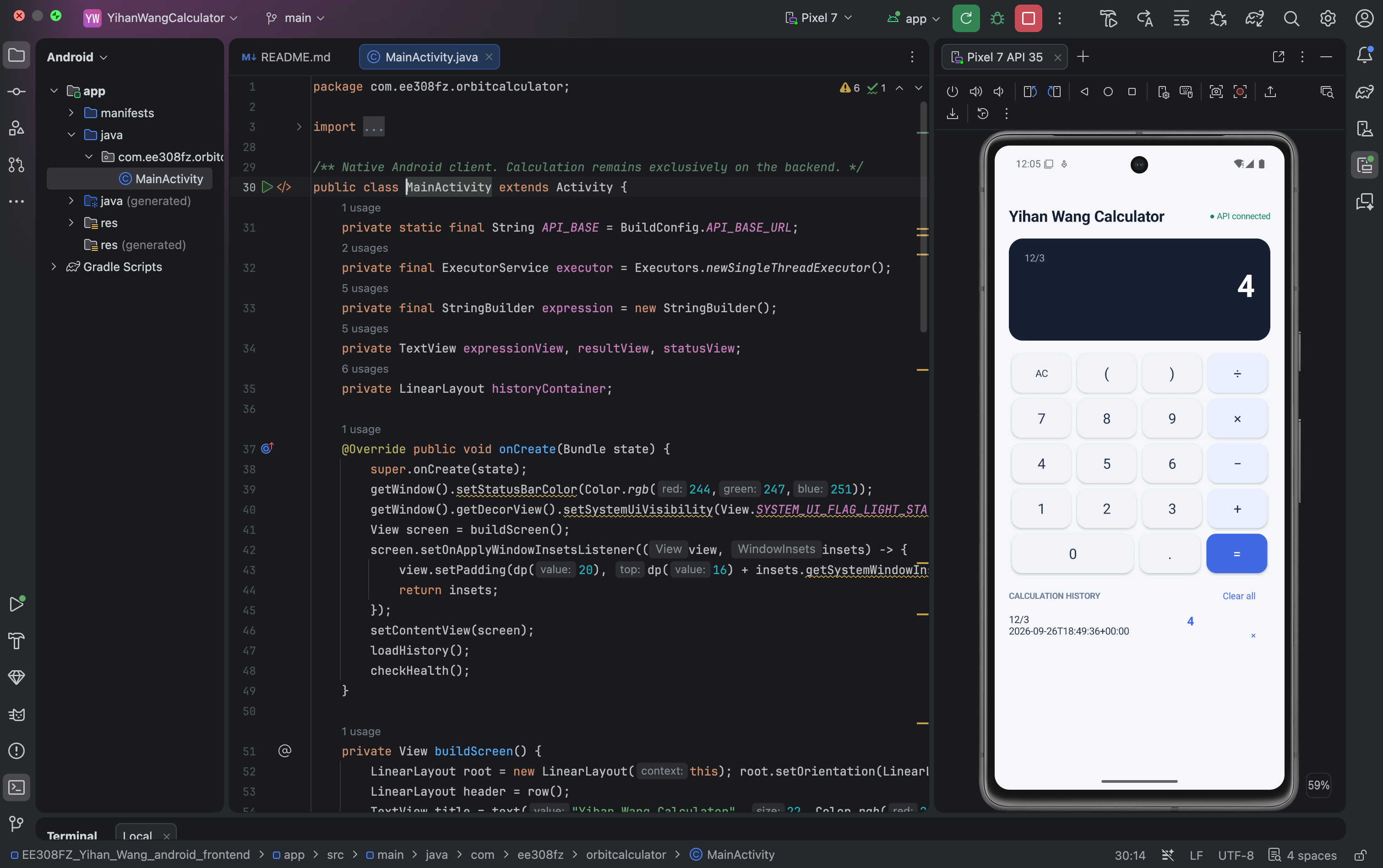
Clone or download the Android frontend repository:
https://github.com/3785107480/EE308FZ_Yihan_Wang_android_frontend
Open Android Studio and select Open. Choose the repository root containing settings.gradle rather than selecting only the app directory.
Allow Gradle synchronization to complete and install Android SDK Platform 35 if requested. Initial dependency downloads require internet access.
Open Device Manager and create an emulator, such as Pixel 7 with Android API 35. On an Apple Silicon Mac, select an ARM64 system image.
Start the emulator, select the app run configuration, choose the running emulator, and click Run. After the application opens, confirm that the startup status displays “API connected”.
The backend URL is configured through the backendUrl property in the frontend repository’s root gradle.properties file:
backendUrl=http://8.217.14.75/api
The Android Gradle configuration reads this property and generates BuildConfig.API_BASE_URL. MainActivity reads the generated value instead of defining the server address directly in Java source code.
The base URL should end with /api without a trailing slash.
After changing backendUrl, rebuild and reinstall the application. The URL is included in the application during compilation; editing gradle.properties does not update an already installed APK.
Open the Android Studio Terminal at the frontend repository root.
On macOS or Linux, run:
./gradlew assembleDebug
In Windows PowerShell, run:
.\gradlew.bat assembleDebug
After a successful build, the APK is generated at:
adb install -r app/build/outputs/apk/debug/app-debug.apk
To install it on an emulator, drag the APK onto the running emulator. Alternatively, with Android platform tools available and a device connected, run:
adb install -r app/build/outputs/apk/debug/app-debug.apk
A debug APK is also available from the release page:
https://github.com/3785107480/EE308FZ_Yihan_Wang_android_frontend/releases/tag/v1.0.0
Open the release’s Assets section and download the APK file rather than the source-code archive.
For a physical Android device, transfer or download the APK and open it. If Android requests installation permission, allow installation from the browser or file manager used to open the file. The exact setting name depends on the Android version.
The application requires Android 6.0, API 23, or later. The debug APK is intended for assignment demonstration and evaluation.
The public configuration uses:
The device therefore needs network access to the public backend. After installation, open the application and check the startup connection status.
If the application displays “API offline”, open the health endpoint in a browser:
The expected response is:
{"status":"ok"}
The connection indicator is checked when the activity starts. It is not a continuously refreshed service monitor.
Clone the backend repository separately:
https://github.com/3785107480/EE308FZ_Yihan_Wang_backend
Use Python 3.10 or later, as documented in the backend README. The service uses the Python standard library and does not require a separate database server.
From the backend repository root, run:
python3 backend/server.py --host 127.0.0.1 --port 8000
The server initializes its SQLite database automatically. Check the local service at:
http://127.0.0.1:8000/api/health
When testing with an Android Emulator, set the following property in the frontend repository’s root gradle.properties file:
backendUrl=http://10.0.2.2:8000/api
The Android Emulator uses 10.0.2.2 to access the host computer’s local service. Rebuild and reinstall the Android application after changing this value.
For a physical Android device on the same local network, start the backend with:
python3 backend/server.py --host 0.0.0.0 --port 8000
Find the computer’s LAN IP address and use it in backendUrl. For example, if the computer’s actual address is 192.168.1.100, configure:
backendUrl=http://192.168.1.100:8000/api
This address is an example and must be replaced with the computer’s real address. The computer’s firewall must allow the device to reach TCP port 8000.
Rebuild and reinstall the application after changing the address. Do not configure a physical phone to use localhost for a backend running on another computer, because localhost on the phone refers to the phone itself.
Before producing the public evaluation APK again, restore the public backendUrl value and rebuild.
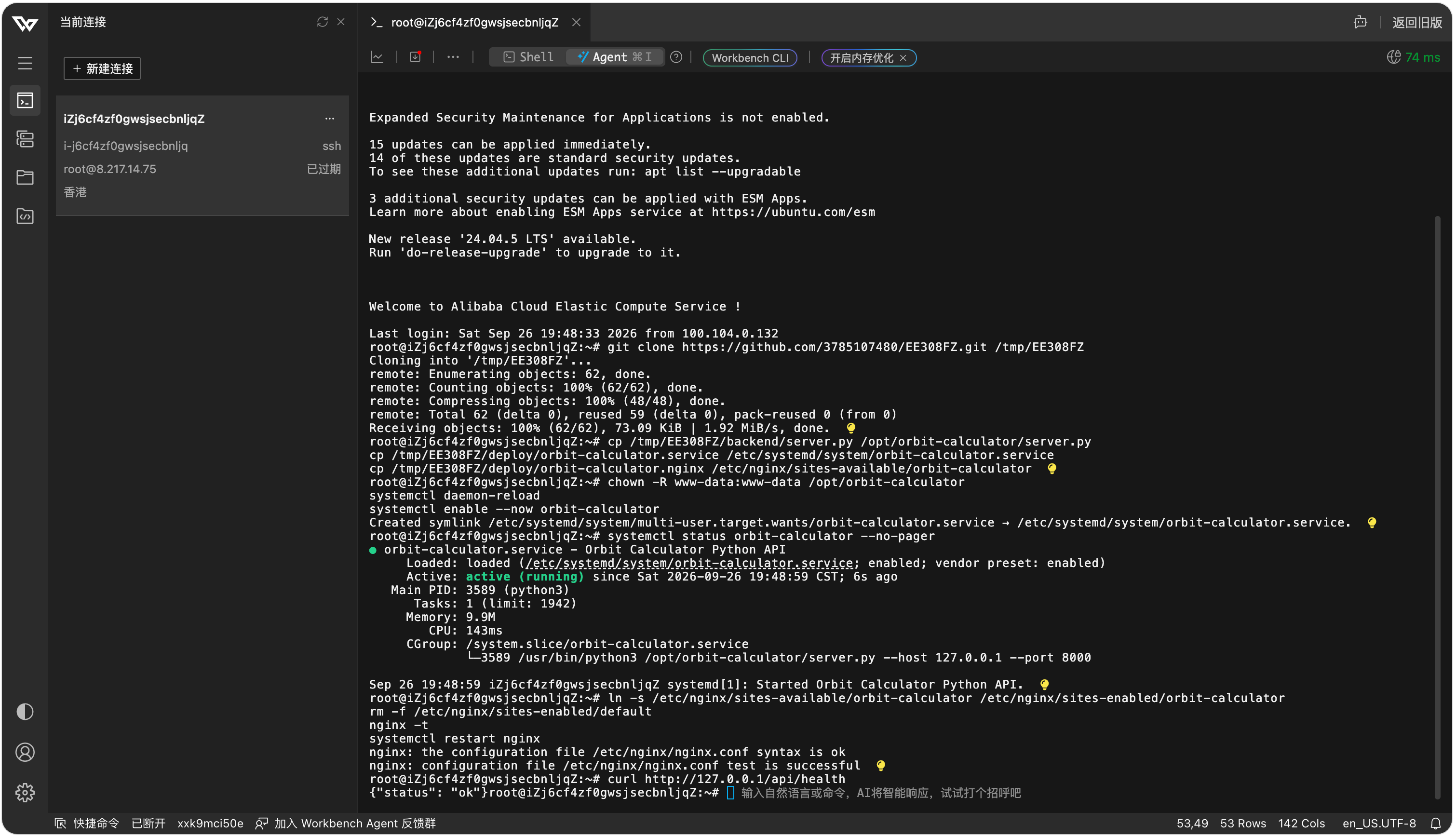
The backend is deployed on an Ubuntu 22.04 server using Python, SQLite, Nginx, and systemd.
The deployment keeps the Python service bound to 127.0.0.1:8000. Nginx accepts public HTTP requests on port 80 and forwards requests under /api/ to the Python service.
The request flow is:
Android application → Public server port 80 → Nginx reverse proxy → Python API on 127.0.0.1:8000 → SQLite database
The deployment files are provided in the backend repository’s deploy directory.
The server script is placed at:
/opt/orbit-calculator/server.py
The corresponding SQLite database is created at:
/opt/orbit-calculator/calculator.db
The systemd configuration is installed as:
/etc/systemd/system/orbit-calculator.service
The Nginx configuration is installed as:
/etc/nginx/sites-available/orbit-calculator
The internal service and directory names retain “orbit-calculator” for compatibility with the existing deployment. The visible application name is Yihan Wang Calculator.
The service account must have permission to write to the database directory. When updating the server, the existing calculator.db file must be preserved if its history is to be retained.
The systemd service starts the backend automatically and is configured to restart it after failure. Nginx provides the public entry point, and the cloud security group must allow inbound TCP port 80.
The deployment can be checked using the public health endpoint:
The expected response is:
{"status":"ok"}
History can be inspected through:
http://8.217.14.75/api/history
The current demonstration uses HTTP and shared history without user accounts. Evaluators accessing the same backend see the same history, so deletion and clear-all operations affect that shared dataset.
The backend must remain accessible throughout the assignment evaluation period. A successful health check confirms availability at the time of the request; it does not guarantee future availability.
The project uses parser unit tests, HTTP integration tests, and manual Android testing. These verify different aspects of the system and should not be treated as interchangeable evidence.
To run the backend test suite, open a terminal at the backend repository root and execute:
python3 -m unittest discover -s tests -v
Parser tests directly evaluate expressions and check parsing exceptions. HTTP integration tests start a local test server and use a temporary SQLite database to check responses and persistence without modifying the public deployment database.
During the available verification run, the parser tests passed. The HTTP integration tests could not complete because the restricted execution environment denied local socket binding. This is an execution-environment limitation, but it means that the full HTTP suite cannot be reported as passed on the basis of that run.
The Android screenshots and public API responses provide separate manual evidence of the demonstrated behavior.
The parser unit tests include the following expressions and expected results:
|
Expression |
Expected Result |
|
12+8 |
20 |
|
8-3*2 |
2 |
|
1+2*3 |
7 |
|
(1+2)*3 |
9 |
|
10/2+7 |
12 |
|
-5+8 |
3 |
|
+5 |
5 |
|
3*-2 |
-6 |
|
10/4 |
2.5 |
|
.5+1.25 |
1.75 |
These tests cover arithmetic, operator precedence, parentheses, unary positive and negative signs, decimal input, and fractional results.
The corresponding parser assertions passed in the verification run.
The parser unit tests check rejection of an empty expression and the following invalid expressions:
2**3
(1+2
1+
abc
2 3
At the parser level, these inputs raise ExpressionError. A parser exception is not itself an HTTP response.
The separate HTTP integration test contains requests for 8/0, 2**3, an empty expression, and (2+3. Its assertions check HTTP 400, an error field, and an empty history list after the rejected requests.
The HTTP test cases are not identical to the complete parser test list. Their execution was blocked by the local socket restriction described above.
The Android invalid-expression screenshot separately demonstrates that 2**3 produces a visible backend error message.
The parser unit test checks:
8/(3-3)
The denominator evaluates to zero, and the parser raises ExpressionError. This test passed.
The manual Android demonstration uses:
8/0
The application displays:
Division by zero is not allowed.
The calculation handler maps this parsing exception to HTTP 400 with an error field. Since parsing fails before the INSERT statement, the calculation is not stored.
The result display resets to 0 after the failed request. This is a UI reset value and does not mean that division by zero produced a valid result.
The manual persistence check submits successful calculations, closes and reopens the Android application, and checks the history after the client reconnects.
The history-after-restart screenshot shows the previously stored records in the reopened client. Android retrieves these records through GET /api/history, and the backend reads them from SQLite.
The automated HTTP test also includes a server-restart check using the same temporary database. It stops and recreates the test server, then verifies that the original records remain available. This automated check is implemented but was not completed in the restricted verification environment.
The manual deletion demonstration begins with multiple successful calculation records. A selected record is deleted, and the updated list shows that the other record remains.
The client sends DELETE /api/history/{id}, where the ID identifies the selected database record. After a successful response, Android reloads the history from the backend.
The HTTP integration test includes assertions that the selected ID disappears from both the API response and the temporary SQLite database. It also checks that deleting the same ID again returns HTTP 404.
These automated assertions describe the implemented test coverage, not a completed HTTP test run in the restricted environment.
The manual clear-all demonstration begins with existing history. After the user selects Clear all, the application displays:
No calculations yet.
The client sends DELETE /api/history and then reloads the list using GET /api/history.
The HTTP integration test includes assertions that the returned history array is empty and the database record count is zero after clearing. The execution limitation stated at the beginning of this section also applies to these assertions.
For an additional manual persistence check, reopen the application after clearing and verify that the list remains empty, provided no other user has added records to the shared backend.
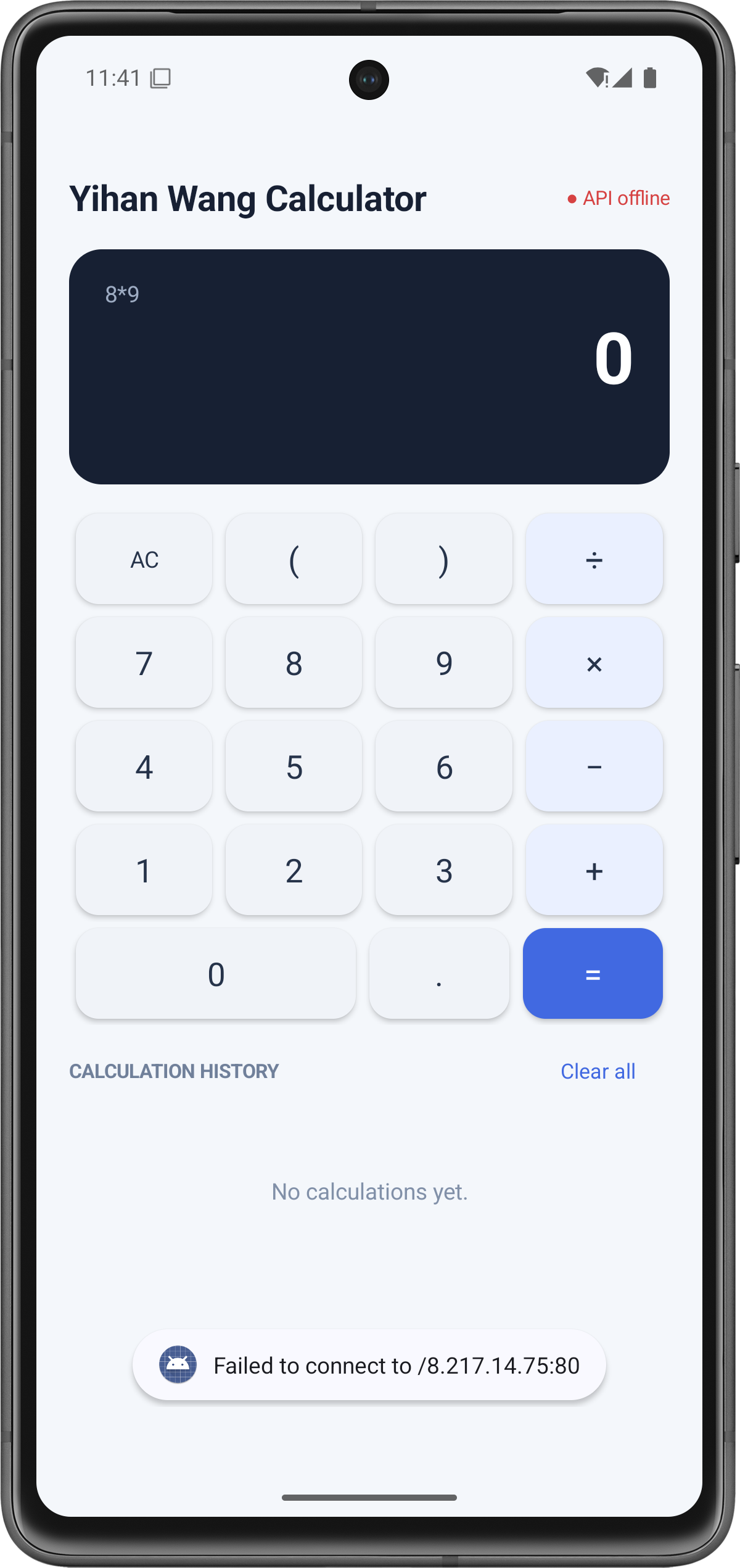
The backend service was stopped while the Android application remained open.
The Android interface could still accept button input, but submitting a new expression did not produce a valid calculation result. This is consistent with the implementation: Android sends the expression to the backend and has no local expression-evaluation fallback.
The connection label may continue to show its earlier startup status if the backend stops after the activity has opened. The relevant evidence is that a new calculation request fails, not that the label must immediately change.
After this test, the backend service must be restarted and the health endpoint checked so that evaluation can continue.
The Android build initially reported an error because buildConfigField was placed at the wrong level of the Gradle configuration.
The solution was to enable BuildConfig generation inside the android block:
buildFeatures {
buildConfig = true
}
The buildConfigField declaration was placed inside defaultConfig. This allowed the configured backend URL to be accessed through BuildConfig.API_BASE_URL.
This problem helped me understand that Gradle settings must be placed in the correct configuration blocks.
The demonstration backend uses HTTP. Android normally restricts cleartext traffic for applications targeting modern Android versions.
The application manifest contains:
android:usesCleartextTraffic="true"
This allows the assignment application to communicate with the public HTTP endpoint. The setting applies to the application configuration; it is not automatically limited to debug builds.
HTTPS would be preferable for a production deployment.
The Android client needed a reachable backend address. A service running only on the computer’s localhost address is not directly accessible from a physical phone.
The public deployment uses a Python service bound to 127.0.0.1:8000 behind Nginx. Nginx exposes the API on port 80, and the Android backendUrl property points to the public /api address.
For local emulator testing, 10.0.2.2 provides access to the host computer. A physical device instead requires a reachable LAN or public address.
This clarified the difference between the emulator, the host computer, and the deployed server.
Executing expressions as general-purpose program code would violate the assignment requirements and introduce security risks.
The solution was a recursive-descent parser with explicit tokenization, operator precedence, parentheses, unary signs, decimal numbers, and error handling.
Separating expression, term, and factor made the evaluation order understandable and allowed invalid syntax to be rejected without executing user input.
A history list held only in Android memory would not provide backend persistence.
The solution was to store successful calculations in SQLite and retrieve them through GET /api/history. The client also reloads history after deletion so that its display follows the backend’s current data.
This showed why the database should be the authoritative history store rather than the Android view.
The assignment requires separate frontend and backend repositories.
The final project was divided into:
The frontend repository contains the Android Gradle project, Java source code, configuration, README, and coding standards.
The backend repository contains the Python service, deployment files, tests, README, coding standards, and supporting documentation.
The two projects communicate through HTTP APIs and do not require a shared source directory.
This assignment improved my understanding of how to divide responsibilities between a frontend client and a backend service.
For this calculator, Android handles input, presentation, and communication. The backend owns expression validation, calculation, exception handling, and persistent history. Sending only the expression makes that boundary explicit.
I learned how HTTP methods and JSON responses form an API contract. POST submits a calculation, GET retrieves history, and DELETE removes records. The client must interpret the response according to both the endpoint and the HTTP status.
The parser helped me understand how recursive methods implement precedence, parentheses, and unary signs. Restricting input to a mathematical grammar is different from executing an expression as arbitrary Python code.
SQLite demonstrated how data can survive client restarts. Parameterized SQL also showed how values should be kept separate from SQL syntax.
Android development introduced practical issues involving Gradle configuration, background networking, UI-thread updates, cleartext HTTP, and emulator addressing.
Deployment introduced Nginx reverse proxy configuration, systemd service management, database file permissions, and public network access.
Finally, testing taught me to distinguish implementation, expected behavior, and observed results. A test that cannot run because of an environment restriction should not be reported as passed.
The current project focuses on the required calculator functions. Future improvements would address security, usability, maintainability, and deployment reliability.
Security improvements include HTTPS, authentication, independent user histories, and request rate limiting. The current shared history model is suitable for a demonstration but does not provide user isolation.
Calculator improvements could include scientific functions, history search, pagination, theme switching, and keyboard input.
Usability improvements could include a persistent error display instead of relying only on short Toast messages. A history-loading failure should also be distinguished from a genuinely empty history list. A refreshable connection indicator would provide more current information than the startup-only health check.
Code improvements could separate HTTP handlers, parser logic, and database operations into different modules. More explicit connection cleanup and consistent server-side error handling would improve robustness.
Distribution improvements could include a release-signed APK and automated build verification. A CI pipeline could run both parser and HTTP integration tests in an environment that supports local test servers.
For a larger deployment, a production-oriented Python server stack, database backups, and deployment automation would be appropriate.
Yihan Wang Calculator implements an Android client and an independent Python backend communicating through HTTP and JSON.
The Android application accepts expressions, sends requests, displays backend results and errors, and presents calculation history. It does not calculate the final expression result locally.
The backend validates and parses expressions, performs calculations, rejects invalid input and division by zero, stores successful calculations in SQLite, retrieves history, and processes individual and clear-all deletion requests.
The blog documents the architecture, API contract, database design, implementation, installation, deployment, and available test evidence. Parser tests passed, and the screenshots demonstrate the manually tested application behavior. HTTP integration tests are included in the repository, with their verification limitation explicitly stated.
Android frontend repository:
https://github.com/3785107480/EE308FZ_Yihan_Wang_android_frontend
Python backend repository:
https://github.com/3785107480/EE308FZ_Yihan_Wang_backend
Android APK:
https://github.com/3785107480/EE308FZ_Yihan_Wang_android_frontend/releases/tag/v1.0.0
Public backend health check:
The backend must remain accessible during evaluation so that the installed Android application can calculate new expressions and retrieve persistent history.

