

 2601_FZU-MU_SE

First Assignment: Front-End and Back-End Separation Calculator System
 墨衍会员 · AI 创作全网分发 墨衍智能分发 通过墨衍一键同步至各平台 可同步平台 CSDN微信公众号微博知乎掘金百家号博客园抖音小红书 你的文章也可以这样分发 墨衍会员 ¥399起/年,写一次发全网
我也要 关注 + 加入社区
墨衍会员 · AI 创作全网分发 墨衍智能分发 通过墨衍一键同步至各平台 可同步平台 CSDN微信公众号微博知乎掘金百家号博客园抖音小红书 你的文章也可以这样分发 墨衍会员 ¥399起/年,写一次发全网
我也要 关注 + 加入社区First Assignment: Front-End and Back-End Separation Calculator System
Course: 2601_FZU-MU_SE
Assignment: First Assignment — Front-End and Back-End Separation Calculator System
Student: Shiyu Qian (钱施宇)
MU ID: 24217213 / FZU ID: 832402115
Completion date: October 1, 2026
Table of Contents
- Course and Assignment Information
- Repository Links and Code Standards
- Assignment Requirements
- PSP Table
- Presentation of the Finished Product
- Requirement Analysis
- System Architecture
- Functional Structure
- API Design
- Database Design
- Code Explanation and Implementation Details
- Frontend Installation and Testing
- Backend Deployment
- Testing Results
- Personal Journey: Problems and Solutions
- Personal Learnings
- Future Improvements
- Third-Party Libraries
- Extra Features
- Conclusion
1. Course and Assignment Information
| Item | Description |
|---|---|
| Course | 2601_FZU-MU_SE / Software Engineering |
| Assignment | First Assignment: Front-End and Back-End Separation Calculator System |
| Objectives | Understand front-end/back-end separation, implement a safe calculator API, persist calculation history, and deploy the system for public access |
| Student | Shiyu Qian (钱施宇) |
| MU ID | 24217213 |
| FZU ID | 832402115 |
| Front end | Web application built with HTML, CSS, and native JavaScript |
| Back end | Node.js 22+, Express, node:sqlite, decimal.js |
| Database | SQLite |
| Deployment | Alibaba Cloud ECS, Ubuntu 24.04, Nginx, PM2 |
| Public frontend | http://120.27.206.217/ |
| Public API | http://120.27.206.217:8080/ |
The goal of this assignment was to build a calculator system with a separated front end and back end. The front end is responsible for user interaction and displaying results. The back end is responsible for validating and parsing expressions, performing calculations, handling exceptions, storing history, and returning JSON responses.
The most important architectural rule is that the final result must be calculated by the back end. The front end only sends an expression and displays the result returned by the API.
2. Repository Links and Code Standards
| Item | Link |
|---|---|
| Frontend repository | https://github.com/q1527700693-afk/832402115_calculator_frontend |
| Backend repository | https://github.com/q1527700693-afk/832402115_calculator_backend |
| Frontend code standard | https://github.com/q1527700693-afk/832402115_calculator_frontend/blob/main/codestyle.md |
| Backend code standard | https://github.com/q1527700693-afk/832402115_calculator_backend/blob/main/codestyle.md |
The frontend and backend are stored in two independent GitHub repositories, as required by the assignment.
3. Assignment Requirements
The assignment requires a calculator system with the following functions:
- Addition, subtraction, multiplication, and division
- Compound expressions with operator precedence
- Parentheses
- Decimal numbers
- Unary positive and negative numbers
- Invalid expression handling
- Division-by-zero handling
- Calculation history stored in a backend database
- History query and deletion
- Clear-all history as an optional function
- Separation of front end and back end
- Frontend/backend communication through HTTP and JSON
- No use of
eval,exec, or equivalent arbitrary-code execution - Deployment with a publicly accessible URL
- Two GitHub repositories with README and
codestyle.md - An English blog with screenshots, PSP data, design explanation, and testing instructions
4. PSP Table
The planned time was recorded before implementation. The actual time was updated after development, testing, and deployment.
| Phase | Task | Planned Time | Actual Time |
|---|---|---|---|
| Requirement analysis | Read the assignment and define the scope | 1 h | 1 h |
| System design | Architecture, API, and database design | 2 h | 2.5 h |
| Frontend development | Layout, button interaction, history display | 4 h | 8 h |
| Backend development | Node.js + Express project and APIs | 4 h | 6 h |
| Expression calculation | Tokenizer, infix-to-RPN conversion, RPN evaluation | 5 h | 7 h |
| Database | SQLite setup, table creation, node:sqlite operations | 3 h | 3 h |
| Frontend/backend integration | Fetch API, CORS, joint debugging | 3 h | 4 h |
| Testing | Normal, invalid, and boundary cases | 3 h | 5 h |
| Deployment | Cloud deployment and public access | 3 h | 4 h |
| Blog writing | Screenshots, documentation, PSP | 3 h | 3 h |
| Total | 31 h | 43.5 h |
The actual time was higher than planned because additional features such as scientific calculation and base conversion were added, and several parser bugs were fixed during testing.
5. Presentation of the Finished Product
Figure 1: Main Interface

The main interface contains three modes: standard calculation, base conversion, and scientific calculation. The calculation history is displayed on the right side.
Figure 2: Division Calculation

The expression 5÷2 is calculated on the backend and the result 2.5 is returned to the frontend.
Figure 3: Compound Expression

The compound expression 3+3×(5÷9)-5 is evaluated as -0.333333333333, which verifies operator precedence and negative results.
Figure 4: Scientific Calculation

The scientific expression 9×ln(2) is evaluated as 6.23832462504.
Figure 5: Base Conversion

The base conversion page supports conversions among binary, octal, decimal, and hexadecimal numbers.
Figure 6: History API

The /api/history endpoint returns calculation history in JSON format.
Figure 7: Clear-All Confirmation

When the user clicks “Clear,” a confirmation dialog appears to prevent accidental deletion.
Figure 8: Backend Not Running

If the backend is stopped, the frontend displays the message “Unable to connect to the backend service.”
Figure 9: History and Scientific Calculations

History records include scientific expressions such as log(8) and 9×ln(2), as well as invalid-expression messages.
Figure 10: Base Conversion Error
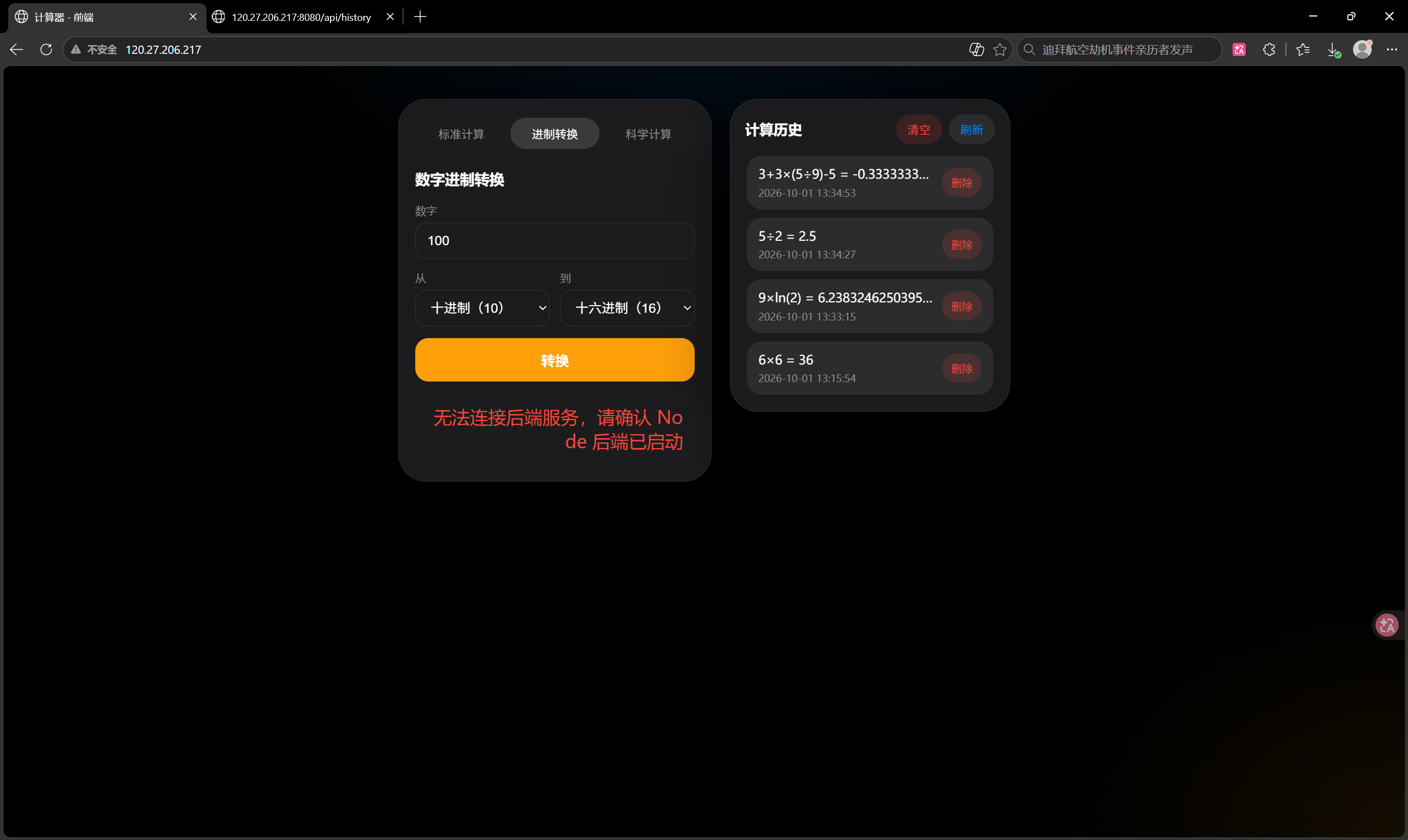
When the backend is unavailable during base conversion, the frontend shows a connection error.
Figure 11: Adjacent Operand Bug

The invalid expression 0.888888888889tan(9)× was once treated as multiplication. This bug was fixed by adding syntax validation.
Figure 12: Input Sanitization

The frontend filters unsupported characters, and the backend returns “Missing operator” for invalid input.
Figure 13: Backend Error Message

When the backend is stopped, historical records remain visible, but new calculations cannot be completed.
6. Requirement Analysis
6.1 Frontend Responsibilities
- Display the calculator interface
- Accept user input through buttons and keyboard
- Send expressions to the backend API
- Display calculation results
- Display calculation history
- Send delete and clear-history requests
- Display error messages returned by the backend
6.2 Backend Responsibilities
- Receive and validate expressions
- Parse mathematical expressions safely
- Perform calculations
- Handle invalid expressions and division by zero
- Store successful calculations in SQLite
- Query and delete history
- Return standardized JSON responses
7. System Architecture
Web Frontend
    |
    | HTTP / JSON
    v
Node.js + Express Backend
    |
    v
SQLite Database
The frontend does not calculate the final result. It sends the expression to the backend, and the backend performs validation, parsing, calculation, and history storage.
8. Functional Structure
Calculator System
├── Standard Calculation
│   ├── Addition, subtraction, multiplication, division
│   ├── Parentheses and operator precedence
│   ├── Decimal numbers
│   └── Unary positive/negative numbers
├── Scientific Calculation
│   ├── sin, cos, tan
│   ├── sqrt, log, ln, abs
│   ├── exponentiation (^)
│   └── constants pi and e
├── Base Conversion
│   └── Binary, octal, decimal, hexadecimal
├── Calculation History
│   ├── Save history
│   ├── Query history
│   ├── Delete one record
│   ├── Clear all history
│   └── Click a record to reuse its result
└── Error Handling
    ├── Invalid expression
    ├── Missing operator
    ├── Division by zero
    └── Backend connection failure
9. API Design
9.1 Calculate
POST /api/calculate
Content-Type: application/json
Request:
{
  "expression": "(1+2)*3"
}
Success response:
{
  "success": true,
  "expression": "(1+2)*3",
  "result": 9
}
Error response:
{
  "success": false,
  "message": "Division by zero is not allowed"
}
9.2 Base Conversion
POST /api/convert/base
Request:
{
  "value": "1010",
  "fromBase": 2,
  "toBase": 10
}
Success response:
{
  "success": true,
  "result": "10"
}
9.3 Query History
GET /api/history
Response:
{
  "success": true,
  "data": [
    {
      "id": 1,
      "expression": "6×6",
      "result": "36",
      "createdAt": "2026-10-01 13:15:54"
    }
  ]
}
9.4 Delete One History Record
DELETE /api/history/{id}
9.5 Clear All History
DELETE /api/history
10. Database Design
The backend uses SQLite to persist calculation history.
Table name: calculation_history
| Field | Type | Description |
|---|---|---|
| id | INTEGER | Primary key, auto-increment |
| expression | TEXT | Calculation expression |
| result | TEXT | Calculation result |
| created_at | TEXT | Creation time |
SQL:
CREATE TABLE IF NOT EXISTS calculation_history (
    id INTEGER PRIMARY KEY AUTOINCREMENT,
    expression TEXT NOT NULL,
    result TEXT NOT NULL,
    created_at TEXT NOT NULL
);
11. Code Explanation and Implementation Details
11.1 Frontend API Request
The frontend uses the Fetch API to send expressions to the backend.
function calculate(expression) {
    return request(API_BASE + "/api/calculate", {
        method: "POST",
        headers: {
            "Content-Type": "application/json"
        },
        body: JSON.stringify({
            expression: expression
        })
    });
}
The frontend selects the API base address dynamically:
var isLocal = window.location.protocol === "file:"
    || window.location.hostname === "localhost"
    || window.location.hostname === "127.0.0.1";

var API_BASE = isLocal
    ? "http://localhost:8080"
    : "http://120.27.206.217:8080";
11.2 Backend Calculation Route
router.post("/calculate", (request, response) => {
    try {
        const expression = request.body.expression;

        if (typeof expression !== "string" || expression.trim() === "") {
            throw new Error("Expression cannot be empty");
        }

        const result = evaluate(expression);
        historyService.save(expression, result);

        response.json({
            success: true,
            expression,
            result: toJsonResult(result)
        });
    } catch (error) {
        response.status(400).json({
            success: false,
            message: error.message
        });
    }
});
11.3 Expression Parser
The parser uses a safe mathematical expression pipeline:
- Tokenize the expression into numbers, functions, constants, operators, and parentheses.
- Validate token syntax to prevent adjacent operands and invalid function calls.
- Convert infix notation to Reverse Polish Notation with the shunting-yard algorithm.
- Evaluate the RPN expression with a stack.
The parser supports +, -, *, /, ^, parentheses, unary signs, sin, cos, tan, sqrt, log, ln, abs, pi, and e.
11.4 Database Operations
Insert:
const insertStatement = db.prepare(
    "INSERT INTO calculation_history (expression, result, created_at) VALUES (?, ?, ?)"
);

insertStatement.run(expression, result.toString(), createdAt);
Query:
const listStatement = db.prepare(
    "SELECT id, expression, result, created_at AS createdAt " +
    "FROM calculation_history ORDER BY id DESC"
);

listStatement.all();
Delete:
const deleteStatement = db.prepare(
    "DELETE FROM calculation_history WHERE id = ?"
);

deleteStatement.run(id);
12. Frontend Installation and Testing
12.1 Local Frontend
Open frontend/index.html directly in a browser, or use a local static server:
cd frontend
python -m http.server 5500
Then visit:
http://localhost:5500
When running locally, the frontend uses http://localhost:8080 as the API base address.
12.2 Test Cases
| Test | Expression | Expected Result |
|---|---|---|
| Addition | 12+8 | 20 |
| Subtraction | 8-3*2 | 2 |
| Multiplication | 7*6 | 42 |
| Division | 10/2+7 | 12 |
| Decimal | 0.1+0.2 | 0.3 |
| Parentheses | (1+2)*3 | 9 |
| Unary negative | -5+8 | 3 |
| Division by zero | 1/0 | Error message |
| Invalid expression | (1+2 | Error message |
| Scientific | sin(30) | 0.5 |
| Base conversion | 1010 from binary to decimal | 10 |
13. Backend Deployment
The backend is deployed on an Alibaba Cloud ECS instance.
Server information:
- Operating system: Ubuntu 24.04 LTS
- CPU / memory: 2 vCPU / 2 GB
- Web server: Nginx
- Process manager: PM2
- Database: SQLite
- Public frontend: http://120.27.206.217/
- Public API: http://120.27.206.217:8080/
Deployment steps:
- Install Node.js 22+.
- Install Git and Nginx.
- Clone the frontend and backend repositories from GitHub.
- Run
npm installin the backend directory. - Start the backend with PM2 and configure auto-start on reboot.
- Configure the frontend API base address.
- Deploy the frontend with Nginx.
- Open the required ports in the Alibaba Cloud security group and system firewall.
- Test the public frontend and API.
14. Testing Results
The following tests were performed:
- Basic arithmetic operations
- Operator precedence
- Parentheses
- Decimal calculation
- Unary positive and negative numbers
- Division by zero
- Invalid expressions
- Scientific functions
- Base conversion
- History insertion, query, deletion, and clear-all
- History persistence after page refresh
- Frontend behavior when the backend is stopped
- Public access from the internet
All required functions worked correctly after the fixes described in Section 15.
15. Personal Journey: Problems and Solutions
Problem 1: Adjacent Operands Were Misparsed
Input:
0.888888888889tan(9)×
The parser treated the expression as 0.888888888889 × tan(9) instead of reporting an error.
Cause: the parser did not check whether two operands were separated by a valid operator.
Solution: I added a validateTokens step. The validator checks:
- Two operands must have an operator between them.
- A function must be followed by parentheses.
- Parentheses cannot be empty.
- A binary operator cannot be followed directly by
). - Illegal consecutive operators are rejected.
After the fix, the expression above returns “Missing operator.”
Problem 2: Frontend Accepted Too Many Invalid Symbols
The input box allowed users to enter long sequences of unsupported characters.
Solution: I added frontend input sanitization and operator replacement:
- Unsupported characters are filtered.
- Maximum input length is limited.
- Consecutive operator buttons replace the previous operator instead of appending endlessly.
- The backend still performs final syntax validation.
Problem 3: Node.js Version Compatibility
The backend uses the built-in node:sqlite module, which requires Node.js 22 or later.
Solution: I installed Node.js 22+ on the server and used PM2 to keep the process running.
Problem 4: Frontend/Backend Connection
When the backend was not running, the frontend showed a connection error. This was expected, but the message was initially misleading because it mentioned Spring Boot.
Solution: I changed the message to “Unable to connect to the backend service. Please make sure the Node backend is running.”
16. Personal Learnings
Through this assignment, I learned how to design and implement a front-end/back-end separated system. I practised:
- Building a calculator UI with HTML, CSS, and JavaScript
- Using the Fetch API to call a backend service
- Designing RESTful APIs with Express
- Parsing mathematical expressions safely without
eval - Using the shunting-yard algorithm and RPN evaluation
- Persisting data with SQLite and
node:sqlite - Using
decimal.jsfor accurate decimal calculations - Deploying a Node.js application with PM2 and Nginx
- Debugging frontend/backend integration and parser bugs
I also learned that testing invalid and boundary inputs is as important as testing normal cases.
17. Future Improvements
Possible future improvements include:
- Unit conversion
- User accounts with independent history
- History search and pagination
- Theme switching
- More scientific functions and angle-unit switching
- Keyboard shortcuts
- Calculation statistics
- Cloud database support such as PostgreSQL
- HTTPS support with a custom domain
18. Third-Party Libraries
| Library | Purpose | Reason |
|---|---|---|
| Express | Web framework | Provides REST API routing and request handling |
| decimal.js | High-precision decimal arithmetic | Avoids floating-point issues such as 0.1 + 0.2 |
| node:sqlite | SQLite driver | Built-in Node.js module for persistent history |
| cors | Cross-origin support | Allows the frontend to call the backend API during development |
The backend does not use eval, exec, or script engines to execute user input. It uses a custom parser with syntax validation, shunting-yard conversion, and stack-based evaluation.
19. Extra Features
19.1 Base Conversion
Supports binary, octal, decimal, and hexadecimal conversions through:
POST /api/convert/base
19.2 Scientific Calculation
Supports:
sin, cos, tan, sqrt, log, ln, abs, ^, pi, e
Trigonometric functions use degrees by default.
19.3 Enhanced History
- Delete one record
- Clear all records
- Click a history record to reuse its result
- Persist history after page refresh
19.4 Frontend Input Protection
- Filter unsupported characters
- Limit input length
- Replace the previous operator when operators are clicked consecutively
20. Conclusion
This assignment helped me understand the complete workflow of a front-end/back-end separated application. The frontend provides a usable calculator interface, while the backend performs all calculations, handles errors, stores history, and returns JSON responses. The project has been deployed to a public server and can be accessed through the URLs above. The bugs found during testing were analysed and fixed, which improved both the reliability of the parser and the user experience.
相关推荐
基于改进虚拟同步发电机的构网型并联储能逆变器控制研究(Simulink仿真实现)
内容概要:本文系统解读了一套完整的多机器人路径规划(MAPF)MATLAB代码库,重点剖析了基于优先级规划算法的实现机制与工程架构设计。该框架采用几何、拓扑、调度与呈现四层解耦结构,实现了从地图解析、四邻域拓扑与Petri网构建、基于启发式的路径规划,到时间同步冲突消解及动画可视化的全流程处理。核心技术亮点包括动态边权膨胀机制以缓解硬封锁引发的虚假不可解问题、基于哈希结构的节点预留历史实现高效冲突查询、以及通过规划阶段信息前移驱动的几何惩罚型局部同步策略,显著提升了大规模场景下的求解效率与可行性。文章还深入比较了三种时间同步策略的设计取舍,并介绍了Petri网双阶段优化路径与端到端的可视化链路,旨在为MAPF领域的研究与教学提供一个可复现、可扩展、可批判的高质量参考实现。; 适合人群:具备一定MATLAB编程基础,从事路径规划、机器人调度、智能交通、自动化仓储等相关领域研究的科研人员、高校研究生及工程技术人员。; 使用场景及目标:①学习和复现多机器人路径规划中的优先级规划算法及其工程实现;②掌握动态边权膨胀、节点预留历史、局部同步等关键技术以提升算法效率与鲁棒性;③构建从算法建模、冲突消解到结果可视化的完整科研流程,支撑论文复现与系统开发。; 阅读建议:建议读者结合提供的代码逐模块调试,重点关注四层架构之间的接口设计与信息传递机制,通过修改地图复杂度与智能体数量验证算法性能,并尝试优化文中指出的重复代码以提升运行效率。
模拟、机会约束、敏感性分析和蒙特卡洛验证的电池储能系统辅助数据中心容量规划的学术研究项目.rar
模拟、机会约束、敏感性分析和蒙特卡洛验证的电池储能系统辅助数据中心容量规划的学术研究项目.rar
新一代NetCore Net10 代码生成器 SmartSoftHelp DeepCore XSuite Pro Global Eco AIAgent 20206.V29国际专业版
这不仅仅是一个代码生成器 SmartSoftHelp DeepCore XSuite Pro Global Eco AIAgent 20206.V29国际专业版 致力于打造世界一流的.NET C# 辅助开发工具。 以「最专业、最智能、最简单、最实用」为核心目标,极简,极速,极致的巅峰之作! 面向世界专业生态版! C#软件开发,代码生成,工具集成,最前沿的科技之作! 数据库安全解决方案,高并发解决方案 软件极速开发解决方案,UI,后端,API,优化方案 微软最新技术栈,最佳架构方案,数据库操作,控制器,UI全程异步操作 程序开发工具集成,版权保护方案 SmartSoftHelp魔法精灵工作室
04_开发环境.rar
04_开发环境
基于PID控制的永磁同步直线电机位置环控制matlab仿真(三闭环)(Simulink仿真实现)
内容概要:本文系统解读了一套完整的多机器人路径规划(MAPF)MATLAB代码库,聚焦于优先级规划算法的工程实现。文章将求解过程划分为几何、拓扑、调度与呈现四个解耦层次,详细阐述了地图解析、Petri网构建、基于动态边权膨胀的路径规划、时间同步与冲突消解机制,以及可视化链路设计。框架核心思想是分离空间规划与时间消解:先通过惩罚机制引导路径避让,再以节点预留历史等技术高效处理时间冲突,并提出几何惩罚前移等优化策略提升同步效率。全文还分析了不同同步策略的取舍与框架的可扩展性,旨在为MAPF的研究与教学提供一份可复现、可批判的参考文本。; 适合人群:具备一定编程基础,熟悉MATLAB环境,从事机器人路径规划、智能调度或相关领域研究的研发人员及研究生。; 使用场景及目标:① 学习并实现大规模多机器人系统的路径规划与冲突消解;② 理解优先级规划中动态边权膨胀、节点预留历史、几何惩罚前移等关键技术的设计原理与工程取舍;③ 为仓储物流、无人机编队等应用场景提供可复现的算法框架和技术参考。; 阅读建议:此资源不仅提供算法代码,更注重系统架构设计与工程实践。建议读者结合全文的数据流组织,逐步实现各模块功能,并通过提供的可视化工具调试和验证算法行为,重点关注各模块间的接口契约与性能优化点。




