

 2601_FZU-MU_SE

First Assignment — Front-End and Back-End Calculator (832401321- 24126497-YeYifan)
 墨衍会员 · AI 创作全网分发 墨衍智能分发 通过墨衍一键同步至各平台 可同步平台 CSDN微信公众号微博知乎掘金百家号博客园抖音小红书 你的文章也可以这样分发 墨衍会员 ¥399起/年,写一次发全网
我也要 关注 + 加入社区
墨衍会员 · AI 创作全网分发 墨衍智能分发 通过墨衍一键同步至各平台 可同步平台 CSDN微信公众号微博知乎掘金百家号博客园抖音小红书 你的文章也可以这样分发 墨衍会员 ¥399起/年,写一次发全网
我也要 关注 + 加入社区| Item | Details |
|---|---|
| Course | 2601_FZU-MU_SE |
| Assignment | First Assignment — Front-End and Back-End Separation Calculator System |
| Student ID | 832401321 |
| Objectives | Implement separate front-end and back-end responsibilities, server-side calculation, persistent history, individual record deletion, and public deployment |
| Project | Suanye Calculator |
| Live Demo | http://193.112.23.200:8080/ |
| References | Official Python, Flask, Waitress, and MDN documentation, together with the coding standards listed at the end of this article |
Front-End Repository: Remisuki/832401321_calculator_frontend
Back-End Repository: Remisuki/832401321_calculator_backend
Front-End Coding Standards: frontend/codestyle.md
Back-End Coding Standards: backend/codestyle.md
目录
- 1. Assignment Overview and Coding Standards
- 2. PSP Table
- 3. Presentation of the Finished Product
- 3.1 Access and Testing Instructions
- 3.2 Main Interface
- 3.3 Basic Arithmetic
- 3.4 Decimals, Precedence, Parentheses, and Unary Signs
- 3.5 Error Handling
- 3.6 Saving, Reopening, and Deleting History
- 3.7 Pagination, Unavailable API, and Mobile Layout
- 4. Design and Implementation Process
- 4.1 Requirements Analysis
- 4.2 System Architecture
- 4.3 Functional Structure
- 4.4 Front-End Design
- 4.5 Back-End Modules
- 4.6 API Design
- 4.7 Database Design
- 4.8 Expression Calculation
- 4.9 Exception Handling
- 5. Key Code Explanation
- 5.1 Sending an Expression from the Front End
- 5.2 Saving Only After Successful Calculation
- 5.3 Multiplication, Division, and Zero Checks
- 5.4 Parameterized Insertion and Deletion
- 5.5 Storage Configuration for Windows
- 6. Testing and Deployment
- 6.1 Automated Tests
- 6.2 Public-Site Verification and Its Scope
- 6.3 Deployment Configuration
- 6.4 Service Operation
- 7. Personal Journey, Lessons, and Future Improvements
- 7.1 Troubleshooting Experience
- 7.2 Understanding the Implementation and Remaining Learning Needs
- 7.3 Implemented Extensions and Future Work
- 8. References
1. Assignment Overview and Coding Standards
This assignment requires a calculator with separate front-end and back-end responsibilities. In addition to addition, subtraction, multiplication, and division, it must support parentheses, operator precedence, decimal numbers, unary signs, and error handling. Every successful calculation must be stored in a back-end database. The front end must retrieve this history and support deleting an individual record.
The front end uses HTML, CSS, and vanilla JavaScript. Python implements calculation and data access, while Flask provides the HTTP API. The public version runs on a Tencent Cloud Windows Server instance, with Waitress serving the application and SQLite storing calculation history.
The front end edits expressions, sends requests, and displays responses. For example, entering (1+2)*3 sends the expression as a string to the back end. The server parses it, calculates and saves the result, and returns 9. The front end does not independently evaluate expressions.
The two projects are maintained in separate GitHub repositories. Front-end conventions draw on the Google JavaScript and HTML/CSS Style Guides and MDN accessibility guidance. Back-end conventions draw on PEP 8, PEP 257, and the official Decimal and sqlite3 documentation. Each repository's codestyle.md identifies its sources and the conventions adopted by this project.
AI assistance was used for implementation, troubleshooting, testing, and documentation. This article distinguishes observed results from design descriptions. Automated checks are identified as such.
2. PSP Table
All values are in minutes.
| Stage | Estimated Time (minutes) | Actual Time (minutes) | Work Performed |
|---|---|---|---|
| Requirements analysis | 30 | 45 | Reviewed calculation, history, deletion, deployment, and reporting requirements |
| System design | 40 | 60 | Defined responsibilities for the front end, API, calculation module, and storage |
| Front-end development | 120 | 150 | Implemented input, buttons, results, history, and responsive layout |
| Back-end development | 90 | 120 | Implemented routes, JSON validation, and error responses |
| Expression calculation | 90 | 120 | Implemented tokenization, precedence, parentheses, and Decimal arithmetic |
| Database and history | 60 | 90 | Implemented SQLite initialization, insertion, pagination, and deletion |
| Integration | 60 | 90 | Connected request URLs, response fields, and error displays |
| Testing | 60 | 90 | Ran automated tests and public-site browser checks |
| Deployment and troubleshooting | 60 | 180 | Configured Windows, ports, background execution, and public access |
| Blog and documentation | 60 | 120 | Updated README files and prepared screenshots and implementation explanations |
| Total | 670 | 1065 |
3. Presentation of the Finished Product
3.1 Access and Testing Instructions
Open the live calculator in a modern browser. The address uses HTTP and must include :8080. Enter an expression and press Enter or click = to calculate. Esc clears the input. The history panel supports pagination, expression reuse, and individual record deletion.
The health endpoint normally returns {"status":"ok"}. This confirms that the endpoint responds; calculation, database writes, and deletion must be tested separately.
The following 18 screenshots were captured during AI-assisted automated browser checks against the actual public site on October 2, 2026. Test records were created for the demonstration, and only those records were removed afterward. Existing records were preserved, so the current history count may differ from the screenshots.
The screenshots retain the application's original Chinese interface; all captions and explanations in this article are in English. The mobile image uses a 390-pixel browser viewport, rather than a physical mobile device.
3.2 Main Interface
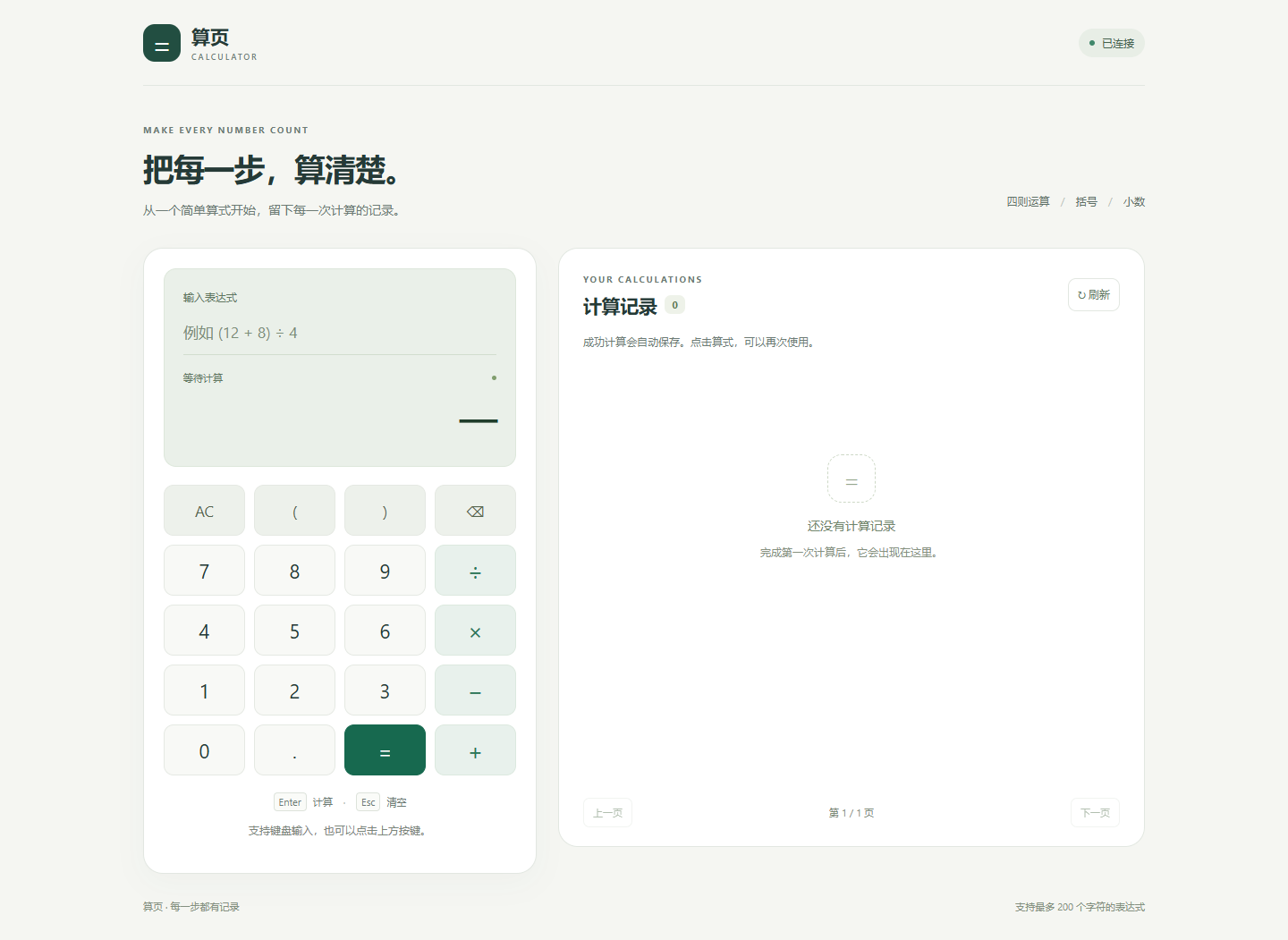
Figure 1. The page contains a calculation panel and a history panel. The header indicates API connection status, while the calculation panel displays input, results, and status messages.
3.3 Basic Arithmetic
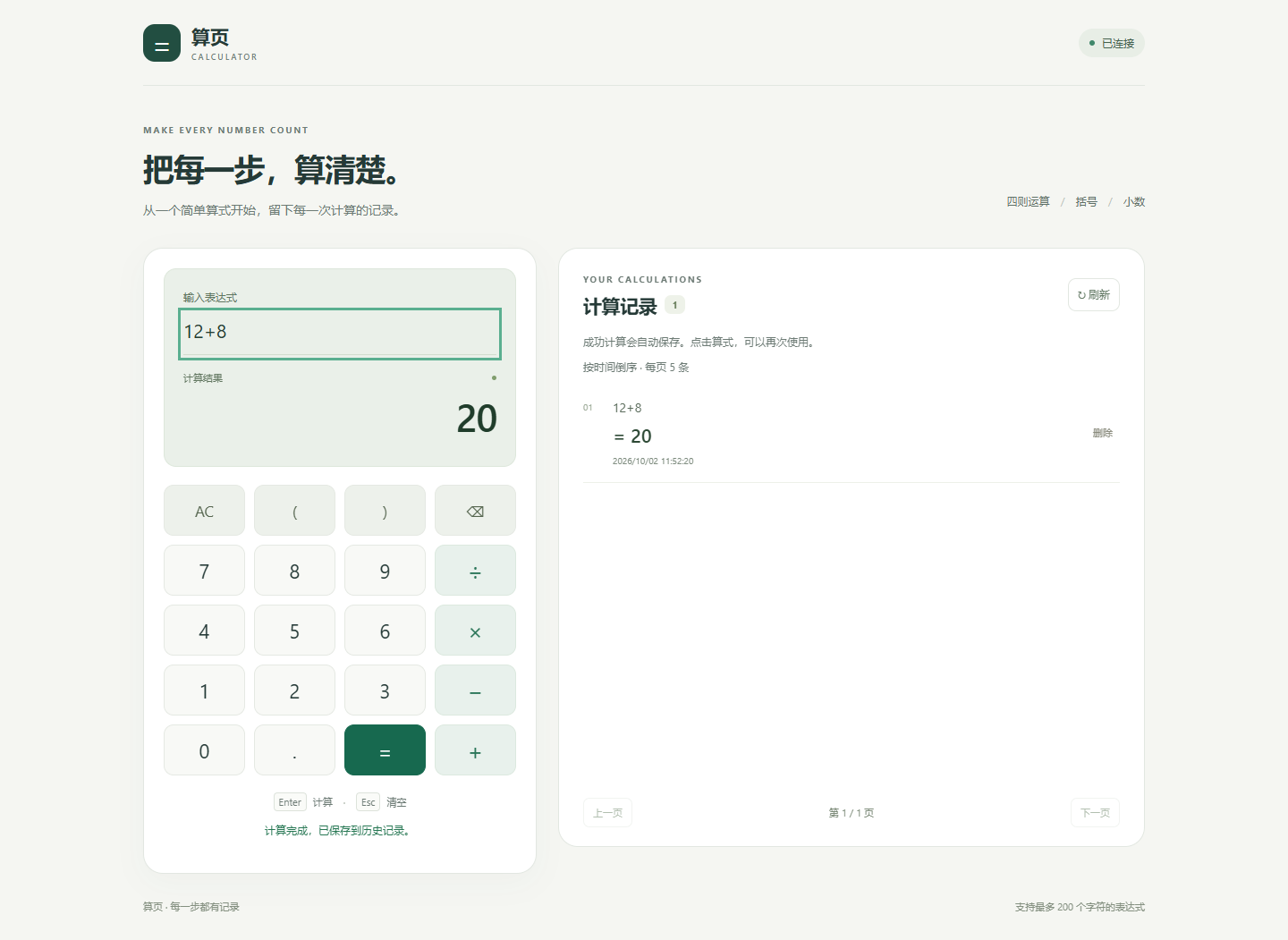
Figure 2. Submitting 12+8 returns 20 from the back end and adds the successful calculation to history.
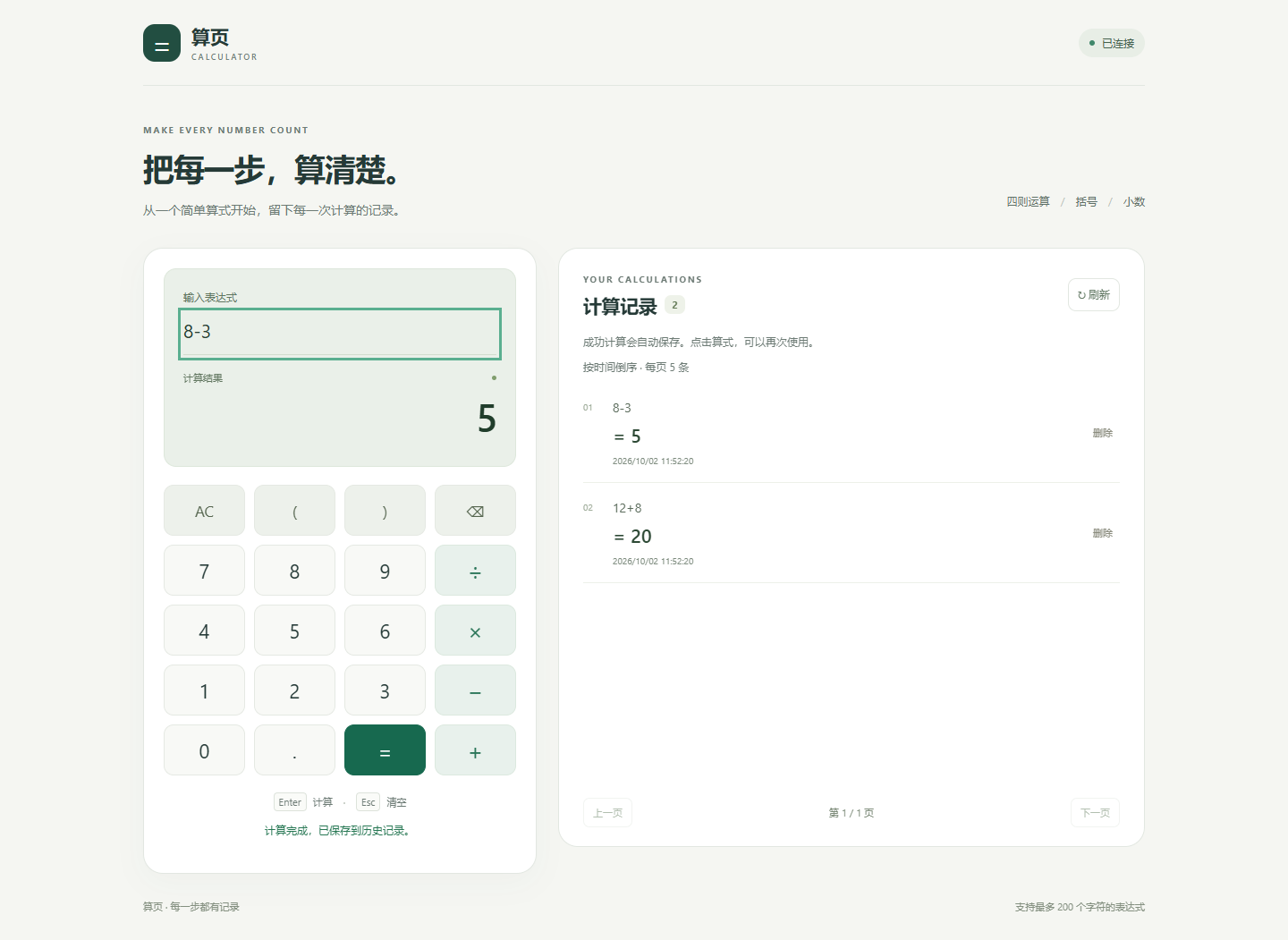
Figure 3. Submitting 8-3 returns 5.
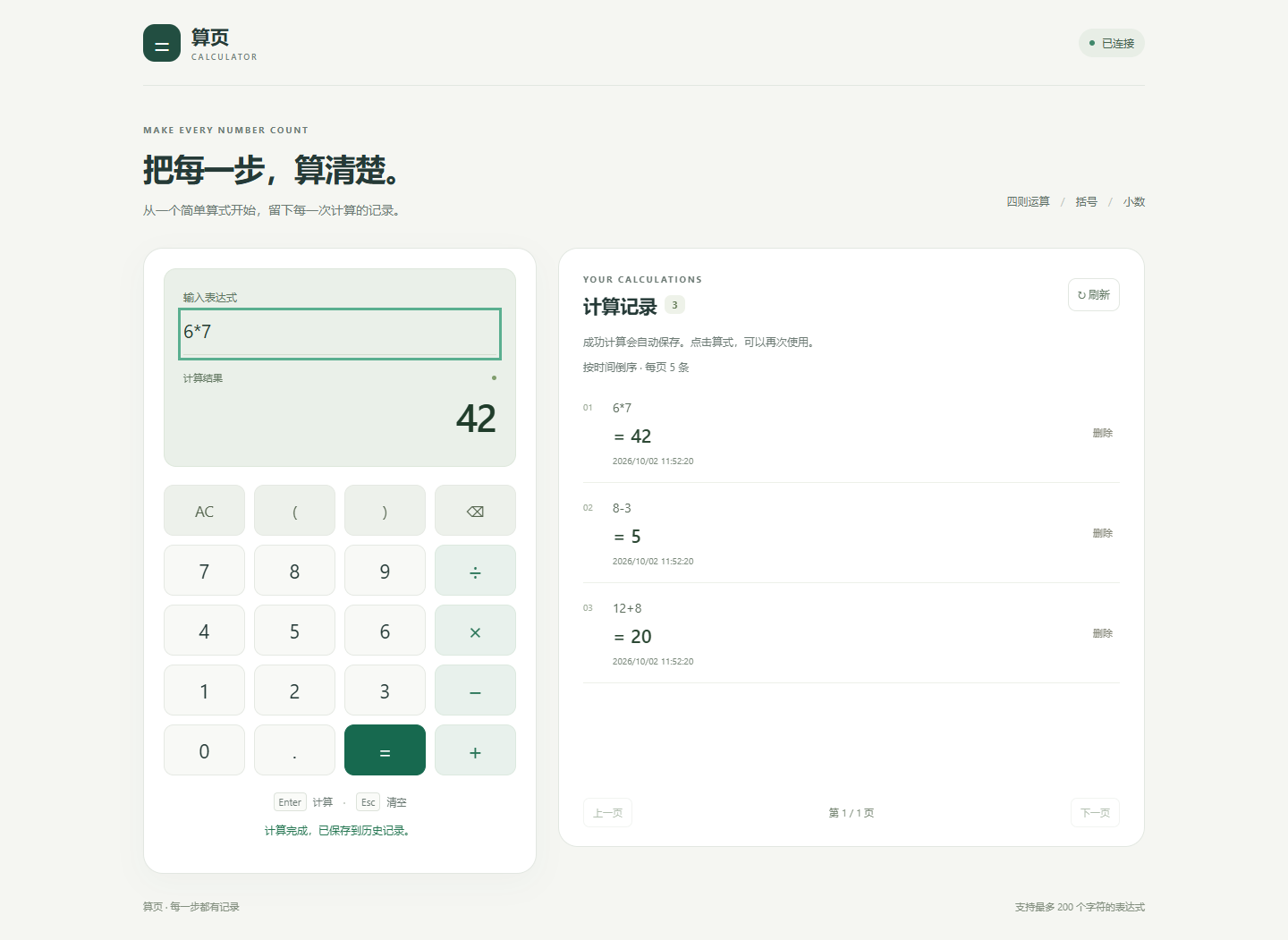
Figure 4. Submitting 6*7 returns 42. The on-screen button displays ×; keyboard input using * is also supported.
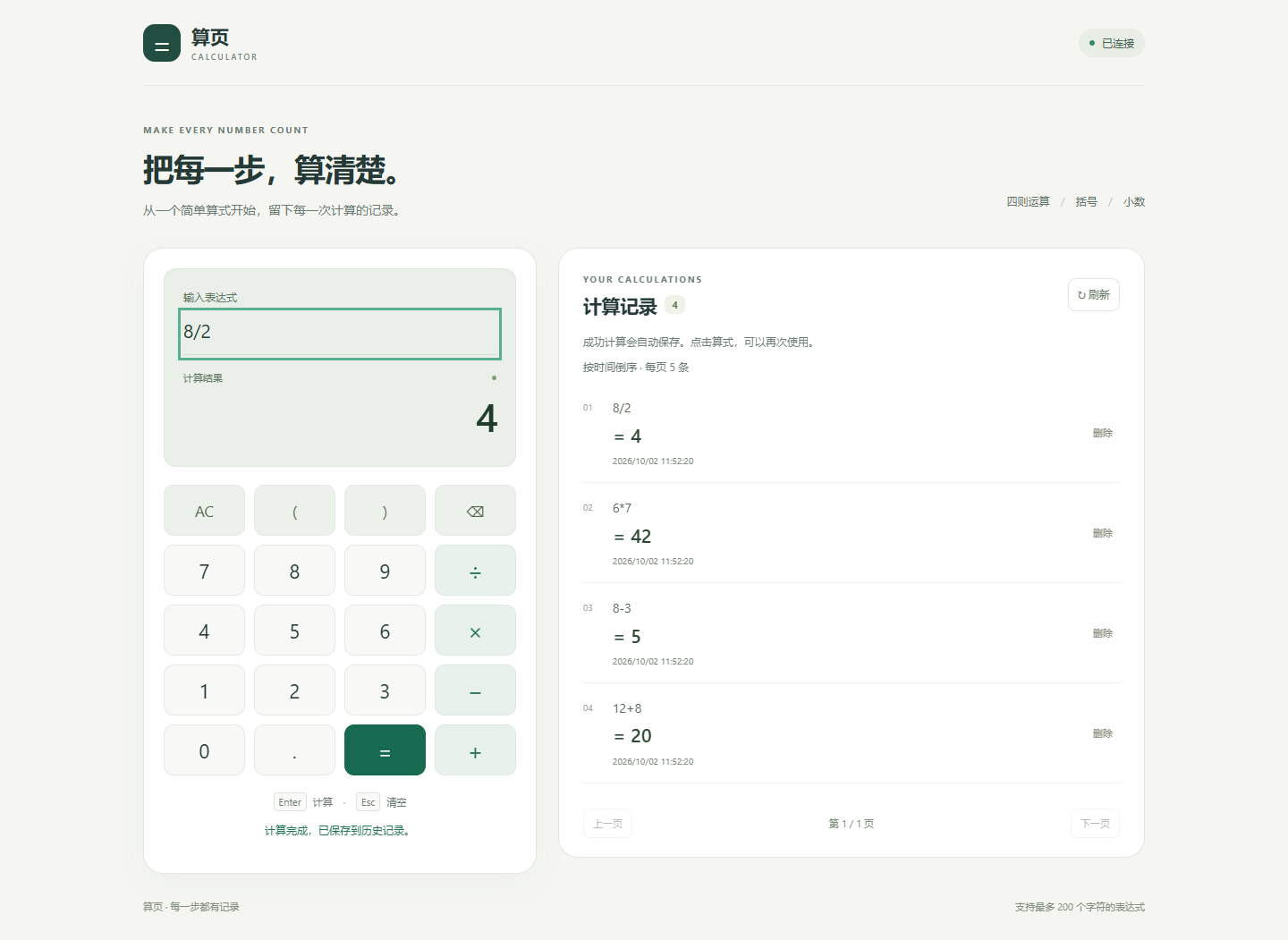
Figure 5. Submitting 8/2 returns 4. Both the on-screen division symbol ÷ and keyboard input / are supported.
3.4 Decimals, Precedence, Parentheses, and Unary Signs
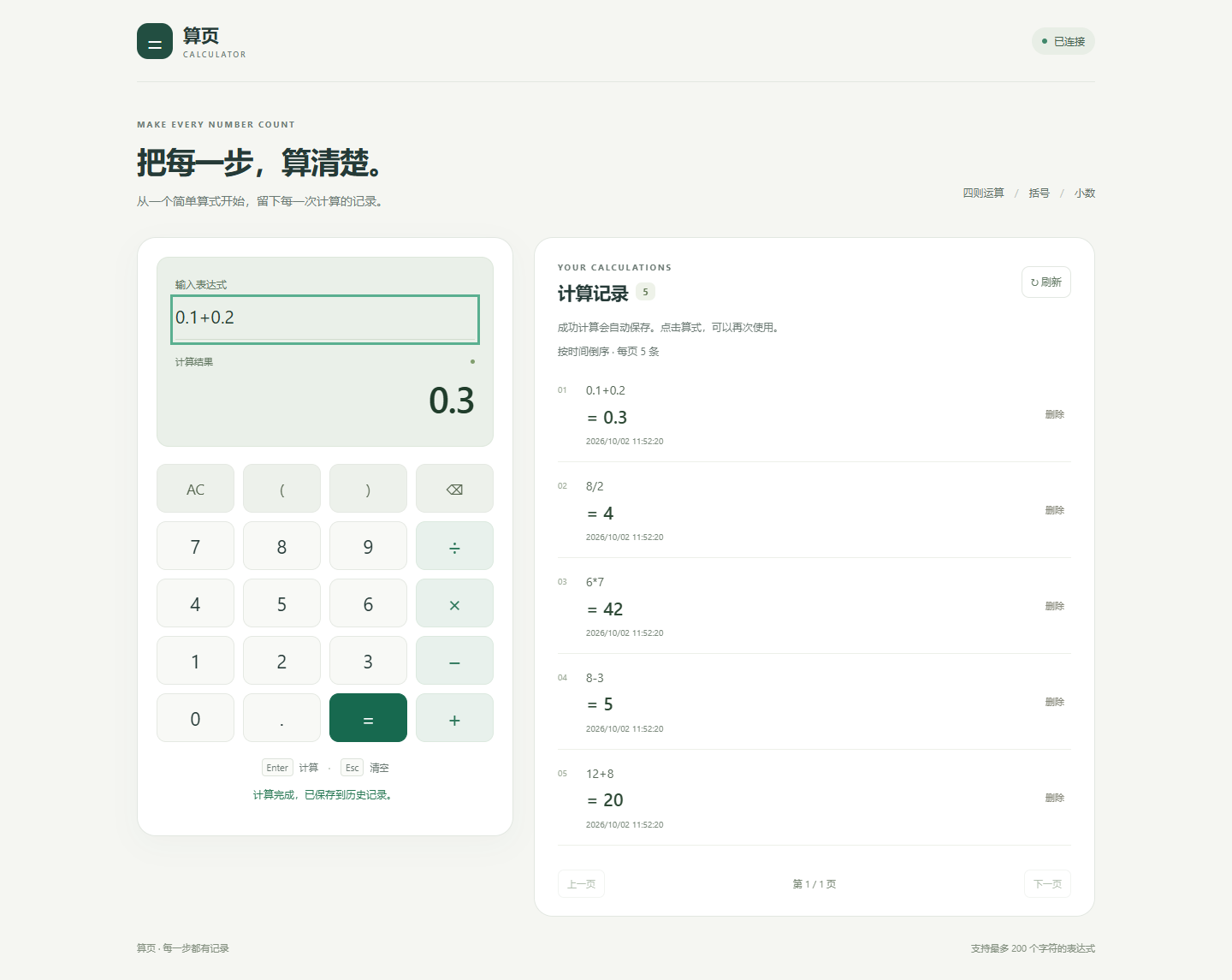
Figure 6. The expression 0.1+0.2 returns the string "0.3". Decimal arithmetic avoids the binary floating-point display error associated with this example. The configured precision is 28 significant digits, not unlimited precision.
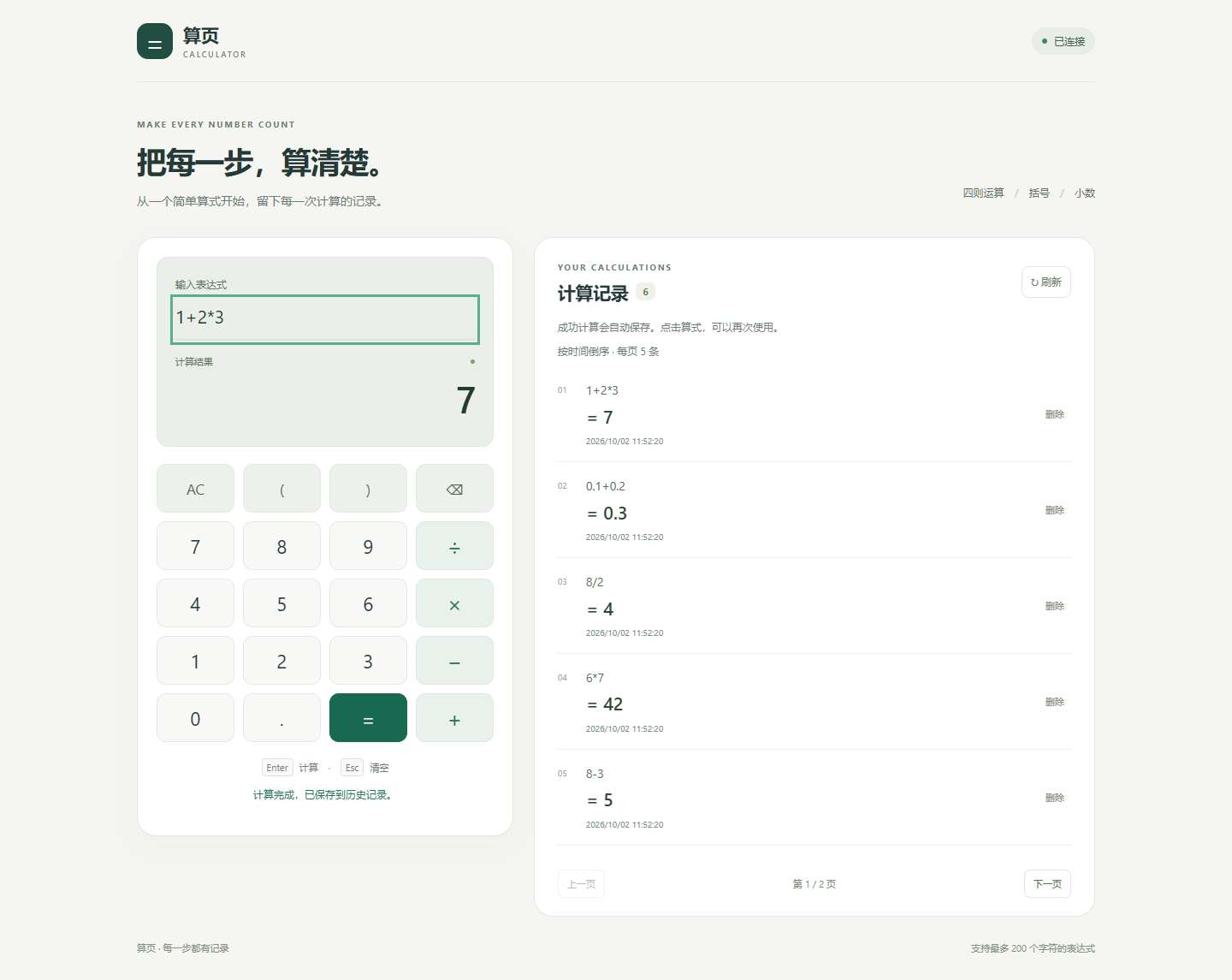
Figure 7. Multiplication is evaluated before addition in 1+2*3, producing 7.
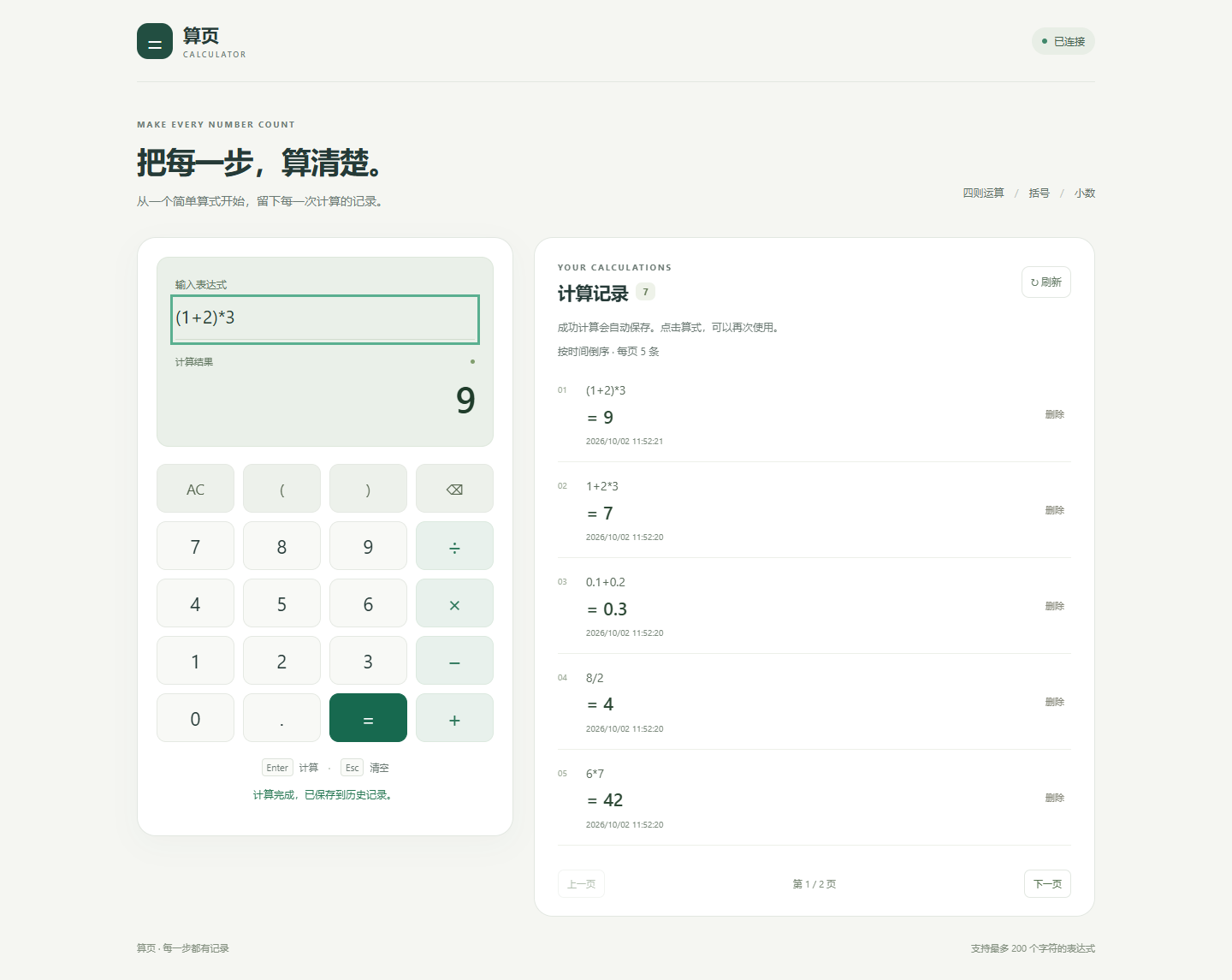
Figure 8. Parentheses change the evaluation order. The expression (1+2)*3 evaluates the addition first and returns 9.
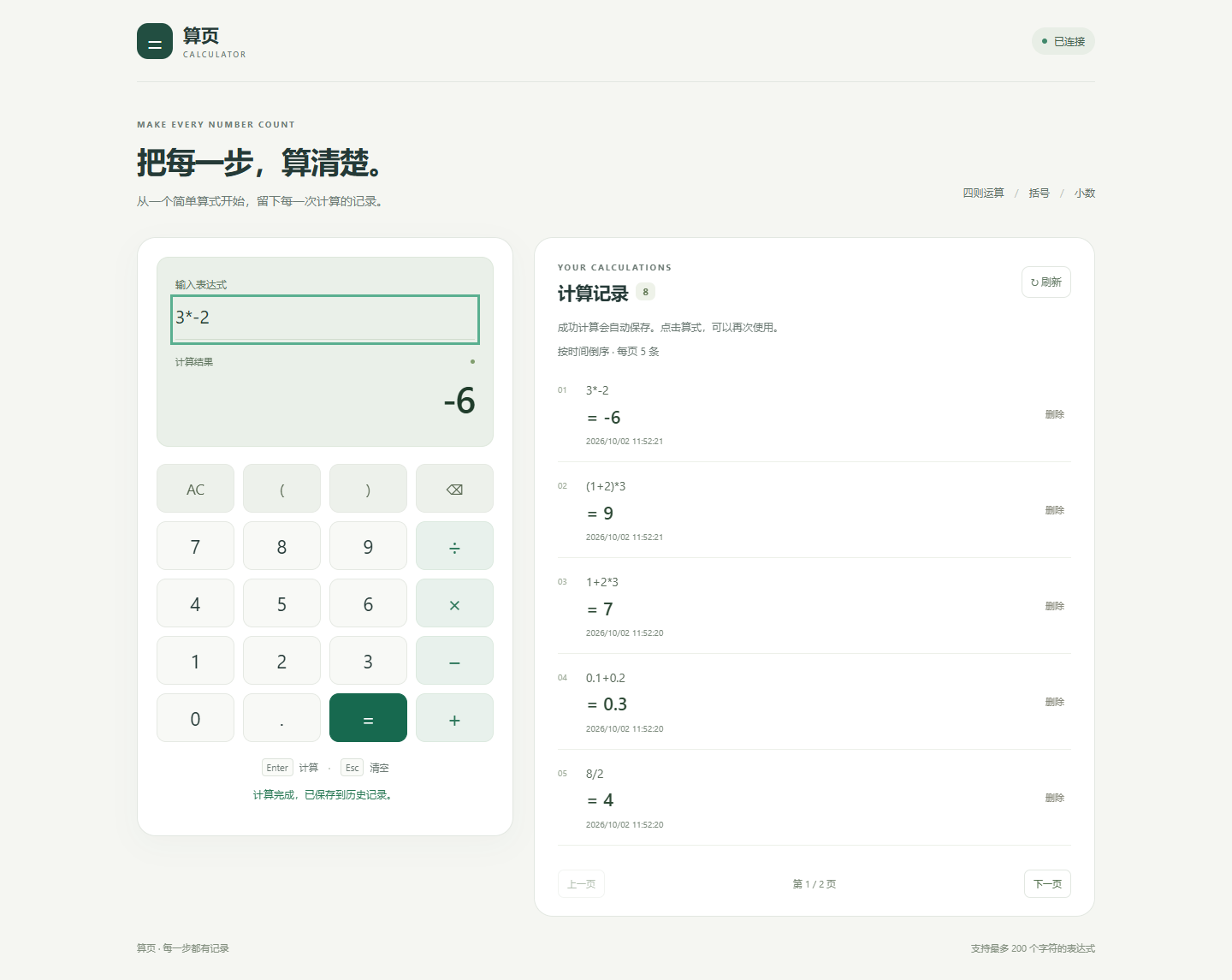
Figure 9. In 3*-2, the minus sign is interpreted as a unary operator applied to the second operand. The result is -6.
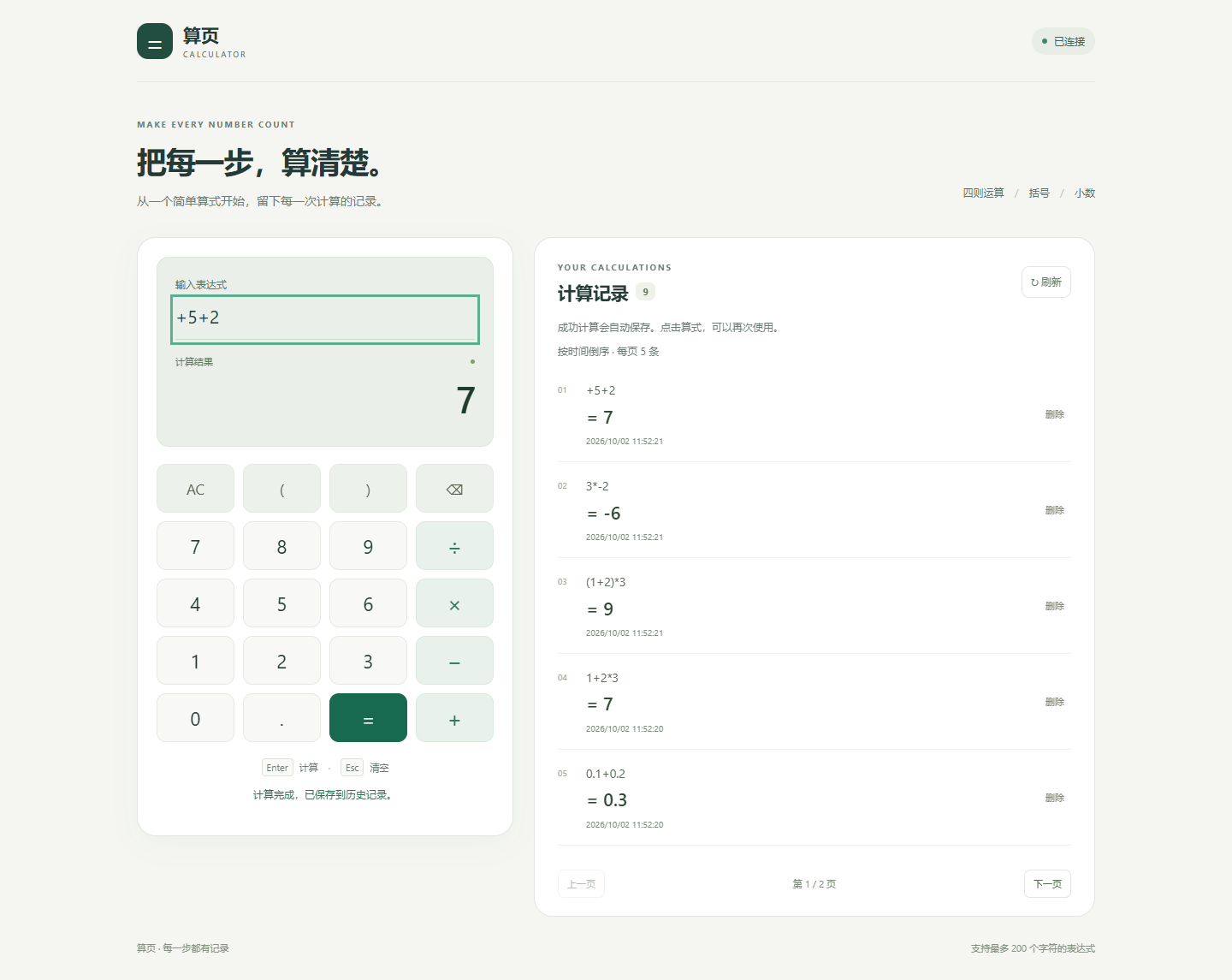
Figure 10. The expression +5+2 returns 7, demonstrating support for unary plus.
3.5 Error Handling
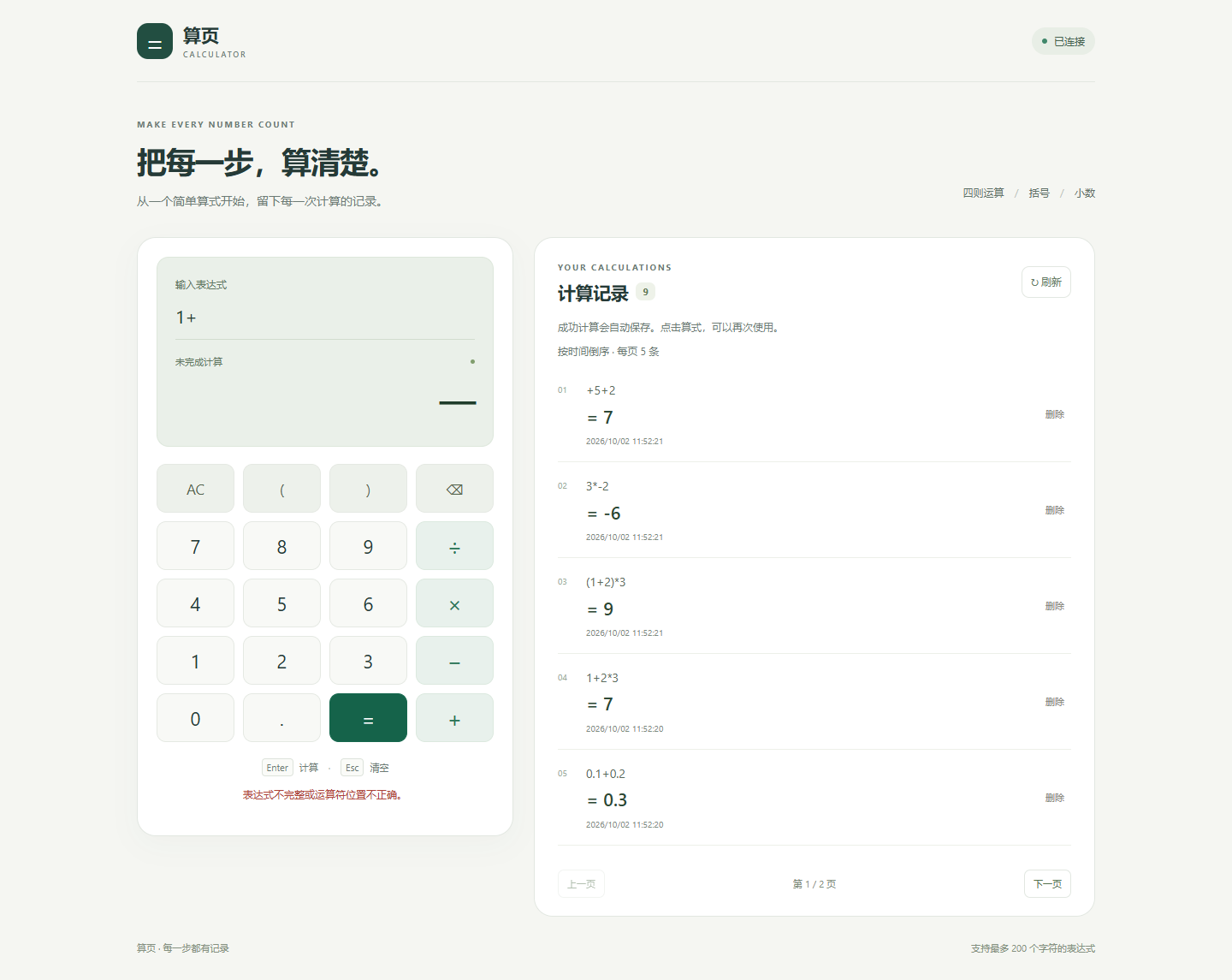
Figure 11. The expression 1+ has a missing operand. The back end returns HTTP 400, and the front end displays an error and clears the result instead of presenting a previous answer as the new result.
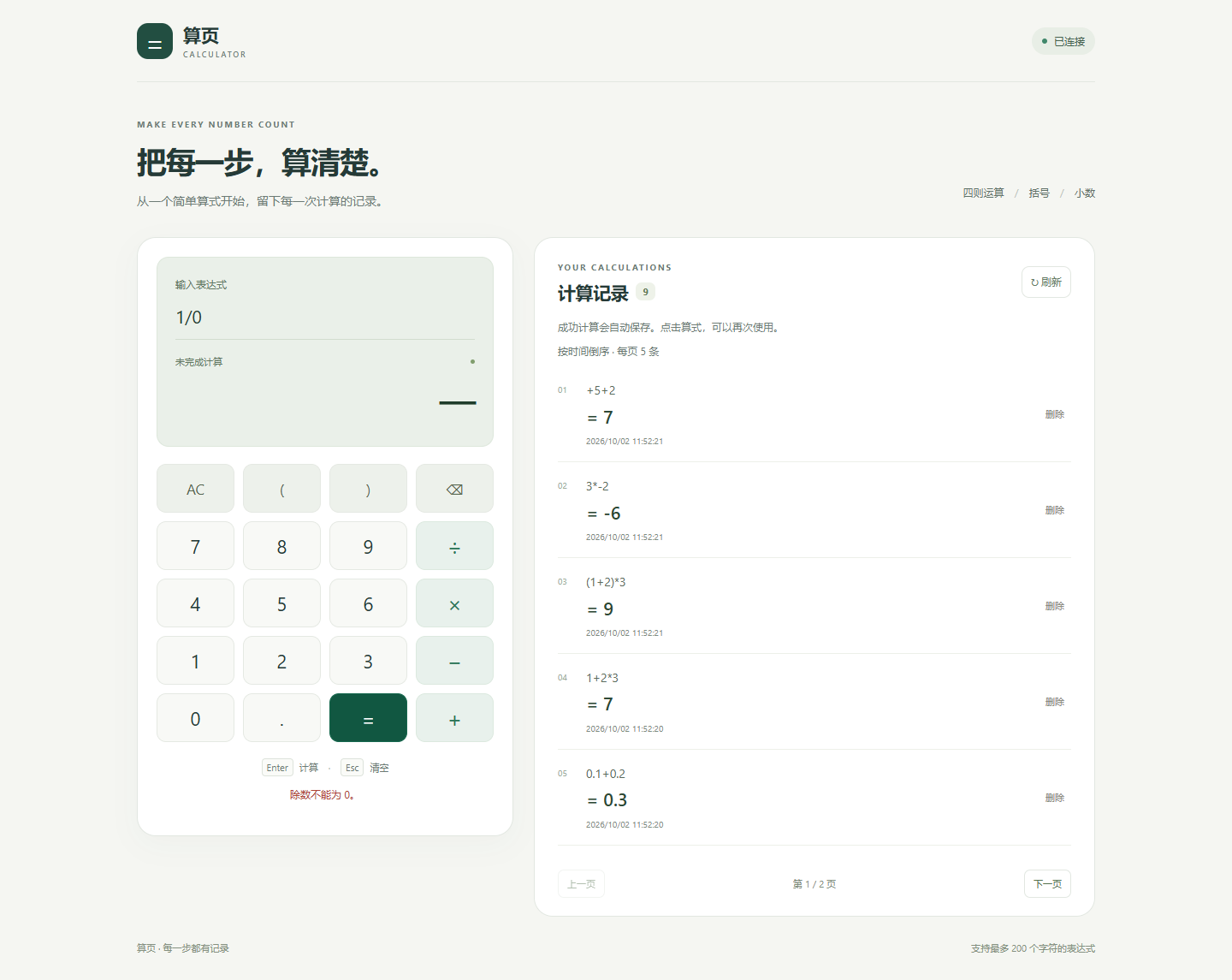
Figure 12. The expression 1/0 produces a division-by-zero error. Failed calculations do not enter the successful-history insertion step.
3.6 Saving, Reopening, and Deleting History
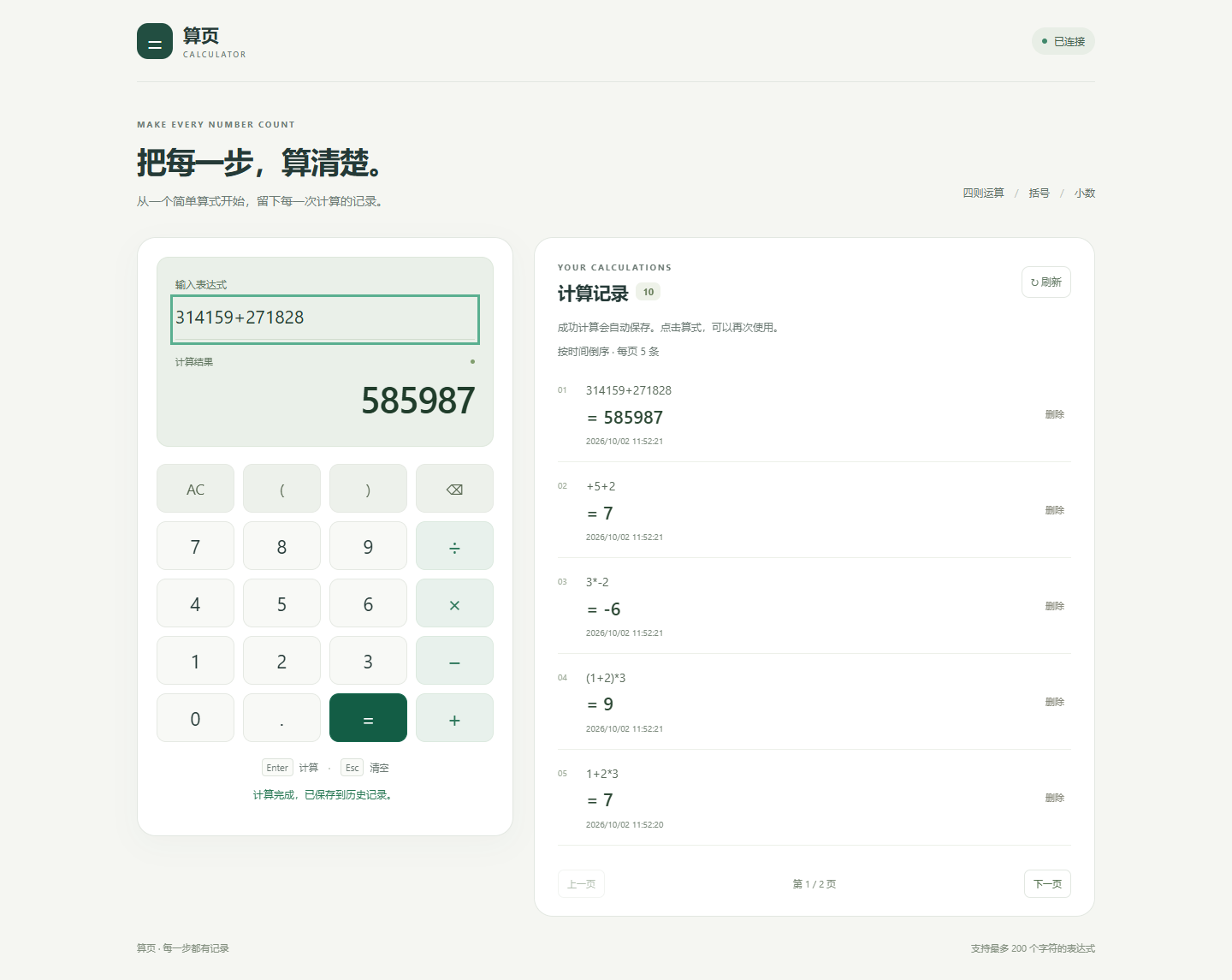
Figure 13. The expression 314159+271828=585987 provides a distinctive demonstration record. The list shows its expression, result, and timestamp.
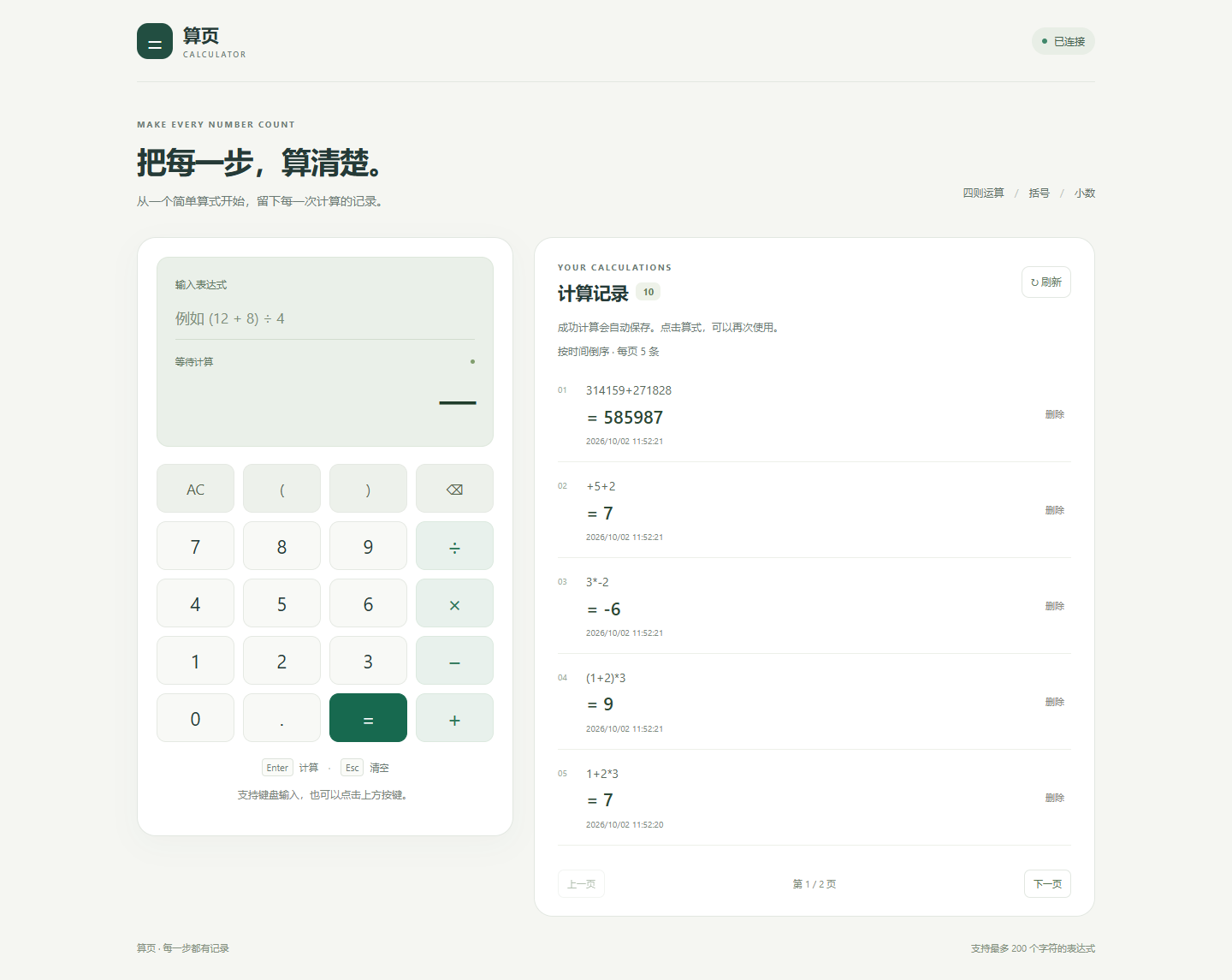
Figure 14. A new browser context was opened without inheriting the original context's local storage. The same record could still be retrieved from the back end. Its availability therefore does not depend on the original browser's LocalStorage or in-memory state.
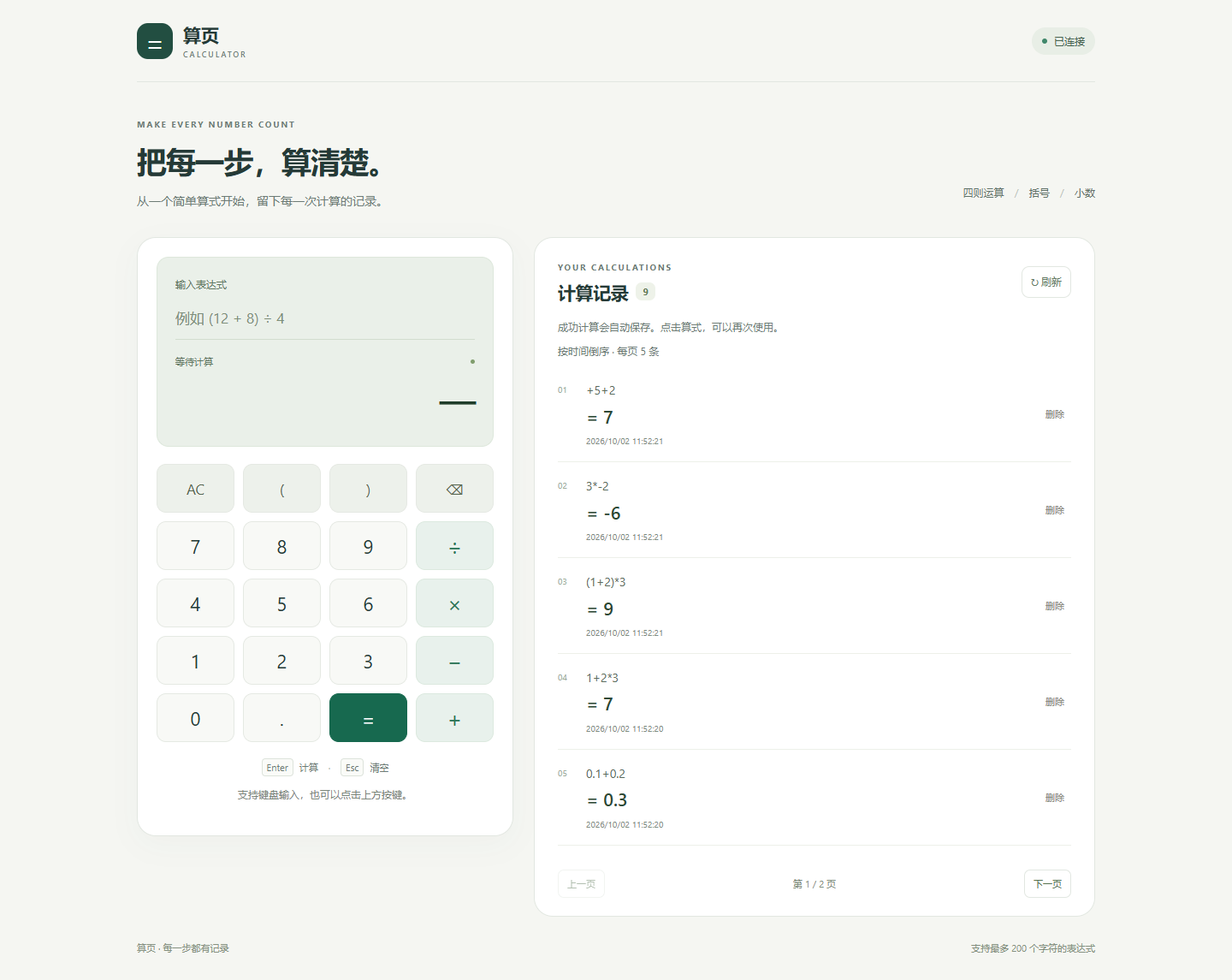
Figure 15. Deleting the demonstration record sends a DELETE request containing its ID. After reloading the page and querying the history API again, the deleted ID was absent. The deletion targeted a record created for this test.
3.7 Pagination, Unavailable API, and Mobile Layout
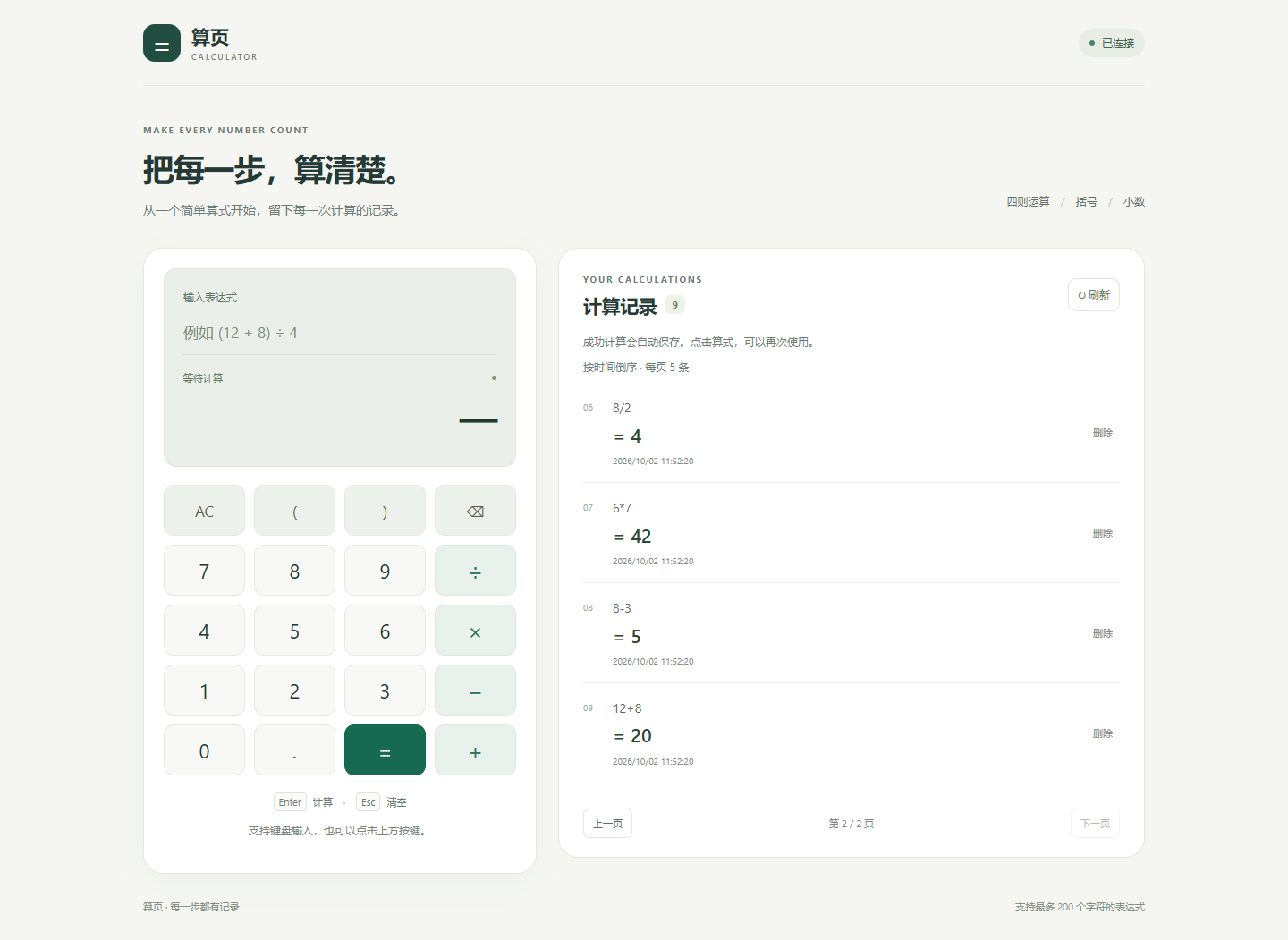
Figure 16. History is displayed in pages of five records. Moving to the second page requests data using limit and offset. Pagination is an implemented extension.
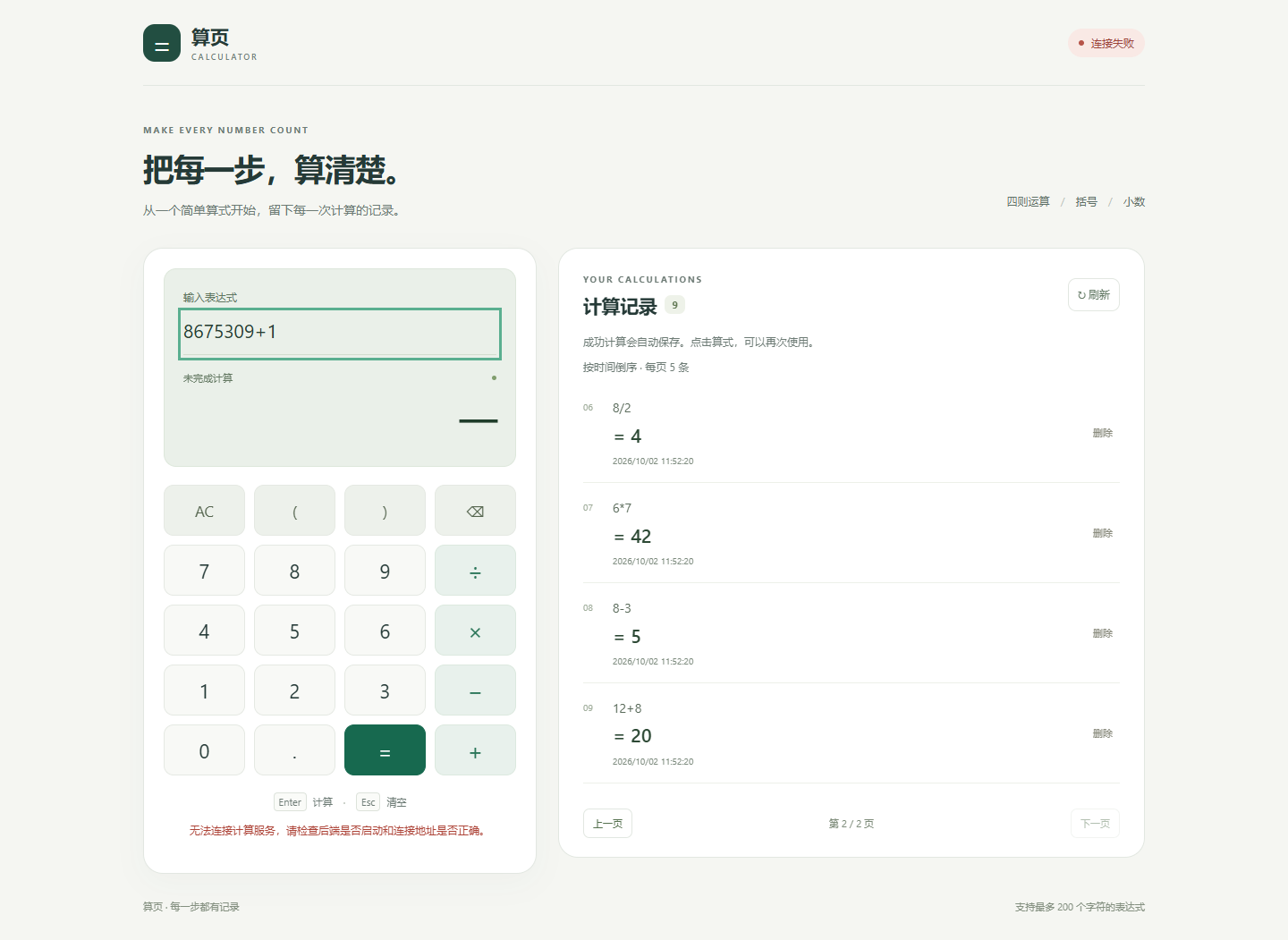
Figure 17. API requests were blocked only within the test browser; the public server was not stopped. After a new expression was submitted, the interface reported a connection failure and kept the result as —. It did not calculate a replacement result locally.
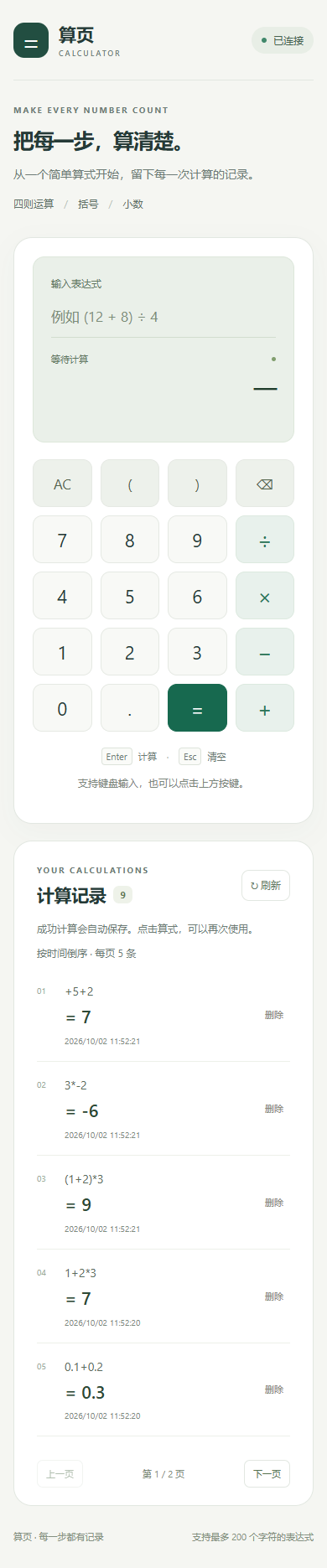
Figure 18. On a narrow viewport, the calculation and history panels are arranged vertically. The check found no horizontal page overflow.
4. Design and Implementation Process
4.1 Requirements Analysis
The main requirements fall into four groups: correctly evaluate basic and compound expressions, return understandable errors for invalid input, persist successful calculations in a database, and delete the database record specified by an ID. The project also needs a clear API, an accessible deployment, and documentation that supports reproduction.
The front end should accept button and keyboard input, prevent duplicate submissions while waiting, and distinguish edited input, successful results, application errors, and connection failures. The back end should validate request boundaries and interpret only the permitted mathematical syntax.
4.2 System Architecture
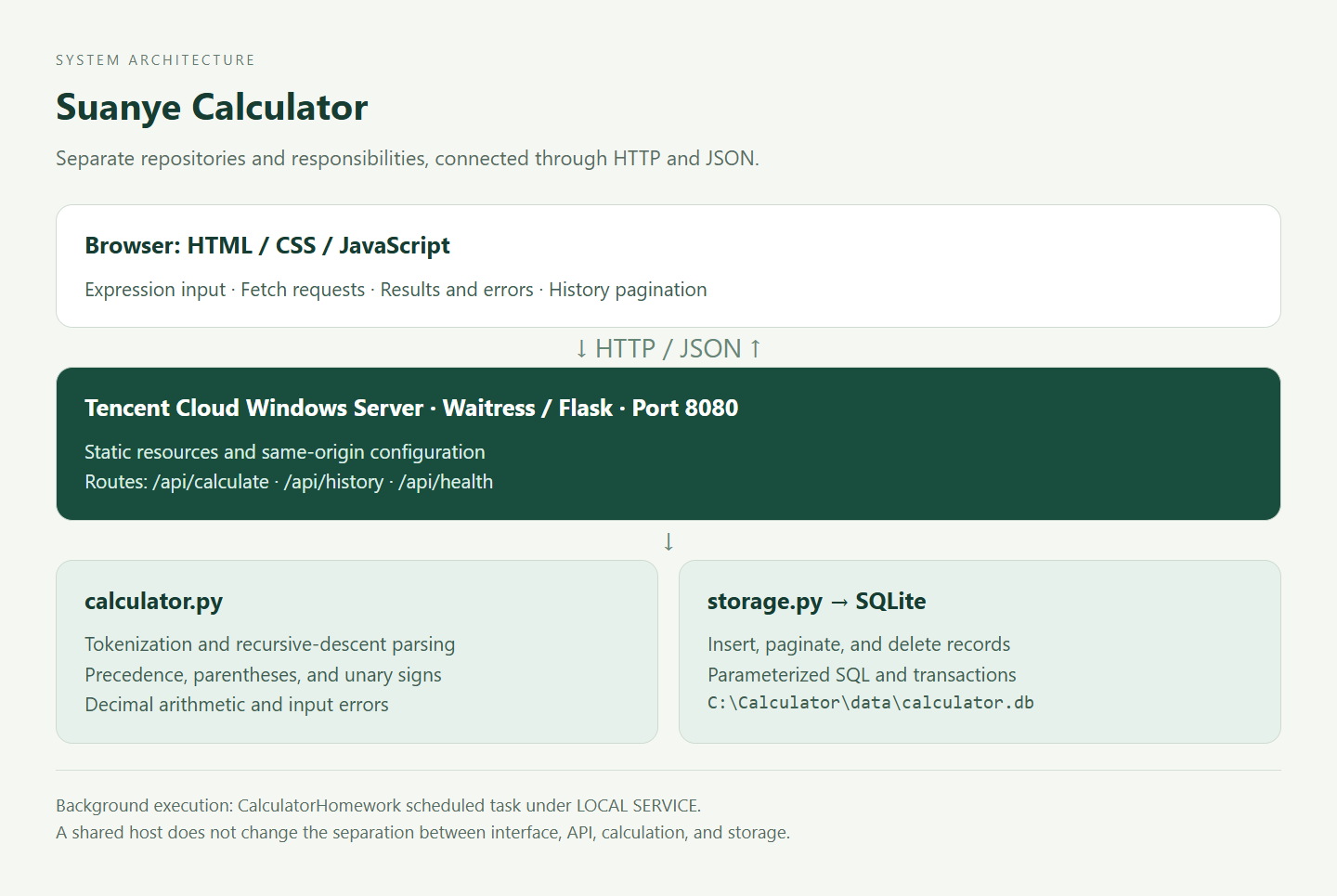
Figure 19. The browser sends JSON through Fetch. Waitress serves the Flask application, whose routes call the calculation and SQLite storage modules before returning JSON. Static resources and APIs share a server and origin, while their responsibilities and source repositories remain separate.
The main data flow is:
Expression input
    -> POST /api/calculate
    -> Validate and parse
    -> Calculate on the server
    -> Commit the history record
    -> Return the successful record
    -> Display the result
    -> GET /api/history to refresh the list
4.3 Functional Structure
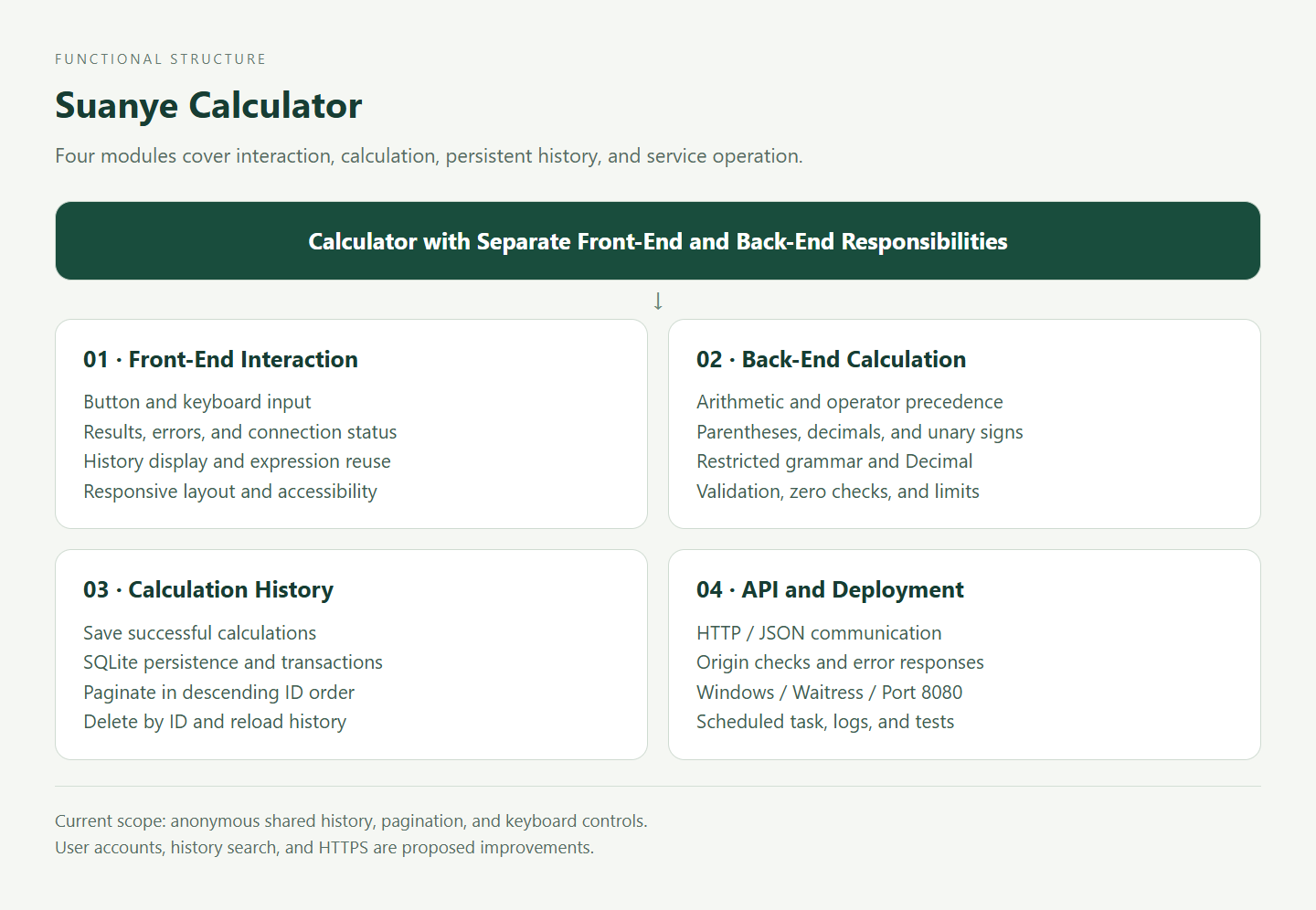
Figure 20. User interaction, calculation, history, and deployment support have separate responsibilities. The calculation module performs no network or file operations, which makes it suitable for independent tests. The API does not concatenate user input into SQL.
4.4 Front-End Design
index.html defines the input, keypad, status messages, result area, and history list. styles.css defines the layout and responsive behavior. app.js manages interaction and API requests.
Editing the expression clears the old result so that it cannot be mistaken for the answer to the new input. During submission, the page indicates a busy state and disables repeated actions. A successful response updates the result and triggers a history refresh. History text is inserted with textContent rather than interpreted as HTML.
History is paginated in groups of five records. A request sequence number allows outdated responses to be discarded, reducing the chance that a slow earlier request overwrites a newer view. Reusing a history expression only fills the input field; calculation still requires another back-end request.
4.5 Back-End Modules
| File | Responsibility |
|---|---|
calculator.py | Mathematical syntax validation, recursive-descent parsing, and Decimal arithmetic |
storage.py | SQLite initialization, transactions, insertion, retrieval, and deletion |
wsgi.py | Flask routes, JSON validation, origin checks, and error responses |
windows_server.py | Windows entry point, static resources, same-origin configuration, and logging |
app.py | HTTP entry point for the local learning environment |
The Windows entry point injects the SQLite storage implementation into wsgi.create_app. The repository retains a PostgreSQL adapter from an earlier deployment option, but the current online instance stores history in SQLite.
4.6 API Design
| Method | Endpoint | Purpose | Success Status |
|---|---|---|---|
| GET | /api/health | Health check | 200 |
| POST | /api/calculate | Calculate and save a record | 201 |
| GET | /api/history?limit=5&offset=0 | Retrieve paginated history | 200 |
| DELETE | /api/history/{id} | Delete a specified record | 200 |
Example calculation request:
{"expression":"(1+2)*3"}
Example successful response. The ID and timestamp are illustrative; actual values are assigned when a record is created.
{
  "success": true,
  "id": 1,
  "expression": "(1+2)*3",
  "result": "9",
  "created_at": "2026-10-02T03:00:00+00:00"
}
An error response has the following structure. The human-readable message is translated into English here; the deployed service returns that message in Chinese.
{
  "success": false,
  "code": "INVALID_EXPRESSION",
  "message": "The divisor must not be zero."
}
The result field is a string so that the browser does not convert the answer back into a floating-point number for display. HTTP 201 is returned only after both calculation and database persistence succeed. Input errors return 400; disallowed origins return 403; missing records return 404; oversized requests return 413; unsupported media types return 415; and database errors return 500.
4.7 Database Design
The database contains a table named calculation_history:
| Field | Type | Purpose |
|---|---|---|
id | INTEGER PRIMARY KEY AUTOINCREMENT | Unique identifier used for record deletion |
expression | TEXT NOT NULL | Normalized expression |
result | TEXT NOT NULL | Decimal result stored as text |
created_at | TEXT NOT NULL | UTC timestamp in ISO 8601 format |
The table is initialized with CREATE TABLE IF NOT EXISTS when the service starts. Insertion and deletion use transactions. Queries return records in descending ID order and use LIMIT and OFFSET for pagination. The count and page rows are read in one transaction so that a response uses a consistent database snapshot.
The database file is located at C:\Calculator\data\calculator.db, separate from the source code. The front end converts timestamps to the visitor's local time zone. There are no user accounts in this version; all visitors share the same history.
4.8 Expression Calculation
The back end first checks the input type and length, then normalizes ×, ÷, and − to their corresponding operators. Tokenization accepts only decimal numbers, arithmetic operators, and parentheses. A recursive-descent parser then evaluates the tokens.
The grammar is organized as follows:
expression = term { ("+" | "-") term }
term       = factor { ("*" | "/") factor }
factor     = ("+" | "-") factor | "(" expression ")" | number
expression calls term, which gives multiplication and division higher precedence than addition and subtraction. factor handles parentheses and unary signs. After parsing, the implementation checks for unconsumed tokens so that malformed expressions are not silently accepted.
Arithmetic uses Decimal with 28 significant digits. Expressions are limited to 200 characters, the recursion-depth threshold is 40, and the absolute value limit is 1e100. The implementation does not use eval, exec, or any equivalent method that executes input as general-purpose code.
4.9 Exception Handling
Division by zero, missing operands, unmatched parentheses, invalid characters, and exceeded limits raise calculation errors that can be presented to users. The API converts them into JSON, and the front end displays a message and restores the controls.
Requests have a timeout. Because a timeout can occur after a database commit, the interface advises checking history before resubmitting. This reduces accidental duplicate records. An origin allowlist restricts browser requests from other origins, but it does not provide user authentication.
5. Key Code Explanation
The following excerpts focus on the implementation decisions rather than reproducing entire source files.
5.1 Sending an Expression from the Front End
const data = await requestApi("/calculate", {
  method: "POST",
  headers: { "Content-Type": "application/json" },
  body: JSON.stringify({ expression }),
});
resultElement.textContent = data.result;
The request contains the expression, while the displayed answer comes from data.result. The requestApi helper handles timeouts, response parsing, and error messages. The event handler is responsible for the page state.
5.2 Saving Only After Successful Calculation
expression, result = calculate_expression(body.get("expression"))
saved = store.save_history(database_url, expression, result)
return jsonify(success=True, **saved), 201
Calculation occurs before storage, and storage occurs before the success response. Invalid input never reaches the insertion step. A database failure also prevents the API from claiming that a record has been saved.
5.3 Multiplication, Division, and Zero Checks
In this excerpt, only the error-message string is translated into English; the control flow matches the implementation.
def term(self, depth):
    value = self.factor(depth)
    while self.peek() in ("*", "/"):
        operator = self.take()
        right = self.factor(depth)
        if operator == "/" and right == 0:
            raise CalculationError("The divisor must not be zero.")
        value = self.checked(value * right if operator == "*" else value / right)
    return value
This layer combines multiplication and division before the enclosing expression handles addition and subtraction. Checking the divisor explicitly produces a predictable error message.
5.4 Parameterized Insertion and Deletion
cursor = connection.execute(
    "INSERT INTO calculation_history (expression, result, created_at) "
    "VALUES (?, ?, ?)",
    (expression, result, created_at),
)
Input values are bound as parameters rather than concatenated into the SQL statement. Deletion uses the same approach:
cursor = connection.execute(
    "DELETE FROM calculation_history WHERE id = ?", (history_id,)
)
return cursor.rowcount > 0
The affected-row count determines whether a record was actually removed. A missing record leads to HTTP 404. After a successful deletion, the front end retrieves history again instead of merely hiding a page element.
5.5 Storage Configuration for Windows
app = create_api_app({
    "DATABASE_URL": ROOT / "data" / "calculator.db",
    "STORAGE": storage,
    "ALLOWED_ORIGINS": origin,
})
Injecting SQLite storage allows the Windows entry point to reuse the existing Flask API and calculation module. Platform-specific startup configuration is kept separate from the mathematical logic.
6. Testing and Deployment
6.1 Automated Tests
The server's installation output included:
Ran 40 tests in 1.958s
OK
Windows entry-point checks passed.
This is output from the actual installation process. It confirms that 40 tests and the Windows entry-point checks passed at that stage. A later firewall step still failed, so passing tests did not by itself mean that deployment was complete.
The tests cover expression syntax, HTTP validation, history pagination and deletion, persistence, origin restrictions, and PostgreSQL adapter boundaries. The adapter tests use substitute connections; they do not connect to a real Neon database. The current deployment does not use Neon.
6.2 Public-Site Verification and Its Scope
| Check | Observed Result |
|---|---|
| Home page and health endpoint | HTTP 200; health status was ok |
| Arithmetic, decimals, precedence, parentheses, and unary signs | Expected values; successful calculation requests returned 201 |
| Incomplete expressions and division by zero | HTTP 400 and a visible error message |
| History availability | A new browser context retrieved the saved record |
| Individual deletion | DELETE succeeded; the target ID was absent after reload and API re-query |
| Pagination | The second history page loaded successfully |
| Front-end/back-end separation | Blocking API requests in the test browser prevented a new result |
| Mobile layout | No horizontal overflow at a 390-pixel viewport width |
A separate isolated local check verified history persistence across an actual Waitress process restart. The public-site screenshot session did not restart the remote server or test a physical phone over a mobile network. Those checks are therefore not reported as completed public-site tests.
6.3 Deployment Configuration
Render was initially considered, but the available payment-card options prevented proceeding with that setup. Deployment was moved to Tencent Cloud's domestic service. Since the server runs Windows, the final HTTP server is Waitress rather than the Gunicorn command prepared for the earlier Linux-based option.
The deployment layout is:
Tencent Cloud Windows Server
  C:\Calculator\frontend\       Front-end static files
  C:\Calculator\backend\        Python back end
  C:\Calculator\venv\           Python environment
  C:\Calculator\data\calculator.db
  C:\Calculator\logs\server.log
  C:\Calculator\settings.json
The configuration specifies public_origin=http://193.112.23.200:8080 and port=8080. The Windows entry point dynamically provides the front-end API configuration so that the browser calls the current site's /api.
A Windows scheduled task named CalculatorHomework runs under the LOCAL SERVICE account. It is configured to start at system startup and retry after failures.
The main deployment issues and their resolutions were:
| Issue | Cause and Resolution |
|---|---|
Python was not found at C:\Python313\python.exe | Python was installed under the Administrator user's directory. py -0p identified its location, which was supplied with -PythonExe. |
| Port 80 was occupied | The listener belonged to C:\BtSoft\nginx\nginx.exe. That service was retained, and the calculator moved to port 8080 with matching address, origin, and network-rule settings. |
| Adding a firewall rule failed with error 1753 | BFE and RpcSs were running, but MpsSvc was stopped and disabled. The existing service policy was preserved, and a recovery script completed the remaining scheduled-task setup before access was verified. |
The final workaround describes the state of this particular server; disabling the Windows firewall is not a general deployment step. The Tencent Cloud firewall or security group must allow TCP 8080, and the server's network policy must permit the service.
6.4 Service Operation
An installed service is managed through its scheduled task rather than by repeatedly running the first-install script:
Start-ScheduledTask -TaskName "CalculatorHomework"
Get-ScheduledTask -TaskName "CalculatorHomework" | Format-Table TaskName, State
Invoke-RestMethod "http://127.0.0.1:8080/api/health"
Get-Content "C:\Calculator\logs\server.log" -Tail 50
The service can be stopped with Stop-ScheduledTask -TaskName "CalculatorHomework". Disconnecting Remote Desktop is different from shutting down the server. The server and task must remain available during evaluation.
Database files should not be overwritten during source updates. Updating GitHub does not automatically synchronize the files already deployed on the server.
7. Personal Journey, Lessons, and Future Improvements
7.1 Troubleshooting Experience
The process moved from local execution to two GitHub repositories and then to a publicly accessible service. Most deployment problems arose from differences between the assumed environment and the actual server. The tutorial's default Python path was not the installed path, and Windows required a different startup approach from Linux.
The port conflict was investigated by following the listener to its process ID and executable path. Once Nginx was identified, using another port preserved the existing service. The firewall issue was investigated through service status, while keeping the installed files that had already passed testing.
These cases show why troubleshooting should use the exact error location and observed system state instead of repeatedly reinstalling the application.
7.2 Understanding the Implementation and Remaining Learning Needs
The project separates user interaction, calculation rules, and persistent data. These components depend on a clear interface between them. A page can load while its API is unavailable, and a health endpoint can respond even when a database operation fails. Testing should therefore cover the complete flow from input to calculation, storage, retrieval, and deletion.
AI assistance was used during the project. Further study is needed to explain recursive-descent parsing, transaction handling, and Windows background execution independently and to reproduce the deployment without relying only on generated instructions.
Future work should include systematic time tracking alongside technical tests, so that effort can be compared consistently across project stages.
7.3 Implemented Extensions and Future Work
Implemented extensions include history pagination, expression reuse, keyboard interaction, and responsive layout. The relevant demonstrations appear earlier in this article.
Possible future work includes history search, user accounts with separate histories, HTTPS, database backups, and service monitoring. These are improvement proposals, not features claimed to be implemented.
The current version is intended for a course demonstration. Visitors share the history, and scientific functions and unlimited-precision arithmetic are outside the present scope.
8. References
相关推荐
front-end-portfolio:第一前端组合
欢迎来到我的投资组合! :waving_hand: 该项目是由爱德华·加西亚·阿尔皮( Eduard Garcia Arpi)创建的 在这里您可以检查 感谢您检阅此前端产品组合。
front-end-QA-to-interview, 前端开发面试问题及答案整理.zip
front-end-QA-to-interview, 前端开发面试问题及答案整理
front-end-book:前端开发人员知识点
网站前端知识点 学不动了〜 目录
First-Step-Blog
第一步博客 Django Full front back博客 如何使用 克隆项目和安装要求 确保您已经安装了python3和git。 $ git clone https://github.com/siyonteam/First-Step-Blog && cd First-Step-Blog $ pip install -r requirements.txt
Web-Front-End:HTML CSS引导程序
使用进行分配(网站的字体结尾); HTML CSS 引导程序 柔性




