

 2601_FZU-MU_SE

832402218谈权焰 — First Assignment — Front-End and Back-End Separation Calculator System
 墨衍会员 · AI 创作全网分发 墨衍智能分发 通过墨衍一键同步至各平台 可同步平台 CSDN微信公众号微博知乎掘金百家号博客园抖音小红书 你的文章也可以这样分发 墨衍会员 ¥399起/年,写一次发全网
我也要 关注 + 加入社区
墨衍会员 · AI 创作全网分发 墨衍智能分发 通过墨衍一键同步至各平台 可同步平台 CSDN微信公众号微博知乎掘金百家号博客园抖音小红书 你的文章也可以这样分发 墨衍会员 ¥399起/年,写一次发全网
我也要 关注 + 加入社区Course Information
| Item | Information |
|---|---|
| Student Name | Tan Quanyan |
| FZU ID | 832402218 |
| MU ID | 24125563 |
| Course | EE308FZ — Software Engineering |
| Assignment | First Assignment — Front-End and Back-End Separation Calculator System |
| Objective | Build and deploy a calculator using a strict front-end/back-end separation architecture, secure server-side expression evaluation, and persistent calculation history |
| Main Technologies | Vue 3, Vite, FastAPI, SQLAlchemy, MySQL, Nginx |
| Public Deployment | http://129.204.51.149:8082 |
Project Links:
Frontend Repository: https://github.com/quanyantan-svg/832402218_calculator_frontend
Backend Repository: https://github.com/quanyantan-svg/832402218_calculator_backend
Frontend Code Standard: https://github.com/quanyantan-svg/832402218_calculator_frontend/blob/main/codestyle.md
Backend Code Standard: https://github.com/quanyantan-svg/832402218_calculator_backend/blob/main/codestyle.md
Public Deployment: http://129.204.51.149:8082
Table of Contents
2. GitHub Repositories and Code Standards
3. PSP Time Record and Analysis
4. Finished Product and Test Evidence
4.2 Compound Expression Calculation
4.9 Production Calculation Network Flow
4.10 Production Delete Network Flow
5.3 Persistent Calculation History
5.4 Delete Selected History Record
6. Design and Implementation Process6.1 Functional Structure
6.2 Overall System Architecture
6.7 Expression Parsing and Calculation
6.9 Calculation History and Deletion
6.11 Frontend-Backend Interaction Flow
7.1 Frontend Calculation Request
7.2 No Frontend Calculation Fallback
7.3 Safe Recursive-Descent Parsing
7.5 Authoritative History Refresh
9.6 Deployment Problems and Solutions
10. Personal Journey and Learnings
1. Assignment Description
The objective of this assignment is to develop a calculator system using a front-end and back-end separation architecture.
The frontend is responsible only for user interaction and information presentation. It accepts the mathematical expression entered by the user, sends it to the backend through an HTTP API, and displays the result returned by the backend.
The backend is responsible for the trusted business logic of the system, including:
- expression validation;
- mathematical expression parsing;
- arithmetic calculation;
- operator precedence;
- parentheses;
- unary plus and minus;
- decimal arithmetic;
- exception handling;
- calculation history persistence;
- history retrieval;
- deletion of a selected history record.
A core design rule of the project is that the frontend must not calculate the final mathematical result locally. If the backend service becomes unavailable, the frontend can still accept and edit an expression, but it cannot produce a new valid result.
Calculation history is stored in a backend MySQL database rather than LocalStorage, sessionStorage, IndexedDB, or temporary frontend memory. Therefore, refreshing or restarting the frontend does not remove persisted history.
The final system was also deployed to a Tencent Cloud Lighthouse Ubuntu server and verified through a public browser.
2. GitHub Repositories and Code Standards
The frontend and backend are maintained in two independent GitHub repositories.
Frontend Repository: https://github.com/quanyantan-svg/832402218_calculator_frontend
Backend Repository: https://github.com/quanyantan-svg/832402218_calculator_backend
Frontend Code Standard: https://github.com/quanyantan-svg/832402218_calculator_frontend/blob/main/codestyle.md
Backend Code Standard: https://github.com/quanyantan-svg/832402218_calculator_backend/blob/main/codestyle.md
The frontend coding conventions are based on mainstream JavaScript and Vue practices, while the backend follows Python conventions based on PEP 8.
Both repositories contain a complete README.md describing the project architecture, technology stack, installation, startup, configuration, frontend/backend connection, and deployment information.
Secrets such as database passwords are not committed to GitHub. Production credentials remain only in the backend server-side .env file.
3. PSP Time Record and Analysis
Before implementation, I estimated the time required for each stage of the project. After development, testing, deployment, and documentation, I retrospectively summarized the actual time based on the development process and task records.
| PSP Stage | Estimated Time / min | Actual Time / min | Difference / min |
|---|---|---|---|
| Requirement Analysis | 40 | 35 | -5 |
| System Design | 50 | 45 | -5 |
| Front-End Development | 180 | 150 | -30 |
| Back-End Development | 180 | 150 | -30 |
| Expression Calculation Module | 120 | 100 | -20 |
| Database Design | 50 | 45 | -5 |
| Calculation History Module | 80 | 70 | -10 |
| Front-End/Back-End Integration | 100 | 85 | -15 |
| Testing & Debugging | 120 | 105 | -15 |
| Deployment | 90 | 120 | +30 |
| Blog Writing & Documentation | 180 | 135 | -45 |
| Total | 1190 | 1040 | -150 |
The original estimate was 1,190 minutes, approximately 19.8 hours, while the actual summarized development time was 1,040 minutes, approximately 17.3 hours.
The total actual time was therefore about 150 minutes, or 12.6%, lower than the original estimate.
Most implementation stages were completed faster than initially expected because the frontend/backend responsibilities and API boundaries were determined before the main implementation work.
Deployment was the major exception. It required additional debugging involving:
- the production Python version;
- Python virtual environments;
- SQLAlchemy dependency compatibility;
- Uvicorn startup;
- systemd service configuration;
- Nginx reverse proxy configuration;
- port allocation;
- Tencent Cloud Lighthouse firewall rules.
This experience showed that application coding is relatively predictable once the architecture has been designed, while deployment problems often depend on the real server environment and are more difficult to estimate accurately.
4. Finished Product and Test Evidence
The final calculator provides a desktop and mobile-responsive interface consisting of a calculator panel and a database-backed calculation history panel.
The public deployment is available at: http://129.204.51.149:8082
4.1 Public Interface
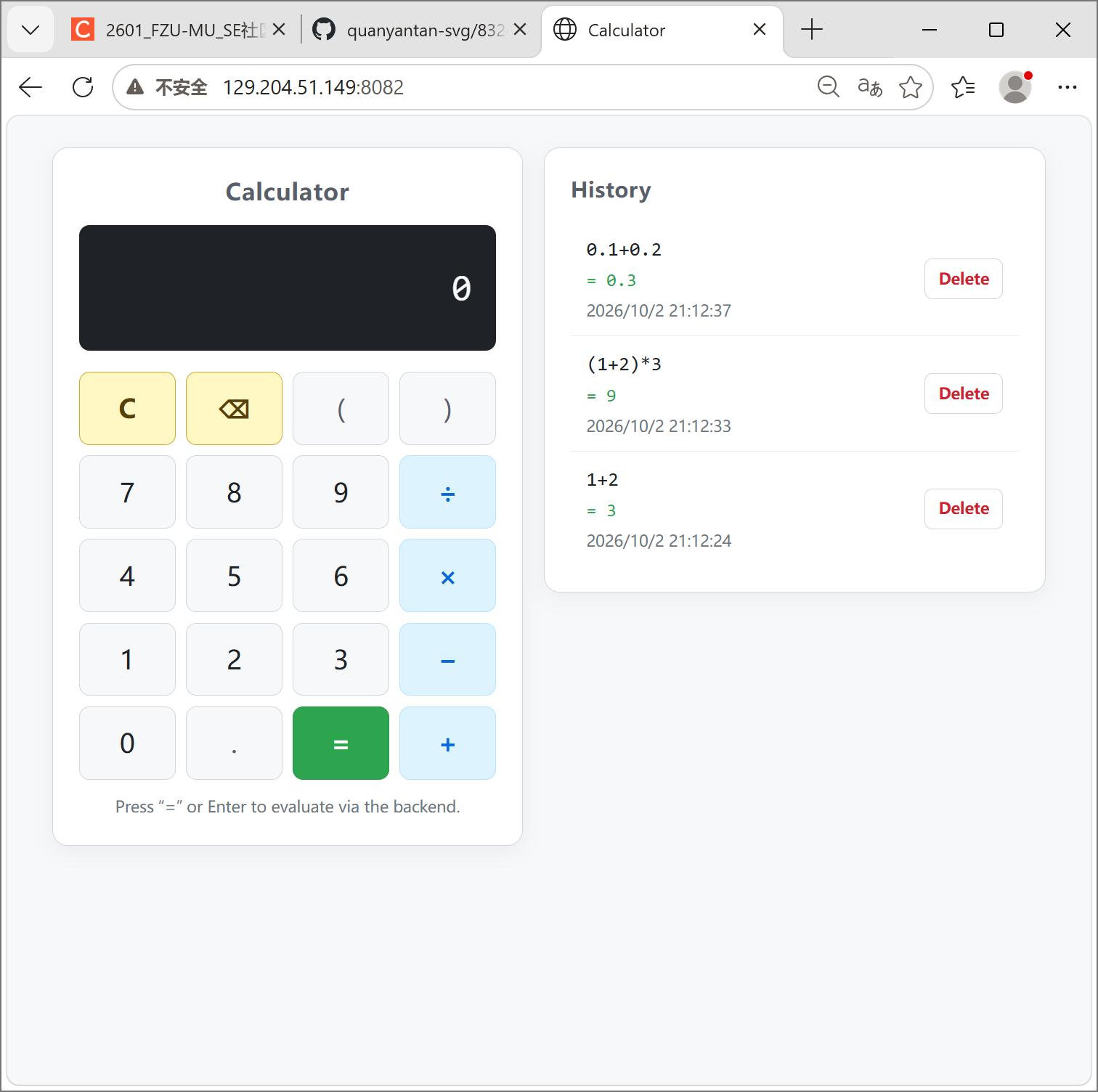
Figure 1. Public deployment of the calculator system.
Figure 1 shows the final calculator accessed through the public Tencent Cloud server. The calculator interface and history panel are served through Nginx on port 8082.
4.2 Compound Expression Calculation

Figure 2. Compound expression calculation on the deployed system.
The expression:
(1+2)*3
returns:
9
The frontend does not calculate this result. It sends the expression to the FastAPI backend and displays the returned result.
4.3 Basic Calculation

Figure 3. Basic arithmetic calculation during local integration testing.
The calculation:
1+2
returns:
3
This verifies the basic arithmetic request and response flow.
4.4 Decimal Arithmetic

Figure 4. Exact decimal calculation performed by the backend.
The expression: 0.1+0.2

returns: 0.3
The backend uses Python Decimal arithmetic rather than normal binary floating-point evaluation, avoiding the common 0.30000000000000004 result.
4.5 Division-by-Zero Handling

Figure 5. Division-by-zero exception displayed by the frontend.
For:
1/0
the backend rejects the calculation and returns a controlled error message:
division by zero
A failed calculation is not stored as successful calculation history.
4.6 Backend API Logs

Figure 6. Backend HTTP requests during integration testing.
The backend log shows successful POST /api/calculate and GET /api/history requests as well as HTTP 400 responses for invalid calculations.
This also demonstrates that mathematical evaluation is performed through backend API requests instead of local browser calculation.
4.7 History Before Deletion
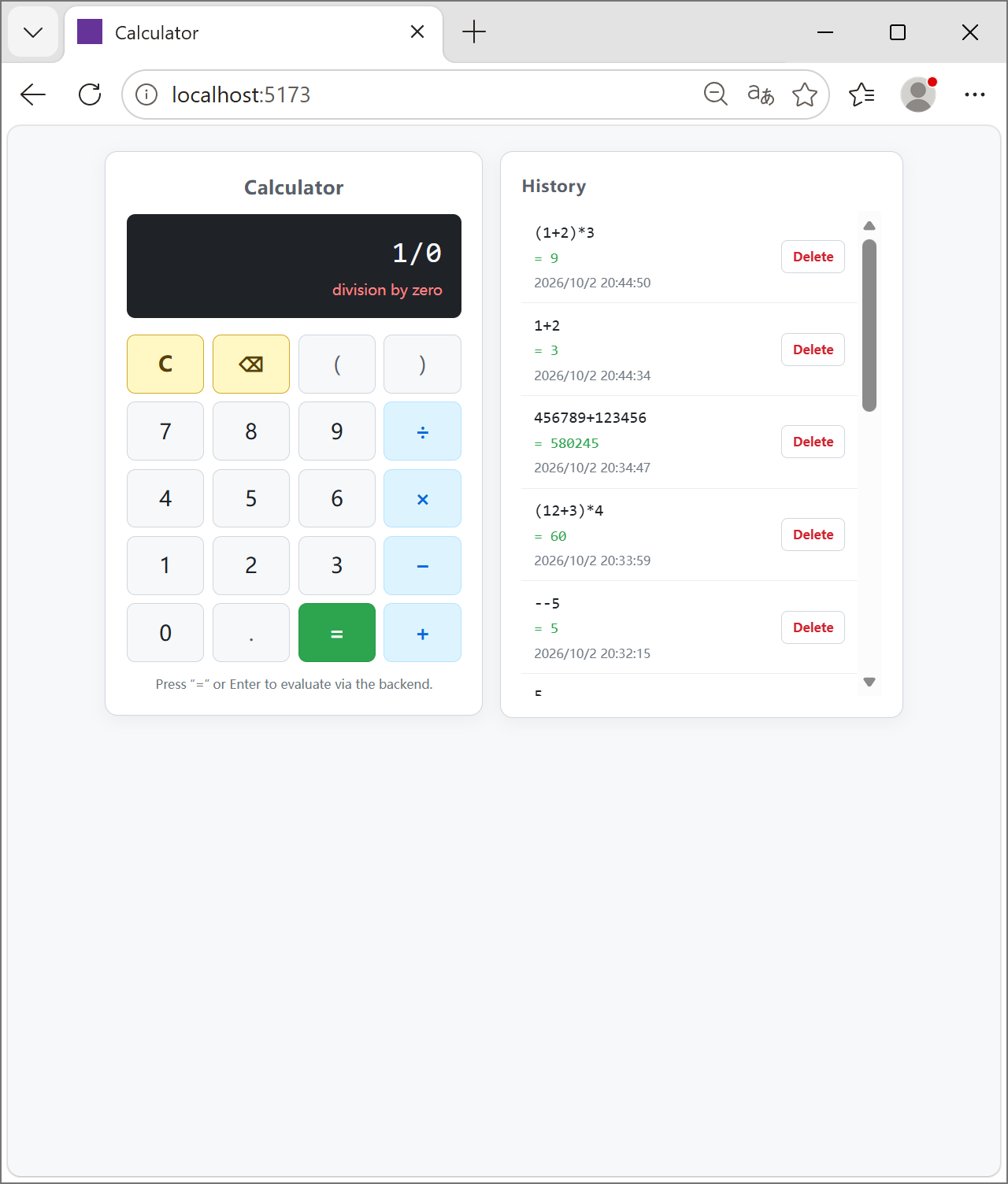
Figure 7. Calculation history before deleting a selected record.
Each history entry contains an expression, result, timestamp, and an individual Delete button.
4.8 History After Deletion
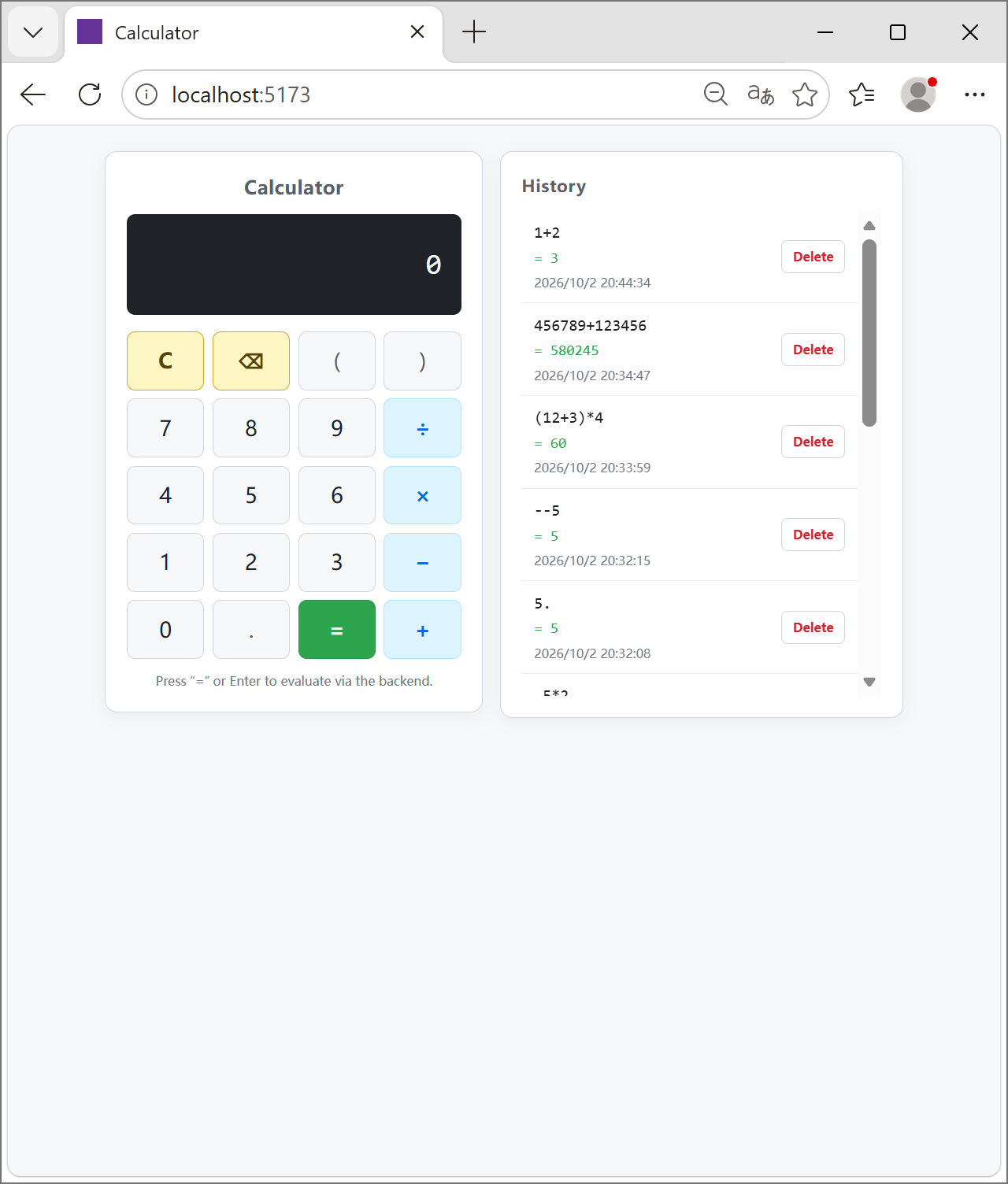
Figure 8. Calculation history after a selected record was deleted.
Only the selected record is removed. The other database records remain unchanged.
The frontend does not simply hide the row locally. It sends the backend record ID to the DELETE API and then performs another history query.
4.9 Production Calculation Network Flow

Figure 9. Production calculation request followed by history refresh.
The browser developer tools show two important requests after evaluating an expression:
POST /api/calculate
GET  /api/history
Both return HTTP 200.
The first request calculates and persists the result. The second retrieves the authoritative history state from the backend.
4.10 Production Delete Network Flow

Figure 10. Production deletion followed by an authoritative history refresh.
Deleting a selected history item generates a backend DELETE request followed by another GET /api/history.
The backend system log independently confirmed:
DELETE /api/history/8  200 OK
GET /api/history       200 OK
This design prevents the frontend from becoming the source of truth for database history.
4.11 Production Health Check

Figure 11. Production backend health check and database connectivity.
The public health endpoint reports:
{
  "status": "healthy",
  "app": {
    "name": "Calculator Backend",
    "env": "production"
  },
  "database": {
    "connected": true
  }
}
This verifies both the production FastAPI application and its MySQL connection.
4.12 systemd Backend Service

Figure 12. FastAPI backend managed by systemd on the production server.
The server reports: Active: active (running)

The service starts Uvicorn using: 127.0.0.1:8000
Therefore, FastAPI is available internally to Nginx but is not directly exposed as the public web endpoint.
4.13 Production Services

Figure 13. MySQL, FastAPI, and Nginx active after deployment verification.
The production server confirms that:
MySQL              active
Calculator Backend active
Nginx              active
The server reboot test also confirmed that these services recover correctly.
4.14 Responsive Interface

Figure 14. Responsive mobile layout of the deployed calculator.
On a narrow viewport, the two-column desktop interface changes into a vertical layout. The calculator remains fully usable and the history panel is displayed underneath it.
5. Requirement Analysis
The project was divided into four main functional requirements.
5.1 Basic Calculation
The calculator supports:
+
-
*
/
The frontend constructs the expression string but does not evaluate it.
When the user presses = or Enter, the original expression is submitted to the backend.
5.2 Compound Expressions
The backend supports:
- operator precedence;
- parentheses;
- unary plus;
- unary minus;
- decimal numbers;
- whitespace;
- left-associative subtraction and division.
Examples include:
1+2*3
(1+2)*3
10-3-2
8/4/2
-(1+2)
--5
0.1+0.2
No eval, exec, JavaScript Function, or other arbitrary-code execution mechanism is used.
5.3 Persistent Calculation History
Every successful calculation is stored in the backend MySQL database.
The history contains:
id
expression
result
created_at
The frontend retrieves these records through:
GET /api/history
The frontend does not persist history using browser storage.
5.4 Delete Selected History Record
Every history row has a Delete button.
The frontend sends the corresponding database ID through:
DELETE /api/history/{id}
After successful deletion, the frontend retrieves the history again instead of locally filtering the list.
This ensures that the displayed history always follows the backend database state.
6. Design and Implementation Process
6.1 Functional Structure

Figure 15. Functional structure of the calculator system.
The system contains four major functional areas:
- calculator functionality;
- calculation history;
- frontend presentation and interaction;
- backend business logic and data access.
The calculator branch contains basic arithmetic, compound expressions, and error handling.
The history branch is responsible for saving, querying, persisting, and deleting records.
The frontend provides user input and presentation, while the backend owns the trusted calculation and database logic.
6.2 Overall System Architecture

Figure 16. Production architecture of the front-end/back-end separated calculator.
The production request flow is:
Browser
   |
   | HTTP :8082
   v
Nginx
   |
   +----> Vue Static Frontend
   |
   +----> /api/* and /health
              |
              v
        FastAPI
        127.0.0.1:8000
              |
              v
           MySQL
        127.0.0.1:3306
Nginx is the public-facing web layer.
FastAPI and MySQL are internal services and are not intended to be accessed directly from the public Internet.
6.3 Frontend Design
The frontend is implemented with:
Vue 3
Vite
JavaScript
Plain CSS
Native fetch API
The main frontend components are:
CalculatorDisplay.vue
CalculatorKeypad.vue
HistoryList.vue
App.vue
calculatorApi.js
CalculatorDisplay.vue displays the current expression, backend result, loading message, or controlled error.
CalculatorKeypad.vue only emits user interaction events. It does not contain mathematical calculation logic.
HistoryList.vue renders records returned by the backend and emits the selected backend record ID when Delete is clicked.
calculatorApi.js owns all frontend HTTP communication.
App.vue coordinates UI state and controls the calculation/history workflow.
A deliberate design choice is that HTTP requests are not duplicated throughout Vue components. All three operations are centralized in the API service:
POST   /api/calculate
GET    /api/history
DELETE /api/history/{id}
6.4 Backend Design
The backend uses:
FastAPI
SQLAlchemy 2.x
PyMySQL
MySQL 8.0
Python Decimal
The backend is separated into:
API routes
Schemas
Services
Expression parser
Database configuration
SQLAlchemy model
Exception handling
The HTTP route layer remains small. Business logic is delegated to the service layer.
For example, the calculation endpoint does not directly parse the expression:
@router.post(
    "/calculate",
    response_model=CalculationResponse,
    status_code=status.HTTP_200_OK,
)
def calculate(
    payload: CalculationRequest,
    db: Session = Depends(get_db),
) -> CalculationResponse:
    service = CalculatorService()
    result = service.calculate_and_persist(db, payload.expression)
    return CalculationResponse(
        expression=result.expression,
        result=result.result,
    )
This provides a clear separation between:
HTTP interface
↓
service logic
↓
parser/database
6.5 API Design
The system exposes four primary backend endpoints.
| Method | Endpoint | Responsibility |
|---|---|---|
| GET | /health | Check application and database connectivity |
| POST | /api/calculate | Validate, evaluate, persist, and return a calculation |
| GET | /api/history | Retrieve calculation history newest-first |
| DELETE | /api/history/{id} | Delete one selected database record |
Calculation Request
Example:
{
  "expression": "(1+2)*3"
}
Successful response:
{
  "success": true,
  "expression": "(1+2)*3",
  "result": "9"
}
The result is represented as a string so that the frontend displays the backend's formatting directly without performing additional numeric calculation.
6.6 Database Design
The history table is:
calculation_history
Its main fields are:
| Field | Type | Description |
|---|---|---|
id | INTEGER | Auto-increment primary key |
expression | VARCHAR(1024) | Original expression |
result | VARCHAR(1024) | Backend-calculated result |
created_at | DATETIME | Database creation timestamp |
The SQLAlchemy model is conceptually:
class CalculationHistory(Base):
    __tablename__ = "calculation_history"

    id = mapped_column(
        Integer,
        primary_key=True,
        autoincrement=True,
    )

    expression = mapped_column(
        String(1024),
        nullable=False,
    )

    result = mapped_column(
        String(1024),
        nullable=False,
    )

    created_at = mapped_column(
        DateTime,
        nullable=False,
        server_default=func.current_timestamp(),
    )
The database owns history persistence. Closing or refreshing the browser therefore does not destroy stored calculation records.
6.7 Expression Parsing and Calculation
A major requirement was to process mathematical expressions without using eval.
I implemented a recursive-descent parser with the following grammar:
expression = term (("+" | "-") term)*
term       = unary (("*" | "/") unary)*
unary      = ("+" | "-") unary | primary
primary    = NUMBER | "(" expression ")"
Each grammar level naturally expresses mathematical precedence.
expression() processes addition and subtraction.
term() processes multiplication and division.
unary() handles repeated unary signs.
primary() handles decimal numbers and parentheses.
For example:
def _expression(self) -> Decimal:
    left = self._term()

    while True:
        token = self._peek()

        if token is None or token.kind not in (
            _TokenKind.PLUS,
            _TokenKind.MINUS,
        ):
            return left

        op = self._consume()
        right = self._term()

        if op.kind == _TokenKind.PLUS:
            left = left + right
        else:
            left = left - right
Because _expression() requests operands from _term(), multiplication and division are completed before addition and subtraction.
Therefore:
1+2*3
becomes:
7
while:
(1+2)*3
becomes:
9
6.8 Decimal Arithmetic
The parser converts number tokens into Python Decimal values.
For example:
value = Decimal(literal)
After calculation, the result is normalized before being returned:
def normalize_decimal(value: Decimal) -> str:
    if value == 0:
        return "0"

    return format(value.normalize(), "f")
This allows:
0.1+0.2
to return exactly:
0.3
instead of exposing binary floating-point artifacts.
6.9 Calculation History and Deletion
After parsing and calculating an expression, the backend creates a database record:
record = CalculationHistory(
    expression=expression,
    result=normalized,
)

db.add(record)
db.commit()
Only after the database operation succeeds does the service return the successful calculation.
History retrieval reads directly from MySQL and orders records newest-first:
rows = (
    db.query(CalculationHistory)
    .order_by(CalculationHistory.id.desc())
    .all()
)
Deletion uses the backend record ID:
record = db.get(
    CalculationHistory,
    history_id,
)

if record is None:
    raise HistoryNotFoundError(...)

db.delete(record)
db.commit()
The frontend then performs a new GET /api/history.
This prevents a frontend-only fake deletion.
6.10 Exception Handling
The backend rejects invalid syntax before the expression can be persisted.
For division:
if right == 0:
    raise DivisionByZeroError(
        "division by zero"
    )
The tokenizer also rejects unsupported characters:
raise InvalidExpressionError(
    f"unexpected character {ch!r} at position {i}"
)
Other invalid situations include:
empty expression
malformed decimal literals
unmatched parentheses
unexpected operators
trailing tokens
expression length above the configured limit
The API converts these application-level exceptions into controlled HTTP responses rather than exposing an internal Python stack trace to the browser.
6.11 Frontend-Backend Interaction Flow
For a successful calculation, the complete flow is:
1. User enters an expression
        ↓
2. Vue stores the expression string
        ↓
3. POST /api/calculate
        ↓
4. FastAPI validates the request
        ↓
5. Recursive-descent parser evaluates the expression
        ↓
6. CalculatorService normalizes the Decimal result
        ↓
7. SQLAlchemy inserts the record into MySQL
        ↓
8. FastAPI returns the result
        ↓
9. Vue displays the backend result
        ↓
10. GET /api/history
        ↓
11. Vue displays the authoritative database history
For deletion:
User selects Delete
        ↓
record.id
        ↓
DELETE /api/history/{id}
        ↓
MySQL row deleted and committed
        ↓
GET /api/history
        ↓
Frontend renders refreshed history
7. Key Code Explanation
7.1 Frontend Calculation Request
All frontend HTTP communication is centralized in calculatorApi.js.
A calculation uses:
const response = await fetch(url, {
  method: 'POST',
  headers: {
    'Content-Type': 'application/json',
  },
  body: JSON.stringify({ expression }),
});
The frontend sends only:
{
  "expression": "..."
}
It never sends a locally calculated answer.
The returned result is then used directly:
return {
  expression:
    typeof payload.expression === 'string'
      ? payload.expression
      : expression,
  result: payload.result,
};
7.2 No Frontend Calculation Fallback
App.vue waits for the backend:
const data =
  await calculateExpression(currentExpression);

result.value = data.result;
If the backend cannot be reached:
errorMessage.value =
  'Unable to connect to the calculator service.';

result.value = '';
There is deliberately no local arithmetic fallback.
This is important because it preserves the front-end/back-end responsibility boundary.
7.3 Safe Recursive-Descent Parsing
The backend tokenizer accepts only supported mathematical characters.
The parser then consumes tokens according to a fixed grammar.
For multiplication and division:
def _term(self) -> Decimal:
    left = self._unary()

    while True:
        token = self._peek()

        if token is None or token.kind not in (
            _TokenKind.STAR,
            _TokenKind.SLASH,
        ):
            return left

        op = self._consume()
        right = self._unary()

        if op.kind == _TokenKind.STAR:
            left = left * right
        else:
            if right == 0:
                raise DivisionByZeroError(
                    "division by zero"
                )

            left = left / right
No source string is passed to Python's eval() or exec().
7.4 Database Persistence
Successful results are persisted before the request is considered successful:
record = CalculationHistory(
    expression=expression,
    result=normalized,
)

db.add(record)

try:
    db.commit()
except SQLAlchemyError as exc:
    db.rollback()
    raise PersistenceError(
        "failed to persist calculation"
    ) from exc
The transaction is rolled back if the database commit fails.
7.5 Authoritative History Refresh
After a successful deletion, the frontend does not perform:
history.value =
  history.value.filter(...);
Instead, it performs:
await deleteHistory(historyId);
await loadHistory();
The list displayed after deletion therefore comes from the backend database.
7.6 History Race Protection
A further frontend hardening step prevents an older history request from overwriting a newer one.
App.vue maintains a monotonic request sequence:
let historyRequestSequence = 0;
Every history load receives its own identifier:
const requestId =
  ++historyRequestSequence;

const items =
  await getHistory();

if (
  requestId !== historyRequestSequence
) {
  return;
}

history.value = items;
This is especially important when calculation, deletion, and history-refresh operations occur close together.
8. Testing and Verification
Testing was performed at multiple levels:
Expression parser
Service layer
Database operations
HTTP API
Frontend/backend integration
Browser behavior
Production deployment
Server restart persistence
Representative acceptance tests included:
| Test | Expected Result | Result |
|---|---|---|
1+2 | 3 | Passed |
10-3-2 | 5 | Passed |
8/4/2 | 1 | Passed |
1+2*3 | 7 | Passed |
(1+2)*3 | 9 | Passed |
0.1+0.2 | 0.3 | Passed |
.5*2 | 1 | Passed |
5. | 5 | Passed |
-(1+2) | -3 | Passed |
--5 | 5 | Passed |
1/0 | Controlled error | Passed |
| Invalid expression | HTTP 400 / controlled message | Passed |
| Browser refresh | History remains | Passed |
| Backend restart | History remains | Passed |
| Server restart | History remains | Passed |
| Delete one ID | Only selected row disappears | Passed |
| Backend offline | No new valid frontend result | Passed |
A particularly important verification was stopping the backend while leaving the frontend available.
In this state, the frontend still allowed expression editing, but pressing = could not produce a new valid answer.
This confirmed that calculation logic had not been duplicated in the Vue application.
9. Production Deployment
9.1 Environment
The application was deployed on a Tencent Cloud Lighthouse Ubuntu server.
The production components are:
Vue production build
Nginx
FastAPI
Python 3.12 virtual environment
systemd
MySQL 8.0
The public address is:
http://129.204.51.149:8082
The current deployment uses HTTP. HTTPS has not been configured.
9.2 Frontend Deployment
The production frontend was built with:
VITE_API_BASE_URL=http://129.204.51.149:8082 npm run build
The resulting files were copied to:
/var/www/calculator
Nginx serves this directory as the calculator frontend.
The browser must not use:
http://127.0.0.1:8000
as its production API address because 127.0.0.1 in a remote browser refers to the user's own computer.
Instead, browser API requests are sent through the public Nginx endpoint.
9.3 Backend Deployment
The backend repository is deployed under:
/opt/calculator/backend
A Python 3.12 virtual environment contains the backend dependencies.
FastAPI is started by systemd with:
/opt/calculator/backend/.venv/bin/python
-m uvicorn
app.main:app
--host 127.0.0.1
--port 8000
Binding Uvicorn to 127.0.0.1 ensures that port 8000 is an internal service rather than the public application endpoint.
9.4 Nginx Reverse Proxy
For this calculator project, Nginx accepts public traffic on:
8082
Its routing responsibilities are:
/          → Vue static files
/api/      → FastAPI 127.0.0.1:8000
/health    → FastAPI 127.0.0.1:8000/health
Therefore, users only interact with the Nginx endpoint.
9.5 MySQL
MySQL runs locally on the server:
127.0.0.1:3306
The production database stores persistent calculation history.
Credentials are stored in the backend server .env file and are not committed to Git.
9.6 Deployment Problems and Solutions
Several deployment issues occurred.
Python Version Compatibility
SQLAlchemy 2.1.2 required Python 3.11 or later, so the production environment was rebuilt using Python 3.12.
Uvicorn and systemd
The first systemd startup failed because the expected Uvicorn executable did not exist in the incomplete virtual environment.
The final service uses:
.venv/bin/python -m uvicorn
which explicitly runs Uvicorn using the project's virtual environment.
Nginx 502 Bad Gateway
Nginx initially returned:
502 Bad Gateway
because FastAPI was not running.
After the Python environment and systemd service were corrected, both:
GET /health
GET /api/history
worked through Nginx.
Port Conflict With Existing Server Application
The same server already hosted another application on port 80.
Instead of disrupting the existing service, the calculator was assigned:
8082
Nginx now serves the calculator independently on this port.
Tencent Cloud Lighthouse Firewall
Although Nginx correctly listened on:
0.0.0.0:8082
the site initially remained unreachable from the Internet.
The issue was the Tencent Cloud Lighthouse firewall rather than Ubuntu UFW.
After allowing TCP port 8082 through the Lighthouse firewall, the calculator became publicly accessible.
9.7 Restart Persistence
The complete server was rebooted as part of the deployment verification.
After reboot:
MySQL              active
Calculator Backend active
Nginx              active
The calculator remained publicly accessible, and previous history records remained in MySQL.
This confirmed that history persistence was not dependent on:
browser memory
frontend process memory
FastAPI process memory
10. Personal Journey and Learnings
This assignment changed my understanding of what front-end/back-end separation actually means.
At first, it is easy to think that separating two folders or two repositories is enough. However, the more important boundary is the responsibility of each side.
For this project, the browser is not trusted to calculate the final result. It only manages input and presentation. The backend validates, parses, calculates, handles errors, and stores the history.
One of the most useful parts of the assignment was implementing a recursive-descent expression parser.
Instead of relying on eval, I needed to explicitly describe the grammar and precedence rules. This made cases such as:
1+2*3
(1+2)*3
-(1+2)
--5
much easier to reason about.
Using Decimal also helped me understand the difference between convenient floating-point arithmetic and decimal arithmetic appropriate for a calculator interface.
The database requirement showed another important architectural difference. A history list visible in the browser does not mean that it is persistent. Real persistence requires a backend database, and deletion should also modify that database rather than only modifying the current Vue state.
Testing the delete function exposed this distinction clearly. After a successful deletion, I deliberately chose to query the backend again instead of using a local array filter.
The deployment stage provided a different kind of learning experience.
During local development, the application mainly involved Vue, FastAPI, and MySQL. Production deployment introduced additional layers:
cloud firewall
Nginx
systemd
Linux permissions
Python environments
ports
loopback interfaces
public addresses
For example, a working FastAPI application was still inaccessible when Nginx could not connect to it, and a correctly configured Nginx server was still inaccessible when the Lighthouse firewall blocked the public port.
The 502 Bad Gateway problem was therefore not solved by changing Vue code. It required tracing the complete request path layer by layer.
Another useful lesson was that production services should not all be exposed directly.
The final design exposes Nginx while FastAPI remains on:
127.0.0.1:8000
and MySQL remains on:
127.0.0.1:3306
This creates a much clearer network boundary.
If I continue improving this project, possible future work would include:
- HTTPS and a domain name;
- pagination for large history lists;
- history search;
- authenticated user accounts;
- separate history for different users;
- additional calculator functions;
- automated frontend testing;
- production monitoring and structured logging.
Overall, the project provided practical experience not only in implementing a calculator, but also in API boundaries, parser design, database persistence, testing, Linux deployment, reverse proxy configuration, and production debugging.
11. Summary
The final project implements a complete front-end/back-end separated calculator using:
Vue 3 + Vite
        ↓
HTTP JSON API
        ↓
FastAPI
        ↓
SQLAlchemy
        ↓
MySQL
The required features include:
Basic arithmetic
Compound expressions
Operator precedence
Parentheses
Unary operators
Decimal numbers
Invalid-expression handling
Division-by-zero handling
Persistent calculation history
Individual history deletion
The frontend contains no trusted calculation implementation. Every displayed successful result originates from the FastAPI backend.
Calculation history is persisted in MySQL and remains available after frontend refreshes, backend restarts, and server restarts.
The final system is publicly deployed through Nginx at:
http://129.204.51.149:8082
Both GitHub repositories contain their source code, README documentation, and coding standards.
Through this assignment, I completed the full development process from requirement analysis and architecture design to implementation, integration testing, database persistence, deployment, and final production verification.
相关推荐
基于MATLAB的复合弹性模量分析,采用混合法则,结合纤维体积分数变化和图形结果。.zip
1.版本:matlab2014a/2019b/2024b 2.附赠案例数据可直接运行。 3.代码特点:参数化编程、参数可方便更改、代码编程思路清晰、注释明细。 4.适用对象:计算机,电子信息工程、数学等专业的大学生课程设计、期末大作业和毕业设计。
基于MATLAB的自适应纯追踪曲线跟踪机器人仿真,采用多路径、自适应速度控制和图形界面可视化。.zip
1.版本:matlab2014a/2019b/2024b 2.附赠案例数据可直接运行。 3.代码特点:参数化编程、参数可方便更改、代码编程思路清晰、注释明细。 4.适用对象:计算机,电子信息工程、数学等专业的大学生课程设计、期末大作业和毕业设计。
【数据库优化】通信行业B/O域查询性能提升:基于分区裁剪与覆盖索引的秒级溯源系统实现
内容概要:本文围绕通信行业中海量话单与信令数据的查询性能问题,系统阐述了从全表扫描到秒级响应的数据库优化路径。文章以运营商 cdr_detail 表为案例,揭示了因使用函数操作索引列(如DATE(call_start_time))和深分页(LIMIT offset, size)导致的全表扫描问题,并提出完整的优化方案:通过时间范围RANGE分区实现分区裁剪、构建msisdn与时间的联合覆盖索引、消除索引列函数运算、采用游标分页替代OFFSET等方式,使查询性能从P95 8.3秒降至290毫秒。同时介绍了执行计划分析(EXPLAIN)在调优中的关键作用,并展望了HTAP架构、向量化执行与AI自治优化器等未来方向。; 适合人群:具备一定数据库基础知识,从事通信行业数据开发、DBA或后端研发的技术人员,尤其是面对大规模时序数据查询性能瓶颈的工程师;; 使用场景及目标:①解决营业厅用户详单查询、网间结算对账、VoNR信令分析等高并发、低延迟查询场景下的性能问题;②掌握如何通过分区策略、索引设计和SQL改写实现从全表扫描到精准索引访问的优化落地; 阅读建议:建议结合实际生产环境中的大表查询案例,对照本文的反例与正例进行执行计划对比分析,并在测试环境中实践分区表创建、覆盖索引构建及游标分页改写,深入理解每项优化技巧的实际效果。
石墨提纯全球市场结构与产业发展趋势分析报告(QYResearch最新研究).docx
石墨提纯全球市场结构与产业发展趋势分析报告(QYResearch最新研究)
政府科技管理者如何提升科技成果转化政策的精准匹配与执行效率?.docx
政府科技管理者如何提升科技成果转化政策的精准匹配与执行效率?




