


160
社区成员
 发帖
发帖 与我相关
与我相关 我的任务
我的任务
 分享
分享Item Information
Course for This Assignment EE308FZ
Assignment Name Web Calculator / NovaCalc
Student Name ChenKongzhou
Student ID 832401104(FZU)、24125041(MU)
The goal of this assignment is to implement a complete Web calculator with a separated frontend and backend architecture.
The calculator should not only support the four basic arithmetic operations, but also demonstrate the ability to design a backend calculation service, parse compound mathematical expressions, persist calculation history in a database, provide history deletion, and implement meaningful extended features.
The project developed for this assignment is called NovaCalc.
NovaCalc uses a browser-based frontend and a FastAPI backend. The frontend is responsible for user interaction and presentation, while the backend is responsible for validation, expression parsing, calculation, exception handling, data persistence, authentication, and other server-side operations.
Public Deployment Addresses
Frontend / Calculator:http://43.128.137.17/
Backend API: http://43.128.137.17/api
API Health Check:http://43.128.137.17/api/health
FastAPI API Documentation (Swagger):http://43.128.137.17/docs
Main Public Access
The NovaCalc calculator can be accessed directly through:
http://43.128.137.17/
Please replace the following placeholders with the actual public GitHub URLs before publishing.
Frontend Repository: https://github.com/2586491796-spec/NovaCalc-Frontend
Backend Repository: https://github.com/2586491796-spec/NovaCalc-Backend
Frontend Code Standard: Google JavaScript Style Guide
Backend Code Standard: PEP 8 – Style Guide for Python Code
Both the frontend and backend repositories contain a codestyle.md file.
The code standard is based on a recognized programming style and is used to keep the project readable, maintainable, and consistent.
The final repository should contain:
Frontend Repository ├── README.md ├── codestyle.md └── src/... Backend Repository ├── README.md ├── codestyle.md └── src/...
The code standards mainly cover:
Naming conventions
File and directory organization
Function and class organization
Comment conventions
Error handling
Formatting
Import organization
API naming
Database-related coding practices
PSP(Personal Software Process)is used to record the estimated and actual time spent during development.
| Stage | Planned Time | Actual Time Main Work |
|---|---|---|
| Requirements analysis | 1h | Analyze assignment requirements and define functional scope |
| Architecture design | 1h | Design frontend, backend, API, and database |
| Database design | 1h | Design users, sessions, history, favorites, and related data |
| Parser design | 2h | Design recursive-descent expression parser and operator precedence |
| Backend development | 4h | Implement FastAPI endpoints, calculation, validation, database operations |
| Frontend development | 5h | Implement calculator UI, history, authentication, and extended features |
| Frontend/backend integration | 2h | Connect frontend API requests with backend services |
| Testing | 2h | Test normal cases, boundary cases, invalid expressions, and persistence |
| Deployment | 1h | Configure frontend/backend services and deployment |
| Blog writing | 2h | Prepare screenshots, code explanation, PSP, and project report |
| Total | 21h | Complete project development and documentation |
NovaCalc is a frontend-backend separated Web calculator.
The project provides:
Basic arithmetic
Compound expression calculation
Parentheses
Unary plus and minus
Decimal numbers
Division-by-zero handling
Invalid-expression handling
Scientific calculations
Number-base conversion
Unit conversion
Calculation history
History search
History pagination
History deletion
User accounts
User data isolation
Favorites
Keyboard shortcuts
Theme switching
Statistics
The project uses a browser as the frontend runtime and FastAPI as the backend framework. SQLite is used for persistent data storage.
The calculator must support:
+
-
*
/
For example:
12 + 8 = 20
20 - 8 = 12
6 * 7 = 42
84 / 7 = 12
The frontend sends the user's expression to the backend, and the backend performs the final calculation and returns the result.
The calculator supports operator precedence.
For example:
1 + 2 * 3
should be interpreted as:
1 + (2 * 3)
and the result is:
7
Parentheses are also supported:
(1 + 2) * 3 = 9
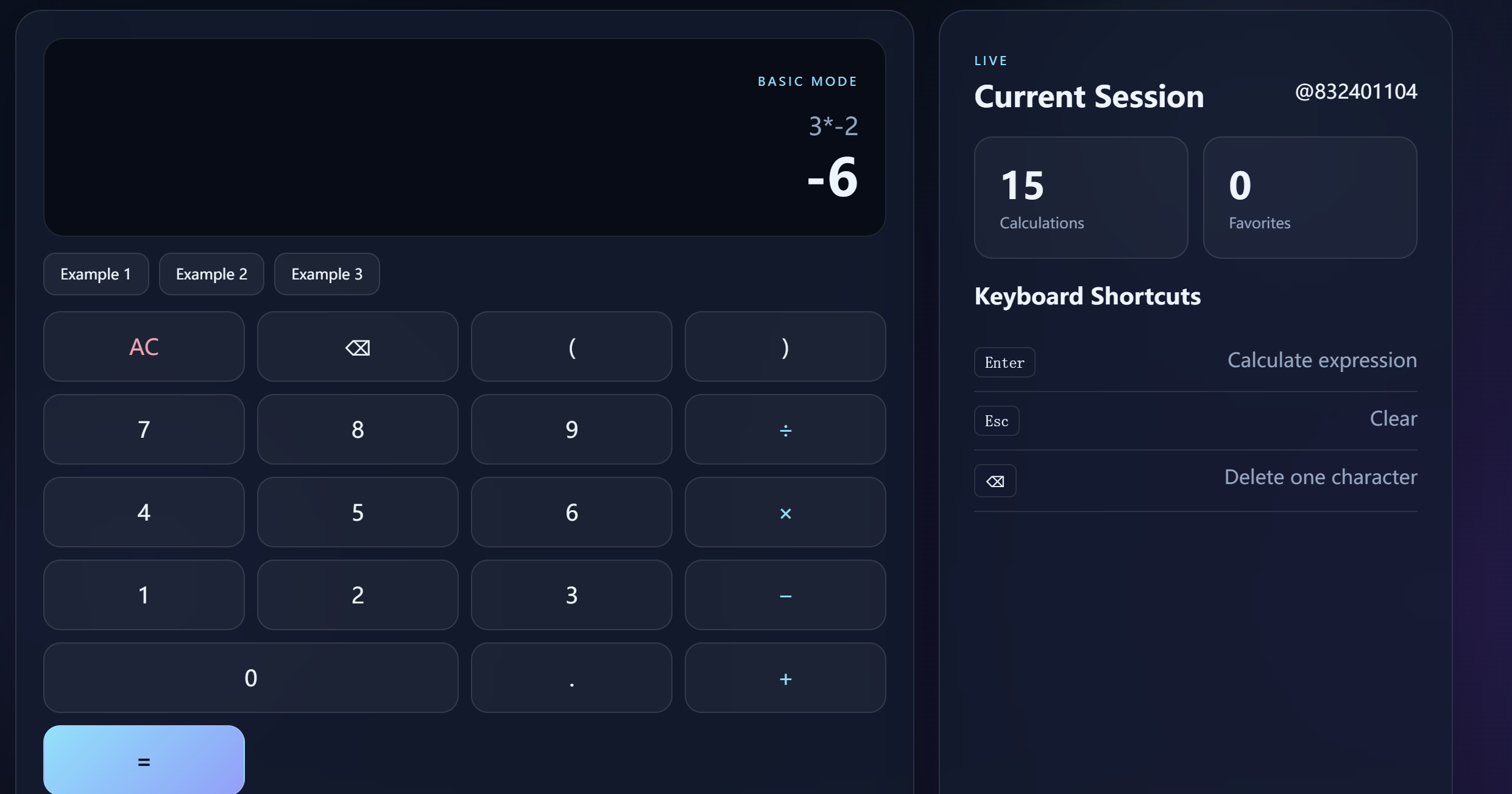
Unary operators are supported:
-5 + 8 = 3
3 * -2 = -6
Decimal values are supported:
0.5 + 1.25 = 1.75
The backend rejects invalid expressions and division by zero.
The final calculation is performed by the backend.
The backend should not simply execute arbitrary user input. NovaCalc uses an expression parser based on recursive descent instead of Python eval() or exec().
This design makes it possible to explicitly control:
Supported tokens
Operator precedence
Parentheses
Unary operators
Numeric formats
Invalid expressions
Division by zero
The main page provides the calculator interface, expression input, result display, calculation controls, history access, and other project functions.
Figure 1 --- NovaCalc main interface 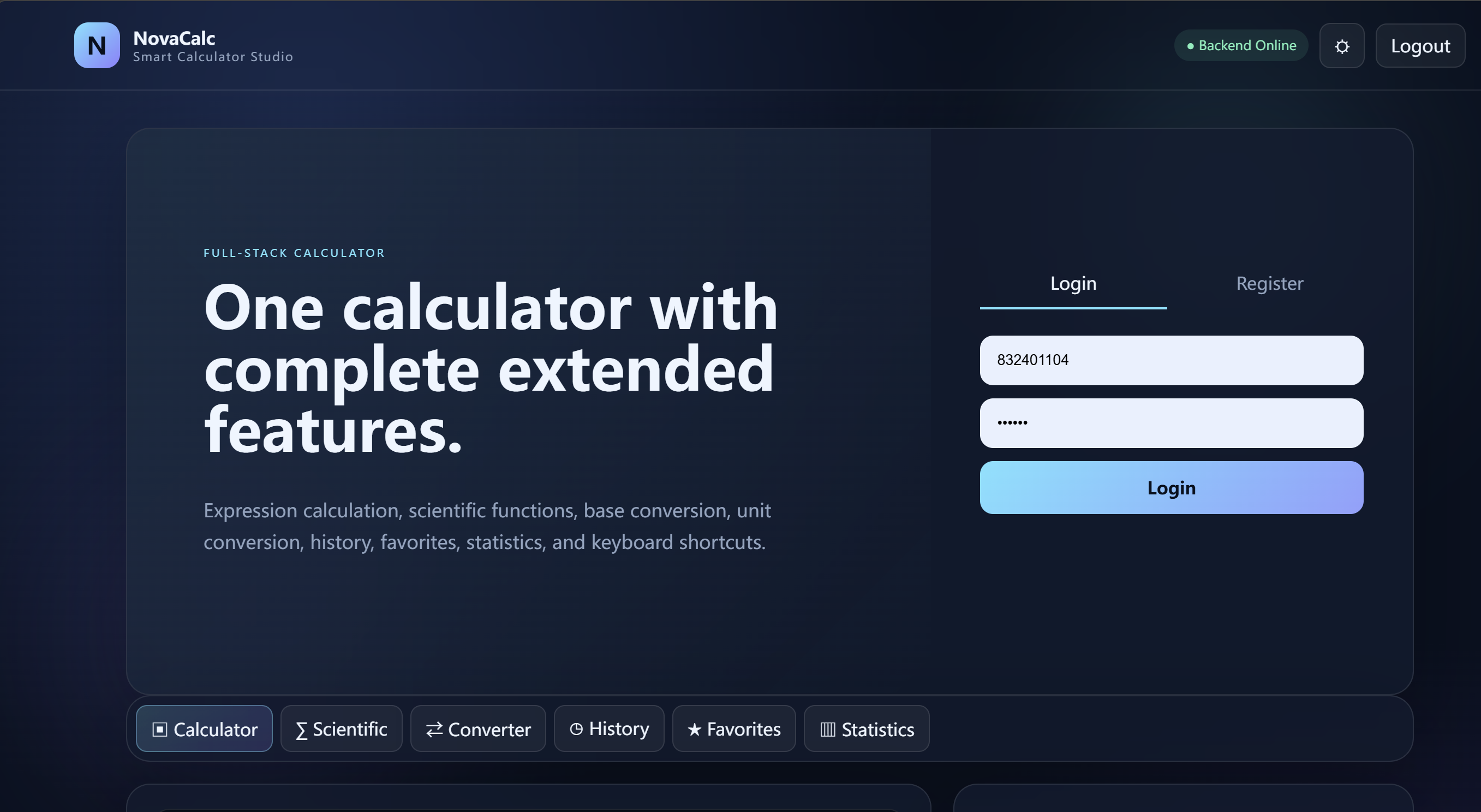
Test:
12 + 8
Expected result:
20
Figure 2 --- Addition calculation
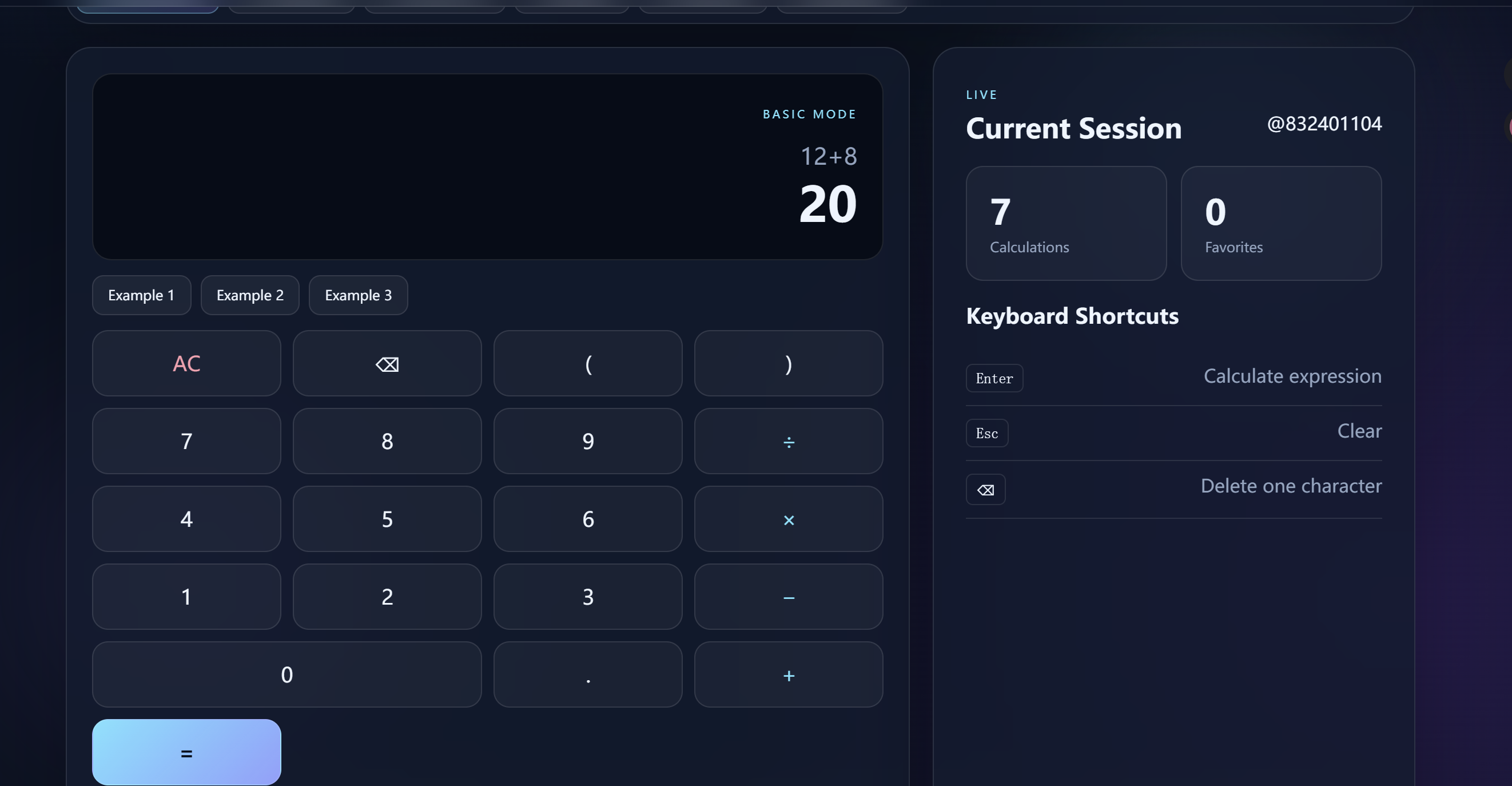
Test:
20 - 8
Expected result:
12
Figure 3 --- Subtraction calculation 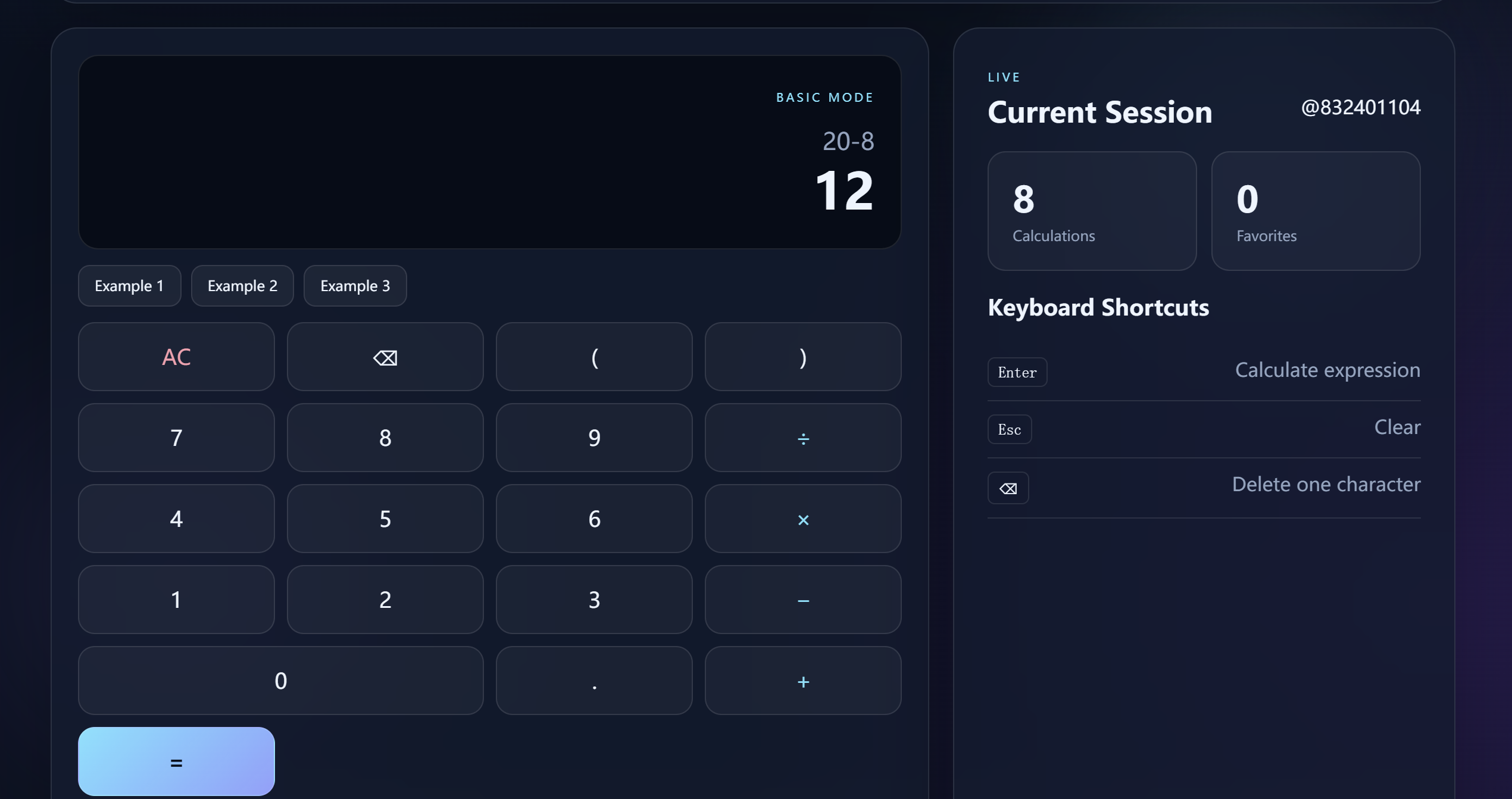
Test:
6 * 7
Expected result:
42
Figure 4 --- Multiplication calculation 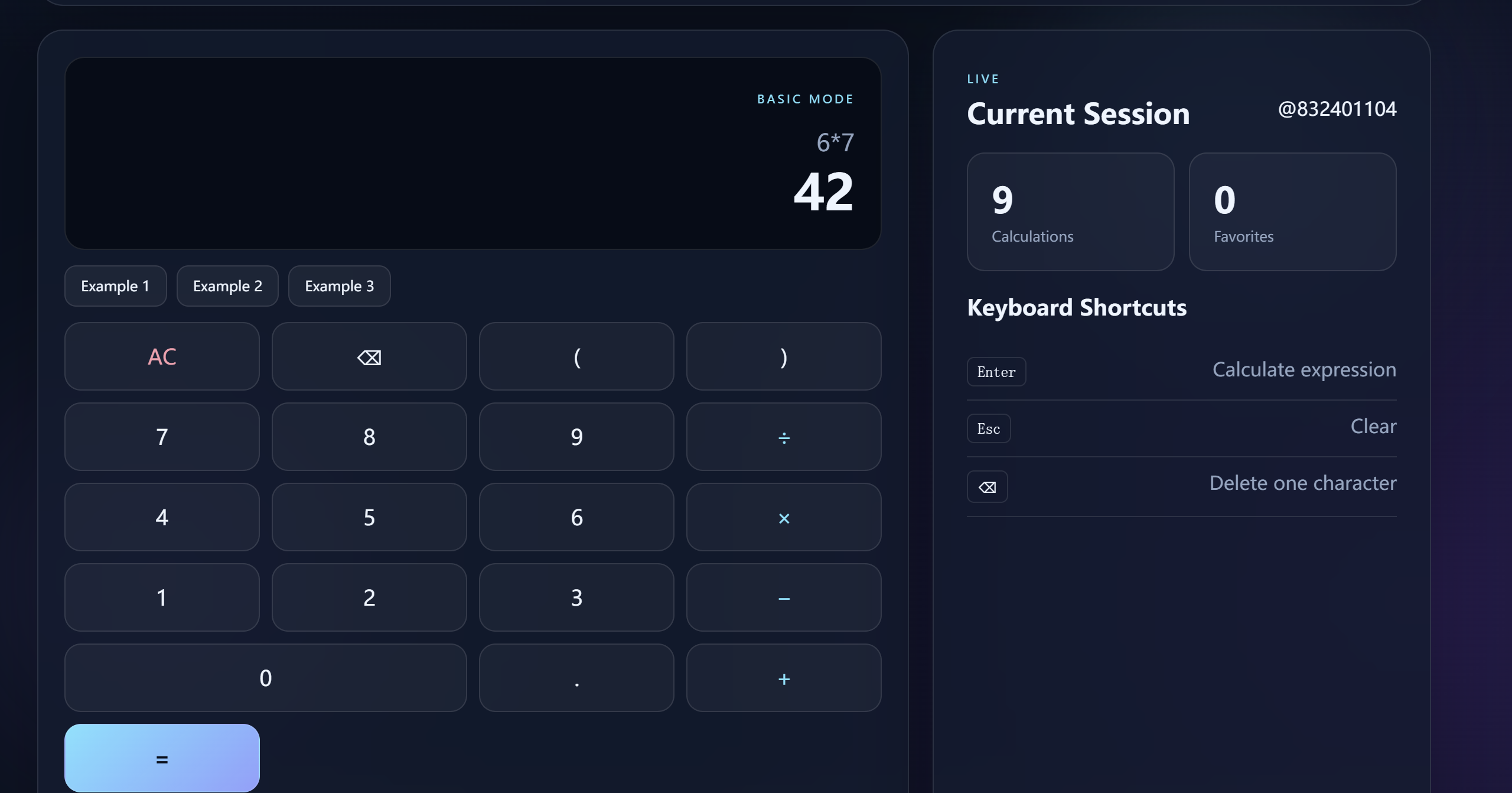
Test:
84 / 7
Expected result:
12
Figure 5 --- Division calculation 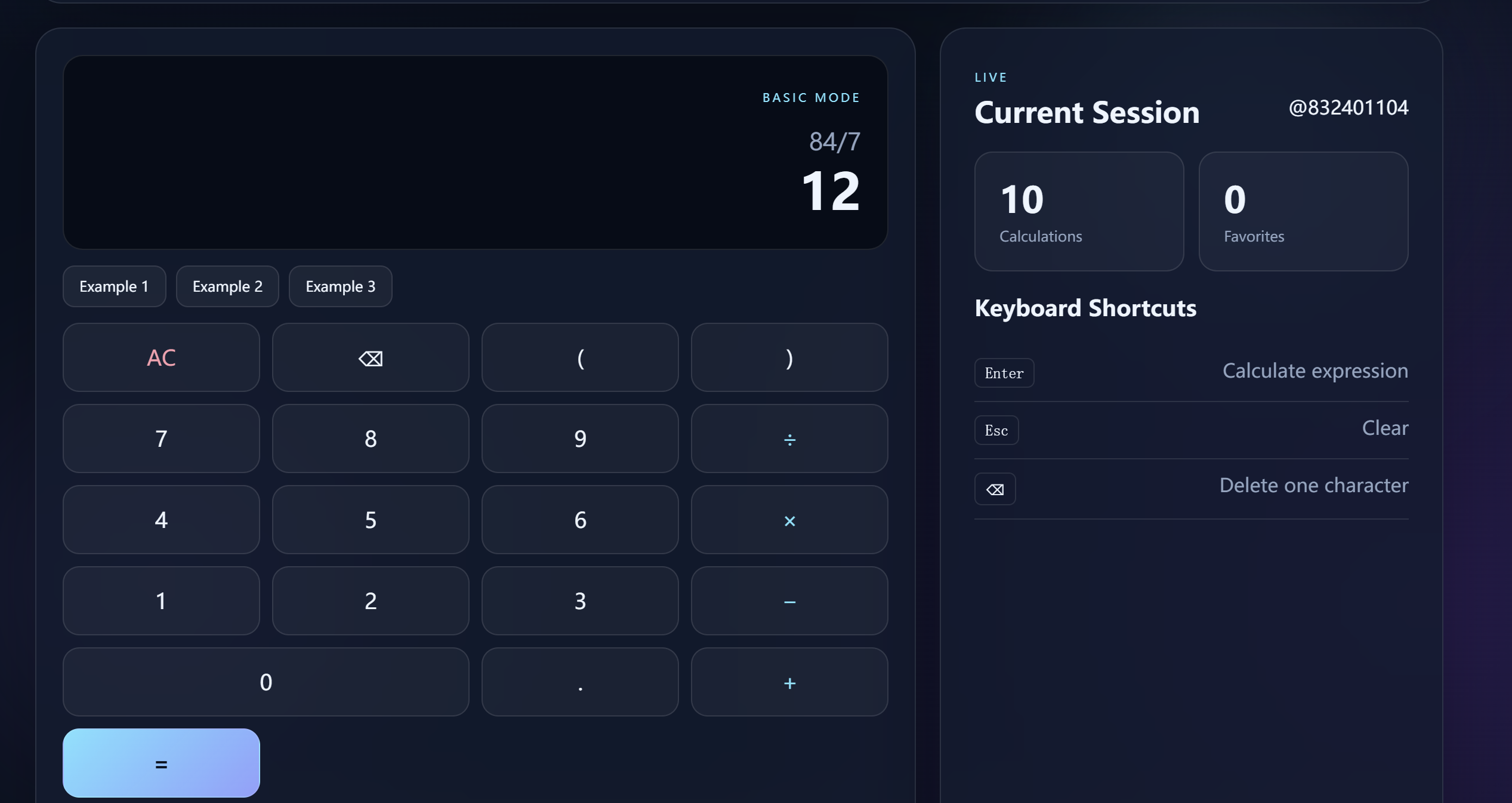
Test:
0.5 + 1.25
Expected result:
1.75
Figure 6 --- Decimal calculation 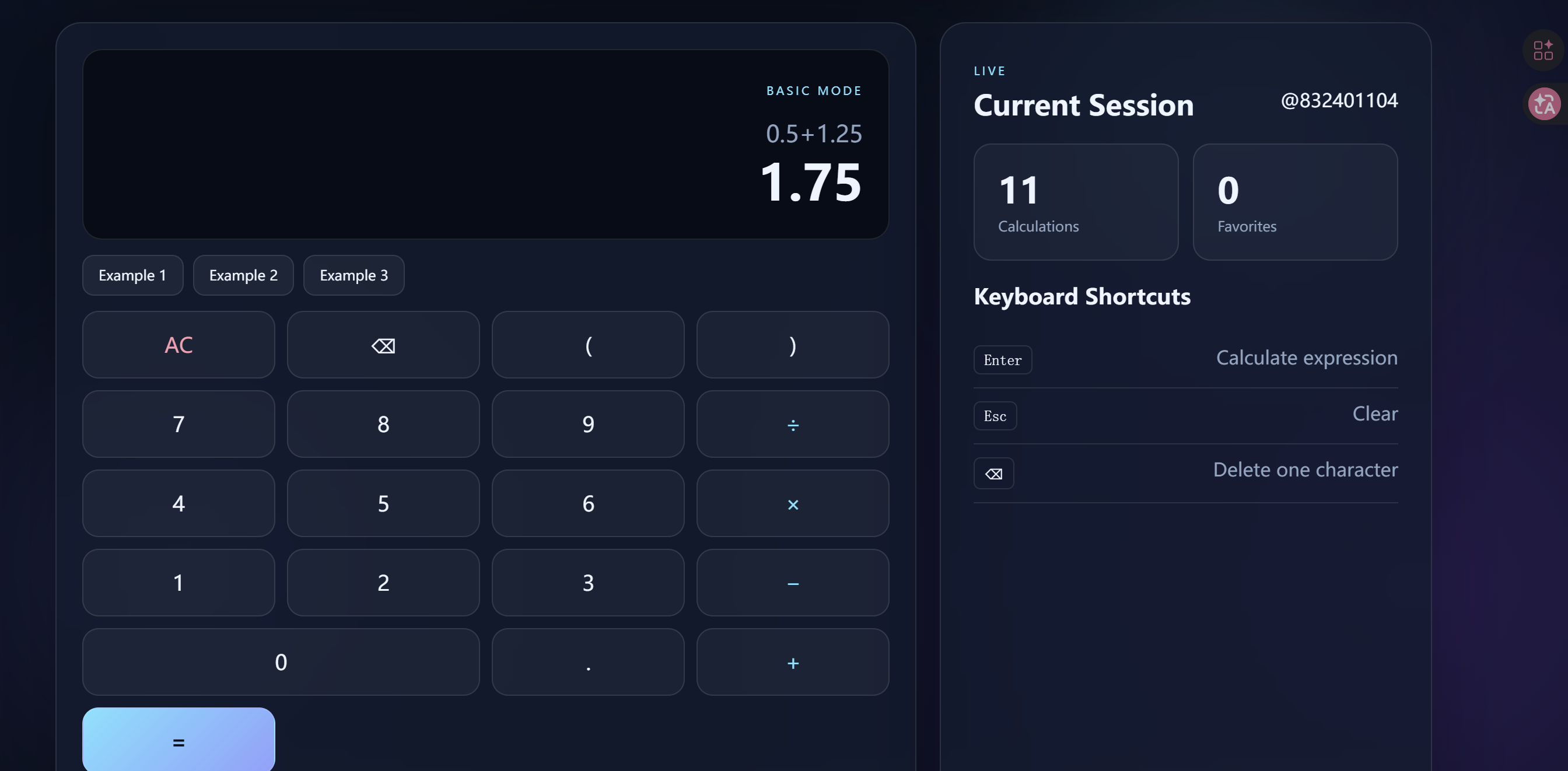
Test:
1 + 2 * 3
Expected result:
7
This demonstrates that multiplication has higher precedence than addition.
Figure 7 --- Operator precedence 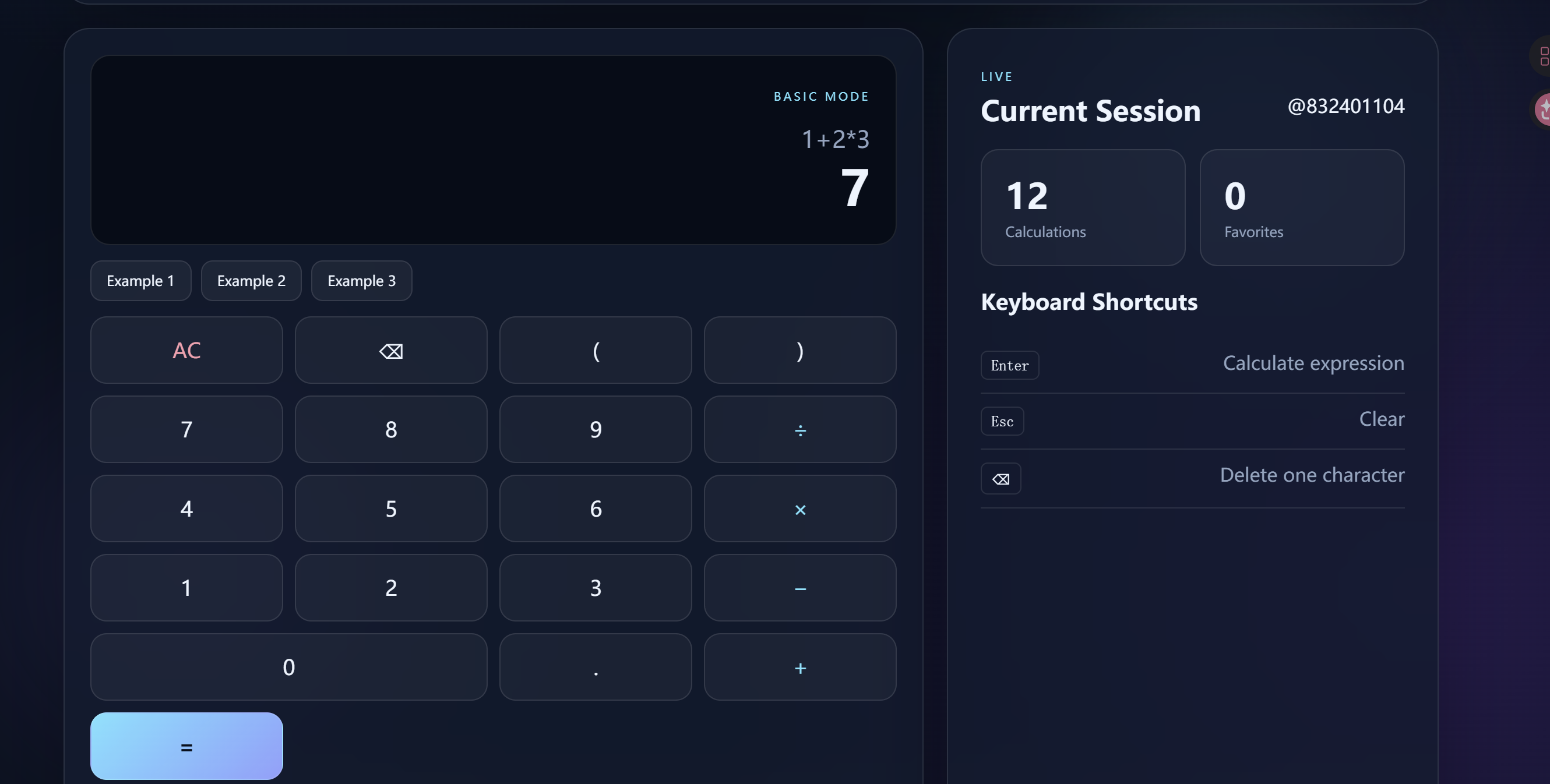
Test:
(1 + 2) * 3
Expected result:
9
Figure 8 --- Parentheses calculation 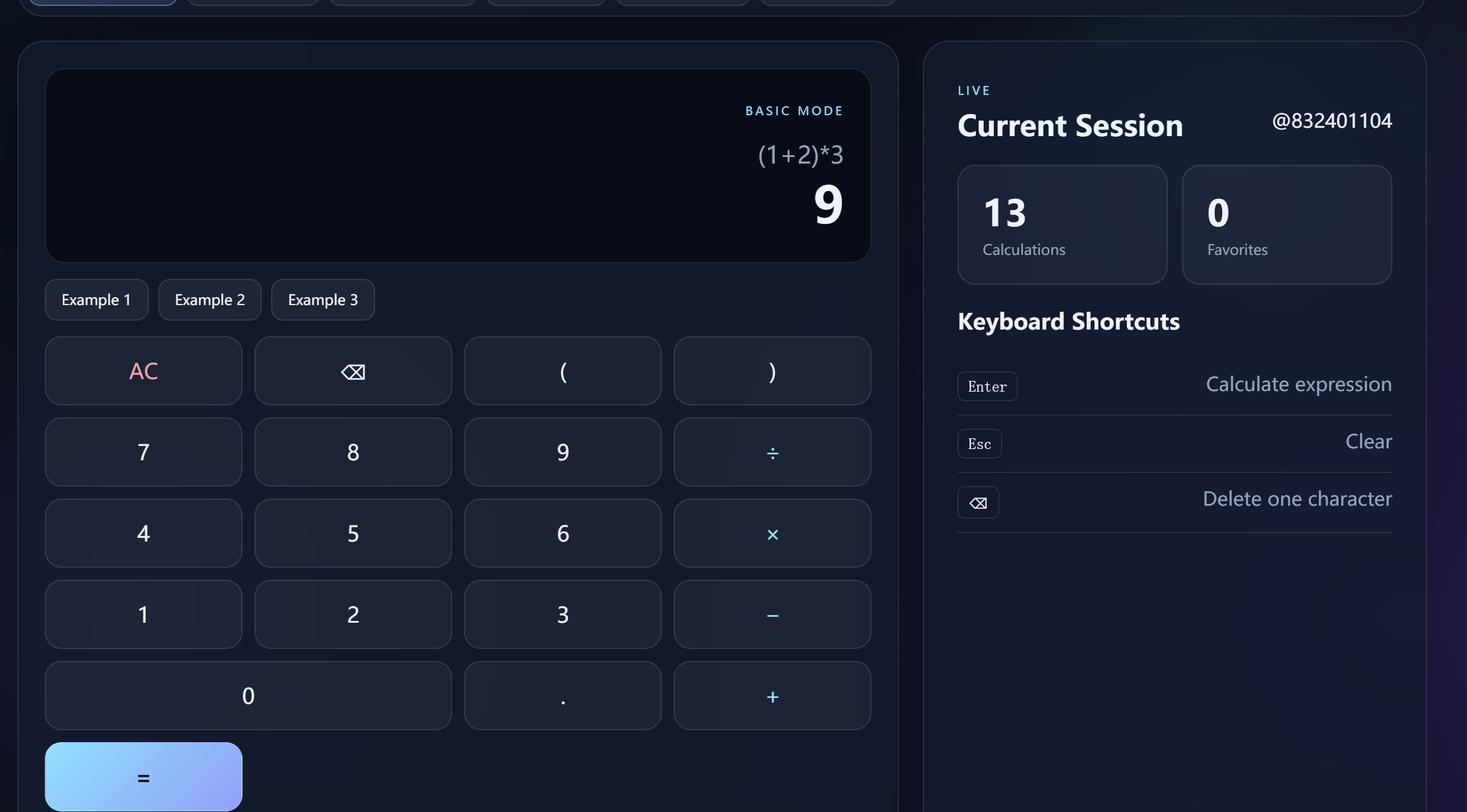
Examples:
-5 + 8 = 3
3 * -2 = -6
Figure 9 --- Unary operator calculation 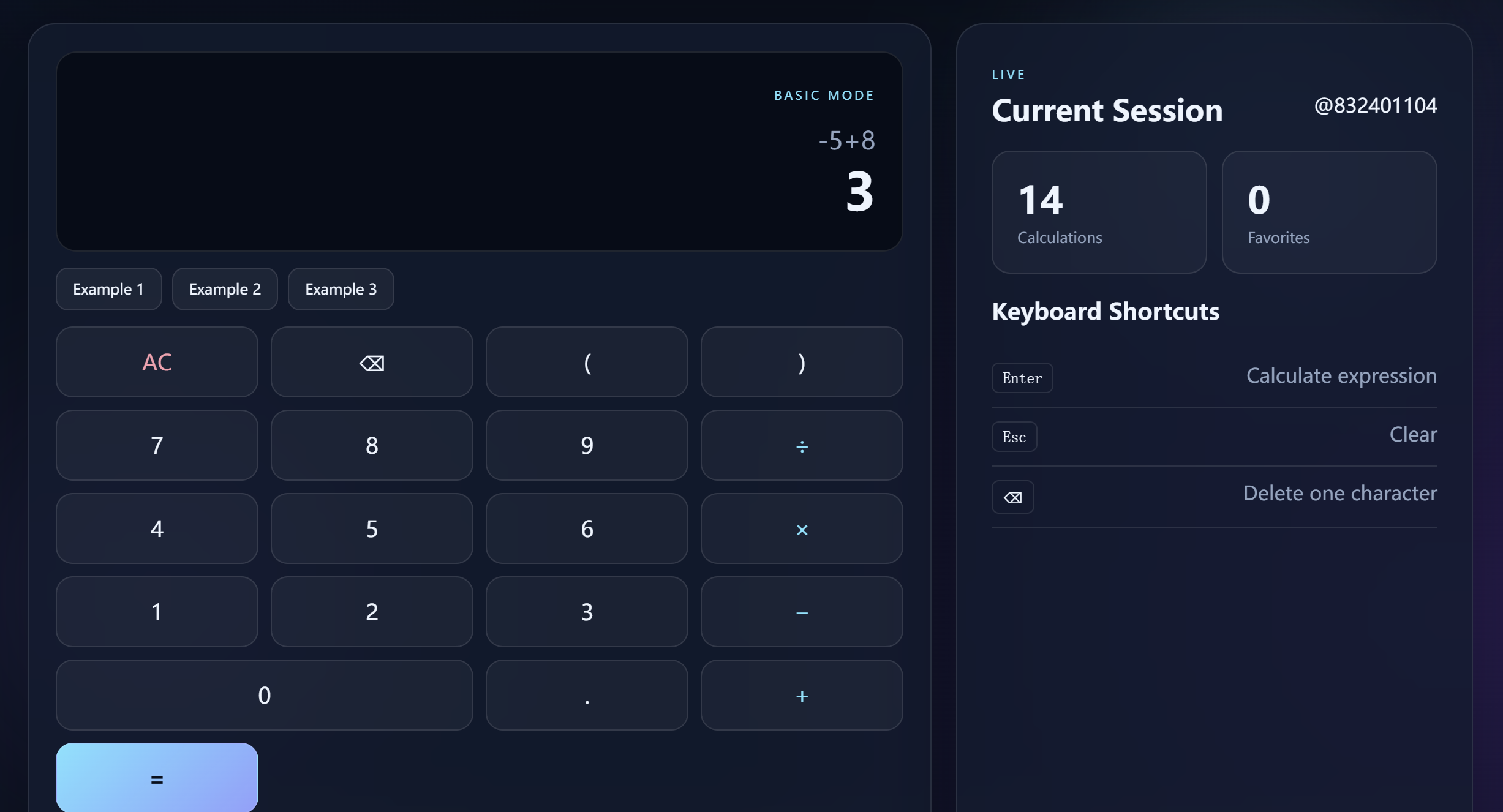
Example:
1 + *
or:
(1 + 2
The backend should reject the expression and return an error instead of producing a misleading result.
Figure 10 --- Invalid expression error 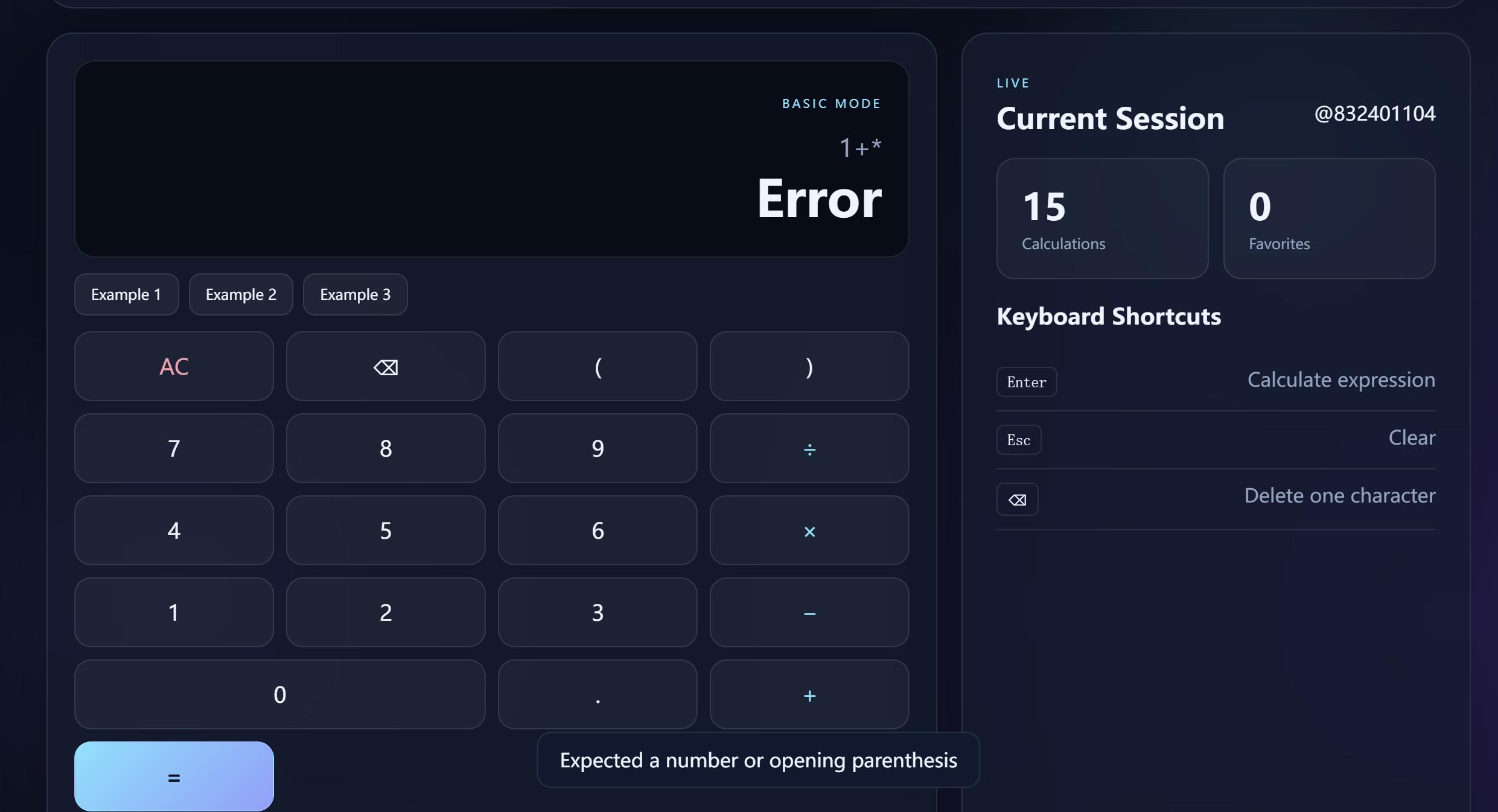
Test:
10 / 0
The application should display an appropriate error message.
Figure 11 --- Division by zero 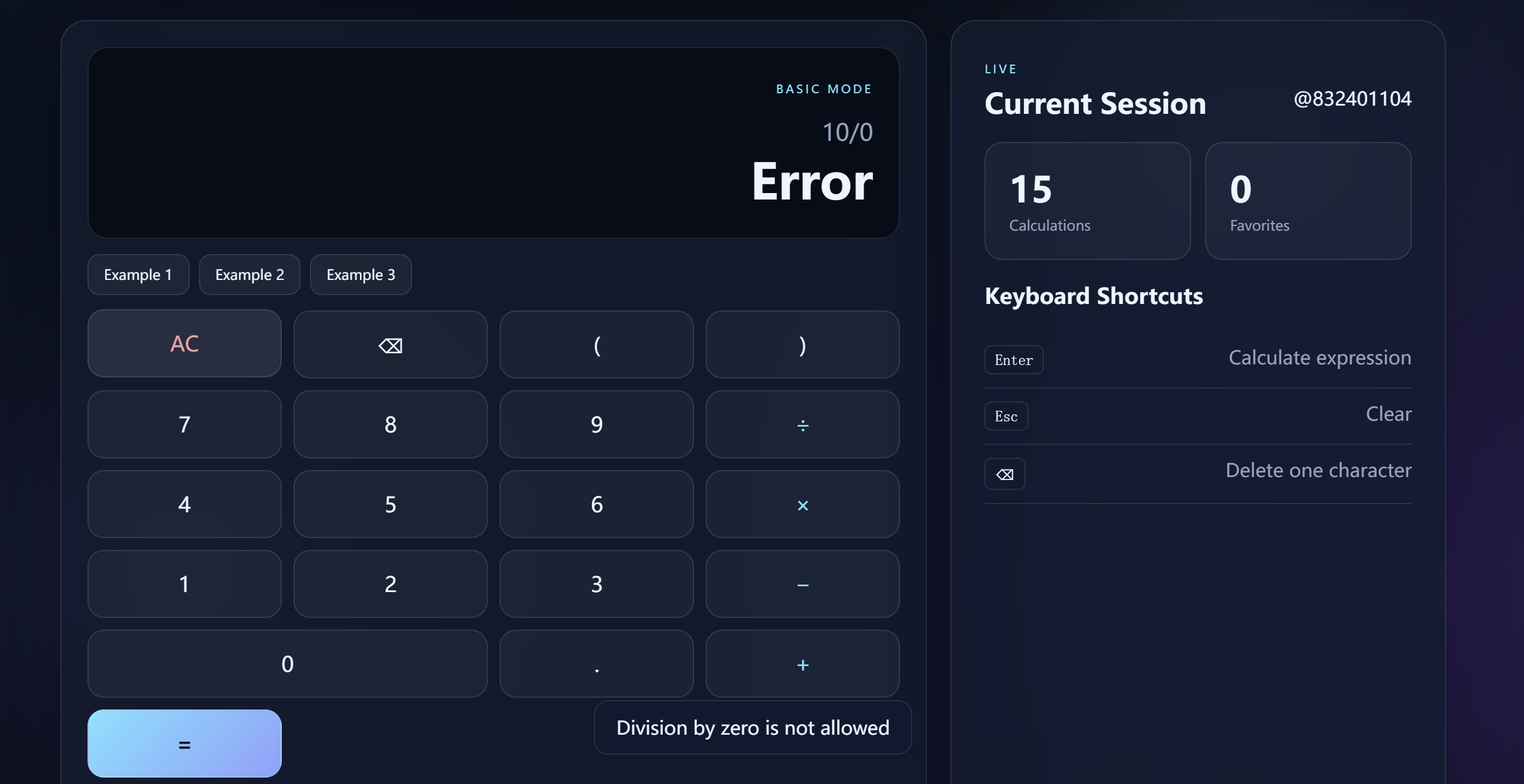
After a successful calculation, the expression and result are stored in the backend database.
The history interface displays information such as:
Expression
Result
Time
User
Favorite status, if applicable
Figure 12 --- Calculation history 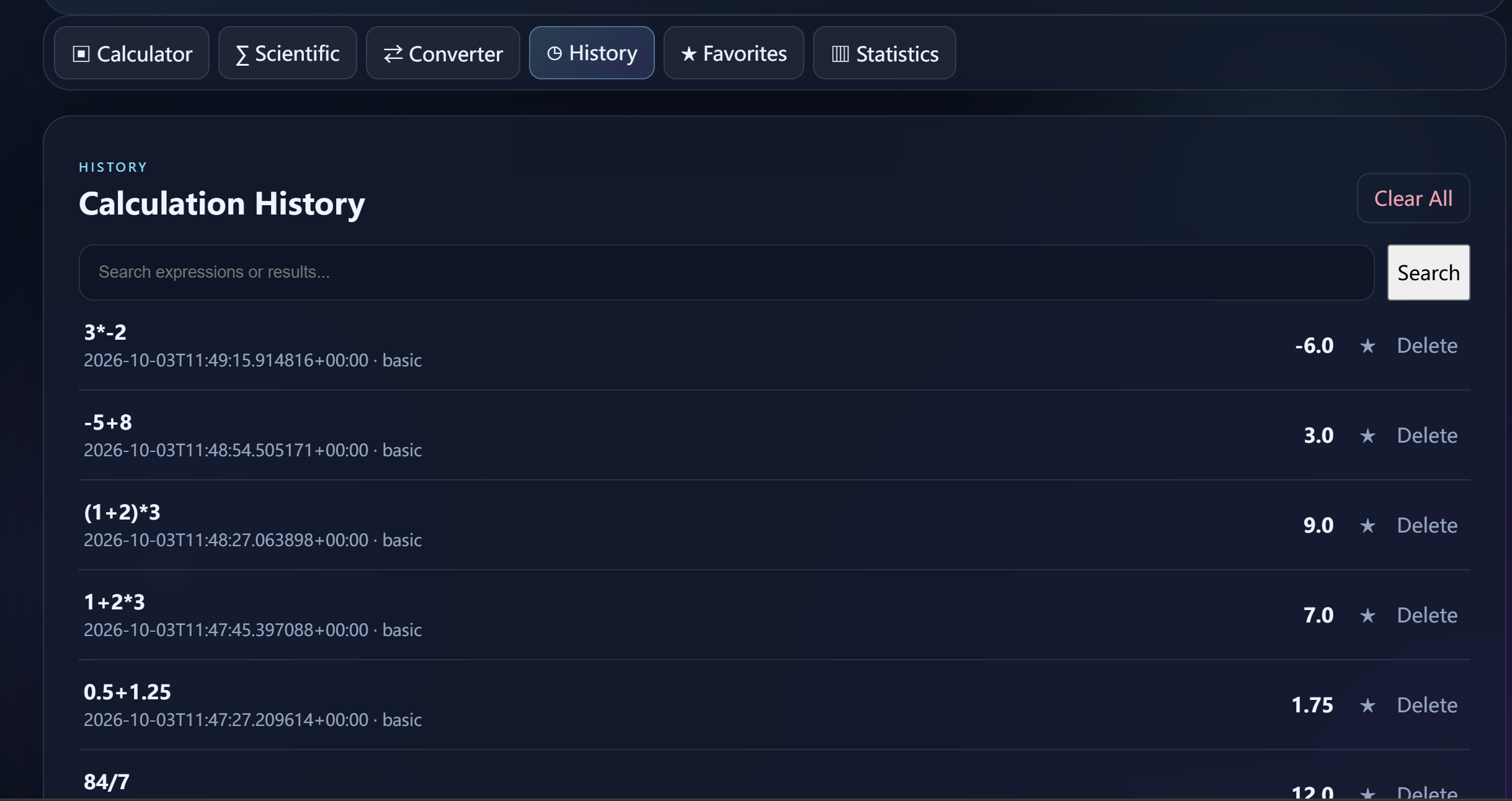
The history requirement is not satisfied merely by displaying a frontend list.
The demonstration should prove:
Perform a calculation.
Confirm that it appears in History.
Refresh the browser.
Reopen the application if necessary.
Confirm that the record still exists.
This demonstrates that history is stored in the backend database.
Figure 13 --- History persistence after refresh/reopen 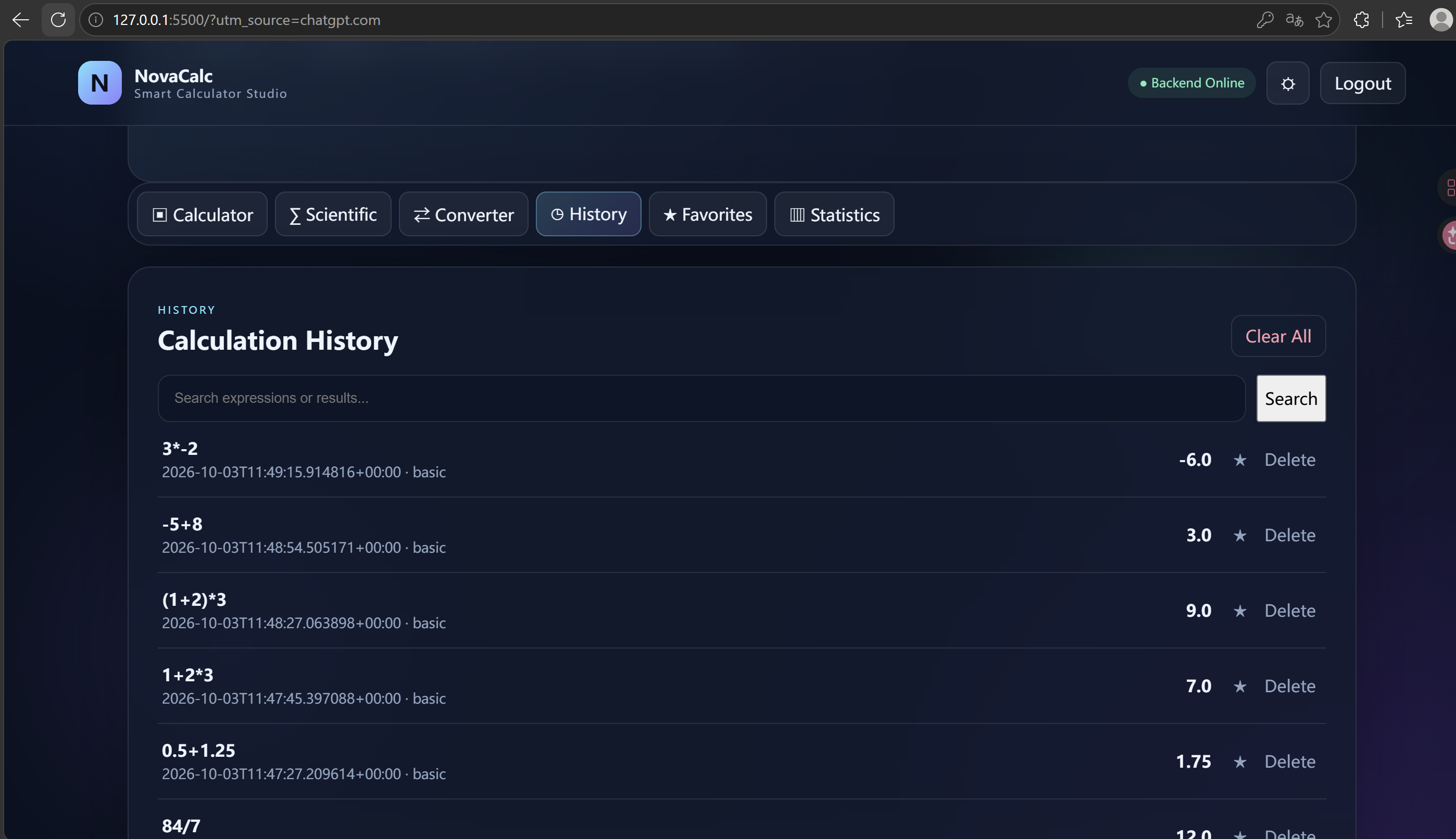
The application supports deletion through a backend API.
Demonstration:
Select a history record.
Delete it.
Confirm that the frontend removes it.
Refresh the history.
Confirm that the deleted record does not return.
Figure 14 --- Delete history record 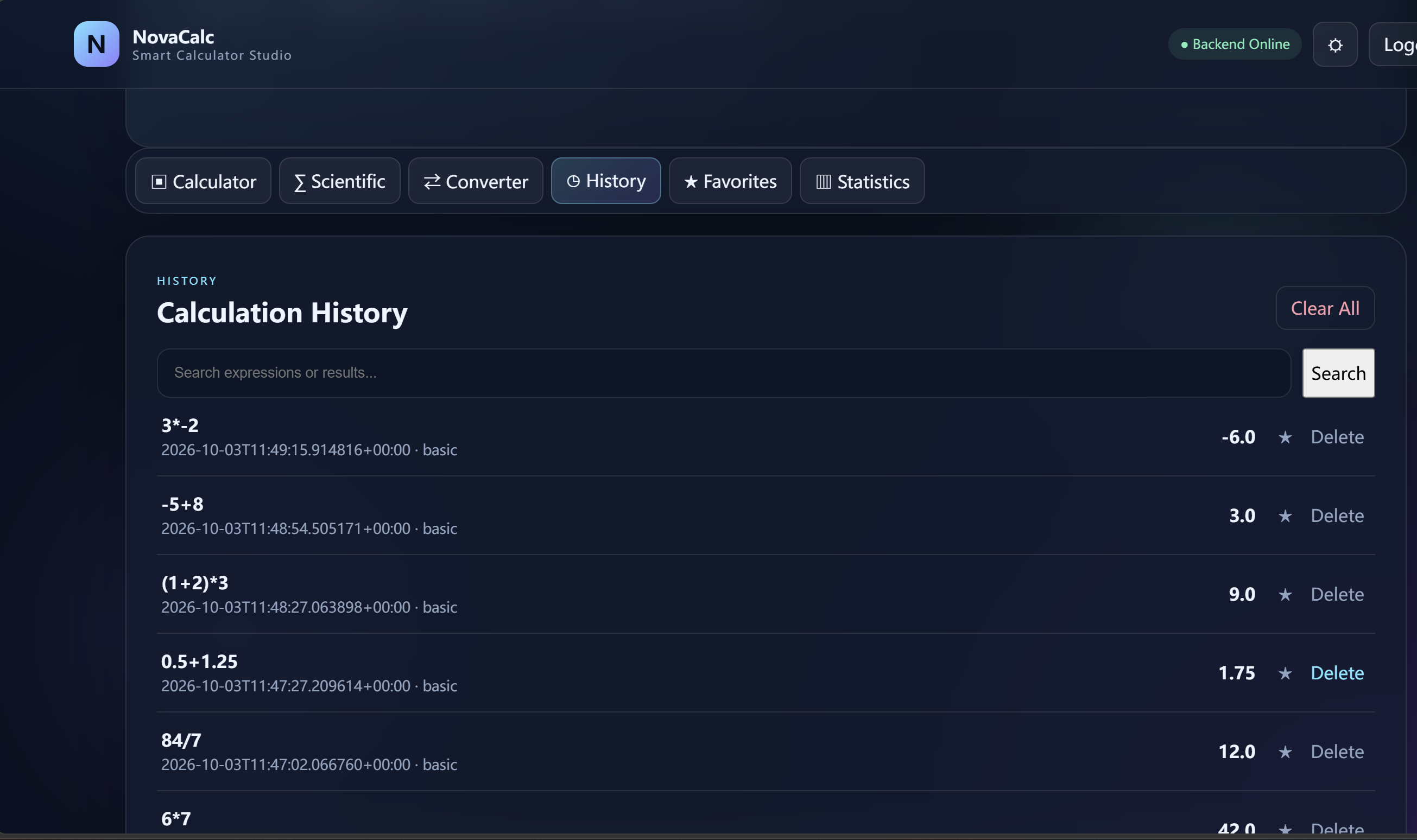
The frontend sends a scientific calculation request to:
/api/scientific
Example:
sqrt(144) = 12
Figure 15 --- Scientific calculation 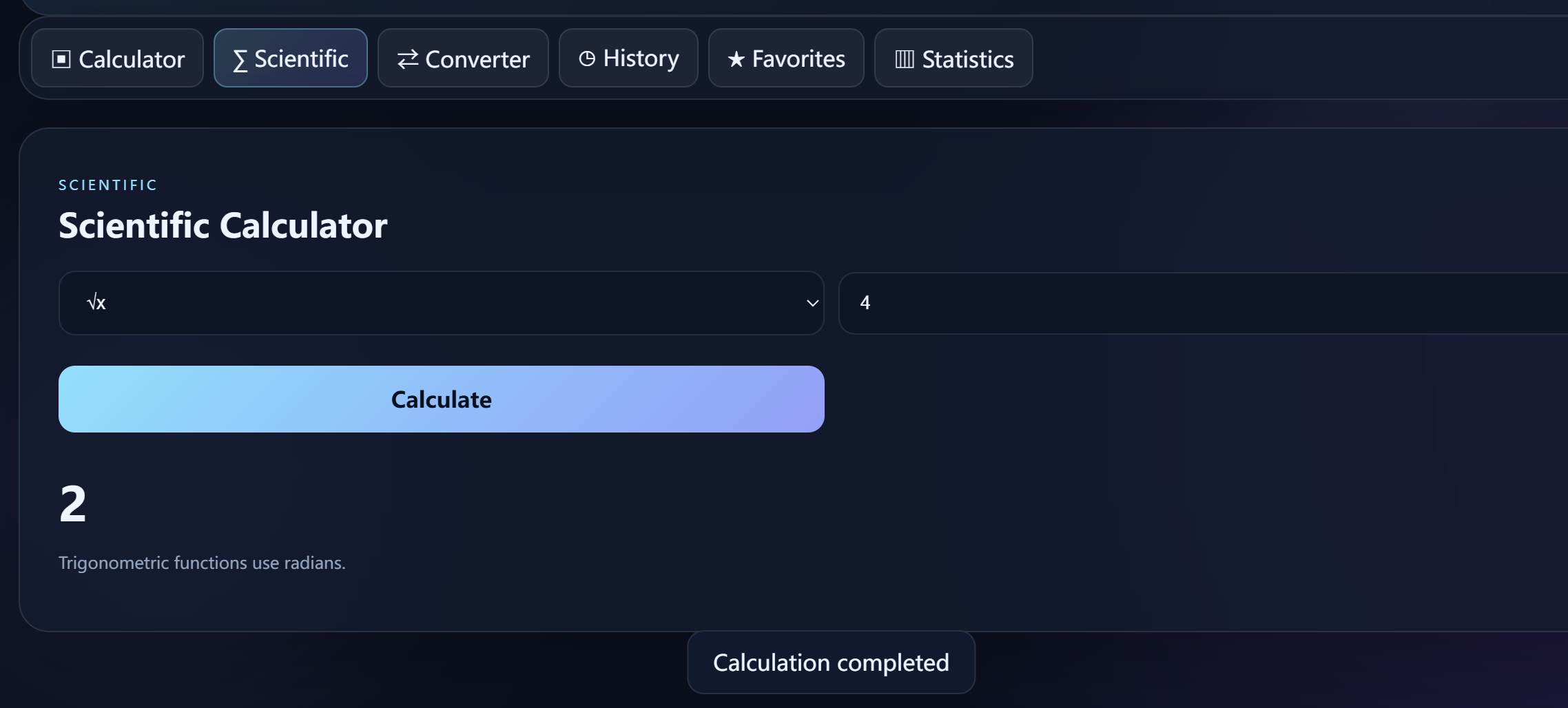
The base conversion endpoint supports bases from 2 to 36.
Example:
FF, base 16 -> base 10 -> 255
Figure 16 --- Number-base conversion 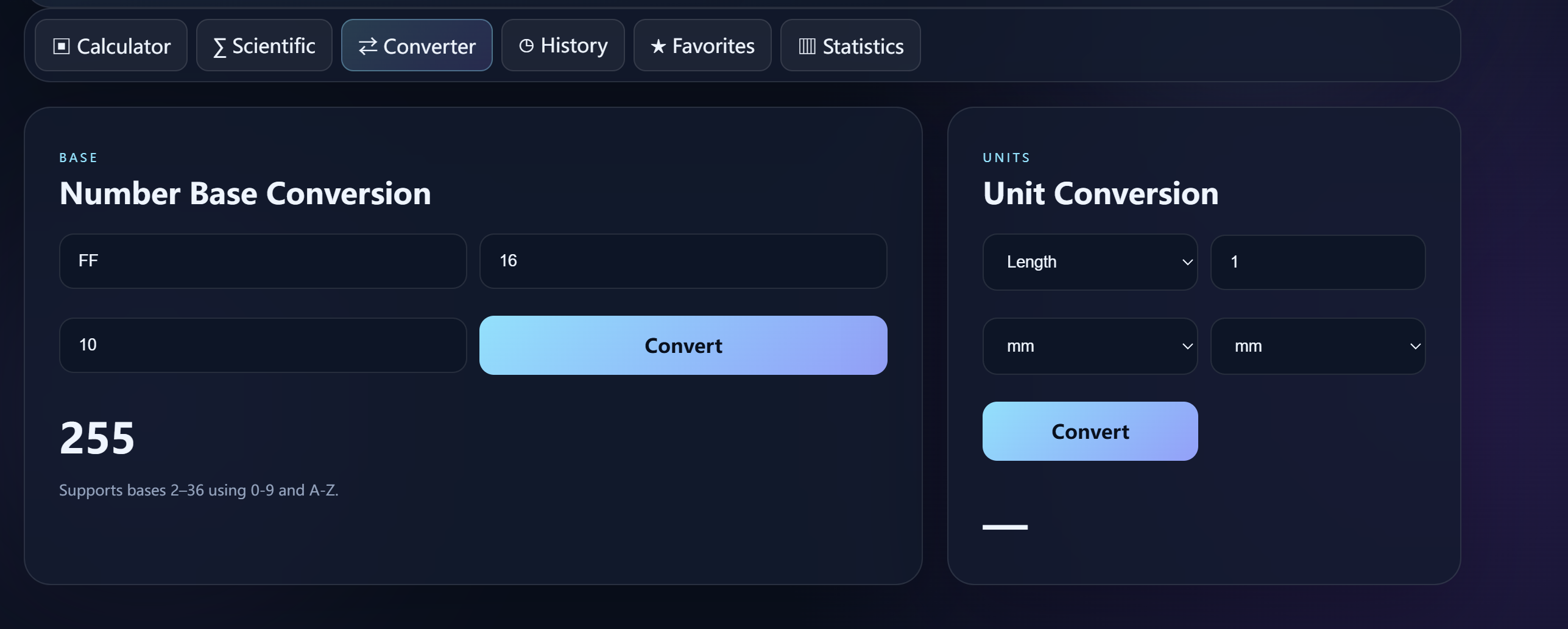
The backend maintains conversion tables for units including:
Length
Mass
Time
Area
Volume
Example:
1 km -> 1000 m
Figure 17 --- Unit conversion 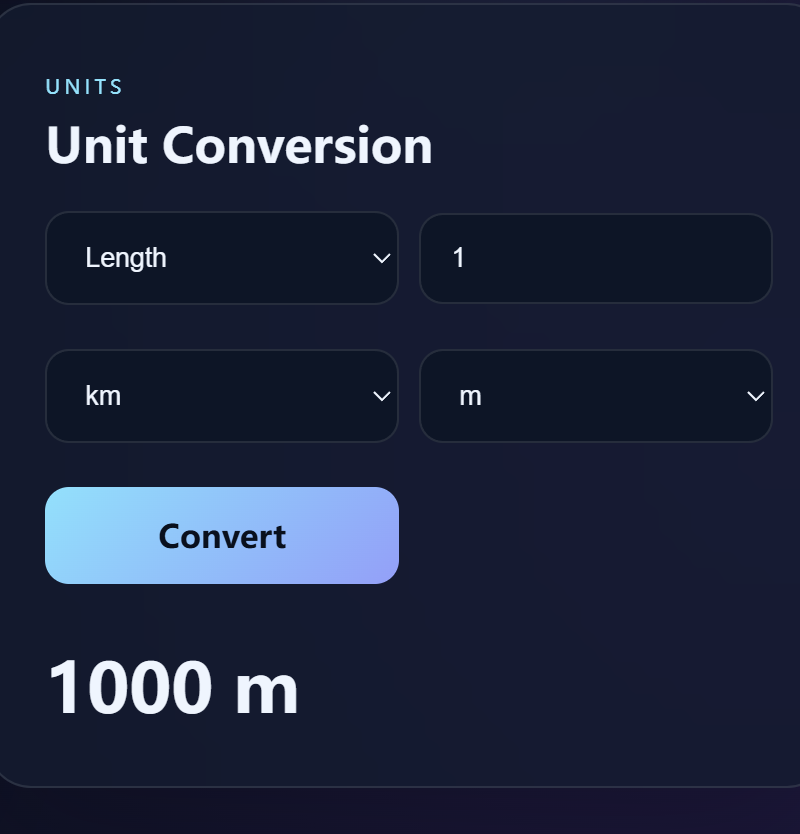
The project provides user registration and login.
A suitable demonstration is:
Register User A.
Perform 1 + 2.
Log out.
Register or log in as User B.
Open History.
Confirm that User B cannot see User A's private history.
Figure 18 --- User registration/login 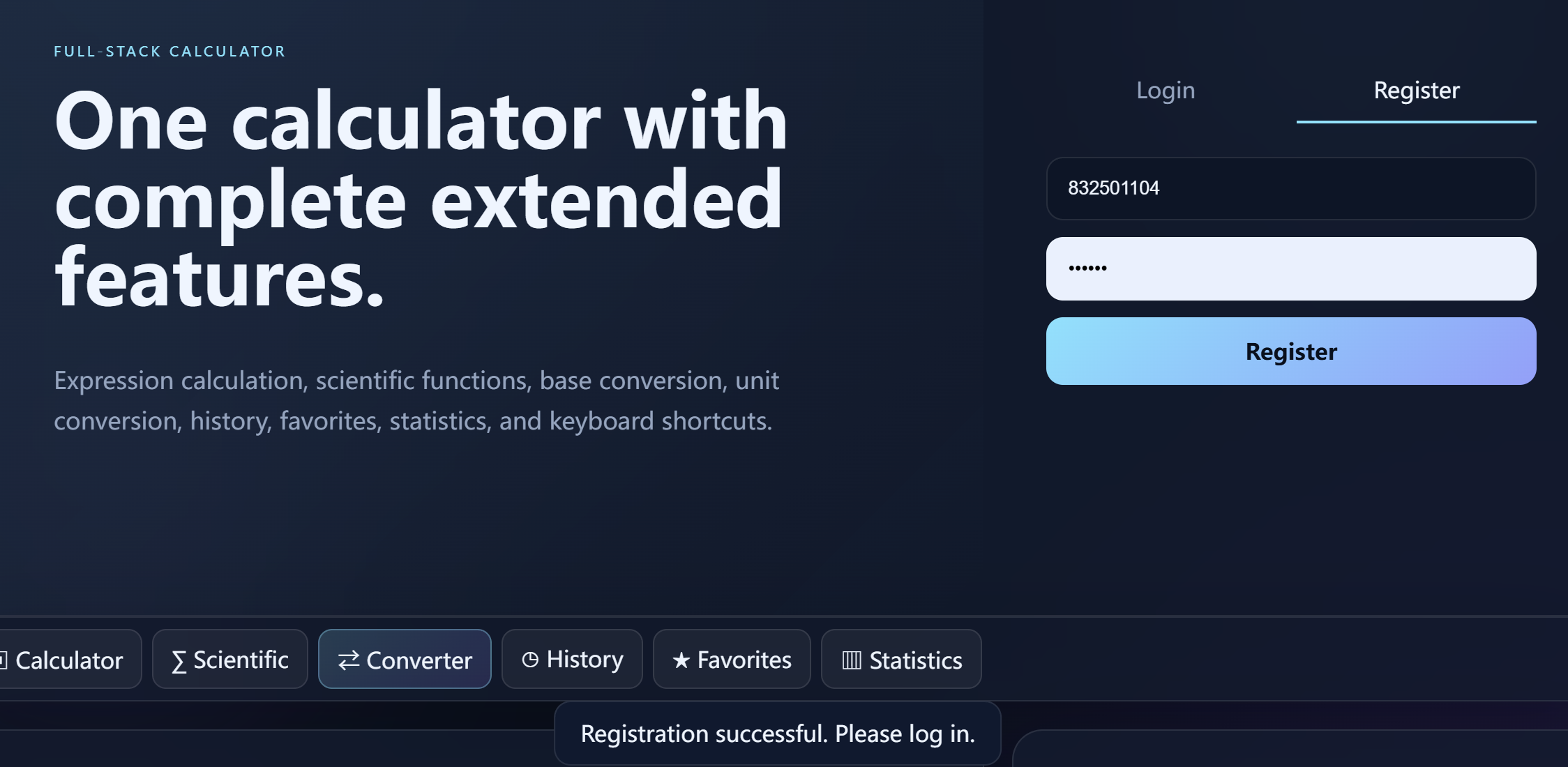
Figure 19 --- User data isolation 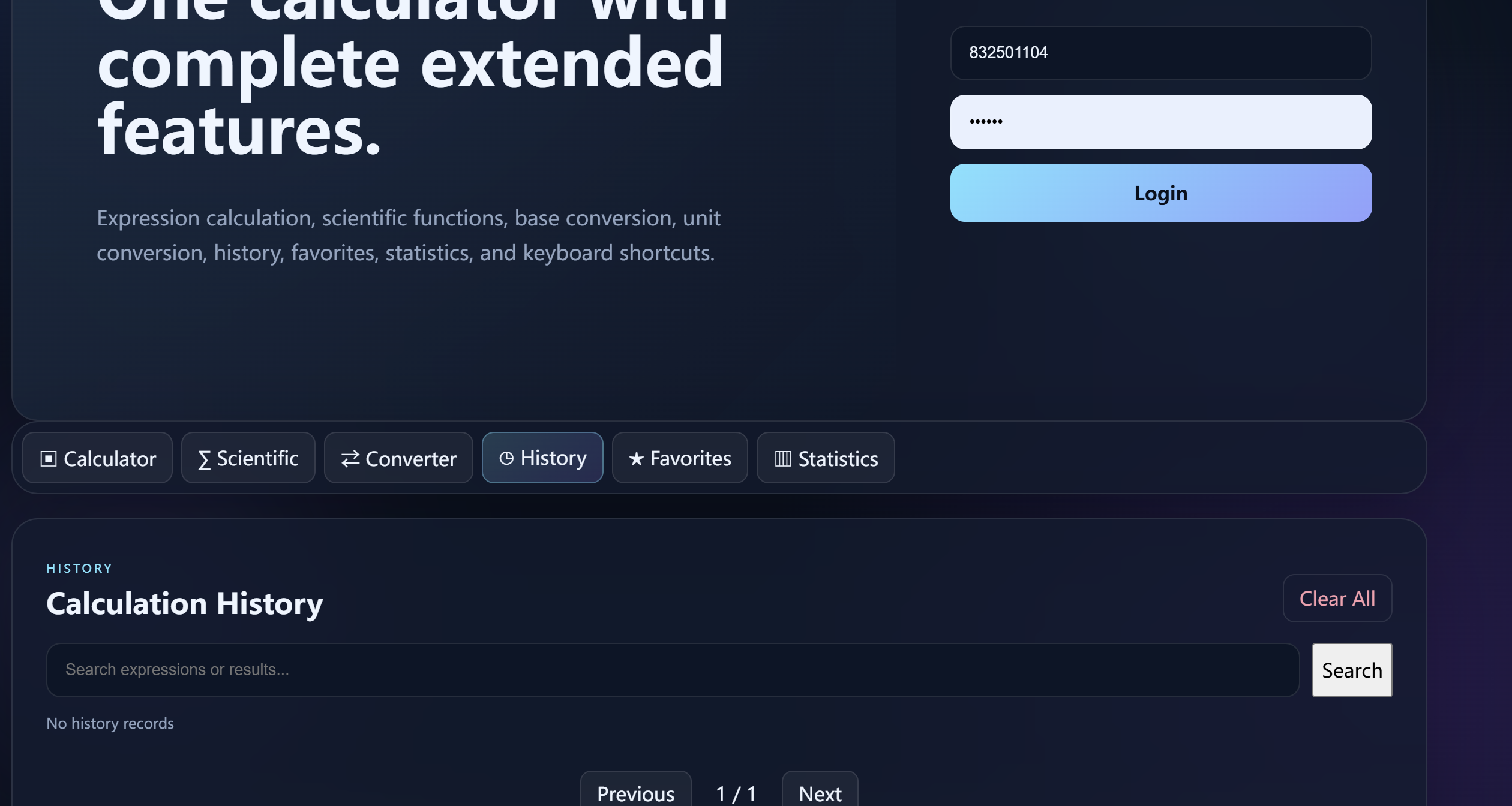
A history record can be added to Favorites.
A favorite record contains information such as:
User ID
Expression
Result
Optional note
Figure 20 --- Favorites 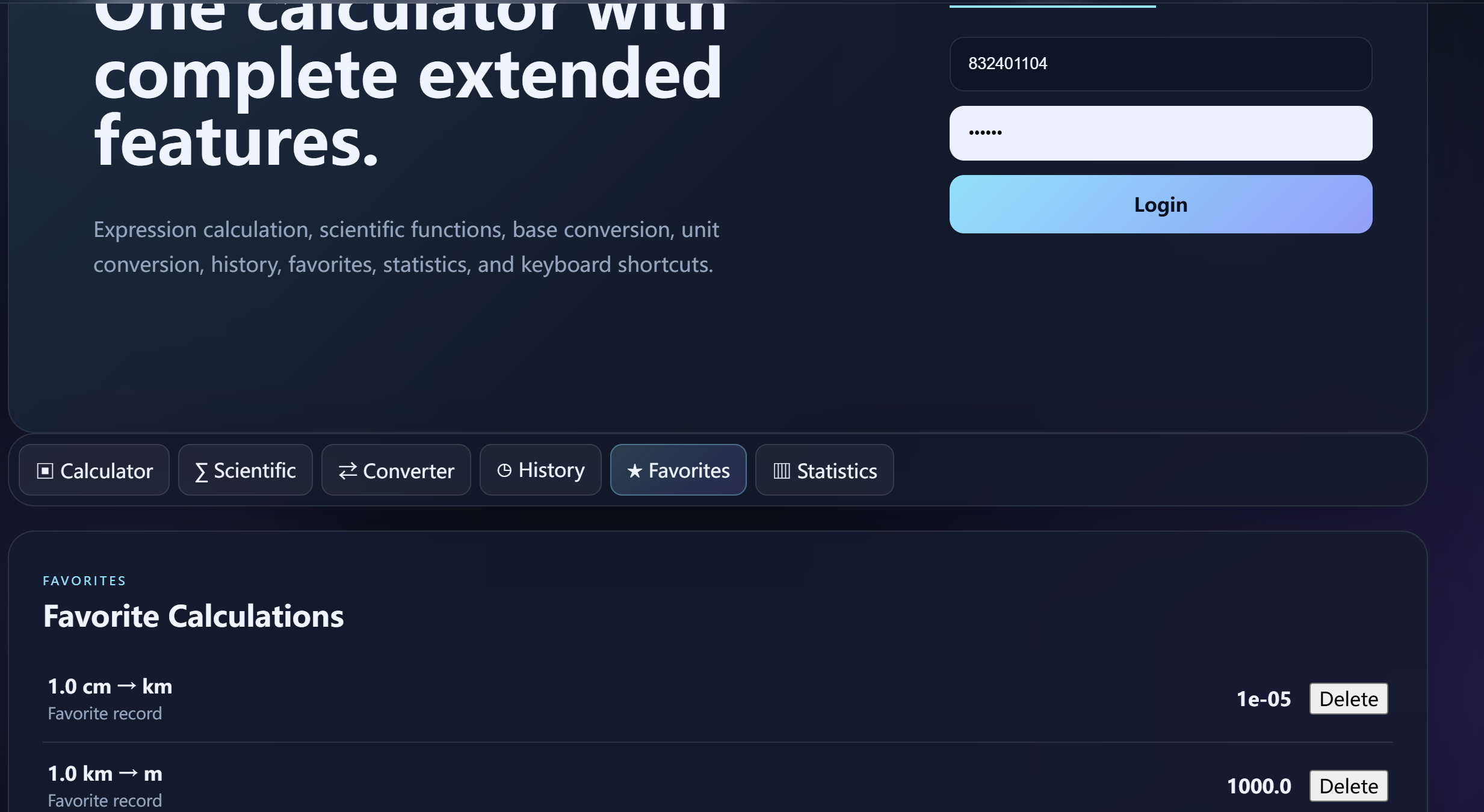
The calculator supports keyboard interaction.
Examples:
Key Function
0-9 Enter numbers + - * / Enter operators Enter Calculate Backspace Delete one character Esc Clear expression
Figure 21 --- Keyboard shortcut demonstration 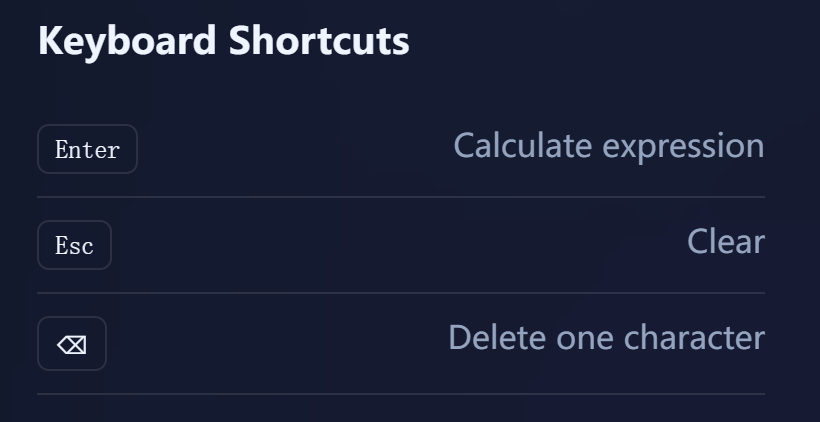
The theme button switches between light and dark themes.
The selected theme is stored in browser local storage.
Figure 22 --- Theme switching 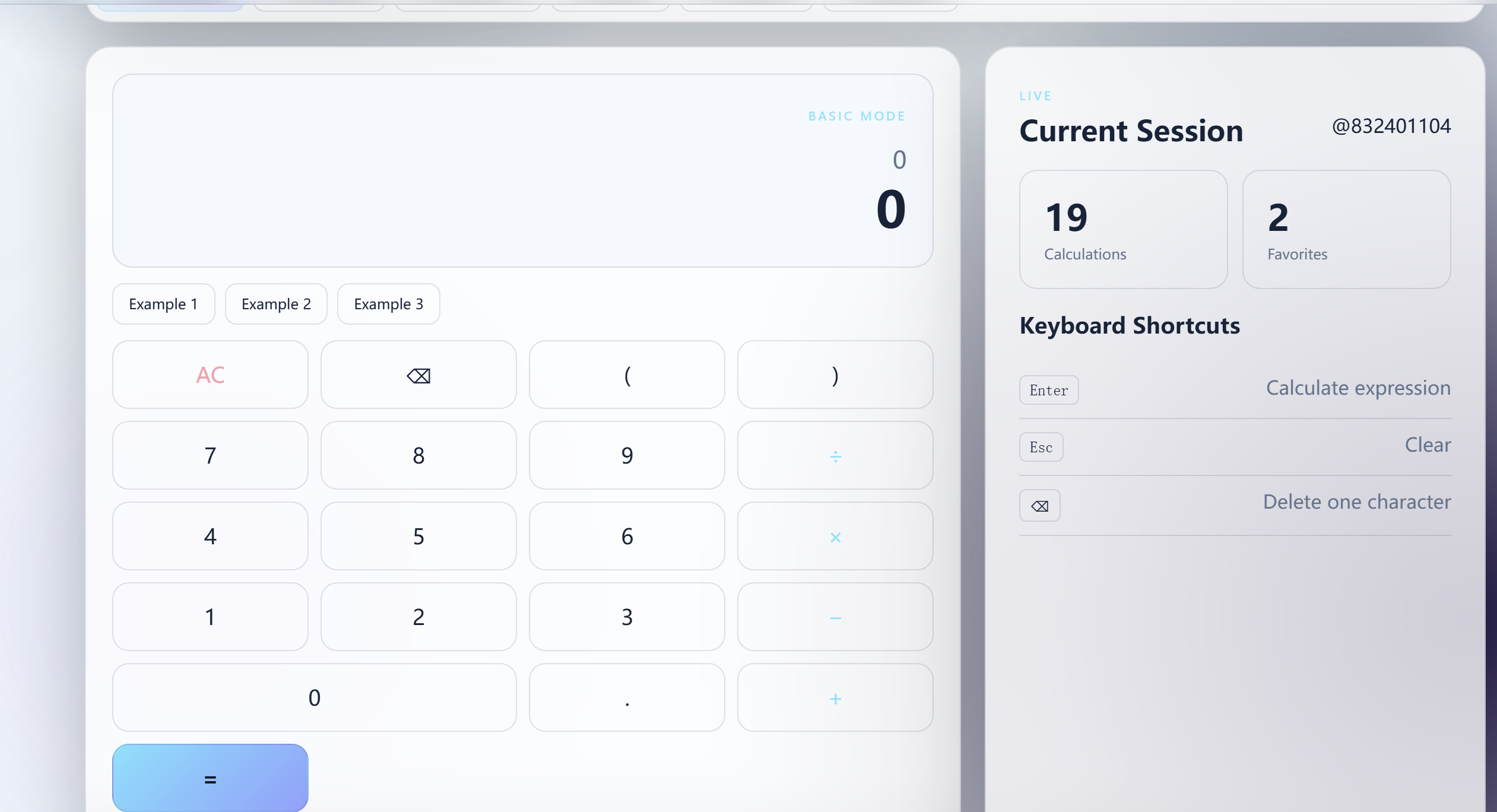
The statistics endpoint returns information such as:
Total calculation count
Favorite count
Usage count by calculation mode
Recent activity
The frontend displays mode usage as visual progress bars.
Figure 23 --- Statistics 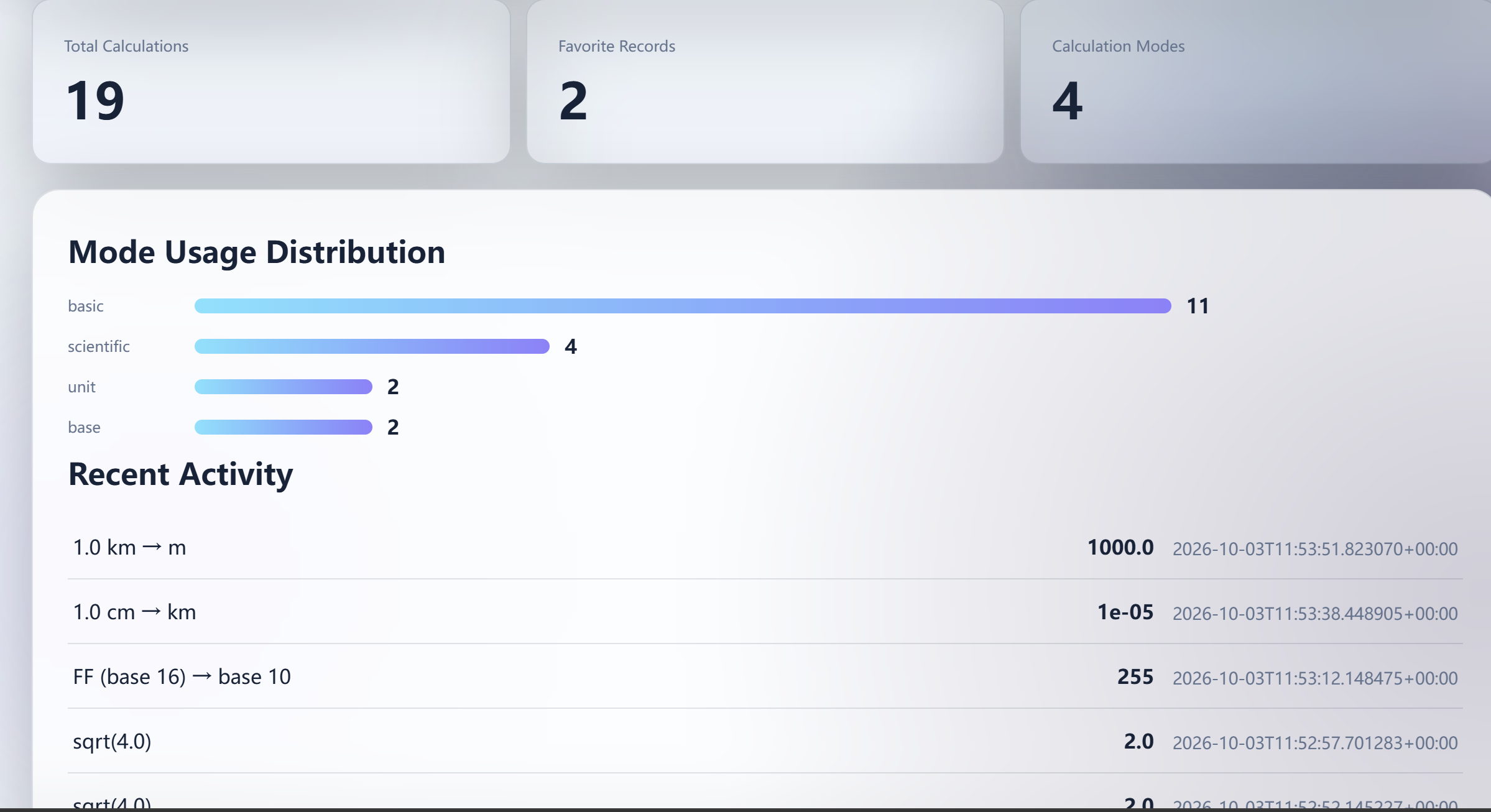
History search can match expressions and results.
Pagination uses backend-supported LIMIT/OFFSET style querying and returns information such as:
Current page
Total pages
Total record count
Figure 24 --- History search and pagination 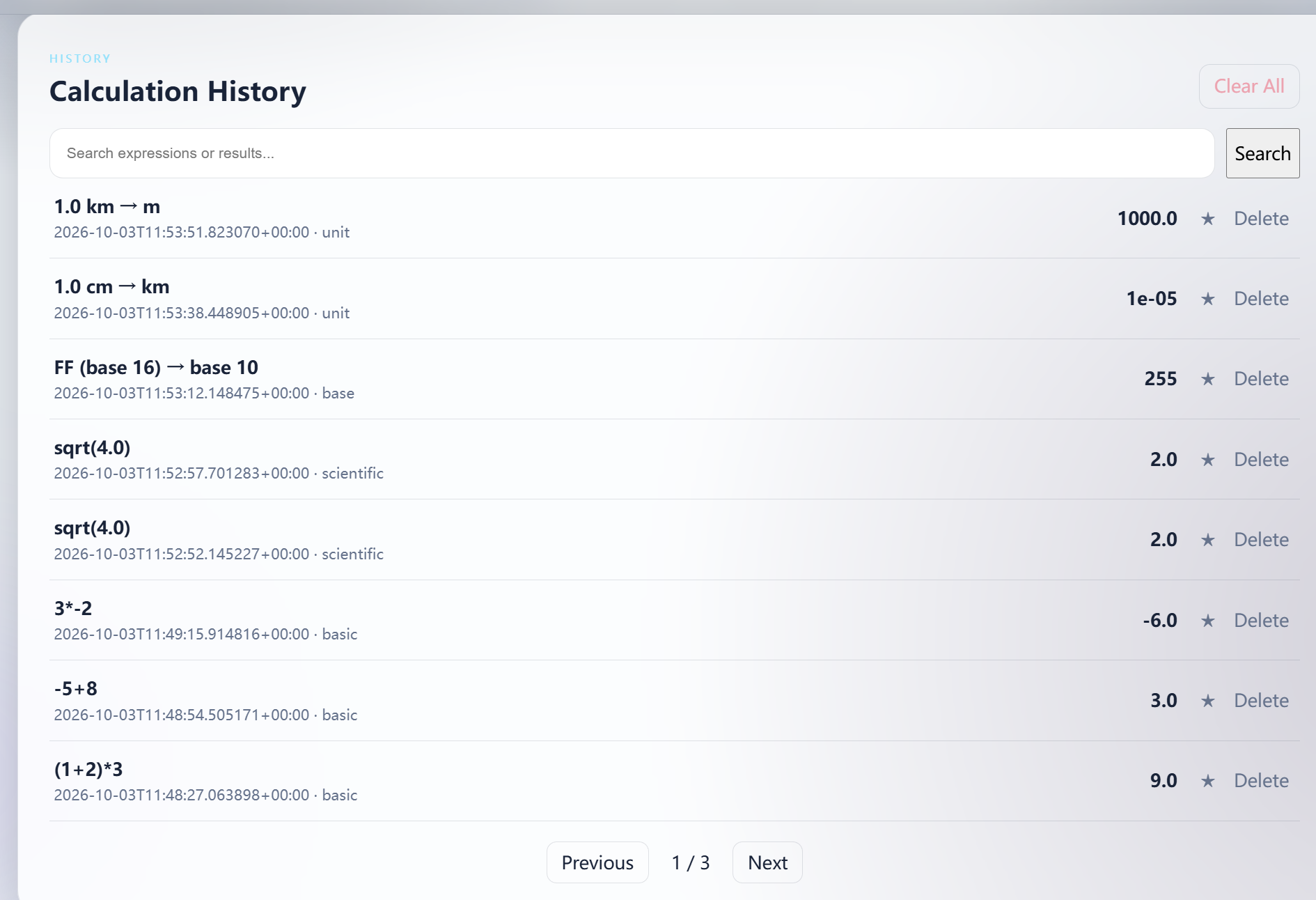
NovaCalc adopts a separated frontend/backend architecture.
+-----------------------+
|       Browser         |
|   NovaCalc Frontend   |
+-----------+-----------+
            |
            | HTTP / JSON
            v
+-----------------------+
|       FastAPI         |
|       Backend         |
+-----------+-----------+
            |
      +-----+-----+
      |           |
      v           v
+-----------+ +-----------+
| Calculator| | SQLite DB |
|   Parser  | | Persistence|
+-----------+ +-----------+
The main responsibilities are:
User interface
Expression input
Button interaction
Sending API requests
Displaying calculation results
Displaying errors
Displaying history
User interaction for extended functions
Request validation
Expression parsing
Calculation
Exception handling
Authentication
History persistence
History querying
History deletion
Scientific calculations
Conversion functions
Statistics
SQLite is used for persistent storage.
The database stores information required by the application, including users, sessions, calculation history, and favorites.
+---------------------------+
|        Browser            |
|    NovaCalc Frontend      |
+---------------------------+
              |
              | HTTP / JSON
              v
+---------------------------+
|        FastAPI            |
|         Backend           |
+---------------------------+
              |
      +-------+--------+
      |                |
      v                v
+-------------+  +-------------+
| Calculator  |  |  SQLite DB  |
|   Parser    |  | Persistence |
+-------------+  +-------------+
The project requirements can be divided into four categories.
Addition
Subtraction
Multiplication
Division
Decimal numbers
Negative numbers
Operator precedence
Parentheses
Unary operators
Invalid expression detection
Division-by-zero detection
Store successful calculations
Query history
Search history
Pagination
Delete individual history records
Preserve history after refresh/restart
Scientific calculation
Number-base conversion
Unit conversion
User accounts
User data isolation
Favorites
Keyboard shortcuts
Theme switching
Statistics
The system should also satisfy:
Frontend/backend separation
Backend-generated final calculation result
Persistent database storage
Clear API boundaries
Reasonable exception handling
No arbitrary execution of user expressions
Maintainable code structure
Reproducible installation and startup process
Publicly accessible deployment for final evaluation
The frontend is responsible for the user-facing interaction layer.
The main responsibilities include:
Collect expression input.
Send requests to the backend.
Display backend results.
Display backend errors.
Load history from the backend.
Request history deletion through the backend.
Provide user controls for extended functions.
Maintain visual state such as theme selection.
The frontend does not independently determine the final result for the main calculation flow.
The expected flow is:
User Input
    |
    v
Frontend Validation / UI State
    |
    v
HTTP JSON Request
    |
    v
Backend
    |
    v
Result / Error
    |
    v
Frontend Display
The backend uses FastAPI.
The backend is responsible for:
Request validation
Authentication
Expression parsing
Calculation
Scientific operations
Base conversion
Unit conversion
Database operations
History management
Favorites
Statistics
Exception handling
The backend is the trusted calculation layer for the main expression calculation.
NovaCalc uses a recursive-descent parser.
The grammar is:
expression := term (("+" | "-") term)*
term       := unary (("*" | "/") unary)*
unary      := ("+" | "-") unary | primary
primary    := NUMBER | "(" expression ")"
This grammar directly represents operator precedence.
The hierarchy is:
expression
    |
    +-- addition / subtraction
          |
          +-- term
                |
                +-- multiplication / division
                      |
                      +-- unary
                            |
                            +-- primary
                                  |
                                  +-- number
                                  |
                                  +-- parenthesized expression
For:
1 + 2 * 3
the parser first resolves:
2 * 3
and then:
1 + 6
so the final result is:
7
For:
(1 + 2) * 3
the parenthesized expression is resolved first, producing:
9
Scientific calculations use a dedicated backend endpoint.
The frontend sends the requested operation and input value.
Example:
Frontend
   |
   | sqrt(144)
   v
POST /api/scientific
   |
   v
Backend scientific calculation
   |
   v
12
The result can also be recorded in calculation history according to the project's history rules.
The base conversion service supports bases from 2 to 36.
Example:
FF
Base: 16
      |
      v
Decimal: 255
The backend performs the conversion and returns the result.
The unit conversion service uses predefined conversion relationships.
Supported categories include:
Length
Mass
Time
Area
Volume
Example:
1 km
 |
 v
1000 m
After a successful calculation:
Expression
    |
    v
Backend Parser
    |
    v
Calculation
    |
    v
Database INSERT
    |
    v
Return Result
History records contain information such as:
id
user_id
expression
result
created_at
The exact field names should be updated to match the final database schema.
History querying supports:
Normal retrieval
Search
Pagination
User isolation
History deletion uses a backend API and deletes the corresponding database record.
The project contains a users table and sessions table.
The user flow is:
Register
   |
   v
User Account
   |
   v
Login
   |
   v
Authenticated Session
   |
   v
Protected API
   |
   v
User-specific Data
History and favorites are associated with a user ID.
This prevents one user's history from being displayed as another user's history.
The frontend communicates with the backend through HTTP requests.
Conceptually:
const response = await fetch(API_URL, {
    method: "POST",
    headers: {
        "Content-Type": "application/json"
    },
    body: JSON.stringify({
        expression: expression
    })
});
The important design point is that the frontend sends the expression to the backend instead of calculating the final result independently.
Before publication, replace this example with a short excerpt from the actual project source code and explain the exact file/function name.
The backend receives the expression, validates the request, parses the expression, calculates the result, stores the successful calculation, and returns a structured response.
Conceptually:
Request
  |
  v
Validate
  |
  v
Parse
  |
  v
Calculate
  |
  +----> Save History
  |
  v
Response
This design makes the calculation flow explicit and keeps the frontend and backend responsibilities separate.
The parser is divided into several levels:
parse_expression()
    -> parse_term()
        -> parse_unary()
            -> parse_primary()
This structure is important because the call hierarchy itself represents operator precedence.
It also allows the implementation to reject unsupported syntax rather than passing arbitrary input to a language interpreter.
The backend explicitly checks the denominator before division.
Conceptually:
if denominator == 0:
    return calculation error
This prevents an invalid numerical operation from being returned as a normal calculation result.
The parser detects invalid syntax, unmatched parentheses, unexpected characters, and other unsupported input.
For example:
1 + *
and:
(1 + 2
should result in a controlled error response.
The frontend then displays an appropriate error message to the user.
Successful calculation records are inserted into the history table.
The database operation should use parameterized SQL rather than string concatenation.
This improves safety and keeps database operations separate from user-provided raw SQL fragments.
History retrieval supports filtering and pagination.
The deletion flow is:
Frontend
   |
   | DELETE request
   v
Backend
   |
   | validate user/session
   v
Database DELETE
   |
   v
Success Response
   |
   v
Frontend refreshes history
This demonstrates that deletion is a real backend/database operation rather than simply hiding a record in the frontend.
NovaCalc uses SQLite for persistent storage.
SQLite is suitable for this project because it is lightweight, easy to deploy, and sufficient for a small Web application.
The project contains data structures corresponding to:
usersStores account information.
Suggested fields:
Field Purpose
id User identifier username Login/account name password_hash Hashed password created_at Registration time
sessionsStores authenticated sessions.
Suggested fields:
Field Purpose
id Session identifier user_id Related user created_at Session creation time expires_at Session expiration information
calculation_historyStores successful calculations.
Suggested fields:
Field Purpose
id History identifier user_id Owner of the record expression Original expression result Calculation result created_at Calculation time
favoritesStores favorite calculations.
Suggested fields:
Field Purpose
id Favorite identifier user_id Owner expression Expression result Result note Optional note created_at Creation time
Please compare this section with the actual database schema and replace field names if the implementation uses different names.
The main relationship is:
users
  |
  +----< sessions
  |
  +----< calculation_history
  |
  +----< favorites
A user can have multiple sessions, history records, and favorites.
Database ER diagram:
+-------------------+
| users             |
+-------------------+
| id PK             |
| username UNIQUE   |
| password_hash     |
| created_at        |
+-------------------+
          |
          | 1
          |
    +-----+-----+
    |           |
    | *         | *
+---v-------+ +-v-----------+
| sessions  | | history     |
+-----------+ +-------------+
| token PK  | | id PK       |
| user_id FK| | user_id FK  |
| expires_at| | expression  |
+-----------+ | result      |
              | mode        |
              | created_at  |
              +-------------+
                    |
                    | *
                    |
              +-----v-------+
              | favorites   |
              +-------------+
              | id PK       |
              | user_id FK  |
              | expression  |
              | result      |
              | note         |
              | created_at   |
              +-------------+
The API is the communication boundary between the frontend and backend.
The table below should be checked against the final backend implementation before publication.
Method Endpoint Purpose
GET /api/health Backend health check POST /api/auth/register Register a user POST /api/auth/login Login POST /api/calculate Calculate a mathematical expression POST /api/scientific Perform a scientific calculation POST /api/convert/base Number-base conversion POST /api/convert/unit Unit conversion GET /api/history Retrieve history DELETE /api/history/{id} Delete a history record GET/POST /api/favorites Manage favorite calculations GET /api/stats Retrieve statistics
Example:
{
  "expression": "1+2*3"
}
Expected logical result:
{
  "result": 7
}
The exact response structure should be updated to match the final implementation.
The backend provides:
GET /api/health
A successful response demonstrates that the FastAPI service is running.
The history API supports:
Querying records
Search
Pagination
User-specific filtering
Deletion
The backend should ensure that a user can only access and delete records belonging to the authenticated user.
Invalid requests should return structured errors rather than causing the server to crash.
Examples:
Invalid expression
Invalid number
Unsupported operation
Invalid conversion
The backend explicitly rejects:
10 / 0
and returns a controlled error.
For:
(1 + 2
the parser should detect the missing closing parenthesis.
eval() or exec()The calculator does not rely on Python eval() or exec() to directly execute arbitrary user input.
Instead, the expression is parsed according to the supported grammar.
This is an important design decision because the application only needs to support a limited mathematical language.
Passwords are not stored directly as plaintext.
The project uses salted:
PBKDF2-HMAC-SHA256
for password hashing.
Database operations use parameterized SQL.
This avoids directly concatenating user-provided values into SQL statements.
Authenticated endpoints require a valid session.
History and favorites are associated with a user ID to maintain data isolation.
Server-provided text should be rendered safely so that user-provided values are not interpreted as arbitrary HTML.
The complete calculation flow is:
1. User enters expression
        |
        v
2. Frontend sends JSON request
        |
        v
3. Backend validates request
        |
        v
4. Backend parses expression
        |
        v
5. Backend performs calculation
        |
        v
6. Backend stores successful history
        |
        v
7. Backend returns result
        |
        v
8. Frontend displays result
This architecture demonstrates the required frontend/backend separation.
Frontend requests history
        |
        v
Backend validates session
        |
        v
Database query
        |
        v
Backend returns records
        |
        v
Frontend renders history
User clicks Delete
        |
        v
Frontend sends DELETE request
        |
        v
Backend validates ownership
        |
        v
Database DELETE
        |
        v
Backend returns success
        |
        v
Frontend refreshes history
A useful verification method is to stop the backend while keeping the frontend running.
Expected behavior:
The frontend page can still load.
The user can still interact with the UI.
A new calculation cannot receive a valid backend-generated result.
History requests cannot retrieve new backend data.
This demonstrates that the calculation result is actually provided by the backend.
Figure 25 --- Frontend/backend separation verification 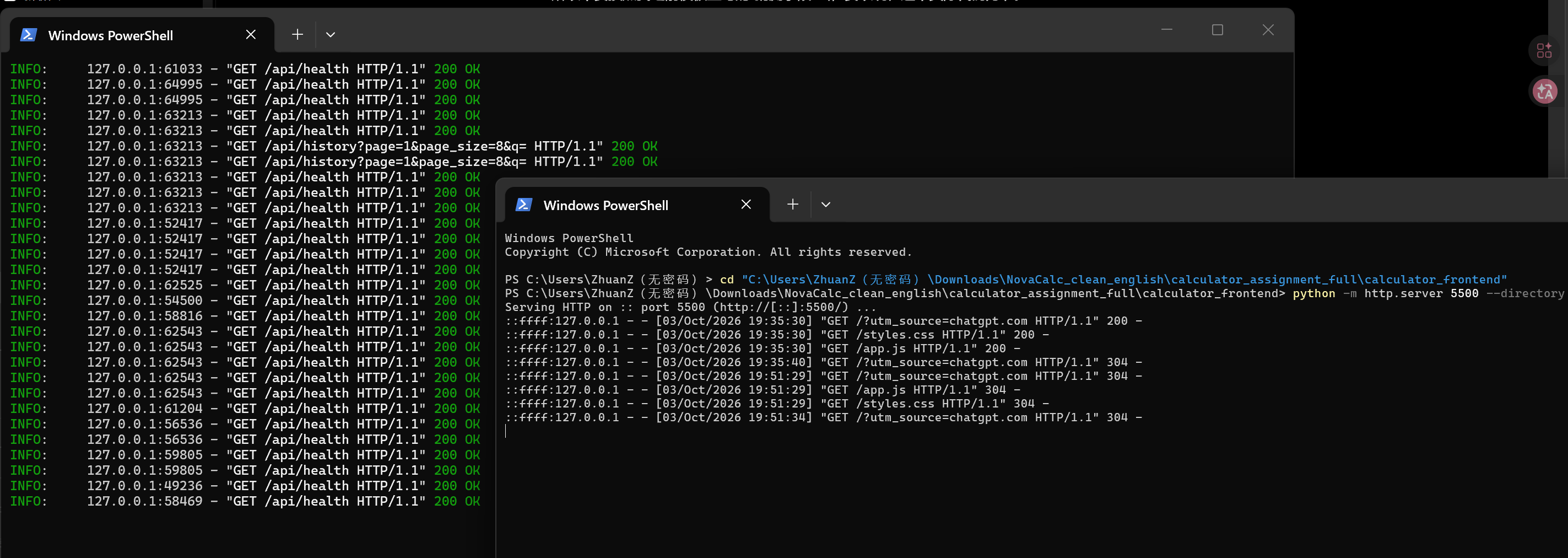
Category Input Expected Result
Addition 1+2 3 Subtraction 5-2 3 Multiplication 3*4 12 Division 12/4 3 Precedence 1+2*3 7 Parentheses (1+2)*3 9 Negative -5+8 3 Unary negative 3*-2 -6 Decimal 0.5+1.25 1.75 Division by zero 10/0 Error Invalid expression 1+* Error Missing parenthesis (1+2 Error Scientific sqrt(144) 12 Base conversion FF, 16 to 10 255 Unit conversion 1 km to m 1000 History Successful calculation Record stored Persistence Refresh/reopen Record remains Delete Delete one record Record removed Search Search expression/result Matching records Pagination More than one page Correct page information User isolation User A / User B Data remains isolated Favorites Add favorite Favorite stored Theme Toggle theme Theme changes Statistics Open statistics Usage data displayed
| Test | Result |
|---|---|
| Basic arithmetic | PASS |
| Compound expressions | PASS |
| Parentheses | PASS |
| Unary operators | PASS |
| Decimal calculation | PASS |
| Invalid expression | PASS |
| Division by zero | PASS |
| History persistence | PASS |
| History deletion | PASS |
| Scientific calculation | PASS |
| Base conversion | PASS |
| Unit conversion | PASS |
| User isolation | PASS |
| Favorites | PASS |
| Theme switching | PASS |
| Statistics | PASS |
The backend API documentation can be checked through FastAPI's automatically generated documentation.
Development address:
http://43.128.137.17/docs
Figure 26 --- FastAPI Swagger/API documentation 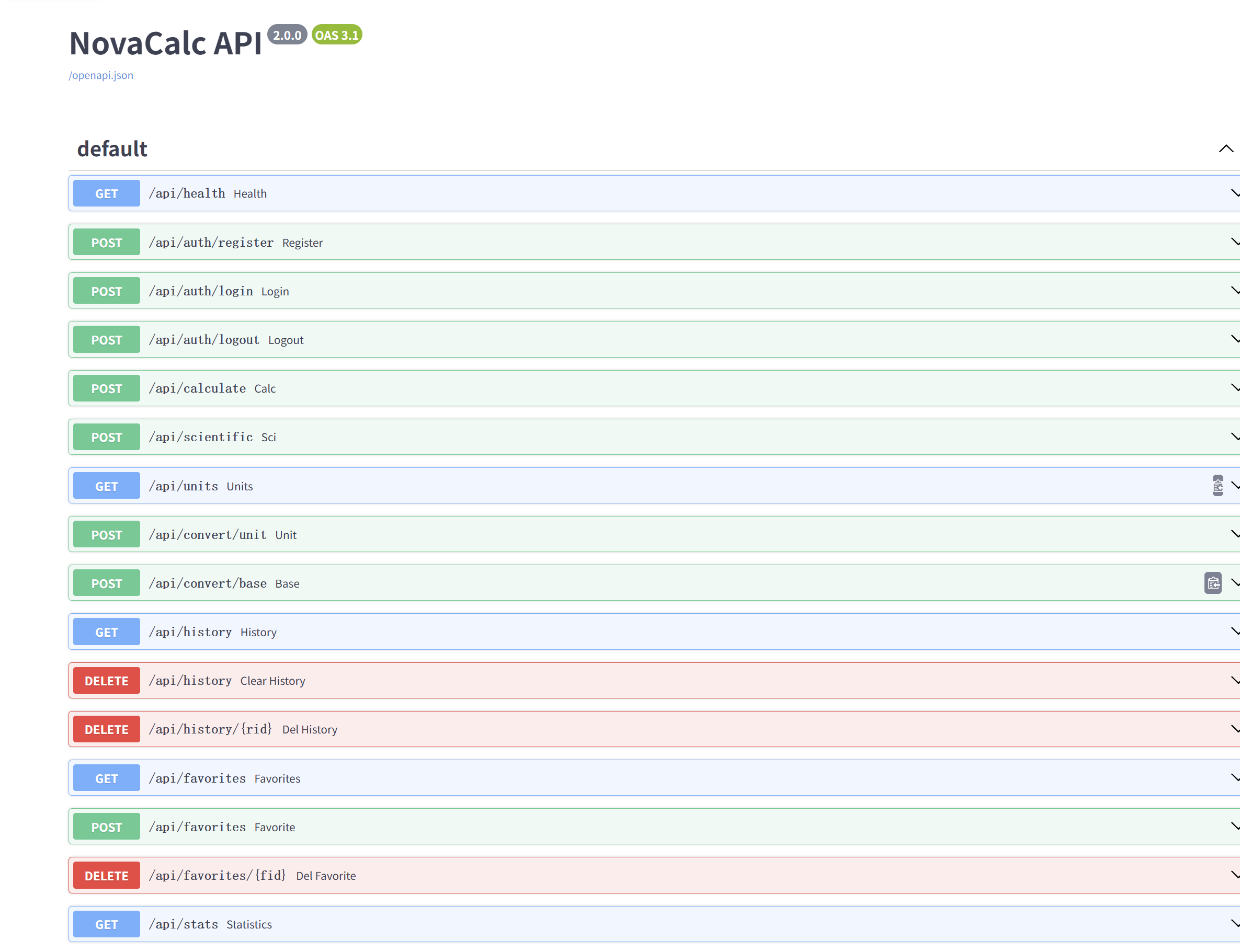
For local development, the project uses two services.
Frontend:
http://43.128.137.17/
Backend:
http://43.128.137.17/api
API Docs:
http://43.128.137.17/docs
The backend is a FastAPI application.
Example startup command:
python -m venv .venv
.\.venv\Scripts\python.exe -m pip install -r requirements.txt
.\.venv\Scripts\python.exe -m uvicorn src.main:app --reload --host 127.0.0.1 --port 8000
The frontend can be served using a simple HTTP server.
Example:
python -m http.server 5500 --directory src
Then open:
http://127.0.0.1:5500/
The final assignment requires a publicly accessible Web project during evaluation.
Production architecture can be:
Internet
   |
   v
Nginx / Public Web Server
   |
   +----> Frontend static files
   |
   +----> Backend reverse proxy
              |
              v
          Uvicorn / FastAPI
              |
              v
            SQLite
Production deployment architecture:
                    Internet
                       |
                       v
+---------------------------+
|     Public Web Server     |
|           Nginx           |
+---------------------------+
              |
      +-------+--------+
      |                |
      v                v
Frontend Static    Reverse Proxy
    Files               |
                        v
+---------------------------+
|         Uvicorn           |
|         FastAPI           |
+---------------------------+
              |
              v
      SQLite Database
Please replace this section with the actual evaluation procedure.
Example:
1. Open
2. Register an account or use the provided test account.
3. Test 1+2.
4. Test 1+2*3.
5. Test (1+2)*3.
6. Test -5+8.
7. Test 10/0.
8. Open History.
9. Refresh the page and verify persistence.
10. Delete one history record.
11. Test one extended feature.
The NovaCalc project has been successfully deployed to a Tencent Cloud server and is publicly accessible through the Internet.
The main public deployment addresses are listed below:
| Purpose | Public URL |
|---|---|
| Frontend / Calculator | http://43.128.137.17/ |
| Backend API | http://43.128.137.17/api |
| API Health Check | http://43.128.137.17/api/health |
| FastAPI API Documentation (Swagger) | http://43.128.137.17/docs |
The main entry point for the NovaCalc calculator is:
http://43.128.137.17/
During development, several problems were encountered.
A calculator that only handles two numbers is relatively simple. However, compound expressions require:
Operator precedence
Parentheses
Unary operators
Decimal numbers
Error detection
The solution was to use a recursive-descent parser.
The calculation result should come from the backend rather than being calculated entirely in the browser.
Therefore, the frontend was designed to send expressions through API requests and display backend responses.
A frontend-only history list disappears when the browser is refreshed.
The solution was to store successful calculations in SQLite and retrieve them through backend APIs.
Simply removing an item from the frontend does not satisfy the persistence requirement.
The deletion action therefore calls a backend API, which removes the corresponding database record.
Once user accounts are introduced, history and favorites must be associated with the correct user.
The solution is to store user_id relationships and validate the authenticated session before accessing protected records.
The local development environment uses:
127.0.0.1:8000
127.0.0.1:5500
but these addresses are only accessible from the local machine.
For final evaluation, the application needs a public address.
The deployment process therefore needs to configure the frontend, backend, reverse proxy, and API address consistently.
Through this project, I gained practical experience in:
Frontend/backend separation
HTTP and JSON API communication
FastAPI
Recursive-descent parsing
Operator precedence
SQLite database design
CRUD operations
Authentication and sessions
User data isolation
Error handling
Frontend state management
Testing
Deployment
Technical documentation
The most important lesson was that a seemingly simple calculator becomes a complete software engineering project when requirements include parsing, persistence, authentication, API design, testing, and deployment.
During development, debugging was not limited to fixing syntax errors.
The development process also required checking:
Whether the frontend was connected to the correct backend address
Whether API requests used the correct method and path
Whether database changes were actually persistent
Whether deleting history changed the database
Whether users could access only their own data
Whether invalid expressions produced controlled errors
Whether the final deployment could be accessed from outside the development machine
These checks helped connect individual code modules into a complete application.
NovaCalc demonstrates a complete Web calculator architecture with a separated frontend and backend.
The core implementation includes:
Basic arithmetic
Compound expression parsing
Operator precedence
Parentheses
Unary operators
Decimal numbers
Backend calculation
Persistent history
History search and pagination
History deletion
User accounts
User data isolation
Scientific calculation
Base conversion
Unit conversion
Favorites
Keyboard shortcuts
Theme switching
Statistics
The project also demonstrates software engineering practices including API design, database persistence, error handling, security considerations, testing, documentation, and deployment.
Future improvements may include:
More scientific functions.
More unit categories.
More advanced expression syntax.
Improved mobile responsiveness.
More detailed statistics.
Better history filtering.
Additional automated tests.
Production database migration for larger deployments.
More robust session management.
Improved deployment monitoring.

