2601_FZU-MU_SE












Extreme Programming Assignment: StarNote Contact Manager (Backend Data Layer & Repository Management
 墨衍会员 · AI 创作全网分发 墨衍智能分发 通过墨衍一键同步至各平台 可同步平台 CSDN微信公众号微博知乎掘金百家号博客园抖音小红书 你的文章也可以这样分发 墨衍会员 ¥399起/年,写一次发全网
我也要 关注 + 加入社区
Extreme Programming Assignment: StarNote Contact Manager (Backend Data Layer & Repository Management)
| Item | Details |
|---|---|
| Course | 2601_FZU-MU_SE |
| Team Name | cat |
| Author | Boyu Xu (FZU ID: 832401320 | Maynooth ID: 24127663) |
| Pair Partner | Yifan Ye (FZU ID: 832401321 | Maynooth ID: 24126494) |
| My Role | Backend Data Model & Persistence, Excel Import/Export, Repo Management & Upload |
| Assignment Link | Extreme Programming (Deadline: November 17, 2026, 23:59) |
| Objective | Implement favorite contacts, multiple contact methods, and Excel import/export, while practicing pair programming, Git workflow, and software engineering processes |
| References | SheetJS Documentation, MDN localStorage |
Table of Contents
- 1. Project Links
- 2. Requirements & Overall Design
- 3. Core Implementation (Data Layer & Excel I/O)
- 4. Frontend UI & Integration
- 5. Program Screenshots
- 6. Demo Video
- 7. Git Collaboration Evidence
- 8. Team Division & Contribution Ratio
- 9. Problems Encountered & Solutions
- 10. PSP Table
- 11. Summary & Reflection
1. Project Links
| Item | Link |
|---|---|
| GitHub Repository | https://github.com/alemanhong-cmyk/address-book |
| Code Standards | https://github.com/alemanhong-cmyk/address-book/blob/main/CODE/_STANDARDS.md |
| Contributing Guide | https://github.com/alemanhong-cmyk/address-book/blob/main/CONTRIBUTING.md |
| Release Version | https://github.com/alemanhong-cmyk/address-book/releases/tag/v1.0.0 |
| Pull Request | https://github.com/alemanhong-cmyk/address-book/pull/1 |
| Test & Acceptance Plan | https://github.com/alemanhong-cmyk/address-book/blob/main/TEST/_PLAN.md |
| Public Deployment | Not applying for bonus deployment points |
How to Run
The project uses a zero-build lightweight architecture. Data persistence runs on browser localStorage, and Excel parsing runs locally via SheetJS.
Option 1: Open Directly
Double-click index.html in the repository root directory.
Option 2: Local Static Server (Recommended)
cd address-book
python -m http.server 5173
Open http://localhost:5173 in a browser.
Reading and writing
.xlsxfiles relies on SheetJS 0.20.3 via CDN, so an internet connection is needed on first load.
2. Requirements & Overall Design
2.1 Requirement Breakdown
The assignment specifies three main functional requirements, which we split into verifiable subtasks:
| Requirement | Subtasks | Points |
|---|---|---|
| Favorite Contacts | Favorite state storage, star toggle, favorite filter, favorite count | 25 |
| Multiple Contact Methods | Contact method array modeling, dynamic row add/remove, multi-type display | 10 |
| Excel Import & Export | Column schema design, .xlsx export, .xlsx import, error handling | 25 |
The grading rubric also covers a usable UI (10 points), Git collaboration (at least 3 commits, PR, Release), and individual blog posts.
2.2 Tech Stack & Frontend/Backend Boundary
Yifan Ye and I agreed not to introduce heavy build tools or a standalone database server so the grader can open and verify the app right away. Even so, we split the codebase along a clean frontend/backend boundary:
| Decision | Choice | Reason |
|---|---|---|
| UI & Interaction (Frontend, Yifan Ye) | Vanilla HTML / CSS / DOM Events | Zero build overhead, fast iteration on card grid layout, responsive styles, and dynamic forms |
| Data Persistence (Backend Logic, Boyu Xu) | localStorage + JSON Serialization | Replaces a remote database, keeps data across page refreshes, and requires zero deployment |
| Excel Processing (Backend Logic, Boyu Xu) | SheetJS (xlsx) | Handles bidirectional .xlsx and internal JSON conversion directly on the client |
2.3 Data Model Design
My main design problem on the data side was how to represent multiple contact methods for one person. Flat fields like phone, email, and wechat break down as soon as someone has two mobile numbers or a custom social handle. I moved all contact entries into a methods array:
{
  id: "uuid",
  name: "林晓",
  company: "星河科技",
  job: "产品经理",
  tags: "客户, 重点",
  notes: "负责年度项目对接",
  favorite: true,            // Boolean favorite flag
  methods: [                 // Unbounded array of contact methods
    { type: "手机", value: "138 0013 8000" },
    { type: "邮箱", value: "lin.xiao@example.com" },
    { type: "微信", value: "linxiao-tech" }
  ]
}
2.4 Module Architecture
| Module | Responsibility | Owner | Key Functions |
|---|---|---|---|
| Storage & Data Layer | Read/write localStorage, maintain contact array state | Boyu Xu (Backend Logic) | save() |
| Import/Export Layer | Bidirectional Excel mapping, timestamp naming, fallback checks | Boyu Xu (Backend Logic) | Export handler, FileReader handler, exportStamp() |
| Utility Layer | XSS HTML escaping, initials extraction | Boyu Xu (Backend Logic) | esc(), initials() |
| Rendering Layer | Generate contact cards, top stats, empty state guide | Yifan Ye (Frontend) | render(), card() |
| Form & Interaction Layer | Create/edit modal, dynamic method rows, favorite filtering | Yifan Ye (Frontend) | openEditor(), addMethod() |
Separating data logic from DOM rendering let Yifan Ye adjust CSS and form behavior without touching my Excel parsing code. Integration only needed a shared agreement on the contacts array and save().
3. Core Implementation (Data Layer & Excel I/O)
3.1 Favorite State Storage & Filtering
Instead of maintaining a separate table of favorite IDs, I stored favorite as a boolean property inside each contact object. Deleting a contact automatically cleans up its favorite state without leaving orphaned records.
When the user clicks the star icon, the logic flips c.favorite, calls save() to persist to localStorage, and triggers a re-render:
const c = contacts.find(x => x.id === star.dataset.star);
c.favorite = !c.favorite;
save();
View filtering and keyword search run in the same filter pipeline so switching between "All" and "Favorites" composes cleanly with the search box:
let list = contacts.filter(c =>
  (filter === 'all' || c.favorite) &&
  (!q || [c.name, c.company, c.job, c.tags, ...c.methods.map(m => m.value)]
          .join(' ').toLowerCase().includes(q))
);
3.2 Excel Import & Export (25 Points)
This was the heaviest part of the backend logic, focused on mapping between a flat spreadsheet table and our nested methods array.
Column Schema
The assignment requires one row per contact. To flatten methods into a single row, I used Chinese column headers and joined multiple entries of the same type with a Chinese semicolon (;). Non-preset types are grouped under "其他联系方式" in type:value format:
| 姓名 | 公司 | 职位 | 标签 | 收藏 | 手机 | 邮箱 | 微信 | 其他联系方式 | 备注 |
|---|---|---|---|---|---|---|---|---|---|
| 林晓 | 星河科技 | 产品经理 | 客户, 重点 | 是 | 138 0013 8000 | lin.xiao@example.com | linxiao-tech | 负责年度项目对接 | |
| 周然 | 远山设计 | 设计总监 | 合作伙伴 | 否 | 139 1234 5678 | zhou.ran@example.com | 地址:福州市鼓楼区 | 每周三沟通 |
Export Implementation
Each contact object is mapped to a flat row object and passed to SheetJS to build and download the workbook:
const rows = contacts.map(c => ({
  姓名: c.name,
  公司: c.company,
  职位: c.job,
  标签: c.tags,
  收藏: c.favorite ? '是' : '否',
  手机: c.methods.filter(m => m.type === '手机').map(m => m.value).join(';'),
  邮箱: c.methods.filter(m => m.type === '邮箱').map(m => m.value).join(';'),
  微信: c.methods.filter(m => m.type === '微信').map(m => m.value).join(';'),
  其他联系方式: c.methods
      .filter(m => !['手机', '邮箱', '微信'].includes(m.type))
      .map(m => `${m.type}:${m.value}`).join(';'),
  备注: c.notes
}));

const ws = XLSX.utils.json_to_sheet(rows);
const wb = XLSX.utils.book_new();
XLSX.utils.book_append_sheet(wb, ws, '联系人');
XLSX.writeFile(wb, `星笺联系人-${exportStamp()}.xlsx`);
Timestamped Export Filenames
During testing, exporting twice with a fixed filename caused the browser to append (1) and (2), making it hard to tell which file was newer. I added exportStamp() to append YYYYMMDD-HHmm to the filename:
function exportStamp(d = new Date()) {
  const p = n => String(n).padStart(2, '0');
  return `${d.getFullYear()}${p(d.getMonth() + 1)}${p(d.getDate())}` +
         `-${p(d.getHours())}${p(d.getMinutes())}`;
}
Import Parsing & Error Handling
On import, FileReader loads the file as an ArrayBuffer, and XLSX.utils.sheet_to_json converts the first sheet back into our internal structure:
const wb = XLSX.read(ev.target.result, { type: 'array' });
const rows = XLSX.utils.sheet_to_json(wb.Sheets[wb.SheetNames[0]], { defval: '' });

const imported = rows.filter(x => x.姓名).map(x => ({
  id: crypto.randomUUID(),
  name: String(x.姓名),
  company: String(x.公司 || ''),
  // ...
  favorite: String(x.收藏) === '是',
  methods: [
    ['手机', x.手机], ['邮箱', x.邮箱], ['微信', x.微信], ['其他', x.其他联系方式]
  ].filter(([, v]) => v).map(([type, value]) => ({ type, value: String(value) }))
}));
Three safeguards protect against bad input:
- Rows without a
姓名value are skipped so nameless records are never created. - Wrapping the parser in
try...catchcatches corrupted or non-.xlsxfiles, shows an error prompt, and leaves existingcontactsintact. - Missing optional columns fall back to
|| ''soundefinednever appears in the UI.
3.3 Data Safety & Persistence
Every write operation (add, edit, delete, favorite toggle, Excel import) goes through save() to serialize contacts into localStorage. Because the frontend builds card HTML via innerHTML, I added esc() in the utility layer to escape &, <, >, ", and ' before rendering user input.
4. Frontend UI & Integration
Yifan Ye built the frontend interface using a classic two-column layout (left navigation sidebar + right main workspace):
- Color Palette: Deep green (
#163b2c) primary accent paired with soft mint (#d5efe1) and an off-white background to keep text readable without visual clutter. - Dynamic Forms & Card Truncation: The modal uses
<template>cloning to add/remove contact method rows and strips empty rows on submit. Cards display up to 4 contact methods and collapse extras into a summary line so card heights stay uniform. - Responsive Layout: Below 750px width, the sidebar collapses to an icon strip and the two-column form stacks into a single column.
5. Program Screenshots
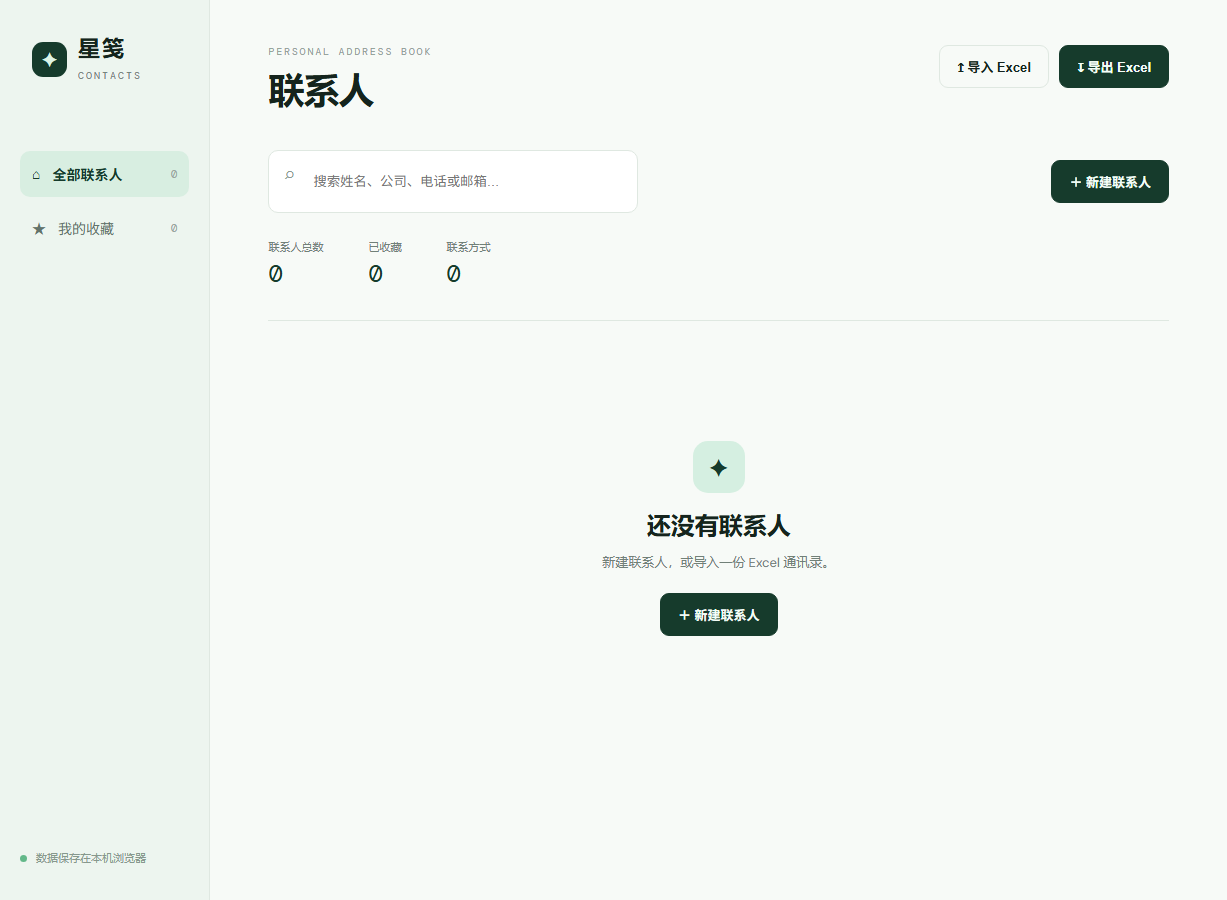
5.1 Initial Empty State
5.2 Contact List & Statistics
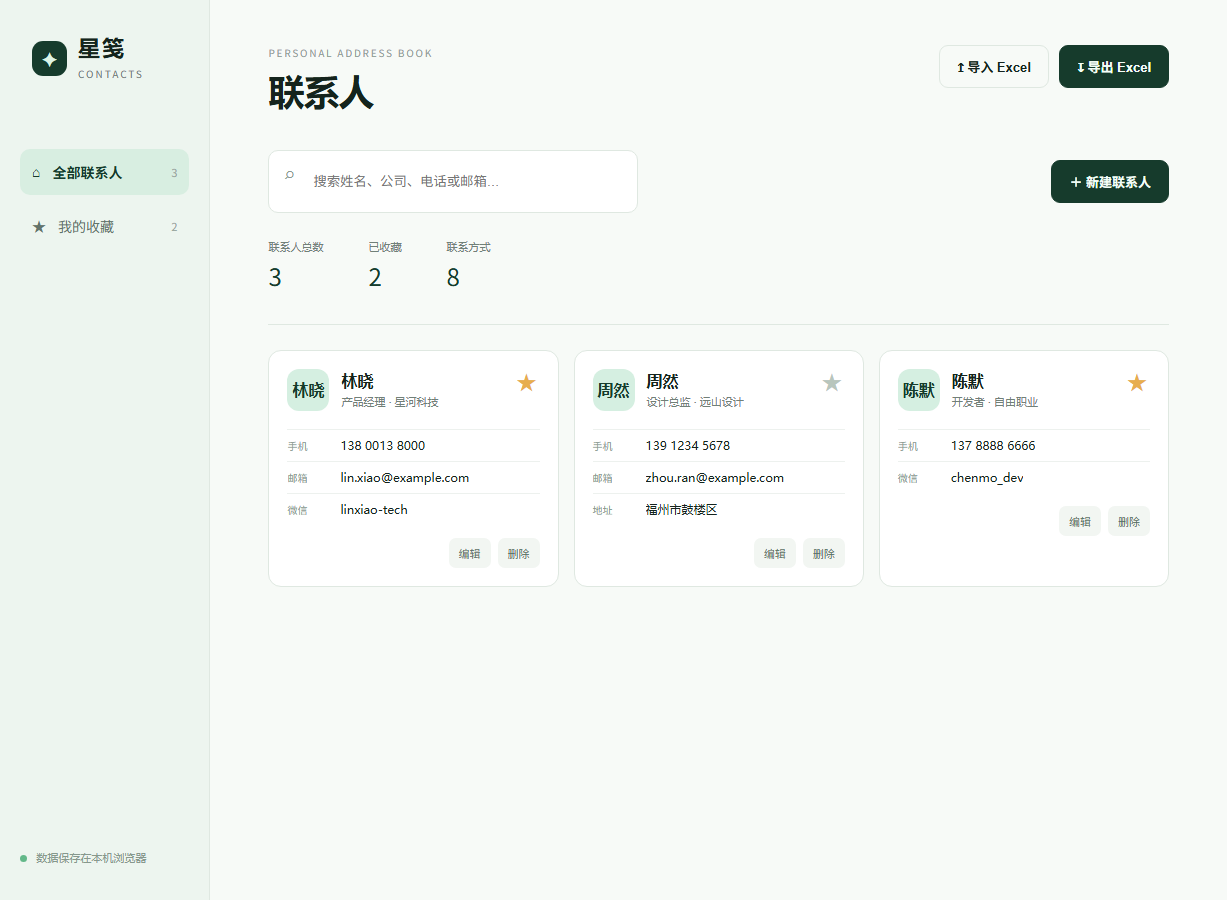
Shows 3 contacts, 2 favorites, and 8 contact methods in the summary bar, along with multi-type methods on each card.
5.3 Editing Multiple Contact Methods
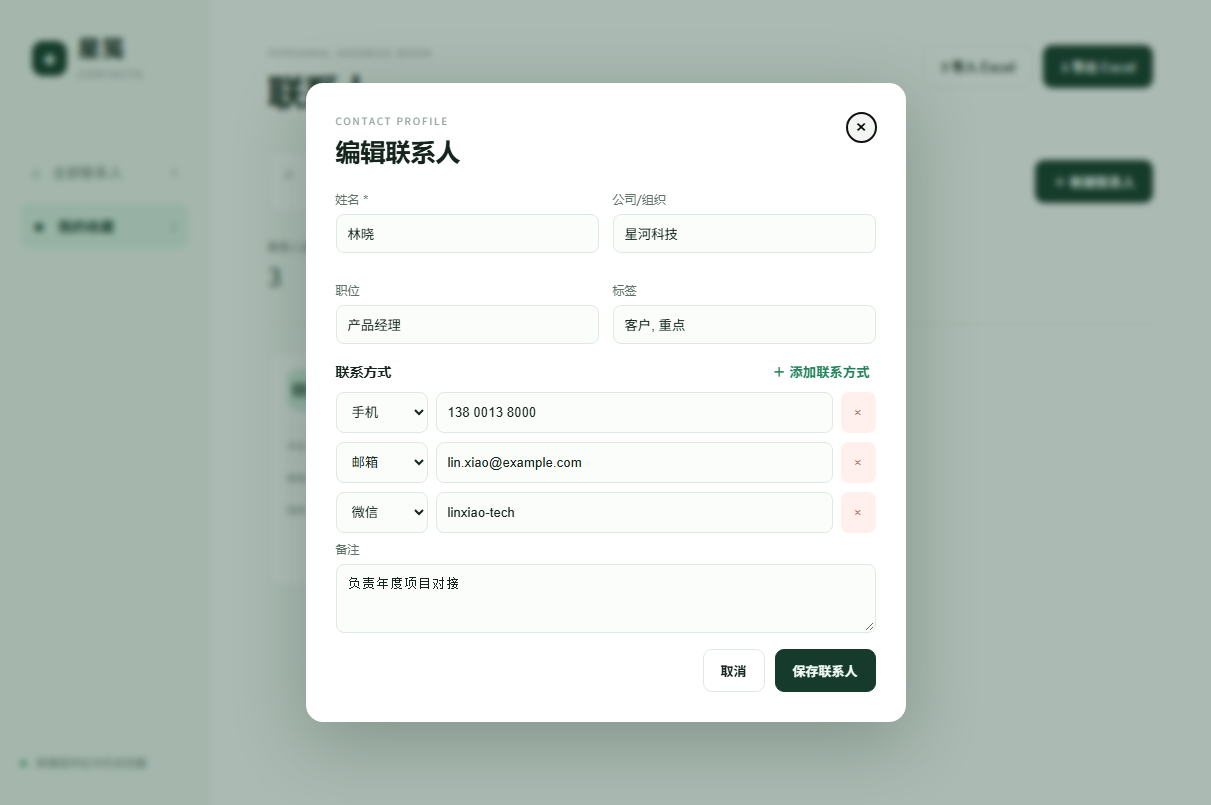
Contact "林晓" holds phone, email, and WeChat entries at the same time, with an option to append more rows.
5.4 Favorites Filter
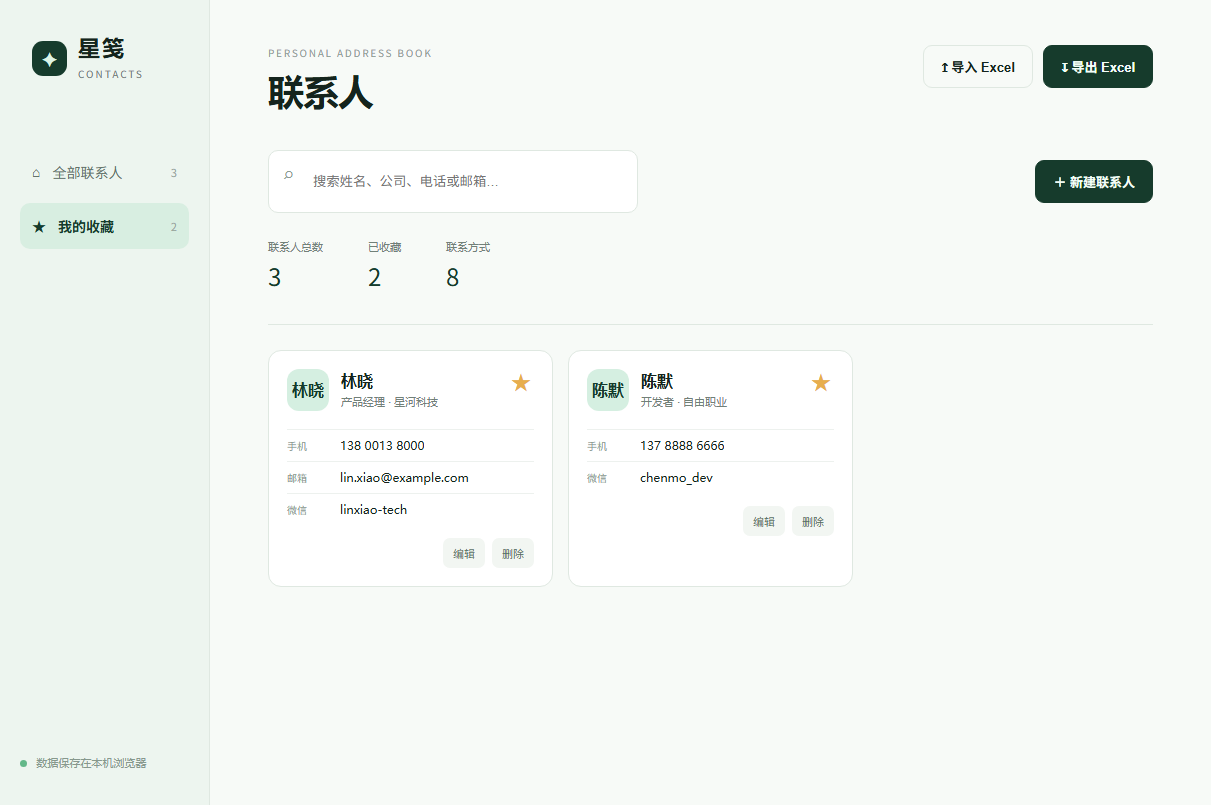
Clicking "我的收藏" in the left sidebar filters the grid down to starred contacts only.
5.5 Search
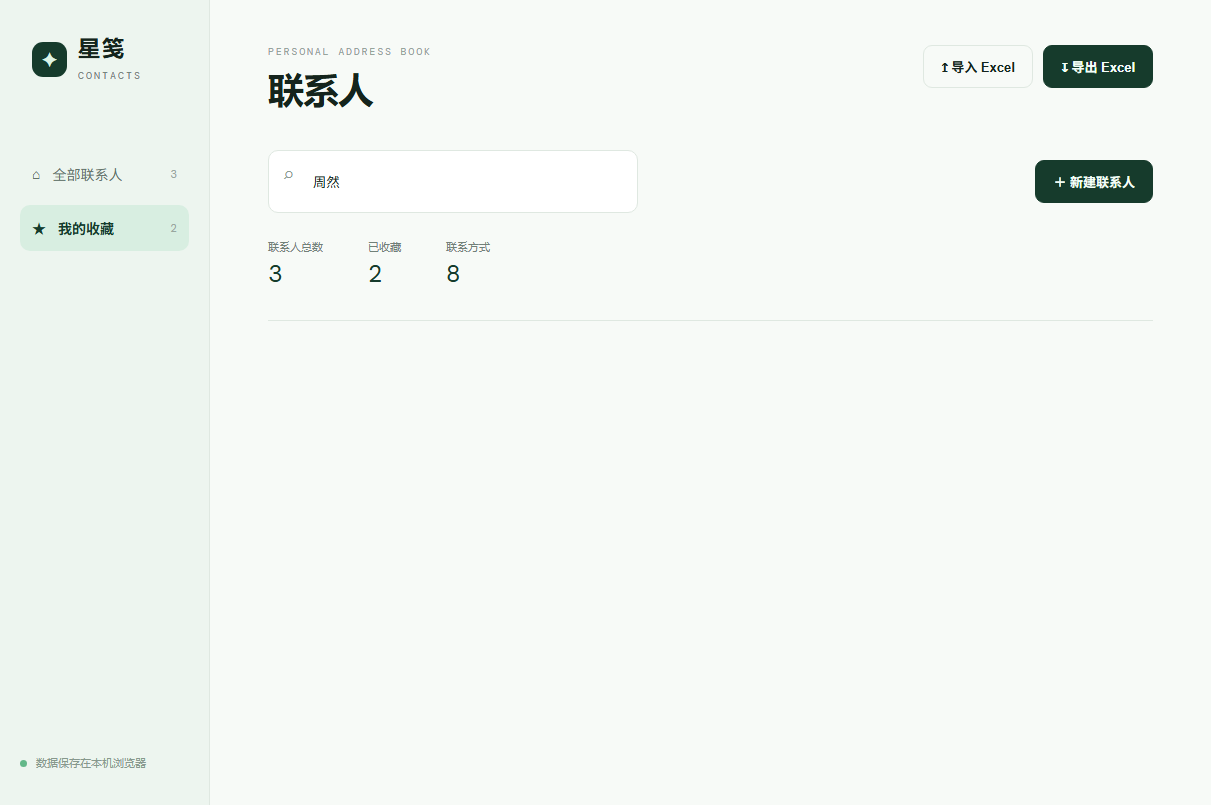
6. Demo Video
The full demo video is committed in the repository:
- Repository file: evidence/星笺联系人演示视频.mp4
- Direct download: https://raw.githubusercontent.com/alemanhong-cmyk/address-book/main/evidence/%E6%98%9F%E7%AC%BA%E8%81%94%E7%B3%BB%E4%BA%BA%E6%BC%94%E7%A4%BA%E8%A7%86%E9%A2%91.mp4
The walkthrough covers:
- Opening the app to show the empty state and counters
- Viewing the contact list and multiple contact methods
- Opening the edit modal to inspect three methods on one contact
- Toggling the favorite star and switching to the Favorites view
- Filtering contacts with the search bar
- Exporting to Excel and checking the column layout
- Deleting data and restoring it via Excel import
- Refreshing the browser to verify
localStoragepersistence
7. Git Collaboration Evidence
7.1 Commit History

7.2 Repository Overview

7.3 Commit Statistics
| Member | GitHub Handle | Commits | Main Contributions |
|---|---|---|---|
| Boyu Xu | alemanhong-cmyk | 9 | Backend data logic, unified code upload after integration, docs, screenshots, and Release |
| Yifan Ye | Remisuki | 1 | MIT LICENSE commit and documentation review |
| Total | 10 |
The repository has 10 commits, 2 branches, 1 tag, and 2 contributors, meeting the minimum 3-commit requirement.
Note on Commit Distribution: During pair development, Yifan Ye implemented the frontend UI and interactions while I (Boyu Xu) implemented the backend data layer and Excel I/O. To avoid merge conflicts on a single-file static bundle, we integrated and tested both parts locally first, and I (alemanhong-cmyk) handled the unified upload, documentation, and Release on GitHub while Yifan Ye (Remisuki) committed the MIT LICENSE and reviewed the docs. Thus, the commit count is concentrated on my account even though the actual coding workload was shared.
7.4 Collaboration Workflow
Our workflow is documented in CONTRIBUTING.md:
- Keep
mainrunnable at all times and develop features onfeature/*branches - Prefix commit messages with
feat:,fix:, ordocs: - Open a Pull Request for peer review before merging
- Verify all items T01 to T11 in
TEST_PLAN.mdbefore merge - Tag milestones and publish a GitHub Release
7.5 Pull Request & Release


- PR #1:
feat: 导出文件名增加时间戳并补充 v1.0.0 发布说明
https://github.com/alemanhong-cmyk/address-book/pull/1 - Release v1.0.0:
https://github.com/alemanhong-cmyk/address-book/releases/tag/v1.0.0
8. Team Division & Contribution Ratio
| Member | Role | Responsibilities | Contribution |
|---|---|---|---|
| Boyu Xu | Backend Logic & Repo Upload | Data model design, localStorage persistence, Excel import/export with fallback handling, HTML escaping utilities, GitHub repo management, unified upload, and Release | 50% |
| Yifan Ye | Frontend UI & Testing | Page layout and CSS color system, responsive breakpoints, card and stat rendering, dynamic method form, favorite/search interactions, LICENSE and test verification | 50% |
| Total | 100% |
The 50/50 split reflects the actual coding workload rather than the commit count. Because the two halves were merged into a single static bundle before being pushed, the Git graph is concentrated on one account — see the note under 7.3 for the full explanation.
9. Problems Encountered & Solutions
Issue 1: Modeling Multiple Contact Methods per Person
Symptom: Using fixed fields (phone, email, wechat) made it impossible to store two mobile numbers or a custom social account.
Solution: Switched to a methods array of { type, value } objects. The dropdown lists common types with an "Other" fallback, so new types require no schema changes.
Issue 2: Data Lost on Page Refresh
Symptom: Early versions kept contacts only in memory, so pressing F5 wiped everything.
Solution: Routed all mutations (create, edit, delete, star toggle, import) through save() to serialize the array into localStorage, and added JSON.parse(... || '[]') on startup.
Issue 3: Losing Extra Numbers During Excel Round-Trip
Symptom: Exporting joined multiple phone numbers into one cell, but the initial import parser only read the first entry.
Solution: Standardized on the Chinese semicolon (;) as the delimiter for both export and import, and documented the type:value format for the "其他联系方式" column in the README.
Issue 4: Identical Filenames on Repeated Exports
Symptom: Exporting twice produced (1) and (2) browser suffixes, making it hard to identify the latest file.
Solution: Added exportStamp() to generate YYYYMMDD-HHmm timestamps, checked syntax with node --check, and verified output formatting as 星笺联系人-20261115-1405.xlsx.
Issue 5: Git Push Failures & Windows SSL Error
Symptom: git push failed with error: failed to push some refs, followed by Windows schannel reporting SEC_E_NO_CREDENTIALS.
Solution: Replaced a placeholder remote URL via git remote set-url, renamed local master to main via git branch -M main, and switched SSL backend with git config http.sslBackend openssl.
10. PSP Tables
10.1 Boyu Xu (Data Layer & Repo Management)
| Phase | Est. Time (min) | Actual Time (min) | Variance | Notes |
|---|---|---|---|---|
| Requirements & API Contract | 30 | 35 | +5 | Aligned data schema and acceptance criteria with Yifan Ye |
| Data Model & Storage Design | 40 | 50 | +10 | Refactored from fixed fields to methods array |
| Backend Logic Coding | 90 | 110 | +20 | localStorage persistence, Excel I/O, and error handling |
| Integration & Edge Testing | 45 | 55 | +10 | Tested missing columns and repeated export filenames |
| Repo Management & Release | 45 | 60 | +15 | Resolved Git push issues, PR, tagging, and v1.0.0 Release |
| Total | 250 | 310 | +60 |
10.2 Yifan Ye (Frontend UI & Verification)
| Phase | Est. Time (min) | Actual Time (min) | Variance | Notes |
|---|---|---|---|---|
| Requirements & UI Contract | 30 | 30 | 0 | Agreed on the data schema and view behaviour with Boyu Xu |
| Layout & CSS System | 60 | 70 | +10 | Sidebar/main shell, colour variables, responsive breakpoints |
| Dynamic Forms & Interactions | 80 | 95 | +15 | Method rows via <template>, star toggle, search, empty state |
| Integration & Manual Testing | 40 | 45 | +5 | Checked T01–T11 on the integrated build |
| Documentation & LICENSE | 30 | 35 | +5 | Reviewed README, added the MIT licence |
| Total | 240 | 275 | +35 |
11. Summary & Reflection
Working on the backend data layer and repository management gave me three concrete takeaways:
First, data modeling sets the ceiling for flexibility. Starting with fixed fields forced a rewrite halfway through once multiple numbers per person came up. That rework accounts for the extra time in my design phase.
Second, import and export must be strictly symmetric. Column names, delimiters (;), and missing-column fallbacks have to match on both sides, otherwise an exported file cannot be re-imported cleanly.
Third, centralizing Git uploads hides individual commit history. Having me upload the integrated code avoided merge conflicts, but it made the commit graph look one-sided even though Yifan Ye wrote the frontend locally. On future pair projects, splitting the codebase into separate files (storage.js, excel.js, ui.js) from day one will let both partners push to their own feature/* branches and open PRs independently.
References
- Assignment Post: https://bbs.csdn.net/topics/620593436
- Course Forum: https://bbs.csdn.net/forums/2601_MU_SE_FZU
- SheetJS Documentation: https://docs.sheetjs.com/
- MDN localStorage: https://developer.mozilla.org/zh-CN/docs/Web/API/Window/localStorage
相关推荐
IBM WebSphere eXtreme Scale Version 7.1 ---Programming Guide
该文档时学习IBM WebSphere eXtreme Scale(内存数据库)方便的权威文档,此文档为Programming Guide。还有一个文档名字为Administration Guide。希望对学习WebSphere eXtreme Scale的人所有帮助。
AIDA64 1.60.1300 Extreme 序列号
AIDA64 1.60.1300 Extreme 正式版 序列号 到2021年!!
Sample-Based Extreme Learning Machine with Missing Data
Sample-Based Extreme Learning Machine with Missing Data
European Extreme Storm Surge level Data 欧洲极端风暴潮水平数据-数据集
这是由欧盟开放数据门户网站托管的联合研究中心的数据集。 european-extreme-storm-surge-level-historical_metadata.json european-extreme-storm-surge-level-rcp45_metadata.json european-extreme-storm-surge-level-rcp85_metadata.json European Extreme Storm Surge level Data_datasets.txt
HackSysExtremeVulnerableDriver:HackSys Extreme漏洞Windows驱动程序
HackSysExtremeVulnerableDriver:HackSys Extreme漏洞Windows驱动程序