2601_FZU-MU_SE

Extreme Programming Assignment_832401108_陈子元 Address Book System
 墨衍会员 · AI 创作全网分发 墨衍智能分发 通过墨衍一键同步至各平台 可同步平台 CSDN微信公众号微博知乎掘金百家号博客园抖音小红书 你的文章也可以这样分发 墨衍会员 ¥399起/年,写一次发全网
我也要 关注 + 加入社区
| Item | Details |
|---|---|
| Course | Software Engineering (FZU–MU) |
| Team | BLGNB |
| Assignment | Extreme Programming |
| Objective | Deliver a working address book with favorites, multiple contact methods per person, and Excel import and export, using Git to collaborate |
| Author | Chen Ziyuan, responsible for backend development and web interface improvements |
| Teammate | Lin Junchen, responsible for frontend development and deployment to Alibaba Cloud |
| Other references | The team API contract and project implementation notes in the repository |
Table of Contents
- Project Overview
- Division of Work and Contributions
- Technical Approach and My Work
- Feature Implementation
- Git Collaboration and Commit History
- Integration, Deployment, and Verification
- Collaboration Challenges and How We Resolved Them
- Personal Software Process (PSP)
- Personal Reflection
1. Project Overview
We built an address book with a separate frontend and backend. Users can create, edit, search for, and delete contacts. They can star contacts and view them together in the Favorites list. Each contact can have multiple phone numbers, email addresses, or other contact methods. Users can import and export the entire address book through Excel.
- GitHub repository
- Live address book on Alibaba Cloud
- Coding standards
- GitHub Release v1.0.0 (commit
8a6bc85)
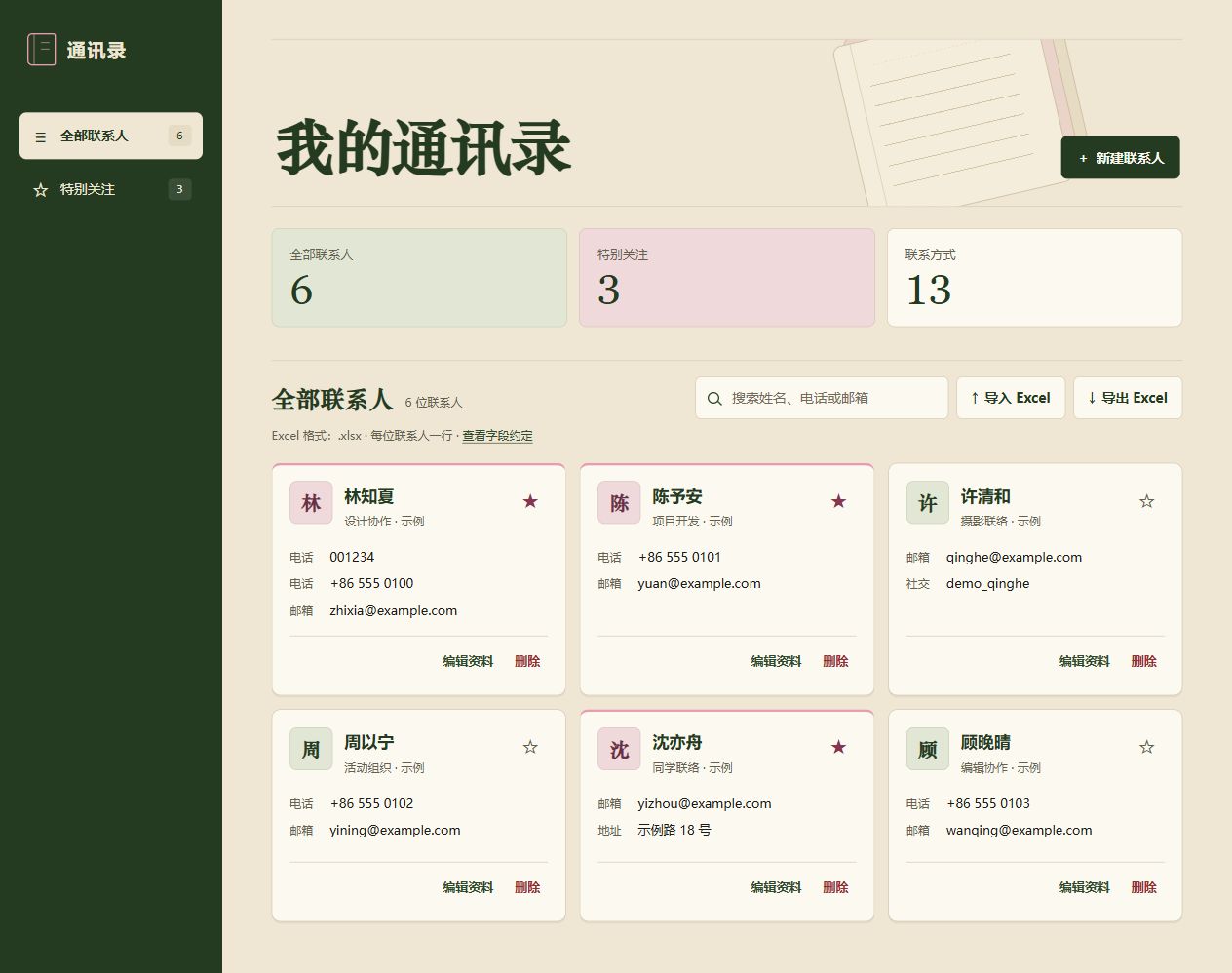
Figure 1. The updated desktop interface running against the local backend with fictional contacts stored in a separate database.
2. Division of Work and Contributions
| Member | Main responsibilities | Contribution |
|---|---|---|
| Lin Junchen | Built the frontend features and initial interface, including contact interactions, favorites filtering, dynamic forms, and Excel uploads and downloads. Deployed the project to Alibaba Cloud and verified public access. | 50% |
| Chen Ziyuan | Implemented the backend API, data validation, SQLite persistence, favorites logic, and Excel parsing and generation. Tested the frontend and backend together locally and improved the web layout, styling, and mobile presentation. | 50% |
| Total | Both members agreed on the API contract, tested the frontend and backend together, and verified the features. The percentages include this shared work. | 100% |
I implemented the backend endpoints and tested them with the frontend locally, including data persistence and Excel import and export. I then improved the web interface. Lin Junchen built the frontend features and initial interface, deployed the project to Alibaba Cloud, and verified public access.
3. Technical Approach and My Work
The browser sends HTTP requests to FastAPI. Pydantic validates fields such as the contact name, favorite status, and contact methods. SQLite stores the address book data, and openpyxl reads and writes .xlsx files. The backend separates API routes, validation, database access, and Excel handling into backend/main.py, schemas.py, database.py, and excel.py, respectively.
Browser (contact list, forms, Excel uploads and downloads)
  ↓ HTTP /api
FastAPI (contact, favorites, and Excel endpoints)
  ├─ Pydantic validates request fields
  ├─ SQLite reads and writes contacts and contact_methods
  └─ openpyxl reads and generates .xlsx workbooks
Method and path relative to /api | Purpose |
|---|---|
GET /contacts | Return the contact list, which the frontend uses for search and favorites filtering |
POST /contacts | Create a contact |
PUT /contacts/{id} | Update a contact and its contact methods |
DELETE /contacts/{id} | Delete a contact |
PATCH /contacts/{id}/favorite | Set or clear a contact's favorite status |
POST /contacts/import | Upload and validate a workbook, then return the numbers of imported and skipped records |
GET /contacts/export | Download a workbook containing all contacts |
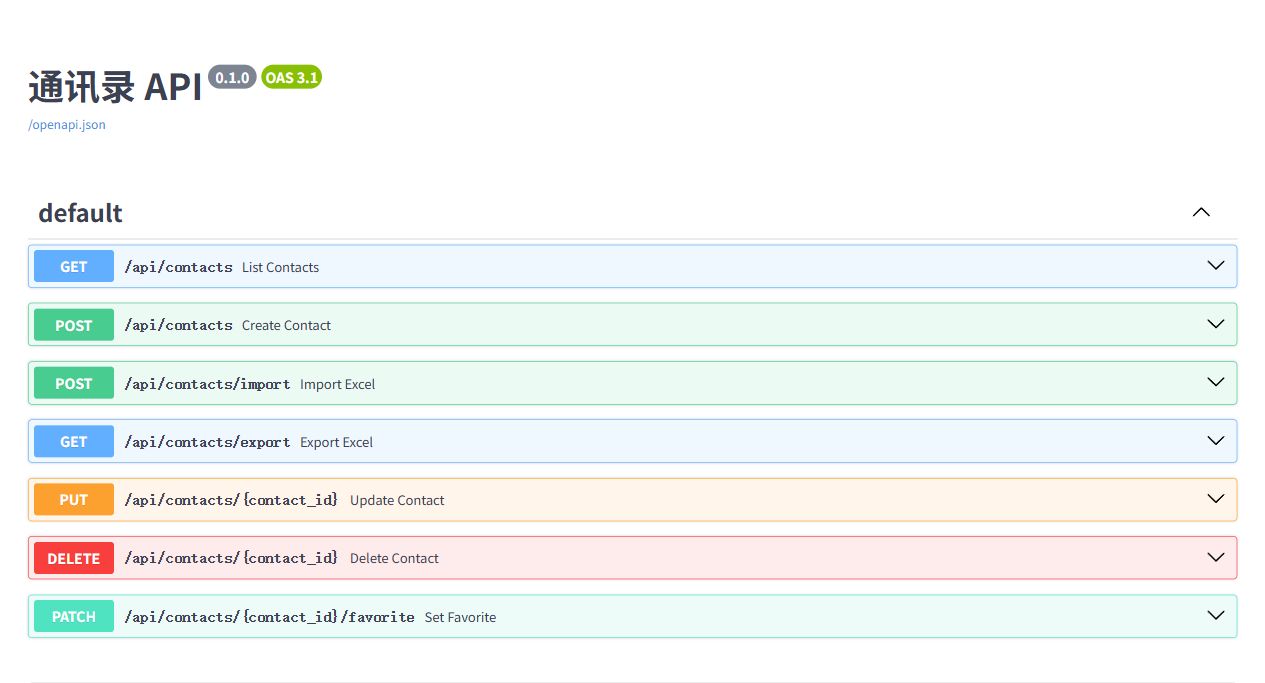
Supplementary figure. The local Swagger documentation shows the endpoints for contact management, favorites, and Excel import and export.
4. Feature Implementation
4.1 Contacts, Favorites, and Multiple Contact Methods
The database uses two tables. The contacts table stores the name, notes, and favorite status. The contact_methods table uses contact_id to associate each method with a contact and position to preserve its order. This lets one contact store two phone numbers and an email address, for example. Edits update the contact fields and methods in a single transaction. Deleting a contact also deletes its associated methods through a cascading delete.
The favorites endpoint takes an explicit Boolean value. Submitting is_favorite: true marks the contact as a favorite, and retrying the same request keeps that state. After a successful update, the browser reloads the contact list and uses the stored state to refresh the star icons and Favorites list.
User clicks a star
  ↓ PATCH /api/contacts/{id}/favorite
FastAPI receives the desired is_favorite value
  ↓
SQLite stores the contact's favorite status
  ↓ After the write succeeds, the browser sends GET /api/contacts
The page refreshes the stars and Favorites list from the response
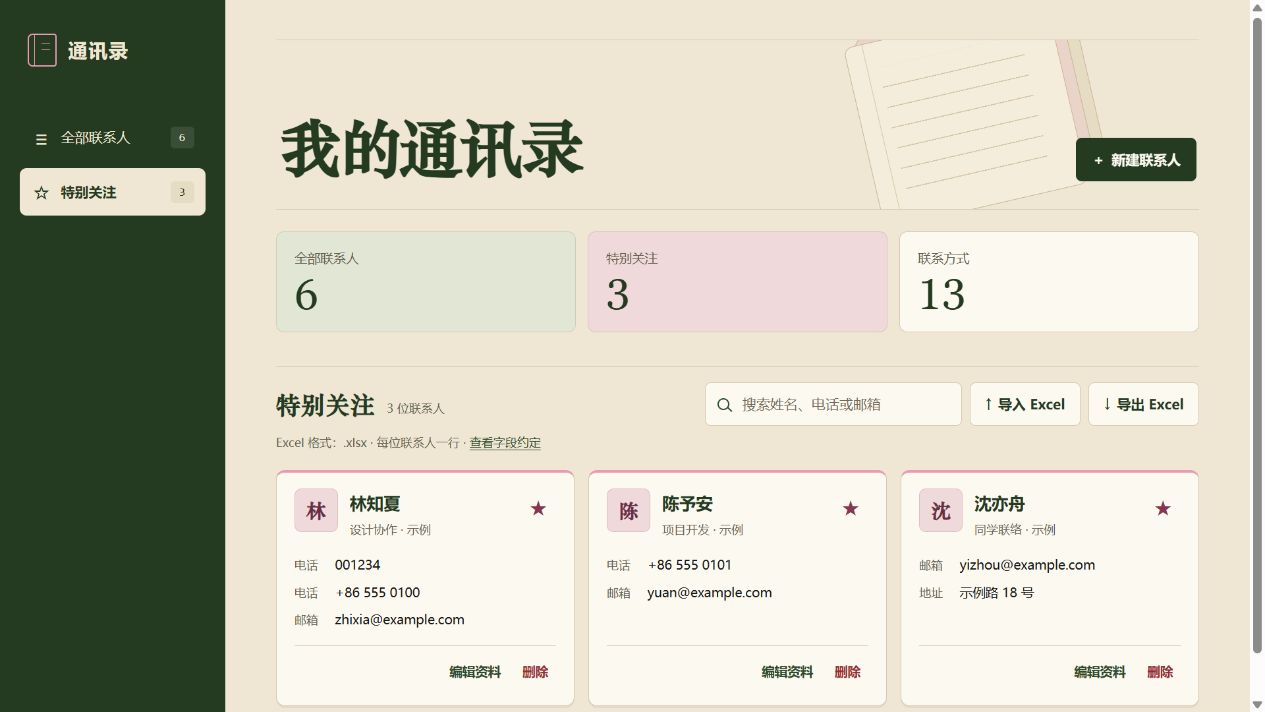
Figure 2. The updated Favorites list shows three starred contacts during local integration testing.
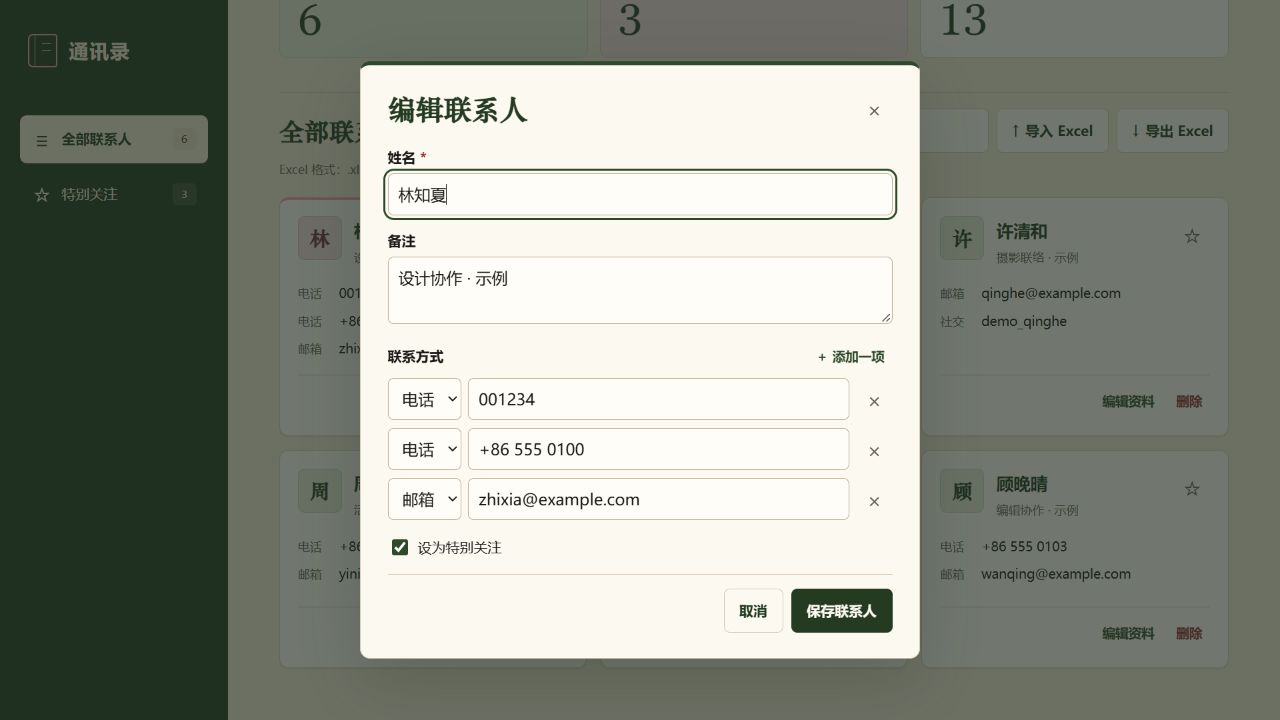
Figure 3. The updated contact editor shows two phone numbers and one email address for the same person during local integration testing.
4.2 Excel Import and Export
The exported workbook has one row per contact. It uses separate columns for name, notes, favorite status, phone numbers, email addresses, social accounts, addresses, and other details. A phone cell can store two numbers as ["001234","+86 555 0100"]. The export writes cell values as text to preserve leading zeros, plus signs, and Chinese characters. The workbook contains the full address book. Search and favorites filters apply only to the on-screen list.
During import, the backend validates the file and every row before writing the batch to SQLite. Each import supports up to 2,000 data rows, excluding the header. Split larger workbooks before importing. If a row is invalid, it returns an error and leaves the database untouched. An incoming record is a duplicate when its name, notes, and contact method values in each category match an existing record in the same order. The import skips the duplicate and preserves the existing record's favorite status.
Import a workbook
  ↓ POST /api/contacts/import
Check the uploaded file → Read the workbook → Validate each row
  ├─ Invalid → Return an error and leave the database unchanged
  └─ Valid → Deduplicate and insert in one SQLite write transaction
               ↓
             Return the numbers of imported and skipped records

Export the address book
  ↓ GET /api/contacts/export
Read all contacts → Generate an .xlsx workbook → Download contacts.xlsx

Figure 4. Microsoft Excel displays the workbook exported from the updated address book. It contains six sample contacts and eight data columns. The two phone numbers for Lin Zhixia retain their leading zero and plus sign, respectively.
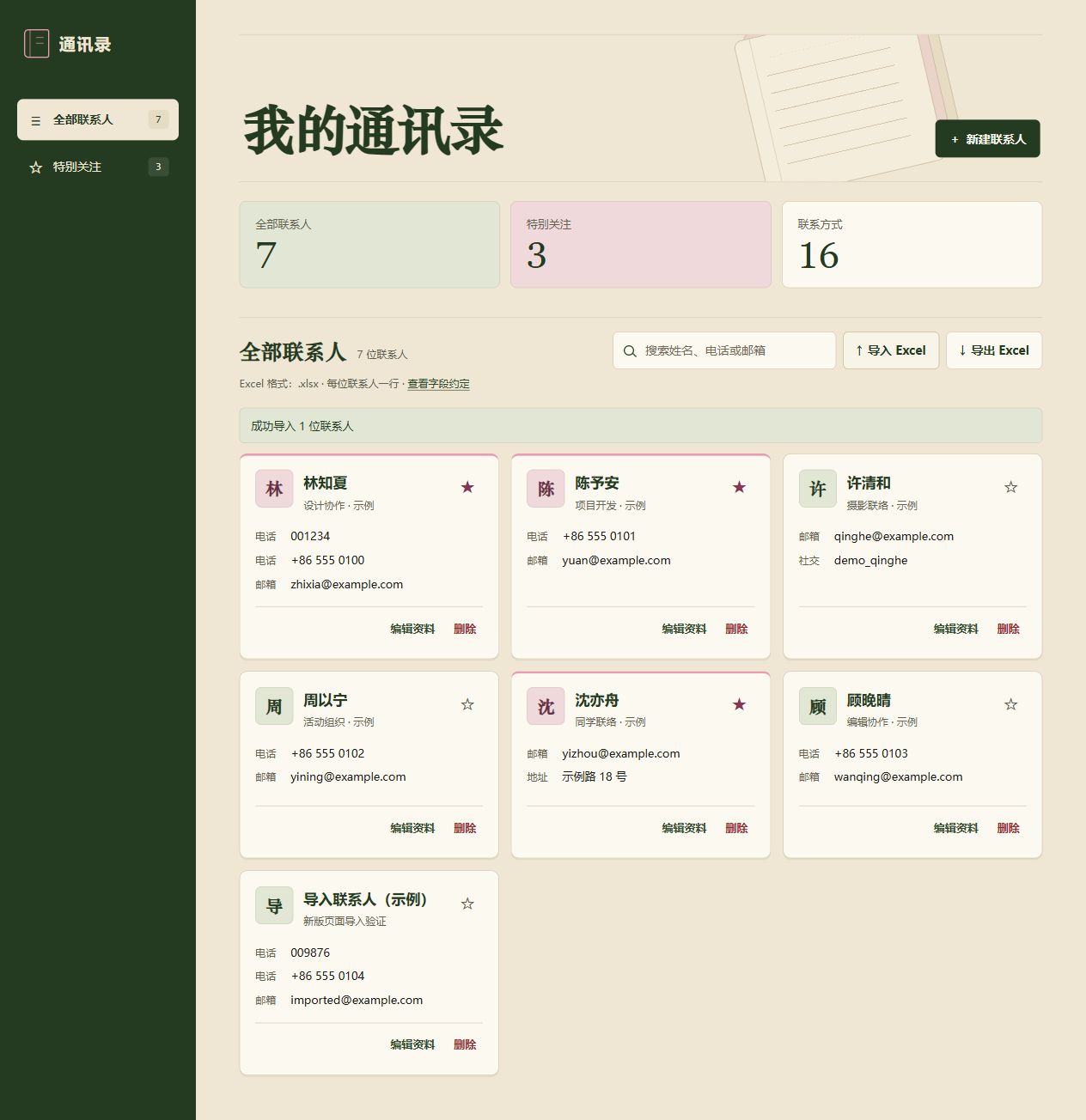
Figure 5. During local integration testing, the updated interface confirmed the import of one contact and displayed the new card.
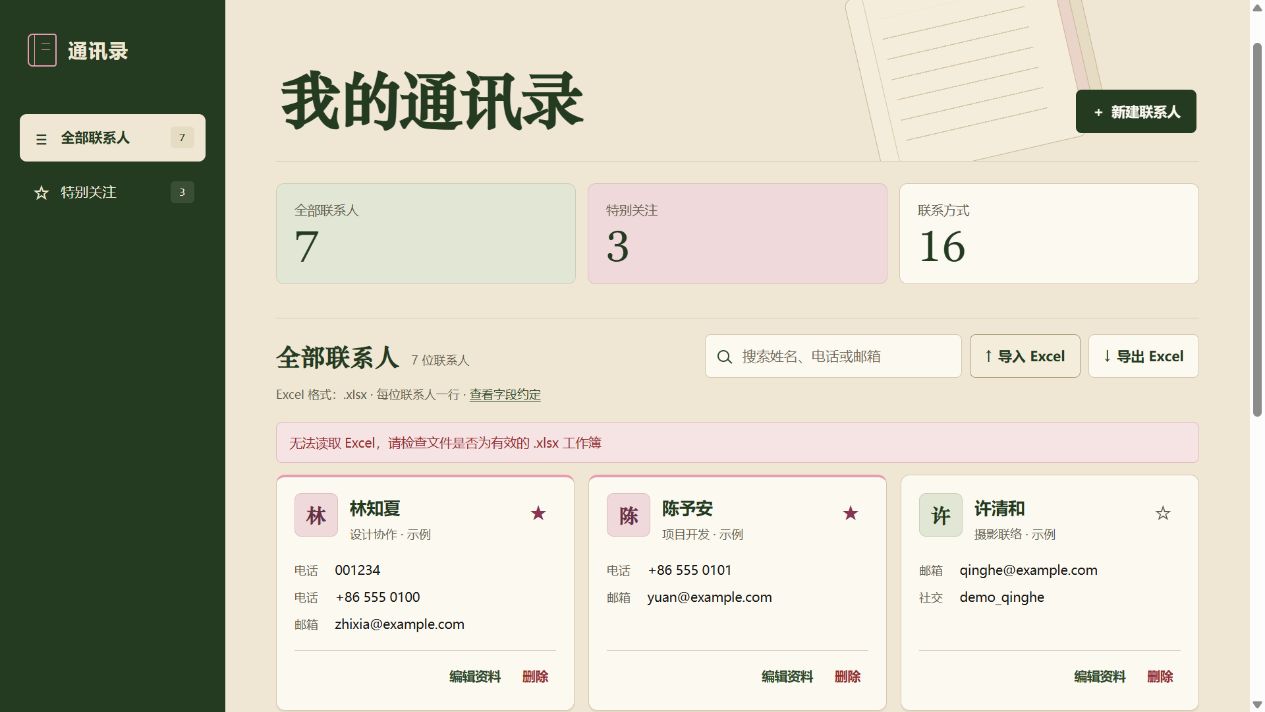
Figure 6. During local integration testing, the updated interface reported that it could not read the damaged workbook. The existing contacts remained in the list.
4.3 Web Interface Improvements
I revised Lin Junchen's initial interface by updating the layout and colors of the home page, contact cards, and edit dialog. I checked the result at both desktop and mobile viewport widths. Figure 1 shows the updated home page. Interface improvements in PR #3
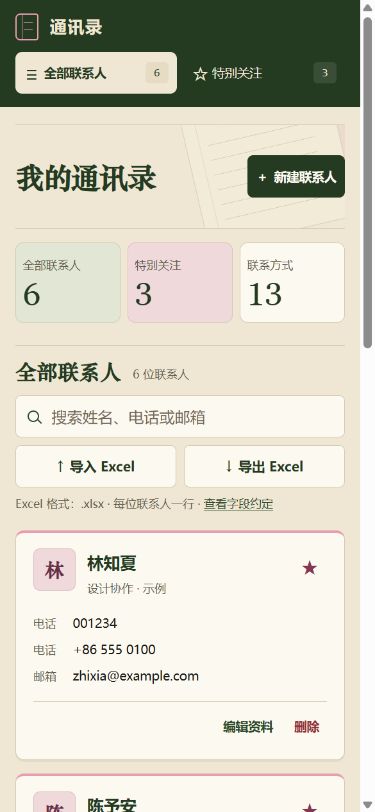
Figure 7. A browser preview of the updated interface at a viewport width of 390 pixels. The navigation moves to the top, the contact cards stack in a single column, and the search and Excel controls remain accessible.
5. Git Collaboration and Commit History
We developed the frontend on feat/frontend and the backend on feat/backend, then merged our changes into main through pull requests. The table counts commits by GitHub account through 8a6bc85 (November 17, 2026), the commit used for Release v1.0.0. GitHub commit history
| Member | GitHub account | Including merge commits | Excluding merge commits |
|---|---|---|---|
| Lin Junchen | linblackchen-code | 16 | 13 |
| Chen Ziyuan | josephchen9jo-coder | 11 | 11 |
| Total | 27 | 24 |

Figure 8. The GitHub commit history through 8a6bc85, the snapshot used in the table.
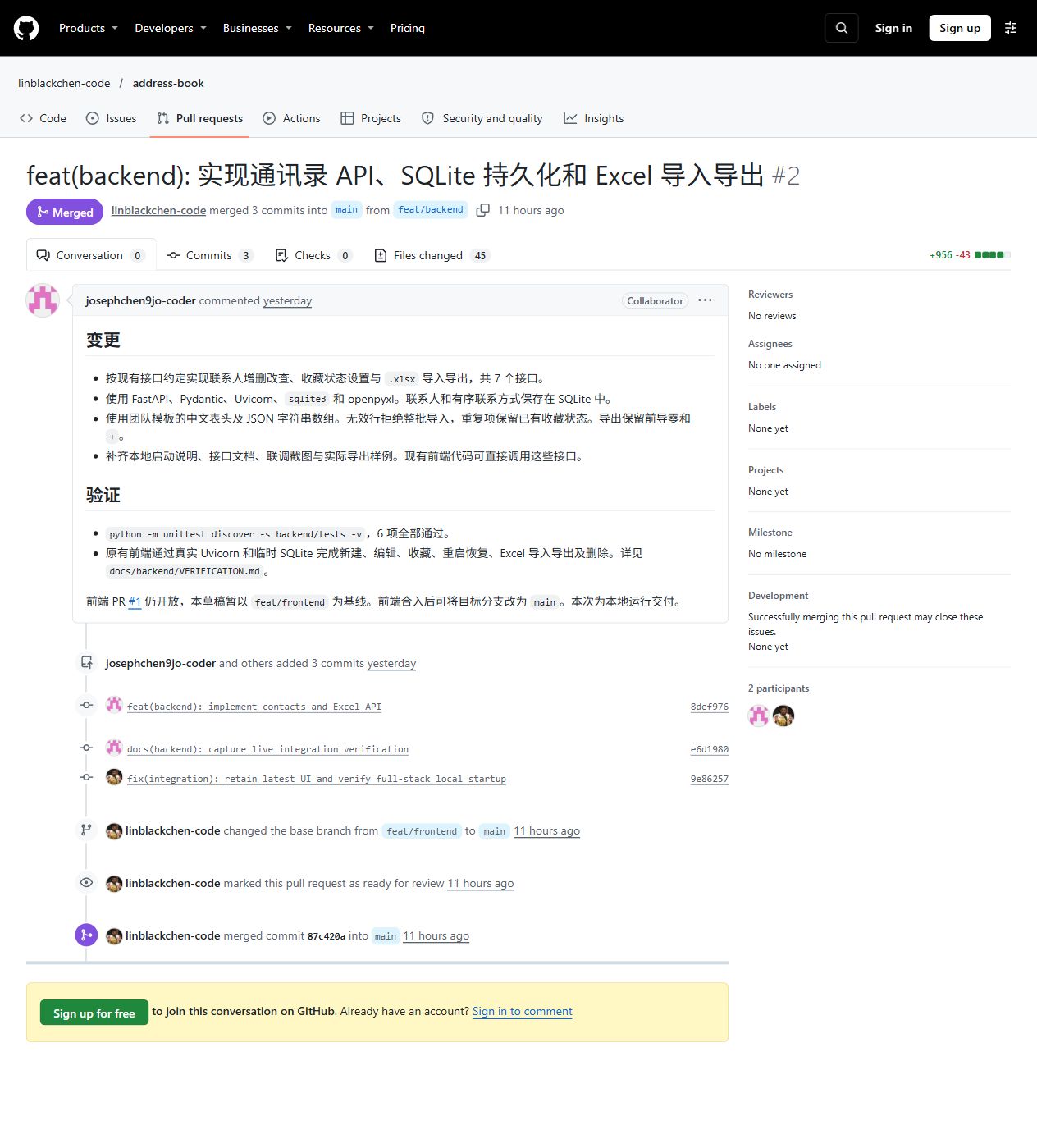
Figure 9. Backend PR #2 was merged into main. It includes two backend commits by Chen Ziyuan and one integration commit by Lin Junchen.
6. Integration, Deployment, and Verification
Six automated backend regression tests passed. They covered contact creation, retrieval, updates, and deletion, as well as favorite requests that are retried, persistence across a service restart, field validation, an Excel export and reimport, failed batch imports, and concurrent imports of duplicate records. Browser tests confirmed that the downloaded workbook retained multiple contact methods and that contacts and favorite status remained available after restarting the service and refreshing the page. Backend verification record
I tested the backend with the frontend locally. Lin Junchen deployed the project at /address-book/ on Alibaba Cloud, configured Nginx to serve the frontend files and forward API requests, and verified public access.
I recorded a demonstration using the updated interface on Alibaba Cloud. The recording shows how to create a contact with multiple contact methods, import a sample workbook, edit contact details, export and open the resulting workbook, search for contacts, delete a contact, and use the Favorites filter.
7. Collaboration Challenges and How We Resolved Them
| Challenge | Resolution and verification |
|---|---|
| A contact can have several methods of the same type, and text values can contain commas. | We exchanged contact methods in a methods array and agreed to store multiple values of the same type in Excel as a JSON array of strings. We verified the export with two phone numbers and one email address, including phone values with leading zeros and plus signs. |
| Successful imports, duplicate imports, and invalid files need different feedback. | The backend returned import and skip counts together with a message, and the frontend displayed the result. Uploading the same template again created zero new records. The backend rejected the damaged workbook. |
| The backend branch brought an earlier version of the interface into the integration. | We compared the changes on both branches during the merge, kept the latest interface at the time, and checked forms, favorites, and Excel workflows against the running backend. |
I handled duplicate Excel imports. The backend checks for duplicates and inserts new records in one SQLite write transaction, then returns the numbers of added and skipped records to the frontend. When we uploaded the same template twice during integration testing, the second upload added zero records. The regression tests also confirmed that reimporting a duplicate preserves any changes the user has made to the existing contact's favorite status.
8. Personal Software Process (PSP)
The figures below are estimates in minutes based on the work I completed. The planned time is a retrospective budget, and the time spent is also estimated retrospectively. The table covers backend development, local integration testing, interface improvements, and preparation of my submission materials.
| PSP activity | Planned time (retrospective budget, min) | Time spent (retrospective estimate, min) |
|---|---|---|
| Read the requirements and plan the work | 25 | 25 |
| Prepare the tools and configure the local backend environment | 20 | 20 |
| Design the contact endpoints, request fields, and response formats, and define Pydantic validation rules | 20 | 25 |
| Implement SQLite storage for contacts and their associated methods, including edit transactions and cascading deletes | 30 | 35 |
| Implement the FastAPI endpoints for contact creation, retrieval, updates, deletion, and favorites, including request validation and error responses | 35 | 40 |
| Implement Excel import, validate the workbook and each row, and skip duplicates | 40 | 50 |
| Implement Excel export and preserve multiple phone numbers, leading zeros, and plus signs | 25 | 30 |
| Write backend regression tests and test the frontend and backend together locally, including persistence across a restart and the handling of failed imports | 55 | 65 |
| Improve the layout, colors, and styling of the home page, contact cards, and edit dialog | 30 | 35 |
| Adjust the layout at mobile widths and check search, favorites, and form interactions | 15 | 20 |
| Prepare verification notes, screenshots, and the blog post | 40 | 55 |
| Total | 335 (5 h 35 min) | 400 (6 h 40 min) |
I estimate that I spent 265 minutes on backend preparation, design, implementation, and local verification, and 55 minutes on interface improvements and mobile layout checks. The total exceeded the budget by 65 minutes. Excel import and local verification each took 10 minutes longer than planned, mainly to check duplicate imports, error feedback for invalid files, and persistence after a service restart. After updating the interface, I checked the layout, search, favorites, and form interactions at both desktop and mobile widths. Next time, I will track time by module for coding, testing, and preparation of submission materials.
9. Personal Reflection
This assignment taught me to consider how the different parts of the backend work together. Storing contacts and contact methods in separate SQLite tables lets a single contact have several methods of the same type. Transactions group writes that need to succeed together. Excel gave users a file they could open to verify how multiple values are stored and reimport to see how the app handles duplicates. Refreshing the browser and restarting the service during testing helped me check that the interface reflected the stored data.
The check that stood out most was verifying that Excel export preserved phone number formatting. I opened the downloaded workbook and checked that 001234 and +86 555 0100 appeared in the same cell with their original values and in the original order. A regression test then imported the exported workbook into an empty database and compared the contact fields one by one. Next time, I will prepare a sample workbook with leading zeros, plus signs, and multiple values of the same type while we are defining the API. Both sides can then use the same data from the first integration test.
相关推荐
国央企创新负责人在推动科研成果产业化时,如何确保技术成果的匹配质量和落地可行性?.docx
科易网基于行业知识库+行业大数据+科技资源要素+AI模型,以AI,赋能技术转移、成果转化、技术经理人培训、知识产权管理、区域产业分析与布局、地方科技招商、创新创业大赛等场景,推出科技创新领域的AI工具、场景化服务和数智化解决方案,推动科技创新与产业创新智能化发展。
rag-ext-part-00
rag-ext-part-00
产业园区运营负责人如何利用平台优化企业与高校院所的协同创新对接?.docx
科易网基于行业知识库+行业大数据+科技资源要素+AI模型,以AI,赋能技术转移、成果转化、技术经理人培训、知识产权管理、区域产业分析与布局、地方科技招商、创新创业大赛等场景,推出科技创新领域的AI工具、场景化服务和数智化解决方案,推动科技创新与产业创新智能化发展。
材料科学一胜百模具钢选材指南:基于工况分类的塑料模冷作热作钢性能对比与应用方案
内容概要:本文是一份关于一胜百(ASSAB)模具钢的全面技术手册,系统介绍了其主要牌号分类、化学成分、硬度特性、热处理工艺及典型应用场景。手册将模具钢分为塑料模具钢、冷作模具钢、热作模具钢和粉末冶金高合金钢四大类,并针对不同工况提供选材建议,重点解析了如718H、S136、XW-42、VIKING、ELMAX、ASP60等常用牌号的性能差异与适用范围。同时,详细说明了在高速端子模、汽车高强钢模具等典型工况下的材料选择、EDM加工处理、去应力回火及镶件设计策略,强调根据实际需求平衡耐磨性、韧性与成本。; 适合人群:从事模具设计与制造的技术人员、材料工程师、热处理工艺师以及采购决策人员,尤其适用于对高端工模具钢有较高要求的工业领域从业者。; 使用场景及目标:①指导在不同成型工艺(如注塑、冲压、压铸)中合理选用一胜百模具钢;②优化模具寿命、加工精度与成本控制;③解决因材料选择不当导致的开裂、磨损、锈蚀等问题;④制定合理的热处理与电加工工艺路线。; 阅读建议:本手册注重实用性与对比分析,建议结合具体项目案例对照查阅,重点关注材料后缀(如ESR、Supreme)对性能的影响,避免仅凭牌号比价而忽视工艺品质差异。
产业园区运营负责人在组织科技成果转化对接活动时,如何实现成果与企业的精准匹配?.docx
科易网基于行业知识库+行业大数据+科技资源要素+AI模型,以AI,赋能技术转移、成果转化、技术经理人培训、知识产权管理、区域产业分析与布局、地方科技招商、创新创业大赛等场景,推出科技创新领域的AI工具、场景化服务和数智化解决方案,推动科技创新与产业创新智能化发展。