

 iOS
iOS

关于横屏应用中插入个别竖屏view问题 求大神指点
 墨衍会员 · AI 创作全网分发 墨衍智能分发 通过墨衍一键同步至各平台 可同步平台 CSDN微信公众号微博知乎掘金百家号博客园抖音小红书 你的文章也可以这样分发 墨衍会员 ¥399起/年,写一次发全网
我也要 关注 + 加入社区
墨衍会员 · AI 创作全网分发 墨衍智能分发 通过墨衍一键同步至各平台 可同步平台 CSDN微信公众号微博知乎掘金百家号博客园抖音小红书 你的文章也可以这样分发 墨衍会员 ¥399起/年,写一次发全网
我也要 关注 + 加入社区如果我在工程设置只能横屏
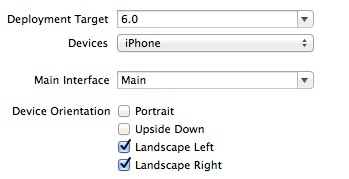
但是项目需要一到两个竖屏
那可不可以单独设置一个竖屏的view或者
-(NSUInteger)supportedInterfaceOrientations{
return UIInterfaceOrientationPortrait;
}
- (BOOL)shouldAutorotate
{
return YES;
}
这样设置没有效果 还报错
Terminating app due to uncaught exception 'UIApplicationInvalidInterfaceOrientation', reason: 'Supported orientations has no common orientation with the application, and shouldAutorotate is returning YES'
但是项目需要一到两个竖屏
那可不可以单独设置一个竖屏的view或者
-(NSUInteger)supportedInterfaceOrientations{
return UIInterfaceOrientationPortrait;
}
- (BOOL)shouldAutorotate
{
return YES;
}
这样设置没有效果 还报错
Terminating app due to uncaught exception 'UIApplicationInvalidInterfaceOrientation', reason: 'Supported orientations has no common orientation with the application, and shouldAutorotate is returning YES'
...全文
相关推荐
Android布局技巧之创建可重用的UI组件
例如,你可以在`layout/`目录下定义一个通用的布局,然后在`layout-land/`(横屏)和`layout-port/`(竖屏)目录下覆盖特定方向的布局。
iOS组件封装与自动布局自定义表情键盘
在自定义表情键盘中,自动布局被用来确保键盘在横屏和竖屏模式下都能正确显示,同时也保证了在不同屏幕尺寸上的用户体验。3.
安卓fragment的运用
例如,可以将一个Activity分为两个Fragment,分别显示在竖屏模式下的左右两侧,或者在横屏模式下占据整个屏幕。
Android Fragment完全解析,关于碎片你所需知道的一切
### Android Fragment 完全解析#### 一、Fragment 概述与应用场景Fragment(碎片)是一种可以在Activity中灵活地插入和删除的用户界面组件。
Basic4Android代码段
横竖屏切换:在Android开发中,当设备从竖屏模式切换到横屏模式时,可能会遇到内存溢出的问题。文件中提到的代码段可能提供了应对这种屏幕方向变化时可能出现的内存问题的解决方案。5.




