请教fopen打开CSV文件输出时遇汉字乱码

slmax1 2015-06-23 04:56:25

#define _CRT_SECURE_NO_WARNINGS
#include <stdio.h>
#include <stdlib.h>


int main()
{
char str[100] = "F:\\视频\\8.csv";
FILE *pf = fopen(str, "r");
if (pf == NULL)
{
return -1;
}
else
{
while (!feof(pf))
{
char str[500] = { 0 };
fgets(str, 500, pf);
fputs(str, stdout);
}
}

getchar();
return 0;
}
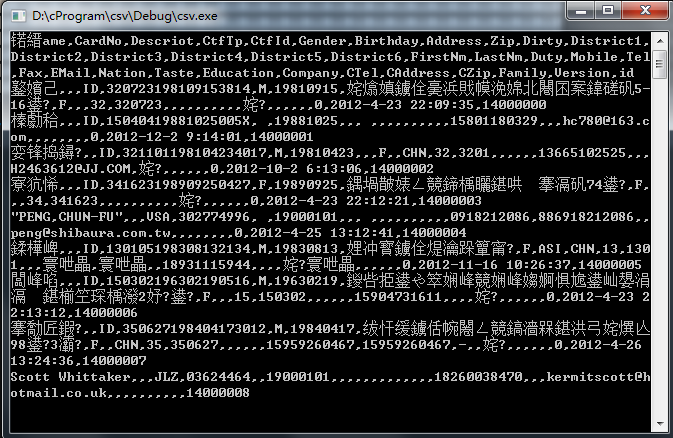

应该如何解决.
...全文
366 2 打赏 收藏 转发到动态 举报
写回复
用AI写文章
2 条回复
切换为时间正序
请发表友善的回复…
发表回复
赵4老师 2015-06-23
  • 打赏
  • 举报
回复
FILE *pf = fopen(str, "r, ccs=UTF-8"); In Visual C++ 2005, fopen supports Unicode file streams. A flag specifying the desired encoding may be passed to fopen when opening a new file or overwriting an existing file, like this: fopen("newfile.txt", "rw, ccs=<encoding>"); Allowed values of the encoding include UNICODE, UTF-8, and UTF16-LE. If the file is already in existence and is opened for reading or appending, the Byte Order Mark (BOM) is used to determine the correct encoding. It is not necessary to specify the encoding with a flag. In fact, the flag will be ignored if it conflicts with the type of the file as indicated by the BOM. The flag is only used when no BOM is present or if the file is a new file. The following table summarizes the modes used in for various flags given to fopen and Byte Order Marks used in the file. Flag No BOM (or new file) BOM: UTF-8 BOM: UTF-16 UNICODE ANSI UTF-8 UTF-16LE UTF-8 UTF-8 UTF-8 UTF-16LE UTF-16LE UTF-16LE UTF-8 UTF-16LE If mode is "a, ccs=<encoding>", fopen will first try to open the file with both read and write access. If it succeeds, it will read the BOM to determine the encoding for this file; however, if it fails, it will use the default encoding for the file. In either case, fopen will then re-open the file with write-only access. (This applies to mode a only, not a+.)
xiaodeerdeer 2015-06-23
  • 打赏
  • 举报
回复
应该是格式的问题 .csv文件的格式,要不就用unicode去读,或者是有一个下划线什么open的一个函数也可以 哈哈
内容概要:本文介绍了如何使用 Google Earth Engine(GEE)和 geemap 库在 Jupyter 笔记本中进行地理空间数据分析与可视化。首先安装并配置 Earth Engine API 和 geemap,完成身份认证后初始化服务。接着加载最新的 Landsat 9 地表反射率数据集(LANDSAT/LC09/C02/T1_L2),通过空间位置和时间排序筛选出覆盖斯坦福大学区域的最新影像,并以假彩色渲染方式展示。进一步地,利用近红外波段(SR_B5)和红光波段(SR_B4)计算归一化植被指数(NDVI),并通过自定义颜色映射(蓝-白-绿)可视化植被分布情况,揭示植被健康状况或密度信息。整个流程展示了从数据获取、处理到可视化的完整遥感分析链条。; 适合人群:具备 Python 编程基础,对遥感、地理信息系统(GIS)或环境监测感兴趣的科研人员、学生及开发者;熟悉 Jupyter Notebook 环境者更佳; 使用场景及目标:① 学习 Earth Engine 在云端处理大规模遥感数据的方法;② 掌握使用 geemap 实现交互式地图可视化技巧;③ 应用于城市绿化评估、农业监测、生态环境研究等需要植被分析的实际项目; 阅读建议:建议在 Colab 或本地 Jupyter 环境中实际运行代码,替换不同地理位置或时间范围以加深理解;注意及时更新项目ID并完成认证步骤以确保 Earth Engine 正常初始化。

70,040

社区成员

发帖
与我相关
我的任务
社区描述
C语言相关问题讨论
社区管理员
  • C语言
  • 花神庙码农
  • 架构师李肯
加入社区
  • 近7日
  • 近30日
  • 至今
社区公告
暂无公告

试试用AI创作助手写篇文章吧
