C语言

Linux下关于文件操作出现乱码的问题
 墨衍会员 · AI 创作全网分发 墨衍智能分发 通过墨衍一键同步至各平台 可同步平台 CSDN微信公众号微博知乎掘金百家号博客园抖音小红书 你的文章也可以这样分发 墨衍会员 ¥399起/年,写一次发全网
我也要 关注 + 加入社区
#include <sys/types.h>

#include <sys/stat.h>

#include <stdio.h>

#include <string.h>

#include <stdlib.h>

#include <errno.h>

#include <unistd.h>

#include <fcntl.h>

#include<pthread.h>

#include <semaphore.h>


#define infile "infile.dat"

#define outfile "outfile.dat"


sem_t f1;

sem_t f2;


void inputdata()

{

    int infd;

    char buf[50];


    if ((infd = open(infile, O_WRONLY | O_TRUNC | O_CREAT, 10700)) == -1)

    {

        printf("ERROR, OPEN READ FILE FAILED:%s \n", sys_errlist[errno]);

        exit(255);

    }


    printf("Please enter the data:\n");

    printf("(Ctrl+D ---- quit)\n");


    while(fgets(buf, sizeof(buf), stdin))

    {

        if (write(infd, buf, strlen(buf)) != strlen(buf))

        {

            printf("ERROR, WRITE FILE FAILED:%s \n", sys_errlist[errno]);

            exit(255);

        }

    }

    close(infd);


    sem_post(&f1);

}


void copydata()

{

    sem_wait(&f1);


    int infd, outfd;

    char buf[50];


    if ((infd = open(infile, O_RDONLY))==-1)

    {

        printf("ERROR, OPEN READ FILE FAILED:%s \n", sys_errlist[errno]);

        exit(255);

    }


    if ((outfd = open(outfile, O_WRONLY | O_TRUNC | O_CREAT, 10700))==-1)

    {

        printf("ERROR, OPEN WRITE FILE FAILED:%s \n", sys_errlist[errno]);

        exit(255);

    }


    int count;


    while((count = read(infd, buf, sizeof(buf))) > 0)

    {

        if (count != write(outfd, buf, count))

        {

            printf("ERROR, WRITE FILE FAILED:%s \n", sys_errlist[errno]);

            exit(255);

        }

    }


    close(infd);

    close(outfd);


    sem_post(&f2);

}


void showdata()

{

    sem_wait(&f2);


    int outfd;

    char buf[50];


    if ((outfd = open(outfile, O_RDONLY, 10700))==-1)

    {

        printf("ERROR, OPEN WRITE FILE FAILED:%s \n", sys_errlist[errno]);

        exit(255);

    }


    int count;


    printf("\nThe data in the file:\n");


    while((count = read(outfd, buf, sizeof(buf))) > 0)

    {

        printf("%s", buf);

    }


    close(outfd);

}


void main()

{

    pthread_t t1,t2,t3,t4;

    sem_init(&f1,0,0);

    sem_init(&f2,0,0);


    pthread_create(&t1,NULL, (void *)showdata, NULL);

    pthread_create(&t2,NULL, (void *)copydata, NULL);

    pthread_create(&t3,NULL, (void *)inputdata, NULL);


    pthread_join(t1,NULL);

}
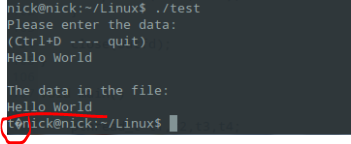
我想问一下,我觉得这段程序已经没有问题了,但是最后一步读文件时,会出现上面标记的乱码,这是为什么??
相关推荐
linux解决中文乱码问题
解决linux环境中出现中文乱码的情况。
部署到linux服务器文件名乱码问题
项目部署到liuux环境中,出现乱码的解决办法,实际遇到的问题
解决linux下zip文件解压乱码问题
原因 由于zip格式并没有指定编码格式,Windows下生成的zip文件中的编码是GBK/GB2312等,因此,导致这些zip文件在Linux下解压时出现乱码问题,因为Linux下的默认编码是UTF8。 解决方案一 使用7z解压。 安装p7zip和convmv # fedora $ su -c 'yum install p7zip convmv' # ubuntu $ sudo apt-get install p7zip convmv 执行一下命令解压缩 # 使用7z解压缩 $ LANG=C 7za x your-zip-file.zip # 递归转码 $ convmv -f GBK -t
解决linux下openoffice word文件转PDF中文乱码的问题
下面小编就为大家带来一篇解决linux下openoffice word文件转PDF中文乱码的问题。小编觉得挺不错的,现在就分享给大家,也给大家做个参考。一起跟随小编过来看看吧
Linux解决firefox中文页面乱码问题
1.由于 firefox 默认是允许网页自己选择字体,在 Linux 上便会出现部分网站的乱码情况。因此可以取消允许页面自己选择字体这个选项便能解决部分乱码情况。 2.倘若还有乱码,以及其他应用程序乱码,则尝试如下解决方案。 简单暴力的方法是直接去掉默认配置文件。 1 $ sudo mv /etc/fonts/conf.d/49-sansserif.conf /etc/fonts/conf.d/49-sansserif.conf.bak 另外 ,49-sansserif.conf 是 flashplayer的字体,其实你修改一下可以了。 1 <?xml ve