

 Web开发应用服务器

nginx 文件目录浏览 中文名 404 报错
 墨衍会员 · AI 创作全网分发 墨衍智能分发 通过墨衍一键同步至各平台 可同步平台 CSDN微信公众号微博知乎掘金百家号博客园抖音小红书 你的文章也可以这样分发 墨衍会员 ¥399起/年,写一次发全网
我也要 关注 + 加入社区
墨衍会员 · AI 创作全网分发 墨衍智能分发 通过墨衍一键同步至各平台 可同步平台 CSDN微信公众号微博知乎掘金百家号博客园抖音小红书 你的文章也可以这样分发 墨衍会员 ¥399起/年,写一次发全网
我也要 关注 + 加入社区配置文件如下
worker_processes 1;
events {
worker_connections 1024;
}
http {
include mime.types;
default_type application/octet-stream;
sendfile on;
keepalive_timeout 65;
server {
listen 80;
server_name localhost;
charset gbk,utf-8,;
autoindex on;
location / {
root html;
index index.html index.htm;
}
location /d/ {
alias D:/logs/;
}
error_page 500 502 503 504 /50x.html;
location = /50x.html {
root html;
}
}
}
英文路径没有问题,但是一访问中文路径,就会出现这样:
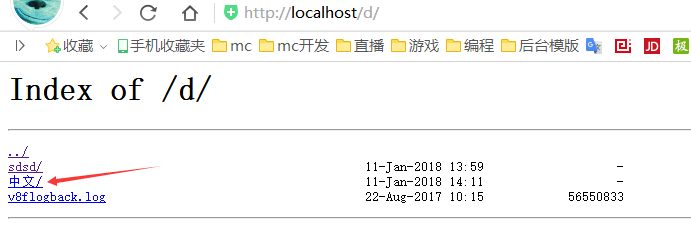
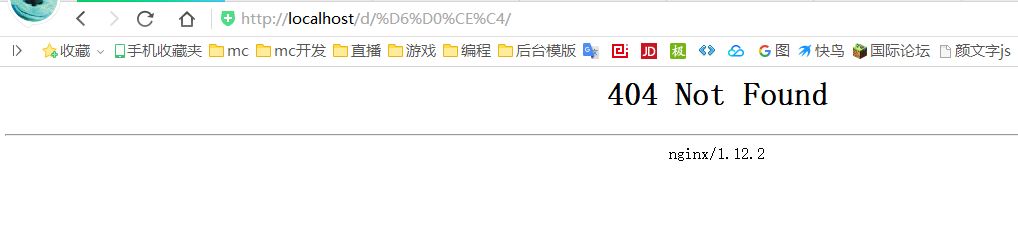
error.log报错:
2018/01/11 22:26:21 [error] 14612#10464: *21 "D:/logs/中文/index.html" is not found (3: The system cannot find the path specified), client: 127.0.0.1, server: localhost, request: "GET /d/%D6%D0%CE%C4/ HTTP/1.1", host: "localhost", referrer: "http://localhost/d/"
D:/logs/中文/index.html这个文件有没有都会这样报错
worker_processes 1;
events {
worker_connections 1024;
}
http {
include mime.types;
default_type application/octet-stream;
sendfile on;
keepalive_timeout 65;
server {
listen 80;
server_name localhost;
charset gbk,utf-8,;
autoindex on;
location / {
root html;
index index.html index.htm;
}
location /d/ {
alias D:/logs/;
}
error_page 500 502 503 504 /50x.html;
location = /50x.html {
root html;
}
}
}
英文路径没有问题,但是一访问中文路径,就会出现这样:
error.log报错:
2018/01/11 22:26:21 [error] 14612#10464: *21 "D:/logs/中文/index.html" is not found (3: The system cannot find the path specified), client: 127.0.0.1, server: localhost, request: "GET /d/%D6%D0%CE%C4/ HTTP/1.1", host: "localhost", referrer: "http://localhost/d/"
D:/logs/中文/index.html这个文件有没有都会这样报错
...全文
相关推荐
Nginx如何优化404报错页面.doc
1、源码安装nginx 2、编译安装 3、启动服务 4、访问一个不存在的页面默认会出现404 Not Found
Nginx中定义404页面并且返回404状态码的正确方法
主要介绍了Nginx中定义404页面并且返回404状态码的正确方法,本文在一次AJAX调用时发现了这个问题,服务器返回了一个404页页但没有返回404状态码,需要的朋友可以参考下
Nginx中404页面的配置及AJAX请求返回404页面的方法
404是请求页面不存在的错误代码,在Nginx中有时处理jQuery中的ajax方法虽然能返回404页面但错误代码却返回200,针对此问题我们具体来看一下Nginx中404页面的配置及AJAX请求返回404页面的方法
vue下使用nginx刷新页面404的问题解决
主要介绍了vue下使用nginx刷新页面404的问题解决,文中通过示例代码介绍的非常详细,对大家的学习或者工作具有一定的参考学习价值,需要的朋友可以参考下
NGINX下配置404错误页面的方法分享
NGINX下配置自定义的404页面是可行的,而且很简单,只需如下几步,需要的朋友可以参考下




