

 嵌入开发(WinCE)

qt中使用无法使用MySQL驱动该怎么解决啊???求大佬解答解答
 墨衍会员 · AI 创作全网分发 墨衍智能分发 通过墨衍一键同步至各平台 可同步平台 CSDN微信公众号微博知乎掘金百家号博客园抖音小红书 你的文章也可以这样分发 墨衍会员 ¥399起/年,写一次发全网
我也要 关注 + 加入社区
墨衍会员 · AI 创作全网分发 墨衍智能分发 通过墨衍一键同步至各平台 可同步平台 CSDN微信公众号微博知乎掘金百家号博客园抖音小红书 你的文章也可以这样分发 墨衍会员 ¥399起/年,写一次发全网
我也要 关注 + 加入社区在编译好arm版本的MySQL驱动libqsqlmysql.so驱动,在移植到嵌入式设备上执行显示下面的这个情况,说是驱动没有加载,但是明明驱动已经放到了plugin中的sqldriver中的,但是显示还是没有加载驱动!!!求大佬帮忙,已经卡在这很久了。实在是解决不了。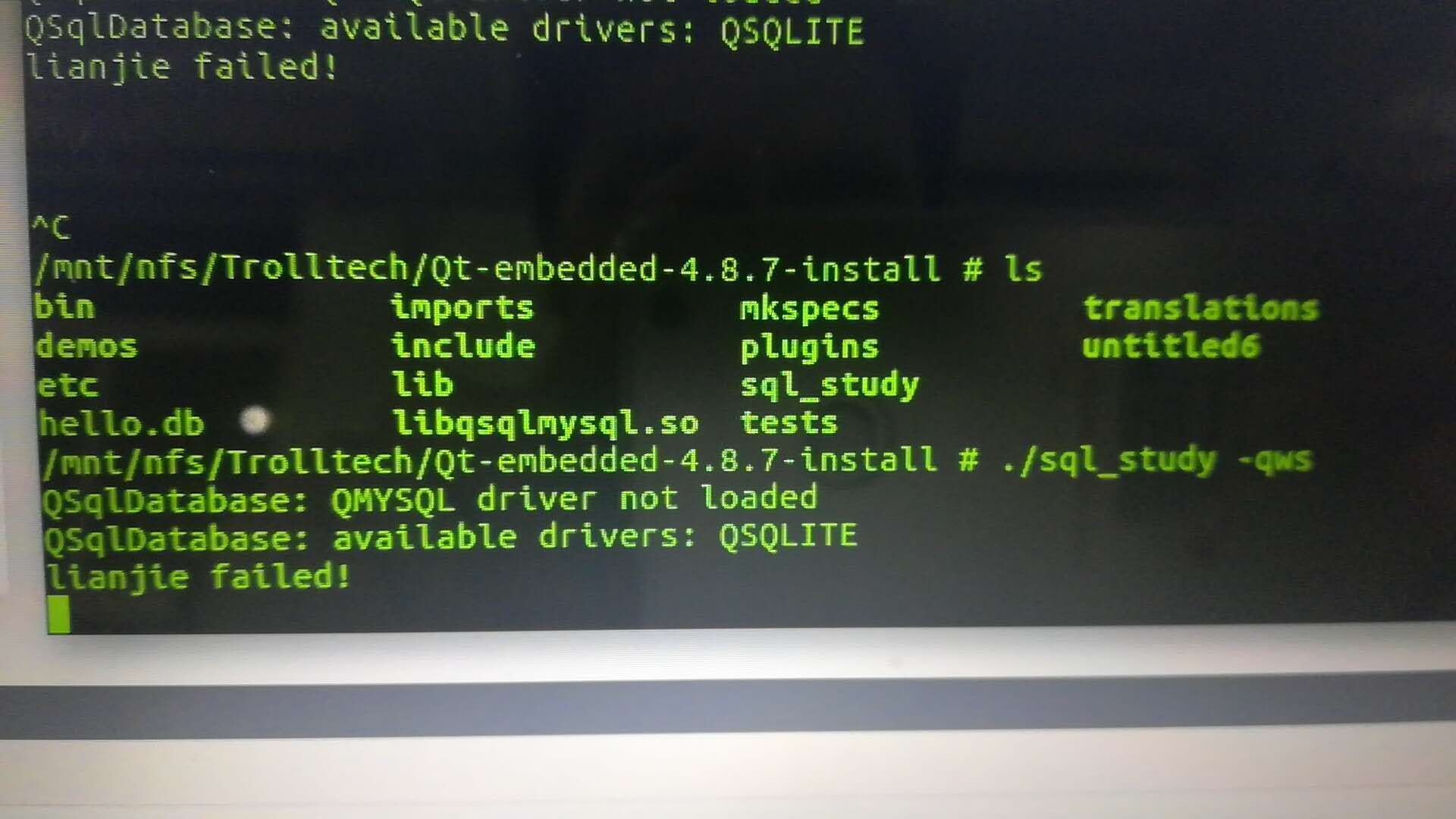
下面是我用来测是mysql驱动的程序的main.cpp文件:
.pro中的文件内容是:
下面是我用来测是mysql驱动的程序的main.cpp文件:
#include "widget.h"

#include <QApplication>

#include<QtSql/QSqlDatabase>

#include<QtSql/QSqlQuery>

extern "C"{

#include "stdio.h"

}

int main(int argc, char *argv[])

{

    QApplication a(argc, argv);

    Widget w;

    QSqlQuery query;

    QSqlDatabase db = QSqlDatabase::addDatabase("QMYSQL");

    db.setHostName("192.168.12.95");

    db.setDatabaseName("finger");

    db.setUserName("finger");

    db.setPassword("qrszwxt");

    db.setPort(3306);

    if(db.open())

    {

        w.show();

        printf("successful!!!\n");


    }else{

        printf("lianjie failed!\n");


}


    return a.exec();

}
.pro中的文件内容是:
#-------------------------------------------------

#

# Project created by QtCreator 2018-12-27T16:07:30

#

#-------------------------------------------------


QT       += core gui sql


greaterThan(QT_MAJOR_VERSION, 4): QT += widgets


TARGET = untitled10

TEMPLATE = app


# The following define makes your compiler emit warnings if you use

# any feature of Qt which has been marked as deprecated (the exact warnings

# depend on your compiler). Please consult the documentation of the

# deprecated API in order to know how to port your code away from it.

DEFINES += QT_DEPRECATED_WARNINGS


# You can also make your code fail to compile if you use deprecated APIs.

# In order to do so, uncomment the following line.

# You can also select to disable deprecated APIs only up to a certain version of Qt.

#DEFINES += QT_DISABLE_DEPRECATED_BEFORE=0x060000    # disables all the APIs deprecated before Qt 6.0.0


SOURCES += \

        main.cpp \

        widget.cpp


HEADERS += \

        widget.h


FORMS += \

        widget.ui
...全文
相关推荐
Qt编译MySQL驱动
**链接MySQL驱动**:现在,你需要告诉Qt你的应用程序应该使用哪个MySQL库。
Qt 添加MySQL驱动教程(成功版)
db.isValid()) { qDebug() << "无法添加MySQL驱动"; return 1;}```如果`db.isValid()`返回`true`,则说明MySQL驱动已成功添加。
qt数据库依赖dll,解决无数据库驱动的问题,解决打包后无法运行的问题
否则,当在没有Qt环境的计算机上运行打包后的程序时,由于找不到这些DLL,程序会报错并无法启动。总结来说,这个压缩包文件解决了在使用高版本Qt进行数据库操作时遇到的问题,尤其是针对MySQL数据库。
QT连接MYSQL数据库的驱动
然而,在实际操作中,有时会遇到"QMYSQL driver not loaded"的错误提示,这表明QT无法找到或加载用于连接MySQL的驱动程序。
QT 5.15.2 安装MySQL驱动
在QT环境中集成MySQL驱动,可以让你的应用程序能够连接并操作MySQL数据库,这是许多开发者在构建数据驱动应用时的需求。以下将详细介绍如何在QT 5.15.2中安装和使用MySQL驱动。




