

 Web开发应用服务器

reactjs npm start 出现错误解决方案
 墨衍会员 · AI 创作全网分发 墨衍智能分发 通过墨衍一键同步至各平台 可同步平台 CSDN微信公众号微博知乎掘金百家号博客园抖音小红书 你的文章也可以这样分发 墨衍会员 ¥399起/年,写一次发全网
我也要 关注 + 加入社区
墨衍会员 · AI 创作全网分发 墨衍智能分发 通过墨衍一键同步至各平台 可同步平台 CSDN微信公众号微博知乎掘金百家号博客园抖音小红书 你的文章也可以这样分发 墨衍会员 ¥399起/年,写一次发全网
我也要 关注 + 加入社区> react-study@0.1.0 start D:\vuedemo\day23\react-study
> react-scripts start
There might be a problem with the project dependency tree.
It is likely not a bug in Create React App, but something you need to fix locally.
The react-scripts package provided by Create React App requires a dependency:
"babel-eslint": "10.1.0"
Don't try to install it manually: your package manager does it automatically.
However, a different version of babel-eslint was detected higher up in the tree:
D:\node_modules\babel-eslint (version: 7.2.3)
Manually installing incompatible versions is known to cause hard-to-debug issues.
If you would prefer to ignore this check, add SKIP_PREFLIGHT_CHECK=true to an .env file in your project.
That will permanently disable this message but you might encounter other issues.
To fix the dependency tree, try following the steps below in the exact order:
1. Delete package-lock.json (not package.json!) and/or yarn.lock in your project folder.
2. Delete node_modules in your project folder.
3. Remove "babel-eslint" from dependencies and/or devDependencies in the package.json file in your project folder.
4. Run npm install or yarn, depending on the package manager you use.
In most cases, this should be enough to fix the problem.
If this has not helped, there are a few other things you can try:
5. If you used npm, install yarn (http://yarnpkg.com/) and repeat the above steps with it instead.
This may help because npm has known issues with package hoisting which may get resolved in future versions.
6. Check if D:\node_modules\babel-eslint is outside your project directory.
For example, you might have accidentally installed something in your home folder.
7. Try running npm ls babel-eslint in your project folder.
This will tell you which other package (apart from the expected react-scripts) installed babel-eslint.
If nothing else helps, add SKIP_PREFLIGHT_CHECK=true to an .env file in your project.
That would permanently disable this preflight check in case you want to proceed anyway.
P.S. We know this message is long but please read the steps above :-) We hope you find them helpful!
npm ERR! code ELIFECYCLE
npm ERR! errno 1
npm ERR! react-study@0.1.0 start: `react-scripts start`
npm ERR! Exit status 1
npm ERR!
npm ERR! Failed at the react-study@0.1.0 start script.
npm ERR! This is probably not a problem with npm. There is likely additional logging output above.
npm ERR! A complete log of this run can be found in:
npm ERR! C:\Users\Administrator\AppData\Roaming\npm-cache\_logs\2020-07-08T09_02_50_542Z-debug.log
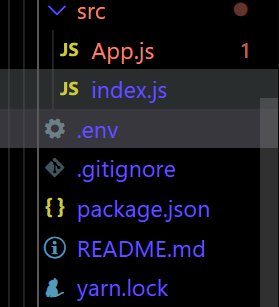
在根目录下建立一个.env文件 如图:
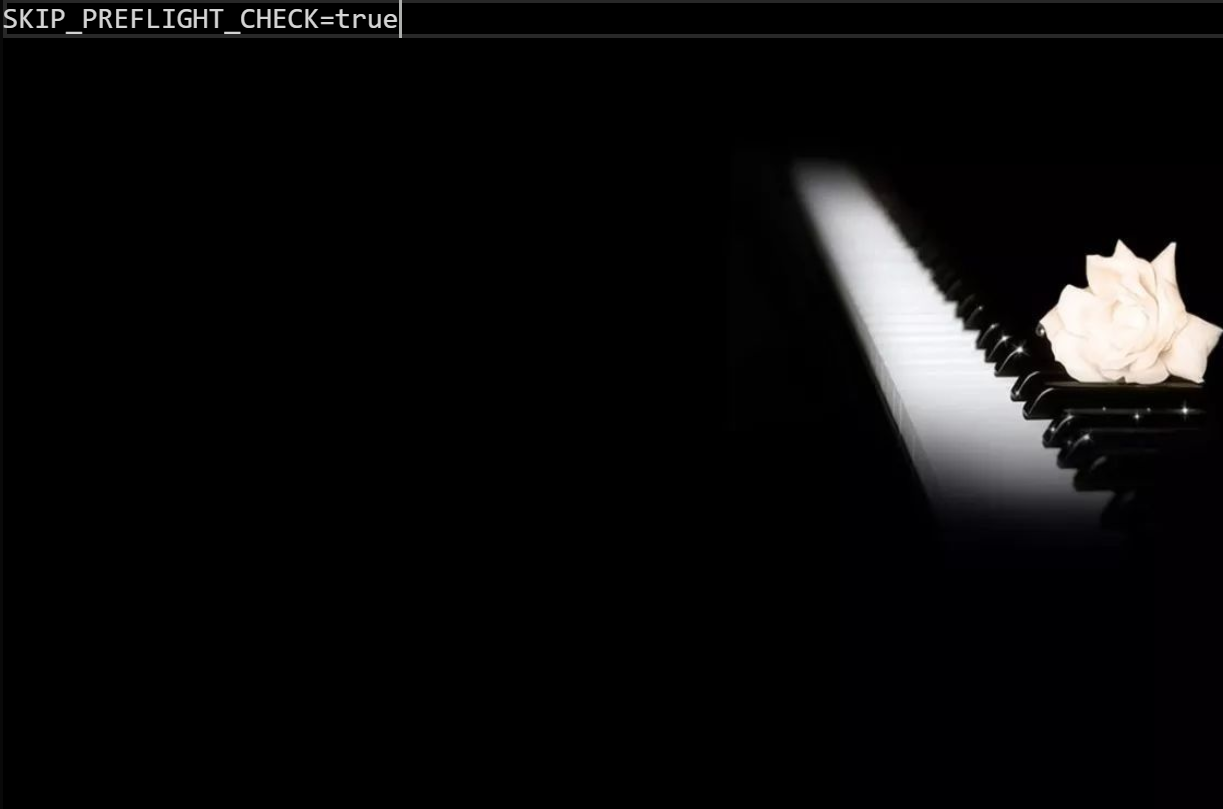
里面填写如下代码,填写完重新启动即可
希望可以帮到你。。
相关推荐
toko-online-reactjs
在线商店-reactjs 经营网上商店 git clone第一个应用程序 在该npm安装之后 那么你可以使用npm start 注意力 如果要成为管理员,只需将其添加到端点/管理员中,请记住文件
portfolio-react-tailwind
登陆页面React React灵敏的投资组合开发(WIP) 要安装应用程序,请运行: npm install 开始运行应用程序 npm start
基于react项目打包css引用路径错误解决方案
没有去修改create-react-app默认的配置文件 执行npm start 一切正常, 但是 npm run build 之后生成的打包文件只能在根目录访问 这样放在服务器目录就访问不到了 报错为 手动更改index.html的路径之后又报静态资源引入错误 报错 解决方案 解决: 在package.json下面增加”homepage”: “.”。
react-task-tracker:ReactJS | 简单的任务跟踪器
React任务跟踪器 一个使用ReactJS实现的简单任务跟踪器应用程序 Create React App入门 该项目是通过引导的。 可用脚本 在项目目录中,可以运行: npm start 在开发模式下运行应用程序。 打开在浏览器中查看它。 如果您进行编辑,则页面将重新加载。 您还将在控制台中看到任何棉绒错误。 npm test 在交互式监视模式下启动测试运行器。 有关更多信息,请参见关于的部分。 npm run build 构建生产到应用程序build文件夹。 它在生产模式下正确捆绑了React,并优化了构建以获得最佳性能。 生成被最小化,并且文件名包括哈希值。 您的应用已准备好进行部署! 有关更多信息,请参见关于的部分。
ReactJS-Crash-Course:ReactJS快速速成课程
ReactJS-速成课程 遍历媒体上的ReactJS快速速成课程 链接: : 指令 Create react app npx create-react-app应用名称 npm start 在开发模式下运行应用程序。 打开在浏览器中查看它。 如果您进行编辑,则页面将重新加载。 您还将在控制台中看到任何棉绒错误。 npm run server 在端口5000上启动模拟数据库服务器,该服务器充当模拟Rest API服务器。 npm run build 构建生产到应用程序build文件夹。 它在生产模式下正确捆绑了React,并优化了构建以获得最佳性能。 生成被最小化,并且文件名包括哈希值。 您的应用已准备好进行部署!




