福州大学-软件工程EE308-2021秋

EE308_Lab4
 墨衍会员 · AI 创作全网分发 墨衍智能分发 通过墨衍一键同步至各平台 可同步平台 CSDN微信公众号微博知乎掘金百家号博客园抖音小红书 你的文章也可以这样分发 墨衍会员 ¥399起/年,写一次发全网
我也要 关注 + 加入社区
|
The Link Your Class | |
|
The Link of Requirement of This Assignment | |
|
MU STU ID and FZU STU ID |
19105819_831901130 |
|
Teammate's MU STU ID and FZU STU ID | 19105754_831901114 |
|
Teammate's blog link | https://blog.csdn.net/jodie__lin?type=bbs |
|
GitHub link | https://github.com/Jodie-Rosie/Lab4_MIEC_Bobing |
|
Video demo link | https://www.bilibili.com/video/BV1344y1x7CC?share_source=copy_web |
目录
3. Programming Thinking and Key Functions
4. The Pair Programming Photos and Experience
1. PSP form
|
Personal Software Process Stage |
Estimated time (min) |
Actual time(min) |
|
Planning |
60 |
90 |
|
Estimate |
30 |
60 |
|
Development |
40 |
40 |
|
Analysis |
90 |
120 |
|
Design Spec |
-- |
-- |
|
Design Review |
-- |
-- |
|
Coding Standard |
120 |
180 |
|
Design |
-- |
-- |
|
Coding |
1020 |
1800 |
|
Code Review |
240 |
180 |
|
Test |
720 |
1200 |
|
Reporting |
45 |
60 |
|
Test Report |
20 |
15 |
|
Postmortem & Process Improvement Plan· Design Review |
30 |
30 |
|
Summary |
2415 |
3775 |
2. Learning Progress Bar
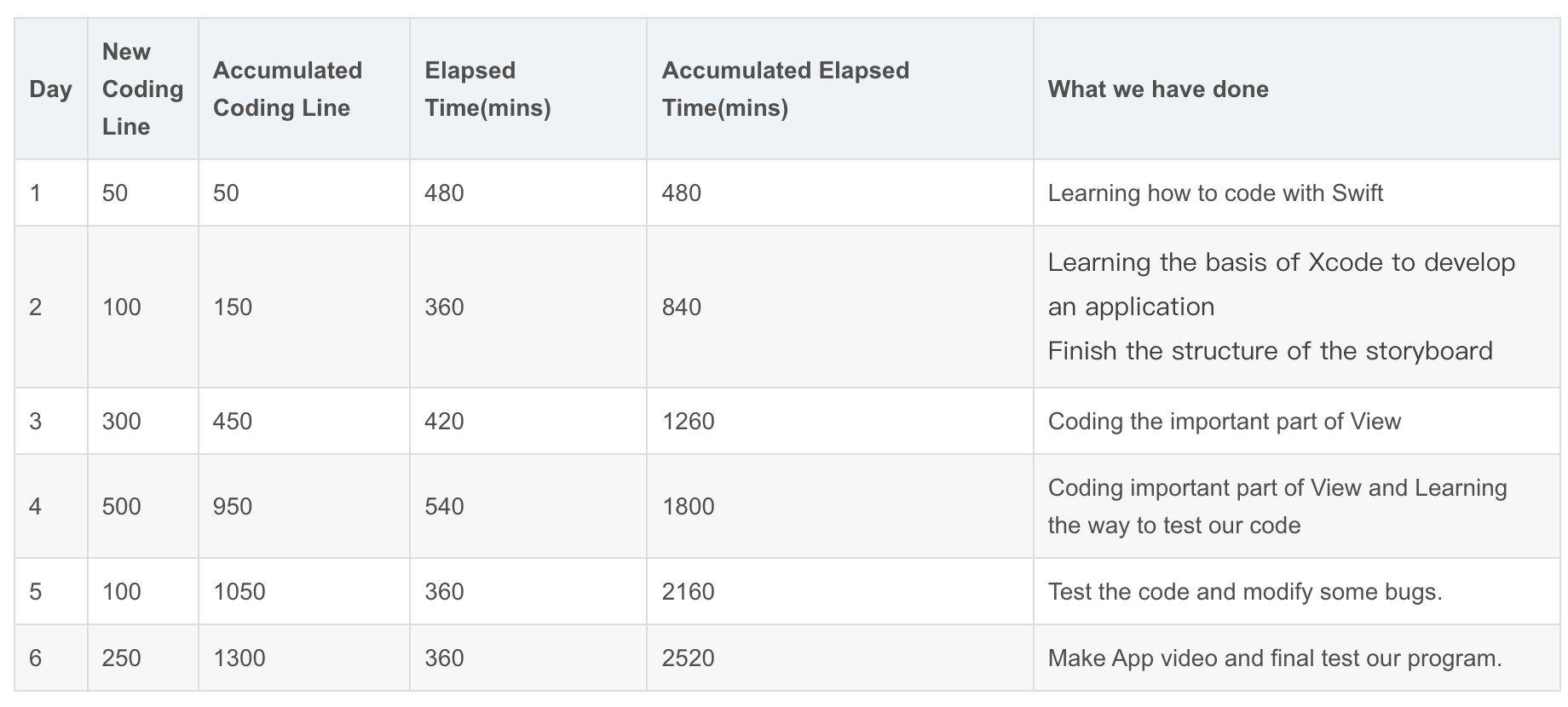
3. Programming Thinking and Key Functions
3.1 Programming Thinking
This is the first time we have completely written a software. We should consider not only the front end and back end, but also the value transfer and interface problems, which is very difficult for us without software foundation. And according to the UI design of our LAB 3, we decided to design the Bobing APP of IOS system. By consulting a lot of materials, we decided to use Xcode compiler and Swift language for programming, which is friendly for beginners.
We first studied swift language, and through some videos, blogs and examples, let us understand the syntax and language style of swift. But we found that this is far from enough for us to implement UI design. We also used the open source website to refer to other people's code and began to try to write it. Due to the tight time and heavy tasks, we have to compress our sleep and rest time.
In our lab, the more difficult and important aspects are:
1. Dice rotation and judgment of results.
2. Value transfer between pages.
3. Jump between button and page.
3.2 Key Functions
1. Dice rotation and judgment of results.
The first thing we need to do is write a function to make six dice produce random numbers between 1 and 6, and there should be animation on the interface. After six random numbers are generated, we should judge the result according to the rules of Bobing. The difficulty of this function is to connect the animation with the actual values, analyze its complex results, and convert the numbers into text output. The code is as follows:
//
//  BobingINGViewController.swift
//  Lab4_Bobing_App
//
//  Created by Jodie Lin on 2021/10/7.
//
import UIKit

var ResultList = [UInt32]()
var someInts:[Int] = [0,1,2,3,4,5]
var Count_1:UInt32 = 0
var Count_2:UInt32 = 0
var Count_3:UInt32 = 0
var Count_4:UInt32 = 0
var Count_5:UInt32 = 0
var Count_6:UInt32 = 0
var Equal_6:UInt32 = 6
var Equal_5:UInt32 = 5
var Equal_4:UInt32 = 4
var Equal_3:UInt32 = 3
var Equal_2:UInt32 = 2
var Equal_1:UInt32 = 1
var Gname:String = String()


class BobingINGViewController: UIViewController {

    @IBOutlet weak var Zhuangyuanlbl: UILabel!
    @IBOutlet weak var BobingINGbackground: UIImageView!
    @IBOutlet weak var Resultshowlbl: UILabel!
    @IBOutlet weak var Resultdetaillbl: UILabel!
    @IBOutlet weak var Resultbtn: UIButton!
    @IBOutlet weak var RuleINGbtn: UIButton!
    @IBOutlet weak var Rollnowbtn: UIButton!
    @IBOutlet weak var Beforebtn: UIButton!
    @IBOutlet weak var Usernamelbl: UILabel!
    @IBOutlet weak var Groupnamelbl: UILabel!
    @IBOutlet weak var Userimagebtn: UIButton!
    @IBOutlet weak var Diceimage6: UIImageView!
    @IBOutlet weak var Diceimage5: UIImageView!
    @IBOutlet weak var Diceimage4: UIImageView!
    @IBOutlet weak var Diceimage3: UIImageView!
    @IBOutlet weak var Diceimage2: UIImageView!
    @IBOutlet weak var Diceimage1: UIImageView!

    var Gname:String = String()

    let empty: String = String("Unnamed")

    override func viewDidLoad() {
        super.viewDidLoad()

        // Do any additional setup after loading the view.

        if Gname == ""
        {
            self.Groupnamelbl.text = empty
        }
        else{
            self.Groupnamelbl.text = Gname

        }
    }

    @IBAction func Rollnowbtn(_ sender: Any) {
        let DiceNumber1 = arc4random_uniform(6) + 1
        let DiceNumber2 = arc4random_uniform(6) + 1
        let DiceNumber3 = arc4random_uniform(6) + 1
        let DiceNumber4 = arc4random_uniform(6) + 1
        let DiceNumber5 = arc4random_uniform(6) + 1
        let DiceNumber6 = arc4random_uniform(6) + 1
        ResultList.append(DiceNumber1)
        ResultList.append(DiceNumber2)
        ResultList.append(DiceNumber3)
        ResultList.append(DiceNumber4)
        ResultList.append(DiceNumber5)
        ResultList.append(DiceNumber6)
        for i in someInts{
            if(ResultList[(i)] == Equal_1){
                Count_1 = Count_1 + 1
            }
            if(ResultList[(i)] == Equal_2){
                Count_2 = Count_2 + 1
            }
            if(ResultList[(i)] == Equal_3){
                Count_3 = Count_3 + 1
            }
            if(ResultList[(i)] == Equal_4){
                Count_4 = Count_4 + 1
            }
            if(ResultList[(i)] == Equal_5){
                Count_5 = Count_5 + 1
            }
            if(ResultList[(i)] == Equal_6){
                Count_6 = Count_6 + 1
            }
        }

        if Count_1 == Equal_2 && Count_4 == Equal_4
        {
            Resultshowlbl.text = "Zhuangyuan"
            Zhuangyuanlbl.text = "Gold Flower"
            Count_1 = 0
            Count_2 = 0
            Count_3 = 0
            Count_4 = 0
            Count_5 = 0
            Count_6 = 0
        }
        else if Count_4 == Equal_6
        {
            Resultshowlbl.text = "Zhuangyuan"
            Zhuangyuanlbl.text = "Six Cup of Red"
            Count_1 = 0
            Count_2 = 0
            Count_3 = 0
            Count_4 = 0
            Count_5 = 0
            Count_6 = 0
        }
        else if Count_6 == Equal_6
        {
            Resultshowlbl.text = "Zhuangyuan"
            Zhuangyuanlbl.text = "Six Cups of Black"
            Count_1 = 0
            Count_2 = 0
            Count_3 = 0
            Count_4 = 0
            Count_5 = 0
            Count_6 = 0
        }
        else if Count_4 == Equal_5
        {
            Resultshowlbl.text = "Zhuangyuan with Five Red"
            Zhuangyuanlbl.text = "  "
            Count_1 = 0
            Count_2 = 0
            Count_3 = 0
            Count_4 = 0
            Count_5 = 0
            Count_6 = 0
        }
        else if Count_3 == Equal_5
        {
            Resultshowlbl.text = "Zhuangyuan with WuZiDengKe"
            Zhuangyuanlbl.text = "  "
            Count_1 = 0
            Count_2 = 0
            Count_3 = 0
            Count_4 = 0
            Count_5 = 0
            Count_6 = 0
        }
        else if Count_4 == Equal_4
        {
            Resultshowlbl.text = "Zhuangyuan with Four Points"
            Zhuangyuanlbl.text = "  "
            Count_1 = 0
            Count_2 = 0
            Count_3 = 0
            Count_4 = 0
            Count_5 = 0
            Count_6 = 0
        }
        else if Count_1 == Equal_1 && Count_2 == Equal_1 && Count_3 == Equal_1 && Count_4 == Equal_1 && Count_5 == Equal_1
        {
            Resultshowlbl.text = "Dui Tang"
            Zhuangyuanlbl.text = "  "
            Count_1 = 0
            Count_2 = 0
            Count_3 = 0
            Count_4 = 0
            Count_5 = 0
            Count_6 = 0
        }
        else if Count_4 == Equal_3
        {
            Resultshowlbl.text = "Three Red"
            Zhuangyuanlbl.text = "  "
            Count_1 = 0
            Count_2 = 0
            Count_3 = 0
            Count_4 = 0
            Count_5 = 0
            Count_6 = 0
        }
        else if Count_2 == Equal_4
        {
            Resultshowlbl.text = "Four Jin"
            Zhuangyuanlbl.text = "  "
            Count_1 = 0
            Count_2 = 0
            Count_3 = 0
            Count_4 = 0
            Count_5 = 0
            Count_6 = 0
        }
        else if Count_4 == Equal_2 && Count_2 != Equal_4
        {
            Resultshowlbl.text = "Two Ju"
            Zhuangyuanlbl.text = "  "
            Count_1 = 0
            Count_2 = 0
            Count_3 = 0
            Count_4 = 0
            Count_5 = 0
            Count_6 = 0
        }
        else if Count_4 == Equal_1
        {
            Resultshowlbl.text = "One Xiu"
            Zhuangyuanlbl.text = "  "
            Count_1 = 0
            Count_2 = 0
            Count_3 = 0
            Count_4 = 0
            Count_5 = 0
            Count_6 = 0
        }
        else{
            Resultshowlbl.text = "Thanks"
            Zhuangyuanlbl.text = "  "
            Count_1 = 0
            Count_2 = 0
            Count_3 = 0
            Count_4 = 0
            Count_5 = 0
            Count_6 = 0
        }
        ResultList = [UInt32]()
        Diceimage1.image = UIImage(named: "Dice\(DiceNumber1)")
        Diceimage2.image = UIImage(named: "Dice\(DiceNumber2)")
        Diceimage3.image = UIImage(named: "Dice\(DiceNumber3)")
        Diceimage4.image = UIImage(named: "Dice\(DiceNumber4)")
        Diceimage5.image = UIImage(named: "Dice\(DiceNumber5)")
        Diceimage6.image = UIImage(named: "Dice\(DiceNumber6)")

    }

    @IBAction func RuleINGbtn(_ sender: Any) {
        self.performSegue(withIdentifier:"GRtoRules", sender: self)
    }

    @IBAction func Resultbtn(_ sender: Any) {
        self.performSegue(withIdentifier:"INGtoResult", sender: self)
    }
    @IBAction func BeforetoHome(_ sender: Any) {
        self.performSegue(withIdentifier:"INGtoHome", sender: self)
    }


    /*
    // MARK: - Navigation
    // In a storyboard-based application, you will often want to do a little preparation before navigation
    override func prepare(for segue: UIStoryboardSegue, sender: Any?) {
        // Get the new view controller using segue.destination.
        // Pass the selected object to the new view controller.
    }
    */

}
The interface is shown in the figure:
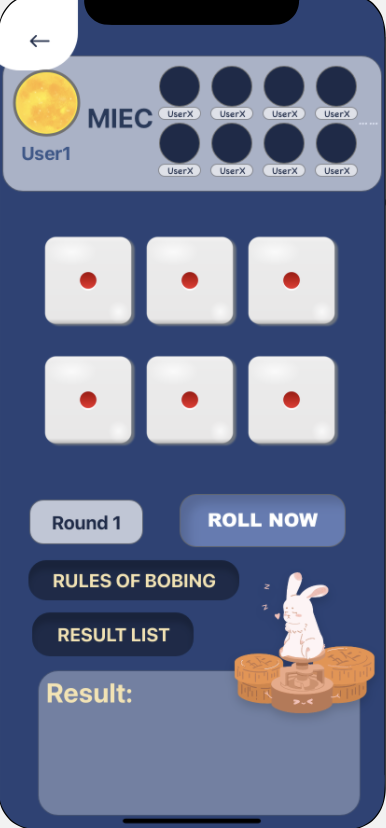
2. Value transfer between pages.
In app, we usually need to transfer the value entered by the user in one interface to the next interface, or feed back the value of the secondary interface to the primary interface. In this project, we use forward transfer between two View Controllers. We use segue to transfer data from the first view controller to the second view controller.
The code of first view controller(sending data):
// MARK: - Navigation

    // In a storyboard-based application, you will often want to do a little preparation before navigation
    override func prepare(for segue: UIStoryboardSegue, sender: Any?) {
        if segue.destination is ProfileViewController
        {
            let VC = segue.destination as? ProfileViewController

            VC?.Location = self.Locationlbl.text!
            VC?.Email = self.Emaillbl.text!
            VC?.Company = self.Grouplbl.text!
            VC?.Birthday = self.Birthdaylbl.text!
            VC?.Gender = self.Genderlbl.text!
            VC?.UserID = self.IDlbl.text!
            VC?.Username = self.Namelbl.text!
        }


        // Get the new view controller using segue.destination.
        // Pass the selected object to the new view controller.
    }
The code of first view controller(receiving data):
var Location : String = String()
    var Email : String = String()
    var Company : String = String()
    var Birthday : String = String()
    var Gender : String = String()
    var UserID : String = String()
    var Username : String = String()

    let empty: String = String("Enter")

    override func viewDidLoad() {
        super.viewDidLoad()

        // Do any additional setup after loading the view.
        if Location == ""
        {
            self.Locationlbl.text = empty
        }
        else{
            self.Locationlbl.text = Location

        }

        if Email == ""
        {
            self.Emaillbl.text = empty
        }
        else{
            self.Emaillbl.text = Email

        }

        if Company == ""
        {
            self.Companylbl.text = empty
        }
        else{
            self.Companylbl.text = Company

        }

        if Birthday == ""
        {
            self.Birthdaylbl.text = empty
        }
        else{
            self.Birthdaylbl.text = Birthday

        }

        if Gender == ""
        {
            self.Genderlbl.text = empty
        }
        else{
            self.Genderlbl.text = Gender

        }

        if UserID == ""
        {
            self.IDlbl.text = empty
        }
        else{
            self.IDlbl.text = UserID

        }

        if Username == ""
        {
            self.Usernamelbl.text = empty
        }
        else{
            self.Usernamelbl.text = Username

        }

    }
3. Jump between button and page.
It should also be noted that we need to connect the code and buttons, as well as between pages. This is crucial for the normal operation of the app
4. The Pair Programming Photos and Experience
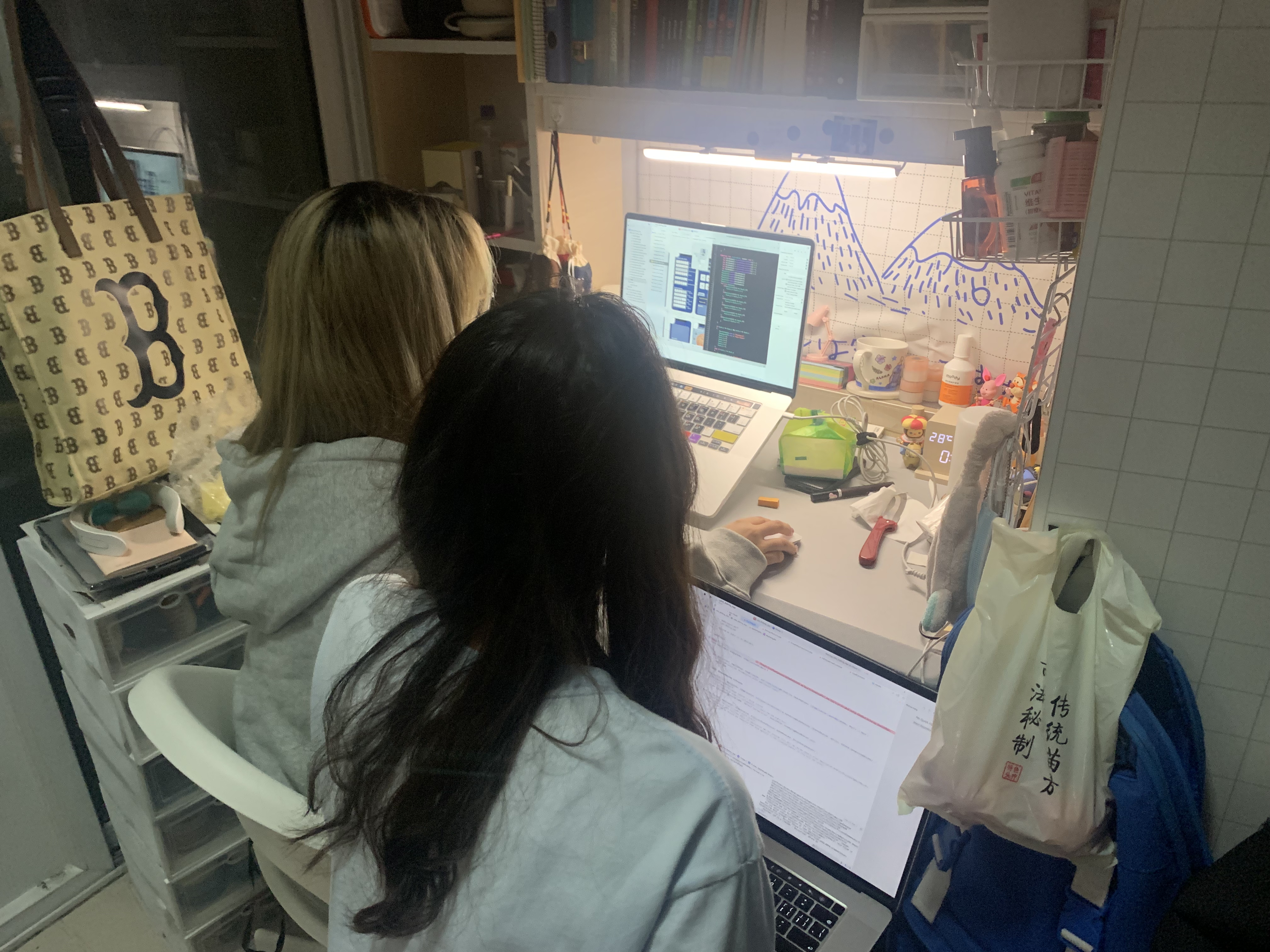
Pair Programming Photos
Experience
This experiment makes me realize that writing software alone is a very difficult task. At present, there must be a strong team behind the software on the market, which reflects the importance of teamwork. This pairing exercise makes me realize that working and learning together will be more efficient, and the collision of ideas can make us make faster progress.
5. Final Result
5.1 The link of Github
https://github.com/Jodie-Rosie/Lab4_MIEC_Bobing
5.2 The link of Bobing APP vedio
https://www.bilibili.com/video/BV1344y1x7CC?share_source=copy_web
6. Commit History
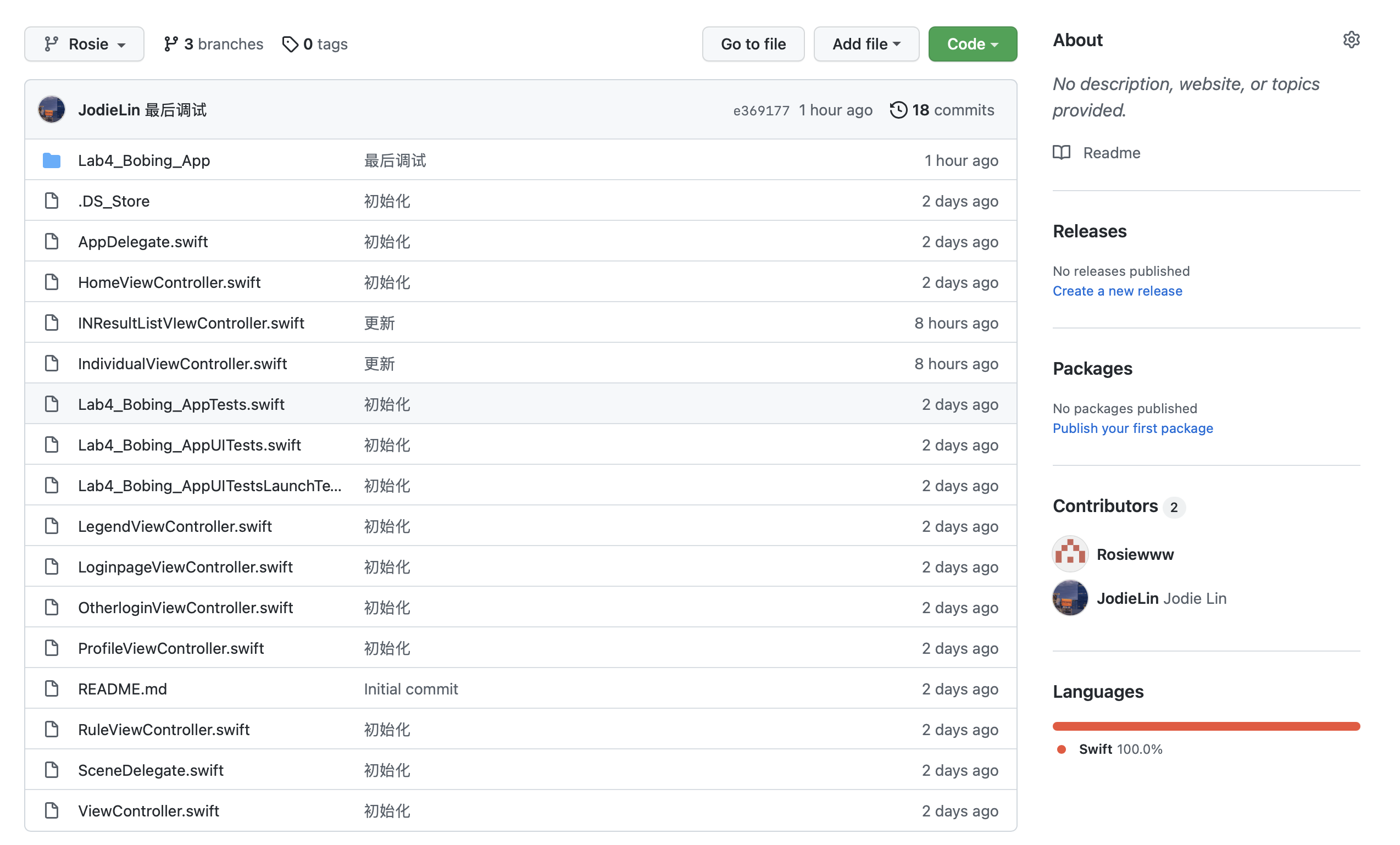
相关推荐
EE-308 LAB4 final version.7z
这是本次实验的压缩包
EE308-Lab8-AlphaSprint-Day4
EE308-Lab8-AlphaSprint-Day4Feedback From Members1. Beichen, ZhouModulePersonal SummaryCode & Results2. Yuwei, JiangModulePersonal SummaryCode & Results3. Yifan, ZhuModulePersonal Summary4. Yifan, ShenModulePersonal SummaryCode & Results5. Shenk
基于AI大模型量化交易可信数据空间设计方案.pptx
基于AI大模型量化交易可信数据空间设计方案.pptx
【配电网规划】配电网N-1扩展规划研究(Matlab代码实现)
内容概要:本文聚焦于配电网N-1扩展规划问题,通过建立满足N-1安全准则的数学模型,并利用Matlab进行代码实现与仿真分析,系统研究了在单一元件故障情况下配电网的安全稳定运行能力。研究内容涵盖网络结构优化、设备选型与布局、潮流计算及可靠性评估等关键环节,提出了兼顾技术可行性与经济性的扩展规划方法。通过典型算例验证了所提方法在提升供电可靠性、降低负荷损失方面的有效性与实用性,为现代智能配电网的规划提供了理论支持和技术路径。; 适合人群:具备电力系统基础知识和Matlab编程能力的高校研究生、科研机构研究人员及从事电力系统规划工作的工程师。; 使用场景及目标:①为配电网规划人员提供符合N-1安全标准的扩展规划技术支持;②辅助教学与科研中关于电力系统可靠性和优化规划的学习与研究;③推动智能电网背景下配电系统向更高效、可靠方向发展。; 阅读建议:读者应结合文中提供的Matlab代码深入理解算法实现细节,同时参考相关电力系统分析理论书籍以加深对背景知识的理解,在实际应用时注意根据具体工程项目的特点调整模型参数。
集团化企业数字化转型WMS解决方案.pptx
集团化企业数字化转型WMS解决方案.pptx