


571
社区成员
 发帖
发帖 与我相关
与我相关 我的任务
我的任务
 分享
分享本项目采用前后端分离,利用 Vue3 + Express 实现了web实时聊天室的demo。实现用户登陆注册、用户登陆、好友聊天等功能。
Vue3:(读音 /vjuː/,类似于 view) 是一套用于构建用户界面的渐进式框架。与其它大型框架不同的是,Vue 被设计为可以自底向上逐层应用。Vue 的核心库只关注视图层,不仅易于上手,还便于与第三方库或既有项目整合。另一方面,当与现代化的工具链以及各种支持类库结合使用时,Vue 也完全能够为复杂的单页应用提供驱动。
Express:是一个保持最小规模的灵活的 Node.js Web 应用程序开发框架,为 Web 和移动应用程序提供一组强大的功能。使用您所选择的各种 HTTP 实用工具和中间件,快速方便地创建强大的 API。
本文主要介绍前端部分,后端部分由负责后端的小伙伴提供,前端首先提供用户注册、登录功能,登陆成功后,用户可以查看自己的好友列表和历史消息,添加好友、处理好友申请,好友聊天功能。
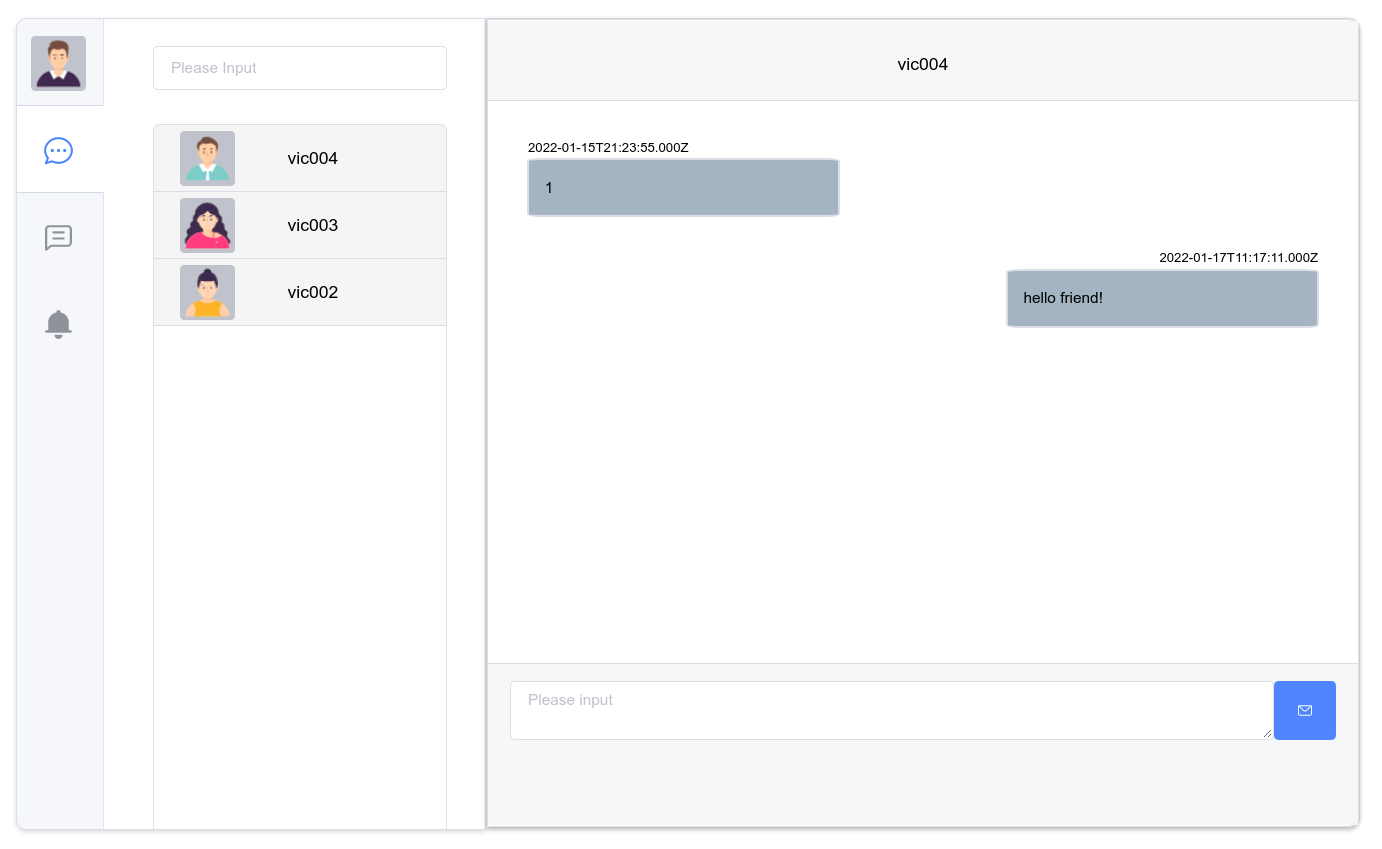
使用UI组件库Elment Plus、路由管理器Vue Router、状态管理模式Vuex、http库Axios等。
路由分发
WebSocket客户端
状态管理
登录注册页面
聊天页面
进入聊天页面之前会先从服务端获取好友列表和历史消息列表,并建立WebSocket客户端用于聊天。
import { createRouter, createWebHistory } from 'vue-router'
import login from '@/views/login/index.vue'
import chat from '@/views/chat/index.vue'
import nProgress from 'nprogress'
import store from '@/store'

const routes = [
  {
    path: '/',
    redirect: {name: 'login'},
    meta: {title: 'redirect'}
  },
  {
    path: '/login',
    name: 'login',
    component: login,
    meta: {title: 'login'}
  },
  {
    path: '/chat',
    name: 'chat',
    component: chat,
    meta: {title: 'chat'},

    async beforeEnter(_to, _from, next) {
      if (store.state.token !== '') {
        console.log('token', store.state.token)
        console.log('user', store.state.user)
        // 获取好友列表
        await store.dispatch('getFriends', store.statetoken).then((res) => {
          // console.log(res)
          // 获取好友信息
          store.dispatch('setFriendInfo', res.data.friends).then((res) => {
            // console.log(res)
            console.log('friends', store.state.friends)
          })
        })

        // 获取单聊消息列表
        await store.dispatch('getMessages', store.state.token).then((res) => {
          console.log('messages', store.state.messages)
        })

        // 初始化websocket
        await store.dispatch('initWebSocket', (e) => {
          let sData = {}
          try {
            sData = JSON.parse(e.data)
            console.log('receive', sData)
            if (sData.type === 'sendMsg' && (sData.data.userId === store.state.user._id || sData.data.friendId === store.state.user._id)) {
              store.dispatch('pushMessage', sData.data)
            } else if (sData.type === 'addFriend' && (sData.data.userId === store.state.user._id || sData.data.friendId === store.state.user._id)) {
              if (sData.data.userId === store.state.user._id) {
                store.dispatch('getUserInfo', sData.data.friendId).then((res) => {
                  sData.data['userInfo'] = res.data.userInfo
                  console.log(sData.data)
                  store.dispatch('unshiftFriend', sData.data)
                })
              } else if (sData.data.friendId === store.state.user._id) {
                store.dispatch('getUserInfo', sData.data.userId).then((res) => {
                  sData.data['userInfo'] = res.data.userInfo
                  console.log(sData.data)
                  store.dispatch('unshiftFriend', sData.data)
                })
              }
            } else if (sData.type === 'dealFriend' && (sData.data.userId === store.state.user._id || sData.data.friendId === store.state.user._id)) {
              console.log('ok')
              store.dispatch('dealFriendState', {userId: sData.data.userId, friendId: sData.data.friendId, state: sData.data.state})
            }
          } catch(e) {
            console.log('WebSocket', e)
          }
        })

      }
      next()
    }
  }
]

const router = createRouter({
  history: createWebHistory(process.env.BASE_URL),
  routes
})

export default router
客户端保存WebSocket对象在状态管理中,通过ws.send()发送消息,通过onMessage函数来接受webSocket服务端广播的消息。
async initWebSocket({ commit }, onMessage) {
    let ws = new WebSocket('ws://localhost:7000')
    ws.addEventListener('open', (e) => {
        console.log('WebSocket Open:', e)
    }, false)
    ws.addEventListener('close', (e) => {
        console.log('WebSocket Close:', e)
    }, false)
    ws.addEventListener('error', (e) => {
        console.log('WebSocket Error:', e)
    }, false)
    ws.addEventListener('message', onMessage, false)

    commit('SET_WS', ws)
},
状态管理保存用户信息、用户token、好友列表、消息列表等信息,并在actions中实现请求后端的接口,例如用户登陆、注册、添加好友、处理好友申请、好友聊天等功能。
import { createStore } from 'vuex'
import { clearJson } from '../utils/index'
import axios from "axios";
import {ElMessage} from "element-plus";
import Qs from 'qs'
import {onErrorCaptured} from "vue";

const store = createStore({
  state: {
    ws: null,
    user: {},
    token: '',
    friends: [],
    messages: [],
    contentShow: 0,
    contentData: {},
    content: {},
    sUser: null
  },
  mutations: {
    SET_WS: (state, ws) => {
      state.ws = ws
    },
    SET_USER: (state, user) => {
      state.user = user
    },
    SET_TOKEN: (state, token) => {
      state.token = token
    },
    SET_FRIENDS: (state, friends) => {
      friends.sort((a, b) => {
        return a.time < b.time ? 1 : -1
      })
      state.friends = friends
    },
    SET_MESSAGES: (state, messages) => {
      messages.sort((a, b) => {
        return a.time > b.time ? 1 : -1
      })
      state.messages = messages
    },
    PUSH_MESSAGE: (state, message) => {
      state.messages.push(message)
    },
    SET_CONTENT_SHOW: (state, show) => {
      state.contentShow = show
    },
    SET_CONTENT_DATA: (state, data) => {
      state.contentData = data
    },
    SET_CONTENT: (state) => {
      if (state.contentShow === 1) {
        state.content = state.messages
      } else if (state.contentShow === 2) {
        // state.content.content =
      } else {

      }
    },
    WS_SEND: (state, data) => {
      state.ws.send(data)
    },
    SET_SUSER: (state, data) => {
      state.sUser = data
    },
    UNSHIFT_FRIEND: (state, data) => {
      state.friends.unshift(data)
    },
    UPDATE_FRIEND_STATE: (state, data) => {
      for (let i = 0; i < state.friends.length; i++) {
        if (data.userId === state.friends[i].userId && data.friendId === state.friends[i].friendId) {
          state.friends[i].state = data.state
          break
        }
      }
    },
    CLEAR_USER: state => {
      state.user = {}
    },
    CLEAR_TOKEN: state => {
      state.token = ''
    },
    CLEAR_FRIENDS: state => {
      state.friends = []
    },
    CLEAR_MESSAGES: state => {
      state.messages = []
    },
    CLEAR_CONTENT_SHOW: state => {
      state.contentShow = 0
    },
    CLEAR_CONTENT_DATA: state => {
      state.contentData = {}
    },
    CLEAR_CONTENT: state => {
      state.content = {}
    },
    CLEAR_SUSER: state => {
      state.sUser = null
    },
  },
  actions: {
    async register({ commit }, data) {
      const r = await axios({
        method: 'post',
        url: 'http://localhost:3000/register',
        data: Qs.stringify(data),
        headers: {'Content-Type':'application/x-www-form-urlencoded;charset=utf-8'}
      })
      return r
    },

    async login({ commit }, data) {
      const r = await axios({
        method: 'post',
        url: 'http://localhost:3000/login',
          data: Qs.stringify(data),
          headers: {'Content-Type':'application/x-www-form-urlencoded;charset=utf-8'}
      })
      if (r.data.status) {
        commit('SET_USER', r.data.userInfo)
        commit('SET_TOKEN', r.data.token)
      }
      return r
    },

    async getFriends({ commit }, token) {
      const r = await axios({
        method: 'post',
        url: 'http://localhost:3000/getFriends',
        data: Qs.stringify({
          token: token
        }),
        headers: {'Content-Type':'application/x-www-form-urlencoded;charset=utf-8'}
      })
      return r
    },

    async setFriendInfo({ commit }, data) {
      for (let i = 0; i < data.length; i++) {
        let queryId = ''
        if (data[i].userId === store.state.user._id) {
          queryId = data[i].friendId
        } else {
          queryId = data[i].userId
        }
        const r = await axios({
          method: 'post',
          url: 'http://localhost:3000/getUserInfo',
          data: Qs.stringify({
            userId: queryId
          }),
          headers: {'Content-Type':'application/x-www-form-urlencoded;charset=utf-8'}
        })
        if (r.data.status) {
          data[i]['userInfo'] = r.data.userInfo
        }
      }
      commit('SET_FRIENDS', data)

      return data
    },

    async getMessages({ commit }, token) {
      const r = await axios({
        method: 'post',
        url: 'http://localhost:3000/pullMessages',
        data: Qs.stringify({
          token: token
        }),
        headers: {'Content-Type':'application/x-www-form-urlencoded;charset=utf-8'}
      })
      if (r.data.status) {
        commit('SET_MESSAGES', r.data.messages)
      }
      return r
    },

    async pushMessage({ commit }, data) {
      console.log('data: ', data)
      commit('PUSH_MESSAGE', data)
      console.log(store.state.messages)
    },

    async initWebSocket({ commit }, onMessage) {
      let ws = new WebSocket('ws://localhost:7000')
      ws.addEventListener('open', (e) => {
        console.log('WebSocket Open:', e)
      }, false)
      ws.addEventListener('close', (e) => {
        console.log('WebSocket Close:', e)
      }, false)
      ws.addEventListener('error', (e) => {
        console.log('WebSocket Error:', e)
      }, false)
      ws.addEventListener('message', onMessage, false)

      commit('SET_WS', ws)
    },

    async clearContent({ commit }) {
      commit('CLEAR_CONTENT_SHOW')
      commit('CLEAR_CONTENT_DATA')
      commit('CLEAR_CONTENT')
    },

    async updateContent({ commit }, data) {
      commit('CLEAR_CONTENT_SHOW')
      commit('SET_CONTENT_SHOW', data.show)
      commit('CLEAR_CONTENT_DATA')
      commit('SET_CONTENT_DATA', data.info)
      commit('CLEAR_CONTENT')
      commit('SET_CONTENT')
    },

    async sendWebSocket({ commit }, data) {
      commit('WS_SEND', data)
    },

    async searchUser({ commit }, data) {
      const r = await axios({
        method: 'post',
        url: 'http://localhost:3000/searchFriend',
        data: Qs.stringify({
          name: data
        }),
        headers: {'Content-Type':'application/x-www-form-urlencoded;charset=utf-8'}
      })
      if (r.data.status) {
        commit('SET_SUSER', r.data.userInfo)
      }
      return r
    },

    async addFriend({ commit }, data) {
      const r = await axios({
        method: 'post',
        url: 'http://localhost:3000/addFriend',
        data: Qs.stringify({
          token: store.state.token,
          userId: data
        }),
        headers: {'Content-Type':'application/x-www-form-urlencoded;charset=utf-8'}
      })
      return r
    },

    async unshiftFriend({ commit }, data) {
      commit('UNSHIFT_FRIEND', data)
    },

    async getUserInfo({ commit }, data) {
      const r = await axios({
        method: 'post',
        url: 'http://localhost:3000/getUserInfo',
        data: Qs.stringify({
          userId: data
        }),
        headers: {'Content-Type':'application/x-www-form-urlencoded;charset=utf-8'}
      })
      return r
    },

    async dealFriendState({ commit }, data) {
      commit('UPDATE_FRIEND_STATE', data)
    },
  }
})

export default store
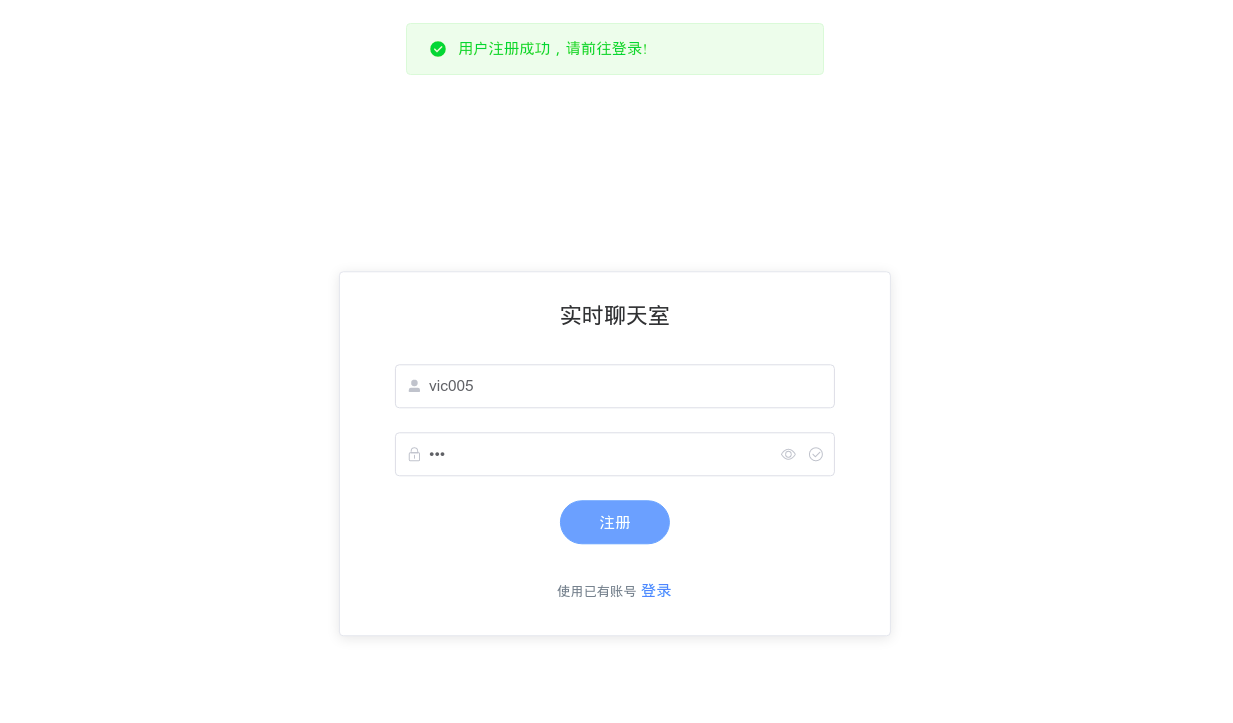
const submit = () => {
    refForm.value.validate(async valid => {
        if (valid) {
            data.loading = true
            if (data.step === 1) {
                // 用户登陆
                // ...
            } else if (data.step === 2) {
                // 用户注册
                await store.dispatch('register', data.form).then((res) => {
                    console.log(res)
                    if (res.data.exists) {
                        ElMessage({
                            message: '用户已存在!',
                            type: 'warning',
                            duration: 3000
                        })
                    } else {
                        if (res.data.status) {
                            ElMessage({
                                message: '用户注册成功,请前往登录!',
                                type: 'success',
                                duration: 3000
                            })
                        } else {
                            ElMessage({
                                message: '用户注册失败,请重试!',
                                type: 'warning',
                                duration: 3000
                            })
                        }
                    }
                })
            }
            data.loading = false
        } else {
            return false
        }
    })
}
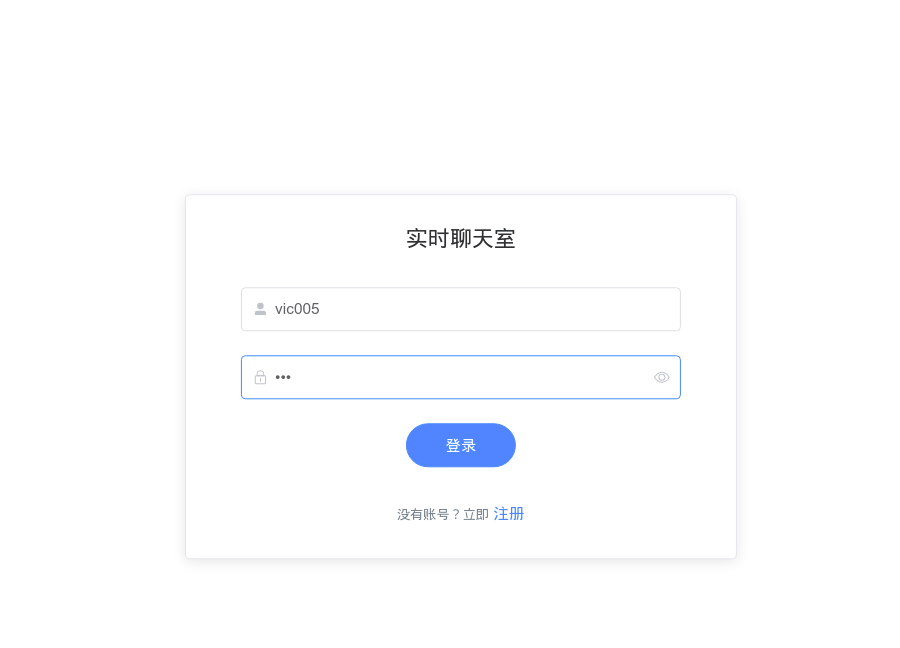
const submit = () => {
    refForm.value.validate(async valid => {
        if (valid) {
            data.loading = true
            if (data.step === 1) {
                // 用户登陆
                await store.dispatch('login', data.form).then((res) => {
                    console.log(res)
                    if (res.data.status) {
                    ElMessage({
                        message: '用户登陆成功!',
                        type: 'success',
                        duration: 3000
                    })
                    router.push({ name: 'chat' })
                    } else {
                    ElMessage({
                        message: '用户登陆失败!',
                        type: 'warning',
                        duration: 3000
                    })
                    }
                })
            } else if (data.step === 2) {
                // 用户注册
                // ...
            }
            data.loading = false
        } else {
            return false
        }
    })
}
async login({ commit }, data) {
    const r = await axios({
        method: 'post',
        url: 'http://localhost:3000/login',
            data: Qs.stringify(data),
            headers: {'Content-Type':'application/x-www-form-urlencoded;charset=utf-8'}
    })
    if (r.data.status) {
        commit('SET_USER', r.data.userInfo)
        commit('SET_TOKEN', r.data.token)
    }
    return r
},
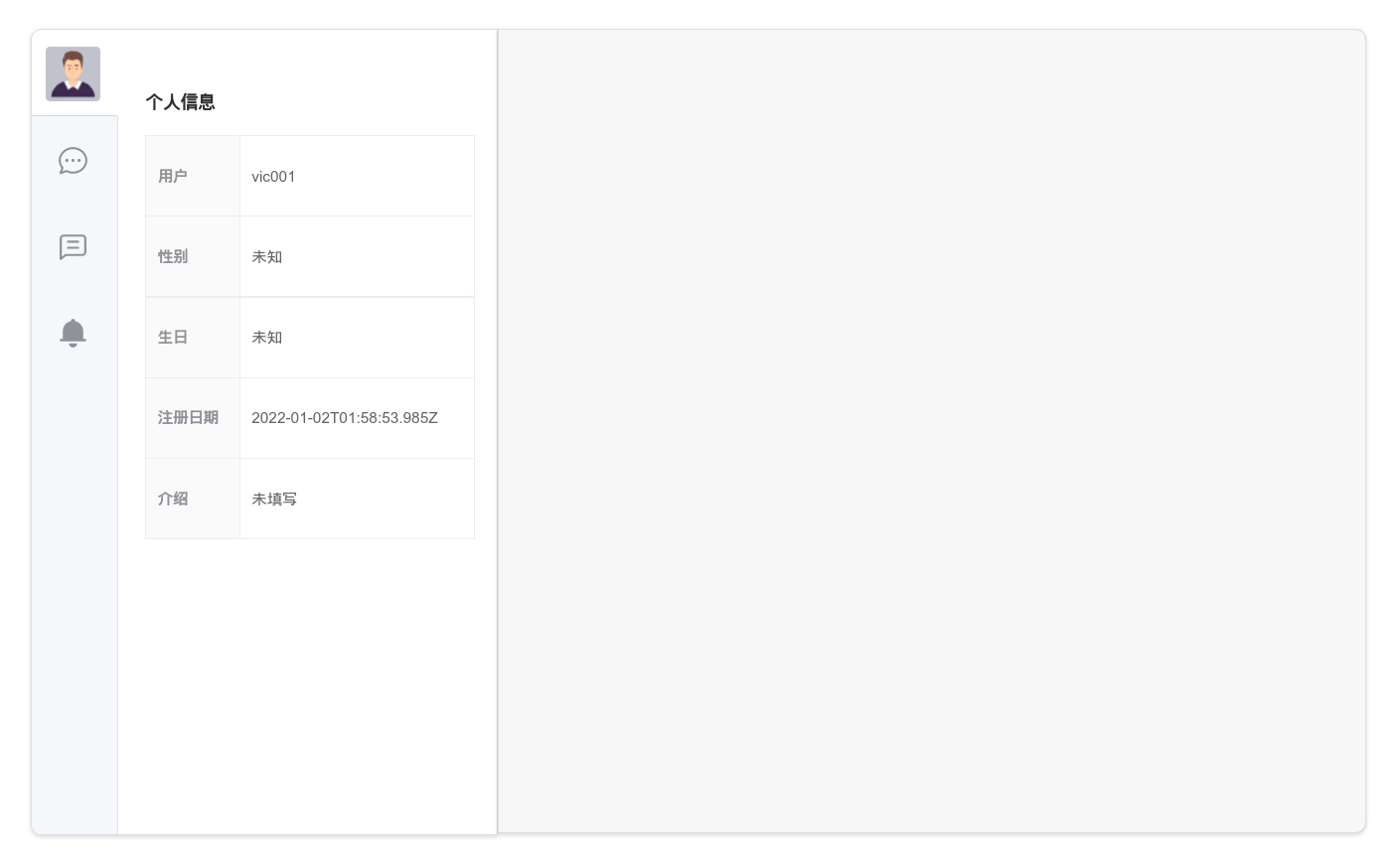
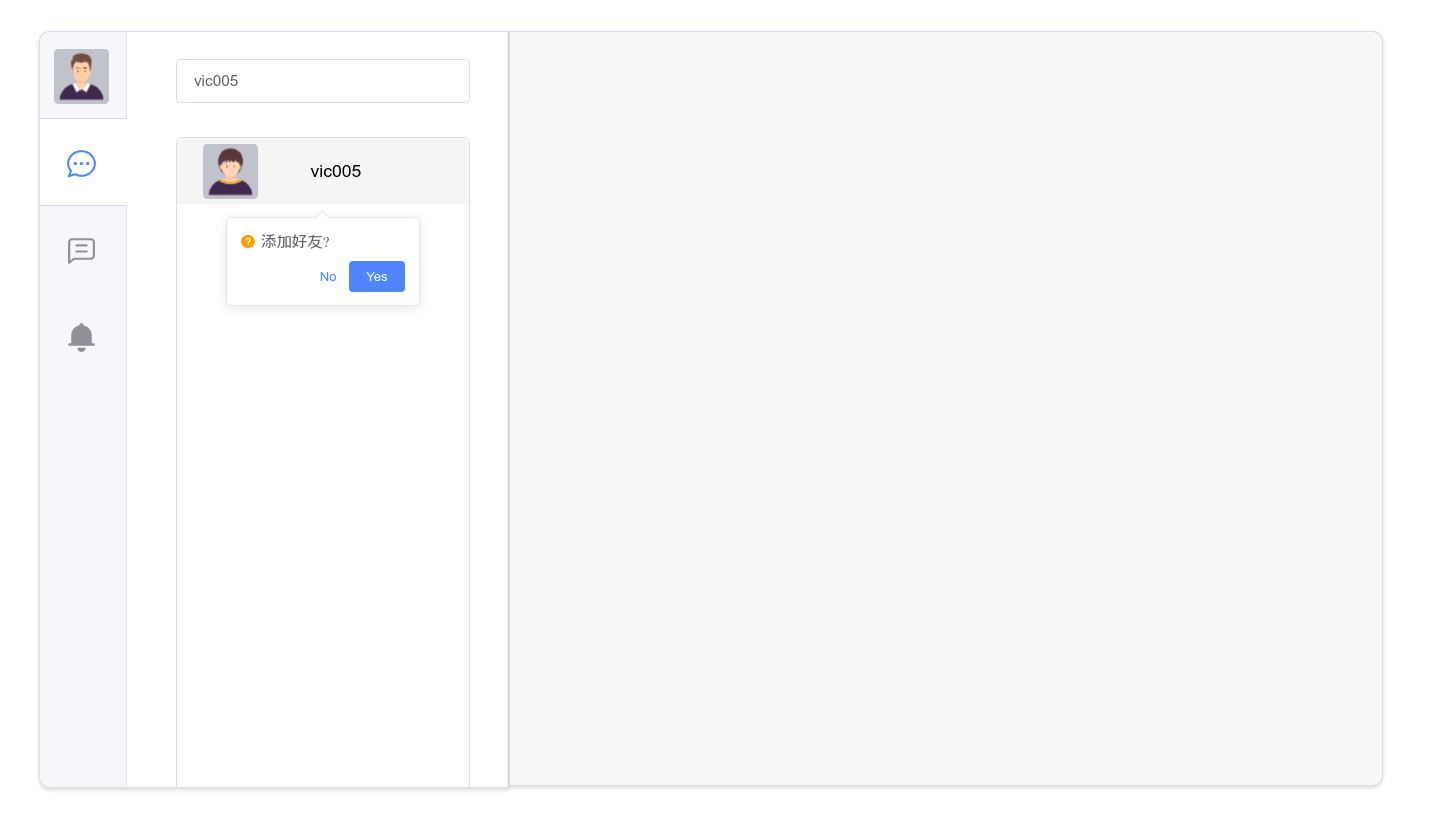
const confirmAddFriend = () => {
    if (store.state.sUser._id === store.state.user._id) {
        ElMessage({
        message: '是自己!',
        type: 'warning',
        duration: 3000
        })
    } else {
        store.dispatch('addFriend', store.state.sUser._id).then((res) => {
            console.log(res)
            if (res.data.exists) {
                ElMessage({
                message: '好友关系已存在!',
                type: 'warning',
                duration: 3000
                })
            } else {
                if (res.data.status) {
                ElMessage({
                    message: '好友申请成功,等待对方同意!',
                    type: 'success',
                    duration: 3000
                })

                let multiMsg = {
                    type: 'addFriend',
                    data: {
                    token: store.state.token,
                    userId: store.state.sUser._id,
                    }
                }
                console.log(multiMsg)
                store.dispatch('sendWebSocket', JSON.stringify(multiMsg))
                } else {
                ElMessage({
                    message: '好友添加失败,请重试!',
                    type: 'warning',
                    duration: 3000
                })
                }
            }
        })
    }
}
async addFriend({ commit }, data) {
    const r = await axios({
        method: 'post',
        url: 'http://localhost:3000/addFriend',
        data: Qs.stringify({
            token: store.state.token,
            userId: data
        }),
        headers: {'Content-Type':'application/x-www-form-urlencoded;charset=utf-8'}
    })
    return r
},
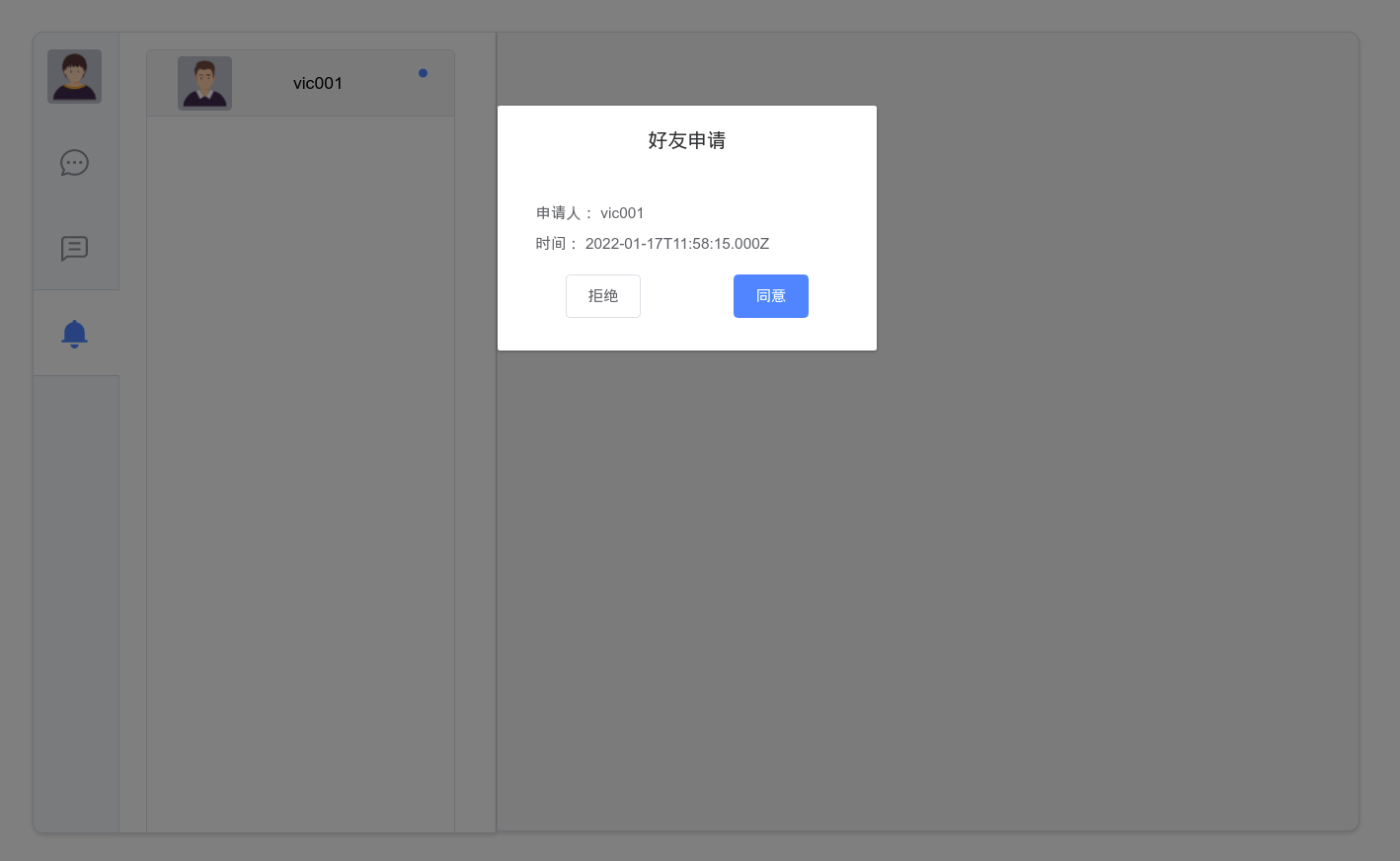
const applyFriend = () => {
    let multiMsg = {
        type: 'dealFriend',
        data: {
            token: store.state.token,
            userId: data.deal.userId,
            agree: true
        }
    }
    store.dispatch('sendWebSocket', JSON.stringify(multiMsg))

    data.dialogVisible = false
}

const refuseFriend = () => {
    let multiMsg = {
        type: 'dealFriend',
        data: {
            token: store.state.token,
            userId: data.deal.userId,
            agree: false
        }
    }
    store.dispatch('sendWebSocket', JSON.stringify(multiMsg))

    data.dialogVisible = false
}
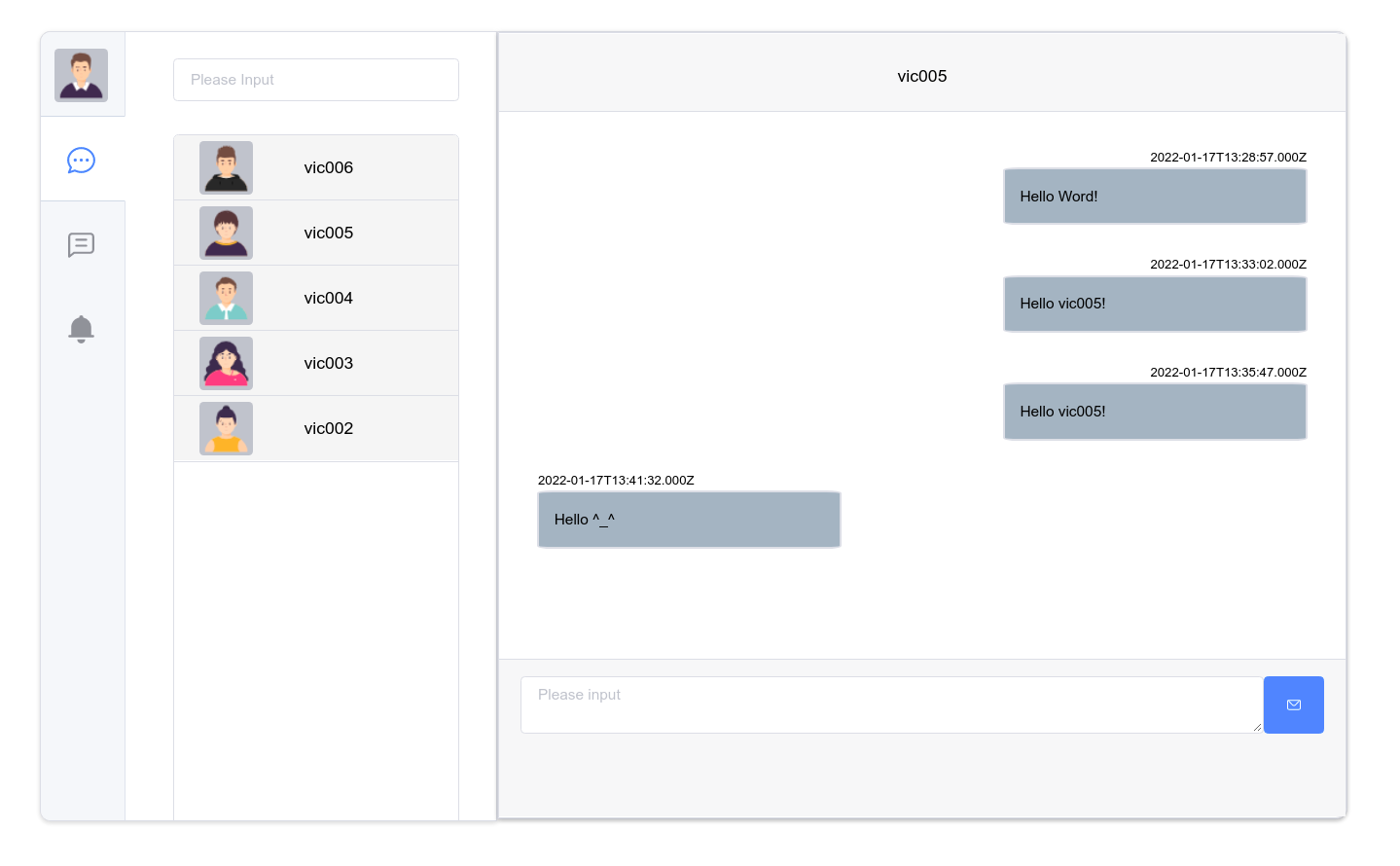
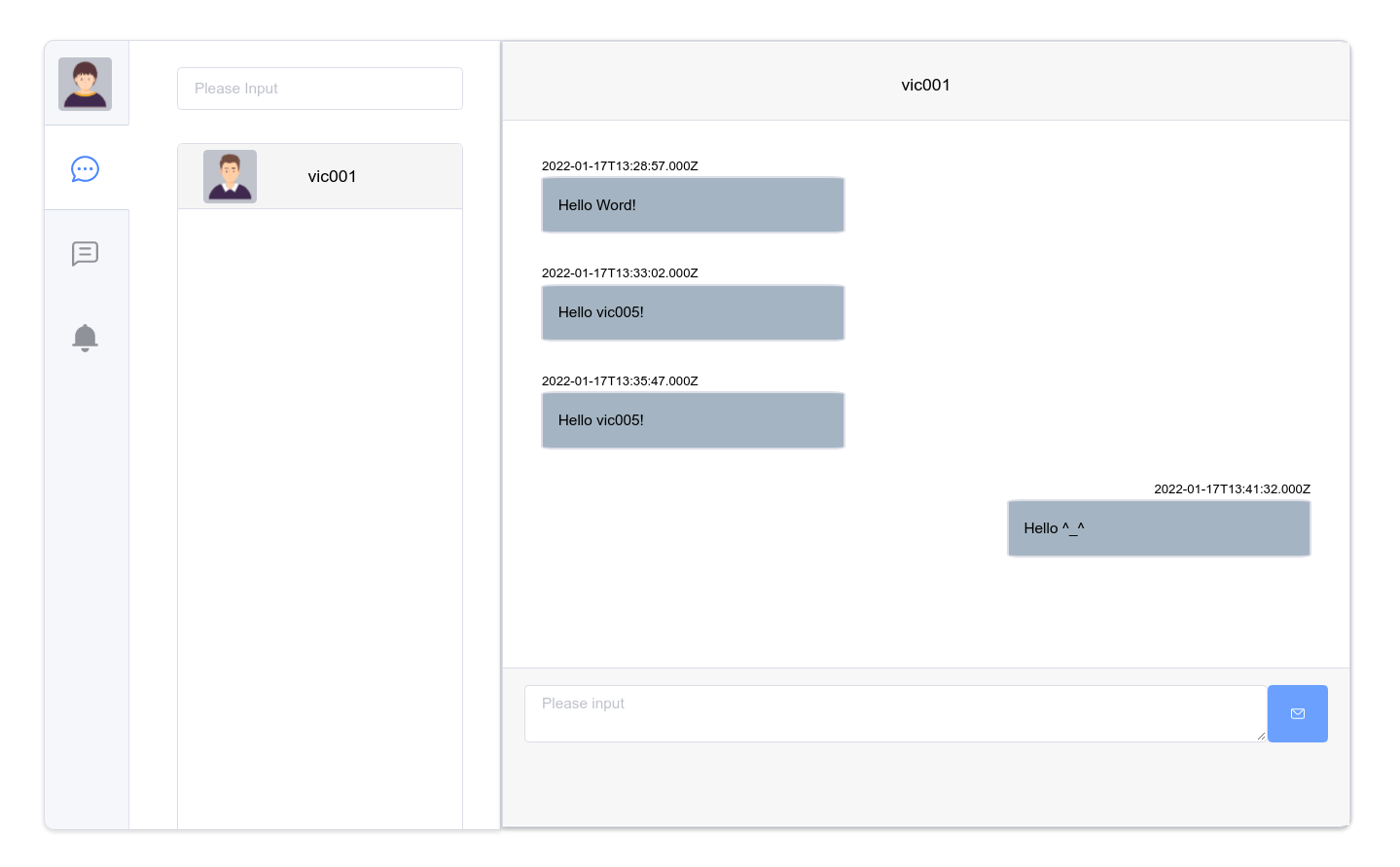
const sendMessage = () => {
    if (data.message !== '') {
        let multiMsg = {
            type: 'sendMsg',
            data: {
            token: store.state.token,
            userId: cData.value._id,
            message: data.message,
            type: 0
            }
        }
        console.log(multiMsg)
        store.dispatch('sendWebSocket', JSON.stringify(multiMsg))

        data.message = ''

        let scrollEnd= document.getElementById('scrolled')
        scrollEnd.scrollIntoView()
    }
}
数据库采用MongoDB,包含三个表:
用户表(users)
好友表(friends)
消息表(messages)
使用mongoose操作数据库。
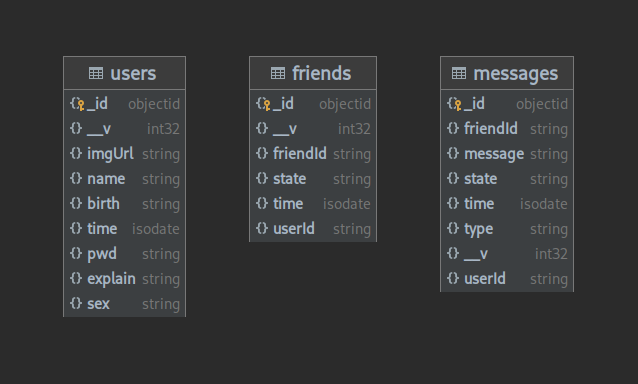
后端提供http服务,支持注册、登录、获取用户信息、获取好友列表等功能。
| 参数 | 类型 | 说明 | 必选 |
|---|---|---|---|
| usename | String | 用户名 | true |
| password | String | 密码 | true |
| 返回字段 | 类型 | 说明 | 必选 |
|---|---|---|---|
| status | Boolean | 注册是否成功 | true |
| exists | Boolean | 帐号是否已存在 | true |
登录: POST http://127.0.0.1:3000/login
请求参数:
| 参数 | 类型 | 说明 | 必选 |
|---|---|---|---|
| usename | String | 用户名 | true |
| password | String | 密码 | true |
返回字段:
| 返回字段 | 类型 | 说明 | 必选 |
|---|---|---|---|
| status | Boolean | 登录是否成功 | true |
| token | String | 用户token | false |
| userInfo | Json | 用户信息 | false |
获取用户信息: POST http://127.0.0.1:3000/getUserInfo
请求参数:
| 参数 | 类型 | 说明 | 必选 |
|---|---|---|---|
| userId | String | 用户id | true |
返回字段:
| 返回字段 | 类型 | 说明 | 必选 |
|---|---|---|---|
| status | Boolean | 获取是否成功 | true |
| userInfo | Json | 用户信息 | false |
获取好友列表: POST http://127.0.0.1:3000/getFriends
请求参数:
| 参数 | 类型 | 说明 | 必选 |
|---|---|---|---|
| token | String | 用户token | true |
返回字段:
| 返回字段 | 类型 | 说明 | 必选 |
|---|---|---|---|
| status | Boolean | 获取是否成功 | true |
| friends | JsonArray | 好友信息列表 | false |
获取单聊信息列表: POST http://127.0.0.1:3000/pullMessages
请求参数:
| 参数 | 类型 | 说明 | 必选 |
|---|---|---|---|
| token | String | 用户token | true |
返回字段:
| 返回字段 | 类型 | 说明 | 必选 |
|---|---|---|---|
| status | Boolean | 获取是否成功 | true |
| messages | JsonArray | 单聊信息列表 | false |
申请添加好友
POST http://127.0.0.1:3000/addFriend
请求参数:
| 参数 | 类型 | 说明 | 必选 |
|---|---|---|---|
| token | String | 用户token | true |
| userId | String | 用户id | true |
返回字段:
| 返回字段 | 类型 | 说明 | 必选 |
|---|---|---|---|
| status | Boolean | 获取是否成功 | true |
| exists | Boolean | 好友关系是否已存在 | true |
后端还提供WebSocket服务,支持添加好友、好友聊天等功能,将添加好友、发送的消息广播给好友。
{
    type: "addFriend",
    data: {
        token: "eyJhbGciOiJIUzI1NiIsInR5cCI6IkpXVCJ9.eyJpZCI6IjYxZDEwNmRkZjAxZDNlODRlYmVmNTQ2MCIsImRhdGEiOiIyMDIyLTAxLTE3VDEyOjMxOjIxLjU2MloiLCJpYXQiOjE2NDI0MjI2ODEsImV4cCI6MTY0MjUwOTA4MX0.Zk4jcc_BsVBb_ri-do8lSvPfWxU1Q8mV_CBfljxDLiU",
        userId: "61e561920bd388f7073927b1"
    }
}
{
    type: "addFriend",
    data: {
        _id: new ObjectId("61e5700e0bd388f7073927ed"),
        userId: "61d106ddf01d3e84ebef5460",
        friendId: "61e556c573f70498d7087235",
        state: "0",
        time: "2022-01-17T13:33:02.000Z",
        __v: 0
  }
}
{
    type: "dealFriend",
    data: {
        token: "eyJhbGciOiJIUzI1NiIsInR5cCI6IkpXVCJ9.eyJpZCI6IjYxZDEwNmRkZjAxZDNlODRlYmVmNTQ2MCIsImRhdGEiOiIyMDIyLTAxLTE3VDEyOjMxOjIxLjU2MloiLCJpYXQiOjE2NDI0MjI2ODEsImV4cCI6MTY0MjUwOTA4MX0.Zk4jcc_BsVBb_ri-do8lSvPfWxU1Q8mV_CBfljxDLiU",
        userId: "61e561920bd388f7073927b1",
        agree: true
    }
}
{
    type: "dealFriend",
    data: {
        _id: new ObjectId("61e5700e0bd388f7073927ed"),
        userId: "61d106ddf01d3e84ebef5460",
        friendId: "61e556c573f70498d7087235",
        state: "0",
        __v: 0
  }
}
{
    type: "sendMsg",
    data: {
        token: "eyJhbGciOiJIUzI1NiIsInR5cCI6IkpXVCJ9.eyJpZCI6IjYxZDEwNmRkZjAxZDNlODRlYmVmNTQ2MCIsImRhdGEiOiIyMDIyLTAxLTE3VDEyOjMxOjIxLjU2MloiLCJpYXQiOjE2NDI0MjI2ODEsImV4cCI6MTY0MjUwOTA4MX0.Zk4jcc_BsVBb_ri-do8lSvPfWxU1Q8mV_CBfljxDLiU",
        userId: "61e561920bd388f7073927b1",
        message: "Hello World!",
        type: "0",
    }
}
{
    type: "senMsg",
    data: {
        _id: new ObjectId("61e5700e0bd388f7073927ed"),
        userId: "61d106ddf01d3e84ebef5460",
        friendId: "61e556c573f70498d7087235",
        message: "Hello World!",
        type: "0",
        state: "0",
        time: "2022-01-17T13:33:02.000Z",
        __v: 0
  }
}

群聊功能未实现,继续加油
