

 SphereEx

Apache ShardingSphere 代码格式化实战 —— Spotless
 墨衍会员 · AI 创作全网分发 墨衍智能分发 通过墨衍一键同步至各平台 可同步平台 CSDN微信公众号微博知乎掘金百家号博客园抖音小红书 你的文章也可以这样分发 墨衍会员 ¥399起/年,写一次发全网
我也要 关注 + 加入社区
墨衍会员 · AI 创作全网分发 墨衍智能分发 通过墨衍一键同步至各平台 可同步平台 CSDN微信公众号微博知乎掘金百家号博客园抖音小红书 你的文章也可以这样分发 墨衍会员 ¥399起/年,写一次发全网
我也要 关注 + 加入社区龙台
Apache ShardingSphere Contributor,GitHub 2.2K star hippo4j 作者,Github ID:longtai-cn。
为什么要代码格式化?代码格式化的意义是让代码更加易读易懂易修改。
ShardingSphere 作为 Apache 顶级开源项目,截止当前已有 380+ 贡献者。因为大部分开发人员的代码风格不一致,在 GitHub 多人协作的模式下,不易保障项目整体代码格式。基于以上诉求,ShardingSphere 采用了 Spotless(https://github.com/diffplug/spotless/tree/main/plugin-maven)充当代码格式统一的角色。
什么是 Spotless
Spotless 是支持多种语言的代码格式化工具,支持 Maven 和 Gradle 以 Plugin 的形式构建。
Spotless 对开发者来说,有两种使用方式:检查代码是否存在格式问题,以及格式化代码。
ShardingSphere 采用 Maven 构建项目,以下若无特殊声明,Spotless 使用 Maven 做演示。
如何使用
下述代码是 Spotless 官方示例。
user@machine repo % mvn spotless:check
[ERROR]  > The following files had format violations:
[ERROR]  src\main\java\com\diffplug\gradle\spotless\FormatExtension.java
[ERROR]    -\t\t····if·(targets.length·==·0)·{
[ERROR]    +\t\tif·(targets.length·==·0)·{
[ERROR]  Run 'mvn spotless:apply' to fix these violations.
user@machine repo % mvn spotless:apply
[INFO] BUILD SUCCESS
user@machine repo % mvn spotless:check
[INFO] BUILD SUCCESS
通过mvn spotless:check检查项目代码时发现错误,接着使用 mvn spotless:apply 进行代码格式化;再次检查时,格式化错误消失。
1. 项目实战
ShardingSphere 使用 Spotless 实现了添加 Java 文件 licenseHeader 和 Java 代码格式化。
Spotless 有多种 Java 代码格式化方式,例如:googleJavaFormat、eclipse、prettier 等。基于定制化的考虑,最终采用 eclipse 进行 Java 代码格式化。
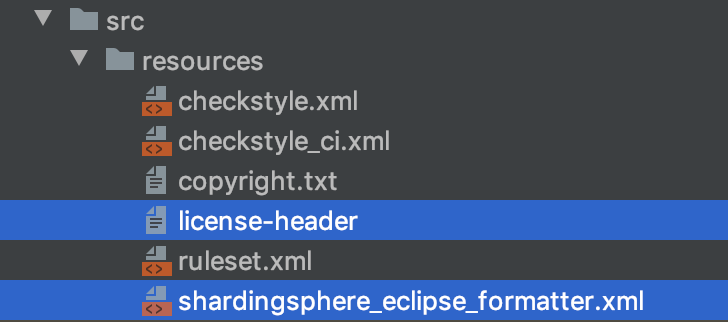
1)根据项目需求添加 licenseHeader
/*
 * Licensed to the Apache Software Foundation (ASF) under one or more
 * contributor license agreements.  See the NOTICE file distributed with
 * this work for additional information regarding copyright ownership.
 * The ASF licenses this file to You under the Apache License, Version 2.0
 * (the "License"); you may not use this file except in compliance with
 * the License.  You may obtain a copy of the License at
 *
 *     http://www.apache.org/licenses/LICENSE-2.0
 *
 * Unless required by applicable law or agreed to in writing, software
 * distributed under the License is distributed on an "AS IS" BASIS,
 * WITHOUT WARRANTIES OR CONDITIONS OF ANY KIND, either express or implied.
 * See the License for the specific language governing permissions and
 * limitations under the License.
 */
注意,licenseHeader 最后要留有一行空格。不然 licenseHeader 和 package 之间将没有空隙。
2)添加 shardingsphereeclipseformatter.xml
<?xml version="1.0" encoding="UTF-8" standalone="no"?>

<profiles version="13">
    <profile kind="CodeFormatterProfile" name="'ShardingSphere Apache Current'" version="13">
        <setting id="org.eclipse.jdt.core.compiler.source" value="1.8"/>
        <setting id="org.eclipse.jdt.core.compiler.compliance" value="1.8"/>
        <setting id="org.eclipse.jdt.core.compiler.codegen.targetPlatform" value="1.8"/>
        <setting id="org.eclipse.jdt.core.formatter.indent_empty_lines" value="true"/>
        <setting id="org.eclipse.jdt.core.formatter.tabulation.size" value="4"/>
        <setting id="org.eclipse.jdt.core.formatter.lineSplit" value="200"/>
        <setting id="org.eclipse.jdt.core.formatter.comment.line_length" value="200"/>
        <setting id="org.eclipse.jdt.core.formatter.tabulation.char" value="space"/>
        <setting id="org.eclipse.jdt.core.formatter.indentation.size" value="1"/>
        <setting id="org.eclipse.jdt.core.formatter.comment.format_javadoc_comments" value="false"/>
        <setting id="org.eclipse.jdt.core.formatter.join_wrapped_lines" value="false"/>
        <setting id="org.eclipse.jdt.core.formatter.insert_space_before_colon_in_conditional" value="insert"/>
        <setting id="org.eclipse.jdt.core.formatter.insert_space_before_colon_in_default" value="do not insert"/>
        <setting id="org.eclipse.jdt.core.formatter.alignment_for_enum_constants" value="16"/>
        <setting id="org.eclipse.jdt.core.formatter.insert_space_before_colon_in_labeled_statement" value="do not insert"/>
        <setting id="org.eclipse.jdt.core.formatter.insert_space_before_colon_in_case" value="do not insert"/>
        <setting id="org.eclipse.jdt.core.formatter.alignment_for_conditional_expression" value="80"/>
        <setting id="org.eclipse.jdt.core.formatter.alignment_for_assignment" value="16"/>
        <setting id="org.eclipse.jdt.core.formatter.blank_lines_after_package" value="1"/>
        <setting id="org.eclipse.jdt.core.formatter.continuation_indentation_for_array_initializer" value="2"/>
        <setting id="org.eclipse.jdt.core.formatter.alignment_for_resources_in_try" value="160"/>
        <setting id="org.eclipse.jdt.core.formatter.alignment_for_throws_clause_in_method_declaration" value="10"/>
        <setting id="org.eclipse.jdt.core.formatter.alignment_for_parameters_in_method_declaration" value="106"/>
        <setting id="org.eclipse.jdt.core.formatter.alignment_for_parameters_in_constructor_declaration" value="106"/>
        <setting id="org.eclipse.jdt.core.formatter.alignment_for_throws_clause_in_constructor_declaration" value="106"/>
        <setting id="org.eclipse.jdt.core.formatter.alignment_for_arguments_in_explicit_constructor_call.count_dependent" value="16|5|80"/>
    </profile>
</profiles>
ShardingSphere 最新规则查看 shardingsphereeclipseformatter.xml(https://github.com/apache/shardingsphere/blob/master/src/resources/shardingsphere_eclipse_formatter.xml),另提供一份 eclipse-java-google-style.xml(https://github.com/google/styleguide/blob/gh-pages/eclipse-java-google-style.xml)供参考。
shardingsphereeclipseformatter.xml 的内容是根据 ShardingSphere 代码规范定制开发的,可灵活变动。
3)添加 Maven plugin
<plugin>
    <groupId>com.diffplug.spotless</groupId>
    <artifactId>spotless-maven-plugin</artifactId>
    <version>2.22.1</version>
    <configuration>
        <java>
            <eclipse>
                <file>${maven.multiModuleProjectDirectory}/src/resources/shardingsphere_eclipse_formatter.xml</file>
            </eclipse>
            <licenseHeader>
                <file>${maven.multiModuleProjectDirectory}/src/resources/license-header</file>
            </licenseHeader>
        </java>
    </configuration>
</plugin>
Spotless 支持格式化指定目录,以及排除指定目录的功能,详情参考 plugin-maven#java(https://github.com/diffplug/spotless/tree/main/plugin-maven#java)。如无指定,执行 check 或 apply 时,默认项目全量代码。
4)执行代码格式化
执行完上述三个步骤,就可以在项目中执行命令,检查 Java 代码是否符合规范,以及代码格式化功能。
user@machine repo % mvn spotless:apply
[INFO] BUILD SUCCESS
user@machine repo % mvn spotless:check
[INFO] BUILD SUCCESS
2. 绑定 Maven 生命周期
在 ShardingSphere 实际应用中,选择将 Spotless apply 绑定到 compile 阶段,这样本地执行 mvn install 时就能自动格式化。
<plugin>
    <groupId>com.diffplug.spotless</groupId>
    <artifactId>spotless-maven-plugin</artifactId>
    <version>2.22.1</version>
    <configuration>
        <java>
            <eclipse>
                <file>${maven.multiModuleProjectDirectory}/src/resources/shardingsphere_eclipse_formatter.xml</file>
            </eclipse>
            <licenseHeader>
                <file>${maven.multiModuleProjectDirectory}/src/resources/license-header</file>
            </licenseHeader>
        </java>
    </configuration>
    <executions>
        <execution>
            <goals>
                <goal>apply</goal>
            </goals>
            <phase>compile</phase>
        </execution>
    </executions>
</plugin>
3. IDEA 格式化
开发者如果在写代码过程中,想检查单个文件是否符合规范,执行 mvn spotless:check 或 mvn spotless:apply 显得有些笨重,因为格式化范围默认是整个项目。
我们可以使用 shardingsphereeclipseformatter.xml 替换 IntelliJ IDEA 原有格式化功能,这样在写代码过程中可以随时格式化,极大提升了开发效率。
IDEA 版本 2019.3.4。
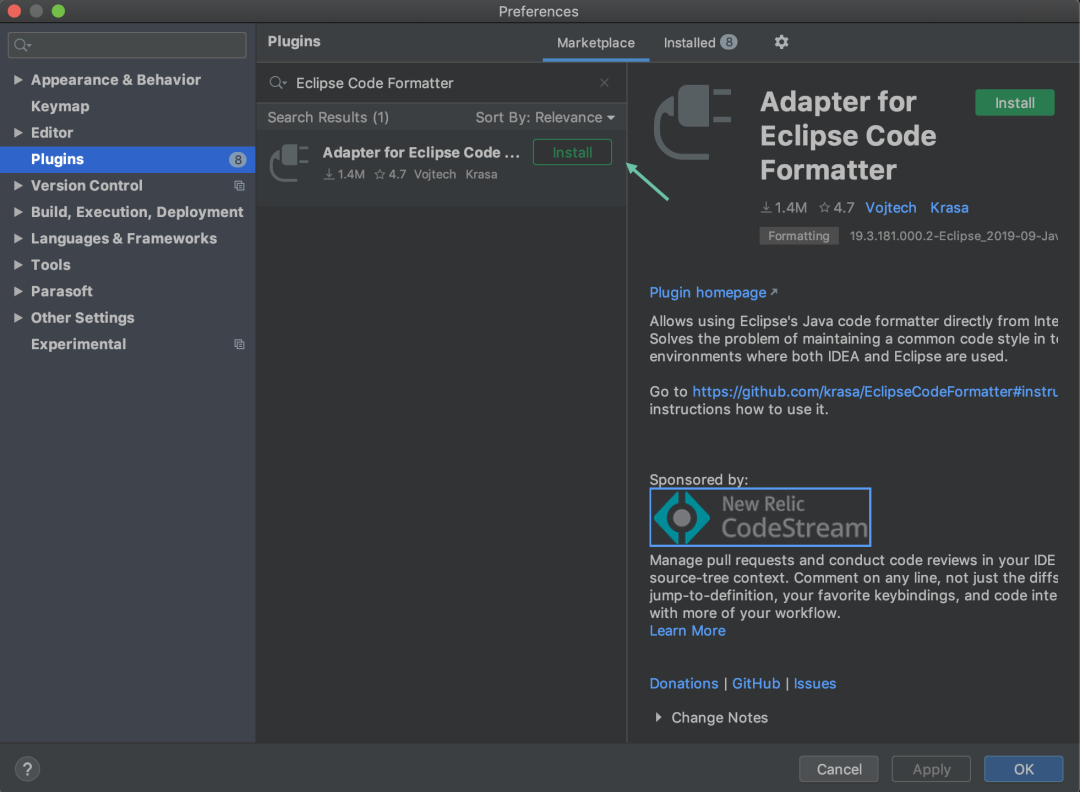
1)安装插件 Eclipse Code Formatter
2)选择 shardingsphereeclipseformatter.xml 为默认格式化模板
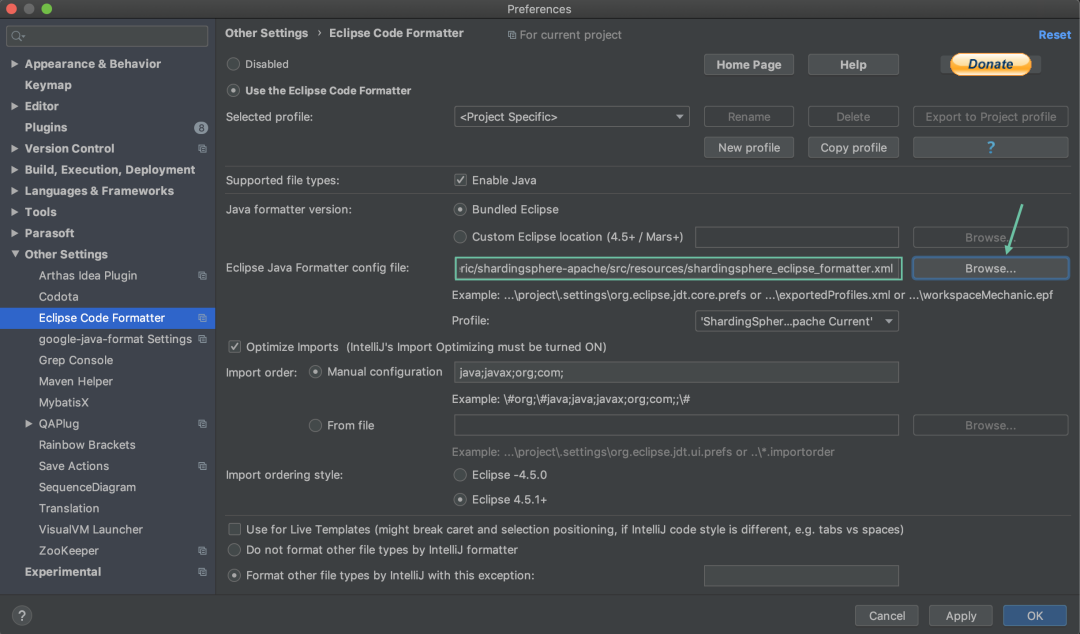
使用 IDEA 代码格式化快捷键,就可以完成 Spotless 代码格式化。
常见问题
1. Spotless 与 Checkstyle 冲突
Checkstyle(https://github.com/checkstyle/checkstyle)是一种用于检查 Java 源代码是否符合代码标准或一组验证规则(最佳实践)的工具。
极端场景下,Spotless 格式化代码后,通过 Checkstyle 检查代码会不通过。
根本原因在于两者设定的检查配置和格式化配置冲突。举个例子,Spotless 格式化后换行缩进了 16 个空格,而 Checkstyle 的换行检查是 12 个空格。
private static Collection<PreciseHintShadowValue<Comparable<?>>> createNoteShadowValues(final ShadowDetermineCondition shadowDetermineCondition) {
    // Checkstyle 可以通过的格式
    return shadowDetermineCondition.getSqlComments().stream().<PreciseHintShadowValue<Comparable<?>>>map(
        each -> new PreciseHintShadowValue<>(tableName, shadowOperationType, each)).collect(Collectors.toList());
    // Spotless 格式化后
    return shadowDetermineCondition.getSqlComments().stream().<PreciseHintShadowValue<Comparable<?>>>map(
            each -> new PreciseHintShadowValue<>(tableName, shadowOperationType, each)).collect(Collectors.toList());
}
这种情况,需要开发者衡量如何取舍。解决方案有两种:修改 Spotless 的格式化规则,或修改 Checkstyle 的检查规则。
2. CRLF 与 LF 格式化冲突
参考 https://github.com/diffplug/spotless/issues/1171
文末总结
文章介绍了 Apache ShardingSphere 使用 Spotless 完成历史代码格式化,以及后续代码格式的统一,对项目代码的整洁起到了很大帮助。
当然,Spotless 的功能不止 Java 代码的格式化,包括不限于 Pom 和 Markdown 等文件类型的格式化,后续这些都会在 ShardingSphere 得以应用。
相关推荐
Delphi 13.2控件之FMXLinux11-20240611.zip
Delphi 13.2控件之FMXLinux11-20240611.zip
语音情感识别系统实战教程
这是一套基于 Librosa + PyTorch CNN 的语音情感识别系统完整实战教程,输入一段 wav 人声录音,程序输出 8 种情感(中性/平静/快乐/悲伤/愤怒/恐惧/厌恶/惊讶)各自的概率和主判定结果,全程纯 CPU 可跑。交付物含可运行 Python 源码、RAVDESS 完整数据集(1440 条)、训练好的权重、9 章文档(三件套)、PPT 和 6 张真跑截图。 内容围绕 main.py 的命令:train 扫描音频提取 MFCC 特征并缓存,二次训练免重复提取,--dryrun 用极小样本几分钟走通全链路;infer 在测试集上输出准确率、分类报告与混淆矩阵图,支持单文件预测和批量识别;gui 打开 Tkinter 可视化工作台,左侧选音频看结果与 Top-3 候选,右侧实时显示波形与 8 类情感概率条形图,批量结果一键导出 CSV。 亮点在于无显卡要求:8GB 内存普通电脑即可,MFCC 特征提取加训练合计十来分钟,模型权重仅 1-2MB;依赖锁定 Python 3.10 + torch 2.1.0+cpu + librosa 0.10.1 + numpy 1.26.4 + scikit-learn 1.3.2;第 7 章整理 15 个以上高频报错;第 8 章给出换情感表、换特征、接入长音频的路径。
一个完全重写的超轻量级 python 引擎,零依赖,零配置,可以在 Flash ≤ 64KB,RAM≤ 4KB 的平台下运行,极易部署和扩展,具有大量的中文文档和视频资料
一个完全重写的超轻量级 python 引擎,零依赖,零配置,可以在 Flash ≤ 64KB,RAM≤ 4KB 的平台下运行(如 stm32g030c8 和 stm32f103c8),极易部署和扩展,具有大量的中文文档和视频资料。
CSDN首页 发布文章 CSDN同步助手 毫米波V2I网络的链路层仿真研究(Matlab代码实现) 28 100 摘要:会在推荐、列表等场景外露,帮助读者快速了解内容,支持一键将正文前 25
内容概要:本文系统介绍了基于自适应神经模糊推理系统(ANFIS)的非线性回归方法,结合模糊逻辑与神经网络的优势,构建能够处理复杂非线性关系的智能建模工具。文章详细阐述了ANFIS的网络结构、模糊规则生成机制、参数学习过程及其在非线性系统建模中的应用流程,并通过Matlab代码实现完整的训练、验证与预测环节,展示了其在高精度拟合与动态系统建模方面的优越性能。该方法特别适用于输入输出关系高度非线性且难以用传统数学模型描述的工程场景,具备良好的泛化能力和可解释性。; 适合人群:具备一定Matlab编程能力,并熟悉模糊系统、神经网络基础理论的高校研究生、科研人员及工程技术开发者,尤其适合从事智能控制、系统辨识、故障诊断、数据分析与预测等领域的研究人员。; 使用场景及目标:①掌握ANFIS在非线性回归与系统建模中的建模流程与实现技巧;②学习如何利用Matlab Fuzzy Logic Toolbox进行模糊规则设计与参数优化;③应用于实际工程中的复杂非线性问题,如环境数据预测、工业过程建模、设备状态评估、金融时间序列分析等高难度回归任务。; 阅读建议:建议读者结合Matlab平台动手实践,重点理解ANFIS中模糊隶属度函数的选择、规则库的自动生成机制以及反向传播与最小二乘法混合训练策略的协同作用,通过调整模型结构与训练参数对比分析其对回归精度的影响,从而深入掌握该方法的核心原理与工程应用要点。
科技中介服务机构如何构建标准化、智能化的服务流程?.docx
科易网基于AI模型+行业大数据,在技术转移、成果转化、技术经纪、知识产权、产业创新、科技招商等垂直领域的多样化应用场景,推出科技创新领域的AI+工具与数智化解决方案,推动科技创新与产业创新智能化发展。





