

 FZU-SE-EE308-2022秋

04 group - Topic selection and requirement analysis
 墨衍会员 · AI 创作全网分发 墨衍智能分发 通过墨衍一键同步至各平台 可同步平台 CSDN微信公众号微博知乎掘金百家号博客园抖音小红书 你的文章也可以这样分发 墨衍会员 ¥399起/年,写一次发全网
我也要 关注 + 加入社区
墨衍会员 · AI 创作全网分发 墨衍智能分发 通过墨衍一键同步至各平台 可同步平台 CSDN微信公众号微博知乎掘金百家号博客园抖音小红书 你的文章也可以这样分发 墨衍会员 ¥399起/年,写一次发全网
我也要 关注 + 加入社区Leader:https://bbs.csdn.net/topics/610171794
目录
- 1.Team gathering
- 1) Introduce Everyone
- 2) team characteristics
- 3) Logo
- 4) group photo
- 2.Start action
- 1)A one-sentence summary of the project
- 2)Contribution ratio method
- 3)Proportion of contribution
- 3.Drip Record
- 1)Mind Map
- a.Project Idea
- b.Web Development
- c.The whole idea
- 2)Burnout map
- 3)UML map
- (a) Part Login
- (b) Part Home page
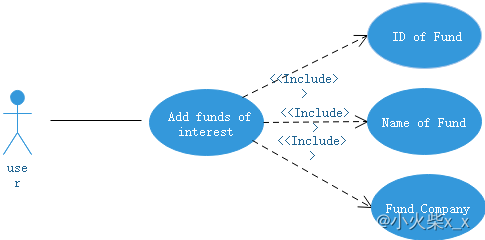
- (c) Part Fund operation
- 4)Learning progress bar
- 5)Experience
- a.Why Eitu diagram
- b. Difficulties encountered in this task and solutions
- 4.Video
1.Team gathering
1) Introduce Everyone
| Team Members | Role | Style |
|---|---|---|
| Li Liangkai | leader | Find the problem and solve it |
| Qing Qiguo | CTO | Chief engineer and technical consultant, lead the team to develop various functions of the website. |
| Tang Zijun | Code developer | Responsible for converting prototype files into front-end files. |
| Ma Yujun | Code developer | Do one thing at a time, and do well. |
| Xue Feiyang | Code developer | Analyze project strengths and weaknesses. Amplify its advantages. |
| An Yi | Marketing manager | User demand analysis and market expansion |
| Peng Haitao | PM(product manager) | Verify the practicability and safety of the product |
| Li xing | UI designer | Keep on going never give up |
| Li Hao | customer manager | Collect the data, find the demographic that we focus on, and analyze it |
| Zhou Zijun | customer manager | Optimize design ideas based on previous experience |
2) team characteristics
In terms of marketing, the project members are experienced and have won three national awards in the Internet + Innovation and Entrepreneurship competition. In terms of technology, there is no doubt that we have one of the most technical people in the college; In terms of experience, there are many cooperative projects among project members, and they are familiar with each other, and the communication is smooth.
3) Logo

4) group photo

2.Start action
1)A one-sentence summary of the project
In order to solve the shortage of fund trading tools in the market, we developed a fund trading tool website with complete basic functions, simple and efficient interface, and predicted the net value of the fund through the LSTM model.
2)Contribution ratio method
The final score of the group was divided into two parts. One was the basic score, which accounted for 40% of the total score of the group and was distributed equally among the group members. The other part is the contribution score, which is evaluated by each member, out of 100, and weighted at the end.For difficult bugs or other problems, bonus points will be given directly to the person who solves them.The bonus points will be drawn from the remaining 60 percent.
Such an approach would incentivize project members to complete their work while ensuring fairness.
3)Proportion of contribution
| Team Members | Proportion (%) |
|---|---|
| Li Liangkai | 110.17 |
| Qing Qiguo | 111.766 |
| Tang Zijun | 96.76 |
| Ma Yujun | 95.296 |
| Xue Feiyang | 97.048 |
| An Yi | 104.29 |
| Peng Haitao | 97.048 |
| Li xing | 97.366 |
| Li Hao | 95.56 |
| Zhou Zijun | 94.726 |
| Total | 1000 |
3.Drip Record
1)Mind Map
a.Project Idea
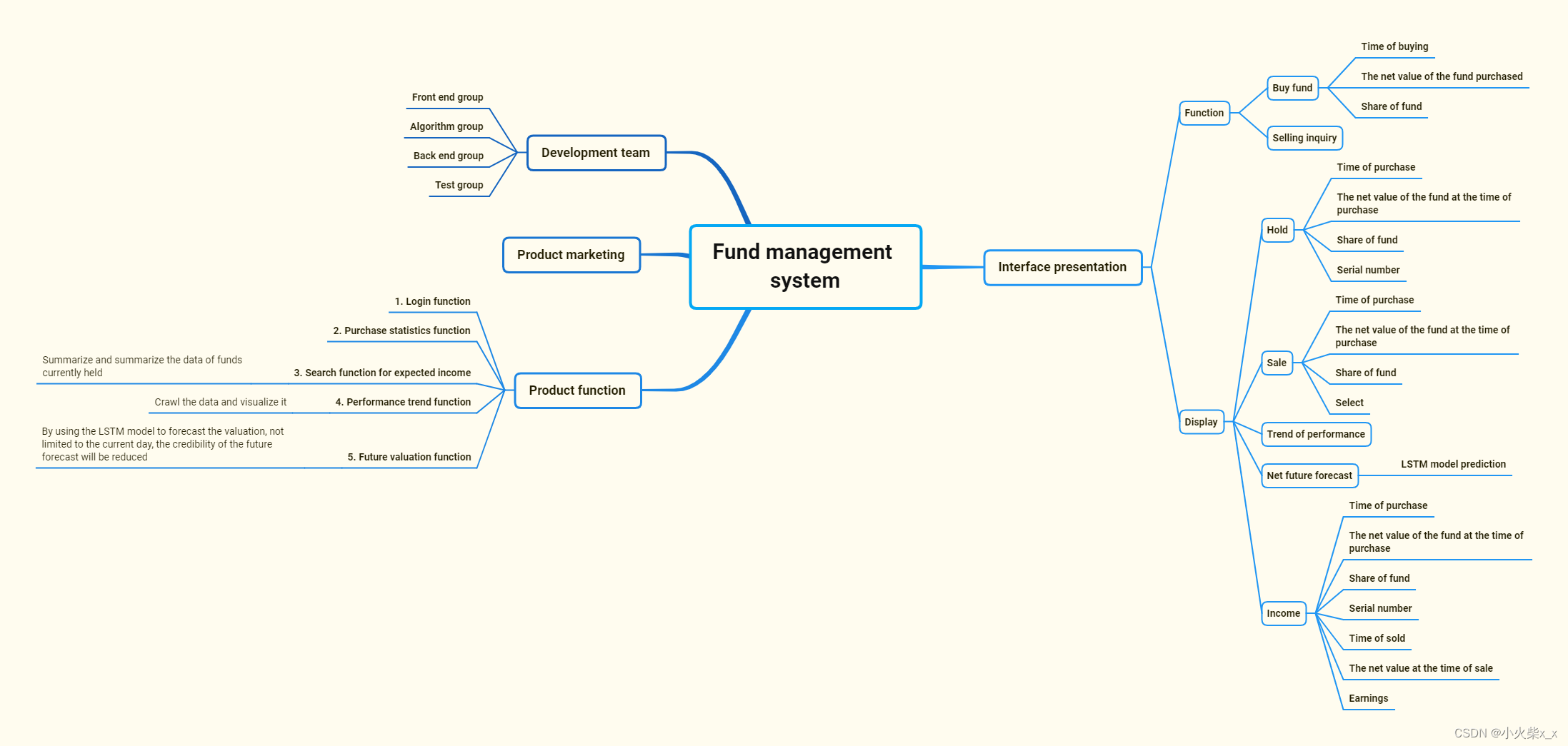
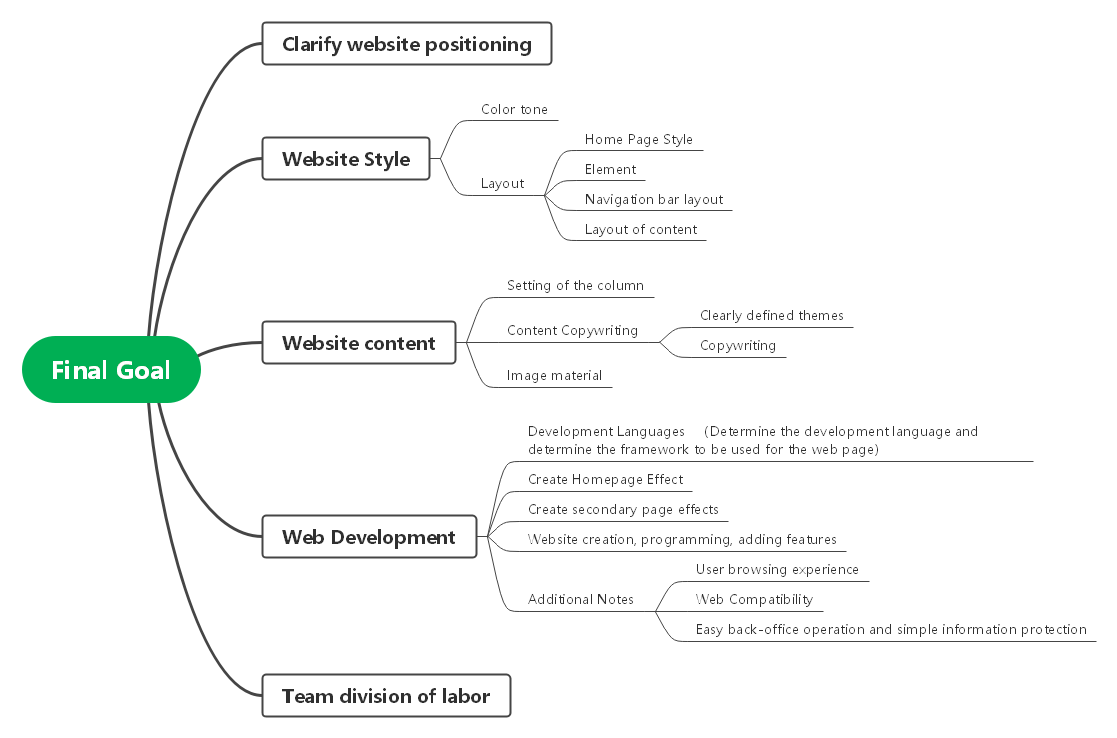
b.Web Development

c.The whole idea
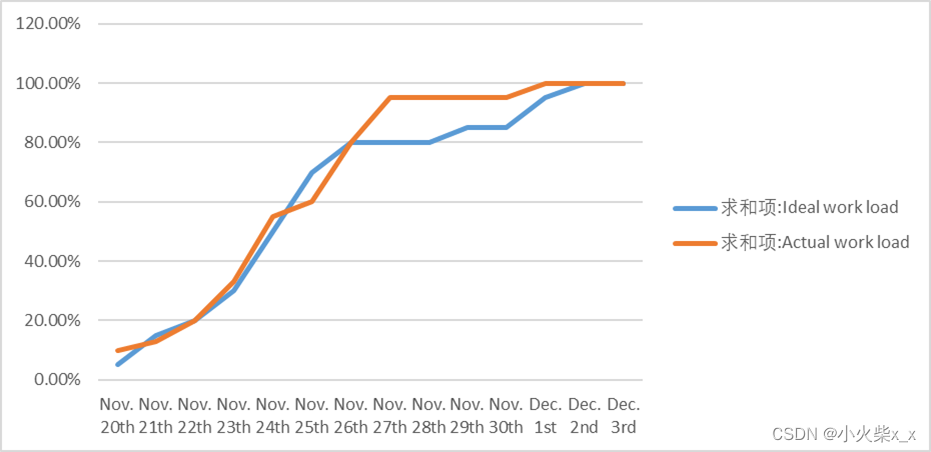
2)Burnout map
3)UML map
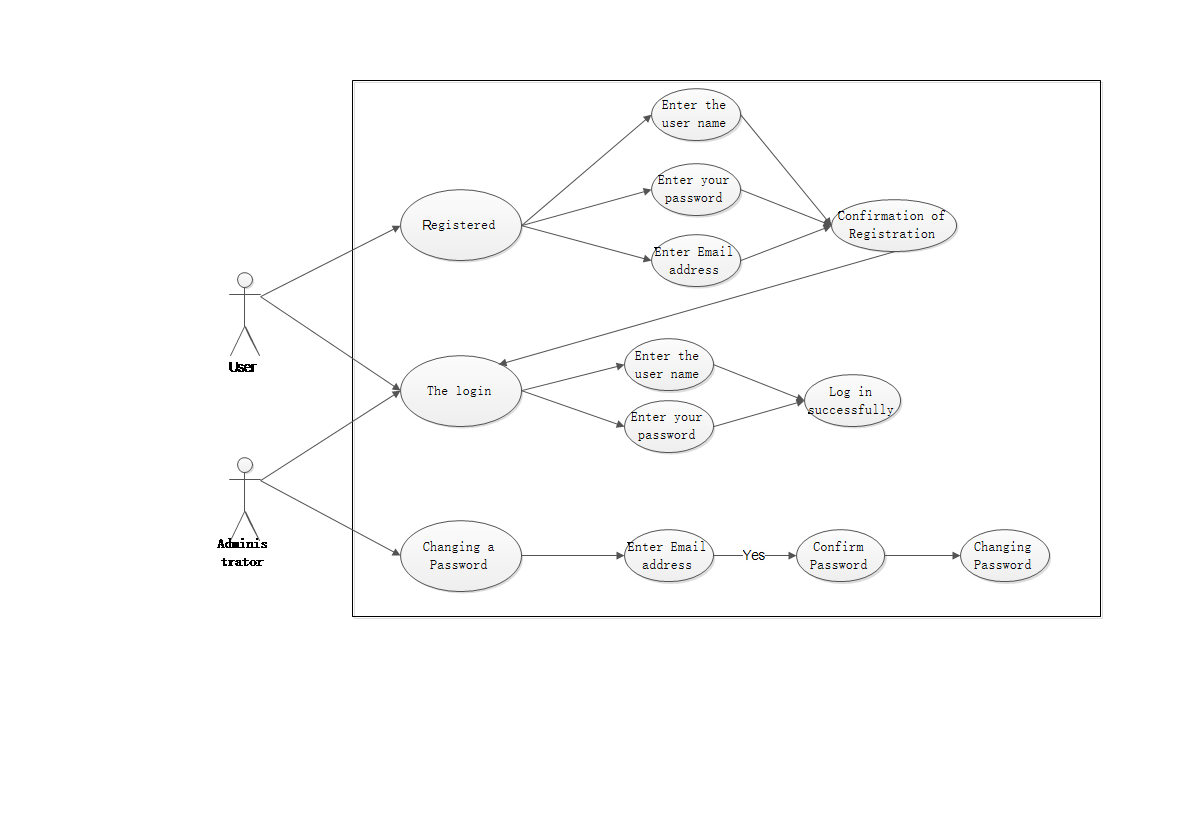
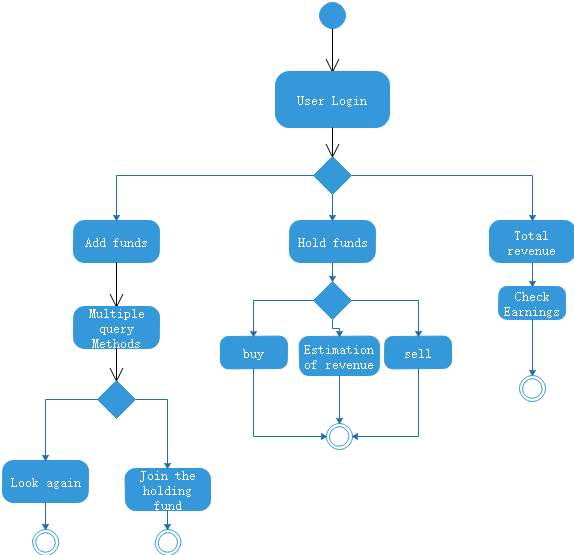
(a) Part Login
Person in charge: Qing Qiguo ,Xue Feiyang,Li Xing
Description:Login
Attachment: (All UML diagrams of this part)
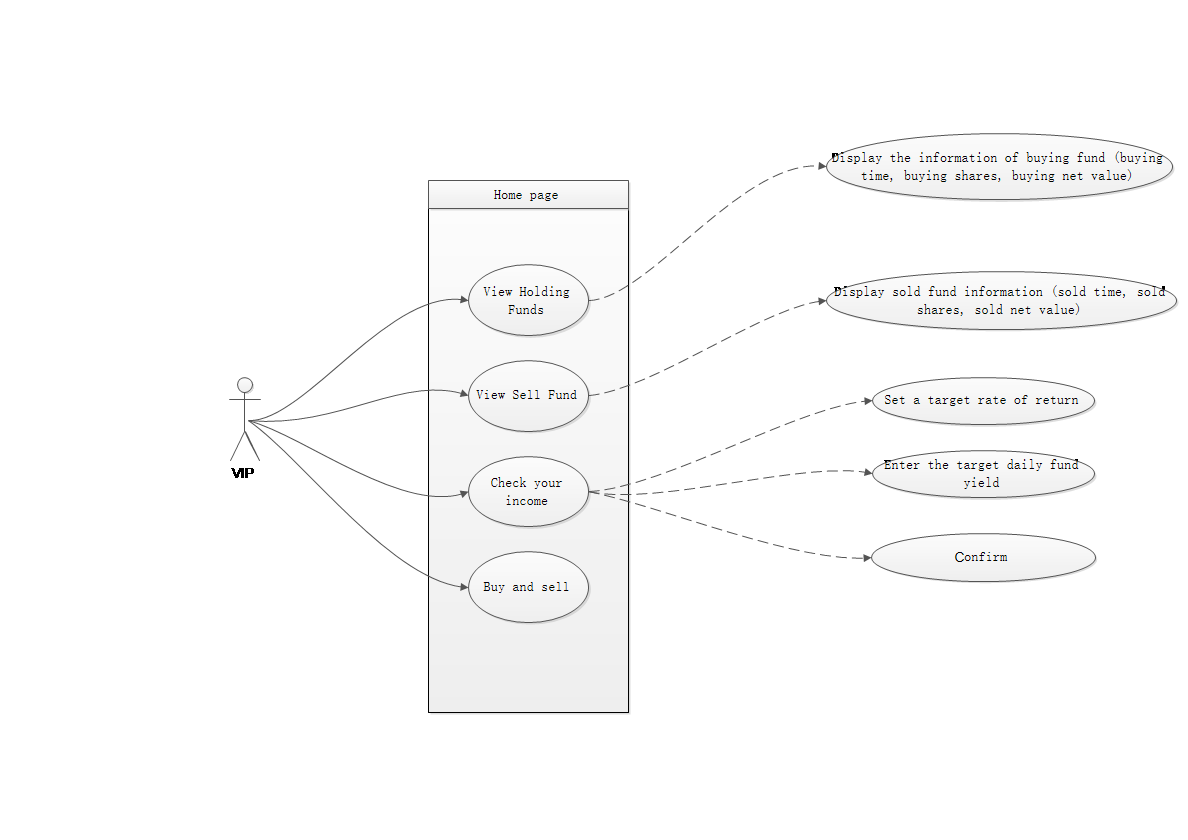
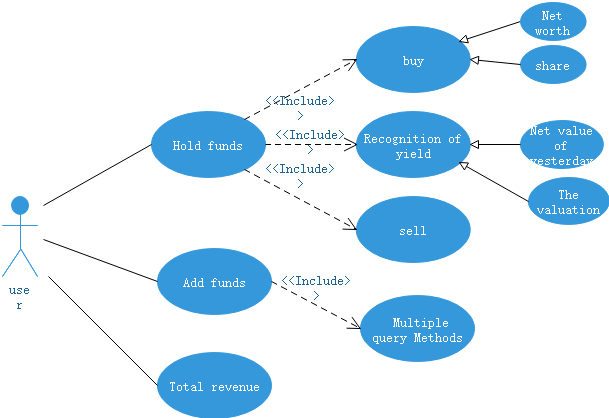
(b) Part Home page
Person in charge: Peng Haitao ,An Yi ,Ma Yujun
Description:Home page
Attachment: (All UML diagrams of this part)
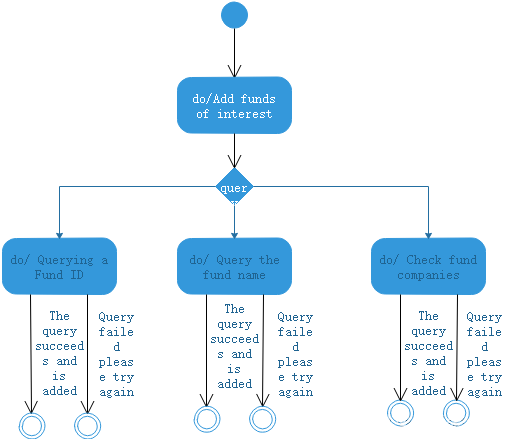
(c) Part Fund operation
Person in charge: LiHao ,Zhou Zijun ,Ma Yujun
Description:Fund operation
Attachment: (All UML diagrams of this part)
4)Learning progress bar
| Week N | New code (line) | Cumulative code (line) | Time spent on learning this week (hours) | Cumulative time spent on learning (hours) | Important growth |
|---|---|---|---|---|---|
| 1 | 500 | 500 | 6 | 6 | None |
| 2 | 900 | 1400 | 13 | 19 | Front-end files |
5)Experience
a.Why Eitu diagram
The uml diagram design tool selects the Eitu diagram. Eitu diagram is a comprehensive drawing software, its strength lies in drawing flowchart. On the one hand, it is easier to draw a flowchart with ETO diagram, which supports free dragging of symbols and quick connection of shapes. Bai can also pick up quickly. On the other hand, Yitu graphic contains a huge symbol library, which supports the functions of free drag and drop, fast connection and so on, making it very simple to operate. It also has a template center, which has a large number of templates, enabling users to use a click, quickly drawing.
b. Difficulties encountered in this task and solutions
Not yet
4.Video
https://www.bilibili.com/video/BV1x44y1Q7uH/?vd_source=239dd70ccc4f96106b3f298e384521bb
相关推荐
CSharp 3.0 With the .NET Framework 3.5 Unleashed(english)
一本不错的C#书,希望对您有帮助,本书目录: C# 3.0 Unleashed 1 Table of Contents 6 Introduction 30 Why This Book Is for You 31 Organization and Goals 32 Part 1 Learning C# Basics 36 1 Introducing the .NET Platform 38 What Is .NET? 38 The Common Language Runtime (CLR) 40 The .NET Framework Class Library (FCL) 43 C# and Other .NET Languages 45 The Common Type System (CTS) 46 The Common Language Specification (CLS) 46 Summary 46 2 Getting Started with C# and Visual Studio 2008 48 Writing a Simple C# Program 48 Creating a Visual Studio 2008 (VS2008) Project 52 Commenting Code 61 Identifiers and Keywords 64 Convention and Style 66 Variables and Types 67 Definite Assignment 73 Interacting with Programs 74 Summary 77 3 Writing C# Expressions and Statements 78 C# Operators 78 Statements 91 Blocks and Scope 92 Labels 92 Operator Precedence and Associativity 93 Selection and Looping Statements 94 Summary 106 4 Understanding Reference Types and Value Types 108 A Quick Introduction to Reference Types and Value Types 108 The Unified Type System 109 Reference Type and Value Type Memory Allocation 114 Reference Type and Value Type Assignment 117 More Differences Between Reference Types and Value Types 121 C# and .NET Framework Types 123 Nullable Types 131 Summary 132 5 Manipulating Strings 134 The C# String Type 134 The StringBuilder Class 151 Regular Expressions 153 Summary 158 6 Arrays and Enums 160 Arrays 160 The System.Array Class 166 Using Enum Types 168 The System.Enum struct 171 Summary 174 7 Debugging Applications with Visual Studio 2008 176 Stepping Through Code 176 Summary 188 Part 2 Object-Oriented Programming with C# 190 8 Designing Objects 192 Object Members 192 Instance and Static Members 193 Fields 194 Methods 195 Properties 196 Indexers 198 Reviewing Where Partial Types Fit In 199 Static Classes 200 The System.Object Class 201 Summary 204 9 Designing Object-Oriented Programs 206 Inheritance 207 Encapsulating Object Internals 213 Polymorphism 219 Summary 229 10 Coding Methods and Custom Operators 230 Methods 231 Overloading Methods 239 Overloading Operators 242 Conversions and Conversion Operator Overloads 247 Partial Methods 256 Extension Methods 257 Summary 259 11 Error and Exception Handling 260 Why Exception Handling? 261 Exception Handler Syntax: The Basic try/catch Block 261 Ensuring Resource Cleanup with finally Blocks 263 Handling Exceptions 264 Designing Your Own Exceptions 272 checked and unchecked Statements 274 Summary 277 12 Event-Based Programming with Delegates and Events 278 Exposing Delegates 279 Implementing Delegate Inference 285 Assigning Anonymous Methods 285 Coding Events 287 Summary 300 13 Naming and Organizing Types with Namespaces 302 Why Namespaces? 303 Namespace Directives 304 Creating Namespaces 307 Namespace Members 310 Scope and Visibility 311 Namespace Alias Qualifiers 312 Extern Namespaces Alias 313 Summary 315 14 Implementing Abstract Classes and Interfaces 316 Abstract Classes 317 Abstract Class and Interface Differences 319 Implementing Interfaces 320 Defining Interface Types 320 Implicit Implementation 322 Explicit Implementation 333 Interface Mapping 339 Interface Inheritance 341 Summary 344 Part 3 Applying Advanced C# Language Features 346 15 Managing Object Lifetime 348 Object Initialization 349 Object Initializers 355 Object Finalization 356 Automatic Memory Management 357 Proper Resource Cleanup 360 Interacting with the Garbage Collector 364 Summary 366 16 Declaring Attributes and Examining Code with Reflection 368 Using Attributes 369 Using Attribute Parameters 371 Attribute Targets 373 Creating Your Own Attributes 374 Using Reflection 378 Reflecting on Attributes 385 Summary 392 17 Parameterizing Type with Generics and Writing Iterators 394 Nongeneric Collections 395 Understanding the Benefits of Generics 395 Building Generic Types 401 Implementing Iterators 417 Summary 425 18 Using Lambda Expressions and Expression Trees 426 Lambda Expressions 427 Expression Trees 433 Summary 435 Part 4 Learning LINQ and .NET Data Access 436 19 Accessing Data with LINQ 438 LINQ to Objects 439 Querying Relational Data with LINQ to SQL 443 Standard Query Operators 456 Summary 468 20 Managing Data with ADO.NET 470 ADO.NET Architecture 470 Making Connections 474 Viewing Data 476 Manipulating Data 479 Calling Stored Procedures 481 Working with Disconnected Data 482 LINQ to DataSet 487 Summary 488 21 Manipulating XML Data 490 Streaming XML Data 491 Writing XML 491 Reading XML 494 Working with the XML DOM 495 Easier Manipulation with LINQ to XML 497 Summary 502 22 Creating Data Abstractions with the ADO.NET Entity Framework 504 An Overview of Entities 505 Starting the Entity Data Model in VS2008 505 Querying Entities with Entity SQL 509 Creating Custom Entities 511 Coding with LINQ to Entities 515 Summary 518 23 Working with Data in the Cloud with ADO.NET Data Services 520 Adding ADO.NET Data Services to Your Project 521 Accessing ADO.NET Data Services via HTTP URIs 522 Writing Code with the ADO.NET Data Services Client Library 528 Summary 533 Part 5 Building Desktop User Interfaces 534 24 Taking Console Applications to the Limit 536 Introducing the PasswordGenerator Console Application 537 Interacting with the User 537 Handling Command-Line Input 539 Adding Color and Positioning to Consoles 540 Summary 543 25 Writing Windows Forms Applications 544 Windows Forms Fundamentals 545 VS2008 Support for Windows Forms 548 Using Windows Forms Controls 557 MenuStrip, StatusStrip, and ToolStrip Controls 560 Data Grids and Data Binding 562 GDI+ Essentials 565 Additional Windows and Dialogs 568 Summary 574 26 Creating Windows Presentation Foundation (WPF) Applications 576 Just Enough XAML 577 Managing Layout 580 WPF Controls 589 Event Handling 602 Data Binding 603 Using Styles 607 Summary 609 Part 6 Designing Web User Interfaces 610 27 Building Web Applications with ASP.NET 612 The Web Application Model 612 Starting an ASP.NET Project with VS2008 615 A Lap Around an ASP.NET Page 617 Controls 622 State Management 625 Navigation 632 Theming a Site 638 Securing a Website 641 Data Binding 643 Summary 646 28 Adding Interactivity to Your Web Apps with ASP.NET AJAX 648 What Is AJAX? 648 Setting Up an ASP.NET AJAX Site 649 The AJAX Page Life Cycle 650 Loading Custom Script Libraries 652 ASP.NET AJAX Controls 654 Accessing Controls via JavaScript 657 Calling Web Services with ASP.NET AJAX 664 Summary 669 29 Crafting Rich Web Applications with Silverlight 670 What Makes Silverlight Tick? 670 Starting a Silverlight Project in VS2008 671 Handling Silverlight Events with C# 677 Playing Media 681 Animating UI Elements 684 Summary 686 Part 7 Communicating with .NET Technologies 688 30 Using .NET Network Communications Technologies 690 Implementing Sockets 690 Working with HTTP 698 Performing FTP File Transfers 700 Sending SMTP Mail 704 Summary 705 31 Building Windows Service Applications 708 Creating Windows Service Projects in VS2008 709 Coding Windows Services 712 Installing a Windows Service 717 Building a Controller to Communicate with a Windows Service 720 Summary 722 32 Remoting 724 Basic Remoting 724 Channels 735 Lifetime Management 738 Summary 741 33 Writing Traditional ASMX Web Services 742 Web Service Basics 742 Using Web Services 748 Summary 752 34 Creating Web and Services with WCF 754 Creating a WCF Application in VS2008 755 Creating a Web Service Contract 756 Implementing Web Service Logic 761 Configuring a Web Service 763 Consuming a Web Service 766 Summary 768 Part 8 Examining .NET Application Architecture and Design 770 35 Using the Visual Studio 2008 Class Designer 772 Visualizing Code 772 Building an Object Model with the Class Designer 778 Summary 783 36 Sampling Design Patterns in C# 784 Overview of Design Patterns 784 The Iterator Pattern 785 Implementing the Proxy Pattern 797 Implementing the Template Pattern 801 Summary 807 37 Building N-Tier/Layer Systems 808 Potential Drag-and-Drop Problems 808 Introducing N-Layer/N-Tier 810 N-Layer Architecture Examples 813 Summary 824 38 Automating Logic with Windows Workflow 826 Starting a Workflow Project 826 Building a Sequential Workflow 827 Building a State Workflow 832 Summary 842 Part 9 Surveying More of the .NET Framework Class Library 844 39 Managing Processes and Threads 846 .NET Process Support 847 Multithreading Overview 852 Thread Synchronization 855 Summary 858 40 Localizing and Globalization 860 Resource Files 860 Multiple Locales 872 Summary 880 41 Performing Interop (P/Invoke and COM) and Writing Unsafe Code 882 Unsafe Code 883 Platform Invoke 893 Communicating with COM from .NET 895 Exposing a .NET Component as a COM Component 898 Introduction to .NET Support for COM+ Services 900 Summary 905 42 Instrumenting Applications with System.Diagnostics Types 908 Simple Debugging 909 Conditional Debugging 910 Runtime Tracing 913 Making Assertions 915 Accessing Built-In Performance Counters 917 Implementing Timers 925 Building a Customized Performance Counter 926 Analyzing Performance with Sampling 937 Summary 946 Part 10 Deploying Code 948 43 Assemblies and Versioning 950 Inside Assemblies 950 Assembly Features 954 Configuration 956 Deployment 959 Summary 959 44 Securing Code 962 Code-Based Security 962 Role-Based Security 971 Security Utilities 973 Summary 974 45 Creating Visual Studio 2008 Setup Projects 976 Running the VS2008 Setup Project Wizard 976 Additional Setup Configuration 979 Summary 983 46 Deploying Desktop Applications 984 Deploying via ClickOnce 984 Configuring ClickOnce 986 Summary 988 47 Publishing Web Applications 990 The Anatomy of a Web Application 990 Web Server Setup 991 Virtual Directory Setup 992 Web Server Deployment 994 Publishing a Web App from VS2008 994 Summary 995 Part 11 Appendixes 996 A: Compiling Programs 998 Advanced 998 Assemblies 1000 B: Getting Help with the .NET Framework 1002 Read This Book 1002 Index 1003 .NET Framework Class Library Documentation 1003 Search Engines 1004 Favorite Websites 1004 Summary 1004
DevExpress VCL v2012 vol 1.6源码-例子-帮助-part1
=============================== ==注意:一共2个压缩包,这是第1个== =============================== DevExpress VCL v2012 vol 1.6 包含所有源码、例子、帮助 如果你安装过其它版本的DevExpressVCL,安装前请完全卸载老版本的Dev控件,并执行“清理Dev残余文件”,清理System32下的DevExpress的BPL文件。 What's New in DevExpress VCL 12.1.6 Release Notes The following sections list all minor and major changes in DevExpress VCL 12.1.6. Note that products, controls and libraries which aren't mentioned in the list below are included in the unified installer for compatibility, but have not been updated. New Features/Changes ExpressLayout Control S170028 - Documentation - Describe runtime object access capabilities in the "On-Form Object Access" topic S170040 - Documentation - Update the "ExpressLayout Control: Resource Strings" topic with resource strings used in customization context menus ExpressTile Control S170009 - Add the capability to determine if a specific point corresponds to a tile control's title using HitTest information Resolved Issues VCL Subscription Q434991 - Data-aware container controls - Format settings are not applied to cells ExpressBars Suite Q440463 - Ribbon - TdxBarApplicationMenu - Check marks displayed for TdxBarLargeButton items appear highly pixelated Q441061 - Ribbon - TdxRibbonBackstageView opened in a new Ribbon Form created in an application remains visible on screen if this Ribbon Form is closed via its Close button Q425185 - Ribbon Form - Incorrect text color is applied to a maximized form's caption B219006 - TcxBarEditItem - LookupComboBox - An error occurs when moving focus from one lookup bar item to another ExpressDocking Library Q440931 - TdxDockPanel is not activated by clicking the panel's tab in TdxTabContainerDockSite ExpressLayout Control Q434679 - A layout group fires the OnTabChanging event twice if the event's handler calls Application.ProcessMessages Q433283 - A layout group with a label layout item that is set to occupy the entire client area of its group has an incorrect width B218895 - Documentation - Incorrect topic navigation due to a corrupt HLP file (Delphi 7 only) ExpressPrinting System Q440760 - Export to PDF - The File Save dialog is not shown if the default file name for a report is too long B218629 - In the Page Number Format dialog, the "Start At" field value is incorrectly validated for character-based number formats B218627 - TBasedxReportLink descendants - Customized values of the TimeFormat, DateFormat and PageFormat properties are reset to their default values in some cases if default formats have been customized at the TdxComponentPrinter level Q440453 - TdxComponentPrinter - The Date And Time dialog cannot be re-opened after the last time format has been selected in the Available Time Formats list Q435027 - The Print Preview window freezes when invoked from a window located in a DLL file B219022 - TreeList Report Link - Rich text formatting is missing when printing cxRichEdit columns ExpressQuantumGrid Suite Q404033 - An exception is thrown when the selection is modified within the View's OnSelectionChanged event handler Q430561 - Assigning a Table View column to a Layout View data item or Card View row modifies the assignee's GroupIndex property Q434910 - Compilation errors occur after the View's Navigator.InfoPanel.OnClick event handler has been created at design time due to the missing cxNavigator unit in the 'uses' clause Q437880 - Data-aware Views - The "RecordIndex out of range" exception is thrown when removing a record if the View contains unbound columns Q433982 - Data-aware Views - The "RowIndex out of range" exception is thrown when updating the TClientDataSet bound to the View within a form's OnDestroy event handler using EmptyDataSet, etc. B218884 - Layout View - Card captions and currently focused items are incorrectly painted in selected cards B218883 - Layout View - Cell content areas are hot-tracked regardless of the View's OptionsBehavior.ItemHotTrack property value B218885 - Layout View - The text color specified in the View's Styles.OnGetItemStyle event handler is not applied to card layout items Q438267 - Server Mode - Clicking a Filter Row cell in a column containing Null values throws the "Could not convert variant of type (Null) into type (OleStr)" exception Q435475 - Tabular and Layout Views - The View does not synchronize edit value changes with the data controller in the OnEditChanged event handler if DataController.Options includes dcoImmediatePost, and a grid item's Properties.ImmediatePost property is set to True ExpressQuantumTreeList Suite Q434260 - TcxDBTreeList refreshes all data if a bound dataset was edited via the TreeList control when the OptionsData.SmartRefresh property is set to True Q435693 - TcxTreeList - An AV occurs when adding nodes in RAD Studio XE3 at design time ExpressScheduler Suite Q431232 - cxDateNavigator - The date navigator does not maintain the number of selected weeks always visible on screen when scrolling months backwards Q433746 - Day View - Resizing an event that lasts more than one day past 11:59pm increases the event's duration by one day if the ShowAllDayEventsInContentArea property is set to True ExpressSkins Library Q435604 - TdxBevel - Additional colors are not defined for the control in the Blueprint, DevExpressStyle, Seven, SevenClassic, VS2010, and Whiteprint skins Q436337 - The Skin Editor does not generate skin packages for RAD Studio XE3 ExpressSpreadSheet B218380 - The TcxSSViewInfoData record fields in the cxSSViewInfo.hpp file generated by a C++Builder application have an invalid alignment ExpressTile Control Q432087 - cxDateEdit controls are not displayed on a detail page when activating this page for the second and subsequent times in Windows XP B218389 - Focus does not move to the previous/next row when it passes the first/last tile within the current row if a tile control's OptionsBehavior.FocusItemOnCycle property is set to True ExpressVerticalGrid Suite Q439250 - Closing the Customization form does not disable the customization mode in error Common Libraries ExpressEditors Library Q431767 - TdxDBBreadcrumbEdit does not update its content after a new record is inserted into a database table in XE2 Update 4 Q434043 - Background and text colors are not applied to a read-only editor if its Properties.ReadOnly property is set via RepositoryItem Q434045 - cxMemo - Scrollbars are not shown if the editor is the last object in a DFM file, the editor has no text, and its Properties.ScrollBars property is set to ssBoth at design time B218869 - dxBreadCrumbEdit - A node's DeleteChildren method does not update the node's HasChildren property Q437728 - dxBreadcrumbEdit - An AV occurs when clicking the Root in a node's drop-down window when the selected node's children are repopulated within an OnPathSelect event handler B213307 - ExpressEditors are erroneously painted by VCL styles, as if they are standard VCL editors Q436036 - Some editors discard changes to the edit value if these changes were made by pasting data from the clipboard, using the Backspace key, etc. Q433948 - TcxImage - Intersections with other transparent DevExpress editors may appear distorted Q440954 - TcxScrollBox - The Create method does not use the GetViewInfoClass method Q436691 - TcxShellBrowserDialog - Memory leaks when selecting a file or folder in the dialog and clicking the OK button Q432788 - TcxSplitter - In Delphi 2010 and later, changes to the AlignSplitter property erroneously cause form resizing Q434498 - TdxShellBreadcrumbEdit - An AV occurs when selecting a file in a linked shell tree view B218303 - TdxShellBreadcrumbEdit - Files selected in a linked shell tree view are added as nodes (folders) to the breadcrumb editor ExpressLibrary Q432285 - TdxScreenTip - An AV occurs when displaying hints for ExpressQuantumGrid cells after ScreenTips have been shown by hint controllers located on other forms
DevExpress VCL v2012 vol 1.6源码-例子-帮助-part2
=============================== ==注意:一共2个压缩包,这是第2个== =============================== DevExpress VCL v2012 vol 1.6 包含所有源码、例子、帮助 如果你安装过其它版本的DevExpressVCL,安装前请完全卸载老版本的Dev控件,并执行“清理Dev残余文件”,清理System32下的DevExpress的BPL文件。 What's New in DevExpress VCL 12.1.6 Release Notes The following sections list
电脑专业英语词汇
电脑常用词汇
常用计算机专业英语词汇缩写解释.doc
常用计算机专业英语词汇缩写解释.doc




